Best Document Generation Software for Small Business - Page 4

How Many Document Generation Software Products Does G2 Track?

Total Products under this Category: 378

Category Stats (Oct 2026)

  • Average Rating: 4.56/5 (↑0.02 vs Sep 2026) The average rating of products in this category, based on all submitted ratings
  • Top Trending Product: Lasernet (+0.89%) - Among all products in this category, Lasernet recorded the largest rating increase compared to last month

Last updated: October 13, 2026

How Does G2 Rank Document Generation Software Products?

Why You Can Trust G2's Software Rankings:

  • 30 Analysts and Data Experts
  • 30,600+ Authentic Reviews
  • 378+ Products
  • Unbiased Rankings

G2's software rankings are built on verified user reviews, rigorous moderation, and a consistent research methodology maintained by a team of analysts and data experts. Each product is measured using the same transparent criteria, with no paid placement or vendor influence. While reviews reflect real user experiences, which can be subjective, they offer valuable insight into how software performs in the hands of professionals. Together, these inputs power the G2 Score, a standardized way to compare tools within every category.

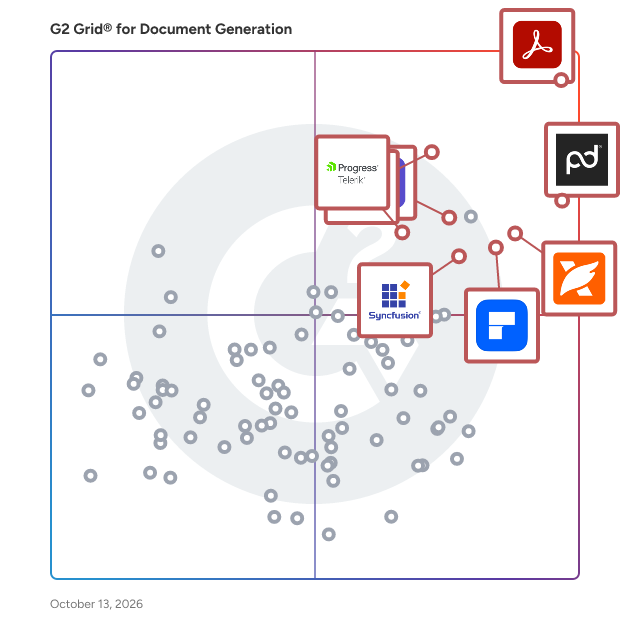
G2 Grid® for Document Generation Software

G2 Grid® for Document Generation Software plotting products by satisfaction and market presence

Highlighted products: Adobe Acrobat, PandaDoc, Foxit PDF Editor, Docusign CLM, Essential Studio, Wondershare PDFelement, Adobe Acrobat Sign, and Progress Telerik.

Underlying data: [Grid® JSON](https://www.g2.com/categories/document-generation/grids.json?focus%5B%5D=adobe-acrobat&focus%5B%5D=pandadoc&focus%5B%5D=foxit-pdf-editor&focus%5B%5D=docusign-clm&focus%5B%5D=essential-studio&focus%5B%5D=wondershare-wondershare-pdfelement&focus%5B%5D=adobe-acrobat-sign&focus%5B%5D=progress-telerik&segment=small-business)

Revv

Revv pushes the boundaries of document automation and workflows. Revv gives you the flexibility to create documents from its rich template library or upload and send external WORD/PDF documents for electronic signatures. Additionally, it offers various signature types to meet every possible eSignature scenario. Whether you want to generate bulk documents for electronic signatures or obtain signatures on fillable web forms, Revv makes everything possible. It provides instant notifications, document analytics, and audit trails to keep you updated. Revv doubles the protection of your eSigning process with email and SMS authentication. Revv offers a robust proof of eSignature with state-of-the-art evidence management. It also offers video authentication for clickwrap signatures. Integrate business apps with Revv to simplify complex tasks and run your document workflows seamlessly. Revv is an all-in-one, no-code document workflow automation platform to run your business anywhere, anytime, and from any device. Revv provides robust protection and operates in a secure environment with multiple levels of encryption and compliance with local laws. BENEFITS: BETTER GOVERNANCE AND COMPLIANCE - Revv complies with ESIGN Act, UETA, and eIDAS regulation, which makes all eSigned documents legally binding. Revv meets all the requirements of electronic signatures. - Intent to sign: Revv confirms the signers’ intent by requesting signers to submit the electronic signatures. - Consent to do business electronically: Revv meets the consent requirement by asking signers to confirm their signatures before submitting the document. Revv also gives recipients an option to decline the signature request. - Signature attribution: Build document control with a full audit trail of each transaction. Revv satisfies signature attribution by capturing and storing all actions with the date and time stamps, signers' details, and IP addresses. - Record retention: Revv automatically creates a copy of signed records and sends it to both the sender and the recipient to maintain their transaction proofs. POWERFUL FEATURES TO CREATE NEW POSSIBILITIES WITH ELECTRONIC SIGNATURES & MAXIMIZE THE BUSINESS BENEFITS - - Create dynamic fields as form fields in the template and speed up your document creation process. Use the chosen template, add custom details in the form fields, and send it to customers to fill in the required information, and eSign the documents. - Flexibility to upload & send your PDF or DOCX files, edit them, and send for electronic signatures. - Gather crucial data from the signers in the form of text or image using the ‘Fill and Sign’ feature. - Ready-to-use templates and a rich editor to instantly create and customize business documents and increase business conversion rates. - Automate sending a document to multiple recipients using the Bulk Send feature and increase your productivity. - Configure eSignature workflows by integrating your everyday business apps through Zapier, Retool, and Native APIs, and save more time, money, and resources. - Liberty to choose the signature type - click-to-sign, draw a signature, or click-to-initial. - Real-time tracking and analytics to intervene and engage customers at the right time. - Multiple choices to get documents signed online via email, shareable links, fillable web forms, or API integrations. UNPARALLELED SECURITY - - Compliance with global and local eSignature laws and latest industry standards. - Two-factor (SMS and email) authentication to guarantee the identity of the signers. - High-level security with AWS global cloud certification (CSA, SOC 1, SOC2, and ISO 27001) to protect your data at every step. - PCI DSS compliant payment gateways LIFE-TIME STORAGE - Revv provides cloud-based storage that keeps your records safe, organized, and easily accessible - forever. ENHANCED CUSTOMER EXPERIENCE - - Send documents instantly to mobile devices via SMS, and reduce customer drop-out rates. - Collaboration features to interact with customers and team members within the documents and accelerate the signing process. A DIY PLATFORM THAT REQUIRES NO CODING SKILLS - Revv is very simple to use and easy to navigate. Its intuitive interface requires no external help or special skills. A SUPPORT SYSTEM BUILT TO EMPOWER CUSTOMERS - - A customer support team of experts that go above and beyond to empower your business. - 24/7 chat support - Multi-language support for documents - Support for designing and creating templates - Help center, support articles, and videos to guide you throughout the process

Average Rating: 4.6/5.0

Total Reviews: 45

How Do G2 Users Rate Revv?

  • Has the product been a good partner in doing business?: 8.9/10 (Category avg: 9.3/10)
  • Documents: 9.4/10 (Category avg: 8.9/10)
  • Software: 9.0/10 (Category avg: 8.6/10)
  • Workflow: 8.6/10 (Category avg: 8.6/10)

Who Is the Company Behind Revv?

  • Seller: Revv
  • Year Founded: 2018
  • HQ Location: Walnut, California
  • Twitter: @REVV
    298 Twitter followers
  • LinkedIn® Page: www.linkedin.com
    11 employees on LinkedIn®

Who Uses This Product?

  • Top Industries: Computer Software, Information Technology and Services
  • Company Size: 60% Small, 24% Medium

What Are Recent G2 Reviews of Revv?

What Are G2 Users Discussing About Revv?

Mitratech HotDocs

Mitratech HotDocs is document automation software trusted by thousands of law firms, enterprise teams, and government agencies to eliminate manual drafting at scale. Used across legal, financial services, insurance, and corporate teams, it handling everything from contracts and compliance documents to client-facing forms. HotDocs turns your most complex, high-volume documents into intelligent templates that generate accurate, consistent output every time. Instead of copy-paste drafting and manual edits, teams answer a guided interview and HotDocs does the rest: applying rules-based logic to produce compliant, error-free documents across every office, jurisdiction, and use case. Key features and capabilities include: - Rules-based document templates — convert standard documents into intelligent templates with conditional logic that automatically adapts content based on inputs, matter type, or jurisdiction - Guided interviews and dynamic questionnaires — structured data collection ensures the right information is captured upfront, reducing back-and-forth and improving output quality - High-volume and complex document support — purpose-built for organizations generating large quantities of intricate documents where manual drafting creates risk and inefficiency - Reusable data across documents and workflows — enter data once and populate it across multiple documents and templates, reducing duplication and improving consistency - Integration with Mitratech platform — native integrations with TAP, TeamConnect, and CaseCloud™ support connected document generation within broader legal and operational workflows Common use cases include: - Contract drafting and standard agreement generation - Regulated document production in financial services, insurance, and government - Legal form and pleading assembly - High-volume client-facing document generation - Compliance document creation across jurisdictions HotDocs is designed for legal, compliance, operations, and business teams in mid-size to enterprise organizations that produce high volumes of documents where accuracy, consistency, and compliance are non-negotiable. It is particularly well-suited for organizations looking to reduce the time and cost of manual document drafting, standardize document output across distributed teams, and scale document production without proportionally increasing headcount or outside counsel spend. By transforming static documents into intelligent, reusable templates, Mitratech HotDocs helps organizations reduce drafting risk, accelerate document turnaround, and maintain compliance across even their most complex and high-volume document workflows.

Average Rating: 4.3/5.0

Total Reviews: 84

How Do G2 Users Rate Mitratech HotDocs?

  • Has the product been a good partner in doing business?: 7.9/10 (Category avg: 9.3/10)
  • Documents: 8.4/10 (Category avg: 8.9/10)
  • Software: 7.7/10 (Category avg: 8.6/10)
  • Workflow: 8.0/10 (Category avg: 8.6/10)

Who Is the Company Behind Mitratech HotDocs?

  • Seller: Mitratech
  • Year Founded: 1987
  • HQ Location: Austin, TX
  • Twitter: @MitratechLegal
    1,055 Twitter followers
  • LinkedIn® Page: www.linkedin.com
    2,105 employees on LinkedIn®

Who Uses This Product?

  • Top Industries: Legal Services, Law Practice
  • Company Size: 66% Small, 19% Medium

What Do G2 Reviewers Say About Mitratech HotDocs?

AI-generated summary from verified user reviews

Pros
  • Users appreciate the ease of use of Mitratech HotDocs, enhancing their document creation efficiency and professionalism.
  • Users value the outstanding technology and ease of use of Mitratech HotDocs for creating professional documents.
  • Users value the highly-customizable nature of Mitratech HotDocs, allowing for tailored solutions to meet specific needs.
  • Users appreciate the highly customizable nature of Mitratech HotDocs, enhancing their experience and meeting diverse needs.
  • Users value the reliable document management of Mitratech HotDocs, ensuring professional and error-free results for important documents.
Cons
  • Users find the inadequate notifications troublesome, often leading to delays in receiving important updates from customer service.
  • Users find the initial difficulty of setting up Mitratech HotDocs quite confusing, though it improves after acclimatization.
  • Users find the learning curve steep, making initial setup and familiarization with features confusing at first.
  • Users express concerns about poor customer support, noting long wait times for responses to their inquiries.
  • Users find the initial setup difficult, leading to confusion before fully benefitting from the software's features.

What Are Recent G2 Reviews of Mitratech HotDocs?

What Are G2 Users Discussing About Mitratech HotDocs?

Docomotion

Docomotion makes it easier to generate documents on Salesforce automatically. We have made it our mission to become the top-rated document generation app on Salesforce, a position we proudly hold thanks to a decade-long dedication to providing the industry's best product, service, and customer experience. GENERATE DOCUMENTS WITH A SINGLE CLICK Use a single button embedded in your Salesforce interface to generate rich and detailed documents populated with accurate customer data. DESIGN TEMPLATES WITH A VISUAL EDITOR Easily create and edit document templates using a drag & drop mechanism on Microsoft Word. You can use an existing template or start from scratch. MAKE LAST-MINUTE CHANGES Finalize the document output and edit any necessary information from your web or mobile device before sending it. RETRIEVE DATA FROM ANY OBJECT Incorporate Salesforce data of any type into your documents, including standard objects, customized objects, and complex content. SELECT FROM VERSATILE OUTPUT FORMATS Send your documents as PDF, Word, E-mail, or HTML5. You can also share the document via a link with a configurable expiration period. ADD EXTERNAL CONTENT Merge data from external sources, attach additional documents, or embed images and rich media from an external repository. COLLECT E-SIGNATURES NATIVELY Give your customers the ability to sign any document without having to integrate your platform with external signature solutions. ASK YOUR CUSTOMERS FOR INPUT Establish a bi-directional communication channel with your customers through interactive forms that gather important feedback and open the door for new business opportunities. SAVE CUSTOMER DATA INTO SALESFORCE Update data entered by your customers, such as satisfaction surveys, personal details, or cross-sell opportunities, directly into Salesforce. INTEGRATE WITH PROCESS BUILDER AND VISUAL FLOW Define automated document generation processes using Salesforce’s inherent automation tools that you’re already familiar with. IMPLEMENT YOUR BUSINESS LOGIC Generate separate documents from the same template with hidden/displayed sections, altered styling, and modified calculations according to predefined business rules. GENERATE THOUSANDS OF DOCUMENTS AT ONCE Send documents to multiple recipients with a single click, each populated with the relevant personal data sourced from its Salesforce record. ONBOARD QUICKLY AND EFFICIENTLY Easily set up and configure your account preferences, either by yourself or with the help of our support team, so you can start generating documents as soon as you wish. WORK FROM YOUR MOBILE DEVICE Enjoy all the features and benefits of the platform on the go, with comprehensive HTML5 compatibility that allows you to get things done anywhere and at any time. STAY 100% PROTECTED Rest assured that security, privacy, availability, redundancy, and other measures are thoroughly taken care of with the greatest attention at all times. Docomotion - Committed To Making Your Life Easier

Average Rating: 4.6/5.0

Total Reviews: 67

How Do G2 Users Rate Docomotion?

  • Has the product been a good partner in doing business?: 9.4/10 (Category avg: 9.3/10)
  • Documents: 8.8/10 (Category avg: 8.9/10)
  • Software: 8.3/10 (Category avg: 8.6/10)
  • Workflow: 8.4/10 (Category avg: 8.6/10)

Who Is the Company Behind Docomotion?

  • Seller: Docomotion
  • Year Founded: 2014
  • HQ Location: Netanya, IL
  • Twitter: @docomotion
    89 Twitter followers
  • LinkedIn® Page: www.linkedin.com
    16 employees on LinkedIn®

Who Uses This Product?

  • Top Industries: Computer Software, Information Technology and Services
  • Company Size: 44% Medium, 41% Small

What Do G2 Reviewers Say About Docomotion?

AI-generated summary from verified user reviews

Pros
  • Users appreciate the seamless Salesforce integration of Docomotion, enhancing efficiency and real-time tracking capabilities.
  • Users value the customization of templates in Docomotion, enhancing efficiency and ensuring document consistency.
  • Users value the easy integrations of Docomotion, enhancing efficiency and streamlining document generation with Salesforce.
  • Users love Docomotion's seamless automation with Salesforce, enhancing efficiency and consistency in document generation.
  • Users value the customizability of Docomotion, enhancing efficiency and ensuring consistency in document creation.
Cons
  • Users find Docomotion's difficult customization and overwhelming setup can hinder their initial experience with automation tools.
  • Users face integration issues with some third-party apps that hinder overall functionality and usability.
  • Users experience lack of integrations with third-party apps, limiting the overall effectiveness of Docomotion.
  • Users find the learning curve steep with Docomotion, making it challenging for newcomers to adapt quickly.
  • Users find the initial setup challenging, particularly new users, making it overwhelming to start with Docomotion.

What Are Recent G2 Reviews of Docomotion?

What Are G2 Users Discussing About Docomotion?

AI can help you find the answers. G2 helps you trust them.

Connect G2 to Claude or ChatGPT for answers grounded in G2's trusted reviews, comparisons, and pricing from real user insights.

How it works

PDFescape

PDFescape is a totally free and open source online PDF reader and editor, as well as a PDF form filler with features for PDF form design. PDFescape offers users a new way to open and edit PDF files online. It allows for a much better PDF software experience by using the original document file format, allowing users to be not be constrained by typical software requirements. Due to the fact that this PDF editor can be accessed online, PDFescape only requires a modern internet browser and an active internet connection. Below are some of the features offered by this PDF editor.

Online PDF Reader

  • Natively open PDF documents in your preferred web browser
  • Manipulate PDF pages with zooming and rotation features for an optimal viewing experience
  • Copy PDF text to your clipboard by selecting your desired content
  • Easily search PDF text for specific keywords and terms with ease
  • Gives you the ability to save, download, and print all PDF documents
  • Provides users with thumbnail, bookmark, and link support features and functionality

Online PDF Editor

  • Gives you the option to add text, shapes, whiteout, and other annotations to PDF files
  • Crop, rotate, shift, move, delete and insert PDF files to create more custom files
  • Easily create links to multiple PDF files or other types of web content
  • Edit PDF information tags to help with identification
  • Encrypt PDF content with password protection features
  • Add additional images to PDF forms and documents
  • Sign PDF documents using scanned and imported signatures

PDF Form Filler

  • Fill out PDF forms using pre-existing form fields or by using a text tool
  • PDF field calculation and formatting features are supported
  • PDF text, checkbox, radio, list, and drop down fields are available and supported
  • Basic PDF field design and styling properties supported
  • Allows users to quickly jump from field to field using tabs

PDF Form Designer

  • Create and add new PDF form fields to any existing PDF file
  • Style PDF form fields with text, color, size features
  • Modify existing PDF form fields to suit custom documents
  • Fully supports checkbox, radio, dropdown, listbox, text, submit button and reset button fields in all PDF files
  • Submit buttons are able to be created to be compatible with PDFescape Ultimate's publishing feature
PDFescape also offers many more features as a PDF editor, including RAD options, PDF merging, and some of the functionality listed below.

PDFescape Additional Features:

  • PDF Annotator
  • Premium Desktop Features
  • Ultimate Desktop Features
  • Webmaster Tools
  • Additional Publishing Features
  • Volume Licensing
  • And many more!

Average Rating: 4.2/5.0

Total Reviews: 67

How Do G2 Users Rate PDFescape?

  • Has the product been a good partner in doing business?: 8.3/10 (Category avg: 9.3/10)
  • Documents: 8.3/10 (Category avg: 8.9/10)
  • Software: 8.5/10 (Category avg: 8.6/10)
  • Workflow: 8.3/10 (Category avg: 8.6/10)

Who Is the Company Behind PDFescape?

  • Seller: Red Software
  • Year Founded: 2015
  • HQ Location: Monza, MB
  • Twitter: @pdfescape
    396 Twitter followers
  • LinkedIn® Page: www.linkedin.com
    26 employees on LinkedIn®

Who Uses This Product?

  • Top Industries: Information Technology and Services, Computer Software
  • Company Size: 39% Medium, 36% Large

What Do G2 Reviewers Say About PDFescape?

AI-generated summary from verified user reviews

Pros
  • Users love the easy editing capabilities of PDFescape, making document management and updates seamless and efficient.
  • Users find PDFescape's PDF editing capabilities invaluable for maintaining and customizing their professional documents effortlessly.
  • Users value the versatile document editing capabilities of PDFescape, enhancing project management and maintaining up-to-date visuals.
  • Users value the easy form filling features of PDFescape, enhancing document customization and overall usability.
  • Users value the content management capabilities of PDFescape, enabling seamless updates and customization of documents.
Cons
  • Users experience conversion issues with PDFescape, particularly in importing files and scaling PDFs to Excel.
  • Users often face data deletion issues that complicate the importing and exporting of PDFs and other files.
  • Users report import issues with PDFescape, noting slow file imports and occasional scaling problems with PDFs to Excel.
  • Users experience PDF importing delays and occasional scaling issues when converting PDFs to Excel.
  • Users find the slow loading times frustrating, especially with larger documents, impacting their workflow efficiency.

What Are Recent G2 Reviews of PDFescape?

What Are G2 Users Discussing About PDFescape?

LaTeX

LaTeX is a high-quality typesetting system designed for the production of technical and scientific documents. Built upon Donald E. Knuth's TeX system, LaTeX provides a comprehensive framework for creating complex documents with precision and consistency. It is widely used in academia and industry for its ability to handle intricate formatting requirements, including mathematical equations, bibliographies, and cross-references. Key Features and Functionality: - Structured Document Preparation: LaTeX encourages authors to focus on content by handling the document's layout and formatting, ensuring a consistent and professional appearance. - Mathematical Typesetting: It offers robust support for mathematical expressions, allowing for the creation of complex equations and formulas with ease. - Cross-Referencing and Bibliographies: LaTeX simplifies the management of references and citations, automatically generating bibliographies and indexes. - Customization and Extensibility: Through a vast array of packages, users can extend LaTeX's capabilities to include graphics, tables, and specialized formatting. - Platform Independence: LaTeX documents can be compiled on various operating systems, including Windows, macOS, and Linux, ensuring broad accessibility. Primary Value and User Solutions: LaTeX addresses the challenges of producing complex documents by automating formatting tasks, allowing authors to concentrate on content creation. Its precision in typesetting makes it ideal for documents requiring exact representation, such as research papers, theses, and technical reports. By providing a standardized approach to document preparation, LaTeX ensures consistency across publications, enhancing readability and professionalism.

Average Rating: 4.7/5.0

Total Reviews: 22

How Do G2 Users Rate LaTeX?

  • Documents: 8.6/10 (Category avg: 8.9/10)
  • Software: 6.0/10 (Category avg: 8.6/10)
  • Workflow: 7.4/10 (Category avg: 8.6/10)

Who Is the Company Behind LaTeX?

  • Seller: LaTex
  • Year Founded: 1989
  • HQ Location: Mainz, DE
  • LinkedIn® Page: www.linkedin.com
    15 employees on LinkedIn®

Who Uses This Product?

  • Top Industries: Education Management, Higher Education
  • Company Size: 44% Small, 32% Large

What Do G2 Reviewers Say About LaTeX?

AI-generated summary from verified user reviews

Pros
  • Users appreciate the ease of use of LaTeX for integrating formulas and structuring their writing efficiently.
  • Users appreciate the simplicity in integration of formulas in LaTeX, enhancing both aesthetics and writing structure.
  • Users value the effective templates of LaTeX, enhancing their writing structure and aesthetic presentation of formulas.
Cons
  • Users find the difficulty in learning commands and structure of LaTeX adds to the initial frustration.
  • Users find the learning curve steep, especially when mastering commands and customizing graphs effectively.
  • Users occasionally experience slow performance with LaTeX, impacting their overall efficiency and productivity.
  • Users find the steep learning curve challenging, as mastering commands and structures takes significant time and practice.

What Are Recent G2 Reviews of LaTeX?

What Are G2 Users Discussing About LaTeX?

Excel-to-Word Document Automation

The Excel-to-Word Document Automation Add-in easily links/updates Word and PowerPoint content (text, tables, and charts) based on Excel data and calculations. Update text, tables, charts, and lists in any new or existing Word or PowerPoint document from any new or existing Excel workbook. Improve productivity of recurring reports that need to be customized multiple times. Save time and improve accuracy. The Excel-to-Word Document Automation add-in is Microsoft 365 Certified. Microsoft has reviewed the app and confirmed that it has passed industry standards for security, compliance, and data handling practices. Free forever version and paid subscription options available. Requires Office 365 or Office Online via OneDrive

Average Rating: 4.4/5.0

Total Reviews: 48

How Do G2 Users Rate Excel-to-Word Document Automation?

  • Has the product been a good partner in doing business?: 9.0/10 (Category avg: 9.3/10)
  • Documents: 8.9/10 (Category avg: 8.9/10)
  • Software: 8.5/10 (Category avg: 8.6/10)
  • Workflow: 8.5/10 (Category avg: 8.6/10)

Who Is the Company Behind Excel-to-Word Document Automation?

  • Seller: AnalysisPlace
  • Year Founded: 2010
  • HQ Location: Pittsburgh, PA
  • Twitter: @exceltoword
    51 Twitter followers
  • LinkedIn® Page: www.linkedin.com
    2 employees on LinkedIn®

Who Uses This Product?

  • Company Size: 48% Small, 32% Medium

What Do G2 Reviewers Say About Excel-to-Word Document Automation?

AI-generated summary from verified user reviews

Pros
  • Users value the easy customization of Excel-to-Word Document Automation, enhancing efficiency and productivity in document creation.
  • Users value the efficiency of Excel-to-Word Document Automation, significantly reducing time and errors in document management.
  • Users value the time-saving automation of Excel-to-Word, enhancing accuracy and boosting productivity significantly.
  • Users value the consistency and efficiency in contract management provided by Excel-to-Word Document Automation.
  • Users find the cost-effective automation of Excel-to-Word Document Automation invaluable for efficient analysis.
Cons
  • Users find setup difficult due to complex configurations, inconsistent data, and time-consuming manual adjustments.
  • Users find formatting issues in Word challenging, often requiring manual adjustments for complex data from Excel.
  • Users find the poor documentation frustrating, making troubleshooting and setup challenging for complex data transfers.
  • Users experience slow performance during document generation, particularly with large batches, affecting efficiency and usability.

What Are Recent G2 Reviews of Excel-to-Word Document Automation?

What Are G2 Users Discussing About Excel-to-Word Document Automation?

Neeraja Prakash
NP
Researched and written by Neeraja Prakash
Updated