GraceBox
Who Is the Company Behind GraceBox?
- Seller: GraceBox
- HQ Location: N/A
-
LinkedIn® Page: www.linkedin.com
1 employees on LinkedIn®
Total Products under this Category: 262
Last updated: October 15, 2026
Why You Can Trust G2's Software Rankings:
G2's software rankings are built on verified user reviews, rigorous moderation, and a consistent research methodology maintained by a team of analysts and data experts. Each product is measured using the same transparent criteria, with no paid placement or vendor influence. While reviews reflect real user experiences, which can be subjective, they offer valuable insight into how software performs in the hands of professionals. Together, these inputs power the G2 Score, a standardized way to compare tools within every category.
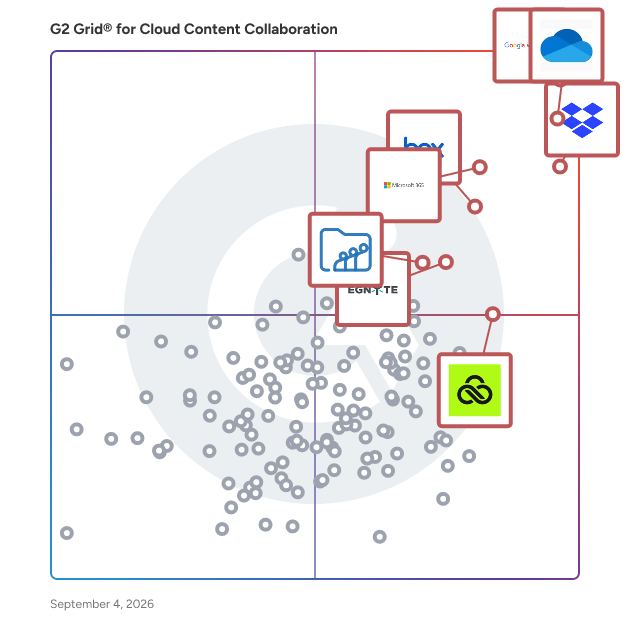
Highlighted products: Google Workspace, Microsoft OneDrive for Business, Dropbox, Microsoft 365, Box, Egnyte, LucidLink, and Zoho WorkDrive.
Underlying data: [Grid® JSON](https://www.g2.com/categories/cloud-content-collaboration/grids.json?focus%5B%5D=google-workspace&focus%5B%5D=microsoft-onedrive-for-business&focus%5B%5D=dropbox&focus%5B%5D=microsoft365&focus%5B%5D=box&focus%5B%5D=egnyte&focus%5B%5D=lucidlink&focus%5B%5D=zoho-workdrive)
Seamless and Compliant data collaboration platform for biotechs to securely connect with CROs, CDMOs, and external partners, ensuring controlled access, full traceability, and regulatory readiness.
Heysquid is an advanced content management and documentation platform developed by 4D CONCEPT. It offers solutions for creating, publishing, and distributing various types of information, including texts, images, videos, and presentations. The platform supports modular and structured documentation, editorial systems for cross-media communications, and centralized knowledge management. Heysquid is customizable to meet specific industry needs and includes extensions like Heysquid DITA, Heysquid PORTAL, and Heysquid NEWS for different applications such as documentation standards, custom portals, and cross-media publication. For more details, visit our website.
Average Rating: 3.8/5.0
Total Reviews: 2
AI-generated summary from verified user reviews
"Centralized Document Management with Key Shortcomings"
Rating: 4.0/5.0 stars
— Verified User in Civil Engineering
Connect G2 to Claude or ChatGPT for answers grounded in G2's trusted reviews, comparisons, and pricing from real user insights.
Kerika is a task management tool with a very user-friendly design and seamless integration with Google Workspace, Microsoft Office 365, and Box. If you use Google Apps, sign up with your Google ID and your Kerika files will be stored in your own Google Drive, where they will remain under your ownership and control. Your IT folks will be thrilled to know that their document management policies are being automatically enforced! You can even create new Google Docs, Slides, Sheets, and Forms from inside Kerika and have them shared automatically with your board's team: Team Members get read+write access and Visitors get read-only access. If you prefer Microsoft, sign up with your Microsoft ID and your Kerika files will be stored in your own OneDrive and, yes, you can even create new Office documents from inside Kerika and have them shared automatically with your board's team! If you use Box, sign up with your Box ID and your Kerika files will be stored in your own Box account. You create new Box Notes from inside Kerika and have them shared automatically with your board's team. Add someone to a board's team and Kerika makes sure all the relevant files in your are shared with the new team member. Change someone's role on a board and Kerika will instantly update that person's access rights to your project files. All of this is done on a board-by-board basis, to give you maximum flexibility and privacy. Within an account you can have as many boards as you like, and each board can be as big as you need it to be. Kerika is the only task management tool that supports both Task Boards that can be used for Kanban-style or Scrum work, and Whiteboards that can be used for creativity. Kerika's Whiteboards are patented and contain other Whiteboards as well as files and Web content, live! Start your new board from scratch or use one of our templates to get started faster. Every board can be completely customized, with the workflow, tags, teams, tasks, and content that you need to get the job done. Each board can also be kept as private as you like, or shared with others in your account team. Everything in Kerika’s clean design, from adjusting automatically to different time zones and highlighting “while you were away” changes supports the needs of distributed and remote teams. Even if your board has thousands of tasks, a unique Highlights feature helps you quickly focus on what matters most to you, like what's assigned to you, or what needs attention. The Dashboard makes sure you stay on top of things when you have dozens of projects to watch over: it summarizes key information across all the boards you care about so you never feel lost or overwhelmed. Kerika is available in 38 languages! After a 30-day free trial (with no strings attached), you can buy a paid plan in 135 currencies. Purchasing annual subscriptions comes with a 30-day Money Back Guarantee.
Average Rating: 4.8/5.0
Total Reviews: 11
AI-generated summary from verified user reviews
"Very User-Friendly UX & Powerful Collaboration with Team"
Rating: 4.5/5.0 stars
— Nirmal B.
Rating: 4.5/5.0 stars
— Verified User in Accounting
LinkShip helps teams and creators turn PDFs, videos, audio, images, Markdown, and static websites into clean, shareable links without setting up separate hosting. Each link can include a custom slug, QR code, password protection, and view tracking. LinkShip is useful for sales collateral, documents, downloadable resources, event materials, media files, and lightweight static pages, with a fast and secure free starting option.
NeatDrive is a Google Drive auditing tool. It shows you who can open your files — every file exposed by a public link or an external domain, listed by name, with owner and folder path. NeatDrive audits the one Google account you connect — not other people's Drives, and not a domain-wide Workspace audit. You choose the scope — My Drive, shared drives, or all drives. Google only lists shared drives to apps that can read or change them, so shared-drive scanning needs the write grant. Read-only by default. Every rename, move or archive is staged and previewed; nothing is applied unless you approve it. No Workspace admin access needed. The free tier finds and lists everything. Paid access is what fixes it.
NevTan Drive is a secure cloud storage workspace with real editors built in. Store, organize, and preview almost any file in the browser — then edit and sign PDFs, write documents, build spreadsheets and presentations without a desktop app. Share with role-based access, expiring links, and a per-file audit log.
NexaFile is an AI-powered document analysis platform for businesses. Analyze PDFs, Word documents, Excel spreadsheets, PowerPoint files, invoices, contracts, HR files, reports and scanned documents. NexaFile extracts key information, summarizes content and surfaces what needs attention, helping teams spend less time reading documents and more time making decisions.
