Best Cloud Content Collaboration Software - Page 15

How Many Cloud Content Collaboration Software Products Does G2 Track?

Total Products under this Category: 308

Category Stats (Nov 2026)

  • Average Rating: 4.35/5 (↑0.01 vs Oct 2026) The average rating of products in this category, based on all submitted ratings
  • Top Trending Product: FileOrbis (+3.7%) - Among all products in this category, FileOrbis recorded the largest rating increase compared to last month

Last updated: November 01, 2026

How Does G2 Rank Cloud Content Collaboration Software Products?

Why You Can Trust G2's Software Rankings:

  • 30 Analysts and Data Experts
  • 124,000+ Authentic Reviews
  • 308+ Products
  • Unbiased Rankings

G2's software rankings are built on verified user reviews, rigorous moderation, and a consistent research methodology maintained by a team of analysts and data experts. Each product is measured using the same transparent criteria, with no paid placement or vendor influence. While reviews reflect real user experiences, which can be subjective, they offer valuable insight into how software performs in the hands of professionals. Together, these inputs power the G2 Score, a standardized way to compare tools within every category.

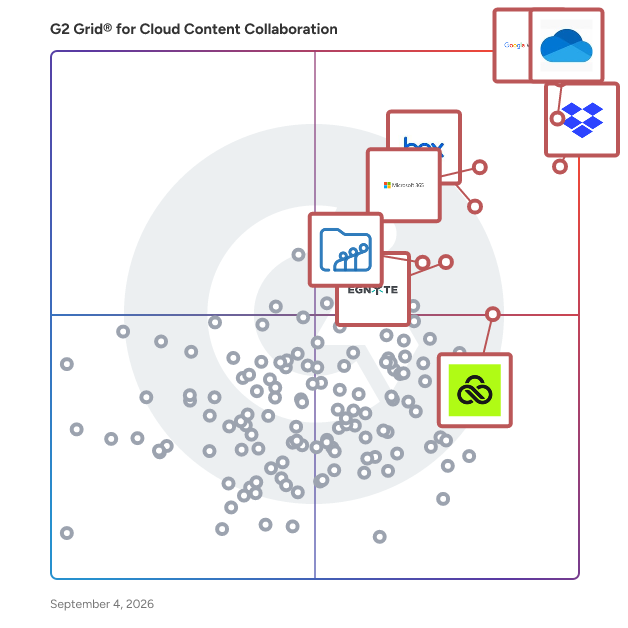
G2 Grid® for Cloud Content Collaboration Software

G2 Grid® for Cloud Content Collaboration Software plotting products by satisfaction and market presence

Highlighted products: Google Workspace, Microsoft OneDrive for Business, Dropbox, Microsoft 365, Box, Egnyte, LucidLink, and Zoho WorkDrive.

Underlying data: [Grid® JSON](https://www.g2.com/categories/cloud-content-collaboration/grids.json?focus%5B%5D=google-workspace&focus%5B%5D=microsoft-onedrive-for-business&focus%5B%5D=dropbox&focus%5B%5D=microsoft365&focus%5B%5D=box&focus%5B%5D=egnyte&focus%5B%5D=lucidlink&focus%5B%5D=zoho-workdrive)

Bluepic

Create brand-compliant graphic generators that anyone – employees, partners, or visitors – can customize in seconds. No design skills needed, no mistakes possible. The design will follow your Brand identity guaranteed! Bluepic is a software for creating Design-Generator-Widgets, that can be embedded into third party applications or websites. The technology can also be used to build AI-Agents and marketing automations.

Average Rating: 5.0/5.0

Total Reviews: 3

How Do G2 Users Rate Bluepic?

  • Has the product been a good partner in doing business?: 10.0/10 (Category avg: 8.8/10)

Who Is the Company Behind Bluepic?

Who Uses This Product?

  • Company Size: 100% Small

What Do G2 Reviewers Say About Bluepic?

AI-generated summary from verified user reviews

Pros
  • Users praise the dynamic and adaptive design of Bluepic, enhancing brand identity and improving team collaboration effortlessly.
  • Users appreciate the dynamic and responsive templates of Bluepic, enhancing brand identity and collaboration effortlessly.
  • Users appreciate the easy cloud integration of Bluepic, enhancing collaboration with its adaptable design and helpful support.
  • Users highlight the enhanced team collaboration in Bluepic, with tools that streamline workflows and improve efficiency.
  • Users value the kind and helpful customer support of Bluepic, making integration easier and enhancing the overall experience.
Cons
  • Users find the learning difficulty of Bluepic challenging, suggesting improved onboarding and tutorials for better usability.

What Are Recent G2 Reviews of Bluepic?

Bluescape

Bluescape is the platform for creative collaboration. Streamline workflows with all your ideas, assets, iterations, and entire projects into one secure virtual workspace. With built-in voice and video calling, simply gather your team in Bluescape and make quicker decisions. Reduce meetings and finish projects faster in a secure platform trusted by Fortune 100 companies, government agencies, and the world’s largest movie studios.

Average Rating: 4.2/5.0

Total Reviews: 29

How Do G2 Users Rate Bluescape?

  • Has the product been a good partner in doing business?: 8.7/10 (Category avg: 8.8/10)

Who Is the Company Behind Bluescape?

  • Seller: Bluescape
  • Year Founded: 2012
  • HQ Location: Redwood City, California
  • LinkedIn® Page: www.linkedin.com
    66 employees on LinkedIn®

Who Uses This Product?

  • Top Industries: Furniture
  • Company Size: 45% Small, 29% Large

What Are Recent G2 Reviews of Bluescape?

What Are G2 Users Discussing About Bluescape?

BlueSpice MediaWiki

BlueSpice is the ideal solution for an agile, collaborative intranet system. As the enterprise distribution of the widely recognized Wikipedia software, MediaWiki, it facilitates seamless knowledge sharing, documentation, and internal collaboration across your organization. BlueSpice can be used for managing knowledge and quality, creating technical and organizational manuals, supporting internal service desks, and streamlining company-wide communication. Share essential know-how, define clear responsibilities, and ensure that your processes and documentation are always up to date. With BlueSpice, you can create a secure, central hub of information that keeps your teams aligned and informed. The software is developed and hosted in Germany, fully compliant with EU GDPR regulations, ensuring your intranet system meets the highest security and compliance standards.

Average Rating: 4.0/5.0

Total Reviews: 3

How Do G2 Users Rate BlueSpice MediaWiki?

  • Has the product been a good partner in doing business?: 7.5/10 (Category avg: 8.8/10)

Who Is the Company Behind BlueSpice MediaWiki?

  • Seller: Hallo Welt!
  • Company Website:
  • Year Founded: 2007
  • HQ Location: Regensburg, DE
  • LinkedIn® Page: www.linkedin.com
    48 employees on LinkedIn®

Who Uses This Product?

  • Company Size: 100% Medium

What Are Recent G2 Reviews of BlueSpice MediaWiki?

What Are G2 Users Discussing About BlueSpice MediaWiki?

AI can help you find the answers. G2 helps you trust them.

Connect G2 to Claude or ChatGPT for answers grounded in G2's trusted reviews, comparisons, and pricing from real user insights.

How it works

BucketDesk

BucketDesk is a workspace for the files in your own Amazon S3 buckets. It finds storage you are overpaying for and moves it to cheaper S3 tiers, and it gives your team one login to browse, preview and share PDFs, Office documents, photos and video. BucketDesk connects through an IAM role you control, so your files stay in your AWS account. Teams can ask AI questions about documents, send expiring share links and choose who sees each bucket. Free for one S3 bucket.

Who Is the Company Behind BucketDesk?

BusyVault

BusyVault is a cloud-based team communication software and project workspace that organizes business conversations, project files and checklists into channels and nested subchannels. It is designed for agencies, design and video teams, startups, remote teams and other small and mid-sized businesses that discuss large files with colleagues and clients and need a clear next step after each discussion. In many team chat tools, a project is spread across a general channel, a cloud-drive link, a task list and a private message. Feedback loses its connection to the file, and decisions become hard to find. BusyVault gives each project its own place: a workspace holds channels, each channel can hold subchannels for workstreams such as design, delivery or client feedback, and every channel and subchannel keeps its own message history and files. Teams upload the asset, discuss it beside an in-app preview and record the agreed changes in a checklist inside the conversation. Key capabilities: - Channels and nested subchannels: a three-layer structure (workspace, channel, subchannel) for multi-project and client work. - Project files with previews and resumable uploads: interrupted uploads resume after the connection returns, single files of up to ~100 GB are supported subject to available storage, originals are kept without compression, and formats such as video and Microsoft Office files preview in the app. - Checklists in the conversation: discussions become visible next steps the team can tick off, alongside polls, voice notes, tasks and tickets. - Controlled access and sharing: role-based permissions, two-factor authentication and external share links that can expire and be revoked at any time. - Included storage per paid account: Basic includes 25 GiB and Pro includes 100 GiB, with additional storage billed per GiB. BusyVault uses business accounts registered with an email address rather than personal phone numbers. It runs as a hosted web app with English and Polish interfaces; native iPhone, iPad and Mac releases are in testing. Pricing is published per paid account in USD, excluding tax. Basic costs $9 per month or $86 per year, and Pro costs $30 per month or $288 per year. Additional storage costs $0.03 per GiB per month. One subscription does not cover a whole team, so each paid account should be counted when budgeting. A 3-day trial with 10 GiB of storage is available; it is not a permanent free plan. As a Slack alternative or Microsoft Teams alternative, BusyVault suits teams that want files, conversations and next actions in one structured project workspace. Teams that rely on Slack's broad app ecosystem, or on the integration of Microsoft Teams with Microsoft 365, may prefer to stay with those platforms, or run one project in BusyVault first and compare the results. BusyVault pricing (USD per paid account, excluding tax): - Basic: $9 per month or $86 per year, 25 GiB included storage - Pro: $30 per month or $288 per year, 100 GiB included storage - Extra storage: $0.03 per GiB per month, rounded up to a whole GiB - Trial: 3 days with 10 GiB of storage (not a permanent free plan) One subscription covers one paid account, not a whole team. Frequently asked questions about BusyVault Q: Is BusyVault a Slack alternative? A: BusyVault is an alternative for teams that use Slack mainly for project conversations around files and want the file, the discussion and the next action in one structured workspace. It offers channels with nested subchannels, checklists inside the conversation, resumable uploads and included storage per paid account. It does not replicate Slack's broad app marketplace, Slack Connect shared channels or Workflow Builder, and it does not provide automatic migration of a Slack workspace. Teams whose processes depend on specific Slack integrations should list those integrations first and check whether BusyVault's incoming webhooks, or the REST API available to Pro customers on request, can cover them. A practical approach is to run one real project in BusyVault during the 3-day trial while the rest of the team stays on Slack, then compare the results. Q: How does BusyVault compare with Slack on files, storage, message history and pricing? A: Slack's help center states that members and guests can add files up to 1 GB in size. BusyVault supports single uploads of up to ~100 GB, subject to the storage available on the account, and interrupted uploads resume. On message history, Slack Free shows the last 90 days of messages and files and deletes data older than one year, while Slack's paid plans, such as Pro, include full message history, so compare paid plans with paid plans. BusyVault bills per paid account: Basic includes 25 GiB for $9/month or $86/year, Pro includes 100 GiB for $30/month or $288/year, and extra storage costs $0.03 per GiB per month. Slack includes huddles, canvases, lists and a large integration ecosystem that BusyVault does not replicate. Check each vendor's current pricing page before deciding. Q: How does BusyVault compare with Microsoft Teams? A: Microsoft Teams is part of Microsoft 365 and connects chat with meetings, Outlook, SharePoint, OneDrive and co-editing in Word, Excel and PowerPoint. For organizations already licensed for Microsoft 365, those connections are a real strength. BusyVault is a focused project communication workspace: channels and nested subchannels, files with previews and resumable uploads, checklists in the conversation and included storage per paid account. It does not include an office suite or an email service, and it is priced separately from any Microsoft licence. BusyVault can serve as a Microsoft Teams alternative for small businesses and project teams that do not need the wider Microsoft 365 suite. When comparing costs, separate the chat tool from the email, document editing, storage and compliance services the business will continue to use. Q: Can BusyVault handle large files, and are uploads resumable? A: Yes. BusyVault is designed for teams that share large project files inside the conversation. Single files of up to ~100 GB can be uploaded; the practical limit also depends on server configuration, the storage available on the account and connection conditions. Uploads use the TUS resumable upload protocol, so an interrupted upload continues after the network returns instead of starting again. Files are kept in their original quality without compression, and common formats, including video and Microsoft Office files such as XLSX, can be previewed in the app without downloading. Storage counts against the account allowance of 25 GiB on Basic or 100 GiB on Pro. Before an upload that needs extra space, BusyVault shows a cost estimate at $0.03 per GiB per month for confirmation. Q: How do nested subchannels and in-chat checklists work? A: BusyVault uses three levels: workspace, channel and subchannel. A workspace can represent a company, agency or client; a channel represents a project or topic; and subchannels separate workstreams such as design, development or client feedback. Each subchannel has its own message stream, file history and webhook address, and team members switch between subchannels with tabs. Checklists are added inline in the conversation. Items can be assigned to people, ticked off as work progresses and keep a history of changes, so the result of a discussion is visible next to the messages and files that led to it. For larger follow-ups, BusyVault also offers tasks with due dates and tickets with priority, assignee and status. A quick filter shows files, polls, checklists and voice notes in a channel without running a search. Q: Can I share files with clients who do not have a BusyVault account? A: Yes. BusyVault can create external share links for files. A link can have an expiry period, for example 3 days, the recipient can open it without creating a BusyVault account, and the sender can revoke the link at any time. This helps agencies, freelancers and video or design teams deliver large files to clients who are not members of the workspace. Before sending a link, check its access settings and expiry date, and keep the source file for production use. For ongoing collaboration with a client, a dedicated client channel or subchannel with suitable roles keeps feedback and next steps beside the file. Confirm the external-access options your organization needs during the trial, especially if client files contain personal or confidential data. Q: How long is the BusyVault free trial, and is there a free plan? A: BusyVault offers a 3-day trial with 10 GiB of storage. It is a time-limited trial, not a permanent free plan. The documentation states that no credit card is needed to create the trial account. If the account is not upgraded to Basic or Pro within 3 days, the free account and its data are deleted automatically, so export anything you need before the trial ends. Because the trial includes 10 GiB of storage, test files must fit within that allowance; to test a very large file, plan the test on a paid account. After the trial, Basic costs $9 per month or $86 per year and Pro costs $30 per month or $288 per year per paid account, with prices in USD excluding tax.

Who Is the Company Behind BusyVault?
Who Uses This Product?

  • Company Size: 100% Small

What Are Recent G2 Reviews of BusyVault?

Carbonio Community Edition

Carbonio Community Edition (Carbonio CE) is a free and open-source (FOSS) email and collaboration platform designed by Zextras. It is a complete email solution, allowing organizations to maintain digital sovereignty through on-premises self-hosted servers, ensuring privacy and control over your communications.Carbonio CE offers comprehensive features, including email management, intuitive calendaring, chat, video chats, dedicated file management, collaborative document editing, and enhanced user experiences. Additionally, its dedicated iOS and Android apps ensure seamless accessibility across devices.What sets Carbonio CE apart:- Seamless migration- GDPR Compliance- Multi-tenant (Multiple domains on a single instance)- Improved & Customizable Anti-Virus & AntiSpam Engine.- Supports both virtual and on-premise deployment

Who Is the Company Behind Carbonio Community Edition?

  • Seller: Zextras
  • Year Founded: 2011
  • HQ Location: Milano, IT
  • LinkedIn® Page: www.linkedin.com
    68 employees on LinkedIn®

Citavi

The Only All-in-One Writing and Referencing Solution Streamline your research writing process with the only tool designed to organize, track, and format your writing and references. With features designed to methodically manage your notes and articles and automatic citation formatting for over 10,000 styles, Citavi brings calm to the chaos of writing. With Citavi, your presentation is half-written before you even begin. Buy now or request a free trial to start improving your research writing process.

Average Rating: 4.9/5.0

Total Reviews: 18

Who Is the Company Behind Citavi?

  • Seller: Lumivero
  • Year Founded: 1995
  • HQ Location: Denver, CO
  • LinkedIn® Page: www.linkedin.com
    296 employees on LinkedIn®

Who Uses This Product?

  • Company Size: 50% Small, 28% Medium

What Are Recent G2 Reviews of Citavi?

ClearVoice

ClearVoice takes the hassle out of content production by combining our network of thousands of vetted freelance talent, our end-to-end production capabilities, and our powerful content platform. Over the past decade, we’ve produced hundreds of thousands of pieces of content for clients ranging from Fortune 500 companies to SMBs, so we know great content and have built the platform and workflow to prove it. Creating content that drives results takes time and focus, and our team is here to help your brand create great content faster, consistently, and at scale while delivering the right pieces produced by the right writers, allowing you to focus on other marketing needs. Ready to drive results with better content? Brands that trust ClearVoice include: CARFAX Esurance McKesson Cox Intuit Cisco Intel Cabela’s "We genuinely could not have hit and exceeded our goals to establish a presence and an authority in our spaces without the ClearVoice platform." Kristen Dahlin, Marketing Manager @ Tailwind "A single expert might only be able to speak deeply on one issue. ClearVoice found specialists in different areas that enabled us to pivot quickly." Matt Weltz, Performance Marketing Lead @ Updater "Pre-pandemic, with no blogging, we were a 5% direct channel. Post-pandemic, with blogging, our direct channel has risen to 27%." Adam Miyasato, Revenue Manager @ Waikiki Resort Hotel

Average Rating: 4.2/5.0

Total Reviews: 23

How Do G2 Users Rate ClearVoice?

  • Has the product been a good partner in doing business?: 9.3/10 (Category avg: 8.8/10)

Who Is the Company Behind ClearVoice?

  • Seller: ClearVoice
  • Year Founded: 2014
  • HQ Location: Phoenix, Arizona
  • LinkedIn® Page: www.linkedin.com
    248 employees on LinkedIn®

Who Uses This Product?

  • Top Industries: Marketing and Advertising, Information Technology and Services
  • Company Size: 83% Small, 17% Medium

What Are Recent G2 Reviews of ClearVoice?

What Are G2 Users Discussing About ClearVoice?

ClientDoq

ClientDoq is a client-facing portal built on top of ClickUp. It gives agencies, consultants, and service businesses a professional way to share project information with clients, without exposing the internal workspace or changing how work gets managed. Teams keep running everything in ClickUp while clients get a focused portal where they can view project updates, tasks, shared views, documents, forms, files, and book meetings. ClientDoq controls exactly what clients see, keeping internal work private and the client experience clean. Key capabilities: Branded client portals connected to your ClickUp workspace Selective sharing of tasks, views, docs, forms, files, and meetings Built-in client user management with role-based access Client requests and collaboration without granting ClickUp guest access Google Calendar integration for meeting scheduling Proposals (create, send, and track client proposals) CRM with contact and organization management Built for: ClickUp consultants delivering client work Agencies managing multiple client accounts Service businesses sharing project progress externally Creators and educators teaching ClickUp workflows Pricing: Free plan available. Starter at $10/mo, Business at $25/mo.

Who Is the Company Behind ClientDoq?

Collaborator

Collaborator is the premier tool for team peer code and document review, built for teams working on projects where code quality is critical. Bridge the gap between development, testing and management teams by working together in one solution to conduct peer reviews for everything from project requirements, user stories, and design documents to source code and test plans. Peer reviews are the #1 way to increase code quality. In Collaborator, you can see code changes, identify defects, and make comments on specific lines. Set review rules and automatic participant notifications to ensure that peer reviews are done on time and done right. Your team shouldn't have to conform to the workflow of the review tool you use. Collaborator allows you to build custom review templates so you can tailor your process to fit your specific needs. Set custom fields, checklists, and participant groups for different types of code and document reviews. Customizable reports enable you to drive your team's growth while also easing auditing burdens.

Average Rating: 3.8/5.0

Total Reviews: 13

How Do G2 Users Rate Collaborator?

  • Has the product been a good partner in doing business?: 8.3/10 (Category avg: 8.8/10)

Who Is the Company Behind Collaborator?

Who Uses This Product?

  • Company Size: 100% Large, 23% Small

What Are Recent G2 Reviews of Collaborator?

What Are G2 Users Discussing About Collaborator?

ContentWorkflow

ContentWorkflow is the all-in-one management tool for creative agencies and content teams juggling multiple clients. Instead of stitching together a project tracker, a review tool, a scheduler and a storage drive, agencies run the entire pipeline in one workspace. The standout is the client review loop: send a review link that clients open with zero logins, and collect frame-accurate, timestamped comments directly on the video. Every plan includes unlimited free client reviewers. Around that sits everything else an agency needs: Kanban project stages from scripting to approved, version history, a content calendar with auto-publishing to TikTok, Instagram and YouTube, team and client chat inside the workflow, per-account analytics, and a 4K/RAW media library. Plans include a 14-day free trial with no credit card required.

Who Is the Company Behind ContentWorkflow?

Neeraja Prakash
NP
Researched and written by Neeraja Prakash
Updated July 20, 2025