# Best Enterprise Animation Software

## How Many Animation Software Products Does G2 Track?

**Total Products under this Category:** 140

### Category Stats (Aug 2026)

- **Average Rating:** 4.38/5 The average rating of products in this category, based on all submitted ratings
- **Top Trending Product:** VideoScribe (+0.37%) - Among all products in this category, VideoScribe recorded the largest rating increase compared to last month

_Last updated: August 21, 2026_

## How Does G2 Rank Animation Software Products?

**Why You Can Trust G2's Software Rankings:**

- 30 Analysts and Data Experts
- 9,900+ Authentic Reviews
- 140+ Products
- Unbiased Rankings

G2's software rankings are built on verified user reviews, rigorous moderation, and a consistent research methodology maintained by a team of analysts and data experts. Each product is measured using the same transparent criteria, with no paid placement or vendor influence. While reviews reflect real user experiences, which can be subjective, they offer valuable insight into how software performs in the hands of professionals. Together, these inputs power the G2 Score, a standardized way to compare tools within every category.

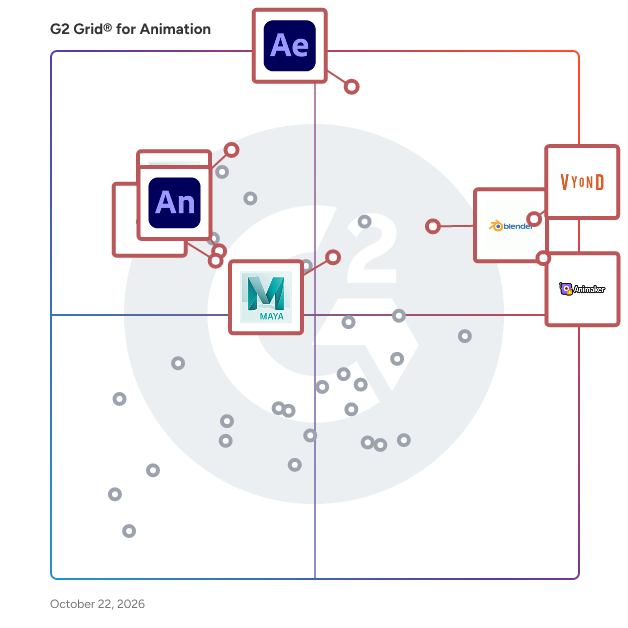
## G2 Grid® for Animation Software
 ![G2 Grid® for Animation Software plotting products by satisfaction and market presence](https://www.g2.com/categories/animation/grids.png?focus%5B%5D=7533&focus%5B%5D=2665&focus%5B%5D=17237&focus%5B%5D=5304&focus%5B%5D=26584&focus%5B%5D=13768&focus%5B%5D=7511&focus%5B%5D=5460)

Highlighted products: Vyond, Adobe After Effects, Adobe Animate, 3ds Max Design, Animaker, Maya, Powtoon, and Blender.

Underlying data: [Grid® JSON](https://www.g2.com/categories/animation/grids.json?focus%5B%5D=vyond&focus%5B%5D=adobe-after-effects&focus%5B%5D=adobe-animate&focus%5B%5D=3ds-max-design&focus%5B%5D=animaker&focus%5B%5D=maya&focus%5B%5D=powtoon&focus%5B%5D=blender&segment=enterprise)

**Sponsored**

### Hi3D

Hi3D is the world’s leading All-in-one 3D maker platform. While traditional AI 3D platforms focus primarily on model generation quality, Hi3D prioritizes whether models can be seamlessly integrated into actual manufacturing workflows. The platform delivers comprehensive optimizations covering modeling, model editing, part splitting, connector design, multi-color printing, nesting, and print export, enabling users to rapidly turn digital models into physical finished pieces. From AI-powered concept generation to tangible physical outputs, Hi3D is redefining the next-generation 3D printing workflow. 1、AI Maker Platform Dedicated to 3D Printing Unlike ordinary AI 3D tools that only pursue visual effects, Hi3D optimizes the full manufacturing pipeline from modeling, repair, splitting, connectors, multi-color printing, nesting to export, turning digital models into printable physical works. 2、One-Click Split & Smart Joints for Smooth Assembly It auto-splits large figures into head, torso and limbs, generates mortise and ball joints with calculated printing tolerances, eliminating complex manual splitting work. 3、AI Multi-Color Printing Solution It creates print-grade color partitions supporting 1–16 colors. Optimizations on color fragmentation and filament switching deliver stable, lifelike full-color prints. 4、Dual-Mode Smart Nesting & Seamless Slicer Compatibility Two layout modes: Surface Priority reduces surface defects; Minimal Support cuts supports and printing time. Compatible with Bambu Studio, OrcaSlicer and other mainstream slicers to form a complete production workflow. 5、Maker Template for Beginner Creators No prompts or modeling skills needed. Upload photos to generate printable chibi figures, portraits, pet ornaments, fridge magnets and keychains, letting ordinary users easily make their first 3D print.

[Visit website](https://www.g2.com/external_clickthroughs/record?secure%5Bad_program%5D=ppc&secure%5Bad_slot%5D=category_product_list_llm&secure%5Bcategory_id%5D=582&secure%5Bchosen_at%5D=2026-08-26T16%3A06%3A04Z&secure%5Bdisplayable_resource_id%5D=576&secure%5Bdisplayable_resource_type%5D=Category&secure%5Bmedium%5D=sponsored&secure%5Bplacement_reason%5D=neighbor_category&secure%5Bplacement_resource_ids%5D%5B%5D=576&secure%5Bprioritized%5D=false&secure%5Bproduct_id%5D=1739790&secure%5Bresource_id%5D=582&secure%5Bresource_type%5D=Category&secure%5Bsource_type%5D=category_page&secure%5Bsource_url%5D=https%3A%2F%2Fwww.g2.com%2Fcategories%2Fanimation%2Fenterprise&secure%5Btoken%5D=8e4233ff84b25fbf07d6ddcd9b028d926013970641d027f0aedf78441862d543&secure%5Burl%5D=https%3A%2F%2Fwww.hi3d.ai%2F%3Futm_source%3Dg2%26utm_medium%3Dsignup%26utm_campaign%3Dfreetry&secure%5Burl_type%5D=custom_url)

### [Vyond](https://www.g2.com/products/vyond/reviews)

Vyond is an all-in-one AI video platform designed to empower organizations in creating secure, compliant, and engaging business content at scale. With a history spanning over 15 years, Vyond has established itself as a trusted solution for more than 20,000 companies, including 65% of the Fortune 500. Vyond is particularly suited for enterprises looking to enhance their internal communications, training programs, sales enablement, and marketing efforts through high-quality video content. Vyond serves a diverse range of use cases. It is particularly beneficial for companies aiming to streamline onboarding processes, improve training completion rates, and enhance compliance training. By integrating seamlessly with existing tools such as Slack, Learning Management Systems (LMS), and Customer Relationship Management (CRM) systems, Vyond allows employees to create brand-safe content without the need to switch between multiple applications. This integration not only fosters a more efficient workflow but also ensures that video content aligns with organizational branding and compliance standards. Key features of Vyond include AI avatars, AI-assisted scripting, instant translation, and text-to-speech capabilities, which collectively enhance the video creation process. Users can develop custom characters and utilize various animation styles, including animated, photorealistic, mixed-media, and live-action formats, all within a single platform. This versatility allows organizations to cater to different audience preferences and learning styles, making their content more engaging and effective. Additionally, Vyond’s SCORM-compliant LMS integration ensures that training materials can be easily tracked and measured, providing valuable insights into employee engagement and learning outcomes. Vyond stands out in the market by simplifying the technology stack for enterprises while expanding their creative capabilities. The platform’s focus on measurable outcomes—such as faster onboarding, higher training completion, and improved sales enablement—enables organizations to track return on investment (ROI) within their existing systems of record. This emphasis on data-driven results allows businesses to make informed decisions about their video content strategies and optimize their communication efforts. With a commitment to ongoing innovation and customer trust, Vyond is dedicated to evolving its platform to meet the needs of modern enterprises. By bringing next-generation AI capabilities into a compliant and governed environment, Vyond enables organizations to create content more efficiently, communicate more effectively, and reduce their reliance on fragmented solutions. This positions Vyond as a comprehensive tool for any organization looking to leverage video as a key component of their business strategy.

**Average Rating:** 4.7/5.0

**Total Reviews:** 546

#### How Do G2 Users Rate Vyond?

- **Has the product been a good partner in doing business?:** 9.3/10 (Category avg: 8.7/10)
- **Quality of Support:** 9.3/10 (Category avg: 8.2/10)
- **Ease of Setup:** 9.6/10 (Category avg: 8.9/10)
- **Ease of Admin:** 9.4/10 (Category avg: 8.6/10)

#### Who Is the Company Behind Vyond?

- **Seller:** [Vyond](https://www.g2.com/sellers/vyond)
- **Company Website:** www.vyond.com
- **Year Founded:** 2007
- **HQ Location:** San Mateo, California
- **Twitter:** @VyondVideo  
136 Twitter followers
- **LinkedIn® Page:** [www.linkedin.com](https://www.g2.com/external_clickthroughs/record?secure%5Bsource_type%5D=product_profile&secure%5Btoken%5D=4f443a61da6f2088bf160ca8190c331836a5a061a5df58f64f04b89705640f75&secure%5Burl%5D=https%3A%2F%2Fwww.linkedin.com%2Fcompany%2Fvyond%2F&secure%5Burl_type%5D=linkedin_company_website)  
274 employees on LinkedIn®

#### Who Uses This Product?

- **Who Uses This:** Instructional Designer, Senior Instructional Designer
- **Top Industries:** E-Learning, Hospital & Health Care
- **Company Size:** 52% Large, 26% Small

#### What Do G2 Reviewers Say About Vyond?

_AI-generated summary from verified user reviews_

##### Pros

- Users love the **ease of use** of Vyond, enabling quick video creation with helpful templates and support.
- Users love the **ease of quick video creation** with Vyond, enabling fast and effective content production.
- Users value Vyond's **wide range of templates and character customization** , enhancing their storytelling and content creation experience.
- Users love the **easy creation process** in Vyond, allowing quick video development with intuitive templates and support.
- Users love the **versatility** of Vyond, making video creation easy and enjoyable for various needs and projects.

##### Cons

- Users express that Vyond offers **limited customization** , hindering their ability to create diverse and specific character actions.
- Users find the **limited features** of Vyond restrict creative flexibility and accessibility for smaller companies.
- Users find **limited options** within Vyond, particularly in clothing, accessories, and image diversity, impacting creativity.
- Users find the **learning curve steep** , requiring time to master Vyond's limited features and functionalities.
- Users find the **limited selection** of clothing and accessories restrictive, hindering customization and creativity in their projects.

#### What Are Recent G2 Reviews of Vyond?

**["Easy to use product"](https://www.g2.com/survey_responses/vyond-review-11299426)**

**Rating:** 5.0/5.0 stars

_— Tuli D._

[Read full review](https://www.g2.com/survey_responses/vyond-review-11299426)

**["Fast, Professional Animated Videos with Vyond’s Templates and Drag-and-Drop Editor"](https://www.g2.com/survey_responses/vyond-review-13133542)**

**Rating:** 4.0/5.0 stars

_— Ravindra N._

[Read full review](https://www.g2.com/survey_responses/vyond-review-13133542)

#### What Are G2 Users Discussing About Vyond?

- [What is Vyond used for?](https://www.g2.com/discussions/what-is-vyond-used-for) - 1 comment

### [Adobe After Effects](https://www.g2.com/products/adobe-after-effects/reviews)

Adobe After Effects is a digital visual effects and motion graphics software developed by Adobe Inc. Widely utilized in the post-production processes of filmmaking, video games, and television production, it enables users to create stunning animations, composite footage, and design intricate visual effects. With its comprehensive suite of tools, After Effects allows for the creation of cinematic title sequences, dynamic transitions, and immersive visual experiences, making it an essential tool for professionals in the visual media industry. Key Features and Functionality: - Motion Graphics and Animation: Animate still images and illustrations to produce striking motion graphics. Add motion to text for cinematic title sequences and simple credit rolls. Work faster with presets or turn your unique vision into reality with powerful animation tools. - 3D Animation: Design dynamic 3D animations by bringing dimension into your videos within a true 3D workspace. Achieve realistic lighting and shading, or combine 2D and 3D elements to create any scene imaginable. - Visual Effects: Create jaw-dropping effects with a wide selection of built-in effects or customize your own. Simulate natural phenomena like storms, add futuristic elements like lasers, or integrate fantastical objects seamlessly into your footage. - AI-Powered Tools: Utilize the AI-powered Roto Brush to easily select and separate any object from the background, even with complex elements like wind-swept hair or transparent materials. - Content-Aware Fill: Remove unwanted elements from your footage, such as accidental boom mics or background distractions. Content-Aware Fill intelligently fills in the gaps, leaving you with clean, polished visuals. - Motion Tracking: Track the movement of any object within your clip to replace screens, add text to moving subjects, or integrate graphics that follow the action seamlessly. Primary Value and User Solutions: Adobe After Effects addresses the needs of video professionals and content creators by providing a robust platform for crafting high-quality visual effects and animations. It streamlines the post-production workflow, allowing for the efficient creation of complex visual narratives. By offering advanced tools for motion graphics, 3D animation, and visual effects, After Effects empowers users to bring their creative visions to life, enhancing the storytelling potential of their projects. Its integration with other Adobe Creative Cloud applications ensures a cohesive and efficient production process, making it an indispensable asset for professionals aiming to produce compelling and visually engaging content.

**Average Rating:** 4.6/5.0

**Total Reviews:** 1,071

#### How Do G2 Users Rate Adobe After Effects?

- **Has the product been a good partner in doing business?:** 8.7/10 (Category avg: 8.7/10)
- **Quality of Support:** 8.2/10 (Category avg: 8.2/10)
- **Ease of Setup:** 8.5/10 (Category avg: 8.9/10)
- **Ease of Admin:** 8.2/10 (Category avg: 8.6/10)

#### Who Is the Company Behind Adobe After Effects?

- **Seller:** [Adobe](https://www.g2.com/sellers/adobe)
- **Year Founded:** 1982
- **HQ Location:** San Jose, CA
- **Twitter:** @Adobe  
956,842 Twitter followers
- **LinkedIn® Page:** [www.linkedin.com](https://www.g2.com/external_clickthroughs/record?secure%5Bsource_type%5D=product_profile&secure%5Btoken%5D=4bd838466d461c6fe81e09c861e82adaaf56d5a567f856b855f9808677f90560&secure%5Burl%5D=https%3A%2F%2Fwww.linkedin.com%2Fcompany%2F1480%2F&secure%5Burl_type%5D=linkedin_company_website)  
42,087 employees on LinkedIn®
- **Ownership:** NASDAQ:ADBE

#### Who Uses This Product?

- **Who Uses This:** Graphic Designer, Designer
- **Top Industries:** Marketing and Advertising, Design
- **Company Size:** 65% Small, 23% Medium

#### What Do G2 Reviewers Say About Adobe After Effects?

_AI-generated summary from verified user reviews_

##### Pros

- Users find Adobe After Effects remarkably **easy to use** , enabling stunning graphics and seamless integration with other tools.
- Users value the **powerful plugin support** and 3D integration in After Effects, enhancing creativity and workflow efficiency.
- Users appreciate the **powerful plugin support and 3D integration** in Adobe After Effects for smooth, advanced animations.
- Users appreciate the **extensive tools and features** in Adobe After Effects, enabling professional and creative project outcomes.
- Users love the **stunning visual effects** in Adobe After Effects that bring their creative ideas to life effortlessly.

##### Cons

- Users find the **learning curve steep** for Adobe After Effects, making initial use challenging despite eventual ease of use.
- Users find Adobe After Effects **expensive** , making it less accessible for beginners in some regions.
- Users report significant **performance issues** with After Effects, including slow speeds and heavy resource demands.
- Users report **slow performance** in Adobe After Effects, particularly with resource-intensive projects on mid-range systems.
- Users find **slow rendering** in After Effects frustrating, especially with complex projects and heavy compositions.

#### What Are Recent G2 Reviews of Adobe After Effects?

**["Creative Freedom and Smooth Workflow with Adobe After Effects"](https://www.g2.com/survey_responses/adobe-after-effects-review-13033675)**

**Rating:** 5.0/5.0 stars

_— Muzammil M._

[Read full review](https://www.g2.com/survey_responses/adobe-after-effects-review-13033675)

**["Total Creative Control with Powerful Tutorials, AI Tools, and Premiere Integration"](https://www.g2.com/survey_responses/adobe-after-effects-review-12847342)**

**Rating:** 4.5/5.0 stars

_— Prakash A._

[Read full review](https://www.g2.com/survey_responses/adobe-after-effects-review-12847342)

#### What Are G2 Users Discussing About Adobe After Effects?

- [What is Adobe After Effects used for?](https://www.g2.com/discussions/what-is-adobe-after-effects-used-for) - 4 comments, 4 upvotes
- [What is the best after effects software?](https://www.g2.com/discussions/what-is-the-best-after-effects-software)
- [What can after effect do?](https://www.g2.com/discussions/what-can-after-effect-do) - 3 comments
- [What is the use of After Effects software?](https://www.g2.com/discussions/what-is-the-use-of-after-effects-software) - 4 comments, 1 upvote

### [Adobe Animate](https://www.g2.com/products/adobe-animate/reviews)

Adobe Animate is a multimedia authoring and computer animation program developed by Adobe Systems. It enables users to design interactive animations for games, TV shows, and the web, bringing cartoons, banner ads, animated doodles, and avatars to life. With Animate, creators can add action to eLearning content and infographics, and quickly publish to multiple platforms in various formats, reaching viewers on any screen. Key Features and Functionality: - Interactive Content Creation: Design engaging web and mobile content for games and advertisements using powerful illustration and animation tools. Build game environments, design start screens, and integrate audio seamlessly. - Expressive Character Animation: Utilize Adobe Fresco live brushes to sketch and draw expressive characters that blend and bloom like real media. Animate characters to blink, talk, and walk with simple frame-by-frame animation techniques. - Responsive Web Banners: Create interactive web banners that respond to user interactions such as mouse movements, touch, and clicks, enhancing user engagement. - Multi-Platform Publishing: Export animations to various platforms, including HTML5 Canvas, WebGL, Flash/Adobe AIR, and custom platforms like SVG. This ensures content reaches audiences on desktops, mobile devices, and TVs without the need for additional plug-ins. - Integrated Asset Design and Coding: Perform all asset design and coding within the app, streamlining the development process and maintaining workflow efficiency. Primary Value and User Solutions: Adobe Animate empowers creators to produce rich, interactive animations that captivate audiences across multiple platforms. By offering a comprehensive suite of tools for designing, animating, and publishing content, Animate simplifies the animation process, making it accessible for both beginners and professionals. Its ability to export to various formats ensures that animations are compatible with a wide range of devices and platforms, eliminating the need for multiple software solutions. This versatility and ease of use make Adobe Animate an essential tool for anyone looking to create dynamic and engaging digital content.

**Average Rating:** 4.1/5.0

**Total Reviews:** 148

#### How Do G2 Users Rate Adobe Animate?

- **Has the product been a good partner in doing business?:** 7.8/10 (Category avg: 8.7/10)
- **Quality of Support:** 7.8/10 (Category avg: 8.2/10)
- **Ease of Setup:** 8.4/10 (Category avg: 8.9/10)
- **Ease of Admin:** 8.7/10 (Category avg: 8.6/10)

#### Who Is the Company Behind Adobe Animate?

- **Seller:** [Adobe](https://www.g2.com/sellers/adobe)
- **Year Founded:** 1982
- **HQ Location:** San Jose, CA
- **Twitter:** @Adobe  
956,842 Twitter followers
- **LinkedIn® Page:** [www.linkedin.com](https://www.g2.com/external_clickthroughs/record?secure%5Bsource_type%5D=product_profile&secure%5Btoken%5D=4bd838466d461c6fe81e09c861e82adaaf56d5a567f856b855f9808677f90560&secure%5Burl%5D=https%3A%2F%2Fwww.linkedin.com%2Fcompany%2F1480%2F&secure%5Burl_type%5D=linkedin_company_website)  
42,087 employees on LinkedIn®
- **Ownership:** NASDAQ:ADBE

#### Who Uses This Product?

- **Top Industries:** Animation, Marketing and Advertising
- **Company Size:** 66% Small, 19% Medium

#### What Do G2 Reviewers Say About Adobe Animate?

_AI-generated summary from verified user reviews_

##### Pros

- Users find the **powerful tools** of Adobe Animate enhance creativity, making learning streamlined and enjoyable.
- Users find Adobe Animate's **intuitive interface** familiar, making the learning process seamless for those experienced with Adobe products.
- Users appreciate the **rich learning materials** available, making it easier to master Adobe Animate's powerful tools.
- Users find the **familiar interface** of Adobe Animate simplifies the learning curve for those acquainted with other Adobe products.

##### Cons

- Users find the **subscription model expensive** and frustrating, preferring a one-time purchase option for software.
- Users find the **expensive subscription model** frustrating, preferring a one-time purchase for lifetime access instead.
- Users find **performance issues** and crashes frustrating, particularly when managing complex animations in Adobe Animate.

#### What Are Recent G2 Reviews of Adobe Animate?

**["Adobe Animate: fast and simple 2D animation with great integration with Illustrator and Photoshop"](https://www.g2.com/survey_responses/adobe-animate-review-8615794)**

**Rating:** 4.0/5.0 stars

_— Eduardo C._

[Read full review](https://www.g2.com/survey_responses/adobe-animate-review-8615794)

**["Adobe Animate Streamlines 2D Animation with an Intuitive Timeline and Adobe Integration"](https://www.g2.com/survey_responses/adobe-animate-review-13033651)**

**Rating:** 5.0/5.0 stars

_— Muzammil M._

[Read full review](https://www.g2.com/survey_responses/adobe-animate-review-13033651)

#### What Are G2 Users Discussing About Adobe Animate?

- [What is Adobe Animate used for?](https://www.g2.com/discussions/what-is-adobe-animate-used-for) - 1 comment, 2 upvotes
- [How do you animate in Adobe?](https://www.g2.com/discussions/how-do-you-animate-in-adobe) - 2 comments, 2 upvotes
- [Is Adobe animate free?](https://www.g2.com/discussions/is-adobe-animate-free) - 1 comment
- [Is Adobe animate any good?](https://www.g2.com/discussions/is-adobe-animate-any-good)
- [What can Adobe animate do?](https://www.g2.com/discussions/what-can-adobe-animate-do)

### [3ds Max Design](https://www.g2.com/products/3ds-max-design/reviews)

Autodesk 3ds Max Design is a professional 3D modeling, rendering, and animation software tailored for architects, designers, and visualization specialists. It enables users to create detailed and realistic visualizations of architectural designs, engineering projects, and other complex structures, facilitating effective communication of design intent and exploration of creative concepts. Key Features and Functionality: - Advanced 3D Modeling: Offers an extensive polygon modeling and texturing toolset, including the Graphite toolset for free-form sculpting and advanced polygonal modeling, allowing for the creation of unique forms and detailed designs. - High-Quality Rendering: Equipped with multiple rendering options, including the integrated Arnold renderer, enabling the production of photorealistic images and animations. - Lighting Simulation and Analysis: Features Exposure technology for simulating and analyzing sun, sky, and artificial lighting, assisting in achieving accurate lighting conditions and supporting LEED 8.1 certification. - Interoperability: Provides optimized workflows for aggregating data from various CAD and Building Information Modeling (BIM) file formats, ensuring efficient data continuity throughout the design process. - Animation Tools: Includes advanced animation support with tools like rigging, keyframing, and procedural animation, helping bring designs to life with natural movement. Primary Value and User Solutions: 3ds Max Design addresses the need for high-quality visual communication in design professions. By offering powerful modeling and rendering tools, it enables users to create compelling visualizations that effectively convey design concepts to clients and stakeholders. The software's interoperability with other Autodesk products and support for various file formats streamline workflows, reducing time and effort in the design process. Additionally, its lighting simulation capabilities allow for accurate analysis of environmental lighting conditions, aiding in sustainable design practices and compliance with certification standards.

**Average Rating:** 4.3/5.0

**Total Reviews:** 280

#### How Do G2 Users Rate 3ds Max Design?

- **Has the product been a good partner in doing business?:** 8.3/10 (Category avg: 8.7/10)
- **Quality of Support:** 7.7/10 (Category avg: 8.2/10)
- **Ease of Setup:** 7.1/10 (Category avg: 8.9/10)
- **Ease of Admin:** 7.0/10 (Category avg: 8.6/10)

#### Who Is the Company Behind 3ds Max Design?

- **Seller:** [Autodesk](https://www.g2.com/sellers/autodesk)
- **Year Founded:** 1982
- **HQ Location:** San Francisco
- **Twitter:** @autodesk  
273,215 Twitter followers
- **LinkedIn® Page:** [www.linkedin.com](https://www.g2.com/external_clickthroughs/record?secure%5Bsource_type%5D=product_profile&secure%5Btoken%5D=a2fe9ff0f27ad5413604e083d9467fcc58e4e387e3e0b0a04c70db95dce1df58&secure%5Burl%5D=https%3A%2F%2Fwww.linkedin.com%2Fcompany%2Fautodesk%2F&secure%5Burl_type%5D=linkedin_company_website)  
15,352 employees on LinkedIn®
- **Ownership:** NASDAQ:ADSK

#### Who Uses This Product?

- **Who Uses This:** Interior Designer, Architect
- **Top Industries:** Architecture & Planning, Design
- **Company Size:** 63% Small, 23% Medium

#### What Do G2 Reviewers Say About 3ds Max Design?

_AI-generated summary from verified user reviews_

##### Pros

- Users value the **powerful 3D modeling and visualization tools** of 3ds Max Design, enhancing creativity and productivity in design.
- Users appreciate the **ease of use** in 3ds Max Design, making complex 3D modeling accessible and efficient.
- Users value the **effective 3D modeling tools** in 3ds Max Design, facilitating impressive visualizations and professional results.
- Users appreciate the **effective 3D visualization tools** of 3ds Max Design, enabling realistic renders and creative flexibility.
- Users value the **efficiency** of 3ds Max Design, as it streamlines workflows and enhances productivity in design projects.

##### Cons

- Users find the **difficult learning curve** of 3ds Max Design challenging, especially for beginners navigating its extensive tools.
- Users find the **high hardware requirements** of 3ds Max Design limits its feasibility and efficiency significantly.
- Users face **high system requirements** for 3ds Max Design, leading to slow performance with complex scenes and heavy files.
- Users express frustration with **slow rendering** times, especially when dealing with complex scenes and limited hardware capabilities.
- Users often face **software bugs** , leading to crashes and delays during rendering, affecting workflow efficiency.

#### What Are Recent G2 Reviews of 3ds Max Design?

**["15 Years of Professional Interior Visualization Experience With 3ds Max"](https://www.g2.com/survey_responses/3ds-max-design-review-10236636)**

**Rating:** 4.5/5.0 stars

_— Rizwanul H._

[Read full review](https://www.g2.com/survey_responses/3ds-max-design-review-10236636)

**["Powerful But Demanding — My Experience with 3ds Max Design"](https://www.g2.com/survey_responses/3ds-max-design-review-12984450)**

**Rating:** 4.0/5.0 stars

_— sandeep j._

[Read full review](https://www.g2.com/survey_responses/3ds-max-design-review-12984450)

#### What Are G2 Users Discussing About 3ds Max Design?

- [What is 3ds Max Design used for?](https://www.g2.com/discussions/what-is-3ds-max-design-used-for) - 2 comments
- [What is the difference between 3ds Max and 3ds Max Design?](https://www.g2.com/discussions/what-is-the-difference-between-3ds-max-and-3ds-max-design) - 2 comments
- [What can we do in 3ds Max?](https://www.g2.com/discussions/what-can-we-do-in-3ds-max)
- [Is 3ds max free?](https://www.g2.com/discussions/is-3ds-max-free) - 3 comments
- [What is 3ds Max Design?](https://www.g2.com/discussions/what-is-3ds-max-design)

### [Animaker](https://www.g2.com/products/animaker/reviews)

Animaker is an online animation maker that helps creators and teams bring ideas to life through animated videos - for training, communication, and marketing. Trusted by 35 million users and 80% of Fortune 500 companies, Animaker turns simple prompts, scripts, or data into professional animated content in minutes, no animation or design skills required. At its core, Animaker is built around animation, and its toolkit comes loaded with advanced AI tools that simplify every stage of video creation. ● AI Whiteboard Video - Create engaging animated videos in a hand-drawn whiteboard style from prompts. ● AI Clip Generator - Generate professional-looking clips from prompts or uploaded media. ● AI Video Generator - Produce full-length, studio-quality Gen AI videos from simple prompts. ● AI Infographic Maker - Convert data and reports into visually stunning animated infographic videos. ● AI Video Trainers - Build personalized, on-demand training videos at scale. ● AI Video Quiz - Make training videos engaging and interactive by adding quizzes within the content. ● AI Video Editor - Edit, enhance, and polish videos automatically with our AI Assistant Max. ● Subtitle Generator - Add accurate, multilingual subtitles in seconds with one click! ● AI Translate - Auto-translate animaker-made videos into 100+ languages to connect with the audience worldwide ● AI Voice Generator - Create realistic, human-like voiceovers from 180+ voices across 2000+ languages and accents. Our other powerful features include - ● Avatar Maker - Build unique, customizable animated characters that represent your brand and audience. ● Animaker Deck - Create animated presentations with characters for engagement and retention! ● 1000+ ready-to-use templates - Quickly make videos for any purpose from training and onboarding to marketing and internal communication. Since 2015, Animaker has powered over 50 million animated videos, helping L&D teams, educators, and enterprises revolutionize how they train, communicate, and grow through the power of AI-driven video creation. Need to work with regular videos instead? Animaker's AI tools generate, edit, and enhance them too.

**Average Rating:** 4.7/5.0

**Total Reviews:** 1,063

#### How Do G2 Users Rate Animaker?

- **Has the product been a good partner in doing business?:** 8.9/10 (Category avg: 8.7/10)
- **Quality of Support:** 9.0/10 (Category avg: 8.2/10)
- **Ease of Setup:** 9.1/10 (Category avg: 8.9/10)
- **Ease of Admin:** 8.9/10 (Category avg: 8.6/10)

#### Who Is the Company Behind Animaker?

- **Seller:** [Animaker, Inc](https://www.g2.com/sellers/animaker-inc)
- **Company Website:** www.animaker.com
- **Year Founded:** 2015
- **HQ Location:** San Francisco, California
- **Twitter:** @animakerhq  
4,054 Twitter followers
- **LinkedIn® Page:** [www.linkedin.com](https://www.g2.com/external_clickthroughs/record?secure%5Bsource_type%5D=product_profile&secure%5Btoken%5D=ca7d09252a5792272a2ff53a31fc6dfe91c43d6a30cbfc20f4cb57e8e4f5f4b0&secure%5Burl%5D=https%3A%2F%2Fwww.linkedin.com%2Fcompany%2F3579051%2F&secure%5Burl_type%5D=linkedin_company_website)  
199 employees on LinkedIn®

#### Who Uses This Product?

- **Who Uses This:** Student, Teacher
- **Top Industries:** Animation, Higher Education
- **Company Size:** 78% Small, 13% Medium

#### What Do G2 Reviewers Say About Animaker?

_AI-generated summary from verified user reviews_

##### Pros

- Users find Animaker to be incredibly **user-friendly** , allowing easy creation of engaging animations and educational content.
- Users find that Animaker makes **video creation effortless** with its animations, customization, and user-friendly features.
- Users appreciate the **user-friendly interface** of Animaker, facilitating effortless navigation for engaging video creation.
- Users love the **easy-to-use animation features** that simplify video creation and enhance creativity.
- Users love the **variety of character styles** in Animaker, enhancing engagement and making video creation enjoyable.

##### Cons

- Users find Animaker's **free account limitations** frustrating, especially with video length and export failures hindering their projects.
- Users find Animaker's pricing to be **expensive** , especially for those on a budget or students.
- Users find the **limited access to premium features** in Animaker frustrating, as it hampers their creative potential.
- Users find the **plan limitations** of Animaker restrictive, particularly the 2-minute video cap and limited features.
- Users experience **slow rendering** issues that hinder smooth animation and complicate video integration, affecting productivity.

#### What Are Recent G2 Reviews of Animaker?

**["Animaker Makes Animated Lessons Easy with an All-in-One Toolkit"](https://www.g2.com/survey_responses/animaker-review-13091055)**

**Rating:** 4.5/5.0 stars

_— Ruth M._

[Read full review](https://www.g2.com/survey_responses/animaker-review-13091055)

**["Animaker Makes Professional Animated Videos Easy—Even for Beginners"](https://www.g2.com/survey_responses/animaker-review-13171006)**

**Rating:** 5.0/5.0 stars

_— Amit R._

[Read full review](https://www.g2.com/survey_responses/animaker-review-13171006)

#### What Are G2 Users Discussing About Animaker?

- [What is Animaker used for?](https://www.g2.com/discussions/what-is-animaker-used-for)
- [Which software is best for animation?](https://www.g2.com/discussions/which-software-is-best-for-animation) - 1 comment
- [Is Animaker a safe site?](https://www.g2.com/discussions/is-animaker-a-safe-site) - 1 comment, 2 upvotes
- [Is Animaker really free?](https://www.g2.com/discussions/is-animaker-really-free) - 1 comment
- [What can Animaker do?](https://www.g2.com/discussions/what-can-animaker-do) - 2 comments

### [Maya](https://www.g2.com/products/maya/reviews)

Autodesk Maya is a comprehensive 3D computer graphics application designed for professionals in the film, television, and gaming industries. It offers a robust suite of tools for modeling, animation, simulation, and rendering, enabling the creation of intricate 3D assets and dynamic visual effects. Key Features and Functionality: - Modeling: Supports NURBS, polygons, and subdivision surfaces, providing flexibility in creating detailed 3D models. - Animation: Offers advanced character animation tools, including rigging and keyframe animation, facilitating lifelike movements. - Simulation: Includes capabilities for simulating realistic physics, such as fluid dynamics, cloth behavior, and hair movement. - Rendering: Integrates with powerful rendering engines like Arnold, delivering high-quality visual outputs. - Customization: Features scripting languages like MEL and Python, allowing users to tailor workflows and develop custom tools. Primary Value and User Solutions: Maya empowers artists and designers to bring their creative visions to life by providing a versatile and efficient platform for 3D content creation. Its comprehensive toolset addresses the complex demands of modern digital production, streamlining workflows and enhancing productivity. By offering extensive customization options and supporting industry-standard formats, Maya ensures seamless integration into various production pipelines, making it an essential tool for professionals aiming to produce high-quality visual content.

**Average Rating:** 4.3/5.0

**Total Reviews:** 260

#### How Do G2 Users Rate Maya?

- **Has the product been a good partner in doing business?:** 8.7/10 (Category avg: 8.7/10)
- **Quality of Support:** 7.8/10 (Category avg: 8.2/10)
- **Ease of Setup:** 8.8/10 (Category avg: 8.9/10)
- **Ease of Admin:** 8.4/10 (Category avg: 8.6/10)

#### Who Is the Company Behind Maya?

- **Seller:** [Autodesk](https://www.g2.com/sellers/autodesk)
- **Year Founded:** 1982
- **HQ Location:** San Francisco
- **Twitter:** @autodesk  
273,215 Twitter followers
- **LinkedIn® Page:** [www.linkedin.com](https://www.g2.com/external_clickthroughs/record?secure%5Bsource_type%5D=product_profile&secure%5Btoken%5D=a2fe9ff0f27ad5413604e083d9467fcc58e4e387e3e0b0a04c70db95dce1df58&secure%5Burl%5D=https%3A%2F%2Fwww.linkedin.com%2Fcompany%2Fautodesk%2F&secure%5Burl_type%5D=linkedin_company_website)  
15,352 employees on LinkedIn®
- **Ownership:** NASDAQ:ADSK

#### Who Uses This Product?

- **Who Uses This:** 3D Artist, Director
- **Top Industries:** Animation, Computer Games
- **Company Size:** 61% Small, 24% Medium

#### What Do G2 Reviewers Say About Maya?

_AI-generated summary from verified user reviews_

##### Pros

- Users value the **straightforward UV mapping** in Maya, highlighting its excellent features and overall effectiveness.
- Users find Maya's **ease of use** in UV mapping makes it an excellent investment in 3D software.
- Users appreciate the **impressive features** of Maya, particularly its straightforward UV mapping and overall excellent performance.

##### Cons

- Users experience **unpredictable crashes** with Maya, which detracts from an otherwise good software experience.
- Users often face **software bugs** that lead to crashes and unpredictable behavior, impacting their overall experience with Maya.
- Users often face **software instability** with Maya, noting crashes and unpredictable behavior that disrupt their experience.
- Users experience **software issues** like occasional crashes and unpredictable behavior, affecting their overall satisfaction with Maya.

#### What Are Recent G2 Reviews of Maya?

**["Maya: Professional, Feature-Rich 3D Modeling and Rendering for Serious Work"](https://www.g2.com/survey_responses/maya-review-12812486)**

**Rating:** 5.0/5.0 stars

_— Muzammil M._

[Read full review](https://www.g2.com/survey_responses/maya-review-12812486)

**["I didn't know how to use this tool, but once I learned, I was impressed by its potential."](https://www.g2.com/survey_responses/maya-review-13119319)**

**Rating:** 4.5/5.0 stars

_— Asdrúbal Javier A._

[Read full review](https://www.g2.com/survey_responses/maya-review-13119319)

#### What Are G2 Users Discussing About Maya?

- [What is new in Maya?](https://www.g2.com/discussions/what-is-new-in-maya) - 3 comments, 1 upvote
- [Is Maya free to use?](https://www.g2.com/discussions/is-maya-free-to-use) - 6 comments
- [What studios use Maya?](https://www.g2.com/discussions/what-studios-use-maya) - 2 comments
- [What does Maya software do?](https://www.g2.com/discussions/what-does-maya-software-do) - 2 comments

### [Powtoon](https://www.g2.com/products/powtoon/reviews)

Powtoon is the unified AI video platform that empowers you to easily create, scale, and share professional video content. Instantly deliver high-quality communications and knowledge engagement with complete creative freedom - all while enterprise-grade brand consistency, security, and compliance seamlessly fuel your AI transformation.

**Average Rating:** 4.4/5.0

**Total Reviews:** 282

#### How Do G2 Users Rate Powtoon?

- **Has the product been a good partner in doing business?:** 8.5/10 (Category avg: 8.7/10)
- **Quality of Support:** 8.5/10 (Category avg: 8.2/10)
- **Ease of Setup:** 9.3/10 (Category avg: 8.9/10)
- **Ease of Admin:** 9.1/10 (Category avg: 8.6/10)

#### Who Is the Company Behind Powtoon?

- **Seller:** [Powtoon](https://www.g2.com/sellers/powtoon)
- **Year Founded:** 2011
- **HQ Location:** Stanmore, GB
- **Twitter:** @PowToon  
43,801 Twitter followers
- **LinkedIn® Page:** [www.linkedin.com](https://www.g2.com/external_clickthroughs/record?secure%5Bsource_type%5D=product_profile&secure%5Btoken%5D=f3da4ceaad49f2936c13851599c287f741fdc63d2a9a81053fe576f49855a78e&secure%5Burl%5D=https%3A%2F%2Fwww.linkedin.com%2Fcompany%2F2565844%2F&secure%5Burl_type%5D=linkedin_company_website)  
152 employees on LinkedIn®

#### Who Uses This Product?

- **Who Uses This:** Teacher, Project Manager
- **Top Industries:** E-Learning, Computer Software
- **Company Size:** 59% Small, 27% Medium

#### What Do G2 Reviewers Say About Powtoon?

_AI-generated summary from verified user reviews_

##### Pros

- Users appreciate the **ease of use** of Powtoon, finding it intuitive and efficient for video creation.
- Users love the **creativity options** in Powtoon, allowing anyone to easily create engaging animations and presentations.
- Users appreciate the **quick and easy creation** process of Powtoon, enjoying user-friendly templates and convenience in one platform.
- Users appreciate the **variety and ease of templates** in Powtoon, enhancing their video creation experience significantly.
- Users value the **easy access and convenience** of Powtoon, streamlining their video creation experience significantly.

##### Cons

- Users experience frustrating **technical issues** with Powtoon, including bugs, blurriness, and limited customization options.
- Users face **missing features** in Powtoon, including limited uploads, blurry images, and frustrating slide management issues.
- Users express frustration with Powtoon due to its **limited content options** and numerous functional bugs affecting usability.
- Users express frustration over Powtoon's **limited features** , including poor customization and lack of flexibility in projects.
- Users are frustrated by the **limited templates** in Powtoon, which restricts creativity and customization in their projects.

#### What Are Recent G2 Reviews of Powtoon?

**["Powtoon: Easy to Use, Seamless Templates, and Top-Notch Support"](https://www.g2.com/survey_responses/powtoon-review-12693403)**

**Rating:** 5.0/5.0 stars

_— patti p._

[Read full review](https://www.g2.com/survey_responses/powtoon-review-12693403)

**["Powtoon Makes Creating Short Videos and Presentations Fast and Easy"](https://www.g2.com/survey_responses/powtoon-review-13266488)**

**Rating:** 4.0/5.0 stars

_— Muzammil M._

[Read full review](https://www.g2.com/survey_responses/powtoon-review-13266488)

#### What Are G2 Users Discussing About Powtoon?

- [What is Powtoon used for?](https://www.g2.com/discussions/what-is-powtoon-used-for)
- [Can you use Powtoon for free?](https://www.g2.com/discussions/can-you-use-powtoon-for-free)
- [What is the purpose of Powtoon?](https://www.g2.com/discussions/what-is-the-purpose-of-powtoon)
- [What is Powtoon software?](https://www.g2.com/discussions/what-is-powtoon-software)

### [Blender](https://www.g2.com/products/blender/reviews)

Blender is a free and open-source 3D creation suite that supports the entire 3D pipeline, including modeling, rigging, animation, simulation, rendering, compositing, motion tracking, and video editing. Designed for versatility, Blender caters to a wide range of users, from hobbyists to professionals, enabling the creation of high-quality 3D content across various media platforms. Key Features and Functionality: - Modeling: Comprehensive tools for creating and editing 3D models, including sculpting and retopology. - Rendering: Integrated rendering engines like Cycles and EEVEE for realistic and real-time rendering. - Animation & Rigging: Advanced animation tools with a robust rigging system for character animation. - Video Editing: Built-in video editor for cutting, splicing, and adding effects to videos. - VFX: Tools for motion tracking, masking, and compositing to create visual effects. - Simulation: Capabilities for simulating fluids, smoke, fire, cloth, and rigid bodies. - Scripting: Python API for custom tools and add-ons. Primary Value and User Solutions: Blender's primary value lies in its comprehensive, all-in-one toolset that eliminates the need for multiple software applications, streamlining the 3D creation process. Its open-source nature ensures continuous improvement and adaptability, driven by a global community of developers and artists. Blender empowers users to produce professional-grade 3D content without financial barriers, fostering creativity and innovation across industries such as film, gaming, and design.

**Average Rating:** 4.6/5.0

**Total Reviews:** 310

#### How Do G2 Users Rate Blender?

- **Has the product been a good partner in doing business?:** 9.4/10 (Category avg: 8.7/10)
- **Quality of Support:** 8.6/10 (Category avg: 8.2/10)
- **Ease of Setup:** 9.0/10 (Category avg: 8.9/10)
- **Ease of Admin:** 8.8/10 (Category avg: 8.6/10)

#### Who Is the Company Behind Blender?

- **Seller:** [Blender](https://www.g2.com/sellers/blender)
- **Year Founded:** 2002
- **HQ Location:** Amsterdam
- **Twitter:** @BlenderDev  
86,088 Twitter followers
- **LinkedIn® Page:** [www.linkedin.com](https://www.g2.com/external_clickthroughs/record?secure%5Bsource_type%5D=product_profile&secure%5Btoken%5D=b8f9f79bb42059194da7377be58d49a7b18e87a38b5b1e69c41a15ff881d05a8&secure%5Burl%5D=https%3A%2F%2Fwww.linkedin.com%2Fcompany%2Fblender-org%2F&secure%5Burl_type%5D=linkedin_company_website)  
1,652 employees on LinkedIn®

#### Who Uses This Product?

- **Who Uses This:** Software Engineer, Graphic Designer
- **Top Industries:** Animation, Computer Games
- **Company Size:** 76% Small, 11% Medium

#### What Do G2 Reviewers Say About Blender?

_AI-generated summary from verified user reviews_

##### Pros

- Users love Blender's **flexibility for diverse content creation** , enabling animation, 3D visualization, and game design effortlessly.
- Users love the **ease of use** in Blender, thanks to its intuitive interface and supportive community for learning.
- Users appreciate the **simple interface and powerful features** of Blender, enhancing their 3D modeling and animation experience.
- Users love Blender's **intuitive interface and extensive animation tools** , making creative projects enjoyable and efficient.
- Users love Blender's **intuitive interface and diverse features** , enabling seamless modeling, animation, and artistic creation.

##### Cons

- Users find Blender's **poor usability** frustrating, citing confusing tools and non-intuitive navigation for beginners.
- Users report frequent **software crashes** during rendering and exporting, leading to instability and frustration.
- Users experience **software instability** with frequent crashes and bugs affecting rendering and exporting processes.
- Users find Blender to be **power-hungry and heavy** , leading to slow performance and poor optimization for portable devices.
- Users frequently face **crashes during rendering** , which can hinder stability and disrupt their workflow.

#### What Are Recent G2 Reviews of Blender?

**["Revolutionized Our 3D Modeling Workflow"](https://www.g2.com/survey_responses/blender-review-4393800)**

**Rating:** 5.0/5.0 stars

_— Dakota F._

[Read full review](https://www.g2.com/survey_responses/blender-review-4393800)

**["All in One Creative Powerhouse with a Supportive Community"](https://www.g2.com/survey_responses/blender-review-13033192)**

**Rating:** 5.0/5.0 stars

_— Muzammil M._

[Read full review](https://www.g2.com/survey_responses/blender-review-13033192)

#### What Are G2 Users Discussing About Blender?

- [What is Blender used for?](https://www.g2.com/discussions/what-is-blender-used-for) - 3 comments
- [Do professionals use blender?](https://www.g2.com/discussions/do-professionals-use-blender) - 4 comments, 1 upvote
- [Is blender safe to use?](https://www.g2.com/discussions/is-blender-safe-to-use) - 2 comments, 1 upvote
- [What are the uses of Blender software?](https://www.g2.com/discussions/what-are-the-uses-of-blender-software) - 2 comments
- [What are the features of Blender?](https://www.g2.com/discussions/what-are-the-features-of-blender) - 1 comment

Spotlight Categories

[Knowledge Base Software](https://www.g2.com/categories/knowledge-base-software)

[Product Lifecycle Management (PLM) Software](https://www.g2.com/categories/product-lifecycle-management-plm)

[Digital Signage Software](https://www.g2.com/categories/digital-signage)

[Corporate Performance Management (CPM) Software](https://www.g2.com/categories/corporate-performance-management-cpm)

[Affiliate Marketing Software](https://www.g2.com/categories/affiliate-marketing)

Similar Categories

- [Business Entertainment](/categories/business-entertainment)
- [Live Stream](/categories/live-stream-software)
- [Other Video](/categories/other-video)

- [OTT Platforms](/categories/ott-platforms)
- [Video Content Creation](/categories/video-content-creation)
- [Video Editing](/categories/video-editing)

- [Video Effects](/categories/video-effects)
- [Video Hosting](/categories/video-hosting-platforms)

[Browse Animation Themes](/categories/animation/themes)