# Best AI Video Generators for Small Business - Page 2

## How Many AI Video Generators Products Does G2 Track?

**Total Products under this Category:** 847

### Category Stats (Aug 2026)

- **Average Rating:** 4.57/5 (↓0.07 vs Jul 2026) The average rating of products in this category, based on all submitted ratings
- **Top Trending Product:** Runway (+6.68%) - Among all products in this category, Runway recorded the largest rating increase compared to last month

_Last updated: August 01, 2026_

## How Does G2 Rank AI Video Generators Products?

**Why You Can Trust G2's Software Rankings:**

- 30 Analysts and Data Experts
- 35,800+ Authentic Reviews
- 847+ Products
- Unbiased Rankings

G2's software rankings are built on verified user reviews, rigorous moderation, and a consistent research methodology maintained by a team of analysts and data experts. Each product is measured using the same transparent criteria, with no paid placement or vendor influence. While reviews reflect real user experiences, which can be subjective, they offer valuable insight into how software performs in the hands of professionals. Together, these inputs power the G2 Score, a standardized way to compare tools within every category.

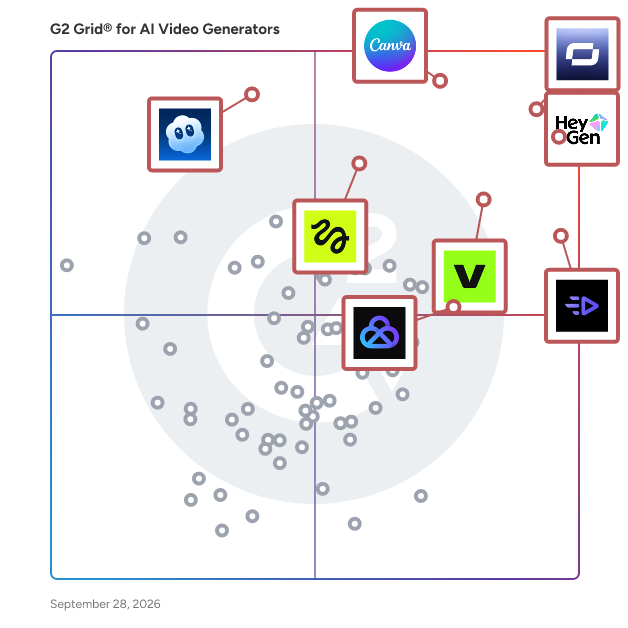
## G2 Grid® for AI Video Generators
 ![G2 Grid® for AI Video Generators plotting products by satisfaction and market presence](https://www.g2.com/categories/ai-video-generators/grids.png?focus%5B%5D=1198169&focus%5B%5D=118455&focus%5B%5D=4400&focus%5B%5D=1336695&focus%5B%5D=159846&focus%5B%5D=1325578&focus%5B%5D=1731231&focus%5B%5D=1625405)

Highlighted products: HeyGen, Synthesia, Canva, Creatify AI, VEED, AKOOL, Sora, and Pollo AI.

Underlying data: [Grid® JSON](https://www.g2.com/categories/ai-video-generators/grids.json?focus%5B%5D=heygen&focus%5B%5D=synthesia&focus%5B%5D=canva&focus%5B%5D=creatify-labs-inc-creatify-ai&focus%5B%5D=veed&focus%5B%5D=akool&focus%5B%5D=openai-sora&focus%5B%5D=pollo-ai&segment=small-business)

**Sponsored**

### RefNow

RefNow is a type of online employment reference management solution designed to help organizations streamline their recruitment processes by providing comprehensive employment reference reports. This innovative platform addresses the common challenges associated with traditional referencing methods, which can often be time-consuming and cumbersome. By leveraging technology, RefNow enables companies to make smarter and more informed hiring decisions, ultimately enhancing their recruitment efficiency. Targeted at a diverse audience that includes large organizations, startups, charities, and educational institutions, RefNow caters to any entity that requires a reliable and efficient referencing process. The platform is particularly beneficial for HR professionals and recruitment teams who seek to minimize administrative burdens while ensuring thorough vetting of potential candidates. With its user-friendly interface, RefNow simplifies the referencing process, allowing users to focus on more strategic aspects of recruitment. One of the standout features of RefNow is its ability to offer user and team management capabilities, which allows organizations to easily manage multiple users and streamline their referencing workflows. Additionally, the platform supports custom question profiles, enabling companies to tailor their reference checks to align with specific job roles or organizational values. This customization ensures that the references collected are relevant and provide valuable insights into a candidate's suitability for a position. Another significant advantage of RefNow is its integration of digital ID checks, which enhances the security and reliability of the referencing process. By verifying candidates' identities digitally, organizations can reduce the risk of fraud and ensure that the references they are receiving are legitimate. This feature not only adds a layer of trust but also accelerates the overall referencing timeline, allowing companies to make quicker hiring decisions without compromising on quality. Overall, RefNow stands out in the employment reference management category by combining efficiency, customization, and security into a single platform. Its mission to alleviate the administrative burden associated with referencing processes resonates with organizations looking to optimize their recruitment strategies. By providing a comprehensive solution that addresses the pain points of traditional referencing, RefNow empowers companies to focus on what truly matters: finding the right talent for their teams.

[Visit website](https://www.g2.com/external_clickthroughs/record?secure%5Bad_program%5D=ppc&secure%5Bad_slot%5D=category_product_list_llm&secure%5Bcategory_id%5D=1006582&secure%5Bchosen_at%5D=2026-08-03T09%3A38%3A50Z&secure%5Bdisplayable_resource_id%5D=898&secure%5Bdisplayable_resource_type%5D=Category&secure%5Bmedium%5D=sponsored&secure%5Bplacement_reason%5D=retargeted_product&secure%5Bplacement_resource_ids%5D%5B%5D=107256&secure%5Bprioritized%5D=false&secure%5Bproduct_id%5D=107256&secure%5Bresource_id%5D=1006582&secure%5Bresource_type%5D=Category&secure%5Bsource_type%5D=category_page&secure%5Bsource_url%5D=https%3A%2F%2Fwww.g2.com%2Fcategories%2Fai-video-generators%2Fsmall-business%3Fpage%3D2&secure%5Btoken%5D=1d6bdc53a51a6959e56f1ca0b4953af3c369df72dbd9d7545c80608fc47b2476&secure%5Burl%5D=https%3A%2F%2Frefnow.com%2Fdemo&secure%5Burl_type%5D=book_demo)

### [Descript](https://www.g2.com/products/descript/reviews)

In Descript you can make any video you want, any way you want. All you need is an idea; it helps if you know how to type. With the world’s first only AI co-editor, Underlord, you can make a video just by describing your vision. It will create, edit, and design your video—all under your direction. It’s got the taste and judgment you want in a creative partner and the expertise you need from a video editor. And it’s tireless—so you can stay focused on getting the result you’re after while it does all the dirty work. And when you want to get dirty, you don’t need special knowledge or skills. If you can edit text, you can edit video with Descript. It’s loaded with automated design tools, plus the friendliest timeline editor you’ve ever seen, a built-in recorder, and hosted publishing that makes collaboration as easy as sending a link. Create product demos, training videos, screen recordings, video messages, podcasts, or social clips. Join the 7 million+ creators and businesses using Descript, and create something impressive—something you can be proud of.

**Average Rating:** 4.6/5.0

**Total Reviews:** 902

#### How Do G2 Users Rate Descript?

- **Ease of Use:** 8.5/10 (Category avg: 9.1/10)
- **Content Creation:** 8.1/10 (Category avg: 8.9/10)
- **Content Editing:** 8.9/10 (Category avg: 8.4/10)
- **File Storage:** 8.3/10 (Category avg: 8.4/10)

#### Who Is the Company Behind Descript?

- **Seller:** [Descript](https://www.g2.com/sellers/descript)
- **Company Website:** descript.com
- **Year Founded:** 2017
- **HQ Location:** San Francisco, CA
- **LinkedIn® Page:** [www.linkedin.com](https://www.g2.com/external_clickthroughs/record?secure%5Bsource_type%5D=product_profile&secure%5Btoken%5D=516aa7c28632669ab09c84212b2becb85a29f73a94c6111a11d19be85957dd60&secure%5Burl%5D=https%3A%2F%2Fwww.linkedin.com%2Fcompany%2Fdescript%2F&secure%5Burl_type%5D=linkedin_company_website)  
184 employees on LinkedIn®

#### Who Uses This Product?

- **Who Uses This:** Founder, Owner
- **Top Industries:** Marketing and Advertising, Media Production
- **Company Size:** 87% Small, 8% Medium

#### What Do G2 Reviewers Say About Descript?

_AI-generated summary from verified user reviews_

##### Pros

- Users love the **easy editing** features in Descript, significantly speeding up video production and enhancing usability.
- Users find the **ease of use** in Descript remarkable, enhancing podcast creation and editing efficiency significantly.
- Users love the **AI integration** in Descript, making video editing incredibly easy and efficient.
- Users love Descript's **A.I.-powered ease of video editing** , making content production and collaboration simple and efficient.
- Users love the **script editing feature** of Descript, making video and audio edits simple and efficient.

##### Cons

- Users face a challenging **learning curve** with Descript, complicating the importing and production process significantly.
- Users experience **learning difficulties** with Descript's interface, finding tools confusing and frustrating to use effectively.
- Users face **complexity challenges** with Descript's frequent updates and navigation, disrupting their workflow and accessibility.
- Users complain about **slow performance** with Descript, often facing issues like freezing and lag during use.
- Users face **editing issues** with hard cuts, inaccurate transcriptions, and challenges in adding audio seamlessly.

#### What Are Recent G2 Reviews of Descript?

**["Absolute game-changer for editing our podcast! Don't Be a Tool Podcast on Spotify"](https://www.g2.com/survey_responses/descript-review-13133474)**

**Rating:** 5.0/5.0 stars

_— Accounts E._

[Read full review](https://www.g2.com/survey_responses/descript-review-13133474)

**["Descript’s Transcript-Based Editing Makes Audio and Video Production Fast and Intuitive"](https://www.g2.com/survey_responses/descript-review-13132238)**

**Rating:** 4.5/5.0 stars

_— Ravindra N._

[Read full review](https://www.g2.com/survey_responses/descript-review-13132238)

#### What Are G2 Users Discussing About Descript?

- [What is Descript used for?](https://www.g2.com/discussions/what-is-descript-used-for) - 1 comment

### [Powtoon](https://www.g2.com/products/powtoon/reviews)

Powtoon is the unified AI video platform that empowers you to easily create, scale, and share professional video content. Instantly deliver high-quality communications and knowledge engagement with complete creative freedom - all while enterprise-grade brand consistency, security, and compliance seamlessly fuel your AI transformation.

**Average Rating:** 4.4/5.0

**Total Reviews:** 281

#### How Do G2 Users Rate Powtoon?

- **Ease of Use:** 8.7/10 (Category avg: 9.1/10)

#### Who Is the Company Behind Powtoon?

- **Seller:** [Powtoon](https://www.g2.com/sellers/powtoon)
- **Year Founded:** 2011
- **HQ Location:** Stanmore, GB
- **Twitter:** @PowToon  
43,801 Twitter followers
- **LinkedIn® Page:** [www.linkedin.com](https://www.g2.com/external_clickthroughs/record?secure%5Bsource_type%5D=product_profile&secure%5Btoken%5D=f3da4ceaad49f2936c13851599c287f741fdc63d2a9a81053fe576f49855a78e&secure%5Burl%5D=https%3A%2F%2Fwww.linkedin.com%2Fcompany%2F2565844%2F&secure%5Burl_type%5D=linkedin_company_website)  
154 employees on LinkedIn®

#### Who Uses This Product?

- **Who Uses This:** Teacher, Project Manager
- **Top Industries:** E-Learning, Computer Software
- **Company Size:** 58% Small, 27% Medium

#### What Do G2 Reviewers Say About Powtoon?

_AI-generated summary from verified user reviews_

##### Pros

- Users appreciate the **ease of use** of Powtoon, finding it intuitive and perfect for quick video creation.
- Users highlight the **high creativity potential** of Powtoon, easily crafting engaging animations and presentations.
- Users appreciate the **quick creation** capabilities of Powtoon, finding it intuitive and convenient for video production.
- Users appreciate the **variety and ease of use** of Powtoon's templates, making video creation quick and intuitive.
- Users value the **access convenience** of Powtoon, enjoying quick video creation with all needed resources in one place.

##### Cons

- Users face numerous **technical issues** with Powtoon, including bugs, blurry images, and frustrating limitations on customization.
- Users find Powtoon lacks **essential features** , such as image uploads and customizable settings, affecting their creative process.
- Users find Powtoon frustrating due to **limited content** , including poor image quality, minimal animations, and few customization options.
- Users are frustrated by Powtoon’s **limited features** , including poor customization, restricted uploads, and insufficient variety in media options.
- Users express frustration over **limited templates** in Powtoon, hindering creativity and customization in their projects.

#### What Are Recent G2 Reviews of Powtoon?

**["AI-Powered Features Make Powtoon a Timesaver"](https://www.g2.com/survey_responses/powtoon-review-12817228)**

**Rating:** 4.0/5.0 stars

_— N J._

[Read full review](https://www.g2.com/survey_responses/powtoon-review-12817228)

**["Powtoon: Easy to Use, Seamless Templates, and Top-Notch Support"](https://www.g2.com/survey_responses/powtoon-review-12693403)**

**Rating:** 5.0/5.0 stars

_— patti p._

[Read full review](https://www.g2.com/survey_responses/powtoon-review-12693403)

#### What Are G2 Users Discussing About Powtoon?

- [What is Powtoon used for?](https://www.g2.com/discussions/what-is-powtoon-used-for)
- [Can you use Powtoon for free?](https://www.g2.com/discussions/can-you-use-powtoon-for-free)
- [What is the purpose of Powtoon?](https://www.g2.com/discussions/what-is-the-purpose-of-powtoon)
- [What is Powtoon software?](https://www.g2.com/discussions/what-is-powtoon-software)

### [Zebracat](https://www.g2.com/products/zebracat/reviews)

Zebracat is an AI-powered video creation platform that transforms text prompts, scripts, and blog posts into engaging videos within minutes. Designed for marketers, content creators, and businesses, it automates the video production process, eliminating the need for traditional editing skills or expensive equipment. By leveraging advanced AI technologies, Zebracat enables users to produce high-quality videos that drive engagement, increase reach, and boost conversions. Key Features and Functionality: - Text-to-Video Conversion: Quickly generate videos from text prompts, scripts, or blog URLs, streamlining content creation. - AI-Generated Visuals and Avatars: Incorporate AI-generated visuals and customizable avatars to enhance video appeal. - Human-Like AI Voiceovers: Choose from a range of realistic AI voices across multiple languages to narrate your content. - Automated Editing: Utilize AI-driven editing tools for smart cuts, transitions, and professional-quality output. - Multilingual Support: Translate videos into over 170 languages to reach a global audience. - Brand Customization: Maintain brand consistency with customizable logos, fonts, colors, and other brand assets. Primary Value and User Solutions: Zebracat addresses the challenges of time-consuming and costly video production by offering an efficient, AI-driven solution. Users can rapidly create professional videos without prior editing experience, making it ideal for producing social media content, marketing campaigns, tutorials, and more. By automating the video creation process, Zebracat empowers users to focus on strategic initiatives, ensuring consistent and engaging content that resonates with their target audience.

**Average Rating:** 4.8/5.0

**Total Reviews:** 29

#### How Do G2 Users Rate Zebracat?

- **Ease of Use:** 9.8/10 (Category avg: 9.1/10)
- **Content Creation:** 9.3/10 (Category avg: 8.9/10)
- **Content Editing:** 8.7/10 (Category avg: 8.4/10)
- **File Storage:** 9.1/10 (Category avg: 8.4/10)

#### Who Is the Company Behind Zebracat?

- **Seller:** [Zebracat](https://www.g2.com/sellers/zebracat)
- **Year Founded:** 2022
- **HQ Location:** Berlin, DE
- **LinkedIn® Page:** [www.linkedin.com](https://www.g2.com/external_clickthroughs/record?secure%5Bsource_type%5D=product_profile&secure%5Btoken%5D=7c915defe3511193939ec150888eccb2827c03dcc522cfb30c5b269699c1867b&secure%5Burl%5D=https%3A%2F%2Fwww.linkedin.com%2Fcompany%2Fzebracat-ai%2F&secure%5Burl_type%5D=linkedin_company_website)  
18 employees on LinkedIn®

#### Who Uses This Product?

- **Top Industries:** Marketing and Advertising
- **Company Size:** 100% Small

#### What Do G2 Reviewers Say About Zebracat?

_AI-generated summary from verified user reviews_

##### Pros

- Users love the **ease of use** of Zebracat, finding it quick and enjoyable for creating diverse video content.
- Users love the **ease of creation** with Zebracat, enabling effortless video production for diverse content needs.
- Users love the **easy editing** feature of Zebracat, making video creation seamless and hassle-free.
- Users appreciate the **simple and easy-to-use interface** of Zebracat, enhancing their overall experience.
- Users love the **free trial and earning credits** on Zebracat, enhancing their experience and engagement.

##### Cons

- Users find the **cost issue** concerning, as credits are insufficient and higher packages are unaffordable.
- Users acknowledge the **limitations of AI** in Zebracat, noting occasional bugs and the need for clear context.
- Users find the **cost of Zebracat** prohibitive, as the regular plan offers insufficient credits for their needs.
- Users find the **limited subscription options** of Zebracat insufficient to meet their diverse needs.
- Users find the **limitations on video length** frustrating, wishing for the ability to share longer tutorials.

#### What Are Recent G2 Reviews of Zebracat?

**["Amazing AI tool that is fun and easy to use."](https://www.g2.com/survey_responses/zebracat-review-10726814)**

**Rating:** 4.0/5.0 stars

_— Kelly M._

[Read full review](https://www.g2.com/survey_responses/zebracat-review-10726814)

**["The future is now with AI video creation!"](https://www.g2.com/survey_responses/zebracat-review-10588220)**

**Rating:** 5.0/5.0 stars

_— Joshua B._

[Read full review](https://www.g2.com/survey_responses/zebracat-review-10588220)

### [Magnific](https://www.g2.com/products/magnific/reviews)

Founded in 2010 and formerly known as Freepik, Magnific is an AI creative platform for professional teams and individual creators. With over 100 million monthly visits and over 1 million paid subscribers, the platform integrates tools for creating images, videos, and audio. Precision camera, lighting control, and 3D model environments, backed by 250M+ creative assets and exclusive upscaling technology. Spaces, its collaborative canvas, supports end-to-end team production without losing precision or brand consistency. Magnific serves enterprise marketing teams, creative studios, production agencies, and independent professionals worldwide.

**Average Rating:** 4.7/5.0

**Total Reviews:** 175

#### How Do G2 Users Rate Magnific?

- **Ease of Use:** 9.4/10 (Category avg: 9.1/10)
- **Content Creation:** 9.4/10 (Category avg: 8.9/10)
- **Content Editing:** 7.6/10 (Category avg: 8.4/10)
- **File Storage:** 9.0/10 (Category avg: 8.4/10)

#### Who Is the Company Behind Magnific?

- **Seller:** [Magnific](https://www.g2.com/sellers/magnific)
- **Company Website:** www.magnific.com
- **Year Founded:** 2010
- **HQ Location:** Malaga, Malaga
- **Twitter:** @magnific  
86,279 Twitter followers
- **LinkedIn® Page:** [www.linkedin.com](https://www.g2.com/external_clickthroughs/record?secure%5Bsource_type%5D=product_profile&secure%5Btoken%5D=f6557a31d1525b5268e9002fbc92391b2168eb1ee8d41d7ccb919d550bff8112&secure%5Burl%5D=https%3A%2F%2Fwww.linkedin.com%2Fcompany%2Fmagnific%2F&secure%5Burl_type%5D=linkedin_company_website)  
254 employees on LinkedIn®

#### Who Uses This Product?

- **Who Uses This:** Graphic Designer
- **Top Industries:** Graphic Design, Marketing and Advertising
- **Company Size:** 73% Small, 20% Medium

#### What Do G2 Reviewers Say About Magnific?

_AI-generated summary from verified user reviews_

##### Pros

- Users find Freepik's **ease of use** remarkable, enabling quick access to diverse design assets and streamlined workflows.
- Users highlight the **high-quality graphics** of Freepik, making it an essential tool for social media and design needs.
- Users value the **ease of image generation** with Freepik, enhancing their design efficiency and creativity significantly.
- Users love the **wide variety of ready-to-use designs** on Freepik, saving time and enhancing creative workflows.
- Users value the **variety and ease of use** in Freepik, making creative workflows smoother and more efficient.

##### Cons

- Users find the **missing features** in Magnific tedious, as navigating assets can be repetitive and restrictive.
- Users find Freepik's subscription **expensive** and limiting, especially with the new credit-based system reducing usability.
- Users are frustrated with Freepik's **expensive subscription and rapid credit depletion** , hindering convenient access to resources.
- Users find the **limited features** of Magnific frustrating, especially with repetitive assets and restricted download options.
- Users find the **limited options** to be repetitive, leading to excessive scrolling and difficulties in finding unique assets.

#### What Are Recent G2 Reviews of Magnific?

**["AI-Powered visual creation made fast and effortless""](https://www.g2.com/survey_responses/magnific-review-12694186)**

**Rating:** 5.0/5.0 stars

_— Manila B._

[Read full review](https://www.g2.com/survey_responses/magnific-review-12694186)

**["Exceptional AI Upscaling with Powerful Detail Control"](https://www.g2.com/survey_responses/magnific-review-13120333)**

**Rating:** 5.0/5.0 stars

_— Ravindra N._

[Read full review](https://www.g2.com/survey_responses/magnific-review-13120333)

#### What Are G2 Users Discussing About Magnific?

- [What is attribute on freepik?](https://www.g2.com/discussions/what-is-attribute-on-freepik)
- [How good is freepik?](https://www.g2.com/discussions/how-good-is-freepik)
- [Can we edit in freepik?](https://www.g2.com/discussions/can-we-edit-in-freepik) - 1 comment
- [What is the use of freepik?](https://www.g2.com/discussions/what-is-the-use-of-freepik) - 2 comments

### [Vyond](https://www.g2.com/it/products/vyond/reviews)

Vyond è una piattaforma video AI tutto-in-uno progettata per potenziare le organizzazioni nella creazione di contenuti aziendali sicuri, conformi e coinvolgenti su larga scala. Con una storia che si estende per oltre 15 anni, Vyond si è affermata come una soluzione affidabile per più di 20.000 aziende, inclusi il 65% delle Fortune 500. Vyond è particolarmente adatta per le imprese che cercano di migliorare le loro comunicazioni interne, i programmi di formazione, l'abilitazione alle vendite e gli sforzi di marketing attraverso contenuti video di alta qualità. Vyond serve una vasta gamma di casi d'uso. È particolarmente vantaggiosa per le aziende che mirano a semplificare i processi di onboarding, migliorare i tassi di completamento della formazione e potenziare la formazione sulla conformità. Integrandosi perfettamente con strumenti esistenti come Slack, Sistemi di Gestione dell'Apprendimento (LMS) e Sistemi di Gestione delle Relazioni con i Clienti (CRM), Vyond consente ai dipendenti di creare contenuti sicuri per il marchio senza la necessità di passare tra più applicazioni. Questa integrazione non solo favorisce un flusso di lavoro più efficiente, ma garantisce anche che i contenuti video siano allineati con gli standard di branding e conformità dell'organizzazione. Le caratteristiche principali di Vyond includono avatar AI, scripting assistito dall'AI, traduzione istantanea e capacità di sintesi vocale, che collettivamente migliorano il processo di creazione video. Gli utenti possono sviluppare personaggi personalizzati e utilizzare vari stili di animazione, inclusi formati animati, fotorealistici, misti e live-action, tutto all'interno di una singola piattaforma. Questa versatilità consente alle organizzazioni di soddisfare le diverse preferenze del pubblico e stili di apprendimento, rendendo i loro contenuti più coinvolgenti ed efficaci. Inoltre, l'integrazione LMS conforme a SCORM di Vyond assicura che i materiali di formazione possano essere facilmente tracciati e misurati, fornendo preziose informazioni sull'engagement dei dipendenti e sui risultati dell'apprendimento. Vyond si distingue nel mercato semplificando lo stack tecnologico per le imprese mentre espande le loro capacità creative. L'attenzione della piattaforma sui risultati misurabili—come un onboarding più veloce, un maggiore completamento della formazione e un miglioramento dell'abilitazione alle vendite—consente alle organizzazioni di tracciare il ritorno sull'investimento (ROI) all'interno dei loro sistemi di registrazione esistenti. Questo focus sui risultati basati sui dati permette alle aziende di prendere decisioni informate sulle loro strategie di contenuto video e ottimizzare i loro sforzi di comunicazione. Con un impegno per l'innovazione continua e la fiducia dei clienti, Vyond è dedicata a evolvere la sua piattaforma per soddisfare le esigenze delle imprese moderne. Portando capacità AI di nuova generazione in un ambiente conforme e governato, Vyond consente alle organizzazioni di creare contenuti in modo più efficiente, comunicare più efficacemente e ridurre la loro dipendenza da soluzioni frammentate. Questo posiziona Vyond come uno strumento completo per qualsiasi organizzazione che desideri sfruttare il video come componente chiave della loro strategia aziendale.

**Average Rating:** 4.7/5.0

**Total Reviews:** 544

#### How Do G2 Users Rate Vyond?

- **Facilità d'uso:** 9.2/10 (Category avg: 9.1/10)
- **Creazione di contenuti:** 9.2/10 (Category avg: 8.9/10)
- **Modifica del contenuto:** 9.1/10 (Category avg: 8.4/10)
- **Archiviazione file:** 9.2/10 (Category avg: 8.4/10)

#### Who Is the Company Behind Vyond?

- **Venditore:** [Vyond](https://www.g2.com/it/sellers/vyond)
- **Sito web dell'azienda:** www.vyond.com
- **Anno di Fondazione:** 2007
- **Sede centrale:** San Mateo, California
- **Twitter:** @VyondVideo  
136 follower su Twitter
- **Pagina LinkedIn®:** [www.linkedin.com](https://www.g2.com/it/external_clickthroughs/record?secure%5Bsource_type%5D=product_profile&secure%5Btoken%5D=4f443a61da6f2088bf160ca8190c331836a5a061a5df58f64f04b89705640f75&secure%5Burl%5D=https%3A%2F%2Fwww.linkedin.com%2Fcompany%2Fvyond%2F&secure%5Burl_type%5D=linkedin_company_website)  
274 dipendenti su LinkedIn®

#### Who Uses This Product?

- **Who Uses This:** Instructional Designer, Senior Instructional Designer
- **Top Industries:** E-Learning, Ospedali e assistenza sanitaria
- **Company Size:** 52% Large, 26% Small

#### What Do G2 Reviewers Say About Vyond?

_AI-generated summary from verified user reviews_

##### Pros

- Gli utenti amano la **facilità d'uso** di Vyond, che consente una rapida creazione di video con modelli utili e supporto.
- Gli utenti amano la **facilità di creazione rapida di video** con Vyond, che consente loro di sviluppare contenuti in modo efficiente.
- Gli utenti apprezzano i **modelli versatili e il supporto** di Vyond, facilitando la creazione di storie visive coinvolgenti senza sforzo.
- Gli utenti amano il **processo di creazione facile** con Vyond, che consente una rapida produzione di video e ampie opzioni di modelli.
- Gli utenti amano la **versatilità** di Vyond, rendendo la creazione di video piacevole e adatta a varie applicazioni.

##### Cons

- Gli utenti esprimono frustrazione per le **opzioni di personalizzazione limitate** in Vyond, desiderando più movimenti dei personaggi e scelte di abbigliamento.
- Gli utenti notano le **funzionalità limitate** e la mancanza di varietà nelle scene, ostacolando la creatività e la flessibilità del progetto.
- Gli utenti trovano le **opzioni limitate** nella personalizzazione dei personaggi e nelle risorse multimediali frustranti e bisognose di miglioramento.
- Gli utenti notano una **ripida curva di apprendimento** con Vyond, che richiede tempo per padroneggiare le sue limitate funzionalità di editing video.
- Gli utenti notano una **selezione limitata** di abbigliamento e accessori in Vyond, rendendo difficile trovare articoli specifici.

#### What Are Recent G2 Reviews of Vyond?

**["Prodotto facile da usare"](https://www.g2.com/it/survey_responses/vyond-review-11299426)**

**Rating:** 5.0/5.0 stars

_— Tuli D._

[Read full review](https://www.g2.com/it/survey_responses/vyond-review-11299426)

**["Video animati veloci e professionali con i modelli di Vyond e l'editor drag-and-drop"](https://www.g2.com/it/survey_responses/vyond-review-13133542)**

**Rating:** 4.0/5.0 stars

_— Ravindra N._

[Read full review](https://www.g2.com/it/survey_responses/vyond-review-13133542)

#### What Are G2 Users Discussing About Vyond?

- [A cosa serve Vyond?](https://www.g2.com/it/discussions/what-is-vyond-used-for) - 1 comment

### [Syllaby](https://www.g2.com/products/syllaby/reviews)

Syllaby is your all-in-one AI studio for viral video creation. Instantly turn ideas into faceless or cinematic content with trending topics, ready-to-film scripts, and studio-quality visuals. From planning to publishing, Syllaby streamlines every step—so your content stays consistent, professional, and unmistakably yours.

**Average Rating:** 4.8/5.0

**Total Reviews:** 47

#### How Do G2 Users Rate Syllaby?

- **Ease of Use:** 9.5/10 (Category avg: 9.1/10)
- **Content Creation:** 9.4/10 (Category avg: 8.9/10)
- **Content Editing:** 8.6/10 (Category avg: 8.4/10)
- **File Storage:** 9.2/10 (Category avg: 8.4/10)

#### Who Is the Company Behind Syllaby?

- **Seller:** [Syllaby](https://www.g2.com/sellers/syllaby)
- **Year Founded:** 2023
- **HQ Location:** Durham, NC
- **LinkedIn® Page:** [www.linkedin.com](https://www.g2.com/external_clickthroughs/record?secure%5Bsource_type%5D=product_profile&secure%5Btoken%5D=31a8334e0abf8e50c24b4618af1b91df7638bea0484e55925530bfbaac41e878&secure%5Burl%5D=https%3A%2F%2Fwww.linkedin.com%2Fcompany%2F90414011&secure%5Burl_type%5D=linkedin_company_website)  
18 employees on LinkedIn®

#### Who Uses This Product?

- **Top Industries:** Marketing and Advertising
- **Company Size:** 96% Small, 4% Medium

#### What Do G2 Reviewers Say About Syllaby?

_AI-generated summary from verified user reviews_

##### Pros

- Users love the **time-saving capabilities** of Syllaby, empowering them to create and schedule content effortlessly.
- Users love the **ease of creation** with Syllaby, making faceless video production quick and effortless.
- Users appreciate the **ease of use** of Syllaby, streamlining video creation and enhancing content posting efficiency.
- Users love the **easy creation** of Faceless videos, appreciating the seamless process and great community support.
- Users value the **speed and flexibility** of Syllaby, enabling efficient creation and automation of diverse video content.

##### Cons

- Users find the **credit system issues** frustrating, noting complications and insufficient credit duration impacting usability.
- Users find the **credit issues** frustrating, noting that they don't last long enough and are complicated.
- Users find the **limited credits** of Syllaby insufficient, hindering their ability to utilize the software effectively.
- Users report **software bugs** that can complicate tasks like voice script generation and may affect usability.
- Users are frustrated with the **high costs** associated with Syllaby, feeling charged excessively for basic features and subscriptions.

#### What Are Recent G2 Reviews of Syllaby?

**["Streamlined Video Creation and Publishing"](https://www.g2.com/survey_responses/syllaby-review-12589091)**

**Rating:** 4.5/5.0 stars

_— Henry M._

[Read full review](https://www.g2.com/survey_responses/syllaby-review-12589091)

**["An all-in-one solution for content generation."](https://www.g2.com/survey_responses/syllaby-review-11456025)**

**Rating:** 5.0/5.0 stars

_— Moaz A._

[Read full review](https://www.g2.com/survey_responses/syllaby-review-11456025)

### [Tagshop.ai](https://www.g2.com/products/tagshop-ai/reviews)

Tagshop AI is a powerful AI UGC video ad generator designed to help brands create high-converting video ads using realistic AI avatars. Instead of relying on traditional shoots, actors, or complex editing workflows, marketers can simply provide a product URL or a short script, and Tagshop AI instantly transforms it into a polished, ready-to-launch UGC-style video ad. Built specifically for performance-driven campaigns, this AI UGC video ad generator creates content that aligns with what actually works on platforms like Instagram, TikTok, Facebook, and YouTube. From attention-grabbing hooks to natural-looking delivery and clear messaging, every video is optimized to feel authentic and drive engagement. What makes Tagshop AI stand out as an AI UGC video ad generator is its ability to produce multiple ad variations at scale. This allows businesses to test different creatives, angles, and messaging quickly without increasing production costs. As a result, teams can move faster, optimize campaigns in real time, and consistently improve ad performance with data-backed creative testing.

**Average Rating:** 4.9/5.0

**Total Reviews:** 145

#### How Do G2 Users Rate Tagshop.ai?

- **Ease of Use:** 9.7/10 (Category avg: 9.1/10)
- **Content Creation:** 10.0/10 (Category avg: 8.9/10)

#### Who Is the Company Behind Tagshop.ai?

- **Seller:** [Tagshop](https://www.g2.com/sellers/tagshop)
- **Year Founded:** 2025
- **HQ Location:** Covina, US
- **Twitter:** @tagshopai
- **LinkedIn® Page:** [www.linkedin.com](https://www.g2.com/external_clickthroughs/record?secure%5Bsource_type%5D=product_profile&secure%5Btoken%5D=a7673da1aeba9f4afcd41fab73dc0ccfd7628ea97914160d63bdec5f07ddae85&secure%5Burl%5D=https%3A%2F%2Fwww.linkedin.com%2Fcompany%2F83528429&secure%5Burl_type%5D=linkedin_company_website)  
18 employees on LinkedIn®

#### Who Uses This Product?

- **Who Uses This:** Founder
- **Top Industries:** Computer Software, Marketing and Advertising
- **Company Size:** 59% Small, 34% Medium

#### What Do G2 Reviewers Say About Tagshop.ai?

_AI-generated summary from verified user reviews_

##### Pros

- Users find Tagshop.ai extremely easy to use, highlighted by its **intuitive interface and seamless integrations**.
- Users commend Tagshop.ai for its **efficient UGC management** , enhancing engagement and boosting conversions effortlessly.
- Users appreciate the **easy-to-use interface** of Tagshop.ai, enabling effortless navigation for teams with varied skill levels.
- Users appreciate the **efficiency of AI-generated video ads** that save time and streamline content creation effectively.
- Users value the **innovative Digital Twin feature** of Tagshop.ai, significantly accelerating product marketing and content creation.

##### Cons

- Users express the need for **missing features** , including additional platform support and improved script recommendations.
- Users feel the **AI-generated scripts and avatars require significant improvement** to enhance customization and realism.
- Users experience **slow performance** with rendering and load times, which hampers their overall experience with Tagshop.ai.
- Users note that some **AI-generated scripts and avatars** require improvements in realism and customization flexibility.
- Users note a **lack of features** , requesting broader platform compatibility and enhanced customization options for big brands.

#### What Are Recent G2 Reviews of Tagshop.ai?

**["The output and video quality by Tagshop AI is amazing. Clean output every time"](https://www.g2.com/survey_responses/tagshop-ai-review-13036111)**

**Rating:** 5.0/5.0 stars

_— Afruz F._

[Read full review](https://www.g2.com/survey_responses/tagshop-ai-review-13036111)

**["Easy to create ai ugc video ads with script, and images. Powerful editing with an in-built editor"](https://www.g2.com/survey_responses/tagshop-ai-review-12879066)**

**Rating:** 5.0/5.0 stars

_— Nuray M._

[Read full review](https://www.g2.com/survey_responses/tagshop-ai-review-12879066)

#### What Are G2 Users Discussing About Tagshop.ai?

- [What is Taggshop used for?](https://www.g2.com/discussions/what-is-taggshop-used-for) - 2 comments

### [Animaker](https://www.g2.com/products/animaker/reviews)

Animaker is an AI-powered animation software that helps creators and teams bring ideas to life through animated videos - for training, communication, and marketing. Trusted by 35 million users and 80% of Fortune 500 companies, Animaker turns simple prompts, scripts, or data into professional animated content in minutes, no animation or design skills required. At its core, Animaker is built around animation, and its toolkit comes loaded with advanced AI tools that simplify every stage of video creation. ● AI Whiteboard Video - Create engaging animated videos in a hand-drawn whiteboard style from prompts. ● AI Clip Generator - Generate professional-looking clips from prompts or uploaded media. ● AI Video Generator - Produce full-length, studio-quality Gen AI videos from simple prompts. ● AI Infographic Maker - Convert data and reports into visually stunning animated infographic videos. ● AI Video Trainers - Build personalized, on-demand training videos at scale. ● AI Video Quiz - Make training videos engaging and interactive by adding quizzes within the content. ● AI Video Editor - Edit, enhance, and polish videos automatically with our AI Assistant Max. ● Subtitle Generator - Add accurate, multilingual subtitles in seconds with one click! ● AI Translate - Auto-translate animaker-made videos into 100+ languages to connect with the audience worldwide ● AI Voice Generator - Create realistic, human-like voiceovers from 180+ voices across 2000+ languages and accents. Our other powerful features include - ● Avatar Maker - Build unique, customizable animated characters that represent your brand and audience. ● Animaker Deck - Create animated presentations with characters for engagement and retention! ● 1000+ ready-to-use templates - Quickly make videos for any purpose from training and onboarding to marketing and internal communication. Since 2015, Animaker has powered over 50 million animated videos, helping L&D teams, educators, and enterprises revolutionize how they train, communicate, and grow through the power of AI-driven video creation. Need to work with regular videos instead? Animaker's AI tools generate, edit, and enhance them too.

**Average Rating:** 4.7/5.0

**Total Reviews:** 1,056

#### How Do G2 Users Rate Animaker?

- **Ease of Use:** 9.0/10 (Category avg: 9.1/10)
- **Content Creation:** 10.0/10 (Category avg: 8.9/10)
- **Content Editing:** 10.0/10 (Category avg: 8.4/10)
- **File Storage:** 10.0/10 (Category avg: 8.4/10)

#### Who Is the Company Behind Animaker?

- **Seller:** [Animaker, Inc](https://www.g2.com/sellers/animaker-inc)
- **Company Website:** www.animaker.com
- **Year Founded:** 2015
- **HQ Location:** San Francisco, California
- **Twitter:** @animakerhq  
4,054 Twitter followers
- **LinkedIn® Page:** [www.linkedin.com](https://www.g2.com/external_clickthroughs/record?secure%5Bsource_type%5D=product_profile&secure%5Btoken%5D=ca7d09252a5792272a2ff53a31fc6dfe91c43d6a30cbfc20f4cb57e8e4f5f4b0&secure%5Burl%5D=https%3A%2F%2Fwww.linkedin.com%2Fcompany%2F3579051%2F&secure%5Burl_type%5D=linkedin_company_website)  
204 employees on LinkedIn®

#### Who Uses This Product?

- **Who Uses This:** Student, Teacher
- **Top Industries:** Animation, Higher Education
- **Company Size:** 78% Small, 13% Medium

#### What Do G2 Reviewers Say About Animaker?

_AI-generated summary from verified user reviews_

##### Pros

- Users find Animaker's **ease of use** invaluable, allowing creative content creation without prior experience or technical skills.
- Users praise Animaker for its **ease of use in video creation** , making it perfect for beginners and educators.
- Users appreciate the **user-friendly interface** of Animaker, making video creation easy and enjoyable for everyone.
- Users love the **excellent animation features** of Animaker, enabling creative video production with audio and layers.
- Users love the **variety of character styles** in Animaker, enhancing engagement and creativity in their video projects.

##### Cons

- Users find the **free plan's limitations** hinder usability, especially for nonprofits and occasional users needing extended features.
- Users find Animaker to be **expensive** , especially for students and those on a budget, limiting access to features.
- Users find the **lack of free access** to premium features restrictive, impacting their animation quality and experience.
- Users are frustrated with the **plan limitations** in Animaker, facing restrictions and high costs for basic features.
- Users report **slow rendering** issues that hinder video quality and increase editing time significantly.

#### What Are Recent G2 Reviews of Animaker?

**["Animaker Makes Professional Animated Videos Easy—Even for Beginners"](https://www.g2.com/survey_responses/animaker-review-13171006)**

**Rating:** 5.0/5.0 stars

_— Amit R._

[Read full review](https://www.g2.com/survey_responses/animaker-review-13171006)

**["Animaker Makes Animated Lessons Easy with an All-in-One Toolkit"](https://www.g2.com/survey_responses/animaker-review-13091055)**

**Rating:** 4.5/5.0 stars

_— Ruth M._

[Read full review](https://www.g2.com/survey_responses/animaker-review-13091055)

#### What Are G2 Users Discussing About Animaker?

- [What is Animaker used for?](https://www.g2.com/discussions/what-is-animaker-used-for)
- [Which software is best for animation?](https://www.g2.com/discussions/which-software-is-best-for-animation) - 1 comment
- [Is Animaker a safe site?](https://www.g2.com/discussions/is-animaker-a-safe-site) - 1 comment, 2 upvotes
- [Is Animaker really free?](https://www.g2.com/discussions/is-animaker-really-free) - 1 comment
- [What can Animaker do?](https://www.g2.com/discussions/what-can-animaker-do) - 2 comments

### [Picsart](https://www.g2.com/products/picsart/reviews)

Picsart is an all-in-one creative platform that gives individuals, teams, and businesses everything they need to create, from quick social media visuals to full campaign production, without needing design experience or a dozen separate tools. AI Photo editor and design studio. For creating and editing individual assets, Picsart's intuitive editor and design studio offer thousands of templates for social media, presentations, brand materials, and product packaging. Pick a template, edit, publish... Or ask the AI Assistant to do the edits. No learning curve. AI Playground: for experimenting and comparing models. The AI Playground is where users test, explore, and compare 157+ generative AI models from 31 providers under a single login: Sora, Kling, and Veo for video; Flux, GPT Image, and Ideogram for images; ElevenLabs for audio. Run the same prompt across multiple models, compare results side by side, and pay only per generation, not per subscription. Every output saves automatically to Drive. Picsart Flow: for building repeatable creative processes. Flow is a no-code, infinite-canvas workflow builder where teams design and automate multi-step creative pipelines. Connect AI models, upload assets, set logic, and package the whole thing as a reusable workflow. Build a batch ad campaign, a branded video series, or a localized asset set once in Flow and run it as many times as needed. A built-in AI Copilot handles the technical setup in plain language. Picsart Agents: for delegating full creative tasks end to end. Agents is a marketplace of specialized AI agents: an art director, a brand designer, a video director, a product photographer, a localization strategist, and more. Brief one in plain language. It plans, executes, and delivers finished work. Agents connect to Slack, WhatsApp, and Telegram, so putting one to work is as simple as sending a message. Picsart Drive: for organizing everything in one place. Every asset created, generated, or uploaded across the platform lives in one centralized media library, organized by project, model, and prompt. No more downloading and re-uploading across tools. AI Try On: for e-commerce visualization. Picsart's AI Try On lets brands and shoppers visualize apparel and accessories on models without a photo shoot, swapping products directly from a single image. For developers and AI agent workflows. Picsart's MCP server connects any MCP-compatible AI agent to the full model library in under a minute. Install via the CLI using npx -y @picsart/mcp-server, and all 157+ models become callable tools inside Claude, Cursor, Windsurf, Hermes, and any other MCP-compatible host. The REST API covers 90+ tools across image generation, video, audio synthesis, background removal, and upscaling, for teams building creative automation into their own products. Picsart is available on web, iOS, Android, and Windows. Whether the goal is a quick social post or a full brand campaign, Picsart is where it gets made.

**Average Rating:** 4.5/5.0

**Total Reviews:** 771

#### How Do G2 Users Rate Picsart?

- **Ease of Use:** 9.2/10 (Category avg: 9.1/10)

#### Who Is the Company Behind Picsart?

- **Seller:** [PICSART](https://www.g2.com/sellers/picsart)
- **Company Website:** www.picsart.com
- **Year Founded:** 2011
- **HQ Location:** Miami, US
- **Twitter:** @Picsart  
123,249 Twitter followers
- **LinkedIn® Page:** [www.linkedin.com](https://www.g2.com/external_clickthroughs/record?secure%5Bsource_type%5D=product_profile&secure%5Btoken%5D=d1a00b3910edfc3daba04f0595ce310942cbaae6a8e702b5924979508401a2ad&secure%5Burl%5D=https%3A%2F%2Fwww.linkedin.com%2Fcompany%2Fpicsart%2F&secure%5Burl_type%5D=linkedin_company_website)  
1,379 employees on LinkedIn®

#### Who Uses This Product?

- **Who Uses This:** Student, Software Engineer
- **Top Industries:** Information Technology and Services, Design
- **Company Size:** 73% Small, 21% Medium

#### What Do G2 Reviewers Say About Picsart?

_AI-generated summary from verified user reviews_

##### Pros

- Users enjoy the **ease of use** of Picsart, allowing for quick and efficient editing without advanced skills.
- Users appreciate the **user-friendly interface** of Picsart, effectively enhancing their editing experience with numerous features.
- Users love the **beginner-friendly features** of Picsart, making editing quick and easy for all skill levels.
- Users love the **powerful AI tools** in Picsart, enabling effortless and creative design for various projects.
- Users love the **efficiency** of Picsart, enabling quick and easy edits for social media across devices.

##### Cons

- Users find Picsart's **expensive premium features** limiting, with essential tools locked behind a costly paywall.
- Users find the **limited free features** of Picsart frustrating, as many valuable tools require payment for access.
- Users find that Picsart has **limited features** , particularly with advanced tools available only in the premium version.
- Users experience **slow performance** with Picsart, particularly on low-end devices, impacting usability and functionality.
- Users are frustrated with the **subscription requirement** for many features, making it hard to access all tools.

#### What Are Recent G2 Reviews of Picsart?

**["Easy, Professional-Looking Edits with Powerful Tools and AI Features"](https://www.g2.com/survey_responses/picsart-review-13097345)**

**Rating:** 4.0/5.0 stars

_— Emma ._

[Read full review](https://www.g2.com/survey_responses/picsart-review-13097345)

**["All-in-One Photo Editing and AI Tools That Save Time"](https://www.g2.com/survey_responses/picsart-review-13035107)**

**Rating:** 5.0/5.0 stars

_— Muzammil M._

[Read full review](https://www.g2.com/survey_responses/picsart-review-13035107)

#### What Are G2 Users Discussing About Picsart?

- [What is Picsart used for?](https://www.g2.com/discussions/what-is-picsart-used-for) - 9 comments, 7 upvotes

### [LTX](https://www.g2.com/products/ltx/reviews)

LTX is a type of open-source AI model that generates and edits synchronized video and audio content from text, image, or audio inputs. It helps developers, AI-native platforms, animation studios, VFX houses, and enterprise teams produce production-grade video without building infrastructure from scratch or relying on closed, cloud-only platforms that charge per generation. The latest model, LTX-2.3, is a 22-billion-parameter audio-video foundation model with open weights available on Hugging Face, where it has surpassed 28 million downloads across all versions. It supports text-to-video, image-to-video, audio-to-video, video-to-video, and keyframe interpolation pipelines within a single model, generating native 4K output at up to 50 frames per second. Because audio and video are generated together in one pass, output does not require a separate syncing step afterward. Teams can fine-tune the model on their own characters, brand styles, and environments using IC-LoRA and the LTX Trainer, which keeps output consistent and repeatable across generations rather than requiring a fresh description each time. Deployment is flexible. Teams can run the model locally on their own hardware, deploy it on-premise to meet data sovereignty requirements, or access it through an API for managed inference starting at $0.06 per second at 1080p resolution, with a commercial license required for companies generating over $10 million in annual revenue. Running the model locally removes per-generation cloud fees and keeps proprietary data within a team's own infrastructure rather than sending it to a third party. LTX also offers LTX Studio, a production platform that covers scripting, storyboarding, shot generation, and editing in one workspace for teams that need a full collaborative workflow rather than a single-model integration. The model is built for teams with an active AI function, not for one-off social clips. Common use cases include synthetic data generation for training and simulation workflows, always-on campaign and product video production for brands and agencies, and integrating AI generation directly into existing animation or VFX pipelines without replacing them.

**Average Rating:** 4.3/5.0

**Total Reviews:** 122

#### How Do G2 Users Rate LTX?

- **Ease of Use:** 8.2/10 (Category avg: 9.1/10)
- **Content Creation:** 8.1/10 (Category avg: 8.9/10)
- **Content Editing:** 7.5/10 (Category avg: 8.4/10)
- **File Storage:** 8.5/10 (Category avg: 8.4/10)

#### Who Is the Company Behind LTX?

- **Seller:** [Lightricks](https://www.g2.com/sellers/lightricks)
- **Company Website:** www.lightricks.com
- **Year Founded:** 2013
- **HQ Location:** Jerusalem, Jerusalem
- **LinkedIn® Page:** [www.linkedin.com](https://www.g2.com/external_clickthroughs/record?secure%5Bsource_type%5D=product_profile&secure%5Btoken%5D=70087d94da633491273218b2c3de1f21d7629d77cd882a1f511dc0f81eb20797&secure%5Burl%5D=https%3A%2F%2Fwww.linkedin.com%2Fcompany%2Flightricks%2F&secure%5Burl_type%5D=linkedin_company_website)  
526 employees on LinkedIn®

#### Who Uses This Product?

- **Top Industries:** Entertainment, Animation
- **Company Size:** 91% Small, 7% Medium

#### What Do G2 Reviewers Say About LTX?

_AI-generated summary from verified user reviews_

##### Pros

- Users appreciate the **enhanced creativity** of LTX Studio, utilizing its tools for unique storytelling and character development.
- Users praise the **ease of use** of LTX, effectively generating story ideas and enhancing their creative workflow.
- Users love the **ease of video creation** with LTX, streamlining the process and enhancing creative output significantly.
- Users love the **versatile scene editor** and image quality, enhancing storyboard creation and character consistency.
- Users love the **ease of creation** with LTX, quickly generating storyboards and enhancing their creative process.

##### Cons

- Users note significant **AI limitations** in LTX, including inconsistencies and challenges with character generation and editing.
- Users experience **animation issues** with LTX, finding video results often warped and lacking compared to newer AI tools.
- Users find the **unnatural movements** in LTX frustrating, with issues in character consistency and animation fluidity.
- Users find it challenging to maintain **character consistency** and smooth movements, impacting overall storytelling quality.
- Users note a challenging **learning curve** for advanced features and starting out with LTX Studio, requiring patience.

#### What Are Recent G2 Reviews of LTX?

**["Seamless Asset Creation and Management"](https://www.g2.com/survey_responses/ltx-review-12509211)**

**Rating:** 5.0/5.0 stars

_— Adam P._

[Read full review](https://www.g2.com/survey_responses/ltx-review-12509211)

**["Lifesaver for Budget Constraints with Room for Improvement"](https://www.g2.com/survey_responses/ltx-review-12506078)**

**Rating:** 4.0/5.0 stars

_— Ric K._

[Read full review](https://www.g2.com/survey_responses/ltx-review-12506078)

### [VisionStory AI](https://www.g2.com/de/products/visionstory-ai/reviews)

VisionStory ist eine KI-gestützte Videoplattform, die entwickelt wurde, um Benutzern zu helfen, statische Bilder in dynamische, sprechende Avatare mit lebensechten Ausdrücken und natürlichen Bewegungen zu verwandeln. Diese innovative Lösung ermöglicht es Benutzern, ein Foto hochzuladen und ein Skript einzugeben, um ansprechende Videos zu erstellen, die realistische Sprache und anpassbare Emotionen bieten. Durch den Einsatz fortschrittlicher künstlicher Intelligenz-Technologie vereinfacht VisionStory den Videoproduktionsprozess und macht ihn für eine breite Benutzergruppe zugänglich. VisionStory richtet sich an Kreative, Vermarkter, Pädagogen und Unternehmen und dient als vielseitiges Werkzeug für verschiedene Anwendungen. Für Vermarkter bietet es eine einzigartige Möglichkeit, überzeugende Werbeanzeigen zu erstellen, die die Aufmerksamkeit des Publikums auf sich ziehen. Pädagogen können die Plattform nutzen, um ansprechende Lehrvideos zu produzieren, die das Lernerlebnis verbessern. Darüber hinaus können Geschichtenerzähler und Content-Ersteller ihre Erzählungen zum Leben erwecken, während Unternehmen die Plattform für effektive Kommunikation und Markenbildung nutzen können. Die Möglichkeit, Videos in professioneller Qualität zu erstellen, ohne filmen oder umfangreich bearbeiten zu müssen, macht VisionStory zu einer unschätzbaren Ressource für alle, die Botschaften visuell vermitteln möchten. Zu den Hauptmerkmalen von VisionStory gehört das Voice Cloning, das es Benutzern ermöglicht, spezifische Stimmmerkmale für eine persönlichere Note zu replizieren. Die Plattform unterstützt auch Green-Screen-Funktionen, die es Benutzern ermöglichen, ihre Avatare in verschiedenen Hintergründen zu platzieren und so das Erzählerlebnis zu verbessern. Mit Unterstützung für über 30 Sprachen richtet sich VisionStory an ein globales Publikum und erleichtert es Benutzern, diverse Märkte zu erreichen. Hochauflösende Videoausgabe stellt sicher, dass das Endprodukt professionellen Standards entspricht und die Qualität der produzierten Inhalte weiter erhöht. Die Vorteile der Nutzung von VisionStory gehen über die Bequemlichkeit hinaus. Durch die Möglichkeit, schnell und kostengünstig Videos zu produzieren, können Benutzer Zeit und Ressourcen sparen und dennoch wirkungsvolle Ergebnisse erzielen. Die intuitive Benutzeroberfläche der Plattform ermöglicht es selbst Personen mit minimalen technischen Fähigkeiten, mühelos ansprechende Videos zu erstellen. VisionStory zeichnet sich in seiner Kategorie aus, indem es fortschrittliche KI-Technologie mit benutzerfreundlichen Funktionen kombiniert und so zu einem leistungsstarken Werkzeug für alle wird, die ihre visuelle Kommunikation verbessern möchten.

**Average Rating:** 4.6/5.0

**Total Reviews:** 117

#### How Do G2 Users Rate VisionStory AI?

- **Einfache Bedienung:** 9.4/10 (Category avg: 9.1/10)
- **Inhaltserstellung:** 10.0/10 (Category avg: 8.9/10)
- **Bearbeitung von Inhalten:** 5.0/10 (Category avg: 8.4/10)
- **Dateispeicher:** 10.0/10 (Category avg: 8.4/10)

#### Who Is the Company Behind VisionStory AI?

- **Verkäufer:** [Vision Story](https://www.g2.com/de/sellers/vision-story)
- **Unternehmenswebsite:** www.visionstory.ai
- **Hauptsitz:** N/A
- **LinkedIn®-Seite:** [www.linkedin.com](https://www.g2.com/de/external_clickthroughs/record?secure%5Bsource_type%5D=product_profile&secure%5Btoken%5D=7886df2ed926834e5eb248c77dcfa8e5c815d3ab1f0fe3132ced0dba45868834&secure%5Burl%5D=https%3A%2F%2Fwww.linkedin.com%2Fcompany%2FNo-Linkedin-Presence-Added-Intentionally-By-DataOps&secure%5Burl_type%5D=linkedin_company_website)  
1 Mitarbeiter\*innen auf LinkedIn®

#### Who Uses This Product?

- **Top Industries:** Animation, Buchhaltung
- **Company Size:** 34% Small, 3% Medium

#### What Do G2 Reviewers Say About VisionStory AI?

_AI-generated summary from verified user reviews_

##### Pros

- Benutzer schätzen die **erschwinglichen Preise** von VisionStory AI, wodurch hochwertige Videoproduktion zugänglich und effizient wird.
- Benutzer schätzen die **Benutzerfreundlichkeit** von VisionStory AI, die eine schnelle Erstellung von hochwertigen Videos mühelos ermöglicht.
- Benutzer schätzen die **beeindruckende Qualität und schnelle Bearbeitung** von VisionStory AI, was die Inhaltserstellung effizient und kostengünstig macht.
- Benutzer loben die **beeindruckende Qualität** und die schnelle Bearbeitung von VisionStory AI, was die Inhaltserstellung effizient und erschwinglich macht.
- Benutzer loben die **Geschwindigkeit und Benutzerfreundlichkeit** von VisionStory AI, die eine schnelle Produktion von hochwertigen Inhalten ermöglicht.

##### Cons

- Benutzer wünschen sich mehr Optionen zur **Anpassung** von Ton und Ausdruck, um besser zu verschiedenen Markenstimmen zu passen.

#### What Are Recent G2 Reviews of VisionStory AI?

**["Schnelle, anfängerfreundliche sprechende Avatar-Videos mit einer unkomplizierten Benutzeroberfläche"](https://www.g2.com/de/survey_responses/visionstory-ai-review-13178527)**

**Rating:** 4.0/5.0 stars

_— Muzammil M._

[Read full review](https://www.g2.com/de/survey_responses/visionstory-ai-review-13178527)

**["VisionStory AI beschleunigt die Videoproduktion und erweckt Ideen schnell zum Leben."](https://www.g2.com/de/survey_responses/visionstory-ai-review-13079839)**

**Rating:** 5.0/5.0 stars

_— Sharon P._

[Read full review](https://www.g2.com/de/survey_responses/visionstory-ai-review-13079839)

### [ImagineArt](https://www.g2.com/de/products/imagineart/reviews)

ImagineArt ist eine All-in-One generative KI-Plattform mit über 50 KI-Modellen für KI-Bilderzeugung, KI-Videoerzeugung, KI-Audio, Bearbeitung und Hochskalierung in einem einzigen Arbeitsbereich. Entwickelt für Kreative, Marketingteams, Agenturen und Unternehmen, die visuelle Inhalte in großem Maßstab produzieren. Vertraut von über 6 Millionen Kreativen und 100 Millionen Nutzern weltweit, ersetzt ImagineArt einen Stapel separater KI-Tools durch ein Abonnement, einen gemeinsamen Teamarbeitsbereich und markenübergreifende Unternehmensrichtlinien. 1. Kernstudios: - Bildstudio: Text-zu-Bild- und Bild-zu-Bild-Erzeugung mit ImagineArt 2.0, Flux 2, Nano Banana Pro, Seedream v4.5 und GPT Image 1.5. Stilkontrollen, Seitenverhältnis-Voreinstellungen, Charakterkonsistenz und referenzbasierte Erzeugung. - Videostudio: Text-zu-Video, Bild-zu-Video und Video-zu-Video angetrieben von Kling 3.0 Pro, Seedance 2.0, Veo 3.1, Runway Gen-4, Wan 2.6 und Luma Ray2. Kinoreife Kamerasteuerung, Bewegungstransfer und plattformbereite Ausgabe für YouTube, TikTok, Instagram und Anzeigen. - Bearbeitungsstudio: KI-Bildbearbeiter und KI-Videobearbeiter mit Inpainting, Outpainting, Hintergrundentfernung, Objektenfernung, Neubeleuchtung, Größenänderung und Multi-Kamera-Winkeln. - Hochskalierungsstudio: KI-Bild- und Videohochskalierung bis zu 4K mit detailerhaltender Verbesserung. - Audiostudio: KI-Musikgenerator, KI-Stimmenklonung, Text-zu-Sprache und Lipsync-Studio für Videodubbing in über 110 Sprachen. 2. Workflows: Knotenbasierte KI-Automatisierung Eine visuelle, knotenbasierte Leinwand, um über 50 KI-Modelle in wiederholbare kreative Pipelines zu verketten. Verwenden Sie Variablen für wiederverwendbare Markeneingaben, Iteratoren für die Stapelverarbeitung und den App-Builder, um Workflows in teamfähige Schnittstellen zu verpacken. Entwickelt für Produktkataloge, Kampagnenautomatisierung und hochvolumige Inhaltsproduktion. 3. Industriestudios - Filmstudio: KI-Filmgenerator mit Charakterkonsistenz, KI-Storyboards und DP-Level-Kontrolle über Objektiv, Winkel, Bewegung und Beleuchtung. - Marketingstudio: Kampagnenfähige Anzeigen, Banner und Produktfotografie mit markenfesten Parametern. - Modestudio: Editorial-Fotografie, Lookbooks, Flatlays und Produktstyling für Modemarken. 4. Imagine Apps: Ein-Klick-KI-Tools Über 100 vorgefertigte Vorlagen für fokussierte Aufgaben: CGI-Produktfotos, KI-Porträts, virale Social-Trends, gesichtslose Videos, Bewegungstransfer und Hintergrundentfernung. Schnelle Ausgabe ohne Workflow-Erstellung. 5. Teams & Unternehmen Echtzeit-Zusammenarbeit mit Kommentaren, Threads, gemeinsamen Markenkits, zentralisierten Asset-Bibliotheken, benutzerdefinierten Charakter- und Stilmodellen, rollenbasierter Zugriff und Teammanagement. ImagineArt Enterprise fügt SOC 2-Konformität, IP-Freistellung, Markenrichtlinien, dedizierten Support, zentralisierte Abrechnung, gemeinsame Kreditpools und SLA-Garantien hinzu. Genutzt von internationalen Unternehmen in den Bereichen Unterhaltung, Mode, E-Commerce und Marketing. Wer nutzt ImagineArt Marketingteams, Kreativagenturen, Content-Ersteller, Social-Media-Manager, E-Commerce-Marken, Filmemacher, Modedesigner und kreative Unternehmensabteilungen. Verfügbar im Web, auf iOS und Android. Wichtige Ergebnisse: Konsolidiert 3 bis 5 KI-Abonnements in eines, 60% bis 80% schnellere Produktion, Markenbeständigkeit im großen Maßstab und kreative Ausgabe auf Abruf ohne Erweiterung des Personalbestands.

**Average Rating:** 4.5/5.0

**Total Reviews:** 199

#### How Do G2 Users Rate ImagineArt?

- **Einfache Bedienung:** 8.9/10 (Category avg: 9.1/10)
- **Inhaltserstellung:** 9.5/10 (Category avg: 8.9/10)
- **Bearbeitung von Inhalten:** 9.1/10 (Category avg: 8.4/10)
- **Dateispeicher:** 9.3/10 (Category avg: 8.4/10)

#### Who Is the Company Behind ImagineArt?

- **Verkäufer:** [ImagineArt](https://www.g2.com/de/sellers/imagineart)
- **Unternehmenswebsite:** www.imagine.art
- **Gründungsjahr:** 1996
- **Hauptsitz:** N/A
- **Twitter:** @ImagineArt\_
- **LinkedIn®-Seite:** [www.linkedin.com](https://www.g2.com/de/external_clickthroughs/record?secure%5Bsource_type%5D=product_profile&secure%5Btoken%5D=cb86c4c68f3be63626f69be7f721b20765f0bed621b03fae5947c230094b4d19&secure%5Burl%5D=https%3A%2F%2Fwww.linkedin.com%2Fcompany%2Fimagine-art%2F&secure%5Burl_type%5D=linkedin_company_website)  
75 Mitarbeiter\*innen auf LinkedIn®

#### Who Uses This Product?

- **Top Industries:** Unterhaltung, Marketing und Werbung
- **Company Size:** 40% Small, 11% Medium

#### What Do G2 Reviewers Say About ImagineArt?

_AI-generated summary from verified user reviews_

##### Pros

- Benutzer lieben die **benutzerfreundliche Zugänglichkeit** von ImagineArt, die KI-generierte Kunst sowohl für Anfänger als auch für Kreative einfach macht.
- Benutzer lieben die **Benutzerfreundlichkeit** von ImagineArt, was es perfekt für Anfänger macht, um mühelos atemberaubende Visuals zu erstellen.
- Benutzer lieben die **Kreativität** von ImagineArt, die mühelos Gedanken in atemberaubende visuelle Darstellungen für ihre Designs verwandelt.
- Benutzer lieben die **einfache Erstellung atemberaubender Visuals** mit dem Imagine AI Art Generator, der Kunst für alle zugänglich macht.
- Benutzer lieben die **erstaunliche Vielfalt an Kunststilen** , die in ImagineArt verfügbar sind, was die Kreativität und Flexibilität bei der Bildgenerierung verbessert.

##### Cons

- Benutzer äußern Frustration über **erzwungene Ausgaben** aufgrund fehlender Testoptionen und Schwierigkeiten bei der Erstattung.
- Benutzer stehen vor **Bildfehlern** mit verzerrtem Text und unscharfen Gesichtern, was zu Frustration in ihrem Designprozess führt.
- Benutzer äußern Frustration über den **Mangel an mobiler Unterstützung** , was es schwierig macht, ImagineArt unterwegs zu nutzen.
- Benutzer finden die **Lernschwierigkeit** von ImagineArt anfangs herausfordernd, aber mit Übung wird sie handhabbar.
- Benutzer finden die **begrenzten Anpassungsoptionen** frustrierend und wünschen sich bessere Möglichkeiten, Bilder nach der Erstellung zu verfeinern.

#### What Are Recent G2 Reviews of ImagineArt?

**["Optimierte Kreativität mit KI-Vielseitigkeit"](https://www.g2.com/de/survey_responses/imagineart-review-13193934)**

**Rating:** 4.0/5.0 stars

_— Jeni J._

[Read full review](https://www.g2.com/de/survey_responses/imagineart-review-13193934)

**["Mühelose, polierte Visuals und Videos—Mein bevorzugtes Werkzeug für schnelle kreative Arbeit"](https://www.g2.com/de/survey_responses/imagineart-review-13191798)**

**Rating:** 5.0/5.0 stars

_— Sree K._

[Read full review](https://www.g2.com/de/survey_responses/imagineart-review-13191798)

### [Clueso](https://www.g2.com/products/clueso/reviews)

Clueso is an AI video and documentation platform trusted by thousands of teams worldwide. It helps teams create engaging, on-brand videos and step-by-step written guides in minutes, not days. Record/upload any screen recording, PowerPoint, document, or training call and Clueso automates most of the video creation process, from scripting and AI voiceovers to editing, visual effects, branding, and documentation, so your team can focus on what matters most. Who uses Clueso: Customer Education — Build and maintain a professional library of onboarding videos, feature walkthroughs, and product tutorials that keeps up with every product update. Reduce support tickets and improve customer retention. Learning and Development — Create polished training videos, job aids, and SOPs in minutes. Update any training content instantly when tools or processes change, without re-recording from scratch. Sales Enablement — Create sales training videos, product walkthrough videos, and onboarding content that gets reps ramped up and selling faster. Turn raw recordings into polished, sales-ready enablement content automatically. Product Marketing — Ship stunning product launch videos, feature demo videos, and explainer videos for every launch, fast, without production bottlenecks or missed deadlines. Digital Customer Success — Scale your customer success motion with on-demand video guides, onboarding walkthroughs, and product education content that customers can access anytime, without requiring live CSM time. Pre-Sales — Create polished, personalized demo videos and product walkthrough videos that move deals forward asynchronously. Send a video instead of scheduling another call. Sales — Turn pitch decks, battlecards, and product walkthroughs into engaging videos your prospects actually watch. Close faster with video follow-ups that answer objections before they arise. Hundreds of enterprise teams use Clueso to cut video and documentation production time by over 90%.

**Average Rating:** 4.8/5.0

**Total Reviews:** 96

#### How Do G2 Users Rate Clueso?

- **Ease of Use:** 9.5/10 (Category avg: 9.1/10)

#### Who Is the Company Behind Clueso?

- **Seller:** [Clueso](https://www.g2.com/sellers/clueso)
- **Year Founded:** 2023
- **HQ Location:** San Francisco, US
- **LinkedIn® Page:** [www.linkedin.com](https://www.g2.com/external_clickthroughs/record?secure%5Bsource_type%5D=product_profile&secure%5Btoken%5D=99916e523eeb281d9cc9790da3ff5065b567914654fbf342930affc7f9d925a6&secure%5Burl%5D=https%3A%2F%2Fwww.linkedin.com%2Fcompany%2Fclueso&secure%5Burl_type%5D=linkedin_company_website)  
34 employees on LinkedIn®

#### Who Uses This Product?

- **Top Industries:** Computer Software, Information Technology and Services
- **Company Size:** 51% Small, 43% Medium

#### What Do G2 Reviewers Say About Clueso?

_AI-generated summary from verified user reviews_

##### Pros

- Users praise the **ease of use** of Clueso, enabling quick production of professional content with minimal effort.
- Users commend Clueso for its **exceptional content creation capabilities** , enabling quick production of professional videos and training materials.
- Users love the **time-saving AI features** of Clueso, making video creation simple and professional while minimizing re-recording.
- Users enjoy the **efficient video recording capabilities** of Clueso, streamlining their workflow and saving valuable time.
- Users value the **time-saving benefits** of Clueso, significantly reducing content creation hours while maintaining high quality.

##### Cons

- Users find **editing difficulties** with Clueso, especially in trimming and complexity management for longer videos.
- Users experience **slow rendering** with Clueso, leading to delays and frustrations during video processing and editing.
- Users find the **time consumption** for video edits and alignments to be a challenge in Clueso's usage.
- Users experience **video playback issues** with sync problems and app crashes, leading to frustrating editing setbacks.
- Users find the **AI performance lacking** with flat default voices and difficulties in achieving natural sound quality.

#### What Are Recent G2 Reviews of Clueso?

**["Revolutionizes Video Creation with Stellar Support"](https://www.g2.com/survey_responses/clueso-review-12973903)**

**Rating:** 5.0/5.0 stars

_— Karishma L._

[Read full review](https://www.g2.com/survey_responses/clueso-review-12973903)

**["Effortless Video Creation with Clueso"](https://www.g2.com/survey_responses/clueso-review-12904248)**

**Rating:** 5.0/5.0 stars

_— John Z._

[Read full review](https://www.g2.com/survey_responses/clueso-review-12904248)

### [Rask AI](https://www.g2.com/products/rask-ai/reviews)

Meet Rask AI – a one-stop-shop localization tool that allows content creators and companies to translate their videos into 130+ languages quickly and efficiently. With "Text-to-Voice" and "Voice Cloning" technologies, they can add a professional-quality voiceover to videos without the need for recording or hiring a voice actor. And now you can keep your own voice or your voiceover tone when dubbing. Check it out here for free: https://www.rask.ai/

**Average Rating:** 4.7/5.0

**Total Reviews:** 270

#### How Do G2 Users Rate Rask AI?

- **Ease of Use:** 9.4/10 (Category avg: 9.1/10)
- **Content Creation:** 8.2/10 (Category avg: 8.9/10)
- **Content Editing:** 8.4/10 (Category avg: 8.4/10)
- **File Storage:** 8.5/10 (Category avg: 8.4/10)

#### Who Is the Company Behind Rask AI?

- **Seller:** [Rask AI](https://www.g2.com/sellers/rask-ai)
- **Year Founded:** 2023
- **HQ Location:** Dover, DE
- **Twitter:** @rask\_ai  
8,063 Twitter followers
- **LinkedIn® Page:** [www.linkedin.com](https://www.g2.com/external_clickthroughs/record?secure%5Bsource_type%5D=product_profile&secure%5Btoken%5D=f9c324fbb493ea30112bb7efe1fec872b63846dafb0a4aa3c3e6edb78d57fc2b&secure%5Burl%5D=https%3A%2F%2Fwww.linkedin.com%2Fcompany%2Frask-ai%2F&secure%5Burl_type%5D=linkedin_company_website)  
23 employees on LinkedIn®

#### Who Uses This Product?

- **Top Industries:** Marketing and Advertising, Education Management
- **Company Size:** 85% Small, 10% Medium

#### What Do G2 Reviewers Say About Rask AI?

_AI-generated summary from verified user reviews_

##### Pros

- Users find Rask AI **easy to use** , appreciating its intuitive design and multiple language options.
- Users appreciate the **intuitive interface** of Rask AI, making it easy to navigate and use across multiple languages.
- Users appreciate the **language diversity** of Rask AI, finding it user-friendly and intuitive for various languages.
- Users appreciate the **extensive language support** in Rask AI, making it user-friendly and intuitive for everyone.
- Users appreciate the **multilingual support** of Rask AI, enhancing accessibility and user experience across languages.

##### Cons

- Users express frustration with the **high cost** of Rask AI, accompanied by poor service quality.
- Users find the **high cost** of Rask AI concerning, compounded by issues with service quality.
- Users find Rask AI **not user-friendly** due to issues like robotic voice and slow customer service.
- Users experience **poor customer support** with Rask AI, often feeling frustrated by slow responses and inadequate solutions.
- Users are frustrated by the **high pricing and poor service** of Rask AI, impacting their overall satisfaction.

#### What Are Recent G2 Reviews of Rask AI?

**["The best in terms of dubbing!"](https://www.g2.com/survey_responses/rask-ai-review-8944990)**

**Rating:** 5.0/5.0 stars

_— Rayssa A._

[Read full review](https://www.g2.com/survey_responses/rask-ai-review-8944990)

**["Powerful Multiformat Translation, Speaker ID & Voice Cloning in a User-Friendly Platform"](https://www.g2.com/survey_responses/rask-ai-review-13164444)**

**Rating:** 4.5/5.0 stars

_— Konjengbam M._

[Read full review](https://www.g2.com/survey_responses/rask-ai-review-13164444)

### [Captions](https://www.g2.com/products/mirage-captions/reviews)

Captions is an AI video creation platform that helps creators, marketers, and businesses produce professional-quality videos in minutes — no editing experience required. Using generative AI, Captions automates the hardest parts of video production: automatic captions, AI voice dubbing, eye contact correction, scene editing, AI avatar generation, and multilingual video creation. The platform is built for anyone creating social media content or video marketing campaigns at scale. Founded in 2021 and headquartered in New York City, Captions is backed by Sequoia Capital, Andreessen Horowitz, Kleiner Perkins, and Adobe Ventures. Its mission: make high-quality video storytelling accessible to everyone.

**Average Rating:** 4.4/5.0

**Total Reviews:** 17

#### How Do G2 Users Rate Captions?

- **Ease of Use:** 9.2/10 (Category avg: 9.1/10)
- **Content Creation:** 9.5/10 (Category avg: 8.9/10)
- **Content Editing:** 9.4/10 (Category avg: 8.4/10)
- **File Storage:** 9.4/10 (Category avg: 8.4/10)

#### Who Is the Company Behind Captions?

- **Seller:** [Mirage](https://www.g2.com/sellers/mirage)
- **HQ Location:** New York, New York, United States
- **LinkedIn® Page:** [www.linkedin.com](https://www.g2.com/external_clickthroughs/record?secure%5Bsource_type%5D=product_profile&secure%5Btoken%5D=1b6d12b76bde9d461060439f59d5d89094ec7e24bf0317c2a676c997f192e7ef&secure%5Burl%5D=https%3A%2F%2Fwww.linkedin.com%2Fcompany%2Fcaptionsapp&secure%5Burl_type%5D=linkedin_company_website)  
135 employees on LinkedIn®

#### Who Uses This Product?

- **Company Size:** 82% Small, 18% Medium

#### What Are Recent G2 Reviews of Captions?

**["Captions Speeds Up Polished Social Videos with Accurate AI Captions and Smart Edits"](https://www.g2.com/survey_responses/captions-review-13182926)**

**Rating:** 4.5/5.0 stars

_— Harpreet S._

[Read full review](https://www.g2.com/survey_responses/captions-review-13182926)

**["AI Video Editing That Saves Hours Every Week"](https://www.g2.com/survey_responses/captions-review-13181945)**

**Rating:** 4.5/5.0 stars

_— Jeni J._

[Read full review](https://www.g2.com/survey_responses/captions-review-13181945)

- [&lsaquo; Prev‹ Prev](/categories/ai-video-generators/small-business?order=g2_score#product-list)
- [1](/categories/ai-video-generators/small-business?order=g2_score#product-list)
- 2
- [3](/categories/ai-video-generators/small-business?order=g2_score&page=3#product-list)
- [4](/categories/ai-video-generators/small-business?order=g2_score&page=4#product-list)
- [Next &rsaquo;Next ›](/categories/ai-video-generators/small-business?order=g2_score&page=3#product-list)

Spotlight Categories

[Applicant Tracking Systems (ATS)](https://www.g2.com/categories/applicant-tracking-systems-ats)

[Demo Automation Software](https://www.g2.com/categories/demo-automation)

[Mobile Device Management (MDM) Software](https://www.g2.com/categories/mobile-device-management-mdm)

[Partner Relationship Management (PRM) Software](https://www.g2.com/categories/partner-relationship-management-prm)

[User Research Tools](https://www.g2.com/categories/user-research)

Similar Categories

- [AI Content Detectors](/categories/ai-content-detectors)

- [Other Synthetic Media](/categories/other-synthetic-media)

- [Text to Speech](/categories/text-to-speech)

[Browse AI Video Generators Themes](/categories/ai-video-generators/themes)

 ![Bijou Barry](/assets/transparent-ad5be28fbcd25b7b08d2cebe1d957125437fb5407d75ee717965ad22c8808791.gif "Bijou Barry")
BB

Researched and written by [Bijou Barry](https://research.g2.com/insights/author/bijou-barry)

Updated 

Products classified in the overall AI Video Generators category are similar in many regards and help companies of all sizes solve their business problems. However, small business features, pricing, setup, and installation differ from businesses of other sizes, which is why we match buyers to the right Small Business AI Video Generators to fit their needs. Compare product ratings based on reviews from enterprise users or connect with one of G2's buying advisors to find the right solutions within the Small Business AI Video Generators category.

In addition to qualifying for inclusion in the AI Video Generators category, to qualify for inclusion in the Small Business AI Video Generators category, a product must have at least 10 reviews left by a reviewer from a small business.

Show More

* * *

## How Do You Choose the Right AI Video Generators?

### What You Should Know About AI Video Generators

### What are AI video generators?

AI video generators, or text-to-video apps, combine [machine learning (ML)](https://www.g2.com/categories/machine-learning)[](https://www.g2.com/categories/machine-learning)and[](https://www.g2.com/articles/natural-language-processing)[natural language processing (NLP)](https://www.g2.com/articles/natural-language-processing) techniques to generate and edit videos based on text input.

These tools are new-age systems used across various industries, such as retail, e-commerce, transportation, and information technology, to build high-quality and contextually relevant videos. The underlying specialized machine-learning algorithms allow them to analyze input prompts and turn them into full-fledged videos.&nbsp;&nbsp;

AI video generators offer a complete studio-like experience, where users can incorporate multiple types of data, such as images, videos, audio, and text. The system compares these elements with the input prompts to personalize video creation and editing.

### **How do AI video generators work?**

The easiest way to use an AI video generator is to follow an input-output iteration of prompts. By submitting clear and[](https://www.g2.com/articles/how-to-write-ai-prompts)[contextual prompts](https://www.g2.com/articles/how-to-write-ai-prompts), users can build correlations with its [training data](https://learn.g2.com/training-data)that contains images, video, audio, and text. Then, based on the prompts, the generator produces a raw cut or blueprint of the video.

This initial blueprint can be refined and improved with special effects and audio transitions. Users can also add subtitles, voiceover audio, extra scenes, background visuals, noise reduction, b-roll footage, stock graphics and so on to give the video a structured and professional outlook.&nbsp;

Switching to an AI video generator can reduce video production costs and the need for expensive studio setups or filmmaking equipment. By selecting text prompts and matching the context with data that has similar characteristics, these systems build accurate patterns, visuals and flows.&nbsp;

AI video generators process clear visuals, new scenarios and transitions, and identify objects from script to draw relationships. Apart from this, these tools offer video tutorials to explain the process of video creation to the user, making the learning process easy and efficient.&nbsp;

AI video generators are improving with time by taking advantage of [generative AI models](https://www.g2.com/categories/generative-ai) to reduce the scope of incorrect video output or vague videos. Newer technologies like[](https://www.g2.com/glossary/gan-definition)[generative adversarial networks](https://www.g2.com/glossary/gan-definition) are bridging the gap between video output and user demands by pairing input keywords with the right video, audio, text, or image match and producing videos in a faster turnaround.

### What are the common features of AI video generator software?

AI video generators emerged as an alternative to traditional video editors, which have limited features and functionalities. This text-to-video technology has become a more accessible choice for businesses to get higher-quality results without relying on video editors.

Here are some standard features industries typically use AI generators for:

- **Playback and narration:** Through AI video generators, you can add multiple soundtracks, voiceovers, tunes, and audio features to your videos. Users can configure audio settings, including pitch and tone, to ensure playback transitions are smooth and glitch-free, resulting in a smooth narrative experience.
- **Content localization:** AI video generators can[translate audio](https://www.g2.com/categories/audio-translation)into multiple local or regional languages. This makes it easier for users to create diverse content and connect with audiences from different segments. It also eliminates the need to reshoot videos or find local actors.
- **AI avatars or talking heads:** The tools also provide 3D avatars,&nbsp;also known as talking heads, that can narrate scripts to the audience. Served as an alternative for human actors, these avatars continually undergo improvements to display more human-like behavior, like moving and shifting their body limbs, changing moods, or just relaxing body language.
- **Subtitles and voice overs:** Users can also add relevant subtitles for suitable scenes in a video to make it more user-friendly. Further, users can change the original voice of the video with AI voice overs or AI dubbing **.**
- **Script formatting:** These generators assist in [script writing](https://learn.g2.com/free-scriptwriting-software)and can help develop a complete narrative structure for your videos. They can transform a half-baked script into a complete story with added dialogue, climax, prequels, and sequels. Many also offer conversational templates and teleprompters, helping actors transition smoothly between scenes and camera angles.
- [Text-to-speech](https://www.g2.com/categories/text-to-speech) **:** By analyzing content doc and converting it into audio, this tool can fetch audio files and build a cohesive and personalized video. The text-to-speech service automated content generation, enabling audio and video synchronization.
- [Natural language processing](https://www.g2.com/categories/natural-language-processing-nlp) **:** These tools interpret natural or organic queries and provide an accurate video response to the user. Users can then use these features to personalize and improve their video scripts and generate synchronous videos. In return, it saves time for video production teams. 

### **What types of AI video generators exist?**

AI video generators vary widely in their features and capabilities, with options available to meet any video production’s needs. Below are the three kinds of AI video generators that businesses mostly use to optimize their video production workflows:

- **Video editors with AI tools:** Video editors with AI tools increase the productivity of art direction and[video marketing](https://www.g2.com/articles/video-content-marketing) teams. These tools analyze the raw footage or stock videos for inconsistencies in audio, camera angles, actor hesitation, subtitles, jump cuts, and patches. By using [machine learning](https://www.g2.com/categories/machine-learning) and [deep learning algorithms](https://www.g2.com/categories/deep-learning), they repair defaults and lags in the videos without utilizing the video editor’s bandwidth.
- **Generative AI video generators:** These tools use algorithms like Gen-3 turbo or Gen-3 alpha to convert raw data into high-quality avant-garde videos for multiple teams. They are powered by [computer vision](https://learn.g2.com/computer-vision) and [neural network](https://www.g2.com/categories/artificial-neural-network)algorithms to[detect objects](https://www.g2.com/articles/object-detection), suggest backgrounds, add a b-roll, and snip fillers from your videos. The resulting videos are quite close to studio-quality videos that can go directly into production.
- **Video productivity apps:** Video productivity apps can turn any mediocre media asset into a high-fidelity video. This is made possible by the productivity features offered, such as animated services, talking heads, auto-beat sync, noise cancellation, multi-camera angular support, and actor voiceover. With these services, your video marketing teams can edit and render brand videos in no time.
- **Text-to-video generators:** These tools accept documents and scripts from users and correlate them with the best possible content match. They help generate content faster and keep it tailored to specific user needs. Text-to-video generators are the most common AI engines for [knowledge-base](https://www.g2.com/categories/knowledge-base-software)and product demonstration videos. 
- **3D modeling generators:** Based on computer vision technology, 3D modeling generators integrate 3D video avatars or objects into video to create an[immersive experience](https://learn.g2.com/immersive-experience) for the user. Graphic design teams, art direction teams, and product teams often work on these tools to build product knowledge bases and browser video applications.
- **Deepfake generators:** These [deepfake](https://www.g2.com/glossary/deepfake-definition) filtering generators create realistic look-alike videos by replacing the subject with an AI-generated clone. Often used for humorous or satirical content, these tools allow brands to replicate original footage with minimal effort. 

### **What are the benefits of AI video generators?**

Reliance on human video editors, while effective, can be both costly and time-consuming. AI video generators, on the other hand, prove to be more beneficial and time-saving. Let's see how.&nbsp;

- **Personalization and customization:** AI video generators are impressive in doling out engaging, top-notch videos that can drive conversions for brands. By understanding and using audience-specific data, browsing preferences, and consumer feedback, these tools auto-update and adjust videos to keep viewers engaged and satisfied
- **High-quality output:** These generators produce clear, high-resolution videos, ranging from 720p to 4K. This high-definition quality enhances viewer experience and meets the demands of today’s visually oriented audiences.
- **Easy distribution:** Many AI tools feature direct [social media integration](https://www.g2.com/categories/social-media-marketing), enabling users to share videos across platforms with a single click. With easy exportation to their consumers' email, brands can build instant connections and update on recent innovations.
- **Scalability and efficiency:** These tools are plugged into your existing tech stack and are compatible with any input file. They can process data from both external or[cloud storage systems](https://www.g2.com/categories/cloud-file-storage) to give quick and collaborative results across teams. The benefit of a short text-to-video timeline is efficiency in the video production process.
- **Highly specialized ML models:** These tools consist of high-performing[ML models](https://www.g2.com/articles/machine-learning-models)that create videos faster than standard video makers. They save time and resources as content teams can create videos in bulk.

### **What are AI video generation tools used for?**

AI video generators have received a positive response from different industries and are being adopted on a massive scale for commercial use. That's because it offers strikingly new and tech-friendly features for everyone to edit and publish videos.&nbsp;

Here are some of the most widely spoken features of AI video generators:

- **Video content creation:** These tools cover everything, from [screen writing](https://learn.g2.com/free-screenwriting-software) to narration to music theme, background removal, dubbing, or voiceovers. As a result, many brands have started creating AI-generated videos to support their in-house marketing and sales firms and create more future-proof videos for their audience.
- **Text-to-speech:** Text-to-speech is an agile feature that automates content delivery from text format to audio format. With this feature, teams can formulate dialogue delivery, build [voice assistant](https://www.g2.com/articles/voice-assistant)features,&nbsp;and convert written content into audio recordings.
- **Video editing:** AI video editors are quite proficient in editing the raw footage of the videos. Once the blueprint is released, they check for scene clarity, audio beats, subtitle time, scene transition, and special effects to publish the video's final version. 

### **Who uses AI video generators?**

AI video generators have become a preferred choice for various professionals. This is especially true for marketers and brand professionals, who benefit from the tool’s well-equipped video libraries and design templates.

Here’s a look at the primary users of AI video generators:

- **IT administrators:** These professionals deploy AI video generators to create employee training and[client onboarding](https://www.g2.com/categories/client-onboarding) videos. These videos improve employee focus and familiarize them with company goals and missions. With visual elements, subtitles, and AI avatars, these tools make onboarding materials more interactive and user-friendly.
- **Product marketers:** With AI video generators, product marketing teams can create videos for digital marketing campaigns. By simplifying brand video production, these tools support [content marketing](https://g2.com/articles/content-marketing) and help increase [customer engagement](https://learn.g2.com/customer-engagement-examples)and retention.&nbsp;
- **Designers:** Designers use AI video generators to bring their ideas to life without starting from scratch. These tools support the design of talking heads, human chatbots, AI avatars, vector illustrations, and visual aids like graphs. All designers have to do is give technical specifications like aspect ratio, image quality, audio alignment, and other metrics to the engine.
- **Sales and marketing teams:** Sales and marketing teams use AI tools to build audiovisual content for email campaigns, newsletters, product promotions, [cross selling and upselling](https://learn.g2.com/cross-selling-and-upselling)new features in apps. The results are product-specific videos that can be further edited to add special effects, subtitles, and the preferred audio. These high-quality videos serve several purposes, from [sales enablement](https://www.g2.com/categories/sales-enablement)to [social media marketing](https://learn.g2.com/social-media-marketing)of products.
- **Advertising teams:** Advertising teams create videos for promotional campaigns by combining [engaging storytelling](https://learn.g2.com/visual-storytelling) with intelligent copywriting. Using AI tools, they integrate raw or stock media footage with enhancements to produce highly engaging videos and advertising material.
- **PR teams:** PR teams produce expert interviews and public responses for press releases with AI video generation software. Uploading AI-generated media with the proper data and market response can amass more extensive [press coverage](https://learn.g2.com/media-coverage)and increase brand recognition.

### **AI video generator pricing**

The pricing of an AI video generator depends on factors such as the tool's version, the machine learning model used, and the business size. Larger businesses typically require more robust, professional-grade, agile, and scalable video generators.

There are five main pricing plans to explore:

- Free (or freemium) plans
- Starter plans
- Pay-as-you-go plans
- Subscription-based plans
- Advanced or enterprise plans

The **free plan** is ideal for teams who want&nbsp;hands-on experience with the tool and improve their video editing skills. These plans often provide limited credit coverage, allowing users to familiarize themselves with the platform. Many freemium plans also include video tutorials and a knowledge base, which can help solidify your skillset.

The **starter plan, subscription, and pay-as-you-go plan** are popular among teams with an established video marketing department. They offer basic and essential features and video integrations to automate video production, storytelling, and script formatting for B2B companies.

The **advanced or enterprise plan** is for companies that invest a large chunk of their revenue in video direction, distribution, and production. Though higher in cost, these plans offer access to video frameworks, customizable 3D avatars, smooth rasterization, and special effects that can support your large-scale studio requirements.&nbsp;

### **How to choose the best AI video generation platform?**

Before choosing an AI video generation tool, check your department's goals. Determine what kind of teams need the tool for their day-to-day operations. Below are the parameters you must keep in mind.

#### Compare AI video generator products

Begin by analyzing and comparing different AI video generators with each other. Check their top-rated features, G2 score, customer reviews, features, pricing, and limitations, and keep them parallel with your buying portfolio. Avoid relying on a single factor since that may lead to an unsatisfactory decision.

Creating a[request for proposal (RFP)](https://www.g2.com/articles/rfp-template)&nbsp;that encompasses details like the number of teams, department type, budget, vendor support, and add-ons can provide a structured framework for your selection process. Narrow down your list to the top five or top ten AI video generation tools that align well with your business infrastructure snugly and design workflow needs.&nbsp;

#### Evaluate your business model

Set meetings with software developers, data engineers, and other decision-makers to devise a plan for software purchase. Consulting these teams will give you a better idea of existing software consumption and additional expenses. Discuss the long-term and the short-term implications of new software and the areas of your business that benefit from it. These discussions centering existing subscriptions or similar tools help avoid redundancy and ensure accurate budget projections.&nbsp;

This step is an opportunity to audit your existing[IT architecture](https://learn.g2.com/data-centric-architecture)and check for any gaps and inconsistencies your new tool could help address. Looking at your business model can inform you how suitable this new tool is for your business.&nbsp;

#### Conduct demos

Arrange live demos for all the shortlisted tools, focusing on evaluating video quality, production quality, graphic quality, rendering speed, and overall performance. Feedback from teammates, including video editors and marketers, can offer valuable insights into the tool’s compatibility with brand standards

Assess compatibility, efficiency, and output resolution to make sure they match your brand quality. The clarity and factual accuracy of a video output are the most important factors to consider in your software purchase.

#### Selection of AI video generation&nbsp;

Insights from the previous step will lead to a final selection of AI video generation software. The selected software should meet[data security](https://learn.g2.com/enhance-personal-data-security),[IT audit](https://www.g2.com/categories/audit-management), and software infrastructure guidelines,&nbsp;fitting into your tech stack perfectly. The unanimous approval of all contributing teams paves the way for drafting a purchase contract and scheduling a review with the software vendor.&nbsp;

#### Negotiation

The [return on investment (ROI)](https://www.g2.com/glossary/return-on-investment-definition)of a software purchase depends on negotiating a good deal. Review the request for proposal (RFP) with the vendor, clearly outlining expectations regarding budget, renewal policy, subscription tenure, and additional software services.&nbsp;

Here, the ultimate concern is to invest in a subscription plan that doesn't lead to the underutilization of software later. Buyers should mention the exact number of stakeholders who can use the software plan. An effective negotiation can significantly impact ROI and long-term cost-effectiveness.

#### Finalize the decision

Once the terms are agreed upon, a final memorandum of understanding (MoU) is signed by both parties. This document includes the deal details, license terms, renewal conditions, warranty coverage, and legal policies. The final decision is materialized in the form of a final vendor agreement that serves as a crucial document for both parties.

### **What are the alternatives to AI video generator apps?**

If working with an AI video generator seems complicated, businesses can explore other alternatives that simplify video creation. Below is a list of alternatives brands can consider:

- [Video content creation](https://www.g2.com/categories/video-content-creation) **:** These tools integrate video marketing workflows on a single platform. With this system in place, you can operationalize the entire video production cycle and have transparency around production costs. It empowers teams to manage their direction budgets and utilize existing resources to build highly engaging and illustrative videos. 
- [Video editing](https://www.g2.com/categories/video-editing) **:** These tools edit multiple video clips and finalize the edits for your videos. Users can add special effects, camera transitions, color correction, close-ups, zoom in and out, animation, motion tracking, or other features to their videos. It comes with a repository of video components that elevate the appearance of the videos and make them more brand-centric.
- [Video CMS](https://www.g2.com/categories/video-cms) **:** These tools allow teams to add, modify, integrate, or update video assets linked on the main website platform. Users can insert, delete, code, or source video links and manage them in one place to ensure all content is easily accessible and secure.

### **Software and services related to AI video generators**

In addition to AI video generators, other AI-based content tools can help automate various tasks, reducing manual work for marketing and production teams. Here are some popular AI-driven alternatives.&nbsp;

- [AI image generators](https://www.g2.com/categories/ai-image-generators) **:** AI image generators, or text-to-image generators, are[large language models](https://www.g2.com/categories/large-language-models-llms) that generate images and photos in response to text-based prompts. These tools are popular among graphic designers, freelancers, and design agencies that create nuanced and detailed graphic design projects.
- [AI writing assistants or AI text generators](https://www.g2.com/categories/ai-writing-assistant): These produce long-form content in response to a single user prompt or command. Trained in NLP algorithms, AI writing assistants translate user inputs into semantic outputs and ensure that the output is coherent and consistent. Businesses use these tools to produce essays, dissertations, page copies, e-books, ad copies, and emails.

### **Challenges with AI video generators** 

While AI video generators are gaining popularity, many users may not fully understand the potential issues associated with ai-generated videos in future. Below are some of the challenges businesses face with these generators.

- **Technology misuse:** Since AI video generator tools are built with powerful artificial intelligence algorithms, they can store critical or sensitive company data. Producing videos that present such critical data can warrant higher risks for your company. Users must ensure input data is carefully vetted and free from confidential or misleading information.
- **Video quality fluctuations:** While this isn't usually a challenge, the vast nature of data and video material can, at times, affect the quality and the rendering speed of the video. Due to the limited algorithm efficiency of these tools, the final video may be distorted and prone to glitches.
- **Hallucinations and inaccuracy:** Creating videos with difficult prompts or scripts can also result in hallucinations and inaccuracy. The underlying data model can incorrectly match the input and video and create wrong video blueprints. These inaccuracies can result in unprofessional or confusing videos.
- **Video lags:** Though these generators process and execute content faster, taking extra camera breaks or multiple shots can sometimes lead to lags. Adding more external footage or stock media, subtitles, music, and themes can cause longer video lags that affect the user experience and brand image.
- **Content bias:** Not double-checking your video script beforehand can result in content bias. Any discrepancy or persuasive data can lead to an unintended or skewed message in your video, leading to severe content bias and damaging your brand’s reputation.
- **Risk of false positives:** Using these generators for data-driven content can be tricky. It is important to make sure&nbsp;the narration aligns with the visuals of the video. Aligning the data and configuring the right actor who delivers the message properly should eliminate the risk of false positives.
- **Ethical concerns:** Not revising your video script and double-checking all spellings and characters may lead to inattentive rolling. This can also lead to AI avatars pronouncing incorrect names or entities. Such errors can damage brand credibility and create negative media perceptions.&nbsp;

### **Which companies should buy AI video generators?**

As more companies are doubling down on their content creation and distribution efforts, the adoption of these AI video tools has also increased. Below are some of the types of industries that use AI technology very commonly:

- **Media companies:** Media companies generate live press coverage, news highlights, and political updates. AI video creation in news companies can increase the probability of timely media telecasts and reduce the risk of obsolete news content.
- **Advertising companies:** These companies build advertising material or [digital signage](https://www.g2.com/categories/digital-signage) that spreads mass awareness. Automating the promotional content with AI text-to-video can result in faster awareness and quicker conversions.
- **E-commerce companies:** E-commerce marketers deploy AI video makers to create [personalized consumer journeys](https://www.g2.com/categories/customer-journey-analytics)from start to end. By analyzing product reviews, discounts, deals, and upgrades, these AI models can tailor content based on the user’s browsing behavior on the internet.
- **Education companies:** Educators can generate AI videos to increase learners' proficiency and conceptual understanding. They can create training videos to showcase practical applications of theoretical concepts. The AI models continue to learn and adapt over time, they can produce accurate learning content for students.

### **AI video generator trends**

Most companies will adopt AI video generators to provide a [unified content experience](https://www.g2.com/categories/content-experience-platforms)to customers in the future.&nbsp;While some already use them to build interview videos or advertisements, others still invest in traditional solutions. Let's see what the trends would look like.&nbsp;

#### Multimodal AI video generators

Multimodal AI video generators will work with diverse data formats like image files, audio files, camera shots, or mixed customizable formats and apply multiple intelligent processing techniques to build expressive and empathetic videos. These tools can also deploy techniques of artificial general intelligence to make the algorithms self-aware and responsive to provide an excellent user experience.&nbsp;

Multimodal AI video generators also offer seamless video distribution, which allows these videos to be forwarded to cross-border teams or any existing database with just a simple click. These tools will eliminate additional studio or production setups and provide configurations for all video processing tasks.&nbsp;

#### Hyper personalization

Hyper-personalization is a trend that already exists for some companies, especially [OTT](https://learn.g2.com/ott-platforms) or [royalty music platforms](https://www.g2.com/articles/best-royalty-free-music-sites) to engage viewers. These applications analyze the user's search history and append a list of personalized recommendations for the user.&nbsp;

In the future, however, companies will also experiment with the theme and emotional aspects of the video. The videos will be hyper-personalized and responsive. The content would shift as per the user's expressions or sentiments, and these systems would be able to register these external actions quickly and efficiently.&nbsp;

#### Gaming videos&nbsp;

AI video generators will be used to develop[immersive graphics](https://www.g2.com/articles/virtual-reality-gaming) for VR games. These systems can produce videos to track input movements, frame rate, latency, and degree of freedom (DoF) and build compatible virtual environments. These virtual ecosystems can serve as a launchpad for gaming applications, where the user's hand and body movements would result in the avatar's motion on-screen.&nbsp;

With interactive and responsive videos, users can simulate their actions in the virtual environment and enjoy immersive gaming experiences.&nbsp;

#### Integration with virtual reality and augmented reality

These tools can integrate with [augmented reality software development kits (AR SDK)](https://www.g2.com/categories/ar-sdk)or [virtual reality software development kits (VR SDK)](https://www.g2.com/categories/vr-sdk) to generate immersive experiences for the end user. Switching to AI video generators and combining them with AR or VR hardware is a viable way to build immersive content and power virtual experiences for consumers.

_Researched and written by_ [_Matthew Miller_](https://research.g2.com/insights/author/matthew-miller)

_Reviewed and edited by_ [_Monishka Agrawal_](https://learn.g2.com/author/monishka-agrawal)