AI-Generated Results
Finding matches…
CheckSprint - Check Printing Software is a Windows program that prints business, payroll and personal checks on an ordinary laser printer. On blank stock, this check printing software lays down the whole check, with the bank name and MICR line. On computer checks from your bank, it fills in only the empty fields. You type the account in once, and any plain sheet can carry it after that.
🧾 How to use
1. Install it, then enter the routing and account numbers from a current check and compare the live MICR sample with that check.
2. Open Write Check, choose a payee and type the amount. The words line fills itself in US style.
3. In Print Checks, pick blank stock or pre-printed paper and one of seven layouts. Print the alignment page on plain paper first.
4. For a batch, import a CSV or XLSX file, match its columns to payee and amount, and review flagged rows before they reach the queue.
💼 Why IT and office teams pick it
- The MICR line uses a built-in E-13B font, and the clear band under it stays locked.
- Before each run, the program compares printer margins with the layout and warns if the MICR line would be cut.
- Checks sent from QuickBooks Desktop or Sage 50 get your bank numbers added. QuickBooks Online users can open a saved PDF.
- Bank details sit in one encrypted database file on the PC. Nothing goes to a cloud.
- As check writing software, it keeps a register with running and cleared balances.
- On import, the check printing software flags broken rows and possible duplicates, so one bill is not paid twice.
👥 Who uses it
Small-business owners who pay vendors and staff from one or two company accounts. Bookkeepers switching between client companies, each with its own numbering and signature. Church and club treasurers who pass a searchable register of past years to the next person in the role. For all of them, check printing at the desk replaces the wait for a box from the bank.
❓ FAQ
Can I print my own checks at home, and is it legal?
Yes, for your own accounts. Your bank needs a readable, signed check. Some banks set rules for office-printed checks, so ask yours before the first payroll.
Do I need MICR toner?
On blank stock it is recommended, because some banks still read the bottom line magnetically. Pre-printed bank checks already carry that line, so regular toner works there.
Can I print payroll checks with check printing software?
Yes, on voucher checks with a pay stub. Import the CSV export from your payroll service. The program prints the figures it receives and does not work out taxes.
Does CheckSprint run on a Mac?
No. It is built for Windows 10 and 11, 64-bit.
✅ Free trial of the check printing software with no time limit and no cap on checks, though printed checks carry a watermark until you add a license key. Requires Windows 10 or 11 (64-bit) and a laser printer.
Not seeing what you're looking for?
Dive deeper into "Steam Link" on G2 AI

Cybord's Deep Visual-AI Platform is an advanced solution designed to enhance the quality, authenticity, and traceability of electronic components throughout the manufacturing process. By integrating seamlessly with existing production lines, it aggregates and analyzes images and data from 100% of electronic components, ensuring comprehensive inspection without disrupting operations. This proactive approach prevents issues related to counterfeit or defective parts, thereby safeguarding product reliability and brand reputation.

Best for contracts managers at US federal contractors working through the FAR overhaul.
Paste FAR and DFARS clause numbers. Each shows its codified number, the deviation number, the proposed number and what changed, each cited to its source.
Free for eight lines with no account. Solo USD 29 a month, Team USD 99 a month. Built by The Art of Service, publishing compliance and governance material since 2000.

Tungsten PSIsafe is a vendor specializing in automation solutions, particularly focused on providing advanced safety and control systems for industrial applications. Their PSIsafe product line is designed to enhance operational safety and efficiency, integrating seamlessly with various automation frameworks. The offerings emphasize reliability, compliance with safety standards, and user-friendly interfaces, making them suitable for diverse industries that require robust safety measures in their automation processes.

Built by analysts for analysts, the EverShield platform is trusted by Fortune 500 companies and 100+ government entities around the world to detect, prevent, and manage insider risk at scale. The national-security-grade platform employs more nuanced methods of identifying indicators of impending insider threat activity. A combination of UAM, UEBA, advanced linguistic analysis, and case management improves prevention, accelerates investigations, and breaks down silos between teams and point products.
Technolex is the ultimate localization gateway for brands entering Ukraine. We specialize in transforming complex digital touchpoints—UI/UX, web platforms, and marketing assets—into natively optimized experiences. While automated tools fail to grasp context, our native-speaker specialists ensure 100% linguistic precision and cultural relevance. We don’t just translate your product; we integrate it into the local ecosystem for seamless growth and lasting impact.
Billtwin compares the invoices in HubSpot with the invoices in Xero or QuickBooks Online, in your browser, and shows what does not line up: missing invoices, duplicates, different totals, currencies, customers and payment status. Built for teams that bill in Xero or QuickBooks and sell in HubSpot. Free for 150 invoices per run. Independent app by Atesen Software, not affiliated with HubSpot, Xero or Intuit.

Asana to Sheets is a Google Workspace add-on that syncs your Asana projects into Google Sheets. Pick a team and a project, choose what to include, and your tasks land in your spreadsheet, one row per task.
Key Features
• Project sync and filtered sync (by section, assignee, completion or due date) into Google Sheets
• Task fields: name, link, section, completed, assignee, followers, tags, start and due dates, creator, created, updated and completed dates
• Subtasks with their parent task, plus subtask progress ("2/6 done")
• Custom fields: text, number, currency, percentage, single-select, multi-select, date and people
• Field ID mapping: renaming a field in Asana does not break your sync
• Manual or scheduled sync: refresh on demand or automatically every 3 hours
• Two-way sync (Business plan): edit in Google Sheets and push changes back to Asana
• Live sync (Business plan): updates through Asana webhooks
• Time entries (Pro and Business, needs Asana Advanced or higher): date and duration per entry
Plans
All plans include a 7-day free trial with no credit card required.
• Starter, $9/month: up to 3 syncs, manual sync
• Pro, $19/month: unlimited projects, scheduled sync (every 3h), time entries, users, reports
• Business, $39/month: all Pro features plus two-way sync and live sync
Yearly billing available (save 2 months). 30-day money-back guarantee.
Who is this for?
• Project managers who need Asana data in spreadsheets for reporting
• Operations teams feeding Google Sheets dashboards with Asana data
• Finance teams tracking budgets and time from Asana projects
• Anyone tired of exporting CSVs from Asana every week
Privacy
Manual and scheduled syncs run in your own Google account: Asana data goes from the Asana API straight to your Google Sheets spreadsheet and does not pass through our servers. Live sync is the exception: Asana sends change events to our backend, which keeps the IDs of changed tasks, short-lived copies of values you wrote from the sheet (so the sync does not echo them back), and your encrypted Asana and Google sign-ins. We do not sell your data or use it for advertising. Website analytics use Umami (cookie-free).

AlarmFront - Central Station Alarm Monitoring Software is alarm monitoring software for a security company or utility that runs its own central station on a Windows PC. It takes signals from GSM security systems as SMS, voice calls and DTMF tones, from hardware panels on a COM port, and from devices that report over TCP/IP. Every event lands on the operator's screen against the card of the object that sent it.
🛠️ How to use
1. Install the central station software on the duty PC and connect GSM modems that accept standard AT commands.
2. Add objects with address, phone numbers, client details and the panel type.
3. Choose how each link is checked: test SMS, control voice call, or a timeout since the last message.
4. Operators accept alarms, note what was done and close each event.
5. Turn on the built-in web server if clients need to view their own objects from a browser.
🏢 Why monitoring teams pick it
- One install covers GSM alarm monitoring, radio channel systems and GPS/GLONASS trackers at once.
- Flexible message settings fit almost any panel, so you are not tied to one hardware vendor.
- As alarm management software it keeps event reports and false alarm statistics per object.
- Parameter monitoring puts temperature, pressure, relay state or SIM balance on the object card, with graphs and Excel export.
- Operator control shows a check message every 30 minutes and logs every action for shift review.
- Data stays on your own PC or database server, because the alarm monitoring software runs locally rather than as a hosted service.
👥 Who uses it
Private security firms that need monitoring station software, bank security departments, heating and water utilities watching boiler rooms and wells, fleet owners tracking vehicles, and guard posts in cottage villages. Larger operators run it as alarm monitoring center software on a second level that collects summary messages from regional stations.
❓ FAQ
What is central station monitoring software?
It sits at the receiving end of an alarm system. It decodes incoming signals, shows them to an operator and keeps an event history per object. This alarm monitoring software does that for GSM, serial and TCP/IP channels.
Can it work as Contact ID receiver software?
Yes, for panels and receivers wired through RS-232/RS-485. Import the Contact ID code list once and events show readable descriptions.
How many modems can one station use?
Windows allows up to 256. A dependable alarm receiving center software setup needs at least two, one of them for calling objects during link checks.
Is it security alarm monitoring software only?
No. Utilities also use this alarm monitoring software to read meters and supervise generators, wells and heating stations.
✅ The free trial has full functions for 30 days and up to 10 objects. AlarmFront runs on a Windows PC with a GSM modem for SMS and voice channels.

PeoplogicaSkills is a web-based online skills testing platform designed to streamline the recruitment process by accurately assessing candidates' job-related skills and knowledge. With a comprehensive library of over 500 subjects and 4,000 subtopics, it enables organizations to create customized, valid, and job-specific assessments that combine multiple subjects and skill levels into a single evaluation. This approach ensures a thorough understanding of a candidate's capabilities before proceeding to resume reviews and interviews.
Key Features and Functionality:
- Customizable Assessments: Users can easily create tailored tests by selecting from an extensive range of subjects, allowing evaluations to focus on the specific requirements of each role.
- Simulation Testing: The platform offers simulation tests that replicate real-world working environments, enabling candidates to perform tasks that closely mirror actual job responsibilities.
- Online Candidate Experience: Candidates complete assessments online through unique or general browser links, with a user-friendly question navigator guiding them through the process.
- Intuitive Dashboard: A centralized dashboard provides easy access to current tests, recent candidate information, and quick scheduling options, enhancing the efficiency of the recruitment workflow.
- Straightforward Reporting: The system generates uncomplicated, real-time reports that can be filtered by difficulty, subject, and topic. Reports are downloadable in multiple formats, including Microsoft Word, Excel, and PDF, facilitating quick interpretation and decision-making.
- Custom Solutions: PeoplogicaSkills offers branding options, integration with third-party HR management systems, and the ability to develop fully customized tests to meet unique organizational needs.
Primary Value and Solutions Provided:
PeoplogicaSkills addresses several critical challenges in the hiring process:
- Enhanced Hiring Accuracy: By assessing candidates' essential job-related skills prior to reviewing resumes and conducting interviews, the platform increases the precision of hiring decisions.
- Time and Cost Efficiency: The streamlined assessment process saves organizations time and resources, reducing the likelihood of costly hiring mistakes and improving the overall quality of candidates.
- Legal Compliance: Implementing standardized skills testing helps ensure that hiring processes are legally compliant, mitigating potential risks associated with biased or inconsistent evaluation methods.
In summary, PeoplogicaSkills empowers organizations to make informed hiring decisions by providing a robust, customizable, and user-friendly platform for evaluating candidates' skills and knowledge, ultimately leading to a more competent and effective workforce.
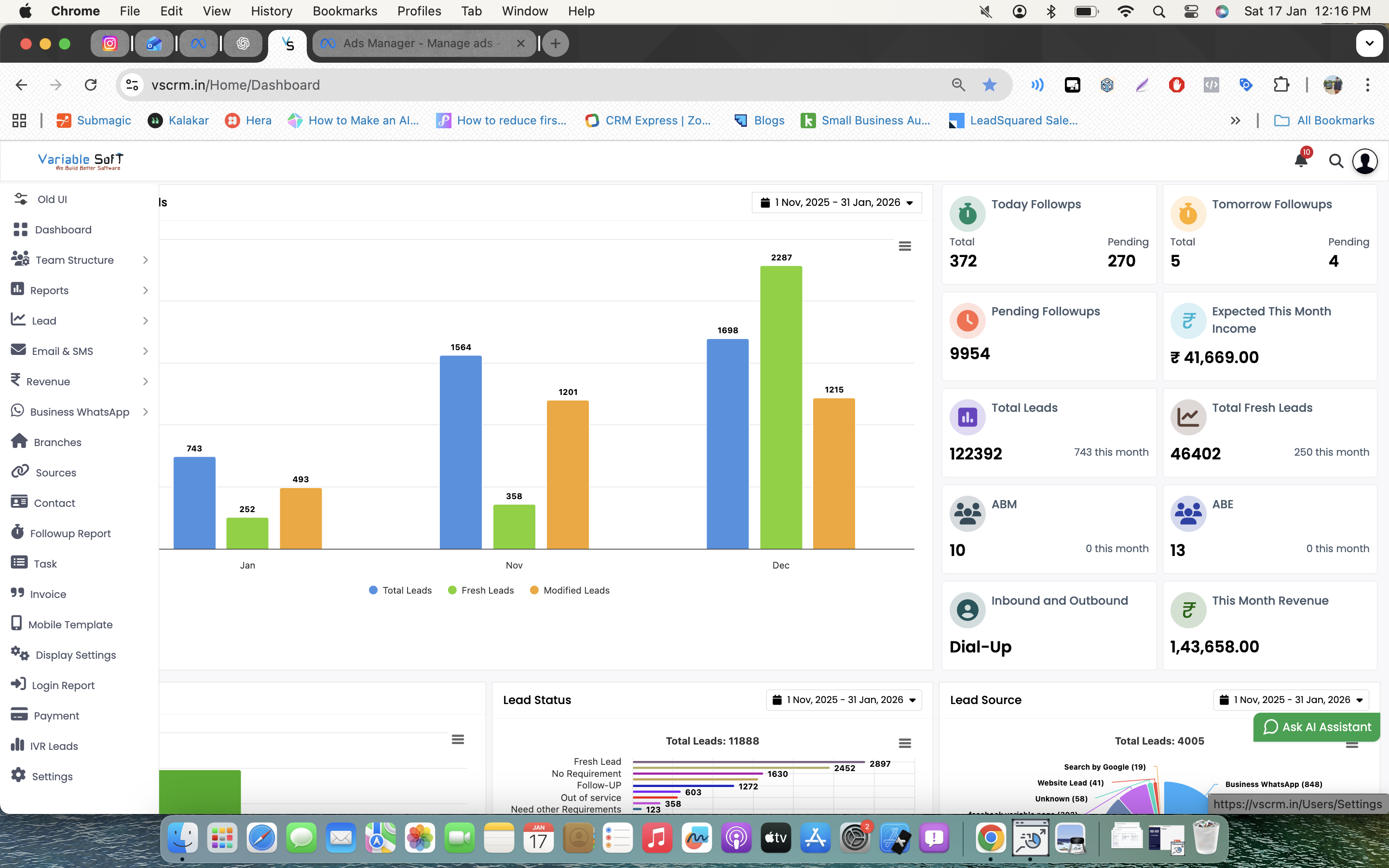
VSCRM
is a cloud-based Customer Relationship Management (CRM) software designed mainly for real estate businesses, sales teams, and organizations that want to manage leads, customers, follow-ups, and sales activities in one platform.
What VSCRM Does
VSCRM helps companies organize and automate their sales process. It allows teams to:
Manage customer leads from different sources
Track sales inquiries and follow-ups
Store customer data securely
Monitor employee sales performance
Automate reminders and task management
Handle call tracking and communication history
Generate sales and performance reports
Improve customer relationship management
Main Features of VSCRM
Lead Management System
Follow-up Reminders
Sales Pipeline Tracking
Call & WhatsApp Integration
Employee Performance Monitoring
Customer Database Management
Reporting & Analytics
Mobile-Friendly Access
Multi-user Access for Teams
Who Can Use VSCRM
VSCRM is useful for:
Real Estate Companies
Sales Teams
Property Dealers & Builders
Small and Medium Businesses
Telecalling Teams
Customer Support Teams
Benefits of Using VSCRM
Increases sales team productivity
Reduces missed follow-ups
Helps convert more leads into customers
Centralizes customer information
Improves communication between teams
Saves time through automation
Simple One-Line Explanation
VSCRM is a smart CRM platform that helps businesses manage leads, customers, follow-ups, and sales operations efficiently from one system.

Appanzee blurs the line between traditional spreadsheets and enterprise software, allowing teams to install or custom-build apps to collect, organize, and analyze data with no coding required.
The Appanzee Store has over 30 free pre-built applications, from general business management to specific domains like video and social media planning. Appanzee also lets you build custom apps to pilot, roll out, and scale new processes, letting the platform grow with your business.
You can customize your data structures and reports as easily as a spreadsheet while maintaining connections between related data entries, giving you a 360-degree view on your data.
Registering for Appanzee is free with a generous usage limit, and highly affordable for teams and small businesses.
Visit appanzee.com to sign up now!

Async Labs is an agency that can help you make your idea happen, improve it and fuel your business. We offer you different services to skyrocket your product from zero to finish line. Some of services that we offer are: software development, web development, mobile development, blockchain development.
With all that said, we are not just a company. We are a young and ambitious team from the capital of Croatia with a passion to create astonishing software and making big ideas happen. The core team was working in top digital agencies in Croatia before we started our agency. We have experience from big corporate enterprises to successful and agile startup companies from which we took the best things and built the best processes for both our clients and our people.

Right on the Line has been supporting IT channel marketers and sales teams for almost 20 years. We devise, create, and design compelling communications and content that keep partners’ teams engaged and, ultimately, increase revenue.
We create just about anything someone working in the IT channel might need, but our biggest passion is video. We love creating informative and engaging video for our customers, and use our expertise to help channel marketers and sales leaders build a coherent video strategy that works.
When our customers need traditional marketing or sales enablement materials, we can turn them around in a flash. And when you’re ready to try something innovative and generate engagement in exciting new ways, we’re full of great ideas to help.

Atmosly, our innovative platform engineering solution, stands as the catalyst for organizations navigating the intricate terrain of digital transformation. Functioning as the linchpin for seamless development and deployment processes, Atmosly embodies a self-service DevOps platform, ushering in a new era of efficiency and empowerment for engineers. By seamlessly integrating cloud services and source control, Atmosly simplifies application deployment across diverse environments, from development and testing to production. Its robust automation capabilities extend to environment provisioning, continuous release management, and ensuring a secure and observable ecosystem. With Atmosly, enterprises can harness the power of multi-cloud support, fostering flexibility and efficiency in leveraging diverse cloud services. As we unveil Atmosly to the world, we invite you to explore a revolutionary approach to platform engineering that redefines tech boundaries, allowing you to design, deploy, and dominate the digital landscape.

Taskfolk is project management software that unifies work planning and execution in one workspace. Teams can create issues, assign ownership, set priorities, and choose from views like boards, backlogs, lists, calendars, sprints, and timelines. Tasks retain attached documentation, files, comments, and workflows for context throughout the project lifecycle. Automation features, including forms, workflows, reminders, and recurring tasks, reduce manual effort. The platform offers visibility into project health with goal tracking, workload monitoring, milestone management, and reporting. Taskfolk integrates with AI agents via MCP, REST API, webhooks, and installable skills, enabling task delegation with human oversight. Teams can customize views and share plans across departments, with support for importing work from Jira, Linear, Trello, and Asana.

Meldstem lets businesses create professional phone greetings in minutes: welcome messages, phone menus (IVR), on-hold announcements, closed messages and voicemail greetings. Type your text, pick a voice, and listen to the complete result for free before you pay. No account needed for the preview.
Files are delivered in the exact audio format your phone system requires (µ-law, a-law, PCM WAV or MP3), with upload instructions for RingCentral, Nextiva, Vonage, 8x8, GoTo Connect, Grasshopper, Ooma, Microsoft Teams and 3CX. Every file includes machine-readable disclosure that the audio was generated with AI, in line with the EU AI Act. Pricing starts at $24 per greeting, with credit packs for teams that need more. On-hold music with a spoken message is also available.

Decision AI for Chiefs of Staff, Strategy, and Leadership Teams - purpose-built for Consumer Businesses.
Bad decisions are the most expensive line item in any organisation. And yet, there is no infrastructure built for the decision itself. In most organisations, context lives in CRMs, decks, dashboards, and people's heads. Strategy teams spend marathons of meetings and analyst sprints stitching it together — reconstructing the same picture, every time. By the time clarity arrives, the window is gone. Signals surface late.
We're building Decision AI - the infrastructure that helps organisations make high-quality decisions, faster. Self-learning, with a Unified Context Layer and Multi-Agent Architecture that gets smarter with every decision your organisation makes.
Over 26,000 + decisions across consumer businesses powered.
We're just getting started.

HockeyPlanner is the complete platform for digital training planning, physical development and team management in ice hockey. Designed by coaches, for coaches.
Coaches draw ice drills and practice plans in a digital rink drawing tool on NHL or international rinks, plan off-ice and physical training across the season, and run standard and custom fitness tests with results tracked per player. AI features include post-game analysis with practice suggestions based on the team's weakest areas, and opponent scouting reports before games. HockeyPlanner also handles the calendar, game call-ups, attendance, line-ups, player surveys and development talks, with a separate app view for players.
HockeyPlanner is web-based, works on computer, tablet and mobile, and is developed in Sweden by Bitjam AB. A free version is available, and HockeyPlanner Pro can be tried free for 14 days.
Notarus is a website feedback and bug reporting tool that attaches the evidence to every report.
Add one script tag and anyone reviewing your site (a client, a stakeholder, a tester) can point at the problem and describe it. The widget captures an annotated screenshot, the browser and device context, the console and network activity, and a session replay of the minutes before the report. Your team gets one ticket it can reproduce without a back-and-forth.
Reports land on a board and can be pushed into Jira, Linear, GitHub Issues, Asana, Trello, ClickUp or monday.com, with status syncing both ways. Slack and Microsoft Teams receive notifications.
The Free plan includes unlimited seats, full session replay, screen recording, every integration, CSV export, AI on each ticket and the MCP server, on up to five projects.