AI-Generated Results
Finding matches…
Massive is a Google Business Profile management platform for local businesses that depend on being found in Google Maps and local search. It connects to your profile and brings the whole local search workflow into one dashboard: audit the profile, fix what is holding rankings back, publish content every week, capture and answer reviews, and track where you actually rank on the map.
Profile auditing and recommendations. Massive audits each location field by field, covering categories, services, description, opening status, special hours, cover photo, logo, photo library, website URL, and linked social profiles. Every gap becomes a specific recommendation you can act on, not just a score.
Map grid rank tracking and competitors. Run geo-grid scans to see your position across a grid of points around your location for the keywords that matter, instead of one averaged number. See which businesses outrank you at each point, with difficulty scoring. Scans run automatically on a schedule, and Massive alerts you when a position declines.
AI content and publishing. Generate and schedule profile posts, offers, service descriptions, and Q&A answers. Massive can pull your existing Instagram and TikTok content and turn it into on-brand profile posts, so weekly posting does not depend on writing something new every time.
Review management. Import and monitor every review, with AI sentiment analysis and periodic email summaries. Generate reply drafts you can approve, rewrite, or send, with approval notifications so nothing publishes unchecked. Collect new reviews through email and WhatsApp requests and printable QR codes.
Media and menu sync. Upload photos and videos once, schedule them, and sync them to Google automatically. Restaurants can manage and sync food menus.
Multi-location management. Bulk import locations from your Google account, manage regular and holiday hours everywhere, export location data, and run the same weekly system at every site with rollup visibility for head office.
Reporting and website. Profile metrics sync into the dashboard with monthly performance reports, so calls, views, and rank movement sit in one place. Every location also gets a website built, published, and hosted by Massive and kept aligned with the profile.
Every plan includes the full dashboard and a dedicated account manager. Pricing is flat per location, with a 14-day free trial, all features included, and no contract.
Not seeing what you're looking for?
Dive deeper into "North" on G2 AI

ProStruct360 is a robust and innovative construction management software designed to streamline operations for contractors and construction professionals. With a focus on efficiency and effectiveness, ProStruct360 offers a comprehensive suite of tools and features tailored to meet the diverse needs of construction projects, regardless of their size or complexity.
Key Features:
User-Friendly Interface: ProStruct360 boasts an intuitive and user-friendly interface, making it accessible to both construction industry veterans and newcomers. The software's layout promotes ease of use and quick adaptation.
Comprehensive Project Management: The software excels in project management, offering features like job creation, estimates, work orders, scheduling, materials management, and document storage. It provides a 360-degree view of every project, ensuring nothing is overlooked.
Efficient Communication: ProStruct360 promotes seamless communication within construction teams through integrated AI-powered email sorting, email templates, and automated task management. It enhances collaboration and ensures everyone is on the same page.
Client and Vendor Management: The platform includes client and vendor portals for improved communication and transparency. Clients can view project updates and pay invoices, while vendors can access work orders and relevant information.
Two-Way Quickbooks Integration: This integration offers seamless data updates, empowering you with the financial insights needed for sound decision-making and budget control in your construction projects. Eliminate the hassle of manual data entry and experience a straightforward, precise financial management solution.
Coaching and Education: ProStruct360 goes beyond software with ProStruct Alliance, offering a business development program that is tailored towards your company's needs. Whether it is personalized coaching, exclusive growth events, customized paperwork, or focused teaching, we are here to help you achieve your goals. Additionally, The Contractor Cuts Podcast provides valuable insights for business growth all for free.
Conclusion:
ProStruct360 is a powerful and adaptable construction management software that addresses the complexities of the construction industry. With its array of features, user-friendly interface, and commitment to user success through coaching and education, it's a valuable tool for contractors and construction professionals looking to enhance their efficiency and grow their businesses. Whether you're just starting as a contractor or part of a larger construction enterprise, ProStruct360 offers the tools and support needed to thrive in this competitive industry.

RoseCore is not a generic business tool adapted for florists. It was built from the ground up for the way flower shops actually operate with perishable inventory, emotionally charged events, seasonal chaos, and no time to manage five different apps.
Here's what's inside:
Florist-Trained AI: Ask RoseCore anything. How to handle a difficult bride. What to charge for a sympathy piece. How to write a Mother's Day email that sounds like you. It knows the floral industry because it was trained on it, not the entire internet.
Connected AI Workflow: Describe an arrangement or event in chat. RoseCore automatically creates the recipe, the project, and the calendar event in one click. No copy-pasting. No re-entering. One conversation that runs your whole business.
Proposal Builder + Stripe Payments — Write a proposal in the AI chat and send it to a client-ready proposal in under 5 minutes. Clients can sign and pay directly from the proposal. No chasing invoices.
Profit Analyzer: Enter your stems, labor, delivery, and overhead.
RoseCore tells you exactly what you're making and what you should be charging. Most florists find they've been undercharging on their most popular arrangements for years. One click sends profitable arrangements directly to your Recipe page.
Recipe Management: Store every design with photos, stem counts, costs, and instructions. Export a full version with margins for you and a clean version for your designers. Less than 2 minutes from start to print.
Project Board:Visual operations board showing today, this week, this quarter, and your whole year. Shareable with your team so everyone stays on the same page.
Google Calendar Sync: Everything added in RoseCore syncs automatically. Nothing lives in two places.
Training Library + Community: Video tutorials, swipe files, marketing guides, and a growing community of florists scaling together.
Pricing:
Essential: $45/month
Best For:
Retail florists, wedding and event florists, studio designers, flower shop owners with 1–20 employees who want to replace their disconnected tool stack with one system built for their business.
What Makes RoseCore Different:
RoseCore is the only platform where the AI connects every part of your business together. You don't manage RoseCore. It runs alongside you.

Dimora AI is an AI operations platform for vacation rental managers. One PMS integration connects a multilingual voice receptionist, automated inbox, cleaning and maintenance coordination, revenue upsells, and payment auditing. It handles the work that keeps you up at night so you can grow your portfolio without growing your team.
Voice receptionist
Picks up guest calls around the clock in multiple languages. Lock codes, check-in details, parking, emergencies. It remembers past interactions,
so returning guests never explain themselves twice. Every call is summarized and logged in your PMS inbox.
Inbox AI
Writes draft replies for every guest message across every channel, right inside your PMS. Ready in under 10 seconds. It picks up your tone from
the edits you make and gets better over time. Pre-booking questions, in-stay issues, checkout follow-ups.
Cleaning scheduling
A reservation gets created, a cleaning job gets created with it. Cleaners are assigned, progress is tracked, same-day flips are flagged. You see
which properties are ready without checking in with anyone.
Maintenance coordination
Work orders and preventive schedules in one place. Something breaks, a ticket is created and assigned. Recurring inspections run on their own.
Contractors accept jobs, upload completion photos, and message you through a shared portal.
Contractor portal
Cleaners and maintenance staff get their own view. Job notifications, property details, completion photos, direct messaging with managers.
Everything tied to the job. Nothing lost in a group chat.
Revenue engine
Scans your calendar for early check-in, late checkout, and gap night openings. Sends offers to guests automatically. Production data across 200+
properties shows an 18% acceptance rate. For most managers, that upsell revenue covers a real chunk of the platform cost.
Payment audit
Watches reservations for outstanding balances and missed charges. Follows up automatically. Flags problems before they become write-offs.
How it all connects
These are not separate tools bolted together. A guest call creates context for a maintenance ticket. A checkout triggers a cleaning job. A gap in
the calendar triggers an upsell offer. The pieces talk to each other, and the AI layer gets sharper from every interaction. One integration. Six
operations. No additional staff.

NueViews is an all-in-one CRM and business management platform built exclusively for wedding and event planning professionals. Designed to replace the chaos of spreadsheets, scattered emails, and disconnected tools, NueViews centralizes every aspect of your planning business into one powerful, intuitive workspace.
Client & Lead Management: Capture and nurture leads from first inquiry through signed contract. Manage your entire client roster, track communication history, and monitor each couple's planning journey from a centralized dashboard.
Contract & Billing: Create and send professional service contracts with built-in e-signature support. Generate invoices, track deposits, set payment schedules, and sync transactions directly with QuickBooks Online. Accept payments securely through Stripe.
Timeline & Vendor Coordination: Build detailed wedding day timelines with drag-and-drop scheduling. Share filtered timelines with vendors so each party sees only the activities relevant to them. Collect vendor feedback and manage time adjustment requests in real time.
Seating & Floor Planning: Design seating charts with smart auto-assignment and guest allergy tracking. Visualize your venue in 2D or 3D, upload custom floor plans, and share filtered seating data with caterers, venues, florists, and rental companies.
Budget Planning: Create multiple budget scenarios per client, compare vendor quotes side by side, and track spending by category. Share live budget reports with clients through their personalized portal.
Client Portal: Every client gets a branded portal where they can view proposals, sign contracts, track payments, manage their budget, and stay connected with their planner throughout the entire planning journey.
Financial Reporting: Monitor revenue, pending payments, business expenses, and net profit across your entire client base. Export reports by client or category and sync directly with QuickBooks for seamless accounting.
Task & Playbook Management: Stay organized with task tracking tied to specific clients and milestones. Use planning playbooks to standardize your workflow and ensure nothing falls through the cracks.
NueViews is built for solo coordinators and full-service planning firms alike. Plans start free with no setup fees and no learning curve, just a smarter way to run your planning business."

SUBR is job software for UK contractors who deliver work through subcontractors or their own teams. Its AI does the reading and the sorting, and your office does the checking.
Upload the quote you sent your client, as a PDF, a scan or a photo. SUBR’s AI reads the client, the site address, the dates, each priced line and the wording. It checks whether the priced lines add up to the total, says how sure it is and gives the reason in plain words. It lists what it could not settle, such as a figure that reads two ways or an area with no size. When the quote does not spell them out, it works out the preparation, access and scaffolding the job needs.
The AI proposes. Your office checks the read against the document and ticks two boxes: “I have read this against the document” and “Approved for scope”. Nothing moves on without them. If the priced lines do not add up to the sale price, SUBR asks for a written reason before the quote goes further.
From the one checked quote, SUBR builds three sets of paperwork: a materials request for each supplier, one scope per trade for subcontractors, and a scope of works for your project manager. A subcontractor’s scope carries no job costs, no margin and no client price. A supplier’s request carries none of your prices.
Your office prices each trade scope and offers it to one subcontractor or to several. Each offer has its own link, which your office sends by email, text or WhatsApp. The subcontractor opens it on their phone with no account and no password, and can accept, decline, ask a question or ask for a change. One acceptance opens one job and closes the other offers on that scope.
A job cannot be marked mobilised until a 23-item pre-start check is ticked, from RAMS signed by the crew to the subcontractor’s compliance in date. The site manager then logs each day, and every job from the quote sits on one project through to close-out.
Each person sees only their part. Owner, admin and operations seats see the money. A surveyor checks the quote and cuts scopes but sees no money. A site manager runs the pre-start check and never sees a price. Every correction your office makes teaches the AI how your firm writes quotes, and that lesson is kept for your firm alone.

ISO-STANDARD.app is an integrated compliance, risk and trust management
platform for UK small and mid-sized businesses and the consultancies that
serve them. It covers ISO/IEC 27001, ISO 9001, ISO/IEC 20000-1 and
ISO/IEC 42001 in one system, with supporting coverage for SOC 2, GDPR,
Cyber Essentials and PCI DSS.
Most SMEs don't buy compliance software because they want certification.
They buy it because a deal is stalled behind a security questionnaire, an
audit is coming, or an enterprise customer has asked how the company
governs AI. ISO-STANDARD.app is built around those outcomes rather than
around framework checklists.
WHAT IT DOES
Risk and controls: a single 5x5 risk register on one ISO 31000
methodology, an asset register, and a controls library with Statement of
Applicability. Every risk links to a control, an owner and evidence.
Evidence and policies: scheduled evidence collection from Microsoft 365,
Entra, Google Workspace, AWS, GitHub, Slack and Okta. Policy editor with
attestations and acknowledgement tracking.
Audit lifecycle: internal audit programmes (clause 9.2), corrective
actions and CAPA (clause 10.1), and management reviews (clause 9.3) —
the clauses most tools leave to spreadsheets.
Buyer-facing trust: a live Trust Center and a security questionnaire
answer library, so procurement can self-serve instead of emailing you.
Third-party risk: vendor assessments, supplier due diligence and
onboarding reviews.
Integrations: Jira, ServiceNow, Freshservice, HaloITSM, TOPdesk, BMC
Helix and ManageEngine, so remediation lands in the tools teams already
use rather than in a separate compliance queue.
FOR CONSULTANTS AND MSPs
Multiple client workspaces run from a single tenant, with per-workspace
branding, roles and seat management — designed for practitioners managing
several SME compliance programmes at once.
ON AI
Drafting is AI-assisted and privacy-respecting: the system proposes,
a named human approves, and every change is recorded in an audit log.
Nothing is published to an auditor without sign-off.
PRICING
Transparent pricing from the off. Starter £79/month (risk register, up to 5 users).
Growth £199/month (internal audits, corrective actions, up to 25 users).
Business £399/month (unlimited users, management reviews, integrations).
No per-framework surcharge and no mandatory implementation fee.
WHO BUILT IT
Founded by Michael McCarroll, who spent 25 years in senior IT governance
and technology leadership before building the tool he wanted as a
practitioner. Based in Durham, UK, with UK support.

Fair, AI-assisted 360° performance reviews and bonus calculation for European SMEs, with no monthly fees.
Quarma360 is a 360° performance review platform built for growing European SMEs with 10–300 employees. It suits companies that have outgrown Excel but don't need, or can't justify, enterprise HR software.
Instead of a single manager deciding an employee's rating, everyone involved evaluates each other on defined competencies. That includes managers, direct reports, peers and the employee themselves. Teams can pick from a competency bank built by HR professionals or create their own soft-skill and hard-skill frameworks.
The built-in Themis AI engine supports the whole process:
- Setup: maps your organizational network, generates competencies and translates content.
- AI telemetry and Trust Score: detect suspicious rating behavior as it happens, such as rushed submissions, uniform scores or coordinated reviews. Those evaluations then count for less, so results are more accurate and harder to game.
- AI assistant: helps with admin work during and after each assessment.
When an assessment closes, Quarma360 instantly produces reports by competency and rater group, with network diagrams and analytics. An optional 15-level bonus/malus system turns results into bonus calculations automatically, so employees can see exactly how their ratings affect their pay. Results can be linked to meetings, files, tasks and development plans so feedback turns into action.
Key features
- Anonymous 360° and multi-perspective evaluations (self, peer, manager, direct report)
- AI-assisted setup, competency generation and one-click AI translation for multi-country teams
- Trust Score and AI telemetry to detect and down-weight suspicious ratings
- Optional automatic 15-level bonus/malus calculation
- Instant reports and analytics, with full access to historical data between assessments
- Native Android and iOS apps with push notifications and biometric login
- Sign-in with Microsoft, Google or Apple; API access for exporting data
- Sensitive data hosted in the EU, with employer-controlled privacy settings
Quarma360 uses pay-per-assessment pricing. There are no subscriptions, packages, tiers or user limits. Companies pay per employee for each assessment round, and all features are included. Using the platform and viewing results between rounds costs nothing. Setup typically takes 2–3 hours, and no IT investment is needed.
Quarma360 is built by New Wave Business (NW Business Ltd.), based in Hungary.
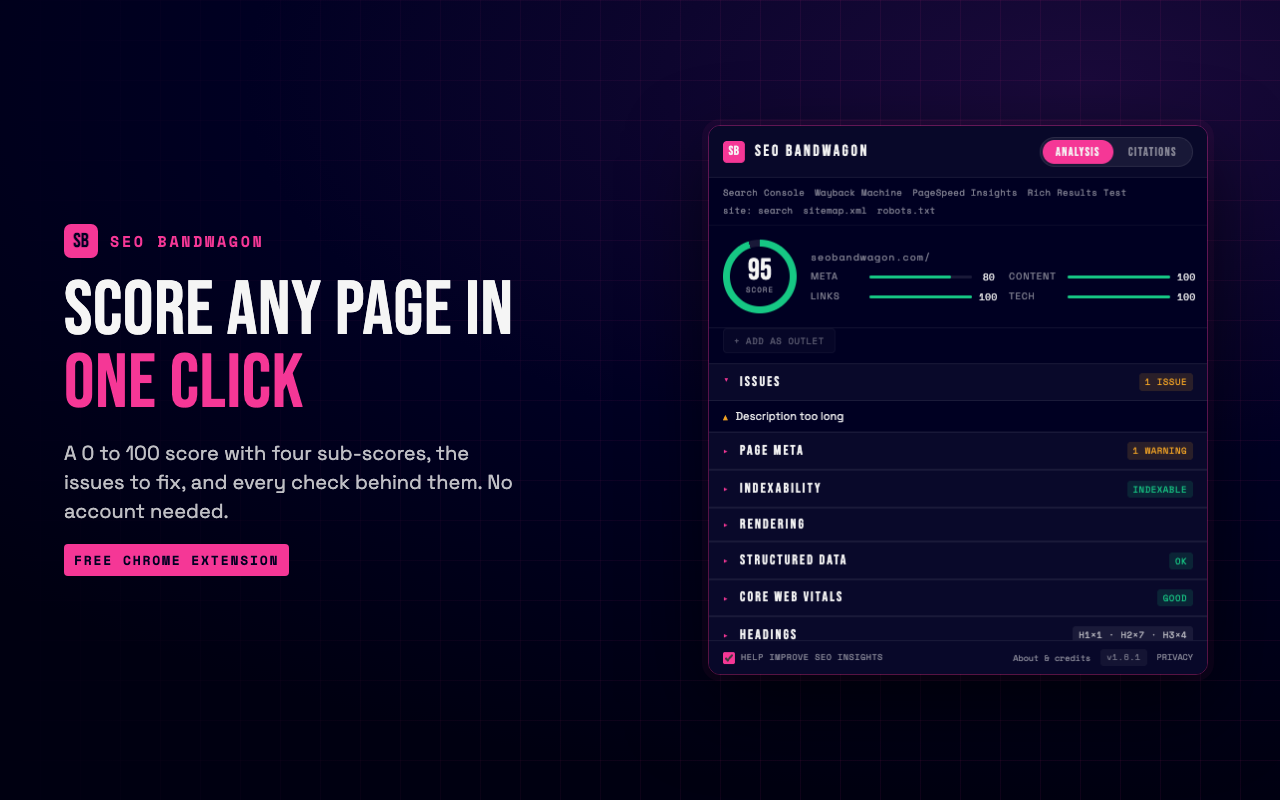
SEO Bandwagon SEO Chrome Extension reviews the on-page SEO of the site you have open, right in
your browser. One click gives you the findings, and no account is needed.
ON-PAGE ANALYSIS
A score from 0 to 100 with a letter grade, four sub-scores and a short list
of fixes. You also see a preview of how the listing could look on Google,
loading and layout speed as your browser measured it, the heading outline,
links and images, and the technology behind the site.
LINK CHECK
On request, tests every link, groups them by status code and highlights the
broken ones where they sit.
INDEXABILITY
Shows the redirects that led to the URL and whether search engines may index
it, with a plain yes or no. You can trace another address without leaving.
HREFLANG
Finds mistakes in language and region tags and, when you ask, confirms that
each alternate version links back.
RENDERING
Compares the HTML the server sent with what your browser displayed, so you
can spot what scripts changed. You can also reload the tab the way a crawler
requests it.
STRUCTURED DATA
Reads the structured data on the page and tells you what is missing before
Google can use it. A local business without a phone number, or a product
without an offer, is flagged with the exact field to add, and complete items
show the rich result they qualify for.
SEARCH RESULTS OVERLAY
Adds a small stats bar under each organic listing on Google and a toolbar to
copy or export what you see. Exports stay on your computer, and only domain
names are looked up, never your query.
SEARCH CONSOLE HELPERS
In a performance report, opens any query on Google in one click and, when
you compare two date ranges, puts the percent change beside each number.
PANELS AND APPEARANCE
A side panel keeps the findings open while you work. Choose Night, Day or
Auto; two matching Chrome themes are available separately.
EXPORTS AND TOOLS
Every section exports a CSV you save yourself, and a right-click menu opens
the current URL in common testing and archive tools.
OPTIONAL ACCOUNT
Connect a free SEO Bandwagon account to keep your analyses, review local
business listings and manage outreach. While reviewing a listing you can save
a screenshot of the whole page as proof, kept on your computer. Nothing is sent until you connect and
turn on sending in Settings.
```
**Privacy policy**: https://seobandwagon.com/privacy

Gamma Wallet is a customer loyalty, retention and engagement platform for small and medium-sized businesses. It helps turn one-time customers into regulars through digital rewards, personalized incentives, memberships, CRM tools and community-based loyalty.
Unlike programs built on points or discount cards, Gamma gives businesses many ways to reward customers: instant rewards, incremental rewards, tiered rewards and discounts, memberships, direct credits, and Community Purchase and Community Deposit pools. All rewards are issued as credits customers can actually use. No special hardware is needed: customers identify themselves with the QR code in their Gamma Wallet, one app for every participating shop.
Gamma CRM
Every Gamma Business account includes a web CRM. The dashboard tracks purchases, rewards given, direct credits issued and redemptions, as running totals and week by week. Every transaction is named and typed, giving a complete customer history. Reward, membership and discount levels, locations, staff logins, reviews and customer groups are all managed in one place, and changes apply at the counter instantly. Businesses can message their customers in-app, by push notification or by email.
Gamma Community
Gamma Community is a free web platform for companies, clubs, unions and associations. An organization registers, is approved, and agrees terms directly with local retailers, who set a reward percentage for its members. Members receive their benefits automatically in Gamma Wallet, with nothing to print or claim. Organizations can distribute credit to members evenly or targeted, track usage per retailer, message members and add co-managers. Retailers gain a steady stream of committed new customers.
Community Loyalty
Community Loyalty lets businesses engage groups of customers around shared rewards and purchasing goals. Rewards grow as more customers take part, driving repeat visits and demand without discounting.
Key capabilities:
- Digital loyalty, rewards and credits
- Retention and repeat-purchase campaigns
- Built-in CRM with full transaction history and weekly analytics
- Customer groups and targeted engagement
- Memberships, VIP programs and tiered levels
- Community Purchase and Community Deposit pools
- Community platform for organizations and their members
- In-app, push and email communication
- Multi-location and staff management
- Customer reviews
- Business and customer apps for iOS and Android
Gamma is built for retailers, cafés, restaurants, bakeries, gyms, salons, boutiques and other customer-facing businesses, and for organizations that want to give their members everyday benefits at local shops.
Gamma's approach is simple: help businesses build more valuable customer relationships while giving customers rewards they can actually use.

RouteWrk is workflow automation for work that arrives by email. It turns the requests in your inbox into tickets, then runs each one through a workflow you draw once.
How it works
Connect your Gmail and new requests land in one routing inbox. Route one to a workspace and it becomes a ticket with an owner and a status. From there the workflow does the steps: it emails the vendor from your own address, waits for the reply in the same thread, sends a reminder if nobody answers, and escalates when the wait runs out. The customer sees you, not a noreply address, and the thread sits in your Sent folder.
It stops at a person only where a decision is needed. An approval step parks the ticket until a named person approves or rejects, and each answer takes its own path. A checklist holds the ticket until every item is ticked. A parked ticket always names what it is waiting for.
Key features
Routing inbox: email from your connected Gmail becomes a ticket in a click.
Workflow builder: branches, waits, loops, approvals and checklists on one canvas.
Await reply with a timeout: the job stays open until the vendor answers, and silence escalates instead of being forgotten.
Kanban board and My Work: every ticket waiting on a person, grouped by what it is waiting for, across every workspace.
Cross-workflow handoff: a closed work order opens the invoice in Accounts Payable, with the fields carried across.
Assignment at intake: an owner on every ticket from the moment it exists, by rotation, by fewest open tickets, or a named person.
Full history: every step, email, reply and decision, on the ticket.
Templates: work orders, invoice processing, IT helpdesk, employee onboarding, field service, sales pipeline and real estate acquisitions. Each is a starting point you change to fit; nothing in RouteWrk is tied to one industry.
Who it is for
The owner of a property portfolio or service business whose work orders, quotes and invoices arrive by email. The person in a department who ended up owning a process, such as approvals, onboarding or vendor requests, and runs it from a mailbox and reminders set by hand. Neither needs IT or an admin to set it up.
Where it is not the fit
RouteWrk works with email and tickets created by hand. It has no live chat, phone channel or public help center, and it connects Gmail rather than a marketplace of apps.
Pricing
The free plan needs no credit card. It covers one person, three workspaces and 25 active tickets per workspace. RouteWrk launched in October 2026.

Smart Templates for Dynamics 365 is a document generation solution for Microsoft Dynamics 365 Customer Engagement (CE) and other environments with Dataverse online. It is used to design templates for quotes, invoices, packing lists, production orders and any other document, and to create PDF documents and e-invoices from Dynamics 365 records. It is an alternative to the built-in Word templates of Dynamics 365, and an existing Word template can be rebuilt with AI as a starting point.
The designer runs as an app inside Dynamics 365, with nothing to install on workstations and no second sign-in. The design surface shows the page in the same font and with the same dimensions as in print, and a full preview shows the document as a real PDF with the data of a sample record. Data tables run across many pages with a repeating header row and can contain nested tables. If-then conditions and rules that filter, sort and summarize data are built from blocks, without programming. Numbers, currencies and dates follow the template language, and barcodes, QR codes, GiroCodes, images from records and custom fonts are supported.
The same template produces e-invoices: ZUGFeRD and Factur-X as a PDF with an embedded XML file, and XRechnung as a pure XML file, for invoices, partial and final invoices, cancellation invoices and credit notes. Mandatory fields and amounts are checked before the document is created.
Users create documents with a button on the record, in a list or in a list within a form. The PDF opens in the browser, goes into an email draft, or is sent directly to a recipient from the record. A Power Automate flow can continue from there, and developers can create documents from plugins, JavaScript, Power Automate or the Web API.
Templates can also be changed with AI. The Smart Templates Assistant works in Microsoft 365 Copilot (a Copilot license or Copilot credits are required), and the AI package lets any other AI chat edit a template or rebuild an existing Word template. Changes are only kept when the user saves them in the designer.
Smart Templates is installed as a solution in the customer's own environment. Designer, PDF generation (as a plugin), templates, images and fonts stay there, and there is no external PDF server or document service. Only the license check contacts the vendor, with technical identifiers and without document contents. On-premises installations, Business Central and Finance and Operations are not supported.
Pricing is per Azure tenant and covers all environments in it, with unlimited documents, users and templates. The designer is available in German and English; the user manual is in German. A 30-day trial with all features is available.

SecValley is a security evidence platform for Microsoft 365, Entra ID, Azure, AWS, Google Cloud, Google Workspace and GitHub. It runs agentless, read-only scans of each tenant and evaluates the configuration against the CIS benchmark pinned to its published version, or against SecValley control sets where no benchmark exists. 1000+ controls across seven surfaces.
Every check names what it read. A finding arrives with severity, the setting that produced it, and step-by-step remediation, together with a scan log that records what was read and what was not. A check SecValley could not read is reported as unanswered, never as a pass.
Three outputs per scan: an Excel action matrix sorted by severity and grouped by workload, a PDF technical report, and the KAM executive report. KAM is the AI vCISO: it drafts a board-grade summary for leadership from the record, not from a template. Every statement cites the control it came from, the unanswered checks are named rather than rounded away, and it is generated in minutes after every scan.
Threat Intel: controls are bound to the MITRE ATT&CK techniques they mitigate or detect. Threat Intel reads your last scan and says which known threat groups still have an open door, with attack paths visualized.
Three products share the same scan records:
Security Posture: the cloud security scanner for the seven platforms above, scheduled or on demand, every record kept, trend views that compare records.
Compliance (early access): SOC 2 evidence built from sealed scan records. Machine-observed and person-attested evidence are shown apart. Only your auditor can declare you compliant.
Insurance Posture: upload the cyber insurance application you signed, and each answer is checked against your Microsoft 365, Entra ID, Azure or AWS tenant. The goal is accuracy, not approvability.
The cost of doing this by hand: a yearly manual assessment cycle (cloud security engineer, compliance analyst, vCISO retainer, tools, training) runs around $375,000 a year. SecValley is the scanner on a schedule with the records kept, at a fraction of the cost. No hiring, no training, no turnover.
Who it is for: IT and security teams, MSPs and vCISOs who need to show what their cloud configuration actually looks like, with a record of how it was read. MSPs manage every tenant from one console with per-client scoring, scheduled scans and KAM reports across the whole book of business.
The connection is read-only and agentless. Nothing is installed in the tenant, and access can be revoked at any time.

couteau.io is a restaurant reservation and table management software built in Paris by restaurant owners, for restaurant owners. It is made for independent restaurants, bistros, brasseries and wine bars in France. The team interface is in French; the guest booking page speaks French, English, Spanish, Italian, German, Dutch and Portuguese.
It started with a painful sum. At Barbo, a 40-seat bistro in Paris, the previous booking software cost €169 a month before VAT: the margin of about 50 covers, every month, just for a subscription. So Maxime, Barbo's co-founder, built his own tool. couteau.io now runs every service at Barbo.
What couteau.io does:
• Online bookings: a booking page in the restaurant's name, a widget for its website, a QR code, and a link for its Google Business Profile and Instagram bio. Tables are assigned automatically according to the restaurant's own rules; large parties send a group request instead.
• Live floor plan: drag a booking onto a table, combine up to three adjacent tables, seat a walk-in in one move.
• Automatic waitlist: when a table frees up, it is offered to the first guest on the list, in order of arrival, without promising it twice.
• Guest book: visit history, allergies, special occasions. Import an existing guest list from a CSV file without creating duplicates, and export it at any time.
• Guest emails: confirmations, reminders and cancellations go out automatically with the restaurant's name, logo and colour, with a link for guests to change or cancel their booking online.
• Analytics: covers, no-shows, booking sources and walk-ins, by service and by week.
• Day-to-day tools: a printable service sheet, team accounts, several venues under one login, and an app that installs on the home screen of a tablet or phone, with nothing to download from an app store.
Two optional add-ons: the Prize Wheel, a QR-code game with prizes and single-use codes that gives guests a reason to come back, and Review Requests, an email sent after the visit that invites guests to review the restaurant on Google.
Pricing is simple: €29 a month per venue, VAT included, plus €5 a month per add-on. No per-cover fees, no commitment, cancel at any time. The free trial includes every add-on and needs no credit card. Data is hosted in France.
Cut costs, not portions.

Calendo Health is scheduling and practice management software built for children's therapy centres in Greece: speech therapy, occupational therapy, child psychology, special education and physiotherapy. It is designed for a children's therapy centre rather than as a generic calendar, so the referral turns into sessions and attendance stays with the same child.
Scheduling and sessions. Reception works from one day calendar with recurring sessions and each therapist's working hours. Attendance is marked on the appointment, a waiting list fills free slots, and families get a heads-up before each session. Appointments can sync to Apple and Outlook calendars (Google Calendar is coming soon), and video sessions can carry a Zoom, Google Meet or Jitsi link.
EOPYY referrals. Calendo Health reads the EOPYY referral PDF and creates the sessions automatically, tracks the monthly quota and produces the official EOPYY certificate.
The child's record. Each child has one record with session notes, goals and progress reports that export as PDF in Greek or English. Files are kept on the child's record and stored in an EU data centre. The parental consent record can be signed by parents through a link and is saved as a signed PDF.
Parents and family. A parent app gives families home practice material, messages and announcements from the centre. Reminders go out by SMS (included, up to 100 per month), email and push. Document templates and Google review requests are built in.
Billing. Charges, receipts, session packages and monthly plans sit next to the sessions. Card payment links work through Viva, and receipts can be issued to myDATA through Wrapp (the Wrapp subscription is paid separately).
Team and administration. Roles separate reception, therapists and owners. Calendo Health also includes therapist pay statements, an owner dashboard, support for multiple branches, two-step sign-in and a full change history. Existing data can be imported from Excel or CSV and exported as ZIP, Excel or CSV at any time.
Platforms. Calendo Health runs in any web browser with nothing to install and includes native apps for iPhone (App Store) and Android, for the team and for parents.
Pricing is one flat subscription per centre with no per-therapist charge: €80 per month including VAT for a centre, or €40 per month for a single therapist (Solo). The free trial is 14 days and needs no credit card. Setup and data migration are free.

Raven is a communication intelligence platform from Germany. It records and transcribes conversations wherever they take place, in Raven's own video rooms, in Google Meet and Microsoft Teams, on the phone and in the team chat, and keeps them in one searchable memory. From that memory come minutes, answers and completed tasks. The platform is hosted in the EU.
Raven Meet provides video rooms with permanent addresses and a waiting room; guests join through a link in the browser, without an account or installation. Raven records one audio track per participant, so the minutes state who said what instead of guessing. Minutes follow a template set per person or team, and two rules cannot be overridden by any template: correct speaker attribution, and nothing invented. When automatic recording is switched on, every participant confirms before joining.
RavenBot joins Google Meet and Microsoft Teams calls, announces itself in the meeting chat and leaves as soon as someone objects. Its recordings go into the same memory as every other conversation.
Users ask questions across all recorded meetings and calls by naming a person and a topic; the answers cite the conversation and the timestamp they draw on. The Raven Agent carries out what was decided in the applications a company already uses, through a catalog of more than 760 applications, and asks for confirmation before it changes anything.
Booking pages show real availability from Google, Microsoft 365, iCloud or any CalDAV calendar, and Raven reminds guests 24 hours and one hour before the appointment. Raven Chat is an end-to-end encrypted team chat based on MLS. Raven installs as an app on phone and desktop, with push notifications. Roles, permissions, shared folders for external parties and an audit log cover teams and whole organisations.
Raven Meet Souverän is built for professions bound by confidentiality, such as law firms, medical practices, tax advisers, works councils and HR departments. Transcription, minutes and the agent run in an attested enclave that no operator, Raven and the AI operator included, can look into; the attestation can be downloaded. If the enclave cannot prove its state, Raven does not process the conversation.
Instead of claiming the best speech recognition, Raven measures it: German transcription runs on Raven's own hardware, the benchmark is public, and the measuring tool is open source.
Raven Phone (landline telephony with a consent announcement before every recording), a CRM lead book and time tracking are available on request.

New Build Tools is construction scheduling and slip-tracking software for residential home builders. We built it around the question a builder asks every day: is this house going to finish on time, and if not, what is that costing us?
Lay out the tasks for a house, from dig and footings through framing, rough-ins, drywall and finishes, and link each one to the tasks it waits on. Links can be finish to start, start to start, finish to finish or start to finish, each with an optional lag in days. When a task moves, every task behind it moves too, so the forecast finish date stays current.
Dates run on your own work calendar: your working week, holidays that repeat each year (fixed dates, or rules such as the fourth Thursday in November) and one-time shutdowns. Every date the app produces lands on a working day.
When a trade gives you a date, confirm it. The app records that finish date as the trade's commitment and measures slip against it, so moving a date out and back again does not pile up as slip, and a delay that came from upstream is not counted against that trade. Reconfirm when the trade gives you a new date.
Every job compares its forecast finish with a goal you set, or with a baseline you saved, and shows green, yellow or red. Turn on cost tracking and enter what it costs to carry a house for a day, as one figure or as cost codes such as loan interest, insurance, taxes and utilities, and each job shows its slip in dollars. A delay log records why a job slipped, which task it hit, whether it was on the critical path, and what it cost.
Each job can be seen as a list, a calendar or a Gantt chart, alongside its delays. Save a schedule as a template and start the next house from it. A portfolio dashboard groups every job by subdivision with its status, so the ones slipping stand out. Tasks and delays export as CSV files. Invite your team, with Owner, Admin and Member roles.
New Build Tools runs in a web browser on a computer or a phone, with nothing to install. Every plan includes every feature; plans differ only by how many active jobs you run at once, and paid plans have no per-user pricing. There is a free plan for one active job, and every new company gets a 30-day trial of the Builder plan with no credit card.

Roost is operations software for relief veterinarians: the operating system for your relief work.
Relief work comes with a second job nobody pays for. Shifts arrive by text, email and marketplace apps. The calendar lives in three places. There's an invoice template, a mileage app that doesn't know which shift the miles belong to, and a pile of checks to match by hand at tax time.
Every shift in one place. Shifts you book directly with practices and shifts you pick up on marketplace apps sit side by side on one calendar, with one invoice trail and one picture of what you've earned. Marketplace shifts are added by hand; Roost doesn't connect to the marketplace apps. Your Roost calendar is also a feed you can subscribe to in Google, Outlook or Apple Calendar.
A free portal for your practices. Each practice you work with requests shifts from only the availability you choose to show it and sees its upcoming shifts and invoices. If you use Roost Payments, it can pay online too. Practices pay nothing to schedule with you.
Invoices that collect themselves. Invoices build from the shifts you worked, and email reminders go out at the intervals you choose. Roost Payments is optional: practices pay by bank transfer or card, and each payment is matched to its invoice and shift automatically. The payment is directly between you and the practice. You're the merchant of record, so a disputed or returned payment is yours too.
Mileage, expenses and your numbers. Mileage is logged against every shift and expenses are captured as they happen. One view shows revenue, cash collected, what's outstanding and how overdue, and confirmed income still to come. Roost produces tax-ready records for your accountant. It doesn't give tax advice.
Your data is yours. Export your practices, rates, shifts and invoices any time, on every plan. No non-competes and no lock-in on the relationships you built.
Pricing. Perch is free until your relief work earns $25K a year: a free plan, not a trial. Nest is $49 a month or $499 a year and adds custom rates, policies and availability for each practice. Every plan works with as many practices as you do and comes with the offer of a setup session. Roost Payments is optional and costs 1% of the payment on Perch or 0.5% on Nest, plus Stripe's processing fee.

Marcelo is an AI marketing employee for small businesses and the agencies that look after them. Instead of handing you another dashboard of problems, it finds the next marketing job and does it.
It starts with Brand DNA: the business's name, services, areas, people and photos, each confirmed by a person. Everything Marcelo writes is built from those confirmed facts, and a fact nobody confirmed is not stated.
Marketing Scan then checks the business's marketing and scores it by category (site speed, technical SEO, content and pages, AI search (GEO), social media, conversion and analytics) with each finding in plain words and a reason when something could not be measured.
From there, Marcelo's experts do the work. Marcelo Fix repairs what the scan found directly on the website (titles, descriptions, structured data, image text, redirects and more) through Marcelo's own WordPress plugin, published on wordpress.org. Marcelo Write writes the pages a business is missing (service pages, city pages and articles) in the site's own design and language, with pictures drawn for each page. Marcelo Daily is a marketing calendar: posts for Instagram, Facebook and the Google Business Profile, articles and follow-up scans, prepared ahead and published on schedule. Marcelo Media makes pictures and short videos for social posts. AI Search Lab asks AI assistants such as ChatGPT, Gemini and Perplexity the questions customers ask, and shows whether they name the business.
You choose how independent Marcelo is. In Assist, nothing is published until a person approves it, and approving publishes in one press. In Autopilot, Marcelo publishes on its own and every action stays visible on the activity screen, where it can be reversed. Money decisions always need a real person's press.
Marcelo connects to the accounts a business already has: its website (WordPress and other popular builders), Google Search Console, Google Analytics, Google Business Profile, Instagram and Facebook. Google data is used only for the business's own reports, never sold and never used to train AI models.
Agencies run several businesses from one account, each with its own website, accounts, Credits and results, and add teammates who sign in with their own email.
Plans are per business: Starter, Growth and Scale, each with a monthly allowance of Marcelo Credits, and a three-day free trial.

Tapwright is quoting software built for the way small contractors actually work: at the job, on a phone, with the customer standing right there.
Most solo operators and small crews still lose their evenings to quoting. They visit a job during the day, go home, and rebuild the estimate at night in a spreadsheet, a notes app, or a generic invoice tool — hours after the customer was ready to say yes. Tapwright removes that second shift.
You set up your pricing book once: your labour rates, materials, and markup. Your costs and margins stay private — only the customer-facing prices appear on the quote. Trade templates in the library give you a starting structure for common jobs, which you adjust to your own numbers. Then, on site, you build the quote from that book in minutes instead of retyping prices from memory.
When the quote is ready, you email your customer a link. There is nothing for them to install and no account for them to create. They open the link, see a clean branded quote, download the branded PDF if they want a copy, and approve it right there. Job-site photos can be attached to the quote, labelled Before / After, so the scope is visible rather than argued about later.
Payment is part of the quote, not a separate chase afterwards. Once a customer approves, they can pay a deposit or the full amount by card through Stripe, directly from the quote. You can set payment terms as full payment, a fixed deposit amount, or a percentage deposit, and the quote shows what has been paid and what balance remains.
Tapwright also handles the follow-through that usually falls through the cracks. Automated follow-up emails can be turned on by the contractor, quote analytics show your close rate and a Sent / Viewed / Approved funnel so you can see where quotes stall, and after a verified payment the customer can be asked for a review — captured inside Tapwright instead of scattered across inboxes.
Tapwright is made for flooring, plumbing, electrical, roofing, HVAC, and home-services contractors, especially solo operators and crews of up to 25. It is deliberately focused on quoting speed and payment capture. It is not a dispatch system, a scheduler, or a full project-management suite — it does the quote, the approval, and the payment, and it does them at the job.
All plans include a 14-day free trial. Solo is $29/month for one seat with unlimited estimates. Crew is $79/month for up to five seats. Shop is $199/month for up to 25 seats.