AI-Generated Results
Finding matches…
inPixio Photo Studio is a comprehensive photo editing software designed to make professional-quality photo enhancements accessible to users of all skill levels. With its intuitive interface and powerful AI-driven tools, inPixio enables users to effortlessly edit, retouch, and transform their photos, achieving stunning results without the need for extensive technical knowledge.
Key Features and Functionality:
- AI-Powered Editing: Utilize artificial intelligence to perform complex edits quickly, such as automatic background removal and sky replacement, enhancing photos with minimal effort.
- Object Removal: Easily erase unwanted elements like people, objects, or shadows from photos, with the software intelligently reconstructing the background for a seamless finish.
- Photomontage Creation: Combine multiple images, add stickers, and apply text to create unique and personalized photo compositions.
- One-Click Corrections: Instantly improve photo quality with automatic adjustments to brightness, contrast, and color balance, achieving optimal results in a single click.
- Creative Effects and Filters: Access a wide range of filters, frames, textures, and LUT styles to add artistic flair and unique touches to photos.
- Selective Retouching: Apply targeted edits using tools like linear and radial gradients, as well as a paintbrush for precise adjustments.
Primary Value and User Solutions:
inPixio Photo Studio addresses common challenges faced by photographers and casual users alike by simplifying the photo editing process. It eliminates the need for expensive and complex software, offering an affordable and user-friendly alternative that delivers professional results. Whether it's removing unwanted objects, enhancing image quality, or creating artistic compositions, inPixio empowers users to bring their creative visions to life with ease and efficiency.
Not seeing what you're looking for?
Dive deeper into "Photos of You" on G2 AI

PhotoBulk is a user-friendly bulk image editor designed for macOS, enabling users to efficiently process large volumes of images with ease. It offers a comprehensive suite of tools for adding watermarks, resizing, optimizing, renaming, and converting images, all within a streamlined interface. With real-time preview capabilities, users can see modifications as they are applied, ensuring precise control over the editing process. PhotoBulk supports popular image formats, including JPEG, PNG, GIF, BMP, and TIFF, making it a versatile solution for photographers, designers, and anyone needing to manage multiple images simultaneously.
Key Features and Functionality:
- Bulk Watermarking: Apply multiple text or image watermarks to numerous photos simultaneously. Customize watermarks with various fonts, sizes, colors, and opacity levels, and position them anywhere on the image.
- Batch Resizing: Resize hundreds of images quickly by specifying dimensions, percentages, or maximum sizes, while maintaining the original aspect ratio.
- Image Optimization: Compress JPEG and PNG files to reduce file sizes without compromising resolution or quality, facilitating faster sharing and saving storage space.
- Bulk Renaming: Rename multiple photos in one go, using customizable naming patterns and sequences, to keep your photo library organized.
- Format Conversion: Convert images between various formats, including JPEG, PNG, GIF, BMP, TIFF, and HEIC (on macOS 10.13 and later), to suit different requirements.
- Real-Time Preview: View changes instantly before processing, allowing for adjustments and ensuring desired outcomes.
- Preset Management: Save frequently used settings as presets for quicker application in future editing sessions.
Primary Value and User Solutions:
PhotoBulk addresses the challenges of managing and editing large collections of images by providing a powerful yet intuitive platform for batch processing. It significantly reduces the time and effort required to perform repetitive tasks such as watermarking, resizing, and renaming, thereby enhancing productivity. By offering real-time previews and customizable presets, PhotoBulk ensures that users achieve consistent and professional results across all their images. Its support for multiple formats and optimization features makes it an essential tool for anyone looking to streamline their image editing workflow.

Corel AfterShot Pro is a powerful, non-destructive photo editing software designed for photographers seeking efficient RAW image processing and comprehensive photo management. It offers a streamlined workflow that enables users to import, process, and output images rapidly, allowing more time behind the camera and less in front of the computer.
Key Features and Functionality:
- Advanced Non-Destructive Editing: Make adjustments to photos without altering the original files, ensuring image integrity.
- Flexible Photo Management: Organize and view all photos in one place with customizable file management options, eliminating the need for importing.
- Ultra-Fast Workflow: Experience significantly faster loading, selecting, editing, and output, with performance up to four times faster than leading competitors.
- Powerful Batch Processing: Edit and perfect multiple photos simultaneously using robust batch processing controls and presets.
- Comprehensive Watermarking: Protect images with customizable watermarks to maintain ownership and brand identity.
- Enhanced Highlight Recovery: Recover more detail in overexposed areas, ensuring balanced and natural-looking photos.
- Blemish Remover Tools: Easily remove imperfections from photos to achieve flawless results.
- Image Preset Library: Access a variety of presets to apply quick adjustments and creative effects to images.
Primary Value and Solutions Provided:
Corel AfterShot Pro addresses the need for a fast, efficient, and affordable photo editing solution that doesn't compromise on quality. By offering a non-destructive editing environment, it ensures that original images remain untouched, providing peace of mind to photographers. The software's advanced features, such as comprehensive watermarking and enhanced highlight recovery, cater to both professional and amateur photographers aiming to produce high-quality images. Its ultra-fast workflow and powerful batch processing capabilities significantly reduce editing time, allowing users to focus more on capturing moments rather than being bogged down by post-processing tasks.

PhotoPad photo editor is a free photo editing software for Windows.It allows you to edit and apply effects to photos and other images. When editing photos you can crop, rotate and resize and, if required, add effects like sepia tones, red eye reduction as well as the ability to change the hue, saturation and brightness levels plus more. * Crop, rotate and flip photos and images. * Load gif, jpg, psd, png, bmp picture formats and more. * Edit hue, saturation, brightness and contrast. * Apply effects such as sepia tones, greyscale, red eye reduction and more. * Preview effects before applying. * Easy deletion of each applied effect without removing other applied effects. * PhotoPad can be added to your right click menu for easy access. A professional edition is available from NCH Software. About NCH Software: NCH Software offers more than 80 easy-to-use audio, video, business, and telephony/VoIP software solutions that improve productivity and usability for small businesses and consumers. Focused on specific needs, they produce software with all the bells and whistles of typical brands, but without the complexity. NCH Software provides users with what they need at a price they can afford. This approach generates more than four million unique visitors and nearly three million downloads per month from the company's website -- NCH Software.
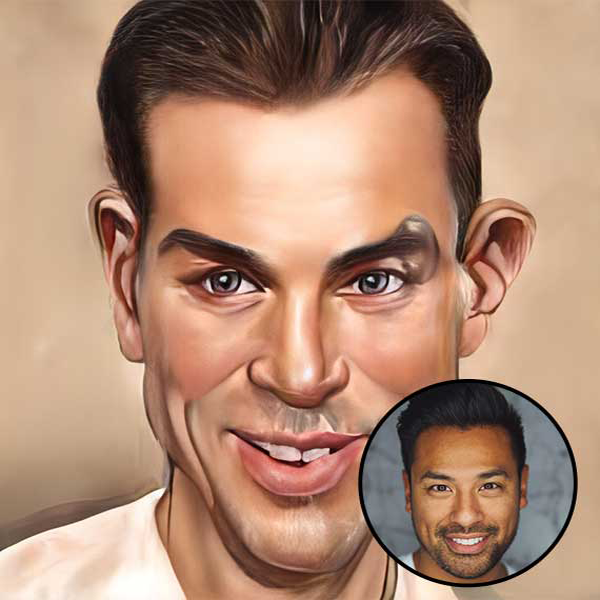
Caricaturer is an online caricature photo maker. It could produce 64 different caricature photos from your portraits based on AI technology. If you want to convert your face or portrait photo to caricatures, you can give Caricaturer a try. It may take some time but deserves the waiting. You can sign up for an account to receive the notification email.
Caricaturer could caricature your portrait photos and create stunning effects online effortlessly. Powered by AI technology, the whole process is automatic and no fancy skills are required.

Adobe Fonts is an extensive online service offering subscribers access to a vast library of over 30,000 fonts, seamlessly integrated with Adobe Creative Cloud applications. This platform enables users to enhance their creative projects by providing a diverse range of typefaces suitable for various design needs.
Key Features and Functionality:
- Extensive Font Library: Access to a comprehensive collection of over 30,000 fonts, including popular typefaces like Helvetica, Times New Roman, Arial, and Proxima Nova.
- Seamless Integration: Fonts are automatically synced with Adobe Creative Cloud applications such as Photoshop, Illustrator, InDesign, and Adobe Express, facilitating a streamlined design workflow.
- Global Language Support: The platform offers fonts supporting multiple languages, including Arabic, Chinese, Japanese, Korean, Thai, and Hindi, catering to diverse design requirements.
- Simplified Licensing: All fonts are licensed for both personal and commercial use, eliminating the need for individual licensing agreements and ensuring compliance across projects.
Primary Value and User Solutions:
Adobe Fonts addresses the challenge of sourcing high-quality, licensed fonts by providing a centralized, expansive library that integrates directly with Adobe's suite of creative tools. This integration enhances workflow efficiency, ensures design consistency, and supports a wide range of creative endeavors, from branding and editorial design to web development and multimedia projects.

Photopea is a free, web-based image editor that offers advanced photo editing and graphic design capabilities directly in your browser. It supports a wide range of file formats, including PSD, AI, PDF, SVG, and CDR, making it compatible with Adobe Photoshop and other popular tools. With Photopea, users can perform tasks such as photo retouching, image composition, vector editing, and UI design without installing any software. Its intuitive interface closely resembles that of traditional desktop tools, making it accessible for both professionals and casual users. Whether you're a designer, student, or hobbyist, Photopea delivers professional-grade editing tools for free, accessible from any device with internet access.
Key Features and Functionality:
- Comprehensive Editing Tools: Offers a full suite of tools, including cropping, resizing, layering, masking, blending, adjustment layers, and advanced filters like Liquify and Puppet Warp.
- Extensive Format Support: Compatible with over 40 file types, such as PSD, PNG, JPG, GIF, SVG, PDF, AI, and raw camera formats, facilitating seamless editing across various platforms.
- Vector and Raster Graphics Support: Enables the creation and editing of both vector shapes and paths alongside pixel-based images, catering to diverse design needs.
- Browser-Based Operation: Runs entirely within the user's browser without requiring file uploads to external servers, ensuring privacy and the ability to work offline once loaded.
- AI-Powered Features: Provides advanced AI tools for tasks like background removal, image replacement, and image generation, enhancing editing efficiency.
- Cross-Device Compatibility: Accessible on desktops, laptops, tablets, and smartphones, with performance optimized based on hardware capabilities.
Primary Value and User Solutions:
Photopea addresses the need for a versatile, accessible, and cost-effective image editing solution by offering a comprehensive set of tools comparable to those found in premium software, all within a free, browser-based platform. It eliminates the barriers of software installation and high costs, making professional-grade editing accessible to a broader audience. By processing files locally, it ensures user privacy and allows for offline work, catering to users who require reliable and efficient editing capabilities without compromising security.

Aftershoot is an AI-powered software solution designed to streamline the post-production workflow for professional photographers. By automating the culling and editing processes, Aftershoot enables photographers to efficiently manage large volumes of images, significantly reducing the time spent on manual selection and adjustment. This allows photographers to focus more on their creative work and client engagement.
Key Features and Functionality:
- AI-Assisted Culling: Aftershoot's advanced algorithms automatically analyze and select the best images from a shoot, filtering out duplicates, blurry shots, and photos with closed eyes. This process groups similar images together and highlights the most compelling ones, saving hours of manual sorting.
- AI-Assisted Editing: The software learns from the user's editing style to create a personalized AI profile. It then applies consistent adjustments to new photos, including exposure, color balance, and cropping, ensuring a uniform look across all images.
- Customizable Preferences: Photographers can tailor Aftershoot's culling and editing criteria to match their specific needs, allowing for a personalized workflow that adapts to different shooting styles and preferences.
- Seamless Integration: Aftershoot integrates smoothly with popular photo editing tools like Adobe Lightroom and Capture One, facilitating an efficient transition from culling to final editing stages.
- Offline Functionality: The software operates locally on the user's computer, enabling culling and editing without the need for an internet connection. This ensures privacy and allows for uninterrupted workflow regardless of location.
Primary Value and Solutions Provided:
Aftershoot addresses the common challenges photographers face in post-production by automating time-consuming tasks. The AI-driven culling feature quickly identifies the best images, eliminating the need for manual selection and reducing the risk of overlooking key shots. The AI-assisted editing ensures consistency and quality across all photos, reflecting the photographer's unique style without the repetitive effort. By significantly reducing the time spent on culling and editing, Aftershoot empowers photographers to focus on capturing moments and growing their business, ultimately enhancing productivity and client satisfaction.

Google My Business is a free tool that enables businesses to manage their online presence across Google Search and Maps. By creating and verifying a business profile, companies can provide essential information such as operating hours, contact details, and location, enhancing their visibility to potential customers.
Key Features and Functionality:
- Business Information Management: Update and display critical details like address, phone number, and business hours.
- Customer Interaction: Respond to customer reviews and questions, fostering engagement and trust.
- Insights and Analytics: Access data on how customers find and interact with your business online.
- Photos and Videos: Showcase your products, services, and premises through visual content.
- Posts and Updates: Share news, offers, and events directly on your business profile.
Primary Value and Solutions:
Google My Business enhances local SEO, making it easier for customers to discover and connect with businesses. It provides a centralized platform for managing online information, ensuring accuracy and consistency across Google services. By facilitating direct communication with customers and offering valuable insights, it helps businesses improve their online reputation and tailor their marketing strategies effectively.

Whether you need it for business, marketing, photography, or for fun, creating a transparent background can be hard work. Not any more. You can remove the background from any image in seconds with Picsart.
Photo Mechanic is a powerful photo management software designed to streamline the workflow of professional photographers. It enables rapid ingestion, culling, tagging, and organization of large volumes of images, significantly reducing the time spent on post-processing tasks. By facilitating quick selection and metadata addition, Photo Mechanic allows photographers to focus more on capturing images and less on managing them.
Key Features and Functionality:
- Fast Ingestion and Culling: Quickly import photos from memory cards and efficiently review them to select the best shots without delay.
- Metadata Management: Easily add, edit, and manage metadata such as captions, keywords, and copyright information to individual or batches of images.
- Advanced Organization: Rename files, create folders, and move images seamlessly to keep your photo library organized.
- Integration with Editing Software: Directly transfer selected images to external editing applications for further processing.
- Cross-Platform Compatibility: Available for both macOS and Windows, supporting a wide range of operating systems.
Primary Value and Solutions Provided:
Photo Mechanic addresses the common challenges faced by photographers in managing extensive photo collections. By offering rapid ingestion and culling capabilities, it minimizes the time required to sort through images. Its robust metadata management tools ensure that photos are accurately labeled and easily searchable. The software's seamless integration with various editing platforms and its cross-platform compatibility make it a versatile tool for photographers aiming to enhance their productivity and maintain an organized workflow.

Turn your 3D models into photorealistic product photos.
Create lifestyle images from your existing 3D assets — without a photoshoot. Your product keeps its real shape and proportions; the AI creates the scene around it.

AI Image Enlarger is an advanced tool designed to upscale images by up to 800% without compromising quality. Utilizing cutting-edge AI algorithms, it ensures that even the smallest details remain sharp and clear, making it ideal for enhancing photos for printing, social media, or professional use.
Key Features and Functionality:
- High-Quality Enlargement: Increase image sizes up to 8x while preserving clarity and detail.
- Batch Processing: Enhance multiple images simultaneously, streamlining workflow and boosting productivity.
- AI-Powered Enhancement: Automatically improve color, contrast, and sharpness to elevate overall image quality.
- Background Removal: Effortlessly remove backgrounds with a single click, facilitating seamless editing and design integration.
- Secure Processing: All uploaded images are deleted after six hours, ensuring user privacy and data security.
Primary Value and User Solutions:
AI Image Enlarger addresses the common challenge of enlarging images without quality degradation. By leveraging AI technology, it provides users with a reliable solution to upscale photos while maintaining exceptional quality. This is particularly beneficial for photographers, designers, and businesses seeking to enhance visual content for various applications, from high-resolution prints to digital media. The tool's user-friendly interface and efficient processing make it accessible to both professionals and hobbyists, enabling them to achieve superior image quality with minimal effort.

Movavi Video Editor for Mac is a user-friendly yet powerful video editing software designed to help users create professional-quality videos with ease. Whether you're a beginner or an experienced editor, this tool offers a comprehensive suite of features to bring your creative ideas to life. With its intuitive interface and advanced functionalities, Movavi Video Editor simplifies the video editing process, making it accessible to all.
Key Features and Functionality:
- Revamped Timeline: The new, clearer, and more streamlined timeline allows for faster project completion, whether you're working on short social media clips or longer family movies.
- Frame-Precise Cuts: The Blade tool enables precise cuts, allowing you to create sharp and engaging montages effortlessly.
- Pro-Quality Color Correction: Enhance your videos with advanced color correction tools that are simple to use, helping you achieve the perfect look for your footage.
- AI Motion Tracking: Easily attach photos, videos, emojis, or memes to moving objects in your footage with AI-powered motion tracking.
- Overlay Effects with Blending Modes: Choose from 13 blending modes for each overlay effect to achieve the perfect visual style for your video.
- Extensive Effects Library: Access a vast collection of professionally designed effects, including filters, transitions, titles, and stickers, to enhance your videos.
- Automatic Subtitles: Utilize AI to quickly generate subtitles from your speech, supporting multiple languages and customizable text options.
- Silence Removal: Automatically detect and remove unwanted pauses in your footage, saving time and improving the flow of your videos.
- Mouse-Over Effects Preview: Easily preview effects like titles, transitions, and filters by hovering your mouse over them, streamlining the editing process.
- Fast Effect Copying: Quickly apply effects, color adjustments, and audio settings from one clip to another, ensuring consistency across your project.
Primary Value and Solutions:
Movavi Video Editor for Mac addresses the needs of users seeking an efficient and accessible video editing solution. By combining a user-friendly interface with advanced features, it enables users to produce high-quality videos without a steep learning curve. The software's AI-powered tools, such as automatic subtitles and motion tracking, automate time-consuming tasks, allowing users to focus on creativity. Additionally, the extensive library of effects and the streamlined editing process make it an ideal choice for content creators aiming to produce engaging videos for social media, personal projects, or professional use.

500px is a global online photography community and marketplace that enables photographers to showcase, discover, and license high-quality images. Founded in 2009, it has grown into a platform where both amateur and professional photographers can share their work, gain exposure, and connect with a worldwide audience.
Key Features and Functionality:
- Photo Sharing and Discovery: Users can upload their photographs and explore a vast collection of images across various categories, including landscapes, portraits, and fine art.
- Community Engagement: The platform fosters interaction through features like commenting, liking, and following, allowing photographers to receive feedback and build a network.
- Licensing Opportunities: 500px offers photographers the chance to monetize their work by licensing images through partnerships with agencies like Getty Images.
- Pulse Algorithm: An algorithm evaluates recently uploaded photos based on views, likes, and comments, assigning a 'Pulse' score that determines a photo's visibility on the platform.
- Mobile Accessibility: Dedicated mobile applications for iOS and Android devices enable users to upload, browse, and engage with the community on the go.
Primary Value and User Solutions:
500px addresses the needs of photographers seeking a platform to display their work in high resolution without compression, ensuring that every detail is preserved. It provides a space for creative expression, learning, and professional growth by connecting photographers with peers and potential clients. The licensing feature offers a pathway for photographers to earn income from their images, transforming passion into profit. Additionally, the community-driven environment encourages feedback and inspiration, helping users to refine their skills and gain recognition in the photography world.

AutoRetouch is expanding the possibilities within digital image editing. Our AI-powered image editing platform for product images is the one-stop-shop for product photography editing. Simply turn raw product photos into e-commerce ready product images and adapt existing images for any kind of online marketplace in seconds. Create workflows that handle tasks like background removal, skin retouch, ghost mannequin, and many more, with just a few clicks and process hundreds of images in parallel. All while retaining full creative control and accessible wherever needed, by leveraging our API. Experience it yourself and try our AI-powered image editing platform for free at www.autoretouch.com

PromeAI Blender is an AI-powered design tool that transforms sketches, 3D model screenshots, photos, or full 3D models into realistic, photo-like renders. It supports reference images, style and scene presets, multiple render modes, and various model versions tailored for different outcomes.
Key Features and Functionality:
- Generative AI Engine: Converts hand-drawn sketches or rough concepts into photorealistic images, preserving the original creative intent.
- Customizable Style Library: Offers a diverse range of AI-generated content (AIGC) style models to match unique project requirements and branding.
- User-Friendly Interface: Provides intuitive tools that enable designers of all skill levels to rapidly iterate and refine visuals.
- Cloud-Based Platform: Ensures secure, scalable access anytime, anywhere, facilitating collaboration among distributed teams.
Primary Value and User Solutions:
PromeAI Blender accelerates design cycles by enabling rapid visualization of concepts, reducing the need for extensive manual rendering. It enhances creative output by allowing exploration of multiple visual styles without additional resources. The tool also ensures consistent quality across projects, maintaining brand and style coherence through repeatable AI-driven workflows.

Nero AI is a leading service provider with a mission to offer businesses more advanced solutions through the power of artificial intelligence. Our services include AI-based image upscaling, file management, and PC benchmarking, all of which are designed to enhance your organization's efficiency and productivity.
Nero AI Image Upscaler: A powerful tool that uses advanced AI algorithms to increase image resolution without sacrificing quality. This feature is particularly useful for businesses in the media and marketing industries that require high-quality images for their digital campaigns.
AI Art: Businesses can turn their ideas into reality by leveraging the power of AI to auto-design their own animated characters or generate comic images from real-life photos. This feature is ideal for businesses in the entertainment and gaming industries, as well as those in need of creative designs for their marketing materials.
Nero AI Restoration: It offers multiple color palettes and filters to restore scratches on vintage photographs and add missing details through inferencing. This feature is particularly useful for businesses in the photography and archival industries, as well as those with a need for high-quality image restoration.
Nero AI Photo Tagger: Powered by 12th generation Intel® Core™ processors and Intel OpenVINO technology, offers lightning-fast AI-based content recognition and organization for your photo library. This feature is ideal for businesses that require efficient and accurate photo management, such as media companies, advertising agencies, and e-commerce platforms.
Nero Score: A real-world PC benchmarking tool that measures the multi-core power of your CPU and pushes your GPU to its maximum limit with real-world multimedia use cases. This feature is useful for businesses in the technology and manufacturing industries that require reliable performance metrics for their workstations and servers.

Pixabay is a comprehensive online platform offering over 5.8 million high-quality, royalty-free images, videos, music, and sound effects. Founded in 2010, it serves as a valuable resource for creatives seeking diverse media content for personal and commercial projects.
Key Features and Functionality:
- Extensive Media Library: Access a vast collection of photos, illustrations, vector graphics, videos, music tracks, and sound effects, all available for free download.
- User-Friendly Interface: Easily search and navigate through content with intuitive filters and categories, enhancing the user experience.
- Flexible Licensing: Content is released under the Pixabay Content License, allowing free use without attribution, with certain restrictions to ensure ethical usage.
- Community Engagement: Join a vibrant community of creators by uploading your own content, participating in discussions, and collaborating with others.
Primary Value and Solutions:
Pixabay addresses the need for accessible, high-quality media by providing a cost-effective alternative to traditional stock media services. It empowers users—including designers, marketers, educators, and content creators—to enhance their projects without the burden of licensing fees or attribution requirements, fostering creativity and efficiency in content production.

LinkedIn Recruitment Marketing is a suite of tools designed to enhance your company's visibility and attract top talent by leveraging LinkedIn's extensive professional network. It enables organizations to effectively showcase their employer brand, engage with potential candidates, and streamline the hiring process.
Key Features and Functionality:
- Career Pages: Customize your company's LinkedIn page to highlight your story, culture, diversity, employee testimonials, and photos. Tailor views for different groups, such as Engineering or Sales, and automatically display recommended jobs and insights to visitors.
- Dynamic Ads: Create personalized advertisements targeting specific audiences based on job title, seniority, skills, education, and experience. These ads ensure your message reaches the right candidates at the right time.
- Sponsored Updates: Share articles, videos, and employee posts directly in the LinkedIn newsfeed to captivate and educate potential candidates about your company, enticing them to explore open roles and respond to outreach.
- Landing Pages: Develop personalized landing pages tailored to your ideal audience, making it easy for candidates to express interest with a one-click "I'm interested" button. This helps build a targeted pipeline of engaged candidates that integrates seamlessly into LinkedIn Recruiter.
Primary Value and Solutions Provided:
LinkedIn Recruitment Marketing addresses several common hiring challenges:
- Standing Out from the Competition: By effectively showcasing your employer brand and company culture, you can differentiate your organization in a competitive job market.
- Engaging an Unfamiliar Candidate Pool: Targeted ads and personalized content help you reach and engage candidates who may not be familiar with your company.
- Managing High-Volume or Seasonal Hiring: Automated and scalable marketing tools enable efficient handling of large-scale recruitment needs.
- Overcoming Limited Recruiter Bandwidth: Streamlined processes and targeted outreach reduce the time and effort required from recruiters, allowing them to focus on high-value interactions.
By utilizing LinkedIn Recruitment Marketing, companies can build awareness, engage with potential candidates, and ultimately attract and hire the right talent more effectively.