Compare this with other toolsSave it to your board and evaluate your options side by side.
Save to board

Wolfeye Reviews & Product Details

Pricing

Pricing provided by Wolfeye.

minimum 4 seats

$80.00
1 seats Per Year

Wolfeye Media

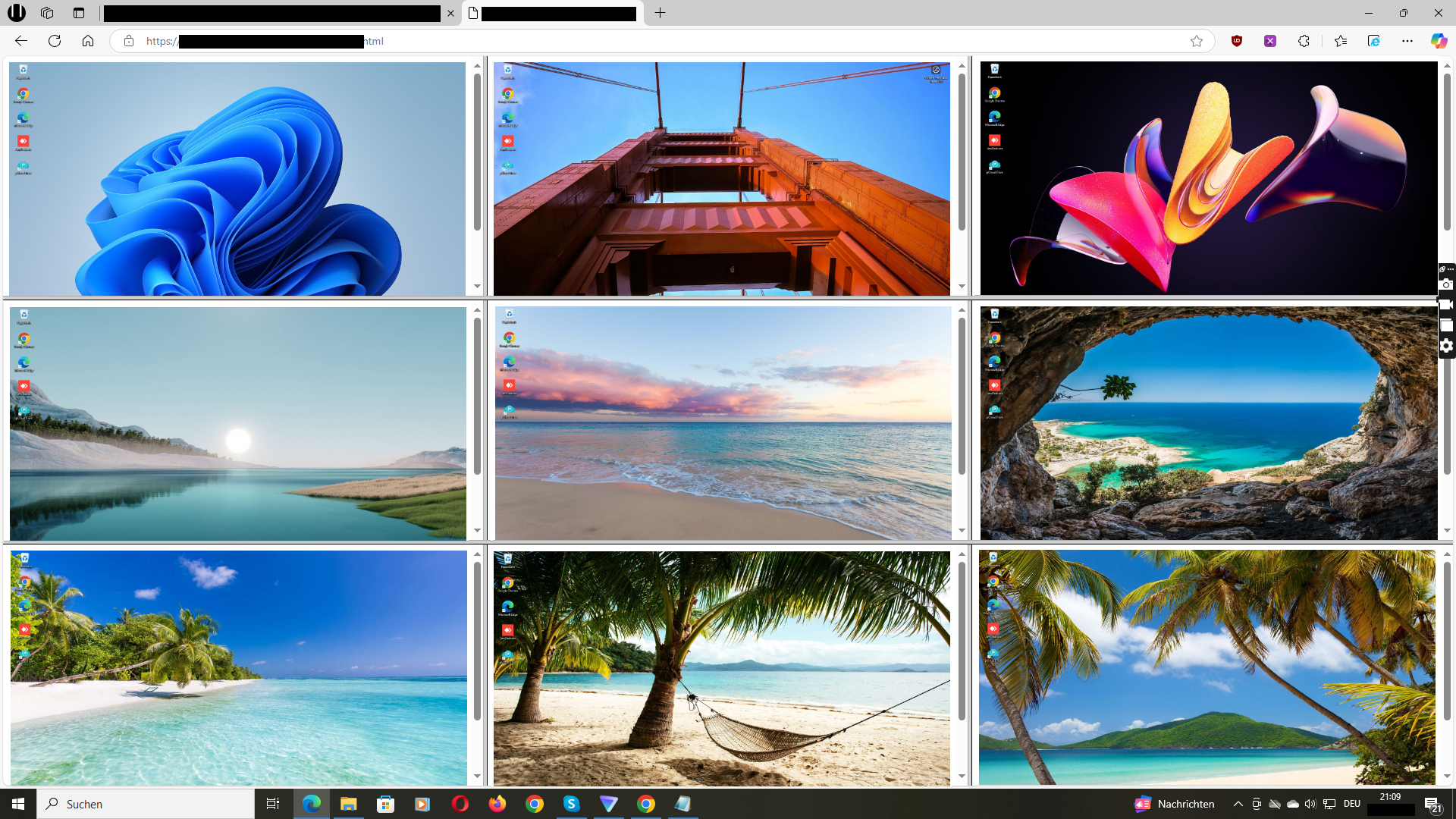
Wolfeye Demo - Wolfeye Dashboard
If you install the “Wolfeye” software on multiple computers, you will receive a link to your dashboard where you will see all the computers’ live screens.
Product Avatar Image

Have you used Wolfeye before?

Answer a few questions to help the Wolfeye community

Wolfeye Reviews (53)

Reviews

Wolfeye Reviews (53)

4.9
53 reviews

Review Summary

Generated using AI from real user reviews
Users consistently praise Wolfeye for its lightweight performance and easy setup, making it accessible even for those without technical expertise. The software effectively enhances productivity by providing real-time monitoring and detailed activity logs, which help maintain compliance and transparency. However, many users note that it is limited to Windows only.

Pros & Cons

Generated from real user reviews
View All Pros and Cons
Search reviews
Filter Reviews
Clear Results
G2 reviews are authentic and verified.
KS
Operations Manager
Small-Business (50 or fewer emp.)
"Scalable, Easy-to-Read Live Monitoring with Responsive Support"
What do you like best about Wolfeye?

The pricing model fits well for growing teams, and the product scales smoothly without requiring much extra effort. I also like being able to monitor multiple systems at the same time without it slowing everything down. The live view is easy to read and updates consistently, which makes it dependable for day-to-day use. Support has been responsive whenever I’ve needed help. Review collected by and hosted on G2.com.

What do you dislike about Wolfeye?

It doesn’t provide deep performance metrics or more advanced productivity scoring, and for larger organizations that could become a real limitation over time. On top of that, the mobile experience still isn’t very strong, which would be especially helpful for managers who need to stay on top of things while on the go. Review collected by and hosted on G2.com.

SF
Systems Administrator
Small-Business (50 or fewer emp.)
"Smooth Windows Rollout with a Lightweight, Time-Saving Dashboard"
What do you like best about Wolfeye?

Rolling this out across our Windows systems was smoother than I expected. After installation, everything is available from a single dashboard, which saves a lot of time and keeps things organized. The live updates come often enough to make monitoring genuinely effective, but not so often that they become distracting or overwhelming. It also feels lightweight overall, so it hasn’t noticeably affected system performance. Review collected by and hosted on G2.com.

What do you dislike about Wolfeye?

The product feels quite minimalistic, which can be a drawback if you’re expecting more advanced insights or any kind of automation. Review collected by and hosted on G2.com.

AH
HR Manager
Small-Business (50 or fewer emp.)
"Minimal Data Collection with Flexible Live View and History"
What do you like best about Wolfeye?

I really appreciate the focus on minimal data collection. It lets us keep an eye on productivity without it feeling overly invasive. For most of our needs, the live view is sufficient, and we can turn on history only when it’s actually necessary. Review collected by and hosted on G2.com.

What do you dislike about Wolfeye?

Some employees were initially concerned about being monitored, so we had to spend time explaining how the monitoring works and what it does (and doesn’t) capture. I’d also find it helpful if the product included more built-in compliance guidance to make those conversations easier. Review collected by and hosted on G2.com.

BK
Project Manager
Small-Business (50 or fewer emp.)
"Reliable Live Monitoring with a Simple, Privacy-Friendly Setup"
What do you like best about Wolfeye?

I like that it focuses on one core function and executes it well. The live monitoring is reliable and consistent, and the system doesn’t overwhelm you with unnecessary features. I also appreciate having control over whether screenshots are stored, which matters for privacy. The setup process was straightforward and easy to follow, even without a dedicated IT team. Review collected by and hosted on G2.com.

What do you dislike about Wolfeye?

There aren’t many customization options available. For instance, the alerts and monitoring settings could be more flexible and better tailored to different roles. Review collected by and hosted on G2.com.

JN
IT Program Manager
Small-Business (50 or fewer emp.)
"Straightforward Real-Time Monitoring with a Clean, Fast-Refreshing Dashboard"
What do you like best about Wolfeye?

I really like how straightforward the live screen monitoring is. After logging in, I can immediately see what everyone is working on without having to dig through reports. The dashboard looks clean and refreshes often, so it genuinely feels real-time. Setup was also easier than I expected, even for a small team without dedicated IT support. Review collected by and hosted on G2.com.

What do you dislike about Wolfeye?

It’s quite focused on live viewing, so if you’re looking for deeper analytics or more advanced reporting, it may feel a bit limited. The screenshot history feature is useful, but it isn’t very detailed. Review collected by and hosted on G2.com.

KI
Growth Manager
Small-Business (50 or fewer emp.)
"Quick Deployment, Smooth Performance, and a Convenient Centralized Dashboard"
What do you like best about Wolfeye?

Deployment was quick, and the software runs smoothly across all of our Windows systems. The centralized dashboard makes it straightforward to manage multiple users at the same time, which has been a real convenience. I also appreciate that it doesn’t store unnecessary amounts of data unless you explicitly enable that option. Review collected by and hosted on G2.com.

What do you dislike about Wolfeye?

It would be great to have more integration options with other tools we already use. Also, while the interface is functional, it could benefit from a more modern, updated look. Review collected by and hosted on G2.com.

RS
Operations Coordinator
Small-Business (50 or fewer emp.)
"Wolfeye: Real-Time Monitoring with LGPD Compliance and Easy Setup"
What do you like best about Wolfeye?

As a manager leading a mostly remote team, having clear visibility into project progress is essential for me. Wolfeye provides this through its live monitoring feature, allowing me to view my team's screens in real time and make sure client tasks remain a top priority. What mattered most to us was LGPD compliance, and knowing that the tool was developed with Brazilian data protection laws in mind gave us the assurance we needed to move forward. I was also impressed by how straightforward the installation process was, as it did not require any advanced technical support. Review collected by and hosted on G2.com.

What do you dislike about Wolfeye?

The live feed occasionally freezes or lags, particularly when one of our team members has an unstable internet connection. This is a frequent issue for us here in Brazil. If there were a lighter or more optimized version designed for low-bandwidth connections, it would greatly improve the experience. Review collected by and hosted on G2.com.

AG
Lead Generation Manager
Small-Business (50 or fewer emp.)
"Wolfeye: Effortless Team Monitoring and Productivity Boost, Especially for Remote Work"
What do you like best about Wolfeye?

What I appreciate most about Wolfeye is that it allows me to monitor my lead generation reps' real-time activity without the need to micromanage. It provides a transparent overview of who is actively engaged in outreach, research, or updating the CRM. Setting it up was quick, and the dashboard is straightforward enough for me to check in at any time, even from my phone. The screenshot feature is particularly useful for reviewing how team members spend their time during campaigns. Overall, it has helped me ensure our workflow remains consistent and that we meet our daily goals. Review collected by and hosted on G2.com.

What do you dislike about Wolfeye?

There isn't much to criticize, honestly. While it would be helpful to have a few additional reporting options for productivity summaries, the core features already address all the essential needs. Review collected by and hosted on G2.com.

Mario G.
MG
Office Manager
Small-Business (50 or fewer emp.)
"Keeping better visibility on our team’s daily work"
What do you like best about Wolfeye?

It’s very easy to use and gives me a clear view of what’s happening on every computer without slowing anyone down. The setup took only a few minutes, and after that I could see each screen live from my office. It helps me keep track of who’s working on what, and I can step in quickly if someone gets stuck or distracted. The screenshots are helpful too, especially when I’m reviewing how projects are moving along. Overall, it keeps the team focused and saves me time checking in. Review collected by and hosted on G2.com.

What do you dislike about Wolfeye?

The main improvement I would suggest is the addition of more summary insights, such as daily or weekly activity reports. This would save me from having to manually go through every session myself. Review collected by and hosted on G2.com.

FJ
Network Manager
Small-Business (50 or fewer emp.)
"Efficient Remote Monitoring for Our Distributed Network"
What do you like best about Wolfeye?

Wolfeye makes it easy to monitor all endpoints across our internal network. I can view multiple PCs in real time and identify connection issues or inactive sessions immediately. The software runs smoothly even on older machines, and installation through our LAN was straightforward. The lightweight agent and fast screen refresh rate help us manage both office and remote devices with minimal bandwidth impact. Review collected by and hosted on G2.com.

What do you dislike about Wolfeye?

It would be useful to have a central dashboard with bandwidth usage per device. I’d also like more options for alert notifications, such as email triggers for long idle times or dropped connections Review collected by and hosted on G2.com.

People Icons

Start a Discussion about Wolfeye

Have a software question? Get answers from real users and experts.

Start a Discussion

Pricing Options

Pricing provided by Wolfeye.

minimum 4 seats

$80.00
1 seats Per Year
Wolfeye Features
Interactions
Web & Application Usage
Mobile App Usage
Calls
Email Activity Tracking
Social Media Activity Tracking
Archives
AI Text Generation
AI Text Summarization
Product Avatar Image
Wolfeye