Best Business VPN Software

How Many Business VPN Software Products Does G2 Track?

Total Products under this Category: 154

Category Stats (Aug 2026)

  • Average Rating: 4.39/5 The average rating of products in this category, based on all submitted ratings
  • Top Trending Product: ExpressVPN (+3.71%) - Among all products in this category, ExpressVPN recorded the largest rating increase compared to last month

Last updated: August 05, 2026

How Does G2 Rank Business VPN Software Products?

Why You Can Trust G2's Software Rankings:

  • 30 Analysts and Data Experts
  • 3,000+ Authentic Reviews
  • 154+ Products
  • Unbiased Rankings

G2's software rankings are built on verified user reviews, rigorous moderation, and a consistent research methodology maintained by a team of analysts and data experts. Each product is measured using the same transparent criteria, with no paid placement or vendor influence. While reviews reflect real user experiences, which can be subjective, they offer valuable insight into how software performs in the hands of professionals. Together, these inputs power the G2 Score, a standardized way to compare tools within every category.

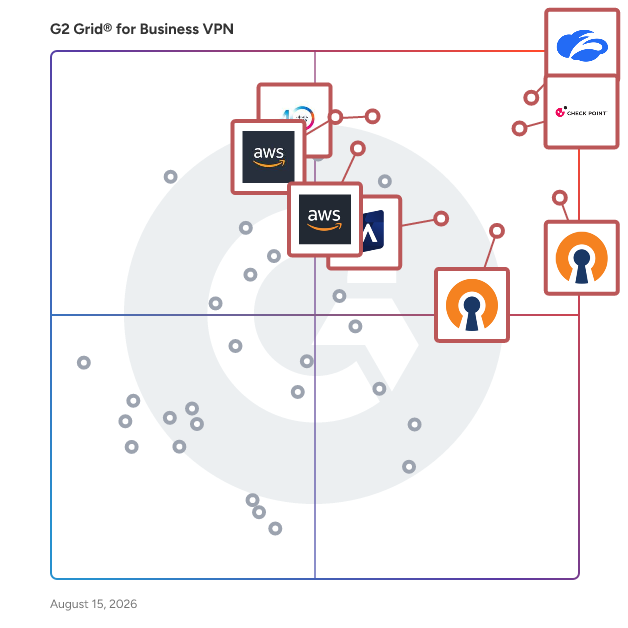
G2 Grid® for Business VPN Software

G2 Grid® for Business VPN Software plotting products by satisfaction and market presence

Highlighted products: Zscaler Private Access, Check Point Remote Access VPN, OpenVPN Access Server, OpenVPN CloudConnexa, Cisco Secure Client, Absolute Secure Access, AWS Client VPN, and AWS VPN.

Underlying data: [Grid® JSON](https://www.g2.com/categories/business-vpn/grids.json?focus%5B%5D=zscaler-private-access&focus%5B%5D=check-point-remote-access-vpn&focus%5B%5D=openvpn-access-server&focus%5B%5D=openvpn-cloudconnexa&focus%5B%5D=cisco-secure-client&focus%5B%5D=absolute-secure-access&focus%5B%5D=aws-client-vpn&focus%5B%5D=aws-vpn)

Sponsored

DNSFilter

DNSFilter is a cybersecurity solution designed to enhance internet safety and workplace productivity by actively blocking malicious online threats. By leveraging advanced artificial intelligence, DNSFilter provides protective Domain Name System (DNS) services that effectively shield users from a wide range of cyber threats, including phishing attacks, malware, and other advanced security risks. With its robust infrastructure, DNSFilter processes an impressive volume of queries, resolving upwards of 130 billion queries daily while blocking an average of 12 million threat queries each day. The target audience for DNSFilter includes businesses of all sizes, educational institutions, and any organization that seeks to safeguard its network from cyber threats. As cyberattacks increasingly leverage DNS, DNSFilter serves as a critical line of defense for organizations looking to protect sensitive data and maintain operational integrity. By implementing DNSFilter, organizations can not only mitigate risks but also enhance overall productivity by reducing the potential for downtime caused by security incidents. One of the standout features of DNSFilter is its unique machine learning models which block threats an average of 10 days faster than traditional threat feeds. This rapid response is crucial in a landscape where cyber threats evolve quickly, and timely intervention can prevent significant damage. The AI-driven technology behind DNSFilter continuously analyzes and adapts to emerging threats, ensuring that users are protected with the most current security measures available. This proactive approach to threat detection and blocking is a key differentiator that sets DNSFilter apart from other cybersecurity solutions. In addition to its threat-blocking capabilities, DNSFilter offers a user-friendly interface that simplifies management and monitoring for IT administrators. The platform provides detailed reporting and analytics, allowing organizations to gain insights into their network's security posture and make informed decisions regarding their cybersecurity strategies. With over 35 million users placing their trust in DNSFilter, the solution not only enhances security but also fosters a more productive work environment by minimizing distractions and interruptions caused by cyber threats. Overall, DNSFilter represents a comprehensive and effective solution for organizations seeking to bolster their cybersecurity defenses while promoting a safer and more efficient online experience. Its speed, intelligence, and ease of use make it a valuable asset in the ongoing battle against cyber threats.

Visit website

Zscaler Private Access

Zscaler Private Access (ZPA) is a cloud-based zero trust solution that securely connects users to private applications hosted in public clouds, data centers, or on-premises environments without relying on traditional VPNs or exposing them to the internet. Built on the principles of zero trust, ZPA ensures that users are authenticated and authorized before granting access, providing application-specific access rather than exposing the network. With AI-powered segmentation and identity-based policies, ZPA minimizes the attack surface, makes applications invisible to the internet, and prevents lateral movement. By simplifying access, reducing IT complexity, and improving user experience, ZPA supports modern hybrid work while delivering unmatched scalability and performance. Key Features and Benefits: • Minimize the Attack Surface: Private applications are hidden behind the Zero Trust Exchange, making them invisible and unreachable. Users connect to apps, not the network. • Eliminate Lateral Movement: Least-privileged access allows one-to-one user-to-application connections, avoiding network-wide exposure. • Deliver Exceptional User Experience & Boost Hybrid Workforce Productivity: Fast, direct access to apps via 160+ global points of presence ensures low latency and no backhauling, boosting productivity. • Accelerate Zero Trust Journey with AI-powered User-to-app Segmentation: AI/ML generates custom app segmentation recommendations, simplifying user-to-app segmentation. • Prevent Compromised Users, Insider Threats & Advanced Attackers: Comprehensive protection for private apps with OWASP Top 10 prevention, inline inspection, advanced threat protection, and data loss prevention. • Extend Zero Trust to All Applications: Enable secure remote access for legacy network connected applications such as VOIP and server-to-client applications, and extranet applications hosted in business partner or vendor networks. • Ensure Business Continuity and High Availability: ZPA Private Service Edge caches policies for zero trust access during internet outages, allowing for secure connectivity and business continuity. • Reduce Cost & Operational Complexity: Replaces legacy VPNs, simplifying management and cutting hardware and operational costs. Accelerate M&A time-to-value without having to integrate networks.

Average Rating: 4.4/5.0

Total Reviews: 133

How Do G2 Users Rate Zscaler Private Access?

  • Has the product been a good partner in doing business?: 9.2/10 (Category avg: 8.9/10)
  • Multi-Device Usage: 7.8/10 (Category avg: 8.9/10)

Who Is the Company Behind Zscaler Private Access?

  • Seller: Zscaler
  • Company Website:
  • Year Founded: 2008
  • HQ Location: San Jose, California
  • Twitter: @zscaler
    17,676 Twitter followers
  • LinkedIn® Page: www.linkedin.com
    8,830 employees on LinkedIn®

Who Uses This Product?

  • Top Industries: Information Technology and Services, Computer Software
  • Company Size: 44% Large, 30% Medium

What Do G2 Reviewers Say About Zscaler Private Access?

AI-generated summary from verified user reviews

Pros
  • Users appreciate the enhanced security of Zscaler Private Access, ensuring safe connections without exposing internal networks.
  • Users value the ease of use of Zscaler Private Access, enjoying a smooth experience with quick setup and management.
  • Users appreciate the secure and fast access to internal applications, eliminating the need for traditional VPNs.
  • Users appreciate the efficient VPN alternatives Zscaler Private Access offers, enabling fast, secure, and hassle-free connections.
  • Users commend the reliability of Zscaler Private Access, appreciating its smooth performance and consistent connectivity.
Cons
  • Users face connection issues with Zscaler Private Access, including random disconnections and frustrating network switching problems.
  • Users experience confusing error handling with Zscaler Private Access, making troubleshooting and connection issues frustrating at times.
  • Users experience frustrating slow loading and dropped connections with Zscaler Private Access, complicating network transitions and troubleshooting.
  • Users find the pricing steep for Zscaler Private Access, particularly challenging for smaller organizations seeking budget-friendly solutions.
  • Users experience slow internet connections with Zscaler Private Access, leading to frustrating interruptions and degraded performance.

What Are Recent G2 Reviews of Zscaler Private Access?

What Are G2 Users Discussing About Zscaler Private Access?

Check Point Remote Access VPN

Check Point Remote Access VPN é uma solução de nível empresarial que permite acesso remoto seguro e contínuo a redes e recursos corporativos para funcionários que trabalham remotamente ou estão viajando. Ele garante a privacidade e a integridade de informações sensíveis por meio de autenticação multifator, verificação de conformidade de endpoint e criptografia de todos os dados transmitidos. Principais Recursos e Funcionalidades: - Acesso Remoto Seguro: Fornece conectividade VPN IPsec completa, garantindo autenticação forte, integridade de dados e confidencialidade. - Suporte a Autenticação Multifator: Oferece opções abrangentes de autenticação, incluindo nome de usuário/senha, SecurID, Desafio/Resposta RADIUS, tokens de software e hardware CAPI e certificados P12. - Verificação de Conformidade de Endpoint: Verifica se os dispositivos dos clientes estão em conformidade com as políticas de segurança da organização, bloqueando conexões não conformes à rede. - Experiência de Usuário Sem Interrupções: Apresenta VPN Auto-Connect e logoff quando os recursos corporativos são necessários e durante a troca de rede, garantindo uma experiência sem complicações para os usuários. - Gestão Integrada: Permite a configuração de políticas e visualização de eventos VPN a partir de um único console, simplificando a administração. Valor Principal e Soluções para Usuários: Check Point Remote Access VPN atende à necessidade crítica de conectividade remota segura, permitindo que os funcionários acessem recursos corporativos com segurança de qualquer local. Ao implementar medidas de segurança robustas, como autenticação multifator e verificação de conformidade de endpoint, ele mitiga riscos associados ao trabalho remoto, incluindo violações de dados e acesso não autorizado. A integração perfeita da solução e a experiência amigável ao usuário aumentam a produtividade enquanto mantêm padrões de segurança rigorosos, tornando-a uma ferramenta essencial para organizações com funcionários remotos ou viajantes.

Average Rating: 4.5/5.0

Total Reviews: 95

How Do G2 Users Rate Check Point Remote Access VPN?

  • the product tem sido um bom parceiro comercial?: 9.2/10 (Category avg: 8.9/10)
  • Uso de vários dispositivos: 9.0/10 (Category avg: 8.9/10)
  • Suporte ao cliente ao vivo: 9.1/10 (Category avg: 8.3/10)
  • Opções de protocolo: 8.7/10 (Category avg: 8.5/10)

Who Is the Company Behind Check Point Remote Access VPN?

  • Vendedor: Check Point Software Technologies
  • Ano de Fundação: 1993
  • Localização da Sede: Redwood City, CA
  • Twitter: @CheckPointSW
    70,955 seguidores no Twitter
  • Página do LinkedIn®: www.linkedin.com
    8,554 funcionários no LinkedIn®
  • Propriedade: NASDAQ:CHKP

Who Uses This Product?

  • Top Industries: Tecnologia da Informação e Serviços, Segurança de Redes e Computadores
  • Company Size: 68% Medium, 28% Large

What Do G2 Reviewers Say About Check Point Remote Access VPN?

AI-generated summary from verified user reviews

Pros
  • Os usuários apreciam a conexão segura e confiável oferecida pelo Check Point Remote Access VPN, garantindo a proteção dos dados.
  • Os usuários apreciam a forte segurança do Check Point Remote Access VPN, garantindo acesso seguro e eficiente aos recursos da empresa.
  • Os usuários apreciam a facilidade de uso do Check Point Remote Access VPN, desfrutando de seu acesso seguro e eficiente para trabalho remoto.
  • Os usuários apreciam a criptografia robusta do Check Point Endpoint Remote Access VPN, garantindo conexões remotas seguras e confiáveis.
  • Os usuários valorizam a forte segurança do Check Point Remote Access VPN, garantindo uma conectividade remota segura e confiável.
Cons
  • Os usuários acham a configuração complexa do Check Point Remote Access VPN desafiadora, especialmente durante a configuração e a resolução de problemas.
  • Os usuários acham a configuração complexa do Check Point Remote Access VPN frustrante e demorada, especialmente para grandes grupos.
  • Os usuários acham o produto caro, o que pode afastar equipes conscientes do orçamento, apesar de suas ótimas características.
  • Os usuários acham a curva de aprendizado íngreme para o Check Point Remote Access VPN, tornando a configuração inicial e a configuração desafiadoras.
  • Os usuários acham que resolver problemas com o Check Point Remote Access VPN é complexo e demorado, impactando a experiência.

What Are Recent G2 Reviews of Check Point Remote Access VPN?

What Are G2 Users Discussing About Check Point Remote Access VPN?

OpenVPN Access Server

O OpenVPN Access Server é uma aplicação de servidor VPN auto-hospedada que fornece às organizações acesso remoto seguro à sua rede privada, aplicações e dados. Construído como um software VPN para negócios, pode ser implantado na nuvem ou no local, oferecendo às empresas uma VPN flexível para equipes de negócios que são remotas, híbridas ou no escritório. Como ele opera em uma infraestrutura que você controla, é facilmente uma das melhores escolhas de VPN para negócios e melhor VPN para empresas que desejam um serviço VPN genuíno para negócios sem dependência de fornecedor a longo prazo, seja você uma equipe em crescimento procurando uma VPN para pequenas empresas ou uma organização maior que precisa de uma VPN empresarial com alta disponibilidade e clustering. Posicionado como uma VPN de acesso remoto, ou simplesmente uma VPN para acesso remoto, o Access Server incorpora capacidades essenciais de acesso à rede de confiança zero (ZTNA): permissões granulares, aplicação do princípio de menor privilégio e verificação de que as conexões vêm de dispositivos e locais confiáveis. Isso o torna uma forte escolha de VPN de acesso remoto seguro para proteger dados sensíveis e isolar aplicações SaaS da internet aberta. Ele também suporta conexões VPN site-a-site, estendendo sua rede de negócios de forma segura para escritórios remotos. Para implantação, o Access Server oferece verdadeira flexibilidade como hospedagem de servidor VPN: imagens pré-configuradas estão disponíveis para AWS, Google Cloud, Microsoft Azure, DigitalOcean, Oracle Cloud e IBM Cloud, oferecendo uma opção de serviço VPN em nuvem, ou você pode executá-lo como uma VPN no local em seu próprio hardware. Quer você prefira uma experiência de VPN totalmente gerenciada ou controle prático, o Access Server pode funcionar como uma VPN-como-serviço através do seu provedor de infraestrutura, e ele combina uma interface de administração web intuitiva, API REST/XML-RPC e ferramentas de linha de comando com forte segurança: PKI X.509 embutido, autenticação SAML/LDAP/RADIUS, autenticação multifator e criptografia AES-256-GCM. O resultado é uma das soluções de VPN mais completas para empresas que precisam de conectividade escalável, econômica e genuinamente segura à medida que crescem.

Average Rating: 4.5/5.0

Total Reviews: 354

How Do G2 Users Rate OpenVPN Access Server?

  • the product tem sido um bom parceiro comercial?: 8.8/10 (Category avg: 8.9/10)
  • Uso de vários dispositivos: 9.1/10 (Category avg: 8.9/10)
  • Suporte ao cliente ao vivo: 7.7/10 (Category avg: 8.3/10)
  • Opções de protocolo: 8.2/10 (Category avg: 8.5/10)

Who Is the Company Behind OpenVPN Access Server?

  • Vendedor: OpenVPN
  • Website da Empresa:
  • Ano de Fundação: 2002
  • Localização da Sede: Pleasanton, CA
  • Twitter: @OpenVPN
    20,209 seguidores no Twitter
  • Página do LinkedIn®: www.linkedin.com
    169 funcionários no LinkedIn®

Who Uses This Product?

  • Who Uses This: Gerente de TI, Diretor de Tecnologia
  • Top Industries: Tecnologia da Informação e Serviços, Software de Computador
  • Company Size: 48% Small, 44% Medium

What Do G2 Reviewers Say About OpenVPN Access Server?

AI-generated summary from verified user reviews

Pros
  • Os usuários apreciam a interface amigável do OpenVPN Access Server, garantindo uma experiência de configuração e gerenciamento tranquila.
  • Os usuários apreciam a configuração fácil do OpenVPN Access Server, permitindo funcionalidade rápida em vários dispositivos.
  • Os usuários apreciam a forte segurança do OpenVPN Access Server, garantindo proteção confiável para dados sensíveis e produtividade remota.
  • Os usuários acham que a instalação fácil do OpenVPN Access Server torna a implantação de suas próprias VPNs sem complicações e eficiente.
  • Os usuários destacam a velocidade superior e a facilidade de implantação do OpenVPN Access Server para múltiplas conexões VPN.
Cons
  • Os usuários acham a configuração complexa desafiadora, especialmente ao rotear e implantar em diferentes sistemas como o Azure.
  • Os usuários observam que o alto preço pode ser uma barreira, especialmente com os custos adicionais de auto-hospedagem e licenciamento.
  • Os usuários acham que a falta de recursos no OpenVPN Access Server limita a funcionalidade e complica as tarefas de gerenciamento.
  • Os usuários experimentam falhas de conexão e interrupções, o que pode prejudicar sua satisfação geral com o OpenVPN Access Server.
  • Os usuários enfrentam uma curva de aprendizado desafiadora com o OpenVPN Access Server, complicando a configuração e a compreensão de seus recursos.

What Are Recent G2 Reviews of OpenVPN Access Server?

Cisco Secure Client

Cisco AnyConnect Secure Mobility Client é uma solução abrangente de segurança de endpoint que fornece acesso remoto seguro e contínuo a redes corporativas para usuários em diversos dispositivos e plataformas. Ao integrar capacidades avançadas de VPN com recursos de segurança robustos, o AnyConnect garante que os funcionários possam se conectar aos recursos empresariais de qualquer lugar, mantendo a produtividade sem comprometer a segurança. Principais Recursos e Funcionalidades: - Acesso VPN Seguro: Suporta protocolos SSL e IPsec IKEv2, oferecendo conexões criptografadas para que usuários remotos acessem recursos corporativos de forma segura. - Suporte Amplo a Plataformas: Compatível com múltiplos sistemas operacionais, incluindo Windows, macOS, Linux, iOS, Android e Chrome OS, facilitando a conectividade de dispositivos diversos. - VPN Inteligente Sempre Ativa: Seleciona automaticamente o ponto de acesso à rede ideal e adapta os protocolos de tunelamento para garantir conectividade contínua e eficiente. - Conformidade de Endpoint e Aplicação de Postura: Integra-se com o Cisco Identity Services Engine (ISE) para avaliar a conformidade do dispositivo e aplicar políticas de segurança em ambientes com fio, sem fio e VPN. - Módulo de Visibilidade de Rede (NVM): Fornece insights detalhados sobre o uso de aplicativos de endpoint e comportamento de rede, auxiliando na detecção de anomalias e potenciais ameaças. - Integração de Segurança Web: Oferece módulos integrados para segurança web, seja através do Cisco Web Security Appliance local ou do Cisco Cloud Web Security baseado em nuvem, protegendo os usuários contra ameaças baseadas na web. - VPN por Aplicativo: Permite que os administradores especifiquem quais aplicativos podem acessar a VPN, aumentando a segurança ao limitar a exposição aos recursos corporativos. Valor Principal e Soluções para Usuários: O Cisco AnyConnect Secure Mobility Client atende à necessidade crítica de acesso remoto seguro, confiável e amigável em ambientes de trabalho móveis e diversos de hoje. Ao fornecer uma solução de segurança unificada que abrange acesso VPN, conformidade de endpoint e visibilidade de rede, o AnyConnect permite que as organizações: - Melhorem a Postura de Segurança: Implementem políticas de segurança consistentes e verificações de conformidade em todos os dispositivos e tipos de conexão, reduzindo o risco de violações de dados e acesso não autorizado. - Melhorem a Produtividade do Usuário: Ofereçam acesso contínuo e ininterrupto aos recursos corporativos, permitindo que os funcionários trabalhem de forma eficiente de qualquer local sem obstáculos técnicos. - Simplifiquem a Gestão de TI: Utilizem um único cliente para gerenciar múltiplos serviços de segurança, simplificando os processos de implantação, monitoramento e manutenção para os administradores de TI. Em resumo, o Cisco AnyConnect Secure Mobility Client oferece uma abordagem robusta e integrada para acesso remoto seguro, garantindo que as organizações possam manter a continuidade operacional enquanto protegem seus ativos digitais.

Average Rating: 4.5/5.0

Total Reviews: 339

How Do G2 Users Rate Cisco Secure Client?

  • the product tem sido um bom parceiro comercial?: 9.2/10 (Category avg: 8.9/10)
  • Uso de vários dispositivos: 10.0/10 (Category avg: 8.9/10)
  • Opções de protocolo: 10.0/10 (Category avg: 8.5/10)

Who Is the Company Behind Cisco Secure Client?

  • Vendedor: Cisco
  • Ano de Fundação: 1984
  • Localização da Sede: San Jose, CA
  • Twitter: @Cisco
    720,366 seguidores no Twitter
  • Página do LinkedIn®: www.linkedin.com
    95,545 funcionários no LinkedIn®
  • Propriedade: NASDAQ:CSCO

Who Uses This Product?

  • Who Uses This: Engenheiro de Software
  • Top Industries: Tecnologia da Informação e Serviços, Software de Computador
  • Company Size: 56% Large, 35% Medium

What Do G2 Reviewers Say About Cisco Secure Client?

AI-generated summary from verified user reviews

Pros
  • Os usuários apreciam a flexibilidade da funcionalidade remota com o Cisco Secure Client, garantindo acesso seguro de qualquer lugar.
  • Os usuários apreciam o fácil acesso que o Cisco Secure Client oferece, permitindo conexões seguras de qualquer local sem esforço.
  • Os usuários apreciam a interface amigável do Cisco Secure Client, que melhora a conectividade e a facilidade de uso.
  • Os usuários apreciam a configuração fácil do Cisco Secure Client, garantindo conexão rápida e transferência segura de dados.
  • Os usuários valorizam a compatibilidade ampla com sistemas operacionais do Cisco Secure Client, tornando-o acessível no Windows, MAC e Linux.
Cons
  • Os usuários enfrentam problemas frequentes de reinicialização com o Cisco Secure Client, levando a problemas de conectividade e desconexão durante o uso.
  • Os usuários observam a falta de recursos ausentes no Cisco Secure Client, impactando a usabilidade e a integração com outras ferramentas.
  • Os usuários acham que o requisito frequente de login do Cisco Secure Client é incômodo e, às vezes, inseguro.
  • Os usuários acham as taxas de licenciamento caras, limitando o acesso para empresas menores e afetando a capacidade dos usuários.
  • Os usuários enfrentam problemas de implantação com o Cisco Secure Client, particularmente em relação à configuração de MFA e processos de atualização complicados.

What Are Recent G2 Reviews of Cisco Secure Client?

What Are G2 Users Discussing About Cisco Secure Client?

OpenVPN CloudConnexa

CloudConnexa is a cloud-delivered zero trust network access (ZTNA) and secure access service edge (SASE) platform that provides organizations with secure, policy-based access to private networks, applications, and resources. As a single-vendor SASE solution built with small and midsize businesses (SMBs) in mind, CloudConnexa combines ZTNA, secure web gateway capabilities, and built-in threat protection into one cloud-delivered service, without the cost or complexity of stitching together point products from multiple ZTNA vendors or ZTNA providers. For organizations evaluating zero trust network access solutions, CloudConnexa stands out among ZTNA solutions by pairing continuous, identity-based zero trust access with a fully managed Wide-area Private Cloud (WPC) spanning 30+ global points of presence, delivering zero trust remote access and zero trust application access to private apps and networks without ever exposing them to the public internet. Granular zero trust access control lets administrators define exactly which users and groups can reach specific hosts, networks, and applications, while built-in IDS/IPS (Cyber Shield), content filtering, and device posture checks extend zero trust network security and zero trust cloud security across every connection, reducing attack surface and blocking common cyber threats before they reach your environment. CloudConnexa also functions as a network access control solution, enforcing device posture, location context, and passwordless authentication policies before any connection is established, with SSO, SCIM provisioning, and multi-factor authentication further hardening identity verification. Because CloudConnexa is delivered entirely as a service, it removes the up-front hardware investment associated with many legacy SASE vendors, giving SMBs predictable SASE pricing and an all-in-one alternative to piecing together separate ZTNA and networking tools. For growing businesses that need enterprise-grade zero trust security without enterprise-level overhead, CloudConnexa delivers ZTNA and SASE in a single, easy-to-manage platform.

Average Rating: 4.6/5.0

Total Reviews: 129

How Do G2 Users Rate OpenVPN CloudConnexa?

  • Has the product been a good partner in doing business?: 9.3/10 (Category avg: 8.9/10)
  • Multi-Device Usage: 9.2/10 (Category avg: 8.9/10)
  • Live Customer Support: 8.3/10 (Category avg: 8.3/10)
  • Protocol Choices: 8.3/10 (Category avg: 8.5/10)

Who Is the Company Behind OpenVPN CloudConnexa?

  • Seller: OpenVPN
  • Company Website:
  • Year Founded: 2002
  • HQ Location: Pleasanton, CA
  • Twitter: @OpenVPN
    20,209 Twitter followers
  • LinkedIn® Page: www.linkedin.com
    169 employees on LinkedIn®

Who Uses This Product?

  • Who Uses This: CTO
  • Top Industries: Computer Software, Information Technology and Services
  • Company Size: 47% Medium, 46% Small

What Do G2 Reviewers Say About OpenVPN CloudConnexa?

AI-generated summary from verified user reviews

Pros
  • Users commend the outstanding customer support of OpenVPN CloudConnexa for their prompt and helpful responses.
  • Users value the ease of use of OpenVPN CloudConnexa, appreciating its straightforward setup and secure connectivity features.
  • Users praise the robust security features of OpenVPN CloudConnexa, ensuring safe and controlled access for all connections.
  • Users value the secure, cloud-native connectivity of OpenVPN CloudConnexa, appreciating its ease of integration and management.
  • Users appreciate the secure, cloud-native connectivity of OpenVPN CloudConnexa, valuing its simplicity and centralized control.
Cons
  • Users find the pricing to be high for OpenVPN CloudConnexa, especially for small teams and larger deployments.
  • Users often face connection issues that complicate login and require technical knowledge for effective troubleshooting.
  • Users find complex configuration challenging, often requiring technical skills and causing delays in setup and performance issues.
  • Users face a difficult learning curve when transitioning to OpenVPN CloudConnexa, especially without technical expertise.
  • Users report connectivity issues such as latency spikes and complex configurations that hinder usability for non-technical individuals.

What Are Recent G2 Reviews of OpenVPN CloudConnexa?

Absolute Secure Access

O Absolute Secure Access (anteriormente NetMotion by Absolute) é uma das principais linhas de produtos da empresa, que foi adicionada através da aquisição da NetMotion em julho de 2021. O portfólio de produtos fornece conectividade de rede resiliente para que os usuários acessem com segurança recursos críticos na nuvem pública, centros de dados privados e no local. Esses produtos permitem que os usuários façam a transição de VPNs tradicionais para uma abordagem resiliente de Zero Trust, sem prejudicar a produtividade ou os controles administrativos. O Absolute Secure Access abrange três produtos: • Absolute VPN fornece segurança e confidencialidade para dados em movimento por meio de criptografia e controles de acesso. Também oferece benefícios ao usuário final, como tornar as sessões de túnel e rede resilientes e otimizar streaming de vídeo e áudio. • Absolute ZTNA fornece um perímetro definido por software via Zero Trust Network Access, criando um limite de acesso lógico baseado em contexto em torno de um aplicativo ou conjunto de aplicativos – onde quer que estejam hospedados. Ele protege os aplicativos da Internet, tornando-os invisíveis para usuários não autorizados. As políticas de acesso são aplicadas no endpoint, evitando latência e qualquer transgressão de dados. • Absolute Insights™ for Network oferece capacidades de diagnóstico e monitoramento de experiência em endpoints e rede, permitindo que as organizações monitorem, investiguem e remediem proativamente problemas de desempenho do usuário final de forma rápida e em escala, mesmo em redes que não são de propriedade ou geridas pela empresa.

Average Rating: 4.7/5.0

Total Reviews: 224

How Do G2 Users Rate Absolute Secure Access?

  • the product tem sido um bom parceiro comercial?: 9.2/10 (Category avg: 8.9/10)
  • Uso de vários dispositivos: 8.9/10 (Category avg: 8.9/10)
  • Suporte ao cliente ao vivo: 8.8/10 (Category avg: 8.3/10)
  • Opções de protocolo: 8.6/10 (Category avg: 8.5/10)

Who Is the Company Behind Absolute Secure Access?

  • Vendedor: Absolute Security
  • Website da Empresa:
  • Ano de Fundação: 1993
  • Localização da Sede: British Columbia, Canada
  • Twitter: @absolutecorp
    3,903 seguidores no Twitter
  • Página do LinkedIn®: www.linkedin.com
    1,255 funcionários no LinkedIn®

Who Uses This Product?

  • Who Uses This: Diretor de TI, Administrador de Sistemas
  • Top Industries: Aplicação da Lei, Administração Pública
  • Company Size: 62% Medium, 25% Large

What Do G2 Reviewers Say About Absolute Secure Access?

AI-generated summary from verified user reviews

Pros
  • Os usuários elogiam a facilidade de uso do Absolute Secure Access, apreciando seu console web intuitivo e funcionalidade aprimorada.
  • Os usuários apreciam a estabilidade de conectividade do Absolute Secure Access, garantindo transições suaves entre diferentes redes.
  • Os usuários apreciam o acesso seguro e confiável fornecido pelo Absolute Secure Access para um trabalho remoto eficaz e desempenho otimizado.
  • Os usuários elogiam a eficiência do Absolute Secure Access, observando o desempenho melhorado e conexões confiáveis para trabalho remoto.
  • Os usuários destacam a confiabilidade do Absolute Secure Access, observando sua conexão estável e medidas de segurança eficazes.
Cons
  • Os usuários relatam problemas de acesso devido à perda de valores de domínio e processos de renovação frustrantemente lentos que afetam sua experiência.
  • Os usuários acham o processo de configuração complexo demorado e desafiador, especialmente para equipes de TI menores.
  • Os usuários acham a implementação complexa do Absolute Secure Access desafiadora, impactando a eficiência da configuração e a curva de aprendizado.
  • Os usuários relatam que o Absolute Secure Access é caro, com custos crescentes tornando-o menos acessível para algumas empresas.
  • Os usuários enfrentam problemas de integração que impedem o pleno potencial do Absolute Secure Access e complicam o processo de configuração.

What Are Recent G2 Reviews of Absolute Secure Access?

What Are G2 Users Discussing About Absolute Secure Access?

AWS Client VPN

O AWS Client VPN é um serviço de VPN totalmente gerenciado, baseado em cliente, que permite acesso seguro e contínuo a recursos da AWS e redes locais a partir de qualquer local. Utilizando o protocolo OpenVPN, ele fornece conexões criptografadas, garantindo a privacidade e a integridade dos dados. O serviço é projetado para ser elástico, escalando automaticamente para acomodar diferentes números de usuários sem intervenção manual, tornando-o ideal para organizações com necessidades de acesso remoto flutuantes. Principais Características e Funcionalidades: - Acesso Remoto Seguro: Estabelece conexões TLS criptografadas de qualquer local através de clientes OpenVPN, garantindo a privacidade e a integridade dos dados. - Serviço Totalmente Gerenciado: A AWS cuida da implantação, provisionamento de capacidade e atualizações de serviço, reduzindo a carga operacional sobre as equipes de TI. - Alta Disponibilidade e Elasticidade: Escala dinamicamente para acomodar diferentes números de usuários conectando-se a recursos da AWS e locais sem intervenção manual. - Métodos de Autenticação Flexíveis: Suporta múltiplos métodos de autenticação, incluindo integração com Active Directory, autenticação federada com SAML 2.0 e autenticação baseada em certificados. - Controle de Acesso Granular: Implementa controles de segurança precisos através de regras de acesso baseadas em rede configuráveis no nível de grupo do Active Directory e controle de acesso baseado em grupos de segurança. - Monitoramento Abrangente: Oferece logs detalhados de conexão e capacidades de gerenciamento em tempo real, incluindo a capacidade de monitorar e encerrar conexões de clientes ativas quando necessário. - Compatibilidade Multiplataforma: Suporta clientes baseados em OpenVPN em vários dispositivos, incluindo Windows, macOS, iOS, Android e sistemas baseados em Linux. Valor Principal e Soluções para Usuários: O AWS Client VPN aborda os desafios de fornecer acesso remoto seguro, escalável e gerenciável a recursos corporativos. Ao eliminar a necessidade de soluções tradicionais de VPN baseadas em hardware, ele reduz os custos e a complexidade da infraestrutura. Sua elasticidade garante que as organizações possam lidar com aumentos súbitos na demanda de acesso remoto sem comprometer o desempenho ou a disponibilidade. A integração do serviço com a infraestrutura existente da AWS e o suporte para vários métodos de autenticação permitem uma incorporação contínua nos ambientes de TI atuais. Isso torna o AWS Client VPN uma solução ideal para empresas que buscam um serviço de VPN de acesso remoto confiável e escalável.

Average Rating: 4.4/5.0

Total Reviews: 21

How Do G2 Users Rate AWS Client VPN?

  • the product tem sido um bom parceiro comercial?: 8.6/10 (Category avg: 8.9/10)
  • Uso de vários dispositivos: 9.0/10 (Category avg: 8.9/10)
  • Suporte ao cliente ao vivo: 8.9/10 (Category avg: 8.3/10)
  • Opções de protocolo: 7.5/10 (Category avg: 8.5/10)

Who Is the Company Behind AWS Client VPN?

  • Vendedor: Amazon Web Services (AWS)
  • Ano de Fundação: 2006
  • Localização da Sede: Seattle, WA
  • Twitter: @awscloud
    2,232,483 seguidores no Twitter
  • Página do LinkedIn®: www.linkedin.com
    147,094 funcionários no LinkedIn®
  • Propriedade: NASDAQ: AMZN

Who Uses This Product?

  • Top Industries: Tecnologia da Informação e Serviços
  • Company Size: 55% Medium, 36% Small

What Do G2 Reviewers Say About AWS Client VPN?

AI-generated summary from verified user reviews

Pros
  • Os usuários acham que a interface amigável do AWS Client VPN torna-o fácil de usar, mesmo para iniciantes.
  • Os usuários apreciam a fácil configuração e alta disponibilidade do AWS Client VPN, melhorando sua experiência geral.
  • Os usuários valorizam a fácil integração com outros serviços da AWS, melhorando sua experiência geral com VPN e escalabilidade.
  • Os usuários apreciam a facilidade de configuração e manutenção com o AWS Client VPN, tornando a configuração direta e eficiente.
  • Os usuários valorizam a escalabilidade e elasticidade do AWS Client VPN, que gerencia efetivamente o aumento de conexões.
Cons
  • Os usuários enfrentam problemas de login devido aos altos custos e à configuração inicial complexa com o AWS Client VPN, criando frustração.
  • Os usuários enfrentam problemas de acesso com o AWS Client VPN devido à falta de suporte nativo para MFA, exigindo a configuração de ferramentas de terceiros.
  • Os usuários acham a configuração complexa para MFA com ferramentas de terceiros como o Duo desafiadora e complicada.
  • Os usuários acham que a configuração complexa do AWS Client VPN consome mais tempo em comparação com soluções de VPN típicas.
  • Os usuários frequentemente enfrentam problemas de conexão com o AWS Client VPN, levando a desconexões inesperadas durante o uso.

What Are Recent G2 Reviews of AWS Client VPN?

AWS VPN

AWS VPN é um serviço abrangente e totalmente gerenciado, projetado para estabelecer conexões seguras e privadas entre suas redes locais, trabalhadores remotos e recursos de nuvem da AWS. Ele oferece duas soluções principais: AWS Site-to-Site VPN e AWS Client VPN. O AWS Site-to-Site VPN permite conexões seguras entre seus data centers ou escritórios filiais e recursos de nuvem da AWS, facilitando a integração perfeita das redes locais com a nuvem. O AWS Client VPN fornece aos funcionários remotos acesso seguro aos recursos da AWS e locais de qualquer lugar, garantindo flexibilidade e escalabilidade sem a necessidade de soluções tradicionais de VPN baseadas em hardware. Principais Características e Funcionalidades: - Conectividade Segura: O AWS VPN utiliza protocolos de criptografia robustos para garantir a privacidade e integridade dos dados durante a transmissão. - Escalabilidade: O serviço escala automaticamente para acomodar demandas de usuários variáveis, permitindo que as organizações lidem com picos de carga sem superprovisionar recursos. - Alta Disponibilidade: O AWS VPN oferece ampla disponibilidade com várias Zonas de Disponibilidade globais da AWS, garantindo conectividade confiável e ininterrupta. - Integração com Serviços AWS: Integração perfeita com outros serviços AWS, como Amazon VPC, AWS Direct Connect e AWS Transit Gateway, permitindo um design eficiente de arquitetura de rede dentro do ambiente AWS. - Opções Flexíveis de Autenticação: Suporta vários métodos de autenticação, incluindo Active Directory, autenticação baseada em certificado e autenticação federada usando SAML-2.0, proporcionando às organizações flexibilidade na gestão do acesso dos usuários. Valor Principal e Soluções Oferecidas: O AWS VPN atende à necessidade crítica de conectividade segura, escalável e confiável entre redes locais, usuários remotos e recursos de nuvem da AWS. Ao oferecer soluções de VPN totalmente gerenciadas, elimina o ônus operacional associado à implantação e manutenção de hardware ou software de VPN tradicional. As organizações se beneficiam de segurança aprimorada por meio de conexões criptografadas, desempenho melhorado com roteamento de tráfego acelerado e eficiência de custos através de um modelo de preços pay-as-you-go. Isso permite que as empresas se concentrem em suas operações principais enquanto garantem acesso seguro e contínuo aos seus recursos de nuvem e locais.

Average Rating: 4.7/5.0

Total Reviews: 25

How Do G2 Users Rate AWS VPN?

  • the product tem sido um bom parceiro comercial?: 8.7/10 (Category avg: 8.9/10)
  • Uso de vários dispositivos: 8.9/10 (Category avg: 8.9/10)
  • Suporte ao cliente ao vivo: 9.0/10 (Category avg: 8.3/10)
  • Opções de protocolo: 9.3/10 (Category avg: 8.5/10)

Who Is the Company Behind AWS VPN?

  • Vendedor: Amazon Web Services (AWS)
  • Ano de Fundação: 2006
  • Localização da Sede: Seattle, WA
  • Twitter: @awscloud
    2,232,483 seguidores no Twitter
  • Página do LinkedIn®: www.linkedin.com
    147,094 funcionários no LinkedIn®
  • Propriedade: NASDAQ: AMZN

Who Uses This Product?

  • Top Industries: Tecnologia da Informação e Serviços
  • Company Size: 50% Medium, 31% Small

What Do G2 Reviewers Say About AWS VPN?

AI-generated summary from verified user reviews

Pros
  • Os usuários acham o AWS VPN fácil de configurar, tornando-o acessível para aqueles sem expertise técnica.
  • Os usuários acham a configuração fácil do AWS VPN benéfica, especialmente para aqueles que não são familiarizados com tecnologia.
  • Os usuários consideram as capacidades de gerenciamento de IP do AWS VPN inestimáveis para acessar diversas plataformas de parceiros sem esforço.
  • Os usuários acham o AWS VPN fácil de configurar e simples, tornando-o ideal para pessoas não técnicas.
Cons
  • Os usuários experimentam desempenho lento com o AWS VPN, causando frustração e produtividade prejudicada durante o uso.
  • Os usuários têm dificuldades com problemas de solução de problemas já que as ferramentas limitadas exigem uma forte dependência da AWS para suporte.

What Are Recent G2 Reviews of AWS VPN?

Tailscale

Tailscale is a zero trust network overlay designed to help users establish secure and seamless connectivity across various resources and infrastructures. Built on the WireGuard® protocol, Tailscale enables organizations to create secure networks that communicate between devices and services without the traditional complexities associated with VPNs and other networking solutions. This innovative approach allows for end-to-end security, ensuring that data remains protected as it travels between endpoints. The target audience for Tailscale includes IT professionals, developers, and organizations looking to enhance their network security while simplifying connectivity. As businesses increasingly adopt remote work and cloud-based services, the need for robust security measures has never been more critical. Tailscale addresses these challenges by providing a user-friendly interface that allows teams to set up secure connections quickly, making it an ideal solution for companies transitioning to a zero trust architecture or seeking to modernize their networking strategies. Key use cases for Tailscale include delivering secure remote access for employees, replacing legacy VPNs that may be cumbersome and less secure, and connecting various software-as-a-service (SaaS) applications and developer workloads. By leveraging Tailscale, organizations can streamline their networking operations, reduce the attack surface, and enhance overall security posture. The ability to connect resources across different environments—whether on-premises, in the cloud, or hybrid—further underscores Tailscale's versatility in meeting diverse networking needs. Tailscale's key features include its simple setup process, which allows users to create secure connections with minimal configuration. The product also supports automatic key management, ensuring that encryption keys are handled securely without requiring manual intervention. Additionally, Tailscale's integration with existing identity providers enables organizations to manage access controls effectively, ensuring that only authorized users can connect to specific resources. The use of WireGuard® technology provides high-performance encryption, making Tailscale not only secure but also efficient in terms of speed and resource usage. By offering a straightforward approach to secure networking, Tailscale stands out in its category. Its focus on zero trust principles, combined with ease of use and robust security features, makes it a valuable tool for organizations looking to enhance their connectivity while maintaining a strong security posture. Whether for remote work, application development, or cloud integration, Tailscale provides a comprehensive solution that addresses the evolving needs of modern businesses.

Average Rating: 4.6/5.0

Total Reviews: 32

How Do G2 Users Rate Tailscale?

  • Has the product been a good partner in doing business?: 9.2/10 (Category avg: 8.9/10)
  • Multi-Device Usage: 9.9/10 (Category avg: 8.9/10)
  • Live Customer Support: 8.5/10 (Category avg: 8.3/10)
  • Protocol Choices: 8.5/10 (Category avg: 8.5/10)

Who Is the Company Behind Tailscale?

  • Seller: Tailscale
  • Company Website:
  • Year Founded: 2019
  • HQ Location: Toronto, Ontario
  • Twitter: @tailscale
    32,313 Twitter followers
  • LinkedIn® Page: www.linkedin.com
    326 employees on LinkedIn®

Who Uses This Product?

  • Top Industries: Information Technology and Services, Computer Software
  • Company Size: 59% Small, 31% Medium

What Do G2 Reviewers Say About Tailscale?

AI-generated summary from verified user reviews

Pros
  • Users appreciate the ease of use of Tailscale, finding the setup process clear and intuitive across devices.
  • Users love the device connectivity of Tailscale, easily accessing multiple devices from anywhere with seamless integration.
  • Users find Tailscale's easy installation impressive, connecting multiple devices in just minutes with minimal setup effort.
  • Users find Tailscale's easy setup process seamless and efficient, enhancing their overall experience effortlessly.
  • Users value Tailscale for its secure peer-to-peer connections, ensuring safety and ease of use across devices.
Cons
  • Users face access issues with Tailscale, struggling with device authentication and network restrictions affecting usability.
  • Users find the teams plan cost excessive, particularly as the number of users increases over time.
  • Users find Tailscale's complex configuration cumbersome, especially for large scale networks and advanced functionalities.
  • Users experience connectivity issues that can act as blockers, leading to frequent logouts and network isolation challenges.
  • Users report frequent firewall issues that hinder authentication, especially in restricted networks, affecting Tailscale's usability.

What Are Recent G2 Reviews of Tailscale?

Google Cloud VPN

Google Cloud VPN is a service that securely connects your on-premises network to Google's Virtual Private Cloud (VPC) network through an IPsec VPN tunnel. This encrypted connection ensures that data traveling between your networks remains protected over the public internet. Cloud VPN is particularly beneficial for low-volume data connections and is designed for secure communication between private networks, not for routing traffic to the public internet. Key Features and Functionality: - High Availability (HA) VPN: Offers a high-availability solution with an SLA of up to 99.99% service availability, depending on the configuration. - Multiple VPN Gateways: Supports the creation of multiple HA VPN gateways, each with two interfaces and external IP addresses, enhancing redundancy and reliability. - Dynamic and Static Routing: Supports both dynamic routes using Cloud Router and static routes, providing flexibility in network configuration. - Protocol Support: Compatible with both IKEv1 and IKEv2 protocols, ensuring broad interoperability with various VPN devices. - Encryption Standards: Utilizes ESP in Tunnel mode with authentication, ensuring secure data transmission. Primary Value and User Benefits: Google Cloud VPN enables organizations to securely extend their on-premises networks into Google's cloud infrastructure, facilitating hybrid cloud deployments. By encrypting traffic between networks, it ensures data security during transmission. The service's high availability and support for multiple gateways and tunnels provide reliable and scalable connectivity solutions. Additionally, its compatibility with various routing protocols and encryption standards allows for seamless integration with existing network infrastructures, reducing operational complexity and enhancing overall network security.

Average Rating: 4.3/5.0

Total Reviews: 16

How Do G2 Users Rate Google Cloud VPN?

  • Has the product been a good partner in doing business?: 8.7/10 (Category avg: 8.9/10)
  • Multi-Device Usage: 9.2/10 (Category avg: 8.9/10)
  • Live Customer Support: 8.3/10 (Category avg: 8.3/10)
  • Protocol Choices: 7.9/10 (Category avg: 8.5/10)

Who Is the Company Behind Google Cloud VPN?

  • Seller: Google
  • Year Founded: 1998
  • HQ Location: Mountain View, CA
  • Twitter: @google
    31,899,995 Twitter followers
  • LinkedIn® Page: www.linkedin.com
    341,888 employees on LinkedIn®
  • Ownership: NASDAQ:GOOG

Who Uses This Product?

  • Company Size: 50% Small, 25% Medium

What Do G2 Reviewers Say About Google Cloud VPN?

AI-generated summary from verified user reviews

Pros
  • Users value the seamless connectivity provided by Google Cloud VPN, ensuring reliable and efficient network integration.
  • Users value the device connectivity provided by Google Cloud VPN, enabling smooth integration within their networking architecture.
  • Users value the exceptional resilience and high availability of Google Cloud VPN, ensuring reliable connectivity and performance.
  • Users value the exceptional reliability of Google Cloud VPN, benefiting from high availability and seamless failover capabilities.
  • Users commend the exceptional security features of Google Cloud VPN, ensuring robust protection and compliance for their networks.
Cons
  • Users face expensive pricing challenges with Google Cloud VPN due to variable charges and additional data transfer fees.

What Are Recent G2 Reviews of Google Cloud VPN?

What Are G2 Users Discussing About Google Cloud VPN?

GoodAccess

GoodAccess é uma plataforma de cibersegurança (SASE/SSE) que capacita empresas de médio porte a implementar facilmente a Arquitetura de Confiança Zero (ZTA) em sua infraestrutura, independentemente de sua complexidade ou escala. Ao aproveitar uma abordagem de Baixo Código/Sem Código, a GoodAccess oferece uma solução de implantação rápida e sem hardware em questão de horas ou dias, permitindo que as empresas melhorem sua segurança sem a necessidade de especialistas em TI internos. Nossa plataforma garante integração perfeita com aplicativos modernos de SaaS/nuvem, bem como sistemas legados, protegendo ativos críticos para forças de trabalho remotas e híbridas. A GoodAccess atende empresas com 50 a 5000 funcionários em diversos setores, especialmente aquelas que adotam ambientes multi-nuvem e SaaS. O que a GoodAccess faz? A GoodAccess protege a infraestrutura do cliente sob um único guarda-chuva de confiança zero, independentemente de quão complexa, heterogênea ou espalhada ela seja. É uma boa opção para empresas que suportam modos de trabalho totalmente remotos ou híbridos usando tanto dispositivos fornecidos pela empresa quanto dispositivos próprios dos funcionários. A plataforma SASE baseada em nuvem e de baixo código/sem código permite que empresas de médio porte criem e gerenciem a arquitetura de confiança zero facilmente. No cenário atual de cibersegurança, isso é uma parte essencial da segurança de qualquer organização de médio porte e um facilitador altamente eficaz para a conformidade regulatória. A plataforma GoodAccess combina várias tecnologias de ponta para enfrentar os desafios de cibersegurança mais urgentes de hoje. ✅ Acesso remoto e BYOD—Aplicação de segurança de dispositivos com inventário de dispositivos e verificações de postura. ✅ Autenticação multifator (MFA)---Solução unificada de MFA para todos os sistemas críticos, incluindo aplicativos legados. ✅ Controle de acesso baseado em identidade (IAM/FwaaS)---Arquitetura de Confiança Zero que permite o controle de todos os acessos por identidade (SSO/SCIM). ✅ Criptografia e segmentação de rede—Segmentação com máxima granularidade reduz radicalmente a superfície de ataque. ✅ Controle e visibilidade total—Logs e relatórios de segurança de toda a organização com integração SIEM. O que torna a GoodAccess única? A GoodAccess se destaca por seu design centrado na usabilidade. É uma plataforma totalmente SaaS, sem hardware, que se adapta a qualquer infraestrutura para fornecer Arquitetura de Confiança Zero baseada em rede (SDP) sem a necessidade de um especialista em TI na equipe. Nossas principais singularidades incluem: ✅ Simplicidade—Plataforma de baixo código/sem código/sem hardware para organizações de médio porte. ✅ Tempo de implantação líder de mercado—A GoodAccess leva de horas a dias para ser implantada. ✅ Agnóstica à infraestrutura—Implantável sobre qualquer infraestrutura existente. ✅ Gestão fácil—Não são necessários especialistas certificados em TI. ✅ Confiança Zero na camada de rede—Permite integração simples de aplicativos legados. ✅ Baseada na UE—Provedor de cibersegurança ideal para conformidade com NIS2. Interessado em dar uma chance à GoodAccess? Agende uma Demonstração Gratuita: https://calendar.goodaccess.com/meetings/eva-hisemova Inicie seu Teste Gratuito: https://app.goodaccess.com/free-trial/

Average Rating: 4.7/5.0

Total Reviews: 164

How Do G2 Users Rate GoodAccess?

  • the product tem sido um bom parceiro comercial?: 9.4/10 (Category avg: 8.9/10)
  • Uso de vários dispositivos: 9.3/10 (Category avg: 8.9/10)
  • Suporte ao cliente ao vivo: 8.5/10 (Category avg: 8.3/10)
  • Opções de protocolo: 8.9/10 (Category avg: 8.5/10)

Who Is the Company Behind GoodAccess?

  • Vendedor: Goodaccess
  • Website da Empresa:
  • Ano de Fundação: 2009
  • Localização da Sede: Usti nad Labem, Czech Republic, Europe
  • Página do LinkedIn®: www.linkedin.com
    23 funcionários no LinkedIn®

Who Uses This Product?

  • Who Uses This: Diretor de Tecnologia, CEO
  • Top Industries: Tecnologia da Informação e Serviços, Software de Computador
  • Company Size: 76% Small, 24% Medium

What Do G2 Reviewers Say About GoodAccess?

AI-generated summary from verified user reviews

Pros
  • Os usuários elogiam a facilidade de uso do GoodAccess, destacando sua interface gráfica simples e funcionalidade confiável para todos os funcionários.
  • Os usuários valorizam a interface amigável e a confiabilidade do GoodAccess, aumentando a produtividade com integração perfeita e configuração rápida.
  • Os usuários valorizam a confiabilidade do GoodAccess, garantindo desempenho consistente para suas operações diárias sem problemas de conexão.
  • Os usuários elogiam o excelente suporte ao cliente da GoodAccess, destacando respostas rápidas e resolução eficaz de problemas.
  • Os usuários apreciam a configuração fácil do GoodAccess, permitindo uma integração rápida e perfeita para operações eficientes.
Cons
  • Os usuários acham o GoodAccess um pouco caro, especialmente com custos associados a limites de bloqueio de usuários e desperdício de licenças.
  • Os usuários enfrentam frequentes problemas de conexão com o GoodAccess, incluindo desconexões e internet lenta ao usar o VPN.
  • Os usuários frequentemente enfrentam problemas de acesso com o GoodAccess, exigindo reinicializações ou atualizações para resolver problemas de conexão.
  • Os usuários sentem que as opções limitadas de localização do GoodAccess dificultam sua capacidade de acessar conteúdo de várias regiões.
  • Os usuários relatam problemas de conectividade com o GoodAccess, incluindo desconexões frequentes e dificuldades para estabelecer uma conexão estável.

What Are Recent G2 Reviews of GoodAccess?

What Are G2 Users Discussing About GoodAccess?

Netgate pfSense

pfSense® Plus software is the world’s most trusted firewall. The software has garnered the respect and adoration of users worldwide - installed well over three million times. Made possible by open source technology. Made into a robust, reliable, dependable product by Netgate.

Average Rating: 4.7/5.0

Total Reviews: 318

How Do G2 Users Rate Netgate pfSense?

  • Has the product been a good partner in doing business?: 9.2/10 (Category avg: 8.9/10)
  • Multi-Device Usage: 9.2/10 (Category avg: 8.9/10)
  • Live Customer Support: 8.1/10 (Category avg: 8.3/10)
  • Protocol Choices: 9.3/10 (Category avg: 8.5/10)

Who Is the Company Behind Netgate pfSense?

  • Seller: Netgate
  • Year Founded: 2002
  • HQ Location: Austin, US
  • Twitter: @NetgateUSA
    8,683 Twitter followers
  • LinkedIn® Page: www.linkedin.com
    120 employees on LinkedIn®

Who Uses This Product?

  • Who Uses This: Network Engineer
  • Top Industries: Information Technology and Services, Computer & Network Security
  • Company Size: 68% Small, 26% Medium

What Do G2 Reviewers Say About Netgate pfSense?

AI-generated summary from verified user reviews

Pros
  • Users appreciate the ease of use of Netgate pfSense, valuing its intuitive interface and reliable management capabilities.
  • Users value the customizability of Netgate pfSense, empowering them to configure their networks as desired.
  • Users find the easy setup of Netgate pfSense straightforward, making it accessible for admins to configure effectively.
  • Users appreciate the control and flexibility of Netgate pfSense, finding it secure and easy to manage.
  • Users value the robust security of Netgate pfSense, finding it reliable and flexible for various networking needs.
Cons
  • Users find the complex configuration challenging, especially for newcomers, due to the steep learning curve.
  • Users find the difficult learning curve of Netgate pfSense daunting, especially for those new to networking.
  • Users note the expertise required to effectively navigate pfSense's complex interface and advanced features.
  • Users find the high resource usage demanding, often consuming significant hardware memory during operation.
  • Users feel there are integration issues with Netgate pfSense, affecting security and support for the CE edition.

What Are Recent G2 Reviews of Netgate pfSense?

What Are G2 Users Discussing About Netgate pfSense?

Check Point SASE

The internet is the new corporate network, leading organizations to transition to their network security to Secure Access Service Edge (SASE). However, current solutions break the user experience with slow connections and complex management. Check Point SASE is a game-changing solution that delivers 10x faster internet security, SaaS Security, and full mesh Zero Trust Access and optimized SD-WAN performance—all with an emphasis on streamlined management. Combining innovative on-device and cloud-delivered network protections, Check Point SASE offers a local browsing experience with tighter security and privacy, and an identity-centric zero trust access policy that accommodates everyone: employees, BYOD and third parties. Its SD-WAN solution unifies industry-leading threat prevention with optimized connectivity, automated steering for over 10,000 applications and seamless link failover for uninterrupted web conferencing. Using Check Point SASE, business can build a secure corporate network over a private global backbone in less than an hour. The service is managed from a unified console and is backed by an award-winning global support team that has you covered 24/7.

Average Rating: 4.5/5.0

Total Reviews: 223

How Do G2 Users Rate Check Point SASE?

  • Has the product been a good partner in doing business?: 8.8/10 (Category avg: 8.9/10)
  • Multi-Device Usage: 9.2/10 (Category avg: 8.9/10)
  • Live Customer Support: 8.7/10 (Category avg: 8.3/10)
  • Protocol Choices: 8.9/10 (Category avg: 8.5/10)

Who Is the Company Behind Check Point SASE?

Who Uses This Product?

  • Top Industries: Information Technology and Services, Computer & Network Security
  • Company Size: 47% Medium, 33% Small

What Do G2 Reviewers Say About Check Point SASE?

AI-generated summary from verified user reviews

Pros
  • Users appreciate the strong zero-trust security model of Check Point SASE, enhancing security for remote teams.
  • Users find Check Point SASE to be easy to use and connect, enhancing their overall experience with its simple interface.
  • Users appreciate the seamless security and connectivity of Check Point Harmony SASE, ensuring safe access everywhere.
  • Users value the comprehensive security provided by Check Point SASE, ensuring protection for distributed workforces.
  • Users value the reliability of Check Point SASE, noting minimal outages and consistent performance over time.
Cons
  • Users find the complex implementation of Check Point SASE frustrating, making initial setup difficult despite detailed documentation.
  • Users report a complex configuration process that may overwhelm new users and complicate initial setup.
  • Users find the complex setup of Check Point SASE to be challenging and time-consuming, affecting deployment experience.
  • Users find the pricing to be steep, making it a barrier for medium-sized businesses to adopt SASE.
  • Users face a steep learning curve with Check Point SASE, complicating initial setup and configuration efforts.

What Are Recent G2 Reviews of Check Point SASE?

What Are G2 Users Discussing About Check Point SASE?

Surfshark

Surfshark é uma empresa de proteção de privacidade que oferece uma VPN sem interrupções com um forte foco em segurança. Oferece aplicativos intuitivos para todos os dispositivos, milhares de endereços IP em mais de 65 locais e mais de 3200 servidores bare-metal. Surfshark VPN é uma solução ideal para pequenas empresas ou grandes famílias, pois oferece conexões simultâneas ilimitadas por cada conta. Além disso, é um dos poucos provedores de VPN que teve uma auditoria independente bem-sucedida e recebeu um selo de aprovação do AV-TEST, um instituto independente de segurança de TI.

Average Rating: 4.0/5.0

Total Reviews: 22

How Do G2 Users Rate Surfshark?

  • the product tem sido um bom parceiro comercial?: 1.7/10 (Category avg: 8.9/10)
  • Uso de vários dispositivos: 9.0/10 (Category avg: 8.9/10)
  • Suporte ao cliente ao vivo: 7.5/10 (Category avg: 8.3/10)
  • Opções de protocolo: 8.1/10 (Category avg: 8.5/10)

Who Is the Company Behind Surfshark?

  • Vendedor: Surfshark Ltd.
  • Ano de Fundação: 2018
  • Localização da Sede: Vilnius
  • Twitter: @surfshark
    22,043 seguidores no Twitter
  • Página do LinkedIn®: www.linkedin.com
    502 funcionários no LinkedIn®

Who Uses This Product?

  • Company Size: 86% Small, 14% Medium

What Do G2 Reviewers Say About Surfshark?

AI-generated summary from verified user reviews

Cons
  • Os usuários relatam estar enfrentando problemas de conectividade, incluindo conexões lentas e falhas ocasionais para conectar de forma confiável.

What Are Recent G2 Reviews of Surfshark?

What Are G2 Users Discussing About Surfshark?

Twingate

Twingate é uma solução de acesso remoto seguro para as aplicações, dados e ambientes privados de uma organização, estejam eles no local ou na nuvem. Construído para facilitar a vida das equipes de DevOps, equipes de TI/infrastrutura e usuários finais, substitui VPNs empresariais desatualizadas que não foram projetadas para lidar com um mundo em que "trabalhar de qualquer lugar" e ativos baseados em nuvem são cada vez mais a norma. A abordagem moderna baseada em confiança zero do Twingate para proteger o acesso remoto foca em melhorar a segurança, sem comprometer a usabilidade e a manutenção. Twingate se distingue de outras soluções das seguintes maneiras: - Solução apenas de software pode ser implantada ao lado de soluções existentes em minutos, sem exigir mudanças na infraestrutura existente. - Permite acesso de menor privilégio no nível da aplicação sem exigir que as redes sejam re-arquitetadas. - Console de administração centralizado, juntamente com capacidades extensivas de registro, fornece controle e visibilidade sobre toda a rede de uma empresa. - Escala para suportar mais usuários e recursos sem sobrecarregar as equipes de TI com projetos de segmentação de rede ou compra de novo hardware. - Agentes de cliente podem ser configurados por usuários sem suporte de TI, estão sempre ativos e não requerem interação do usuário uma vez habilitados. - A conectividade de internet do usuário é melhorada devido ao tunelamento dividido, sem backhauling, e um agente de cliente inteligente que lida com atividades de autorização e roteamento no dispositivo.

Average Rating: 4.7/5.0

Total Reviews: 74

How Do G2 Users Rate Twingate?

  • the product tem sido um bom parceiro comercial?: 9.3/10 (Category avg: 8.9/10)
  • Uso de vários dispositivos: 9.3/10 (Category avg: 8.9/10)
  • Suporte ao cliente ao vivo: 7.0/10 (Category avg: 8.3/10)
  • Opções de protocolo: 5.0/10 (Category avg: 8.5/10)

Who Is the Company Behind Twingate?

  • Vendedor: Twingate Inc.
  • Website da Empresa:
  • Localização da Sede: Redwood City, California
  • Twitter: @TwingateHQ
    2,391 seguidores no Twitter
  • Página do LinkedIn®: www.linkedin.com
    83 funcionários no LinkedIn®

Who Uses This Product?

  • Top Industries: Tecnologia da Informação e Serviços, Software de Computador
  • Company Size: 52% Medium, 43% Small

What Do G2 Reviewers Say About Twingate?

AI-generated summary from verified user reviews

Pros
  • Os usuários apreciam a robusta segurança do Twingate, garantindo ambientes seguros e acessíveis para diversas necessidades de desenvolvimento.
  • Os usuários acham a facilidade de uso do Twingate notável, desde a instalação até a integração perfeita com os sistemas existentes.
  • Os usuários valorizam os recursos de conectividade de dispositivos do Twingate, permitindo acesso e integração contínuos em vários dispositivos.
  • Os usuários elogiam o Twingate por sua alta segurança e conectividade confiável, melhorando o acesso seguro em várias redes.
  • Os usuários valorizam o acesso seguro fornecido pela Twingate, melhorando o desempenho enquanto garantem segurança robusta para os recursos.
Cons
  • Os usuários enfrentam problemas significativos de desempenho com o Twingate, especialmente na implantação e configuração em empresas através de vários sistemas.
  • Os usuários frequentemente enfrentam problemas de atualização com o Twingate, complicando a implantação e configuração em várias plataformas.
  • Os usuários acham a configuração complexa do Twingate desafiadora, especialmente para implantações em larga escala e integrações com MDM.
  • Os usuários acham a implementação complexa do Twingate desafiadora, especialmente para implantação e configuração em larga escala em empresas.
  • Os usuários acham a configuração do Twingate complexa e desafiadora, especialmente para implantações e configurações em larga escala em empresas.

What Are Recent G2 Reviews of Twingate?

What Are G2 Users Discussing About Twingate?

Brandon Summers-Miller
BS
Researched and written by Brandon Summers-Miller
Updated March 5, 2025

Learn More About Business VPN Software

What is Virtual Private Network (VPN) Software?

Virtual private network (VPN) software connects users and devices to private networks using encryption and security mechanisms. It ensures that only credentialed users have access to private networks and sensitive data, and protects data in transit, using encryption.

Users of VPN software employ these tools to restrict access to corporate networks to credentialed users, protect the information they send over the internet from being accessed by third parties like hackers attempting to view confidential information, mask their IP address and location, and access geo-specific website content.

VPN software has both corporate and personal use cases. Companies seeking to increase their security or restrict user access to sensitive corporate data can utilize VPNs to set up gated, internal networks. Individuals often use personal VPN software to secure their connection and encrypt their traffic when using an unsecured or public Wi-Fi network that may be vulnerable to attacks, such as those found at homes, airports, hotels, or coffee shops.

VPN software works by creating a secure, encrypted connection over a less secure network, like public internet. VPN software uses VPN tunneling protocols to achieve this and encrypts incoming and outgoing data traffic. These tools also encrypt IP addresses, mask locations, and can bridge connections between devices. These products often contain firewalls to prevent viruses, hacks, and other threats. 

What Does VPN Stand For?

VPN stands for virtual private network. VPNs are virtual because they connect users to other computers virtually. They are private because of their ability to hide a user’s IP address and encrypt their traffic data. The word network in VPN refers to the network of VPN servers accessible to the user with their VPN provider.

What Types of Virtual Private Network (VPN) Software Exist?

Corporate or enterprise VPN: Corporate or enterprise VPN software securely connects remote employees to corporate networks and cloud services. These tools encrypt company data traffic end to end and prevent unauthorized access to company networks. This VPN connection enables a company’s mobile workforce to access corporate email, chat, file sharing, intranet sites, and other corporate and cloud applications when working remotely.

  • Remote access VPN: This type of VPN lets users connect to private corporate networks. This is best for organizations with a highly mobile workforce. It allows them to work as if they were in the office.
  • Site-to-site VPNs: This VPN connects branch offices to corporate office networks. Intranet-based VPNs connect offices of the same company. Extranet-based VPNs connect to offices of an external company.

Personal VPN: Personal VPNs help users access the internet when they are connected to an unsecured network to privately browse the internet. It also allows them to change their IP address to access geo-restricted websites and content. 

What are the Common Features of Virtual Private Network (VPN) Software?

The following are some core features within VPN software:

Strength of VPN protocol: Each VPN protocol has strengths and weaknesses related to speed, encryption, stability, streaming, and downloading. The most secure and mobile-friendly VPN connection protocols are OpenVPN and IKEv2 protocols.

Strength of encryption: The most common encryption types are AES-128 encryption or AES-256 encryption, known as military-grade encryption.

Double VPN: Some VPN service providers send internet traffic through two servers, encrypting it twice.

Kill switch: A kill switch automatically shuts off a user’s internet access when the encrypted connection is lost, preventing data breach.

Logging data: Some companies and IT administrators want to monitor VPN usage. Some VPN providers record and store user logs.

No log or zero log policy: In some instances, VPN users value privacy and opt to have no user logs recorded. Some VPN service providers offer a no log or zero log policy. The VPN provider does not collect or keep any data transmitted on the VPN. Depending on the jurisdiction, there may be legal issues with no log policies.

GDPR compliance: If a VPN provider keeps data logs on European Union (EU) citizens, the provider is required to comply with GDPR regulation.

Desktop clients: Many VPN providers work with operating systems such as Windows, macOS, or Linux.

Mobile clients: For mobile and secure VPN access, many VPN providers support Android and iOS mobile device connections.

Browser extension: Some VPN providers offer browser extensions as a quick, easy way to connect to a VPN server using browsers like Chrome, Firefox, and Safari.

Multidevice limitations: VPN providers may limit the number of devices, users, or businesses that can access the VPN. Most free VPNs allow up to five or six devices before they require users to switch to a paid version.

High-speed connectivity and reliability: Speed, bandwidth, and reliability are important when considering which VPN provider to select. VPN providers may highlight the geo-location and the number of server switches they have, as user speeds improve when more servers are available.

Malware protection: Some VPN providers offer auto installation of patches to prevent malware attacks.

Zero-trust secure access: This ensures only authenticated users with compliant devices can access network applications.

DNS leak prevention: This encrypts DNS queries, preventing leakages due to security flaws in DNS requests that may be revealed to ISP DNS servers.

Ease of administration: People use VPN software because accessibility is important. Choosing a solution with an intuitive, user-friendly interface can help users log on to the VPN more easily.

Customer service: Many free VPN providers offer no customer support while enterprise VPN providers offer dedicated customer support to help troubleshoot problems.

What are the Benefits of Virtual Private Network (VPN) Software?

With VPN software, remote employees can securely log on to their corporate networks and access the same corporate applications, folders, messaging, intranet sites, and corporate email as their colleagues at the corporate office. For an increasingly remote workforce, traveling employees and people who work from home, VPN software is a major consideration for companies to make. Benefits of using VPN software include:

Remote workforce support: VPN software enables remote employees to connect to corporate networks.

Secure access: VPN software restricts access to corporate networks to credentialed users and secures data sharing between offices with end-to-end encryption.

Privacy: For those using VPNs for personal use, the most common reason is to mask the user’s true IP address. This helps when using public internet for privacy purposes, to access geo-restricted content, and to ensure a secure connection.

Who Uses Virtual Private Network (VPN) Software?

The two main constituencies of VPN software are businesses that want to protect sensitive company data by restricting access to their company data and individuals who want to mask their IP address while browsing the internet, whether for work or for personal reasons.

IT administrators: IT administrators generally manage VPN software. Companies that want to ensure their information is safeguarded and control who has access to their networks use VPN software. Companies primarily use VPN software to connect regional office networks to their headquarters and to authorize users, such as their remote employees or partners, with access to their corporate network.

Remote or mobile employees: With an increasingly mobile workforce, secure access to business applications is critical to accomplish work. Employees use VPN software when they are out of the office to get secure, seamless access to corporate networks and applications, such as corporate email, messaging, and file sharing.

Individuals: When not using VPN software to access corporate networks, individuals commonly use VPN software for secure personal internet browsing. This is typically to evade snooping from hackers while using unsecured Wi-Fi or to mask an IP address and location when visiting websites that track visitors. Individuals use VPNs to change their IP address’s country of origin to access geo-blocked websites. For example, if a person traveling for work in Singapore tries to access a website or service based in the United States, they might find that it is geo-restricted content per the Singaporean Media Development Authority. The traveler could utilize VPN software to use an IP address located in a different country, such as the United States, to bypass the Singaporean restrictions and view the content.

Software Related to Virtual Private Network (VPN) Software

VPN solutions provide access to networks, like corporate networks for credentialed users; VPNs do not validate the user’s identity or provide access management functions. To get user-specific session information, adding identity and access-related tools to VPN deployment can be helpful.

Identity and access management (IAM) software: IAM software helps companies protect their systems from unauthorized access or misuse by only allowing authenticated, authorized users (typically employees, based on job roles) to access specific, protected company systems and data.

Privileged access management (PAM) software: PAM software helps companies protect the keys to their IT domain by ensuring the credentials of their privileged accounts, such as admin accounts on critical company assets, are only accessed by those with proper permissions to do so. PAM software helps prevent external hacking or internal misuse of important company assets by employing the least privilege access policies, wherein users receive the absolute minimum access needed to perform their duties.

Software-defined perimeter (SDP) software: SDP products are a specific type of network security solution that focuses on network segmentation and user authentication. SDP itself is an architecture designed to allow access on a need-to-know basis, meaning every device and user must be verified before accessing either the network as a whole or specific systems and applications within a network.

Remote desktop software: For companies seeking a lighter weight software solution to view desktops remotely--often used for technical support use cases--remote desktop software may be an option. Remote desktop software allows a user to seamlessly connect to and interact with a computer in another location via an internal network or the internet. Remote desktop software enables the user to see and control a connected PC or laptop as though they were sitting directly in front of it. 

Challenges with Virtual Private Network (VPN) Software

Legality: Some countries ban the use of VPN software. For example, in the United States, it is perfectly legal to use VPNs. In Russia, Venezuela, Turkey, and several other countries, it is illegal to use a VPN in some instances. This includes changing an IP address’s country of origin to access blocked websites.

List of countries where VPNs are illegal, as of May, 2019:

  • Turkey
  • Iraq
  • Russia
  • Belarus
  • North Korea
  • Turkmenistan

List of countries where only government-approved VPNs are legal, as of May, 2019:

  • China
  • United Arab Emirates
  • Iran
  • Oman

(Source: Comparitech)

Legality of no log or zero log policies: Depending on where the VPN provider’s servers are located, local legislation dictates what recordkeeping is required of VPN providers. Information VPN providers may be legally required to hand over to local authorities include user activity, IP address, connection timestamps, and devices used. This means that in some cases, no log or zero log policies may not be available.

Free VPNs may track and sell user data: Some free VPNs sell user data, which usually defeats the purpose of using a VPN in the first place. Hence, it is important to read the terms and conditions of the VPN provider carefully.

Which Companies Should Buy Virtual Private Network (VPN) Software?

Businesses of all sizes can benefit from VPNs, in particular those supporting a remote workforce.

Remote workforce: VPNs allow a remote workforce to securely access the corporate network.

Employees who travel: For employees who travel frequently and use insecure internet connections, VPNs can ensure traffic is secured.

Global companies: For companies looking to connect their branch offices to the headquarters’ corporate networks, site-to-site VPNs may be an option.

How to Buy Virtual Private Network (VPN) Software

Requirements Gathering (RFI/RFP) for Virtual Private Network (VPN) Software

VPN software can meet a variety of business needs depending on a business’s specific requirements. When developing the list of requirements and priorities for selecting a VPN software solution, companies should be mindful of the following:

End-user use cases: Companies should determine the use cases of the software by asking the following questions: 

  • Who are we trying to allow network access with the VPN solution, employees or contractors? 
  • Are we trying to create a private connection for an individual user? 
  • Do we just need a site-to-site VPN to connect remote offices to a company’s headquarters?  

Strength of protocol: Businesses should determine which protocol they require based on the speed, encryption strength, stability, streaming, and downloading capabilities. A VPN protocol is the instruction a VPN uses to communicate with the VPN client and the VPN server. The protocol is comprised of transmission protocols and encryption standards.

There are several types of VPN protocols with differing speed, encryption, stability, streaming, and downloading abilities. The most secure and mobile-friendly VPN protocols are OpenVPN and IKEv2 protocols, while PPTP and L2TP/IPsec are less secure protocols.

  • PPTP: Point-to-Point Tunneling Protocol

Pros: speed, stability, streaming, downloading

Cons: poor encryption

  • L2TP/IP Sec: Layer Two Tunneling Protocol (L2TP) and Internet Protocol Security (IPsec)

Pros: speed, streaming, downloading

Cons: fair encryption, fair stability

  • OpenVPN: Open-source VPN

Pros: encryption, stability

Cons: fair speed, poor streaming, poor downloading

  • SSTP: Secure Socket Tunneling Protocol

Pros: encryption, downloading

Cons: fair speed, fair stability, fair streaming

  • IKEv2: Internet Key Exchange version 2

Pros: speed, encryption, stability

Cons: fair streaming, fair downloading

Encryption standard: Companies must determine which encryption standard meets their security requirements. The most common encryption standards include:

  • Advanced Encryption Standard (AES-128 encryption): AES-128 encryption, is an industry-standard encryption cipher. AES-128 encryption is very secure and nominally faster than AES-256.
  • Advanced Encryption Standard (AES-256 encryption): AES-256 encryption, also known as military-grade encryption is the first publicly accessible cipher approved by the National Security Agency. It is nominally slower than AES-128.

Business segment or region-specific solution: When looking for software tailored to the small businesses segment versus mid-market or enterprise segments, companies should be clear in their RFP about this. Similarly, if there is a need for a tool that works well in a specific geographical region or language, that should be included in the RFP.

Integrations: Companies must ascertain which integrations are important.

Licenses needed: Companies should decide how many licenses they need for end users and if there are different license types based on user type.

Number of servers and geographic locations: The number of servers and their geographic location is important when selecting a VPN solution, in particular for individual VPN use cases.

Timeline: How quickly a company needs to implement a solution is also a factor in the buying process.

Level of support: Companies should know if they require high-quality support or if they are able to implement this in house?

Compare Virtual Private Network (VPN) Software Products

Create a long list

Upon finding some products through research on G2.com, selections can be saved in “My List”, so buyers can easily reference these software solutions. From meeting the business functionality needs to implementation, vendor evaluations are an essential part of the software buying process. For ease of comparison after all demos are complete, it helps to prepare a consistent list of questions regarding specific needs and concerns to ask each vendor.

Create a short list

To determine the best VPN solution from the long list of products, buyers should read through product user reviews, view ratings on the G2 Grid® report for the Virtual Private Network (VPN) software category, read usability ratings, and cull the long list of vendors in the G2 “My List” down to a handful.

Conduct demos

In the next step, buyers can contact the shortlisted vendors for demos using the G2 “Get a Quote” button. During the demo of each solution, buyers should ask the same questions, get clarifications on the same use cases to best evaluate like for like, and see how each vendor stacks up against the competition. 

Selection of Virtual Private Network (VPN) Software 

Choose a selection team

The software selection team should consist of members of the organization who have the right interest, skills, and time to participate in this process. A good starting point is to aim for three to five people who fill roles such as the main decision maker, project manager, process owner, system owner, or staffing subject matter expert, as well as a technical lead, IT administrator, or security administrator, in addition to an end user. It is important to include an end user on the selection team because after all, for VPN software to work, end-user adoption is critical.

Negotiation

Pricing often depends on the number of licenses bought and the length of time. The more licenses bought and for a longer term, usually helps in getting a discounted deal. Negotiates may be possible for free or reduced implementation services or ongoing support, as well.

Final decision

After this stage, and before going all in, it is recommended to roll out a test run or pilot program to test adoption with a small sample size of users. If the tool is well used and well received, the buyer can be confident that the selection was correct. If not, it might be time to go back to the drawing board.