Fast.io is an AI-first content workspace where humans and AI agents collaborate on files, knowledge, and workflows. It is designed as a modern alternative to Box, Dropbox, and Google Drive for teams that use AI agents alongside human teammates. Every file uploaded is automatically indexed for semantic search, enabling teams to find content by meaning rather than filename, ask questions across entire workspaces, and get cited answers without building a separate knowledge base. With high intelligence enabled, workspaces gain a full RAG stack on documents for deeper AI querying and document chat. The platform is accessible through the web, a native desktop app for Mac, a CLI installed via npm, a REST API, and an MCP server exposing 251 tools over Streamable HTTP or SSE. Pricing is usage-based with no per-seat fees, starting at $0 per month with 50 GB of storage and 5 seats included. Built by MediaFire, Fast.io is trusted by teams at Samsung, Amazon, Walmart, Target, Autodesk, Logitech, and GoPro.
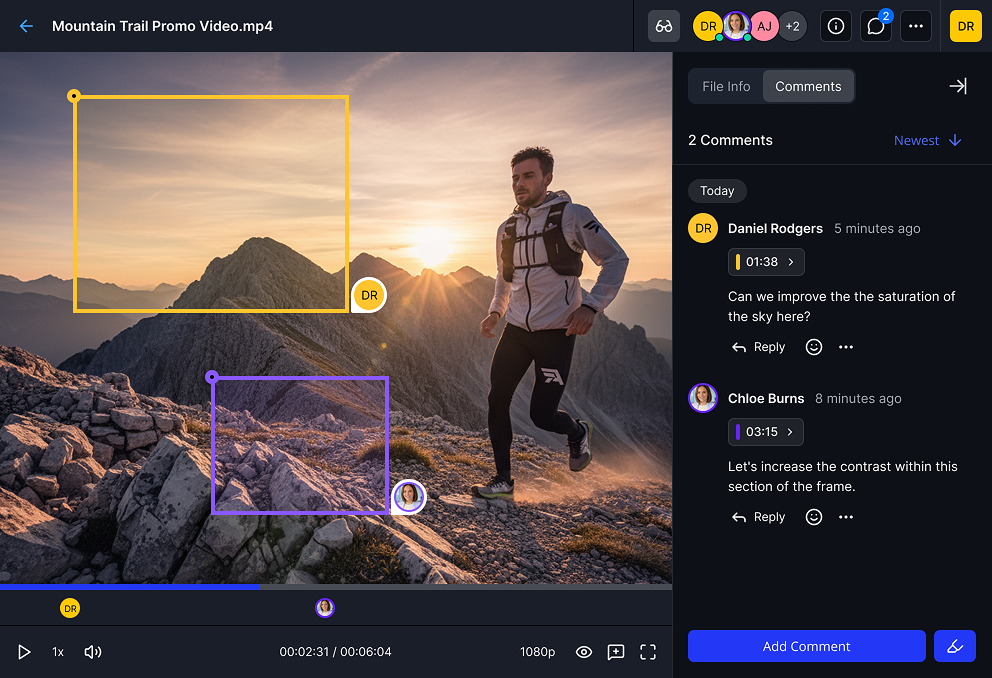
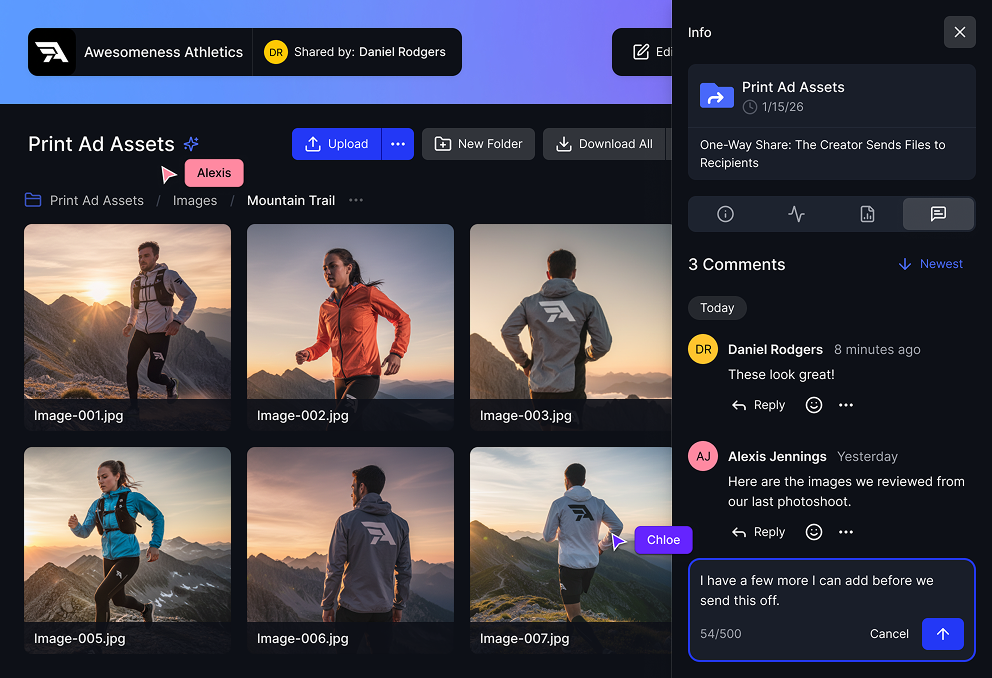
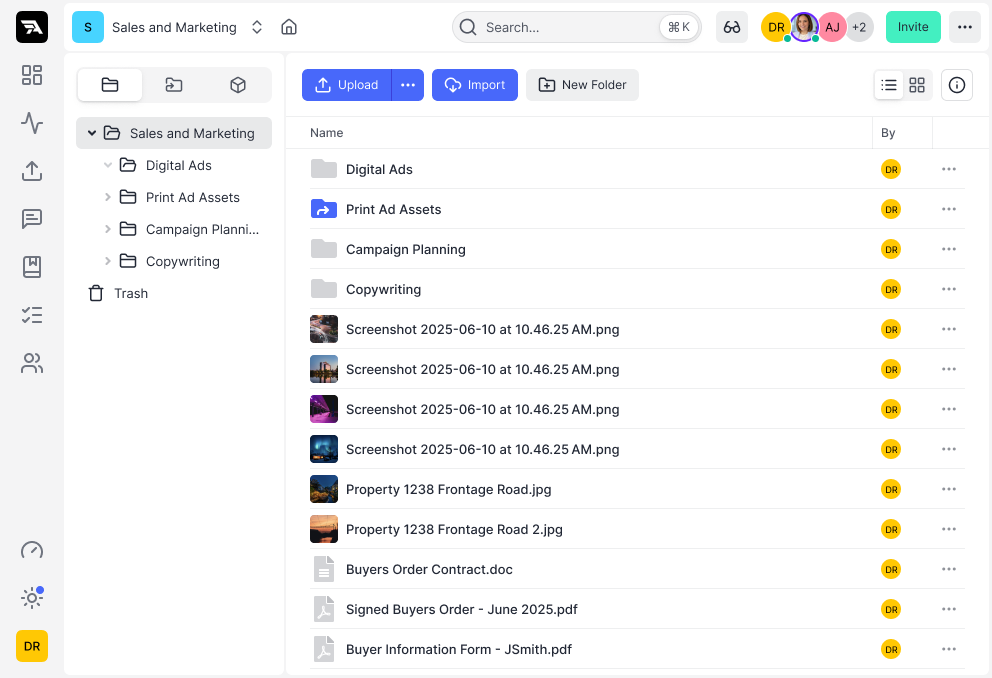
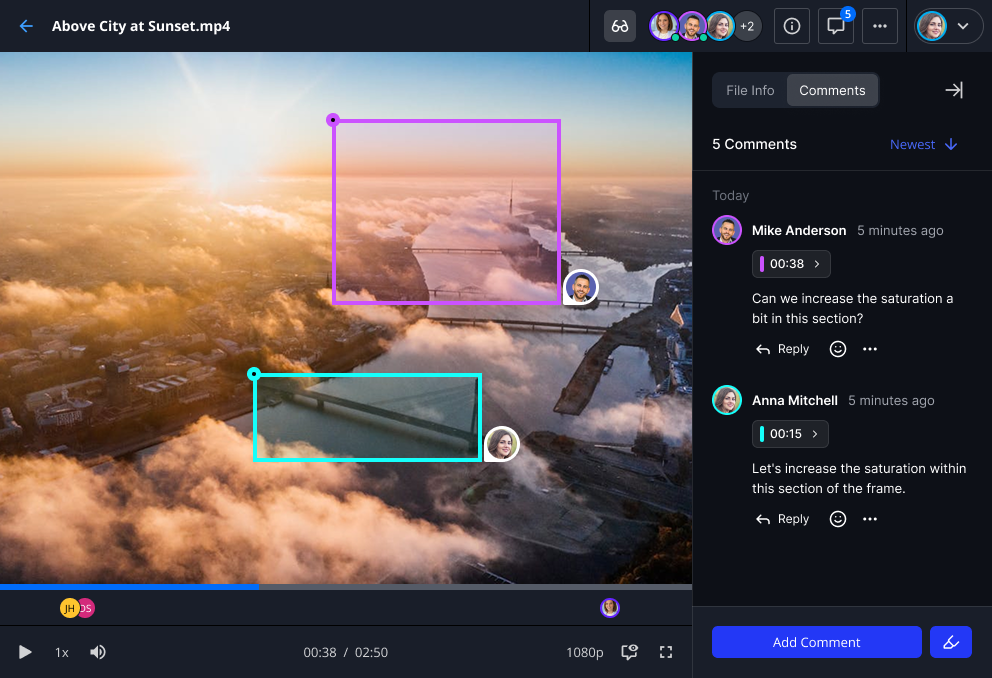
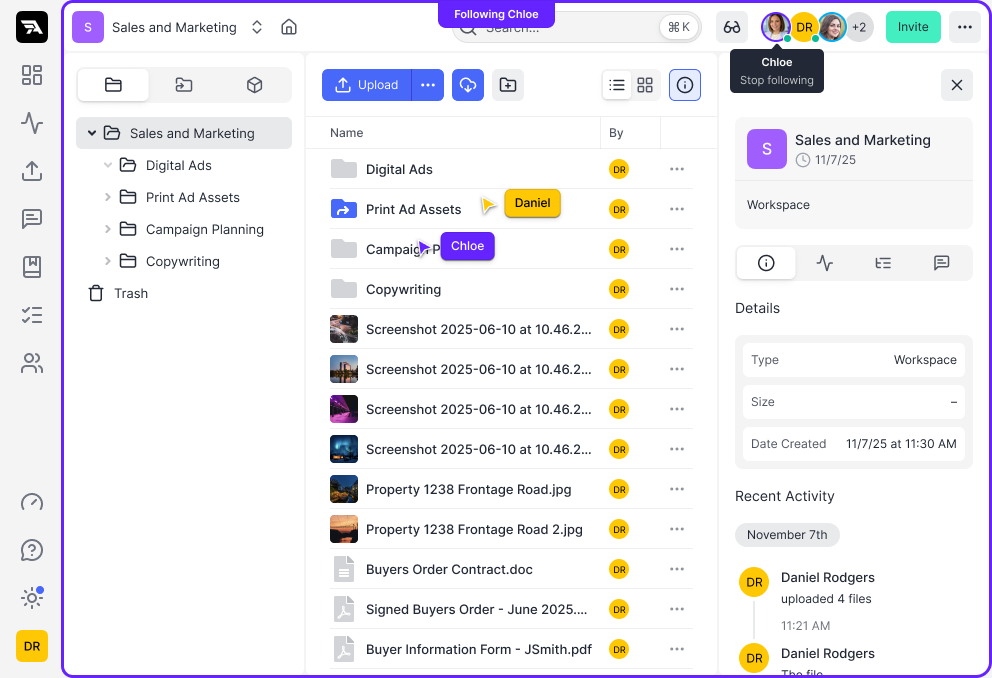
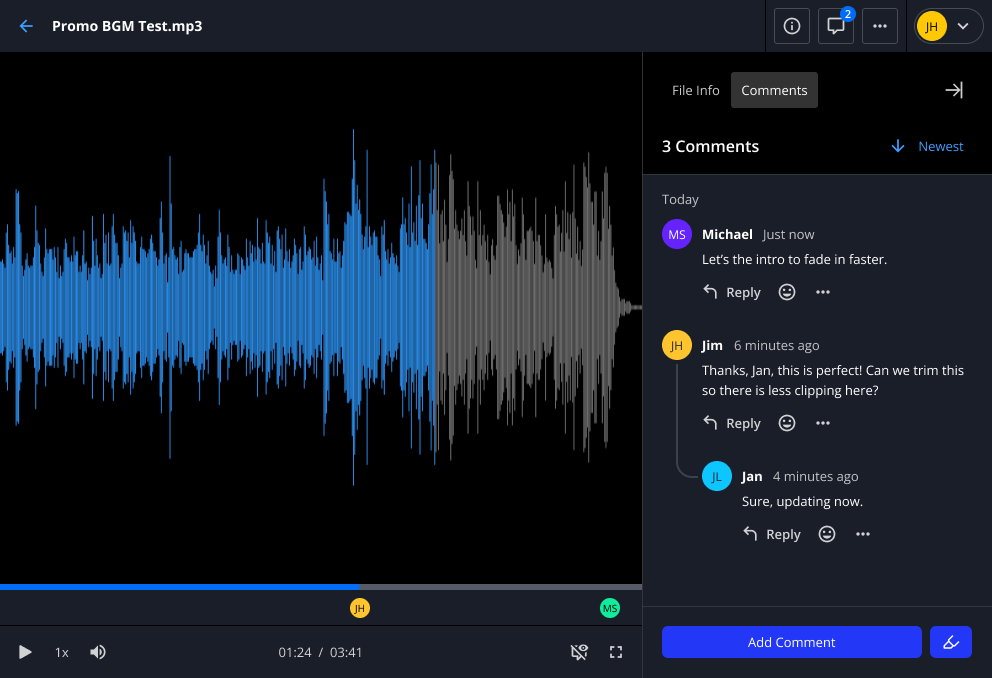
Fast.io organizes work into project workspaces where team members and AI agents share the same permissioned spaces. Each workspace acts as a self-contained environment for a project, client, or department. Collaboration happens in real time with live cursors, presence indicators, and a follow mode that lets you sync your view to any teammate's navigation, similar to how multiplayer design tools work but applied at the filesystem level. Comments can be pinned to specific video frames, document pages, image regions, or audio timestamps, keeping feedback attached to the exact content it references. Threaded discussions stay organized alongside the files they relate to. Activity tracking provides full visibility across workspaces, shared folders, portals, and individual files, including version history, view counts, download counts, comments, and shares.
Ripley AI is the built-in intelligence layer that lives inside every workspace, shared folder, portal, and Quickshare link. Intelligence is always on by default. Every file uploaded is automatically processed with text extraction, embedding generation, and summary creation, with new files indexed within seconds. This processing uses credits from the plan's monthly allocation. At the baseline level, every workspace includes semantic search across all content, auto-summarization, auto-titling, and AI metadata extraction. Teams can describe what they are looking for in plain language and get the right file returned instantly. High intelligence can be enabled per workspace to unlock a full RAG stack on documents, adding document chat with retrieval-augmented generation, page-level citations, and deeper AI querying across workspace content. Each intelligence feature has a corresponding MCP tool, so external agents connected to the workspace get the same capabilities that human users access through the UI. Ripley also generates AI-powered link previews and smart summaries that can be exported and shared with external tools.
AI agents on Fast.io are not treated as integrations. They have their own accounts with scoped permissions and full audit trails. Teams can connect Claude, ChatGPT, Gemini, Cursor, OpenClaw, or custom-built agents via MCP or REST API, then assign tasks, set approvals, and collaborate with those agents exactly as they would with a human teammate. Agent workspaces persist across sessions, meaning files survive restarts, context switches, and model updates. When a project is ready, ownership can be transferred from the agent to a human team member while the agent retains access. Authentication uses OAuth with PKCE, so there are no API keys to manage. Each supported agent has a dedicated setup guide and optimized integration path. There is a dedicated Agent Plan at $0 per month that allows AI agents to sign up and provision storage fully autonomously, with 50 GB of storage, 5,000 monthly credits, and 3 workspaces included.
The MCP server exposes 251 tools through a single connection, covering file operations, search, AI queries, sharing, tasks, approvals, comments, events, and more. Response latency is under 50 milliseconds at the 95th percentile. Transport options include Streamable HTTP, SSE, and local stdio for CLI-based connections. Any MCP-compatible client can connect, not only the agents with dedicated setup guides.
Fast.io provides two distinct sharing modes. Quickshare generates expiring links for one-off file transfers. Links can be set to expire from one hour to thirty days, protected with a password, and tracked for download activity. Recipients do not need a Fast.io account. Shared Folders provide a persistent collaboration space with member permissions, desktop app sync, and the ability to invite external collaborators without exposing the rest of the workspace. Each mode is designed for a different workflow: Quickshare for fast delivery, Shared Folders for ongoing collaboration.
Content Portals let teams create branded, password-protected spaces where clients or partners access files. Each portal can be customized with a logo, colors, background, vanity URL, custom link previews, and social links. Analytics show who opened the portal, which files were downloaded, how long recipients spent reviewing each document, and a complete audit trail for compliance. Recipients do not need to create an account. Portals can be gated behind an approval step, so internal review happens before external viewers see updated content. This makes portals suitable for deal rooms, client deliveries, press kits, and due diligence packages.
The review and approvals system provides structured approval workflows. A team member submits content for sign-off, reviewers are notified and can preview files and leave comments inline, and they approve or reject with a single click. Ripley AI generates plain-language change summaries for each approval request, highlighting what was added, removed, or modified since the last version so reviewers do not need to compare files side by side. Every approval, rejection, and comment is written to an immutable audit log with timestamps and author attribution. This is designed for regulated industries and teams that need verifiable approval records.
Tasks, todos, and worklogs are built directly into the workspace alongside the files they reference. Tasks support assignees, watchers, priorities, due dates, and status tracking from open to done, and can be linked to specific files or folders so the task and the deliverable stay connected. Todos provide lightweight checklists for quick action items like launch day rundowns or onboarding steps. Worklogs are append-only activity entries where every human edit, agent action, and status change is recorded with a timestamp and author. Entries cannot be edited or deleted. Both humans and agents write to the same log. This replaces the need for a separate project management tool, time tracker, or audit logger alongside your file storage.
The media engine handles video, audio, images, and professional file formats. Videos are automatically optimized for adaptive streaming with instant playback and smooth scrubbing on any connection. Audio files get waveform visualization for navigating silence, speech, and music patterns. Universal previews support professional formats including PSD, AI, RAW photos, and CAD drawings directly in the browser without requiring the original software. Uploaded media is transcoded into lightweight proxies while originals are preserved.
The desktop app provides native Mac sync with selective sync, offline file pinning, and a unified activity stream showing what teammates and agents are doing across all synced workspaces in real time. Workspaces mount directly into macOS Finder as native filesystem entries. Files are available offline when pinned, and changes sync automatically on reconnect. Windows support is in development. The CLI, fastio-cli, is installed via npm and provides full terminal-based workspace management including upload, search, share, and AI queries from the shell. It includes a built-in MCP server for local agent connections via stdio.
Fast.io also includes an advanced metadata system with AI metadata extraction, metadata templates, and a data grid view for browsing files as structured records. Markdown notes stored in workspaces are auto-indexed for AI, making them searchable and queryable alongside all other file types.
Cloud import supports Google Drive, Dropbox, OneDrive, and Box. Teams connect via OAuth, browse their folder tree, select what to import, and Fast.io transfers everything in the background with folder structure preserved. Imported files land in a workspace ready for the team and AI agents to search, preview, and work with immediately.
Security features include email risk screening, Geo-IP access controls, virus and malware scanning, scoped access tokens, file locking, and agent-to-human handoff controls.
Fast.io is used by marketing teams, creative agencies, video production studios, construction firms, manufacturers, real estate companies, education institutions, and legal teams. Common use cases include managing campaign assets, delivering client proofs through branded portals, running approval workflows on creative deliverables, providing AI agents with persistent cloud storage, and consolidating content from multiple cloud providers into a single searchable workspace.
Pricing is usage-based with no per-seat fees. The Free plan is $0 per month and includes 50 GB of storage, 5 seats, 3 workspaces, 10,000 monthly credits, and a 1 GB maximum file size. No credit card is required and the plan does not expire. The Professional plan is $10 per month and includes 1 TB of storage, 25 seats, 10 workspaces, 100,000 monthly credits, and a 25 GB maximum file size. The Business plan is $24 per month and includes 5 TB of storage, 100 seats, 1,000 workspaces, 240,000 monthly credits, and a 50 GB maximum file size. Additional seats beyond the included allocation on Professional and Business plans are $1 per user per month. The Agent Plan is $0 per month and allows AI agents to sign up autonomously with 50 GB of storage, 5,000 monthly credits, and 3 workspaces. All plans include MCP access.
Seller
Fast TechnologiesDiscussions
Fast.io CommunityLanguages Supported
English
Overview by
Kate Miller