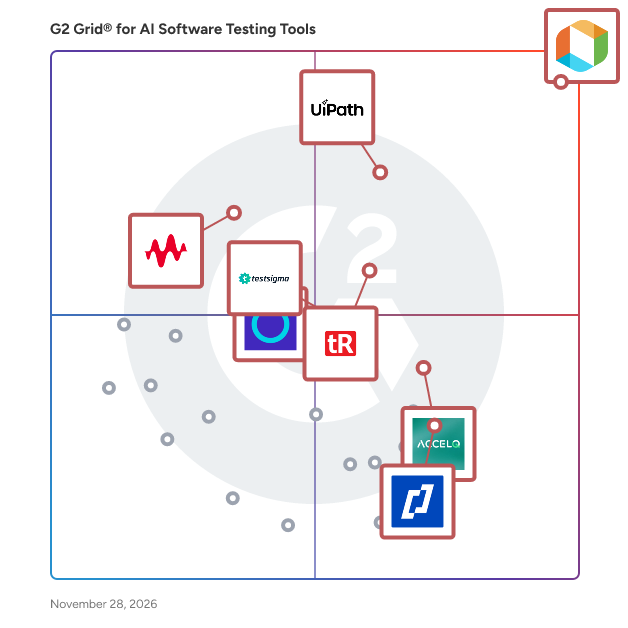
What I Often See in AI Software Testing
Feedback Pros: What Users Consistently Appreciate
- Real device coverage exposes browser and mobile differences
"real devices and browser combinations"
- BrowserStack review, Lars Lehner
- Plain English tests lower the cost of maintenance
"using plain English."
- testRigor review, Kopal Dhuria
- Coverage signals reveal gaps before a cycle closes
"missing test cases in a cycle."
- Kualitee review, Benish Adnan
Cons: Where Many Platforms Fall Short
- Remote device latency disrupts precise interaction checks sometimes
"a slight input delay when interacting with the remote devices"
- BrowserStack review, Lars Lehner
- False failures can still delay a release decision
"re-run things when we get a test suite failure"
- testRigor review, Kenneth Herrington
- Complex interfaces slow new testers during first setup
"tough to navigate."
- Kualitee review, mateo den
My Expert Takeaway on AI Software Testing
I would choose among AI software testing platforms by the quality of their failures. AI software testing tools need to catch a real regression and help a tester identify why a run failed. BrowserStack review evidence makes device coverage concrete, while testRigor feedback makes authoring and maintenance worth testing. Kualitee feedback suggests coverage mapping can help a team spot omissions. These are different strengths, and no single recent review proves that one product solves all of them.
For a pilot, I would take a real cross-platform user journey, make one small UI change, and seed one intentional defect. The team should show that its tests remain readable, catch the defect, and run on the required iOS and Android devices. I would connect the run to a build, inspect screenshots and logs, and time the triage. If a vendor claims automatic repair, I would review what assertion changed. The best AI software testing tools reduce reruns and device wait time while still catching the defect; those costs determine whether AI-assisted testing speeds the release.
AI Software Testing Tools FAQs
Which tools provide real-device access without test flakiness?
No recent review establishes zero flakiness. BrowserStack users describe extensive real-device coverage and occasional remote-device delay. A Maestro reviewer found mobile UI testing approachable but reported slow Android startup; testRigor feedback discusses reduced flakiness alongside occasional reruns. Run the same critical journey repeatedly on the required devices, then separate product defects, device-session problems, and unstable test logic before deciding.
Which tools integrate with Jenkins, GitHub Actions, and GitLab?
Treat the named integrations as a verification checklist. Recent reviews in this extract do not prove native support for all three in any one product. Ask BrowserStack, Testsigma, ACCELQ, and testRigor to demonstrate the exact pipeline used by the team, including branch triggers, secrets, parallel capacity, result links, and failure reporting. A working run in the buyer's own repository is stronger evidence than a connector logo.
What are the best AI tools for QA?
The answer depends on the QA task. BrowserStack has recent real-device testing feedback; testRigor reviewers discuss plain-English end-to-end tests; Kualitee reviewers discuss coverage and defect management; Maestro reviewers discuss mobile UI automation. Choose one regression flow and compare the effort to create, run, repair, and investigate it. These reviews support a task-matched shortlist, not a universal winner.
Will QA testers be replaced by AI?
Recent G2 reviews show tools reducing test-writing and maintenance work, while also reporting false failures, slow runs, and the need for human guidance in complex scenarios. That evidence does not support a prediction about QA jobs. Testers still define expected behavior, decide which risks matter, inspect automatic repairs, and determine whether a failure blocks release. Evaluate AI by the time it returns to those higher-judgment tasks rather than by the number of tests it generates.
How can a team use AI in software testing?
Start with a bounded task: draft a test from an approved user story, identify coverage gaps, or summarize a failure. Have a tester verify the assertion and expected result. Kualitee review evidence supports testing coverage suggestions; testRigor feedback supports readable test creation. Measure maintenance effort and false failures over several builds rather than counting generated test cases alone.
What should a small team automate first?
Choose a stable, business-critical journey such as login and checkout or account creation. Run it on the browsers and devices customers use most. A small suite with a clear owner is easier to maintain than many generated tests with no triage process. Record how long the first failure takes to explain.
Can no-code testing replace a developer's review?
No-code authoring can broaden participation. A Maestro reviewer said manual QA engineers could use it without coding; testRigor reviewers value plain-English tests. A developer or experienced tester still needs to confirm that the assertions test the right behavior and that a repaired test has not hidden a defect. Make code and test reviews part of the process.
How should startups budget for real devices?
Estimate peak concurrent sessions, the device matrix, and how often a team reruns failed tests. BrowserStack feedback highlights real-device value and pricing concerns for a solo user. Compare the quoted plan with a normal release week, not an isolated one-minute trial. Include the cost of waiting for a device when a build is blocked.
What signals an AI-generated test is brittle?
Watch for failures after harmless layout changes, assertions that only check page load, and repairs that remove checks. Run the test repeatedly with controlled data and inspect each automatically changed step. A testRigor reviewer described fewer locator fixes, but another still reported reruns. The buyer should measure its own false-failure rate.
Which artifacts should a bug report contain?
Keep the build and commit, device or browser version, test data, reproducible steps, logs, and screenshots or video. BrowserStack reviewers value cross-device reports but one described trouble opening attachments. Verify that the team can access artifacts from its issue tracker and that recordings remain available long enough to investigate.
How should enterprises compare parallel execution?
Use the normal pipeline schedule and observe queue time, run time, failure triage, and results handoff. A vendor's maximum concurrency does not show whether the team's tests can run reliably at that level. Repeat the same suite several times to identify intermittent failures and device contention.
Which controls matter for regulated test data?
Check how test accounts, secrets, screenshots, recordings, and logs are stored and deleted. Use synthetic or approved data in the pilot. Ask who can access test artifacts across projects and whether a pipeline token can be scoped. These are buyer requirements; recent product reviews in this extract do not prove compliance for a specific vendor.
How can teams govern automatic test repair?
Require a visible diff, an owner, and approval for any change to an expected result. A locator repair may be safe, but an AI system that changes an assertion can erase the test's purpose. Include a deliberate regression in the pilot to ensure the tool does not repair its way to a false pass.
How should mobile teams measure reliability?
Separate application defects from device availability, network timing, and script problems. Track rerun rate, reproducibility, average investigation time, and missed defects. BrowserStack review evidence supports checking real-device coverage; Maestro feedback supports checking iOS/Android behavior. A single green run is too little evidence.
What should support demonstrate during an evaluation?
Submit a difficult failure with logs and device details. Ask for a specific diagnosis, workaround, and escalation route. A reviewer's satisfaction with a tool does not predict the response to the team's unique pipeline problem. Include support quality in the pilot scorecard alongside run stability and maintenance effort.