Best Remote Desktop Software - Page 4

How Many Remote Desktop Software Products Does G2 Track?

Total Products under this Category: 162

Category Stats (Sep 2026)

  • Average Rating: 4.45/5 (↓0.02 vs Aug 2026) The average rating of products in this category, based on all submitted ratings
  • Top Trending Product: HelpWire (+0.17%) - Among all products in this category, HelpWire recorded the largest rating increase compared to last month

Last updated: September 26, 2026

How Does G2 Rank Remote Desktop Software Products?

Why You Can Trust G2's Software Rankings:

  • 30 Analysts and Data Experts
  • 16,400+ Authentic Reviews
  • 162+ Products
  • Unbiased Rankings

G2's software rankings are built on verified user reviews, rigorous moderation, and a consistent research methodology maintained by a team of analysts and data experts. Each product is measured using the same transparent criteria, with no paid placement or vendor influence. While reviews reflect real user experiences, which can be subjective, they offer valuable insight into how software performs in the hands of professionals. Together, these inputs power the G2 Score, a standardized way to compare tools within every category.

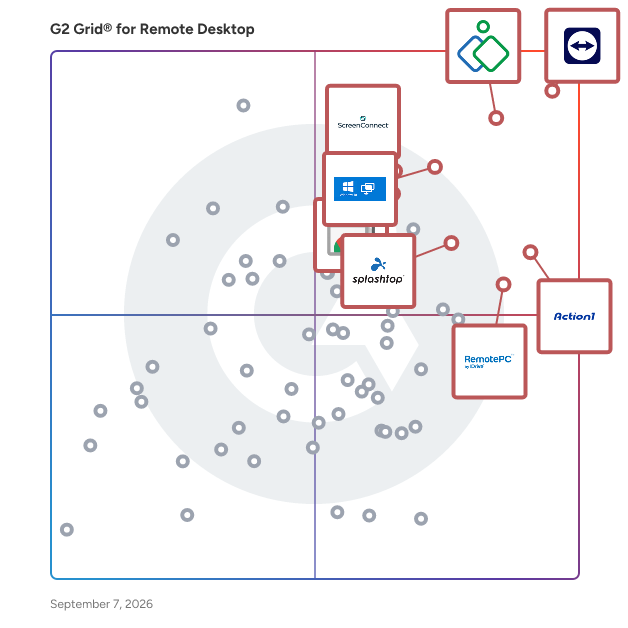
G2 Grid® for Remote Desktop Software

G2 Grid® for Remote Desktop Software plotting products by satisfaction and market presence

Highlighted products: TeamViewer, Zoho Assist, Action1, Microsoft Quick Assist, Chrome Remote Desktop, RemotePC, Splashtop Remote Access, and ScreenConnect.

Underlying data: [Grid® JSON](https://www.g2.com/categories/remote-desktop/grids.json?focus%5B%5D=teamviewer&focus%5B%5D=zoho-assist&focus%5B%5D=action1&focus%5B%5D=microsoft-quick-assist&focus%5B%5D=chrome-remote-desktop&focus%5B%5D=remotepc&focus%5B%5D=splashtop-remote-access&focus%5B%5D=screenconnect&segment=all)

Glance

Glance lets your sales rep, service rep, or trainer join the customer on your site or app, see their screen, and provide hands-on, personal guidance through highlighting, gesturing and more. Glance Cobrwose complies with the most rigorous privacy and security requirements, making it an ideal fit for enterprise financial, healthcare, software, and retail organizations. Integrations with the most popular CRMs and support tools - Salesforce, AWS, Microsoft, Genesys, Twilio, and more - make starting a cobrowsing session seamless. Get started with Glance to deliver personal, hands-on CX.

Average Rating: 4.5/5.0

Total Reviews: 23

How Do G2 Users Rate Glance?

  • Has the product been a good partner in doing business?: 10.0/10 (Category avg: 9.0/10)
  • Usage Information: 9.6/10 (Category avg: 8.7/10)
  • Remote Access/Control: 8.3/10 (Category avg: 9.1/10)
  • Device Management: 9.7/10 (Category avg: 8.7/10)

Who Is the Company Behind Glance?

  • Seller: Glance
  • Year Founded: 2000
  • HQ Location: Wakefield, MA
  • Twitter: @glancenetworks
    2,149 Twitter followers
  • LinkedIn® Page: www.linkedin.com
    73 employees on LinkedIn®
  • Phone: 1-888-945-2623

Who Uses This Product?

  • Top Industries: Information Technology and Services
  • Company Size: 65% Medium, 30% Large

What Do G2 Reviewers Say About Glance?

AI-generated summary from verified user reviews

Pros
  • Users find the ease of use in Glance makes authorizing and reviewing claims payouts very straightforward.

What Are Recent G2 Reviews of Glance?

What Are G2 Users Discussing About Glance?

Apache Guacamole

Apache Guacamole is a clientless remote desktop gateway. It supports standard protocols like VNC, RDP, and SSH.

Average Rating: 4.6/5.0

Total Reviews: 17

How Do G2 Users Rate Apache Guacamole?

  • Has the product been a good partner in doing business?: 8.3/10 (Category avg: 9.0/10)
  • Usage Information: 8.2/10 (Category avg: 8.7/10)
  • Remote Access/Control: 9.3/10 (Category avg: 9.1/10)
  • Device Management: 8.9/10 (Category avg: 8.7/10)

Who Is the Company Behind Apache Guacamole?

Who Uses This Product?

  • Top Industries: Information Technology and Services
  • Company Size: 47% Small, 29% Medium

What Are Recent G2 Reviews of Apache Guacamole?

What Are G2 Users Discussing About Apache Guacamole?

Matrix42 FastViewer

Matrix42 FastViewer is a remote support and maintenance solution designed to facilitate seamless remote control of computers and devices, regardless of location. It enables IT teams to troubleshoot issues, perform maintenance tasks, and transfer files efficiently, all while ensuring secure and reliable connections. Key Features and Functionality: - Remote Control: Access and control unattended computers and servers as if on-site, allowing for efficient troubleshooting and maintenance. - Multiple Access Points: Utilize FastViewer through a standalone web-based browser application, a desktop application for Windows and Mac, or an integrated web-based application within Matrix42’s Enterprise Service Management. - File Transfer: Easily transfer individual files and folders or synchronize entire folder structures between devices. - Multi-Monitor Support: Collaborate effectively with support for multiple monitors, enhancing the remote working experience. - Unattended Access: Manage and control devices without the need for an on-site presence, providing flexibility and scalability for IT operations. - Security: Ensure data protection with 256-bit AES encryption, safeguarding all remote sessions and file transfers. Primary Value and User Solutions: FastViewer addresses the growing need for robust remote support tools in an increasingly remote and hybrid work environment. By enabling IT departments to resolve issues remotely, it reduces the need for on-site visits, leading to significant cost and time savings. The solution enhances productivity by accelerating ticket resolution and minimizing downtime, allowing employees to focus on their core tasks without interruptions. Its flexibility and ease of use make it an ideal choice for organizations seeking to centralize IT operations and provide consistent support across various locations.

Average Rating: 4.3/5.0

Total Reviews: 79

How Do G2 Users Rate Matrix42 FastViewer?

  • Has the product been a good partner in doing business?: 8.0/10 (Category avg: 9.0/10)
  • Remote Access/Control: 10.0/10 (Category avg: 9.1/10)

Who Is the Company Behind Matrix42 FastViewer?

  • Seller: Matrix42
  • Year Founded: 1992
  • HQ Location: Frankfurt, Germany
  • Twitter: @Matrix42_global
    1,097 Twitter followers
  • LinkedIn® Page: www.linkedin.com
    624 employees on LinkedIn®

Who Uses This Product?

  • Top Industries: Information Technology and Services, Computer Software
  • Company Size: 52% Small, 42% Medium

What Do G2 Reviewers Say About Matrix42 FastViewer?

AI-generated summary from verified user reviews

Pros
  • Users find FastViewer's ease of use remarkable, making remote communication and meetings straightforward and efficient.
  • Users value the ease of connectivity for remote control, enhancing remote work efficiency and collaboration.
  • Users value the secure connection protocols of Matrix42 FastViewer, enhancing trust in remote support and communication.
  • Users praise the high-quality audio and user-friendly interface of Matrix42 FastViewer, enhancing online meeting experiences.
  • Users value the amazing video quality of Matrix42 FastViewer, enhancing their remote communication and collaboration experience.
Cons
  • Users find FastViewer relatively expensive, especially for small businesses, limiting access to its features.
  • Users find the limited features of FastViewer restrict flexibility and customization, impacting overall user experience.
  • Users face connectivity issues with Matrix42 FastViewer, leading to frustrations and disruptions during use.
  • Users experience connection issues with Matrix42 FastViewer, often facing difficulties in accessibility and data transfer.
  • Users find the slow loading time of Matrix42 FastViewer frustrating, especially during large file transfers.

What Are Recent G2 Reviews of Matrix42 FastViewer?

What Are G2 Users Discussing About Matrix42 FastViewer?

NetSupport Manager

Secure, multi-platform remote access to workstations and servers. NetSupport Manager has consistently led the way with innovative features to aid remote PC management for 34 years. Designed to operate over your LAN, WAN or the internet, securely and without the need for firewall configuration, NetSupport Manager provides a single, high-speed solution for the remote management of critical systems, servers and users – with no need for third-party services or ongoing subscription costs. Adding to traditional one-to-one remote control capabilities, NetSupport Manager excels as a one-to-many solution: from monitoring multiple systems in real time and showing the operator screen to multiple recipients for training, to file distributions across the network. Its enviable reputation for security sets it apart from others, with its use of activity logs, two-factor authentication, SSL/TLS certificates, 256-bit encryption, smart card support, AD integration and more. It also enables IT teams to provide remote support to staff off-site and allows staff working remotely to access their work PC and applications safely and securely from home. What makes NetSupport Manager unique is its range of supporting tools to ensure maximum efficiency and, most importantly, its ability to minimise system downtime and lost productivity as support issues are being addressed – making it the perfect tool of choice for any IT team.

Average Rating: 4.7/5.0

Total Reviews: 17

How Do G2 Users Rate NetSupport Manager?

  • Has the product been a good partner in doing business?: 9.6/10 (Category avg: 9.0/10)
  • Usage Information: 10.0/10 (Category avg: 8.7/10)
  • Remote Access/Control: 10.0/10 (Category avg: 9.1/10)
  • Device Management: 9.6/10 (Category avg: 8.7/10)

Who Is the Company Behind NetSupport Manager?

  • Seller: NetSupport Limited
  • Year Founded: 1989
  • HQ Location: Market Deeping, United Kingdom
  • Twitter: @NetSupportGroup
    6,759 Twitter followers
  • LinkedIn® Page: www.linkedin.com
    110 employees on LinkedIn®

Who Uses This Product?

  • Top Industries: Information Technology and Services
  • Company Size: 56% Medium, 22% Large

What Are Recent G2 Reviews of NetSupport Manager?

What Are G2 Users Discussing About NetSupport Manager?

Accops HySecure

Accops HySecure is an application access gateway that enables enterprise mobility and secure access to corporate applications, desktops and network services from any device working from any network. HySecure enables users working from any network, be it trusted LAN or untrusted WAN or Internet or mobile network to securely access corporate resources. HySecure's SPAN technology makes secure access a simple, fast deployment without requiring any complex network configurations. User can get onto a browser, desktop client or mobile application and start accessing the applications without requiring any configuration on the devices. Accops HySecure brings together the performance, simplified management and functionality required for enterprise remote access and reduces complexity and costs traditionally associated with other VPN solutions.

Average Rating: 4.5/5.0

Total Reviews: 13

How Do G2 Users Rate Accops HySecure?

  • Has the product been a good partner in doing business?: 9.3/10 (Category avg: 9.0/10)
  • Usage Information: 9.1/10 (Category avg: 8.7/10)
  • Remote Access/Control: 9.3/10 (Category avg: 9.1/10)
  • Device Management: 8.5/10 (Category avg: 8.7/10)

Who Is the Company Behind Accops HySecure?

  • Seller: Accops Systems
  • Year Founded: 2012
  • HQ Location: Pune, Maharastra
  • Twitter: @accopsinc
    231 Twitter followers
  • LinkedIn® Page: www.linkedin.com
    353 employees on LinkedIn®

Who Uses This Product?

  • Company Size: 60% Large, 40% Medium

What Do G2 Reviewers Say About Accops HySecure?

AI-generated summary from verified user reviews

Pros
  • Users value the high security offered by Accops HySecure, making it ideal for remote work needs.
  • Users value the high security and scalability of Accops HySecure, making it ideal for remote work needs.
Cons
  • Users face an information deficiency with Accops HySecure as clipboard functionality remains inaccessible despite being enabled.

What Are Recent G2 Reviews of Accops HySecure?

What Are G2 Users Discussing About Accops HySecure?

Iperius Remote

Remote Desktop Software, for Remote Support, Remote Access, and Online Meetings. Iperius Remote ensures fast and secure remote desktop connections. The software is convenient for both ITPROS and private individuals. Connect from any a PCs or Devices to another easily and stability. Iperius Remote allows connection over the internet. Remote Control Connect in a simple and rapid manner to any computer. Work as if you were present locally, transfer files, make use of chat. Complete Remote Desktop. Unattended access Install Iperius Remote as a service for unattended access. You can keep a list of the computers of your customers and connect to them in order to carry out assistance at any time. Remote Support Software Access the Servers and Computers of your customers and provide technical support in the easiest and most immediate way. You can connect multiple customers simultaneously in separate windows or have multiple operators access the same remote computer. Manage all your tasks remotely from a centralized panel Once you get in your own account, you’ll be able to see a list of all connected computers and therefore obtain an immediately accessible list of customers to whom you can provide support and managing tasks remotely. Check your Detailed Session Reports The Pro versions allow you to quickly view all the statistics relating to remote connections made. These statistics can be grouped by group, computer or operator, and filtered by specific dates. Secure Powerful Universal Iperius Remote ensures the highest possible level of security with end-to-end encryption, compliant with HIPAA and GDPR standards and Two-Factor Authentication. The video transmission technology is among the most powerful available, with a frame rate of up to 60 FPS. Iperius Remote is a multi-platform software, you can use it on Mac, Windows, Linux but also on Android and iOS.

Average Rating: 4.5/5.0

Total Reviews: 25

How Do G2 Users Rate Iperius Remote?

  • Has the product been a good partner in doing business?: 8.6/10 (Category avg: 9.0/10)
  • Usage Information: 8.3/10 (Category avg: 8.7/10)
  • Remote Access/Control: 8.9/10 (Category avg: 9.1/10)
  • Device Management: 9.2/10 (Category avg: 8.7/10)

Who Is the Company Behind Iperius Remote?

  • Seller: Enter
  • HQ Location: Grottammare, AP
  • Twitter: @enter
    2,965 Twitter followers
  • LinkedIn® Page: www.linkedin.com
    29 employees on LinkedIn®

Who Uses This Product?

  • Top Industries: Information Technology and Services
  • Company Size: 85% Small, 15% Medium

What Do G2 Reviewers Say About Iperius Remote?

AI-generated summary from verified user reviews

Pros
  • Users value the automation for unattended access, enabling quick server restarts and efficient remote troubleshooting.
  • Users love the super fast connection speed of Iperius Remote, ensuring quick access for seamless remote troubleshooting.
  • Users appreciate the superior connectivity of Iperius Remote, enabling seamless access and quick troubleshooting for uninterrupted services.
  • Users value the ease of use of Iperius Remote, finding it intuitive for quick and efficient access.
  • Users love the easy access provided by Iperius Remote for quick and seamless remote troubleshooting and service management.
Cons
  • Users often find audio issues during video conferencing, impacting their overall experience with Iperius Remote.
  • Users find the tool great, but it needs improvement for video conferencing capabilities to enhance overall usability.
  • Users find the video quality lacking during conferencing, which impacts their overall experience with Iperius Remote.

What Are Recent G2 Reviews of Iperius Remote?

What Are G2 Users Discussing About Iperius Remote?

Cameyo

Cameyo’s Virtual App Delivery (VAD) platform provides an ultra-secure, simple, and cost-effective cloud desktop solution for enabling you to deliver all your apps – legacy Windows, internal web, and SaaS – to any device without the need for legacy virtual desktops or VPNs. Unlike traditional VDI and DaaS solutions, Cameyo is the only cloud-native virtualization solution that delivers any application to any device without delivering the Windows OS. Cameyo’s cloud desktop solution dramatically reduces cost & complexity while increasing security and providing a more seamless user experience. Cameyo is one of three Chrome Enterprise Recommended virtualization solutions globally, and hundreds of enterprises and organizations across all industries utilize Cameyo to deliver business-critical applications to hundreds of thousands of users worldwide. As of August 2022, Cameyo has a Net Promoter Score (NPS) of +83 with zero detractors – 100% of responding customers would recommend Cameyo to their peers. To learn more, visit cameyo.com.

Average Rating: 4.7/5.0

Total Reviews: 31

How Do G2 Users Rate Cameyo?

  • Has the product been a good partner in doing business?: 9.8/10 (Category avg: 9.0/10)
  • Usage Information: 8.7/10 (Category avg: 8.7/10)
  • Remote Access/Control: 10.0/10 (Category avg: 9.1/10)
  • Device Management: 10.0/10 (Category avg: 8.7/10)

Who Is the Company Behind Cameyo?

  • Seller: Cameyo
  • Year Founded: 2018
  • HQ Location: Cary, NC
  • Twitter: @cameyoco
    614 Twitter followers
  • LinkedIn® Page: www.linkedin.com
    4 employees on LinkedIn®

Who Uses This Product?

  • Top Industries: Computer Software
  • Company Size: 45% Small, 32% Large

What Do G2 Reviewers Say About Cameyo?

AI-generated summary from verified user reviews

Pros
  • Users appreciate the excellent customer support of Cameyo, enhancing their overall experience and satisfaction.
  • Users find the ease of use in Cameyo complemented by excellent support and seamless ChromeOS integration.
  • Users highlight the seamless integration with ChromeOS, enhancing their experience with ease and excellent support.
Cons
  • Users express concern over removed features without notice, lack of communication, and additional costs for support.
  • Users are frustrated by the poor customer support, including unexpected feature removals and lack of communication.

What Are Recent G2 Reviews of Cameyo?

What Are G2 Users Discussing About Cameyo?

AeroAdmin

All-in-one solution for everyday tasks in professional and private life AeroAdmin is a free remote desktop software that does not require installation or configuration. It is ready for use right after downloading and easily connects computers in different local area networks, behind NAT. Key Features: > No Installation and Configuration > Connects Computers in Different LAN, and works behind NAT > Unattended Access to Remote PCS and SERVERS > Total AES + RSA Encryption

Average Rating: 4.0/5.0

Total Reviews: 10

How Do G2 Users Rate AeroAdmin?

  • Has the product been a good partner in doing business?: 9.4/10 (Category avg: 9.0/10)
  • Usage Information: 7.4/10 (Category avg: 8.7/10)
  • Remote Access/Control: 9.7/10 (Category avg: 9.1/10)
  • Device Management: 7.2/10 (Category avg: 8.7/10)

Who Is the Company Behind AeroAdmin?

Who Uses This Product?

  • Company Size: 70% Small, 30% Medium

What Do G2 Reviewers Say About AeroAdmin?

AI-generated summary from verified user reviews

Pros
  • Users praise the easy connection of AeroAdmin, finding its user-friendly interface beneficial for remote support.
  • Users appreciate the easy setup of AeroAdmin, finding it user-friendly and straightforward for remote connections.
  • Users appreciate the user-friendly interface of AeroAdmin, making remote desktop connections easy and accessible.
Cons
  • Users experience occasional lagging resolution in AeroAdmin, suggesting improvements for speed and stability compared to TeamViewer.
  • Users note that the slow performance of AeroAdmin can hinder their experience compared to faster alternatives.

What Are Recent G2 Reviews of AeroAdmin?

Parsec

Remote desktop reimagined. Enable your creative teams to work together from anywhere, in seamless 4k at 60 frames per second with near-zero latency. Parsec’s peer-to-peer streaming provides secure, flexible, effortless access to whatever you do, at any time, from wherever you go. Quickly deploy on-prem or in the cloud, and team members can access their Mac or PC from anywhere. Parsec installs in seconds, and teams can take their preferred peripherals with them to create from wherever inspiration strikes – Parsec supports mouse, keyboard, gamepads, and drawing tablets with precise pen tilt and pressure. Parsec offers two business solutions: Parsec for Teams and Parsec for Enterprise. Parsec for Teams is built to support remote and hybrid work by keeping data secure on the host while empowering admins with simple yet powerful security and access controls. Teams security and admin features include SAML single sign-on, audit logs, and group and computer management. Upgrade to Enterprise for additional security and scalability, with access to features including a high performance relay, and API automation and reporting.

Average Rating: 4.7/5.0

Total Reviews: 26

How Do G2 Users Rate Parsec?

  • Has the product been a good partner in doing business?: 8.7/10 (Category avg: 9.0/10)
  • Usage Information: 8.4/10 (Category avg: 8.7/10)
  • Remote Access/Control: 10.0/10 (Category avg: 9.1/10)
  • Device Management: 7.9/10 (Category avg: 8.7/10)

Who Is the Company Behind Parsec?

  • Seller: Parsec Cloud
  • Year Founded: 2016
  • HQ Location: New York, US
  • Twitter: @parsecteam
    12,668 Twitter followers
  • LinkedIn® Page: www.linkedin.com
    49 employees on LinkedIn®

Who Uses This Product?

  • Top Industries: Media Production
  • Company Size: 50% Medium, 35% Small

What Do G2 Reviewers Say About Parsec?

AI-generated summary from verified user reviews

Pros
  • Users value the mobile compatibility of Parsec, enabling seamless remote access to work PCs on the go.
  • Users appreciate the tool utility of Parsec, enabling convenient access to remote work PCs for extended periods.
Cons
  • Users experience poor customer support with Parsec, facing unresponsiveness and vague solutions during critical issues.
  • Users report slow performance with Parsec, experiencing frequent crashes that hinder productivity and complicate work efforts.
  • Users report frequent technical issues with Parsec, including hard freezes and unresponsive support complicating their workflow.

What Are Recent G2 Reviews of Parsec?

What Are G2 Users Discussing About Parsec?

ShowMyPC

ShowMyPC provides easy-to-use and secure remote access, remote support, collaboration, and productivity tools for individuals and businesses worldwide. Browser-based, no download HTML5 viewer, blazing-fast Windows RDP support, access and manage unattended PCs.

Average Rating: 4.1/5.0

Total Reviews: 18

How Do G2 Users Rate ShowMyPC?

  • Has the product been a good partner in doing business?: 8.3/10 (Category avg: 9.0/10)
  • Usage Information: 9.7/10 (Category avg: 8.7/10)
  • Remote Access/Control: 9.4/10 (Category avg: 9.1/10)
  • Device Management: 9.8/10 (Category avg: 8.7/10)

Who Is the Company Behind ShowMyPC?

  • Seller: ShowMyPC
  • HQ Location: Santa Clara,CA
  • Twitter: @desktopsharings
    2 Twitter followers
  • LinkedIn® Page: www.linkedin.com
    1 employees on LinkedIn®

Who Uses This Product?

  • Top Industries: Information Technology and Services
  • Company Size: 56% Small, 22% Medium

What Do G2 Reviewers Say About ShowMyPC?

AI-generated summary from verified user reviews

Pros
  • Users value the ease of use of ShowMyPC, finding it simple and efficient for remote access and support.
  • Users love the easy access of ShowMyPC, enjoying its straightforward setup and reliable remote support.
  • Users love the easy setup of ShowMyPC, finding it straightforward and perfect for quick remote access.
  • Users highlight the reliable remote connectivity of ShowMyPC, enhancing their experience with straightforward access and support.
  • Users commend the reliability of ShowMyPC, enjoying its straightforward functionality for remote access and support.
Cons
  • Users find feature limitations in ShowMyPC, especially compared to advanced remote access tools, somewhat restricting.
  • Users find limited customization options in ShowMyPC, making it less versatile than more advanced remote access tools.
  • Users find ShowMyPC's limited features inadequate for advanced tasks, making it feel basic compared to other tools.
  • Users find missing advanced features in ShowMyPC, feeling it's limited compared to other remote access tools.
  • Users find ShowMyPC not user-friendly, with a limited interface and minimal advanced features affecting overall ease of use.

What Are Recent G2 Reviews of ShowMyPC?

What Are G2 Users Discussing About ShowMyPC?

Supremo

Supremo is a powerful, safe (thanks to the AES 256-bit encryption) and complete solution for remote desktop control and support. It is constituted by one executable file, so it doesn’t need any installation and allows you to access a remote PC/server or host a Meeting in just a few seconds.

Average Rating: 4.0/5.0

Total Reviews: 25

How Do G2 Users Rate Supremo?

  • Has the product been a good partner in doing business?: 7.2/10 (Category avg: 9.0/10)
  • Usage Information: 7.4/10 (Category avg: 8.7/10)
  • Remote Access/Control: 7.5/10 (Category avg: 9.1/10)
  • Device Management: 7.6/10 (Category avg: 8.7/10)

Who Is the Company Behind Supremo?

  • Seller: Nanosystems
  • Year Founded: 1986
  • HQ Location: Ascoli Piceno, Italy
  • Twitter: @NanosystemsSrl
    344 Twitter followers
  • LinkedIn® Page: www.linkedin.com
    20 employees on LinkedIn®

Who Uses This Product?

  • Top Industries: Marketing and Advertising, Computer Software
  • Company Size: 44% Small, 28% Medium

What Do G2 Reviewers Say About Supremo?

AI-generated summary from verified user reviews

Pros
  • Users appreciate the ease of use of Supremo, enjoying seamless remote connections without the need for registration.
  • Users appreciate the seamless file transfer feature of Supremo, enhancing convenience and security for remote work.
  • Users enjoy the seamless mobile compatibility of Supremo, facilitating efficient remote control and printing from anywhere.
  • Users enjoy the seamless connections for remote control, allowing secure and effortless access to their files from home.
  • Users appreciate the super security provided by Supremo, enhanced by password authentication for remote access.

What Are Recent G2 Reviews of Supremo?

What Are G2 Users Discussing About Supremo?

MSP360 Connect

MSP360 Connect is a remote desktop solution designed for MSPs, IT professionals, businesses, and individuals. Whether providing remote support, managing IT infrastructure, or accessing personal devices, MSP360 Connect delivers fast, stable, and secure remote access. With features like unattended access, strong encryption, and seamless connectivity, it ensures efficient troubleshooting, remote maintenance, and collaboration—eliminating the need for on-site visits.

Average Rating: 4.2/5.0

Total Reviews: 51

How Do G2 Users Rate MSP360 Connect?

  • Has the product been a good partner in doing business?: 9.3/10 (Category avg: 9.0/10)
  • Usage Information: 8.5/10 (Category avg: 8.7/10)
  • Remote Access/Control: 8.5/10 (Category avg: 9.1/10)
  • Device Management: 8.4/10 (Category avg: 8.7/10)

Who Is the Company Behind MSP360 Connect?

  • Seller: MSP360
  • Year Founded: 2011
  • HQ Location: Pittsburgh, PA
  • Twitter: @msp360
    2,785 Twitter followers
  • LinkedIn® Page: www.linkedin.com
    120 employees on LinkedIn®

Who Uses This Product?

  • Who Uses This: Owner
  • Top Industries: Information Technology and Services
  • Company Size: 74% Small, 15% Medium

What Do G2 Reviewers Say About MSP360 Connect?

AI-generated summary from verified user reviews

Pros
  • Users find MSP360 Connect to be an affordable solution for effectively managing remote client devices.
  • Users find MSP360 Connect impressively easy to use, simplifying tasks and ensuring efficient data management and security.
  • Users value the easy connection of MSP360 Connect, enabling smooth access and management of systems remotely.
  • Users find the easy deployment of MSP360 Connect simplifies installation and enhances remote management capabilities.
  • Users appreciate the easy setup of MSP360 Connect, making transitions smooth and efficient for backup management.
Cons
  • Users report audio issues impacting their experience, with problems like mouse functionality and custom settings not saving.
  • Users report encountering remote access issues, including problems with mouse functionality and custom settings not being retained.

What Are Recent G2 Reviews of MSP360 Connect?

What Are G2 Users Discussing About MSP360 Connect?

Crossover

Crossover allows users to run Windows on Mac and Linux, easily and affordably.

Average Rating: 3.7/5.0

Total Reviews: 19

How Do G2 Users Rate Crossover?

  • Has the product been a good partner in doing business?: 7.1/10 (Category avg: 9.0/10)
  • Usage Information: 10.0/10 (Category avg: 8.7/10)

Who Is the Company Behind Crossover?

  • Seller: codeweavers
  • Year Founded: 1996
  • HQ Location: St. Paul, Minnesota
  • Twitter: @CodeWeavers
    6,724 Twitter followers
  • LinkedIn® Page: www.linkedin.com
    56 employees on LinkedIn®

Who Uses This Product?

  • Top Industries: Information Technology and Services
  • Company Size: 52% Small, 33% Large

What Are Recent G2 Reviews of Crossover?

What Are G2 Users Discussing About Crossover?

NoMachine Everybody

Free remote desktop software.

Average Rating: 4.5/5.0

Total Reviews: 10

How Do G2 Users Rate NoMachine Everybody?

  • Has the product been a good partner in doing business?: 6.7/10 (Category avg: 9.0/10)
  • Usage Information: 8.1/10 (Category avg: 8.7/10)
  • Remote Access/Control: 8.6/10 (Category avg: 9.1/10)
  • Device Management: 8.0/10 (Category avg: 8.7/10)

Who Is the Company Behind NoMachine Everybody?

  • Seller: NoMachine
  • Year Founded: 2003
  • HQ Location: Grand Duchy of Luxembourg, LU
  • Twitter: @NoMachine
    1,157 Twitter followers
  • LinkedIn® Page: www.linkedin.com
    61 employees on LinkedIn®

Who Uses This Product?

  • Company Size: 50% Small, 30% Medium

What Are Recent G2 Reviews of NoMachine Everybody?

Ammyy

Ammyy is a multi-task solution used as remote access software for remote server administration, distant assistance, education and virtual classes.

Average Rating: 4.1/5.0

Total Reviews: 10

How Do G2 Users Rate Ammyy?

  • Has the product been a good partner in doing business?: 8.9/10 (Category avg: 9.0/10)
  • Usage Information: 9.0/10 (Category avg: 8.7/10)
  • Remote Access/Control: 9.6/10 (Category avg: 9.1/10)
  • Device Management: 9.4/10 (Category avg: 8.7/10)

Who Is the Company Behind Ammyy?

Who Uses This Product?

  • Company Size: 40% Medium, 40% Small

What Are Recent G2 Reviews of Ammyy?

What Are G2 Users Discussing About Ammyy?

Tian Lin
TL
Researched and written by Tian Lin
Updated April 9, 2026