Best Product Lifecycle Management (PLM) Software with MES Capabilities

How Many Product Lifecycle Management (PLM) Software Products Does G2 Track?

Total Products under this Category: 146

Category Stats (Sep 2026)

  • Average Rating: 4.33/5 The average rating of products in this category, based on all submitted ratings
  • Top Trending Product: Teamcenter (+0.65%) - Among all products in this category, Teamcenter recorded the largest rating increase compared to last month

Last updated: September 01, 2026

How Does G2 Rank Product Lifecycle Management (PLM) Software Products?

Why You Can Trust G2's Software Rankings:

  • 30 Analysts and Data Experts
  • 9,500+ Authentic Reviews
  • 146+ Products
  • Unbiased Rankings

G2's software rankings are built on verified user reviews, rigorous moderation, and a consistent research methodology maintained by a team of analysts and data experts. Each product is measured using the same transparent criteria, with no paid placement or vendor influence. While reviews reflect real user experiences, which can be subjective, they offer valuable insight into how software performs in the hands of professionals. Together, these inputs power the G2 Score, a standardized way to compare tools within every category.

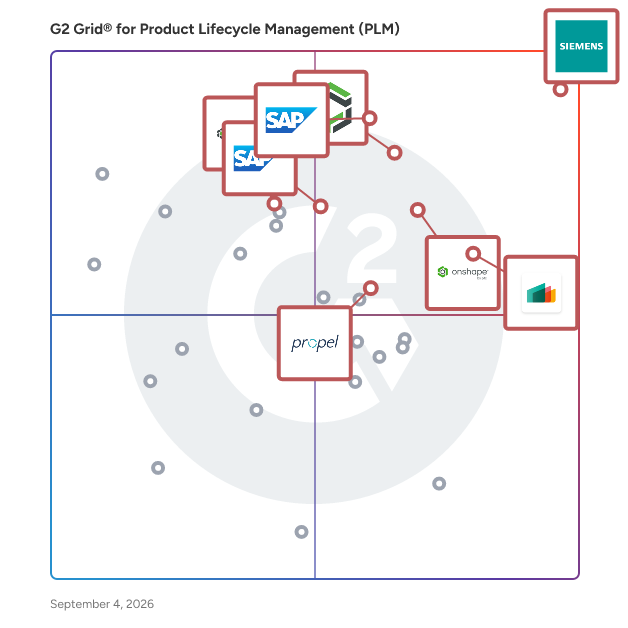
G2 Grid® for Product Lifecycle Management (PLM) Software

G2 Grid® for Product Lifecycle Management (PLM) Software plotting products by satisfaction and market presence

Highlighted products: Teamcenter, SAP Integrated Product Development, Arena PLM & QMS, Odoo MRP, Onshape, SAP PLM, Propel, and Windchill.

Underlying data: [Grid® JSON](https://www.g2.com/categories/product-lifecycle-management-plm/grids.json?focus%5B%5D=teamcenter&focus%5B%5D=sap-integrated-product-development&focus%5B%5D=arena-plm-qms&focus%5B%5D=odoo-mrp&focus%5B%5D=onshape&focus%5B%5D=sap-plm&focus%5B%5D=propel-propel&focus%5B%5D=ptc-windchill)

Teamcenter

Teamcenter® software is a modern, adaptable product lifecycle management (PLM) system designed to help organizations manage the entire lifecycle of a product from inception, through engineering design and manufacturing, to service and disposal. By connecting people and processes across functional silos, Teamcenter utilizes a digital thread to facilitate innovation and streamline product development. This comprehensive approach enables teams to collaborate effectively, ensuring that every stakeholder is engaged in the product development process. The target audience for Teamcenter encompasses a diverse range of professionals, including manufacturers, engineers, and product managers across industries such as automotive, aerospace, electronics, and consumer goods. These professionals often face complex challenges in product development, including managing intricate supply chains, ensuring compliance with regulations, and meeting customer demands for faster innovation. Teamcenter addresses these challenges by providing a centralized platform where teams can access critical information, share insights, and make informed decisions throughout the product lifecycle. Key features of Teamcenter include robust data management capabilities that allow users to organize and control product data efficiently. The software supports advanced visualization tools that enable teams to review and analyze designs collaboratively, which reduces errors and enhances decision-making. Additionally, Teamcenter's intuitive user interface simplifies navigation, making it easier for users to engage with the system and access the information they need. The platform also offers flexible deployment options, allowing organizations to choose between on-premises, cloud-based, or SaaS solutions via Teamcenter X, ensuring that they can adapt the software to their specific needs and infrastructure. The benefits of using Teamcenter are significant. Organizations can innovate faster by leveraging the software's comprehensive portfolio of solutions tailored to various aspects of product development. The integration of processes and data helps to eliminate silos, fostering collaboration and improving communication among teams. Furthermore, Teamcenter's scalability ensures that it can grow alongside an organization, accommodating increasing complexity and volume in product development efforts. By providing a unified platform for managing the entire product lifecycle, Teamcenter empowers organizations to deliver high-quality products more efficiently and effectively. In essence, Teamcenter serves as a vital tool for organizations looking to enhance their product development processes, ensuring that they can navigate the complexities of modern manufacturing and meet the evolving demands of the market.

Average Rating: 4.3/5.0

Total Reviews: 1,410

How Do G2 Users Rate Teamcenter?

  • Product Intelligence: 8.6/10 (Category avg: 7.5/10)
  • Ease of Use: 7.8/10 (Category avg: 8.4/10)
  • Development: 9.0/10 (Category avg: 8.1/10)
  • ECO Management: 8.6/10 (Category avg: 8.3/10)

Who Is the Company Behind Teamcenter?

Who Uses This Product?

  • Who Uses This: Design Engineer, Application Engineer
  • Top Industries: Automotive, Aviation & Aerospace
  • Company Size: 52% Large, 32% Medium

What Do G2 Reviewers Say About Teamcenter?

AI-generated summary from verified user reviews

Pros
  • Users appreciate the ease of use of Teamcenter, highlighting its friendly setup and seamless integration for all disciplines.
  • Users appreciate the flexibility and integration capabilities of Teamcenter for effective data management and unique workflows.
  • Users value the seamless CAD/ERP integrations of Teamcenter, enhancing their product development and engineering workflows.
  • Users value the seamless integration and comprehensive functionality of Teamcenter, enhancing their product development process.
  • Users value Teamcenter's flexibility in creating unique workflows, ensuring quality and organization in product development.
Cons
  • Users face difficult usability with Teamcenter, struggling with complex workflows and configuration challenges that hinder productivity.
  • Users report a significant learning difficulty with Teamcenter due to its confusing workflows and dated user interface.
  • Users often face a steep learning curve due to customization requirements and separate view modifications in Teamcenter.
  • Users find usability complex, with challenging workflows and setups that hinder effective adoption, especially for small businesses.
  • Users find Teamcenter's interface not intuitive, with confusing features and processes that hinder efficiency and usability.

What Are Recent G2 Reviews of Teamcenter?

What Are G2 Users Discussing About Teamcenter?

Arena PLM & QMS

Arena by PTC is a cloud-native product lifecycle management (PLM) and quality management system (QMS) that unifies product and quality information in a secure, single source of truth. By hosting all electrical, mechanical, and software information in a centralized product record, Arena enables every participant throughout the entire product lifecycle to work together anytime and anywhere, increasing visibility and traceability. This accelerates new product development (NPD) and new product introduction (NPI) by streamlining processes, automating review cycles, and reducing errors. Arena PLM keeps internal teams and supply chain partners on the same page. Our scalable and collaborative platform streamlines engineering change reviews, simplifies bill of materials (BOM) management and document control, mitigates supply chain risk, and helps speed product launches. Arena QMS connects quality and product record information into a single, secure system. Easily traceable closed-loop quality and product processes help you introduce high-quality products to market while ensuring compliance with quality standards and regulations, such as FDA 21 CFR Part 820, FDA 21 CFR Part 11, ISO 13485, and AS 9100. Arena Supply Chain Intelligence (SCI) provides real-time electronic component risk and compliance information to reduce supply chain risk throughout NPI and NPD. With Arena SCI embedded within Arena PLM, you can proactively monitor the health of your BOM and mitigate component issues throughout the product lifecycle, as well as ensure electronic component compliance as regulatory requirements evolve. Arena’s AI capabilities create smarter, more personalized experiences that empower every customer while adhering to its responsible AI policies. Arena AI Assistant uses a conversational interface to help users navigate Arena with ease and reduce onboarding time, while Arena AI Engine drives faster document reviews and comparisons to further speed workflows. Arena supports more than 1,500 complex high-tech electronics, medical device, and aerospace/defense companies around the world. Using Arena’s proven cloud-native solutions, your internal teams and external partners can leverage the most comprehensive product development platform to accelerate product launches while reducing expenses, increasing profitability, and speeding time to market.

Average Rating: 4.2/5.0

Total Reviews: 456

How Do G2 Users Rate Arena PLM & QMS?

  • Product Intelligence: 7.2/10 (Category avg: 7.5/10)
  • Ease of Use: 8.1/10 (Category avg: 8.4/10)
  • Development: 7.9/10 (Category avg: 8.1/10)
  • ECO Management: 8.6/10 (Category avg: 8.3/10)

Who Is the Company Behind Arena PLM & QMS?

  • Seller: PTC
  • Company Website:
  • Year Founded: 1985
  • HQ Location: Boston, Massachusetts
  • Twitter: @PTC
    37,560 Twitter followers
  • LinkedIn® Page: www.linkedin.com
    8,145 employees on LinkedIn®

Who Uses This Product?

  • Who Uses This: Mechanical Engineer, Engineer
  • Top Industries: Medical Devices, Electrical/Electronic Manufacturing
  • Company Size: 57% Medium, 26% Small

What Do G2 Reviewers Say About Arena PLM & QMS?

AI-generated summary from verified user reviews

Pros
  • Users find Arena PLM & QMS to be user-friendly, with excellent support and seamless integration enhancing their experience.
  • Users value the structured document management in Arena PLM & QMS, enhancing efficiency and compliance in workflows.
  • Users find Arena PLM & QMS's document control system convenient and effective for compliance and workflow management.
  • Users value the ease of use of Arena PLM & QMS, highlighting seamless migrations and responsive support.
  • Users praise the excellent customer support of Arena PLM & QMS, appreciating quick and effective assistance at all times.
Cons
  • Users find feature limitations in Arena PLM & QMS, especially needing extra tools for better tracking and integration.
  • Users identify missing features like auto text and better template creation, hindering efficiency in project tracking.
  • Users find the difficult usability of Arena PLM & QMS frustrating, especially when transitioning from other systems.
  • Users experience limited functionality in Arena PLM & QMS, requiring additional software for effective production tracking.
  • Users find the non-intuitive interface of Arena PLM & QMS frustrating, complicating workflow and navigation.

What Are Recent G2 Reviews of Arena PLM & QMS?

What Are G2 Users Discussing About Arena PLM & QMS?

Windchill

PTC's Market Leading PLM Solution, Windchill, is an application suite that manages all aspects of the product development lifecycle—from concept through service and retirement—by enabling a digital thread of product parts, materials, and configuration information.

Average Rating: 4.1/5.0

Total Reviews: 110

How Do G2 Users Rate Windchill?

  • Product Intelligence: 8.2/10 (Category avg: 7.5/10)
  • Ease of Use: 7.6/10 (Category avg: 8.4/10)
  • Development: 8.2/10 (Category avg: 8.1/10)
  • ECO Management: 9.3/10 (Category avg: 8.3/10)

Who Is the Company Behind Windchill?

  • Seller: PTC
  • Year Founded: 1985
  • HQ Location: Boston, Massachusetts
  • Twitter: @PTC
    37,560 Twitter followers
  • LinkedIn® Page: www.linkedin.com
    8,145 employees on LinkedIn®
  • Ownership: NASDAQ: PTC

Who Uses This Product?

  • Who Uses This: Design Engineer, Section Engineer
  • Top Industries: Automotive, Mechanical or Industrial Engineering
  • Company Size: 55% Large, 33% Medium

What Do G2 Reviewers Say About Windchill?

AI-generated summary from verified user reviews

Pros
  • Users appreciate the smooth CAD integration in Windchill, enhancing collaboration and organization across engineering teams.
  • Users appreciate the strong data management and version control in Windchill, streamlining collaboration and reducing errors.
  • Users appreciate the ease of use in Windchill, highlighting its seamless integration and user-friendly features for data management.
  • Users value the enhanced collaboration in Windchill, benefiting from centralized data management and seamless CAD integration.
  • Users value the high customizability of Windchill, enabling tailored solutions that fit their specific business needs seamlessly.
Cons
  • Users find Windchill has a steep learning curve and outdated interface, complicating the user experience for newcomers.
  • Users struggle with the steep learning curve of Windchill, making it challenging to navigate and utilize effectively.
  • Users find Windchill's poor interface design frustrating, particularly due to its complexity and outdated feel.
  • Users often find the significant training required for Windchill to be a barrier, particularly for new users.
  • Users find that assembly issues complicate the check-in process, often requiring time-consuming troubleshooting to resolve.

What Are Recent G2 Reviews of Windchill?

What Are G2 Users Discussing About Windchill?

Autodesk Fusion Manage

What is Autodesk Fusion Manage? Fusion Manage is cloud-based product lifecycle management that is easy to implement and use. Powerful PLM processes with data-driven workflows empower greater productivity across roles and responsibilities. As teams work together to bring product ideas to life, everyone uses the same data and live record of a product. Enjoy the flexibility, faster time to value, and low total cost of ownership of cloud PLM that adapts to your business. Implement what you need, when you need it with the simplicity of configurable, out-of-the-box workflows and an open API for integrations with other business systems. Key features: - New product introduction: Reduce delays and get to market faster with project templates, standardized phase-gate milestones, and automated workflows. - Product portfolio management: Build a competitive product portfolio with automation helping you manage the whole lifecycle of products from ideation through development to launch. - Quality management: Improve product quality and traceability with automated processes to manage non-conformance, return merchandise authorizations (RMA), corrective/preventative actions (CAPA), failure mode and effect analysis (FMEA), and supplier quality action reports (SCAR). Quality and engineering have a closed-loop change process to improve product designs, identify supplier problems, and make corrections. - Bill of Materials management: Ensure everyone is working with the most up-to-date information with centralized, structured BOMs and items. - Change management: Manage changes efficiently, including change requests, change orders, change tasks, electronic approvals, and problem reports with automated processes and full traceability. - Supplier collaboration: Stay connected to your supply chain with anytime, anywhere access to the information your extended stakeholders need for quoting, procurement, and product development processes. - Requirements management: Ensure that your products meet market and customer expectations by managing all requirements in a connected environment. Automated workflows manage approval signoffs, revision control, and track changes. - Ideas management: Drive innovation by capturing ideas and applying a formal process to review and implement those ideas and documentation of outcomes. - Comprehensive process template library: Increase productivity using the Fusion Manage template library. A collection of free, ready-to-implement business processes with pre-configured workspaces to reduce implementation time. Fusion Manage provides enterprise-wide access to data and collaboration for all involved in the product lifecycle—from engineering and supply chain to quality and manufacturing so you can bring better products to market faster and at lower cost.

Average Rating: 4.3/5.0

Total Reviews: 108

How Do G2 Users Rate Autodesk Fusion Manage?

  • Product Intelligence: 9.0/10 (Category avg: 7.5/10)
  • Ease of Use: 8.1/10 (Category avg: 8.4/10)
  • Development: 9.0/10 (Category avg: 8.1/10)
  • ECO Management: 8.9/10 (Category avg: 8.3/10)

Who Is the Company Behind Autodesk Fusion Manage?

  • Seller: Autodesk
  • Company Website:
  • Year Founded: 1982
  • HQ Location: San Francisco
  • Twitter: @autodesk
    273,215 Twitter followers
  • LinkedIn® Page: www.linkedin.com
    15,352 employees on LinkedIn®

Who Uses This Product?

  • Who Uses This: Design Engineer
  • Top Industries: Automotive, Mechanical or Industrial Engineering
  • Company Size: 45% Medium, 41% Small

What Do G2 Reviewers Say About Autodesk Fusion Manage?

AI-generated summary from verified user reviews

Pros
  • Users value the cloud integration of Autodesk Fusion Manage, enhancing collaboration and streamlining workflows effortlessly.
  • Users love Autodesk Fusion Manage for its real-time collaboration features, enhancing workflow efficiency and team communication.
  • Users appreciate the ease of use of Autodesk Fusion Manage, enjoying its intuitive interface and seamless implementation.
  • Users value the real-time collaboration in Autodesk Fusion Manage, enhancing team communication and project transparency effectively.
  • Users appreciate the workflow efficiency of Autodesk Fusion Manage, fostering clear communication and smooth project progression.
Cons
  • Users find Autodesk Fusion Manage's complexity in configuration challenging, particularly during initial setup and workflow customization.
  • Users find Autodesk Fusion Manage's workflow issues arise due to overwhelming configuration options and complex initial setup.
  • Users find the configuration options overwhelming, making initial setup and integration with other systems challenging.
  • Users find the difficult configuration of Autodesk Fusion Manage overwhelming, especially when setting up custom workflows.
  • Users find the difficult setup of Autodesk Fusion Manage can complicate initial workflow customization and overall experience.

What Are Recent G2 Reviews of Autodesk Fusion Manage?

What Are G2 Users Discussing About Autodesk Fusion Manage?