Best PC Backup Software - Page 2

How Many PC Backup Software Products Does G2 Track?

Total Products under this Category: 88

Category Stats (Sep 2026)

  • Average Rating: 4.39/5 (↑0.01 vs Aug 2026) The average rating of products in this category, based on all submitted ratings
  • Top Trending Product: Datto SIRIS (+0.02%) - Among all products in this category, Datto SIRIS recorded the largest rating increase compared to last month

Last updated: September 05, 2026

How Does G2 Rank PC Backup Software Products?

Why You Can Trust G2's Software Rankings:

  • 30 Analysts and Data Experts
  • 8,200+ Authentic Reviews
  • 88+ Products
  • Unbiased Rankings

G2's software rankings are built on verified user reviews, rigorous moderation, and a consistent research methodology maintained by a team of analysts and data experts. Each product is measured using the same transparent criteria, with no paid placement or vendor influence. While reviews reflect real user experiences, which can be subjective, they offer valuable insight into how software performs in the hands of professionals. Together, these inputs power the G2 Score, a standardized way to compare tools within every category.

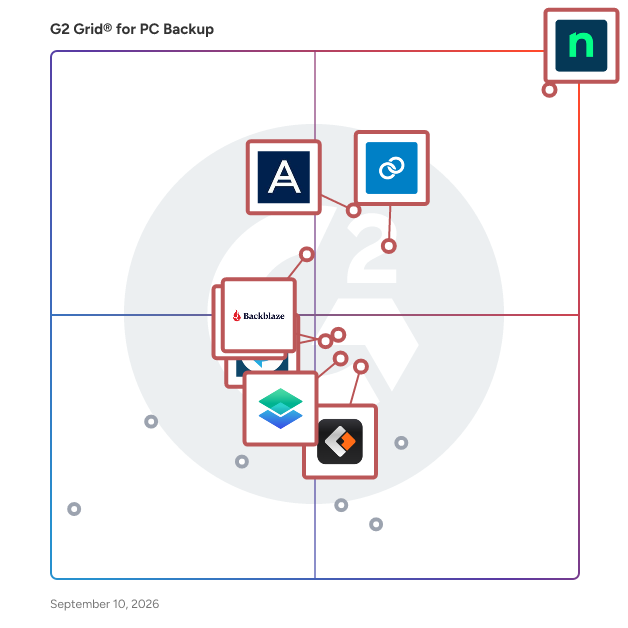
G2 Grid® for PC Backup Software

G2 Grid® for PC Backup Software plotting products by satisfaction and market presence

Highlighted products: NinjaOne, Datto SIRIS, Acronis True Image, Backblaze Computer Backup, Macrium Backup & Restore, EaseUS Todo Backup Business, MSP360 Backup, and C2 Backup.

Underlying data: [Grid® JSON](https://www.g2.com/categories/pc-backup/grids.json?focus%5B%5D=ninjaone&focus%5B%5D=kaseya-datto-siris&focus%5B%5D=acronis-true-image&focus%5B%5D=backblaze-computer-backup&focus%5B%5D=macrium-backup-restore&focus%5B%5D=easeus-todo-backup-business&focus%5B%5D=msp360-backup&focus%5B%5D=c2-backup)

Ace Data Devices

Ace Data is your reliable technology partner providing ultra-modern, and cutting-edge cloud back-up solutions tailored to your needs. Having done this for well over two decades, we have everything it takes to safeguard your most critical data. Our latest solution, Virtual Vault comes with an automated backup system, quick data migration, and a single code-based architecture. That's not all. It's fully compliant with all the global standards including HIPAA, HITECH for storage, backup, and disaster recovery. Because we understand the importance of your critical data, our solution offers bank-grade security and fast recovery options. Being an all-inclusive environment, Ace Data cloud allows cloud-based data backup to a physical, virtual, and hybrid environment. It allows the user to backup data in one or more data centers with quick access to dispersed data centers. Data backup to different environments targets complete systems, including all directories and files. Backup also incorporates data de duplication, compression, replication, and life cycle management. If you're seeking to safeguard your data - Virtual Vault is an ideal cloud backup solution tailored to your needs. Schedule a demo today to know more.

Average Rating: 5.0/5.0

Total Reviews: 10

Who Is the Company Behind Ace Data Devices?

  • Seller: Ace Data Devices
  • Year Founded: 1996
  • HQ Location: Mumbai, Maharashtra
  • Twitter: @AceDataDevices
    161 Twitter followers
  • LinkedIn® Page: www.linkedin.com
    43 employees on LinkedIn®

Who Uses This Product?

  • Company Size: 64% Medium, 27% Large

What Are Recent G2 Reviews of Ace Data Devices?

What Are G2 Users Discussing About Ace Data Devices?

NovaBACKUP

NovaBACKUP is a reliable Windows backup solution for businesses, resellers, and managed service providers. It uses decades of in-house data protection and backup expertise to help users simply and securely back up their critical data. The software is designed to keep backups small and fast to reduce disruption during working hours and deliver quick and easy data recovery. Customers also benefit from ongoing, personalized support from NovaBACKUP’s support team.

Average Rating: 4.7/5.0

Total Reviews: 11

How Do G2 Users Rate NovaBACKUP?

  • Ease of Admin: 9.0/10 (Category avg: 8.8/10)
  • Incremental Backup: 9.3/10 (Category avg: 8.9/10)
  • Deduplication: 9.2/10 (Category avg: 8.3/10)
  • Lag Free Operation: 8.3/10 (Category avg: 8.6/10)

Who Is the Company Behind NovaBACKUP?

Who Uses This Product?

  • Company Size: 64% Small, 36% Medium

What Do G2 Reviewers Say About NovaBACKUP?

AI-generated summary from verified user reviews

Pros
  • Users value the automatic backup feature of NovaBACKUP, ensuring data safety and accessibility across devices.
  • Users value the user-friendly interface of NovaBACKUP, making data protection accessible for everyone.
  • Users value the cloud backup options of NovaBACKUP, enhancing accessibility and security for their files.
  • Users value the automatic backup functionality of NovaBACKUP, ensuring their data remains safe and easily recoverable.
  • Users value the efficient data restoration capabilities of NovaBACKUP, ensuring their data is always recoverable and secure.
Cons
  • Users find backup issues with NovaBACKUP, including slow bandwidth and restrictions on advanced features.
  • Users find the limited features of NovaBACKUP insufficient for advanced needs, particularly lacking reporting and application-aware processing.
  • Users find NovaBACKUP lacks advanced features, particularly application-aware processing and robust reporting and analytics options.
  • Users feel that NovaBACKUP's outdated interface diminishes the overall experience compared to modern backup solutions.
  • Users experience backup failures due to slow bandwidth and latency issues, impacting their overall satisfaction with NovaBACKUP.

What Are Recent G2 Reviews of NovaBACKUP?

What Are G2 Users Discussing About NovaBACKUP?

Pulseway

Pulseway is RMM software, built to help MSPs and IT teams reduce downtime, take control and become more efficient. Pulseway provides all-in-one IT monitoring and management software, filled with features and modules to boost your productivity straight out of the box and never miss critical alerts. - Pulseway’s comprehensive remote monitoring and management (RMM) software provides a complete view across your network. View operational data for workstations, servers, VMs, network devices and more, while resolving issues straight from the same interface. - Be instantly alerted to issues, resolve them before they become a problem and minimize downtime – across the network. - Let you and your team be fully productive from anywhere to deliver first-class customer service wherever you are. - Automate repetitive IT tasks and automatically fix issues before they become a problem. - Pulseway built-in Mobile Remote Control enables simple, reliable, and fluid remote access to any monitored systems. Access files, applications and control remote systems as if you were sitting right in front of them. Try Pulseway RMM today with a free 14-day no-commitment trial to see for yourself.

Average Rating: 4.5/5.0

Total Reviews: 122

How Do G2 Users Rate Pulseway?

  • Ease of Admin: 9.2/10 (Category avg: 8.8/10)
  • Incremental Backup: 10.0/10 (Category avg: 8.9/10)
  • Deduplication: 9.7/10 (Category avg: 8.3/10)
  • Lag Free Operation: 10.0/10 (Category avg: 8.6/10)

Who Is the Company Behind Pulseway?

  • Seller: MMSoft Design
  • Year Founded: 2011
  • HQ Location: Dublin, Ireland
  • Twitter: @pulsewayapp
    6,073 Twitter followers
  • LinkedIn® Page: www.linkedin.com
    47 employees on LinkedIn®

Who Uses This Product?

  • Who Uses This: IT Manager, Owner
  • Top Industries: Information Technology and Services, Computer & Network Security
  • Company Size: 52% Small, 42% Medium

What Do G2 Reviewers Say About Pulseway?

AI-generated summary from verified user reviews

Pros
  • Users praise the exceptional customer support of Pulseway, highlighting their responsiveness and understanding of unique business needs.
  • Users find Pulseway to be easy to use, enabling seamless access and integration for efficient infrastructure management.
  • Users praise the intuitive interface of Pulseway, making it easy to implement and enhancing business operations seamlessly.
  • Users commend the easy setup of Pulseway, enabling seamless integration and management for their computer repair services.
  • Users rave about the responsive support from Pulseway, ensuring quick and effective assistance whenever needed.
Cons
  • Users are frustrated with constant upselling and unfinished features, alongside issues with logging out and reporting quality.
  • Users note the limited features of Pulseway, particularly in network monitoring and mobile app updates.
  • Users find limited compatibility with Pulseway, particularly regarding Microsoft Office and Linux integration issues.
  • Users find the slow performance of Pulseway frustrating, particularly during peak hours, affecting overall usability.
  • Users find the pricing very high compared to other comparable remote monitoring management solutions.

What Are Recent G2 Reviews of Pulseway?

What Are G2 Users Discussing About Pulseway?

BackUp Xplorer

The latest in automated backup integrations for Microsoft Office applications. You no longer have to worry about lost work or overwritten files. With this tool you can create an unlimited amount of sequential copies that are overwritten at your discretion. *Roll back to any point in time as you develop your file *Automatically store copies in multiple file directories *Add multiple backup sequences to handle daily, weekly, or monthly copies *Keep a running up-to-the-minute log of changes so you never lose valuable work *For Multi-User files, track changes made by each user This is the ultimate tool for those who need to truly secure and track important files. Works with: Excel | Word | PowerPoint | Publisher | Project | Outlook

Average Rating: 4.9/5.0

Total Reviews: 6

How Do G2 Users Rate BackUp Xplorer?

  • Incremental Backup: 8.3/10 (Category avg: 8.9/10)
  • Deduplication: 8.3/10 (Category avg: 8.3/10)
  • Lag Free Operation: 10.0/10 (Category avg: 8.6/10)

Who Is the Company Behind BackUp Xplorer?

Who Uses This Product?

  • Company Size: 67% Small, 17% Medium

What Do G2 Reviewers Say About BackUp Xplorer?

AI-generated summary from verified user reviews

Pros
  • Users value the reliable data storage of BackUp Xplorer, preventing lost work and file duplication effortlessly.
  • Users love the easy installation of BackUp Xplorer, enhancing efficiency by preventing lost work and file duplicacy.
Cons
  • Users find the complex setup process tricky, and it only supports the Windows platform, limiting accessibility.
  • Users find the advanced setup tricky and are disappointed that it only supports the Windows platform.

What Are Recent G2 Reviews of BackUp Xplorer?

Storware Backup and Recovery

Storware Backup and Recovery is a proprietary backup and recovery software developed by Storware for virtual machines, containers, cloud environments (Microsoft 365), applications, storage providers and endpoints (macOS and Windows-based desktops and laptops). The software provides data protection services for: - open virtual machines (Citrix Hypervisor, Huawei FusionCompute, KVM, Nutanix Acropolis, OpenStack, Oracle Linux Virtualization Manager, Oracle VM, oVirt, Proxmox, Red Hat Virtualization, XCP-ng, Xen), - virtual environments built on VMware vSphere and Microsoft Hyper-V hypervisors, - containers (OpenShift, Kubernetes, Proxmox) , - cloud (AWS EC2. Microsoft 365). - storage providers (Ceph RBD, SUSE Enterprise Storage, Nutanix Files, Nutanix Volume Groups, and File System) - applications (MS SQL, MySQL/MariaDB, Oracle DB, PostgreSQL, Relax & Recovery, Git repository) - endpoints (macOS and Windows-based desktops and laptops) Storware Backup and Recovery is an enterprise data protection system with competitive functionalities, and intuitive HTML5 Web Interface. In addition, it allows you to backup data, applications and configurations to multiple backup providers. Storware Backup and Recovery enables VM-level data protection and can function as a standalone solution or integrate with enterprise backup software.It provides a wide range of features to extend data protection capabilities for the above advanced virtualization platforms.

Average Rating: 4.7/5.0

Total Reviews: 27

How Do G2 Users Rate Storware Backup and Recovery?

  • Ease of Admin: 8.8/10 (Category avg: 8.8/10)
  • Incremental Backup: 8.3/10 (Category avg: 8.9/10)
  • Deduplication: 10.0/10 (Category avg: 8.3/10)

Who Is the Company Behind Storware Backup and Recovery?

  • Seller: Storware
  • Year Founded: 2014
  • HQ Location: Warsaw, Mazowieckie
  • Twitter: @Storware
    2,400 Twitter followers
  • LinkedIn® Page: www.linkedin.com
    57 employees on LinkedIn®

Who Uses This Product?

  • Top Industries: Information Technology and Services
  • Company Size: 46% Medium, 39% Small

What Are Recent G2 Reviews of Storware Backup and Recovery?

What Are G2 Users Discussing About Storware Backup and Recovery?

BounceBack

With BounceBack your backup is an exact duplicate of your computer's internal drive and all your backup files can be viewed using Windows Explorer.

Average Rating: 4.8/5.0

Total Reviews: 5

Who Is the Company Behind BounceBack?

  • Seller: CMS Products
  • Year Founded: 1983
  • HQ Location: Mission Viejo, CA
  • Twitter: @cmsproducts
    419 Twitter followers
  • LinkedIn® Page: www.linkedin.com
    18 employees on LinkedIn®

Who Uses This Product?

  • Top Industries: Information Technology and Services
  • Company Size: 100% Large

What Are Recent G2 Reviews of BounceBack?

What Are G2 Users Discussing About BounceBack?

Iperius Backup

Iperius Backup unites file, image-based, VM, database, and Microsoft 365 protection with fast recovery in one lightweight platform for Windows servers and PCs. It delivers pro-grade resilience with a minimal footprint and a predictable, perpetual licensing model. Protect all your workloads: Proxmox VE (incremental VM backup/restore, unlimited VMs), VMware vSphere/ESXi, Microsoft Hyper-V, Microsoft 365 (Exchange, OneDrive, SharePoint, Teams), and leading databases (SQL Server/Express, MySQL, MariaDB, PostgreSQL, Oracle). Store backups on NAS, LTO/RDX, FTP/SFTP, or the cloud—Amazon S3/S3-compatible, Azure Storage, Google Drive, OneDrive, Backblaze/Wasabi. Built-in scheduling, incrementals, compression, and AES-256 encryption help you meet RPO/RTO targets without complicating daily operations. Iperius Backup makes modern data protection simple—and cost-effective—for businesses and MSPs.

Average Rating: 4.5/5.0

Total Reviews: 39

How Do G2 Users Rate Iperius Backup?

  • Ease of Admin: 9.0/10 (Category avg: 8.8/10)

Who Is the Company Behind Iperius Backup?

  • Seller: Enter
  • HQ Location: Grottammare, AP
  • Twitter: @enter
    2,965 Twitter followers
  • LinkedIn® Page: www.linkedin.com
    29 employees on LinkedIn®

Who Uses This Product?

  • Top Industries: Information Technology and Services, Computer Software
  • Company Size: 69% Small, 27% Medium

What Are Recent G2 Reviews of Iperius Backup?

What Are G2 Users Discussing About Iperius Backup?

AOMEI Backupper

AOMEI Backupper is a comprehensive Windows backup and recovery software designed to safeguard personal and business data. It offers a user-friendly interface suitable for both novice and professional users, providing robust features for data protection and disaster recovery. Key Features and Functionality: - Backup Options: Supports full, incremental, and differential backups for files, folders, partitions, disks, and the entire system. - Restore Capabilities: Allows restoration of backed-up data to its original state, including system recovery to dissimilar hardware configurations. - File Synchronization: Offers real-time, mirror, and two-way sync to keep data consistent across different locations. - Cloning Tools: Enables disk and system cloning for OS migration or disk upgrades without reinstalling Windows. - Advanced Utilities: Includes tools like PXE Boot, bootable media creation, and command-line backup for enhanced data management. Primary Value and User Solutions: AOMEI Backupper addresses the critical need for reliable data protection by offering versatile backup, restore, sync, and clone solutions. It ensures data integrity and system availability, minimizing downtime and data loss risks. Its intuitive design and comprehensive features make it an ideal choice for users seeking efficient and effective data management solutions.

Average Rating: 4.3/5.0

Total Reviews: 18

How Do G2 Users Rate AOMEI Backupper?

  • Ease of Admin: 9.2/10 (Category avg: 8.8/10)
  • Incremental Backup: 7.8/10 (Category avg: 8.9/10)
  • Deduplication: 9.2/10 (Category avg: 8.3/10)
  • Lag Free Operation: 10.0/10 (Category avg: 8.6/10)

Who Is the Company Behind AOMEI Backupper?

  • Seller: AOMEI Technology
  • Year Founded: 2010
  • HQ Location: Jiangxi, China
  • Twitter: @aomeitech
    3,173 Twitter followers
  • LinkedIn® Page: www.linkedin.com
    32 employees on LinkedIn®

Who Uses This Product?

  • Company Size: 56% Small, 39% Medium

What Do G2 Reviewers Say About AOMEI Backupper?

AI-generated summary from verified user reviews

Pros
  • Users praise the feature-rich design of AOMEI Backupper, highlighting its ease of use for data management.
  • Users appreciate the backup frequency of AOMEI Backupper, simplifying their data storage, copying, and backup processes.
  • Users appreciate the rich features and ease of use in AOMEI Backupper for data backup and storage.
  • Users find AOMEI Backupper to be easy to use, simplifying the process of storing, copying, and backing up data.
  • Users value the reliability of AOMEI Backupper, noting its past effectiveness and beneficial features.
Cons
  • Users report frequent backup failures and poor support, causing frustration and dissatisfaction with AOMEI Backupper.
  • Users report backup issues with AOMEI Backupper, facing failures and lacking support for troubleshooting their problems.
  • Users report insufficient information in AOMEI Backupper, making troubleshooting and support nearly impossible.
  • Users are frustrated by the lack of backup options and inadequate support from AOMEI Backupper, leading to failed backups.
  • Users often face licensing issues, needing to contact support to re-register their license numbers.

What Are Recent G2 Reviews of AOMEI Backupper?

AOMEI PXE Boot

You can use AOMEI PXE Boot Tool and make other clients or target computers boot from these micro system.

Average Rating: 4.3/5.0

Total Reviews: 4

How Do G2 Users Rate AOMEI PXE Boot?

  • Ease of Admin: 9.4/10 (Category avg: 8.8/10)
  • Incremental Backup: 10.0/10 (Category avg: 8.9/10)

Who Is the Company Behind AOMEI PXE Boot?

  • Seller: AOMEI Technology
  • Year Founded: 2010
  • HQ Location: Jiangxi, China
  • Twitter: @aomeitech
    3,173 Twitter followers
  • LinkedIn® Page: www.linkedin.com
    32 employees on LinkedIn®

Who Uses This Product?

  • Company Size: 75% Medium, 25% Small

What Are Recent G2 Reviews of AOMEI PXE Boot?

What Are G2 Users Discussing About AOMEI PXE Boot?

APBackup

APBackup is an automatic backup tool that allows you to back up your data to local or network drives, FTP or LAN. The backup files can be stored uncompressed or in standard Zip format, with additional support for other compression formats (using plug-ins).

Average Rating: 4.6/5.0

Total Reviews: 4

Who Is the Company Behind APBackup?

Who Uses This Product?

  • Company Size: 100% Small

What Are Recent G2 Reviews of APBackup?

What Are G2 Users Discussing About APBackup?

IvyBackup

IvyBackup is an easy to use, modern and blazing fast backup tool for your Windows computer. It helps you create and automate simple or complex backup tasks with more ease than ever before. IvyBackup saves you time because it makes your backup and restore tasks more efficient and less hands on. From backup compression, encryption, cloud storage uploads and backup tests, all this is handled efficiently for you behind the scenes. You're able to create and schedule your backup tasks in the shortest time possible because your backup process is broken down into distinct and manageable chunks.

Average Rating: 4.4/5.0

Total Reviews: 4

How Do G2 Users Rate IvyBackup?

  • Incremental Backup: 6.7/10 (Category avg: 8.9/10)
  • Deduplication: 6.7/10 (Category avg: 8.3/10)
  • Lag Free Operation: 6.7/10 (Category avg: 8.6/10)

Who Is the Company Behind IvyBackup?

Who Uses This Product?

  • Company Size: 75% Small, 50% Medium

What Are Recent G2 Reviews of IvyBackup?

What Are G2 Users Discussing About IvyBackup?

DRS Office 365 Email Backup Tool

DRS Office 365 Email Backup tool is a reliable and affordable Office 365 Backup and Restore software that has a capability to take backup of all the Office 365 mailbox items, public folder, archive folders to various emails clients such as PST, OST, MBOX, EML, EMLX, MSG, HTML, etc. with ease. Furthermore, the software allows users to export Office 365 data into email clients like Gmail, Yahoo, AOL, Live Exchange, Thunderbird, iCloud, Godaddy, Amazon webmail, Zoho mail, etc. The Office 365 Email Backup Tool supports data backup from one Office 365 account to another Office 365 account with full accuracy. The software provides preview features before taking the backup of O365 mailbox items. The software also offers you to skip duplicate emails while performing the backup process. The Office 365 Email Backup tool is equipped with many advanced features and simple user-interface that can help even novice users to operate the software without having any prior technical knowledge. The software has a wide compatibility with all the MS Windows and Mac OS versions. To evaluate the working functionality of the software, you can simply download Office 365 Email Backup tool demo version from its official website and save 50 Office 365 emails in any of the file formats or email clients for free.

Average Rating: 4.5/5.0

Total Reviews: 3

How Do G2 Users Rate DRS Office 365 Email Backup Tool?

  • Ease of Admin: 8.3/10 (Category avg: 8.8/10)
  • Incremental Backup: 9.2/10 (Category avg: 8.9/10)
  • Deduplication: 8.3/10 (Category avg: 8.3/10)
  • Lag Free Operation: 6.7/10 (Category avg: 8.6/10)

Who Is the Company Behind DRS Office 365 Email Backup Tool?

Who Uses This Product?

  • Company Size: 33% Small, 33% Medium

What Do G2 Reviewers Say About DRS Office 365 Email Backup Tool?

AI-generated summary from verified user reviews

Pros
  • Users find DRS Office 365 Email Backup Tool's ease of use and integration capabilities very helpful in their tasks.
  • Users find DRS Office 365 Email Backup Tool to be very easy to integrate with various applications, enhancing usability.
Cons
  • Users experience download issues with DRS Office 365 Email Backup Tool, requiring repeated attempts to access files.

What Are Recent G2 Reviews of DRS Office 365 Email Backup Tool?

MobiKin Backup Manager for Android

Backing up your phone data is an important step if you don't want to suffer from the pain of data corruption or loss. With MobiKin Backup Manager for Android, backing up and restoring Android data will never be easier. This software allows you to selectively back up files on your Android device to PC and then restore from your PC to your Android device. Now, let's take a look at how to use this software to flexibly back up and restore your Android phone.

Average Rating: 4.2/5.0

Total Reviews: 3

How Do G2 Users Rate MobiKin Backup Manager for Android?

  • Ease of Admin: 10.0/10 (Category avg: 8.8/10)
  • Incremental Backup: 8.3/10 (Category avg: 8.9/10)
  • Deduplication: 8.3/10 (Category avg: 8.3/10)
  • Lag Free Operation: 9.4/10 (Category avg: 8.6/10)

Who Is the Company Behind MobiKin Backup Manager for Android?

Who Uses This Product?

  • Company Size: 67% Medium, 33% Small

What Are Recent G2 Reviews of MobiKin Backup Manager for Android?

Reboot Restore Rx

Reboot Restore Rx prevents any changes made on your drive(s) by restoring a saved baseline every time the PC boots up.

Average Rating: 4.7/5.0

Total Reviews: 3

How Do G2 Users Rate Reboot Restore Rx?

  • Ease of Admin: 10.0/10 (Category avg: 8.8/10)
  • Incremental Backup: 10.0/10 (Category avg: 8.9/10)
  • Deduplication: 10.0/10 (Category avg: 8.3/10)
  • Lag Free Operation: 10.0/10 (Category avg: 8.6/10)

Who Is the Company Behind Reboot Restore Rx?

  • Seller: Horizon DataSys
  • Year Founded: 1998
  • HQ Location: Vancouver, BC
  • Twitter: @HorizonDataSys
    601 Twitter followers
  • LinkedIn® Page: www.linkedin.com
    8 employees on LinkedIn®

Who Uses This Product?

  • Company Size: 67% Large, 33% Small

What Are Recent G2 Reviews of Reboot Restore Rx?

What Are G2 Users Discussing About Reboot Restore Rx?

AOMEI OneKey Recovery

AOMEI OneKey Recovery is a free and easy-use software designed to back up and restore your system.

Average Rating: 4.3/5.0

Total Reviews: 2

How Do G2 Users Rate AOMEI OneKey Recovery?

  • Incremental Backup: 6.7/10 (Category avg: 8.9/10)
  • Deduplication: 5.0/10 (Category avg: 8.3/10)
  • Lag Free Operation: 8.3/10 (Category avg: 8.6/10)

Who Is the Company Behind AOMEI OneKey Recovery?

  • Seller: AOMEI Technology
  • Year Founded: 2010
  • HQ Location: Jiangxi, China
  • Twitter: @aomeitech
    3,173 Twitter followers
  • LinkedIn® Page: www.linkedin.com
    32 employees on LinkedIn®

Who Uses This Product?

  • Company Size: 100% Small

What Are Recent G2 Reviews of AOMEI OneKey Recovery?

What Are G2 Users Discussing About AOMEI OneKey Recovery?

Tian Lin
TL
Researched and written by Tian Lin
Updated October 3, 2024