Best Password Managers - Page 3

How Many Password Managers Products Does G2 Track?

Total Products under this Category: 127

Category Stats (Sep 2026)

  • Average Rating: 4.42/5 (↑0.01 vs Aug 2026) The average rating of products in this category, based on all submitted ratings
  • Top Trending Product: Passwork (+0.13%) - Among all products in this category, Passwork recorded the largest rating increase compared to last month

Last updated: September 01, 2026

How Does G2 Rank Password Managers Products?

Why You Can Trust G2's Software Rankings:

  • 30 Analysts and Data Experts
  • 12,500+ Authentic Reviews
  • 127+ Products
  • Unbiased Rankings

G2's software rankings are built on verified user reviews, rigorous moderation, and a consistent research methodology maintained by a team of analysts and data experts. Each product is measured using the same transparent criteria, with no paid placement or vendor influence. While reviews reflect real user experiences, which can be subjective, they offer valuable insight into how software performs in the hands of professionals. Together, these inputs power the G2 Score, a standardized way to compare tools within every category.

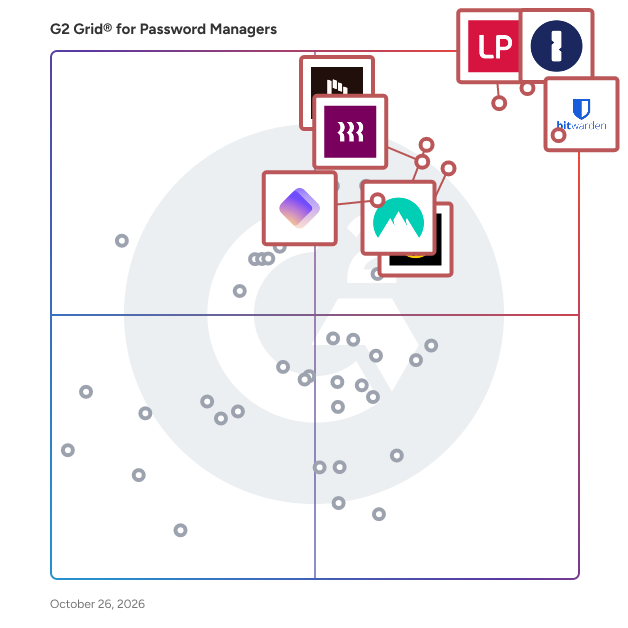
G2 Grid® for Password Managers

G2 Grid® for Password Managers plotting products by satisfaction and market presence

Highlighted products: 1Password, Bitwarden, LastPass, NordPass Business, Keeper Password Manager, Rippling IT, Dashlane Password Manager, and IT Glue.

Underlying data: [Grid® JSON](https://www.g2.com/categories/password-managers/grids.json?focus%5B%5D=1password&focus%5B%5D=bitwarden&focus%5B%5D=lastpass&focus%5B%5D=nordpass-business&focus%5B%5D=keeper-password-manager&focus%5B%5D=rippling-it&focus%5B%5D=dashlane-password-manager&focus%5B%5D=it-glue)

Corbado

Corbado is the passkey intelligence platform for enterprise CIAM teams running consumer authentication at scale. The platform answers the three questions every passkey rollout faces: why is adoption flat, what's breaking logins, and how do we scale passkeys across millions of users without replacing the IDP. Two products sit on the platform. Corbado Connect ships managed passkeys with analytics built in: SDKs, UI components, backend infrastructure, gradual rollout controls and funnel analytics in one product, for teams that want faster time-to-passkeys with analytics from day one. Corbado Observe is the passkey observability layer for teams that already shipped passkeys and need visibility: funnel analytics, error patterns by device and browser, per-user drill-down, and device readiness signals. Both products work alongside Okta, Auth0, Ping, ForgeRock, Cognito or in-house stacks. Customers like VicRoads (5 million users) use Corbado to reach 50 to 80 percent passkey adoption, cut SMS OTP costs and reduce authentication helpdesk tickets. The roadmap extends the same intelligence engine from passkeys to every auth method.

Average Rating: 4.8/5.0

Total Reviews: 11

How Do G2 Users Rate Corbado?

  • Has the product been a good partner in doing business?: 10.0/10 (Category avg: 9.1/10)
  • Admin Management: 9.8/10 (Category avg: 9.0/10)
  • Quick Login: 9.8/10 (Category avg: 9.1/10)
  • Two-Factor Authentication: 10.0/10 (Category avg: 9.1/10)

Who Is the Company Behind Corbado?

  • Seller: Corbado
  • Year Founded: 2021
  • HQ Location: Munich, Germany
  • Twitter: @corbadotech
    216 Twitter followers
  • LinkedIn® Page: www.linkedin.com
    8 employees on LinkedIn®

Who Uses This Product?

  • Top Industries: Computer Software
  • Company Size: 82% Small, 9% Large

What Do G2 Reviewers Say About Corbado?

AI-generated summary from verified user reviews

Pros
  • Users enjoy the ease of use with Corbado, simplifying passkey logins without complex implementations.
  • Users appreciate the ease of implementation with Corbado, allowing focus on product rather than complex setups.
  • Users appreciate the easy and secure authentication features of Corbado, enabling seamless passkey integration with fallback options.
  • Users appreciate the easy integration of passkeys with fallback passwords, enhancing security while ensuring user-friendly access.
  • Users value the easy and secure biometric authentication of Corbado, enhancing access while protecting sensitive data.
Cons
  • Users find Corbado’s limited compatibility disappointing, lacking OIDC provider support and missing major login options like Microsoft and Apple.
  • Users face issues due to lack of Microsoft and Apple login support, making access difficult and inconvenient.
  • Users note the missing features of Corbado, specifically the lack of Apple login and certain social authentication methods.
  • Users face authentication issues due to the lack of Microsoft login support, hindering access to the platform.
  • Users note the lack of Apple login support in Corbado, which limits accessibility for Apple device users.

What Are Recent G2 Reviews of Corbado?

GateKeeper Proximity Authentication

Proximity MFA for shared workstations. MFA for Shared Computers is a cutting-edge security solution designed to enhance user authentication and access control in environments where multiple users share computing resources. This innovative approach allows individuals to log in using their physical presence rather than traditional passwords, creating a seamless and secure experience across computers, VPNs, websites, and desktop applications. Patented and designed for rugged environments including law enforcement, healthcare, manufacturing (ICS/OT cybersecurity), and compliance. Targeted primarily at organizations that require stringent security measures, such as healthcare providers, financial institutions, and government agencies, this solution addresses common challenges associated with password management. By eliminating the need for users to remember or type passwords, it significantly reduces the risk of forgotten credentials, password resets, and the chaos that often accompanies password management. The continuous authentication feature ensures that users remain securely logged in as long as they are present, while automatically locking the system when they step away, thus preventing unauthorized access. Key features of MFA for Shared Computers include passwordless proximity login, which utilizes a wireless key to authenticate users effortlessly. This technology allows passwords to auto-fill across various platforms, including electronic health records (EHRs) like Allscripts PM and eClinicalWorks, as well as web applications such as Office365 and banking sites. The solution integrates seamlessly with existing systems such as Active Directory, Okta, and RADIUS, ensuring that organizations can maintain their current infrastructure while enhancing security protocols. The benefits of adopting this solution extend beyond mere convenience. Organizations can automate access control and ensure compliance with various regulatory standards, including CMMC, CJIS, HIPAA, and NIS2. By streamlining user authentication processes, businesses can improve productivity while maintaining a high level of security. The ability to manage passwords efficiently across shared computers not only enhances user experience but also fortifies overall organizational security, making it an essential tool for any entity looking to safeguard sensitive information in a shared computing environment.

Average Rating: 4.9/5.0

Total Reviews: 43

How Do G2 Users Rate GateKeeper Proximity Authentication?

  • Has the product been a good partner in doing business?: 9.9/10 (Category avg: 9.1/10)
  • Admin Management: 10.0/10 (Category avg: 9.0/10)
  • Quick Login: 10.0/10 (Category avg: 9.1/10)
  • Two-Factor Authentication: 9.4/10 (Category avg: 9.1/10)

Who Is the Company Behind GateKeeper Proximity Authentication?

  • Seller: Untethered Labs
  • Company Website:
  • Year Founded: 2015
  • HQ Location: Greenbelt, MD
  • Twitter: @gkaccess
    1,989 Twitter followers
  • LinkedIn® Page: www.linkedin.com
    19 employees on LinkedIn®

Who Uses This Product?

  • Top Industries: Hospital & Health Care, Electrical/Electronic Manufacturing
  • Company Size: 40% Medium, 38% Small

What Do G2 Reviewers Say About GateKeeper Proximity Authentication?

AI-generated summary from verified user reviews

Pros
  • Users appreciate the ease of use of GateKeeper Proximity Authentication, highlighting its straightforward setup and intuitive design.
  • Users value the strong security features of GateKeeper Proximity Authentication, ensuring easy and safe access management.
  • Users find the implementation ease of GateKeeper Proximity Authentication exceptional and hassle-free throughout the setup process.
  • Users praise GateKeeper's exceptional customer support, finding it highly responsive and helpful in various environments.
  • Users value the secure sharing capabilities of GateKeeper, enhancing security while simplifying account management.
Cons
  • Users experience occasional authentication issues with proprietary tokens, causing concerns about security and usability.
  • Users note a difficult learning curve, requiring additional training for effective use of GateKeeper Proximity Authentication.
  • Users face limited compatibility issues, particularly with Bluetooth strength and the lack of an Android app.
  • Users are concerned about app issues like biometric data privacy and insider threats affecting overall trust and security.
  • Users express concerns over biometric data privacy and insider threats related to GateKeeper Proximity Authentication.

What Are Recent G2 Reviews of GateKeeper Proximity Authentication?

What Are G2 Users Discussing About GateKeeper Proximity Authentication?

PassCamp

PassCamp is a game changing cloud based secret manager for teams and enterprises. It’s the first and only password & secret management tool that was built for teams from day one. PassCamp is a user-friendly and secure solution that solves all of your password problems. - Only need to remember one password - Securely store & Organize passwords, payments, addresses, notes, codes - One-click generate unique and secure passwords - Autosave, Autofill & Autoupdate passwords as you go - Access Passwords wherever you are with mobile and web apps Also, with PassCamp you can: - Securely Share passwords with your team, your clients and your family - Control Access & Permissions to your passwords - Track history of every single password you have PassCamp uses the most advanced security technologies like AES-256 and RSA-4096 encryption, zero-knowledge proof, transport layer encryption centralized blockchain to ensure your sensitive data is secure. It is created to be as easy to use as possible, using the best design practises and user testing. Both collaborating teams and individual users find PassCamp to be the most user friendly password manager out there. Join thousands of teams using PassCamp and try it out for free today.

Average Rating: 4.3/5.0

Total Reviews: 16

How Do G2 Users Rate PassCamp?

  • Admin Management: 9.2/10 (Category avg: 9.0/10)
  • Quick Login: 9.3/10 (Category avg: 9.1/10)
  • Two-Factor Authentication: 9.2/10 (Category avg: 9.1/10)

Who Is the Company Behind PassCamp?

  • Seller: PassCamp
  • Year Founded: 2017
  • HQ Location: Kaunas, Kaunas
  • Twitter: @PassCamp
    65 Twitter followers
  • LinkedIn® Page: www.linkedin.com

Who Uses This Product?

  • Company Size: 56% Small, 31% Medium

What Are Recent G2 Reviews of PassCamp?

What Are G2 Users Discussing About PassCamp?

TransferChain

TransferChain provides the safest cloud storage, file transfer, and file request capabilities for businesses - through zero-knowledge encryption, file splitting, distributed cloud architectures, and blockchain authorization. Neither TransferChain nor any unauthorized third parties, be it potential bad actors or data centers, can access the user’s private and confidential information. TransferChain is the most secure and private way to store your sensitive documents and share them externally.

Average Rating: 4.7/5.0

Total Reviews: 29

How Do G2 Users Rate TransferChain?

  • Has the product been a good partner in doing business?: 10.0/10 (Category avg: 9.1/10)
  • Admin Management: 10.0/10 (Category avg: 9.0/10)
  • Quick Login: 10.0/10 (Category avg: 9.1/10)
  • Two-Factor Authentication: 10.0/10 (Category avg: 9.1/10)

Who Is the Company Behind TransferChain?

  • Seller: TransferChain AG
  • Year Founded: 2020
  • HQ Location: Baar, Switzerland
  • Twitter: @TransferChain_
    860 Twitter followers
  • LinkedIn® Page: www.linkedin.com
    21 employees on LinkedIn®

Who Uses This Product?

  • Company Size: 86% Small, 3% Large

What Do G2 Reviewers Say About TransferChain?

AI-generated summary from verified user reviews

Pros
  • Users value the exceptional security features of TransferChain, appreciating the peace of mind for sensitive file transfers.
  • Users appreciate the ease of use of TransferChain, enjoying its intuitive interface and seamless navigation for all.
  • Users appreciate the security focus of TransferChain, feeling secure with its zero-knowledge encryption for sensitive data.
  • Users love the secure storage of TransferChain, appreciating its zero-knowledge encryption and end-to-end protection for sensitive files.
  • Users commend the reliability of TransferChain, praising its fast loading and secure handling of sensitive data.
Cons
  • Users find the file size limitations of TransferChain frustrating, causing slow uploads and impacting overall efficiency.
  • Users find mobile app issues challenging, especially with integration on phones and older browsers, but hope for improvements.
  • Users find the security complexities of TransferChain overwhelming, making login and cloud creation confusing and frustrating.
  • Users find the insufficient information regarding file size limits frustrating for transferring larger files effectively.
  • Users experience a small learning curve with TransferChain initially, but it becomes more user-friendly over time.

What Are Recent G2 Reviews of TransferChain?

CyberFOX Password Manager

CyberFOX Password Manager is secure and easy to use password management software designed for MSPs and IT professionals. It lets you securely store, access, and share passwords and digital credentials all in one place while giving your team strong security controls and visibility. This solution is built to help organizations enforce strong password hygiene, reduce support tickets for password resets, and protect sensitive login information with industry grade encryption and flexible access policies. CyberFOX Password Manager helps teams centralize sensitive credential management and improve overall security posture while making password handling simple and reliable. ___ Start Your CyberFOX Password Manager Free Trial Try CyberFOX Password Manager and securely store, manage, and share credentials with your team. No credit card required. https://www.cyberfox.com/password-manager-trial

Average Rating: 4.2/5.0

Total Reviews: 14

How Do G2 Users Rate CyberFOX Password Manager?

  • Has the product been a good partner in doing business?: 8.6/10 (Category avg: 9.1/10)
  • Admin Management: 9.5/10 (Category avg: 9.0/10)
  • Quick Login: 8.5/10 (Category avg: 9.1/10)
  • Two-Factor Authentication: 9.8/10 (Category avg: 9.1/10)

Who Is the Company Behind CyberFOX Password Manager?

  • Seller: CyberFOX
  • Year Founded: 2022
  • HQ Location: Tampa, FL
  • Twitter: @CyberFoxLLC
    162 Twitter followers
  • LinkedIn® Page: www.linkedin.com
    140 employees on LinkedIn®

Who Uses This Product?

  • Company Size: 67% Small, 20% Medium

What Are Recent G2 Reviews of CyberFOX Password Manager?

Passpack

Passpack is the Team Password & Credentials Manager for every business: A mission-critical solution built for secure Team & Role access management and productive collaboration, yet easy and versatile for everyone to use. Passpack delivers a compelling value proposition for businesses as a platform-agnostic solution offering highly secure, organization-wide online password & credentials management. Enhance company defenses against cyberattacks with end-to-end encryption and organize your library of digital credentials, PINs, registration codes, account numbers, and certificates in a central repository that can be updated in real time and shared among trusted individuals.

Average Rating: 4.0/5.0

Total Reviews: 35

How Do G2 Users Rate Passpack?

  • Has the product been a good partner in doing business?: 7.8/10 (Category avg: 9.1/10)
  • Admin Management: 8.7/10 (Category avg: 9.0/10)
  • Quick Login: 8.6/10 (Category avg: 9.1/10)
  • Two-Factor Authentication: 8.1/10 (Category avg: 9.1/10)

Who Is the Company Behind Passpack?

  • Seller: Passpack
  • Company Website:
  • Year Founded: 2013
  • HQ Location: Sandy, UT, USA
  • Twitter: @passpack
    901 Twitter followers
  • LinkedIn® Page: www.linkedin.com
    10 employees on LinkedIn®

Who Uses This Product?

  • Top Industries: Computer Software, Marketing and Advertising
  • Company Size: 54% Small, 43% Medium

What Do G2 Reviewers Say About Passpack?

AI-generated summary from verified user reviews

Pros
  • Users appreciate the ease of use in Passpack, especially for managing and categorizing passwords effortlessly.
  • Users value the robust password security provided by Passpack, thanks to its advanced encryption and management features.
  • Users appreciate the centralized management of Passpack, ensuring secure and trustworthy handling of critical password information.
  • Users appreciate the responsive customer support of Passpack, enhancing their overall experience and satisfaction.
  • Users value the robust cybersecurity of Passpack, with its zero architecture ensuring utmost protection for sensitive information.
Cons
  • Users find the manual intervention required for creating labels cumbersome and inconvenient during password saves.
  • Users feel the poor interface design of Passpack detracts from the overall user experience and usability.
  • Users feel the poor UI hinders their experience and could benefit from a more straightforward design.
  • Users find the process of adding labels complex, requiring extra steps that complicate saving new logins.
  • Users feel the UI issues detract from their overall experience and suggest improvements for better usability.

What Are Recent G2 Reviews of Passpack?

What Are G2 Users Discussing About Passpack?

mSecure

mSecure is a secure password management solution designed to help individuals, families, and businesses store and safeguard sensitive information, such as passwords, credit cards, and private notes, in an organized and highly secure environment. mSecure focuses on simplifying the management of credentials while providing robust protection against unauthorized access and data breaches. mSecure is ideal for users who value data security and require an intuitive platform for storing, generating, and organizing sensitive information. mSecure Password Manager is compatible across multiple platforms, ensuring that users can access their data on desktop and mobile devices seamlessly. Key features and benefits of mSecure include: Comprehensive Security Measures: mSecure uses industry-standard encryption (AES-256) to protect user data both at rest and during transmission. Password Generator: Users can create strong, unique passwords for every account to enhance security and prevent unauthorized access. Cross-Platform Synchronization: Securely sync data across devices using mSecure Cloud or other sync methods, such as Wi-Fi and Dropbox. Customizable Organization: Users can create and manage custom templates and categories for efficient organization of sensitive data. Secure Sharing: Share login credentials and other sensitive information with family members or colleagues securely through encrypted channels. Whether you need to manage personal passwords, collaborate with team members, or enhance organizational security, mSecure offers the tools and functionality to meet diverse use cases. The software prioritizes simplicity and user control without compromising security, making it an excellent choice for users looking to protect their most valuable digital assets.

Average Rating: 4.4/5.0

Total Reviews: 13

How Do G2 Users Rate mSecure?

  • Has the product been a good partner in doing business?: 8.3/10 (Category avg: 9.1/10)
  • Admin Management: 8.6/10 (Category avg: 9.0/10)
  • Quick Login: 9.0/10 (Category avg: 9.1/10)
  • Two-Factor Authentication: 8.1/10 (Category avg: 9.1/10)

Who Is the Company Behind mSecure?

  • Seller: mSeven Software
  • Year Founded: 2008
  • HQ Location: N/A
  • Twitter: @msecure
    1,136 Twitter followers
  • LinkedIn® Page: www.linkedin.com
    7 employees on LinkedIn®

Who Uses This Product?

  • Company Size: 62% Small, 31% Medium

What Do G2 Reviewers Say About mSecure?

AI-generated summary from verified user reviews

Pros
  • Users appreciate the robust security and accessibility of mSecure, ensuring their sensitive information is well-protected.
  • Users praise the reliability of mSecure for protecting sensitive information with robust encryption and easy access.
  • Users value the secure storage of mSecure, ensuring sensitive information is reliably protected and easily accessible.
  • Users value the robust security features of mSecure, ensuring reliable protection for their sensitive information across devices.
Cons
  • Users dislike the monthly subscription model of mSecure, preferring the one-time fee from previous versions.
  • Users face the issue of data loss when switching apps due to dependency on a monthly subscription model.
  • Users find the monthly subscription fee of mSecure unsuitable, especially compared to one-time payment alternatives.

What Are Recent G2 Reviews of mSecure?

What Are G2 Users Discussing About mSecure?

TeamsID

TeamsID was a cloud-based password management solution designed to help teams securely store, share, and manage passwords and sensitive information. It provided a centralized platform where organizations could control access to credentials, ensuring that team members had the necessary information to perform their tasks efficiently. Key Features and Functionality: - Secure Password Sharing: Allowed teams to share passwords safely within the organization, ensuring that only authorized personnel had access to specific credentials. - Centralized Password Vault: Offered a unified repository for storing all team logins and sensitive records, simplifying access management. - Multi-Platform Support: Provided native applications for iOS, Android, Windows, Mac, and browser extensions, enabling access across various devices. - Two-Factor Authentication (2FA): Enhanced security by requiring an additional verification step during login processes. - Integration with Google SSO: Facilitated seamless login experiences by integrating with Google Single Sign-On, reducing the need for multiple passwords. - Activity Logging: Tracked user actions within the platform, offering administrators insights into access patterns and potential security concerns. Primary Value and User Solutions: TeamsID addressed the common challenge of managing and sharing passwords within organizations. By providing a secure and centralized platform, it eliminated the risks associated with sharing credentials through unsecured channels like email or messaging apps. This not only enhanced security but also improved operational efficiency by ensuring that team members had timely access to the necessary information. The platform's user-friendly interface and integration capabilities made it suitable for businesses of all sizes seeking to strengthen their password management practices. As of February 2024, TeamsID transitioned to TeamPassword, offering users an upgraded and more efficient password management experience.

Average Rating: 4.4/5.0

Total Reviews: 12

How Do G2 Users Rate TeamsID?

  • Has the product been a good partner in doing business?: 10.0/10 (Category avg: 9.1/10)
  • Admin Management: 9.2/10 (Category avg: 9.0/10)
  • Quick Login: 10.0/10 (Category avg: 9.1/10)
  • Two-Factor Authentication: 10.0/10 (Category avg: 9.1/10)

Who Is the Company Behind TeamsID?

  • Seller: SplashData
  • Year Founded: 2000
  • HQ Location: Los Gatos, CA
  • Twitter: @splashdata
    2,038 Twitter followers
  • LinkedIn® Page: www.linkedin.com
    11 employees on LinkedIn®

Who Uses This Product?

  • Company Size: 54% Small, 31% Medium

What Do G2 Reviewers Say About TeamsID?

AI-generated summary from verified user reviews

Pros
  • Users appreciate the ease of use of TeamsID, valuing its simple features for accessible video calls.
  • Users praise the easy access of TeamsID, highlighting its simplicity and convenience for video calls.
  • Users enjoy the ease of use of TeamsID, finding it simple and accessible for their video call needs.

What Are Recent G2 Reviews of TeamsID?

What Are G2 Users Discussing About TeamsID?

Sticky Password

Sticky Password is a trusted password management company headquartered in Brno, Czech Republic. Founded in 2001 by security professionals with extensive experience in cybersecurity and encryption. Sticky Password is a cross-platform solution, providing native applications for Windows, macOS, Linux, ChromeOS, Android, and iOS. It supports secure access to passwords without requiring installation on the target computer, which is ideal for restricted or shared environments. Core features include secure password storage, autofill, password generation, two-factor authentication, encrypted cloud sync or optional local-only sync, Dark Web monitoring, and emergency access. Sticky Password helps users simplify and secure their online experience by managing all their passwords and sensitive information in one encrypted vault. With a privacy-first design, all data is processed locally on the user’s device, giving them full control and minimizing exposure.

Average Rating: 4.0/5.0

Total Reviews: 16

How Do G2 Users Rate Sticky Password?

  • Has the product been a good partner in doing business?: 10.0/10 (Category avg: 9.1/10)
  • Admin Management: 6.7/10 (Category avg: 9.0/10)
  • Quick Login: 7.9/10 (Category avg: 9.1/10)
  • Two-Factor Authentication: 7.8/10 (Category avg: 9.1/10)

Who Is the Company Behind Sticky Password?

  • Seller: Lamantine Software
  • Year Founded: 2001
  • HQ Location: Brno
  • Twitter: @stickypassword
    3,431 Twitter followers
  • LinkedIn® Page: www.linkedin.com
    8 employees on LinkedIn®

Who Uses This Product?

  • Company Size: 56% Small, 44% Large

What Do G2 Reviewers Say About Sticky Password?

AI-generated summary from verified user reviews

Cons
  • Users are frustrated by the duplication issues that lead to multiple password files being created unnecessarily.

What Are Recent G2 Reviews of Sticky Password?

What Are G2 Users Discussing About Sticky Password?

SplashID

SplashID is the most trusted name in password managers with over 10 years of delivering security to over 1 million users.

Average Rating: 3.8/5.0

Total Reviews: 19

How Do G2 Users Rate SplashID?

  • Has the product been a good partner in doing business?: 5.8/10 (Category avg: 9.1/10)
  • Admin Management: 6.7/10 (Category avg: 9.0/10)
  • Quick Login: 7.6/10 (Category avg: 9.1/10)
  • Two-Factor Authentication: 8.0/10 (Category avg: 9.1/10)

Who Is the Company Behind SplashID?

  • Seller: SplashData
  • Year Founded: 2000
  • HQ Location: Los Gatos, CA
  • Twitter: @splashdata
    2,038 Twitter followers
  • LinkedIn® Page: www.linkedin.com
    11 employees on LinkedIn®

Who Uses This Product?

  • Top Industries: Information Technology and Services
  • Company Size: 63% Large, 21% Small

What Are Recent G2 Reviews of SplashID?

Intuitive Password

Intuitive Password is a military-grade password manager that simplifies your online experience by remembering your passwords and confidential data for you. With Intuitive Password to manage your logins and passwords, it's easy to have an unique and strong password for every online account and improve your online security.

Average Rating: 4.5/5.0

Total Reviews: 11

How Do G2 Users Rate Intuitive Password?

  • Admin Management: 10.0/10 (Category avg: 9.0/10)
  • Quick Login: 9.0/10 (Category avg: 9.1/10)
  • Two-Factor Authentication: 9.0/10 (Category avg: 9.1/10)

Who Is the Company Behind Intuitive Password?

Who Uses This Product?

  • Company Size: 45% Small, 36% Large

What Are Recent G2 Reviews of Intuitive Password?

What Are G2 Users Discussing About Intuitive Password?

LogMeOnce

LogMeOnce Team Password Manager is a comprehensive solution designed to help teams efficiently manage and secure their passwords. It offers a user-friendly interface that simplifies password administration, facilitates secure sharing among team members, and ensures access from any device or location. Ideal for teams of up to 50 members, LogMeOnce enhances security protocols while promoting productivity by reducing the complexities associated with password management. Key Features and Functionality: - Simple Administration: Streamlines the management of multiple passwords, allowing IT administrators to set up best practices and enforce security policies effectively. - Auto Login & Autofill: Provides seamless access to applications with single-click authentication, enhancing user convenience and efficiency. - Secure Sharing: Enables secure credential sharing among team members without exposing actual passwords, ensuring sensitive information remains protected. - Dedicated Employee Vaults: Offers individual password vaults for each employee, maintaining a clear separation between personal and professional credentials. - Multiple Two-Factor Authentication Options: Supports various 2FA methods, including SMS, voice call, email, Google Authenticator, and more, to enhance account security. - Passwordless Login: Introduces innovative authentication methods like PhotoLogin and QR code login, eliminating the need for traditional passwords. Primary Value and User Solutions: LogMeOnce Team Password Manager addresses the critical need for secure and efficient password management within teams. By centralizing password storage and enforcing robust security measures, it mitigates the risks associated with weak or reused passwords. The platform's secure sharing capabilities foster collaboration without compromising sensitive information. Additionally, its user-friendly design and advanced features like passwordless login and multiple 2FA options enhance both security and productivity, allowing teams to focus on their core tasks without the burden of managing multiple credentials.

Average Rating: 3.9/5.0

Total Reviews: 15

How Do G2 Users Rate LogMeOnce?

  • Has the product been a good partner in doing business?: 5.8/10 (Category avg: 9.1/10)
  • Admin Management: 8.3/10 (Category avg: 9.0/10)
  • Quick Login: 9.0/10 (Category avg: 9.1/10)
  • Two-Factor Authentication: 7.5/10 (Category avg: 9.1/10)

Who Is the Company Behind LogMeOnce?

  • Seller: LogmeOnce
  • Year Founded: 2011
  • HQ Location: McLean, VA
  • Twitter: @LogmeOnce
    9,435 Twitter followers
  • LinkedIn® Page: www.linkedin.com
    11 employees on LinkedIn®

Who Uses This Product?

  • Top Industries: Information Technology and Services
  • Company Size: 39% Medium, 33% Large

What Do G2 Reviewers Say About LogMeOnce?

AI-generated summary from verified user reviews

Pros
  • Users find LogMeOnce to be easy to use, with most tasks being straightforward after a brief learning curve.
  • Users highly value the reliability of LogMeOnce, noting its flawless performance and user-friendly features.
  • Users value the robust two-factor authentication of LogMeOnce, enhancing account security effortlessly across various methods.
  • Users enjoy the passwordless authentication of LogMeOnce, simplifying access while maintaining top-notch security measures.
  • Users value the advanced security features of LogMeOnce, ensuring robust protection for their accounts and data.
Cons
  • Users experience autofill issues with LogMeOnce, including unwanted prompts and confusion between different user logins.
  • Users find the learning curve challenging, as initial setup and complex features may overwhelm less tech-savvy individuals.
  • Users find the complex setup of LogMeOnce to be time-consuming and challenging for effective utilization.
  • Users often find the complex usability of LogMeOnce challenging, requiring significant time to learn its features.
  • Users express concerns about the high cost associated with unlocking full features and premium support of LogMeOnce.

What Are Recent G2 Reviews of LogMeOnce?

Locker Password Manager

Locker is a cross-platform password manager that goes beyond the mere concept of password management. It helps users secure sensitive data such as passwords, secret notes, payment cards, crypto assets and online identities. It stores passwords and autofill information for popular websites, logs you into your favorite sites, and scans for data breaches to ensure that your privacy is protected. Locker offers other additional security-related features, such as private emails (allows you to hide your original email), built-in authenticator,... A plus point is that those features are available on our most supported platforms and in a single Locker app. Every feature in Locker is built on the foundation of privacy and transparency to ensure the highest security for users. We believe everyone deserves a secure and seamless internet experience, and Locker strives to provide just that. No matter if you are tech-savvy or not, you can always keep yourself safe online with Locker. Locker for Business is an advanced business password manager. Mitigate risks. Improve productivity. Locker is a product of CyStack Security - a leading cybersecurity company based in Vietnam. CyStack has been a reputable partner providing security applications and security-managed services for many large and small businesses in Vietnam and around the world.

Average Rating: 3.5/5.0

Total Reviews: 8

How Do G2 Users Rate Locker Password Manager?

  • Has the product been a good partner in doing business?: 6.1/10 (Category avg: 9.1/10)
  • Admin Management: 7.3/10 (Category avg: 9.0/10)
  • Quick Login: 7.1/10 (Category avg: 9.1/10)
  • Two-Factor Authentication: 7.7/10 (Category avg: 9.1/10)

Who Is the Company Behind Locker Password Manager?

  • Seller: CyStack
  • Year Founded: 2017
  • HQ Location: Hanoi, VN
  • Twitter: @CyStackSecurity
    35 Twitter followers
  • LinkedIn® Page: www.linkedin.com
    49 employees on LinkedIn®

Who Uses This Product?

  • Company Size: 63% Small, 38% Medium

What Do G2 Reviewers Say About Locker Password Manager?

AI-generated summary from verified user reviews

Cons
  • Users find the poor customer support of Locker Password Manager frustrating and unhelpful when seeking assistance.
  • Users find the unfriendly interface of Locker Password Manager challenging and lack support for their questions.
  • Users find the UX unhelpful, as Interce lacks intuition and support for troubleshooting their queries.

What Are Recent G2 Reviews of Locker Password Manager?

DoubleClue: Identity Security Platform

Unified digital security for the "human factor": DoubleClue combines Identity- and Access Management with a hardwareless multi factor authentication and comes with an integrated password- and confidential data safe. Your digital identity is efficiently secured while productivity and user experience is increased by single sign on (SSO) and an adaptive policy concept. DoubleClue protects everything around your account including passwords and the data you´d like to exchange safely with others. Don´t be limited by smartphones or tokens and even manage your IAM locally / on premises in case you don´t want any data to be stored on external clouds.

Average Rating: 4.5/5.0

Total Reviews: 10

How Do G2 Users Rate DoubleClue: Identity Security Platform?

  • Has the product been a good partner in doing business?: 9.4/10 (Category avg: 9.1/10)
  • Admin Management: 9.2/10 (Category avg: 9.0/10)
  • Quick Login: 9.0/10 (Category avg: 9.1/10)
  • Two-Factor Authentication: 9.3/10 (Category avg: 9.1/10)

Who Is the Company Behind DoubleClue: Identity Security Platform?

Who Uses This Product?

  • Company Size: 64% Medium, 36% Small

What Do G2 Reviewers Say About DoubleClue: Identity Security Platform?

AI-generated summary from verified user reviews

Pros
  • Users find the ease of use of DoubleClue highly beneficial, enhancing their security experience effortlessly.
  • Users find DoubleClue highly intuitive and user-friendly, making it an excellent choice for identity security.
  • Users find the user-friendly security platform of DoubleClue to be highly effective and beneficial for their needs.
  • Users find DoubleClue to be a very user-friendly and useful security platform for all their identity protection needs.
Cons
  • Users find the complexity of security settings challenging, making the overall experience less user-friendly.
  • Users find error handling challenging in DoubleClue, making some security features difficult to manage effectively.
  • Users find the inadequate security of DoubleClue challenging, as some features are difficult to manage effectively.
  • Users find the process complexity of DoubleClue challenging, making certain security measures difficult to manage effectively.
  • Users find the security complexity of DoubleClue challenging to manage, impacting overall usability at times.

What Are Recent G2 Reviews of DoubleClue: Identity Security Platform?

PasswordState

Click Studios (SA) Pty Ltd | 304 followers on LinkedIn. Password management should be affordable for everyone. Because it's important! | Click Studios Passwordstate is the web-based solution for Enterprise Password Management. Allow teams of people to access and share sensitive password credentials without the need of additional complex security and auditing tools.

Average Rating: 4.3/5.0

Total Reviews: 6

How Do G2 Users Rate PasswordState?

  • Has the product been a good partner in doing business?: 10.0/10 (Category avg: 9.1/10)
  • Admin Management: 8.3/10 (Category avg: 9.0/10)
  • Quick Login: 9.0/10 (Category avg: 9.1/10)
  • Two-Factor Authentication: 7.8/10 (Category avg: 9.1/10)

Who Is the Company Behind PasswordState?

Who Uses This Product?

  • Company Size: 50% Large, 33% Medium

What Do G2 Reviewers Say About PasswordState?

AI-generated summary from verified user reviews

Pros
  • Users find PasswordState to be simple and easy to use, suitable for managing all types of sensitive information.
  • Users value the simplicity and ease of use of PasswordState for managing various types of secrets.
Cons
  • Users report occasional SSO issues with PasswordState, leading to unexpected access complications.

What Are Recent G2 Reviews of PasswordState?

Brandon Summers-Miller
BS
Researched and written by Brandon Summers-Miller
Updated April 9, 2026