Best Other Office Software - Page 26

How Many Other Office Software Products Does G2 Track?

Total Products under this Category: 523

Category Stats (Sep 2026)

  • Average Rating: 4.4/5 The average rating of products in this category, based on all submitted ratings
  • Top Trending Product: NoteGPT (+0.81%) - Among all products in this category, NoteGPT recorded the largest rating increase compared to last month

Last updated: September 06, 2026

How Does G2 Rank Other Office Software Products?

Why You Can Trust G2's Software Rankings:

  • 30 Analysts and Data Experts
  • 1,100+ Authentic Reviews
  • 523+ Products
  • Unbiased Rankings

G2's software rankings are built on verified user reviews, rigorous moderation, and a consistent research methodology maintained by a team of analysts and data experts. Each product is measured using the same transparent criteria, with no paid placement or vendor influence. While reviews reflect real user experiences, which can be subjective, they offer valuable insight into how software performs in the hands of professionals. Together, these inputs power the G2 Score, a standardized way to compare tools within every category.

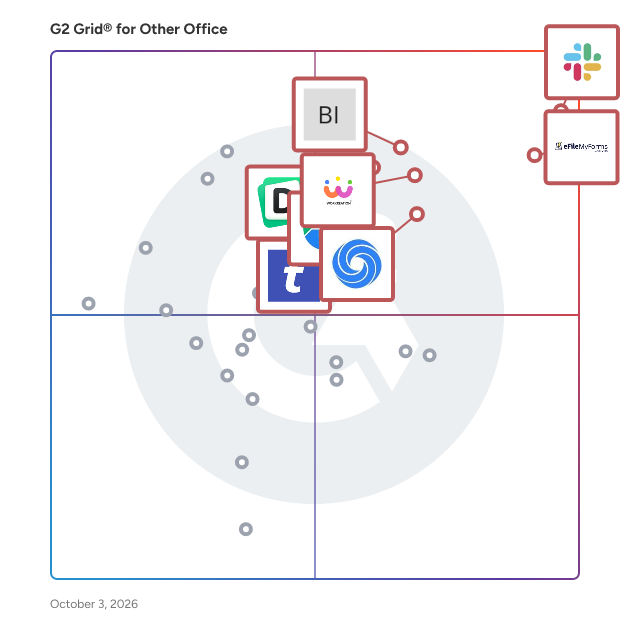
G2 Grid® for Other Office Software

G2 Grid® for Other Office Software plotting products by satisfaction and market presence

Highlighted products: Slack Connector for Jira, Google Drive & Docs for Confluence, Workreation®, NoteGPT, Drive Uploader, Diffchecker, TransferNow, and DocsAutomator.

Underlying data: [Grid® JSON](https://www.g2.com/categories/other-office/grids.json?focus%5B%5D=slack-connector-for-jira&focus%5B%5D=google-drive-docs-for-confluence&focus%5B%5D=workreation&focus%5B%5D=notegpt&focus%5B%5D=drive-uploader&focus%5B%5D=diffchecker&focus%5B%5D=transfernow&focus%5B%5D=docsautomator)

PDF Automation Server

PDF Automation Server is a modular server product that provides a rich set of PDF processing functions for different environments. Use PAS as an essential tool to streamline your PDF processing, document workflows and web service orchestration in your organization.

Who Is the Company Behind PDF Automation Server?

PDF Extractor Tool

DRS Softech PDF Data Extractor Tool is a simple and helpful software that lets you pull out specific information or attachments from PDF files quickly. You can use it to work with many PDF files at once, which saves you a lot of time. The tool makes it easy to separate pages, split files by size or page numbers, and even handle password-protected PDFs. It’s user-friendly, so you don’t need to be a tech expert to use it. This tool is great for anyone who needs to organize or manage lots of PDF documents, such as students, office workers, or legal professionals.

Who Is the Company Behind PDF Extractor Tool?

PDF GPT

PDFGPT.io – The AI PDF Summarizer and Q&A Tool PDFGPT.io is an AI-powered PDF tool that lets you instantly summarize, search, and interact with your PDFs. Instead of manually scrolling through long documents, you can ask questions in plain language and get accurate answers within seconds. Built for students, researchers, professionals, and teams, PDFGPT.io is the fastest way to work with documents and saves hours of time by: 📄 AI PDF Summarizer – Turn large documents into clear, concise takeaways ❓ Ask Questions in PDFs – Get direct answers from your files instantly 🔍 Smart PDF Search – Find the right section of a document in seconds ⏱️ Boost Productivity – Spend less time reading, more time acting on insights With a clean, user-friendly interface and no learning curve, PDFGPT.io makes working with PDFs as simple as having a conversation. Why users choose PDFGPT.io: ✅ Saves hours on reading, note-taking, and research ✅ Improves study and work efficiency with AI ✅ No technical setup required — just upload and start using If you work with PDFs daily and want to study smarter, research faster, and get instant insights from your documents, PDFGPT.io is the #1 AI PDF summarizer and Q&A tool built for you.

Who Is the Company Behind PDF GPT?

PDF Password Remover

PDF Password remover is the best tool to remove password protection from PDF files. Moreover, the utility has a feature to provide a new password to output PDF files. Following are some amazing features of the PDF Password Remover tool:- 1. The tool also maintains the folder structure of PDF files. 2. The professional software provides the option to select multiple PDF files at once. 3. It also lets users change or enter the Author, Title, Subject, Creation Date, Modification Date, and Keywords. 4. The utility supports all the versions of Windows OS like 11, 10, 8.1, 8, 7, Vista, XP, 2003, and 2000. 5. The professional software is compatible with all PDF file versions.

Who Is the Company Behind PDF Password Remover?

  • Seller: ConverterTools
  • Year Founded: 2014
  • HQ Location: San Jose, US
  • Twitter: @converttools
    3 Twitter followers
  • LinkedIn® Page: www.linkedin.com
    1 employees on LinkedIn®

Who Uses This Product?

  • Company Size: 100% Large

What Are Recent G2 Reviews of PDF Password Remover?

Pentalogic Reminder

Pentalogic Reminder is delivered as a SharePoint web part and an NT Service. Once installed on a SharePoint server you add it to a Web Part Page and then configure it to 'watch' one of your lists and send out Reminder emails according to your requirements.

Who Is the Company Behind Pentalogic Reminder?

PlantUML Diagrams for Confluence

Stratus Add-ons is a vendor of Atlassian apps with over 10 years of development experience in the Atlassian Ecosystem.

Who Is the Company Behind PlantUML Diagrams for Confluence?

Pomodus

Pomodus is part productivity and focus tool and part interruption killer.

Who Is the Company Behind Pomodus?

  • Seller: Pomodus
  • HQ Location: N/A
  • Twitter: @pomodus
    27 Twitter followers
  • LinkedIn® Page: www.linkedin.com
    1 employees on LinkedIn®

Poper Blocker

Poper Blocker is a browser extension designed to enhance your online experience by automatically blocking pop-ups, ads, cookie requests, overlays, and other distractions across various websites. Compatible with Google Chrome, Microsoft Edge, and Firefox, it ensures a cleaner, more focused browsing environment. Key Features and Functionality: - Comprehensive Ad Blocking: Effectively removes all types of pop-ups and ads, including those on YouTube and social media platforms like Facebook, Instagram, LinkedIn, and Twitter. - Cookie Consent Removal: Automatically hides cookie request banners, streamlining your browsing experience. - Overlay and Notification Blocking: Eliminates disruptive overlays and site notifications that can hinder content visibility. - Social Media Content Filtering: Allows users to control their social media feeds by hiding posts containing specific keywords. - Customizable Interface: Enables users to hide any web element with a simple click, offering a personalized browsing experience. Primary Value and User Benefits: Poper Blocker addresses the common frustrations of online users by eliminating intrusive pop-ups, ads, and other distractions, leading to a smoother and more enjoyable browsing experience. Its comprehensive blocking capabilities ensure that users can focus on their desired content without interruptions. Additionally, the social media content filter empowers users to curate their feeds, reducing exposure to unwanted topics. By providing these features, Poper Blocker enhances productivity and user satisfaction during web navigation.

Who Is the Company Behind Poper Blocker?

Postilize

A digital AI assistant that recognizes key business events, drafts messages and allows users to retain customers, upsell and gain new business.

Who Is the Company Behind Postilize?

Presstimator

Presstimator is a print estimating software that provides extensive and customizable costs and settings for production of newspapers and the commercial web offset press.

Who Is the Company Behind Presstimator?

Product Directory Plugin

The Product Directory Plugin for WordPress allows you to create a curated catalog of products with rich media like images and videos. It features an intuitive search and filter system for easy navigation. You can also monetize the directory by charging fees for adding and maintaining product listings.

Who Is the Company Behind Product Directory Plugin?

  • Seller: CreativeMinds
  • Year Founded: 2014
  • HQ Location: Kfar Bin-Nun, IL
  • Twitter: @CMPlugins
    1,493 Twitter followers
  • LinkedIn® Page: www.linkedin.com
    39 employees on LinkedIn®

Productivity Page

Productivity Page simplifies note-taking with an intuitive design that's easy to use without advanced technical skills.

Who Is the Company Behind Productivity Page?

Professor Excel Tools

Professor Excel Tools is a lightweight Excel Add-In with more than 125 features. All functions are located on a new ribbon in Excel. - Get a whole new ribbon in Excel: Extend Excel with more than 125 very useful features. - Start right away: Professor Excel Tools are easy to use but still very powerful. - No crammed computer, no spam. Our add-in doesn’t use any background resources and doesn’t slow down your computer. The features include: - Amazing copy & paste functions solving all the shortcomings of the built-in paste options. - Real time-savers: Unique Excel functions or bulk-edit existing formulas and functions. - Need special elements in Excel? Bulk insert text, special symbols or flags with just a mouse click. - Editing cells the smart way: Instead of spending a lot of time on searching through Excel features, just apply often used functions with a click. And not only to one cell, but to all selected cells at the same time. - Powerful Workbook Tools: Break all links in Excel, create a table of contents, merge Excel files and Excel sheets, edit (hidden) named ranges and much, much more… - Formatting made easy: Use the Layout tools to apply professional formatting. Not only to the current worksheet, but also to the whole workbook! - Finished working on your contents? Share it with others with just a click. Or reduce the file size for large Excel files.

Who Is the Company Behind Professor Excel Tools?

Neeraja Prakash
NP
Researched and written by Neeraja Prakash
Updated June 16, 2025