Best Online Form Builder Software - Page 19

How Many Online Form Builder Software Products Does G2 Track?

Total Products under this Category: 513

Category Stats (Nov 2026)

  • Average Rating: 4.49/5 The average rating of products in this category, based on all submitted ratings
  • Top Trending Product: Fomr (+1.57%) - Among all products in this category, Fomr recorded the largest rating increase compared to last month

Last updated: November 01, 2026

How Does G2 Rank Online Form Builder Software Products?

Why You Can Trust G2's Software Rankings:

  • 30 Analysts and Data Experts
  • 114,800+ Authentic Reviews
  • 513+ Products
  • Unbiased Rankings

G2's software rankings are built on verified user reviews, rigorous moderation, and a consistent research methodology maintained by a team of analysts and data experts. Each product is measured using the same transparent criteria, with no paid placement or vendor influence. While reviews reflect real user experiences, which can be subjective, they offer valuable insight into how software performs in the hands of professionals. Together, these inputs power the G2 Score, a standardized way to compare tools within every category.

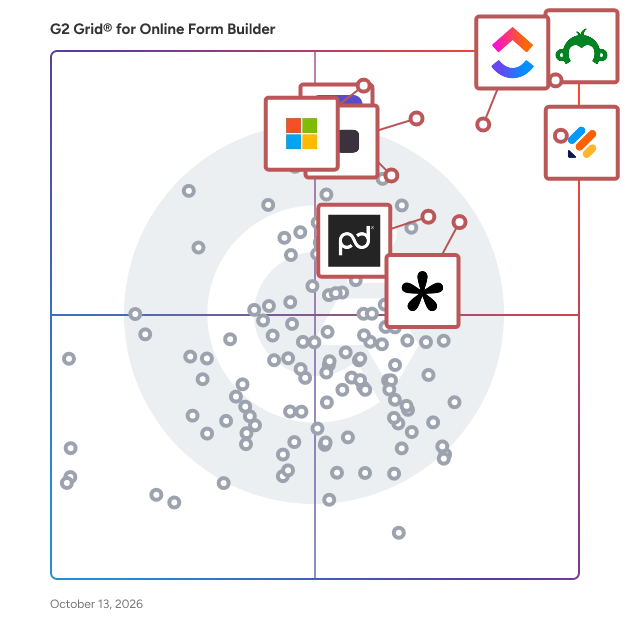
G2 Grid® for Online Form Builder Software

G2 Grid® for Online Form Builder Software plotting products by satisfaction and market presence

Highlighted products: SurveyMonkey, Jotform, ClickUp, Typeform, Microsoft Forms, Tally, Adobe Acrobat Sign, and PandaDoc.

Underlying data: [Grid® JSON](https://www.g2.com/categories/online-form-builder/grids.json?focus%5B%5D=surveymonkey&focus%5B%5D=jotform&focus%5B%5D=clickup&focus%5B%5D=typeform&focus%5B%5D=microsoft-forms&focus%5B%5D=tally-forms-tally&focus%5B%5D=adobe-acrobat-sign&focus%5B%5D=pandadoc)

betterform

Forms simply for everyone - betterform is simple and intuitive forms that just work anywhere on your website without the hassle. Forget spending hours setting up custom form handling and notifications. Our forms are a breeze to set up on any tech stack, and even easier to maintain. It's like being on submission auto-pilot. With a small footprint of only 1.2KB zipped, betterform will work and scale with even the most performance-minded websites. Better yet, you own your data, because no one else should. Betterform? I think so.

Who Is the Company Behind betterform?

Bit Form

Bit Form is a WordPress form builder plugin with a ultra lightweight, drag-and-drop builder that lets users create powerful contact forms, payment forms, event registrations, and multi-step forms.

Who Is the Company Behind Bit Form?

Briefing.nl

Briefing is the modern way to create, share, and manage online forms. From smart applications to streamlined internal processes, Briefing helps you create forms that work. For you, your team, and your target audience. The company is headquartered in the Netherlands.

Who Is the Company Behind Briefing.nl?

AI can help you find the answers. G2 helps you trust them.

Connect G2 to Claude or ChatGPT for answers grounded in G2's trusted reviews, comparisons, and pricing from real user insights.

How it works

Brieform

Brieform is an AI-native online form builder. Instead of a drag-and-drop canvas, you describe the form you want in plain English and Brieform builds it natively — fields, validation, conditional logic and multi-step flows — no plugins or integrations required. Every form gets a shareable public link (or embed) so you can collect and store responses directly in Brieform, with built-in analytics on views and conversions. What sets Brieform apart is where the builder lives: it ships as a Model Context Protocol (MCP) server, so you create, edit and publish forms — and read submissions back — from inside your AI assistant (Claude, ChatGPT, Cursor, Le Chat, VS Code). The same assistant can tag and route incoming responses. Build a working form in under 90 seconds, entirely in natural language. Best for solopreneurs, freelancers, agencies and small teams who want lead-capture, intake, feedback and survey forms without learning a new tool. EU-hosted with a native GDPR field. Free to start.

Who Is the Company Behind Brieform?

Captisa Forms

Captisa lets users create online forms. Users can develop forms to generate leads, conduct customer surveys, find applicants for a job, or register guests for an event, Captisa's easy-to-use form builder lets users build a customized online form to fit your exact needs in minutes.

Who Is the Company Behind Captisa Forms?

CaptureIQ

CaptureIQ is an advanced AI-powered form builder designed to go far beyond traditional form tools. At its core, it allows you to generate fully functional, optimized forms instantly using AI—whether it’s a survey, feedback form, lead qualification flow, or a graded quiz. Unlike static builders, every CaptureIQ form can adapt to your needs with AI refinements, ensuring your forms are always optimized for your specific goals. One of the most powerful features inside CaptureIQ is Leads Intelligence Mode, built specifically for businesses that want to capture and qualify leads. By analyzing your website or business description, CaptureIQ understands your Ideal Customer Profile (ICP), key demographics, and priority attributes. Based on this, it automatically generates lead qualification questions and assigns intelligent scoring to responses—giving higher weight to answers that matter most to your business. When it comes to analyzing collected data, CaptureIQ offers Smart Analytics powered by AI. Beyond showing you basic stats like visits, starts, submissions, and completion rates, it goes deeper with Sentiment Analysis, which detects whether responses are positive, negative, or neutral. It also performs Topic and Subtopic Clustering on open-ended responses, helping you instantly see key themes emerging from customer feedback without manual sorting. This turns raw text responses into structured, actionable insights that reveal exactly what your audience is thinking. To make insights even more accessible, CaptureIQ introduces Ask AI, an assistant built directly into your results dashboard. Instead of manually sifting through data, you can simply ask questions in natural language—such as “What are the main concerns customers raised?” or “Which city gave the most positive feedback?”—and the AI will summarize findings instantly. This empowers businesses to move from data collection to decision-making in seconds, without requiring a data team. All of this intelligence is wrapped in a platform that makes sharing forms effortless. CaptureIQ gives you a direct link as soon as a form is published, but also provides advanced options like branded short links with your own domain, QR codes (including fully branded QR codes with logos and colors), and Open Graph Preview customization for social media sharing. You can even embed the first question directly in email campaigns to improve participation rates. Combined with access controls like setting expiration dates or response limits, your forms remain both professional and manageable. Ultimately, CaptureIQ is not just a form builder—it’s an AI-driven insights engine. From creation to distribution to deep analytics, it helps businesses save time, improve lead quality, understand customer sentiment, and extract actionable intelligence at scale. Whether you’re qualifying leads, running campaigns, collecting feedback, or analyzing audience behavior, CaptureIQ transforms simple forms into powerful tools for growth.

Who Is the Company Behind CaptureIQ?

ChatterForms

ChatterForms puts existing paperwork and new ideas online. Start with a prompt, a blank PDF, an image, a public form URL or a template. Review the draft, edit fields with AI or the visual builder, and publish a link or website embed. Create intake forms, applications, registrations and agreements. Configure conditional fields and arithmetic calculations, and choose a traditional or one-question-at-a-time format. Basic adds e-signatures, Stripe payments and Calendly. Pro adds HIPAA-enabled forms with a signed BAA and email survey distribution. Zapier integration is free during beta. Send new non-HIPAA submissions to Google Sheets, Slack or email through configured Zaps. HIPAA forms are excluded. Zapier's own pricing and limits apply. Review submissions, export CSVs and download response PDFs. Start on the Free plan without a credit card; paid features require the appropriate plan. ChatterForms charges no platform fee on Stripe payments. Stripe processing fees apply.

Who Is the Company Behind ChatterForms?

Chekkit

Chekkit is an all-in-one platform that helps local businesses grow faster with less effort. It combines AI-powered messaging and automation with the tools teams use every day—review management, business text messaging, groupchat, a centralized inbox, textable landline, customer surveys, competitive benchmarking, and more—so you can boost engagement, convert more leads, and outperform the competition from one place.

Average Rating: 4.9/5.0

Total Reviews: 154

How Do G2 Users Rate Chekkit?

  • Has the product been a good partner in doing business?: 9.8/10 (Category avg: 9.1/10)

Who Is the Company Behind Chekkit?

  • Seller: Chekkit
  • Year Founded: 2016
  • HQ Location: Winnipeg
  • Twitter: @getchekkit
    204 Twitter followers
  • LinkedIn® Page: www.linkedin.com
    10 employees on LinkedIn®

Who Uses This Product?

  • Who Uses This: Owner, Manager
  • Top Industries: Retail, Luxury Goods & Jewelry
  • Company Size: 90% Small, 10% Medium

What Do G2 Reviewers Say About Chekkit?

AI-generated summary from verified user reviews

Pros
  • Users value the AI integration of Chekkit, enhancing their websites with unique chatbot capabilities for improved customer interaction.
  • Users appreciate the innovative AI chatbot feature of Chekkit, setting their website apart in the industry.
  • Users find the unique chatbot integration feature of Chekkit enhances their website's functionality and user engagement.
  • Users value the integration capabilities of Chekkit, allowing unique features like chatbots on their websites.
Cons
  • Users find the limited communication options of Chekkit frustrating, as responding to guests is only possible through text.
  • Users are frustrated by the limited chat functionality, only allowing responses to guests via text.
  • Users find the limited response options to guests via text to be restrictive and inconvenient.
  • Users find the poor chat functionality of Chekkit limiting, as text responses are the only option for communication.

What Are Recent G2 Reviews of Chekkit?

What Are G2 Users Discussing About Chekkit?

Clickiny

Clickiny is a powerful, easy-to-use platform designed to help businesses and individuals create dynamic forms, quizzes, and surveys effortlessly. Whether you're generating leads, collecting customer feedback, or conducting research, Clickiny offers a seamless experience with smart logic, audience segmentation, and automation features.

Average Rating: 4.5/5.0

Total Reviews: 2

How Do G2 Users Rate Clickiny?

  • CMS Support: 9.2/10 (Category avg: 8.5/10)

Who Is the Company Behind Clickiny?

Who Uses This Product?

  • Company Size: 100% Small

What Do G2 Reviewers Say About Clickiny?

AI-generated summary from verified user reviews

Pros
  • Users value the quick access to design customization offered by Clickiny, enhancing their creative efficiency.
  • Users appreciate the design customization options in Clickiny, enabling quick access to tailored solutions.
  • Users value the quick access to design customization, enhancing their overall experience with Clickiny.
  • Users find the amazing features of Clickiny enhance their experience and enjoyment of the product.
  • Users love the amazing features of Clickiny, enhancing their overall experience and satisfaction.
Cons
  • Users frequently experience slow loading times with Clickiny, impacting overall efficiency and usability of the application.
  • Users experience slow performance, which hampers efficiency and can lead to frustration when using Clickiny.

What Are Recent G2 Reviews of Clickiny?

Clipform

Clipform is a video-first form builder. Every question can be a short video, and respondents reply by video, audio, or text. Build interactive quizzes, surveys, and lead-capture forms, then embed them anywhere - no code required.

Who Is the Company Behind Clipform?

Coherent

Coherent Spark is a no-code software-as-a-service (SaaS platform that revolutionizes the way businesses develop and deploy software by transforming complex Excel-based business logic into ready-to-use APIs. This innovative solution enables organizations to leverage their existing spreadsheet models, converting them into scalable, cloud-based applications without the need for extensive coding or IT intervention. By bridging the gap between business expertise and technological implementation, Coherent Spark accelerates digital transformation, enhances operational efficiency, and reduces time-to-market for new products and services. Key Features and Functionality: - Automatic API Generation: Converts Excel rules, formulas, and data models into APIs that seamlessly integrate with various front-end and back-end systems. - No-Code Platform: Empowers users to develop and deploy applications without writing code, making software development accessible to non-technical staff. - Centralized Management: Provides a unified platform for managing, securing, and auditing business logic, ensuring consistency and compliance across the organization. - Advanced Testing and Simulation: Offers tools for complex modeling, testing, and business impact simulations, enabling thorough validation before deployment. - Cloud Scalability: Facilitates effortless migration of business logic to the cloud, enhancing scalability and performance. Primary Value and Problem Solved: Coherent Spark addresses the common challenge of translating intricate business logic embedded in spreadsheets into functional, scalable software applications. By automating this conversion process, it eliminates the need for manual coding, reduces the risk of errors, and significantly shortens development cycles. This empowers businesses to rapidly adapt to market changes, innovate more efficiently, and maintain a competitive edge by leveraging their existing intellectual capital in a more dynamic and integrated manner.

Who Is the Company Behind Coherent?

  • Seller: Coherent
  • Year Founded: 2018
  • HQ Location: New York, New York, United States
  • LinkedIn® Page: www.linkedin.com
    249 employees on LinkedIn®

Commence CRM

Commence CRM provides growing businesses with a comprehensive suite of applications for account and contact management, activity management, lead management, sales opportunity management, marketing, customer support with ticketing, a web based customer portal, project management and multi-level reporting with analytics. The product is ideal for businesses that require more functionality and customizability than is offered by the myriad of low cost one size fits all CRM solutions, but without the cost and complexity of enterprise level products.

Average Rating: 4.1/5.0

Total Reviews: 15

How Do G2 Users Rate Commence CRM?

  • Has the product been a good partner in doing business?: 9.0/10 (Category avg: 9.1/10)

Who Is the Company Behind Commence CRM?

  • Seller: Commence
  • Year Founded: 1988
  • HQ Location: Eatontown, NJ
  • Twitter: @CommenceCorp
    467 Twitter followers
  • LinkedIn® Page: www.linkedin.com
    15 employees on LinkedIn®
  • Phone: 1(732) 380-9100

Who Uses This Product?

  • Company Size: 50% Small, 17% Medium

What Are Recent G2 Reviews of Commence CRM?

Cost Calculator

Cost Calculator Builder is a WordPress plugin that allows website owners to create interactive cost estimation forms for products or services directly on their websites. It falls under the category of form-building and estimation tools designed specifically for WordPress platforms. The plugin is commonly used by small to medium-sized businesses, freelancers, and service providers who need to offer dynamic pricing or quoting tools to their customers. WP Cost Calculator enables users to build custom calculators using a visual drag-and-drop interface. These calculators can be used to estimate service costs, product pricing, or any scenario where users need to calculate values based on inputs. Common use cases include loan calculators, service estimators, appointment quote tools, and product configuration pricing. The plugin supports a wide variety of input types such as text fields, dropdowns, sliders, checkboxes, radio buttons, and conditional logic to adjust calculations dynamically. Users can embed forms via shortcodes and assign custom calculation formulas to reflect real-time cost outputs. Key features include: - Drag-and-drop form builder with customizable fields and real-time calculation logic - Payment integrations including PayPal, Stripe, Razorpay, and WooCommerce - Conditional field display, allowing logic-based visibility and dynamic calculations - Over 100 prebuilt templates for industries like healthcare, home services, education, and e-commerce - Advanced form elements like file uploads, date and time pickers, geolocation, and repeaters - In-depth Order Analytics to track the engagement and sales The plugin also provides automation options with webhook support, email quote delivery, and PDF invoice generation. WP Cost Calculator is a flexible solution for businesses that need a visual and interactive way to communicate pricing structures and streamline customer inquiries.

Who Is the Company Behind Cost Calculator?

Neeraja Prakash
NP
Researched and written by Neeraja Prakash
Updated April 9, 2026