Best Note-Taking Software - Page 17

How Many Note-Taking Software Products Does G2 Track?

Total Products under this Category: 243

Category Stats (Nov 2026)

  • Average Rating: 4.4/5 (↑0.01 vs Oct 2026) The average rating of products in this category, based on all submitted ratings
  • Top Trending Product: Fyxer (+1.05%) - Among all products in this category, Fyxer recorded the largest rating increase compared to last month

Last updated: November 01, 2026

How Does G2 Rank Note-Taking Software Products?

Why You Can Trust G2's Software Rankings:

  • 30 Analysts and Data Experts
  • 103,800+ Authentic Reviews
  • 243+ Products
  • Unbiased Rankings

G2's software rankings are built on verified user reviews, rigorous moderation, and a consistent research methodology maintained by a team of analysts and data experts. Each product is measured using the same transparent criteria, with no paid placement or vendor influence. While reviews reflect real user experiences, which can be subjective, they offer valuable insight into how software performs in the hands of professionals. Together, these inputs power the G2 Score, a standardized way to compare tools within every category.

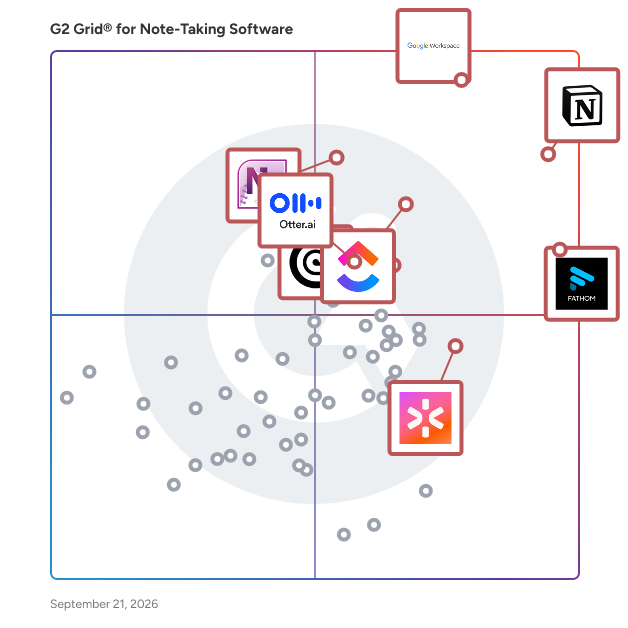
G2 Grid® for Note-Taking Software

G2 Grid® for Note-Taking Software plotting products by satisfaction and market presence

Highlighted products: Notion, Google Workspace, Fathom, ClickUp, Microsoft OneNote, Rev, CoRecruit (formerly Quil), and Otter.ai.

Underlying data: [Grid® JSON](https://www.g2.com/categories/note-taking-software/grids.json?focus%5B%5D=notion&focus%5B%5D=google-workspace&focus%5B%5D=fathom-video&focus%5B%5D=clickup&focus%5B%5D=microsoft-onenote&focus%5B%5D=rev&focus%5B%5D=corecruit-formerly-quil&focus%5B%5D=otter-ai)

Zen Clutter

Are you tired of juggling multiple tools and losing track of important tasks, notes, and ideas? Zen Clutter is designed to make life easier by giving you a centralized, intuitive platform to manage your personal and professional life effortlessly. Zen Clutter isn't just about organization; it's about clarity. With tools like task management, journaling, and bookmarks, it helps you prioritize what matters most. Whether you're scheduling your day, storing critical notes, or bookmarking essential information, Zen Clutter is the quiet assistant that keeps you in control. Discover the joy of streamlined simplicity. Say goodbye to scattered files and forgotten tasks. Say hello to a more productive, organized you with Zen Clutter.

Who Is the Company Behind Zen Clutter?

ZipyTiny

Zipytiny is an AI knowledge workspace built for professionals and teams who need to convert long-form video, audio, and document content into structured, actionable output in seconds instead of hours. For business users, Zipytiny turns Zoom, Microsoft Teams, and Google Meet recordings into structured meeting notes, auto-extracted action items with assigned owners, and executive summaries tailored for stakeholders who couldn't attend. Meeting content can also be exported directly into formatted PowerPoint presentations, removing the manual work of turning a call recording into a shareable deck. Beyond meetings, Zipytiny processes a wide range of input formats — YouTube videos, PDFs, Word documents, PowerPoint slides, Excel sheets, scanned images (via OCR), and MP3/MP4 recordings — and converts them into timestamped notes, interactive mind maps, and practice quizzes. This makes it useful not only for corporate training and onboarding documentation, but also for research teams distilling long technical material, and educators or L&D teams building structured learning content from source recordings. Every output links back to the exact timestamp or source page it was generated from, so users can verify details without re-scrubbing through raw recordings. Generated content can be exported to PDF, Word, Markdown, or Notion, and integrated into existing team workflows rather than staying siloed in a separate tool. Zipytiny is built by a solo founder with a background in enterprise ERP consulting, with a free tier for individual use and Pro ($9.99/mo) and Enterprise ($39/mo) plans for teams needing unlimited processing, team workspaces, and API access.

Who Is the Company Behind ZipyTiny?

  • Seller: Zipytiny
  • Year Founded: 2026
  • HQ Location: Sharjah, AE
  • LinkedIn® Page: www.linkedin.com
    1 employees on LinkedIn®

Zoom My Notes

Zoom My Notes is an AI note-taking solution for capturing, organizing, and following up on conversations across virtual and in-person meetings. Built into the Zoom ecosystem, it helps individuals and teams record meeting context without manually documenting every discussion, then turns transcripts and personal notes into summaries, key takeaways, and action items. My Notes can be used in Zoom Meetings as well as supported third-party meeting platforms, including Microsoft Teams and Google Meet, without adding a meeting bot. Users can also capture in-person conversations and mobile meeting notes, with notes and transcripts synchronized across devices. After a meeting, notes can be reviewed, edited, shared, or saved as templates through Zoom Hub and shared through Zoom Canvas or Zoom Chat. Key features include: - AI-powered transcription that captures meeting discussions in real time. - Automated meeting summaries with key takeaways, decisions, and suggested action items. - Manual note capture, with AI able to organize and expand on users’ written notes. - Cross-platform meeting support for Zoom, Microsoft Teams, Google Meet, and in-person conversations. - Mobile and desktop synchronization for access to notes and transcripts across devices. - Workflow automation for follow-up actions such as sending recap emails, creating tasks, and sharing team updates. - Sharing and collaboration through Zoom Hub, Zoom Canvas, and Zoom Chat. - Configurable settings in the Zoom web portal for options such as transcription permissions and voice activity detection. - A visible in-meeting indicator when transcription is active. - Support for nine My Notes languages; access to all features requires Zoom client version 6.7.5 or later. Zoom My Notes is suited to professionals and teams that run frequent meetings and need a consistent record of discussions and follow-up work. Common use cases include consultants documenting client conversations, sales teams capturing customer needs and next steps, project teams creating meeting recaps and assigned tasks, managers recording one-on-ones, and educators or tutors summarizing sessions for students. It can also support hybrid work by providing a single place for notes captured from online, mobile, and in-person conversations. Technically, My Notes is a Zoom-account-based capability that stores notes and transcripts in Zoom Hub and Zoom Canvas. It uses speech recognition and AI processing to transcribe discussions, organize captured information, and produce post-meeting summaries. Workflow actions can be attached directly to notes to initiate follow-up processes. Zoom states that it does not use customer audio, video, chat, screen sharing, attachments, or other communications-like customer content to train its or third-party AI models. Availability varies by plan, region, and industry vertical.

Average Rating: 4.5/5.0

Total Reviews: 186

How Do G2 Users Rate Zoom My Notes?

  • Has the product been a good partner in doing business?: 8.9/10 (Category avg: 9.1/10)
  • Quality of Support: 8.6/10 (Category avg: 8.5/10)
  • Ease of Use: 9.1/10 (Category avg: 8.9/10)

Who Is the Company Behind Zoom My Notes?

  • Seller: Zoom
  • Year Founded: 2011
  • HQ Location: San Jose, CA
  • LinkedIn® Page: www.linkedin.com
    14,013 employees on LinkedIn®

Who Uses This Product?

  • Who Uses This: Associate Data Engineer
  • Top Industries: Computer Software, Information Technology and Services
  • Company Size: 41% Medium, 37% Small

What Are Recent G2 Reviews of Zoom My Notes?

Neeraja Prakash
NP
Researched and written by Neeraja Prakash
Updated March 3, 2025