Top Free Mind Mapping Software - Page 3

How Many Mind Mapping Software Products Does G2 Track?

Total Products under this Category: 91

Category Stats (Oct 2026)

  • Average Rating: 4.48/5 The average rating of products in this category, based on all submitted ratings
  • Top Trending Product: Lucid Visual Collaboration Suite (+0.13%) - Among all products in this category, Lucid Visual Collaboration Suite recorded the largest rating increase compared to last month

Last updated: October 17, 2026

How Does G2 Rank Mind Mapping Software Products?

Why You Can Trust G2's Software Rankings:

  • 30 Analysts and Data Experts
  • 45,200+ Authentic Reviews
  • 91+ Products
  • Unbiased Rankings

G2's software rankings are built on verified user reviews, rigorous moderation, and a consistent research methodology maintained by a team of analysts and data experts. Each product is measured using the same transparent criteria, with no paid placement or vendor influence. While reviews reflect real user experiences, which can be subjective, they offer valuable insight into how software performs in the hands of professionals. Together, these inputs power the G2 Score, a standardized way to compare tools within every category.

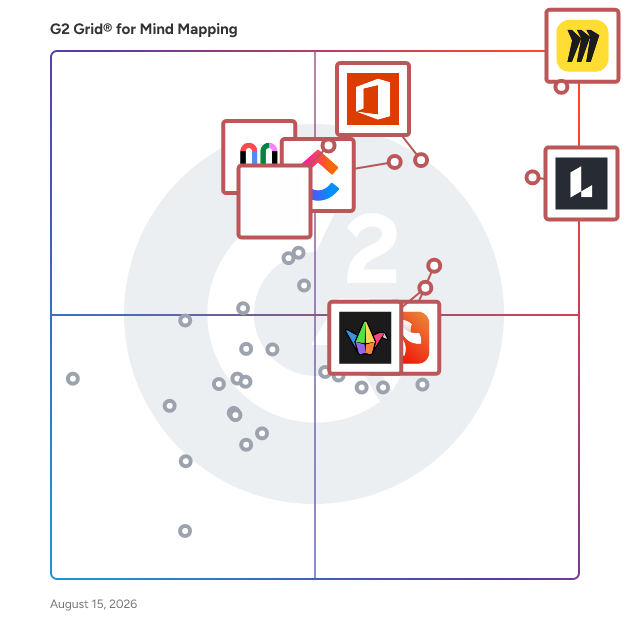
G2 Grid® for Mind Mapping Software

G2 Grid® for Mind Mapping Software plotting products by satisfaction and market presence

Highlighted products: Miro, Lucid Visual Collaboration Suite, Visio, ClickUp, FigJam, Xmind, Padlet, and Mural.

Underlying data: [Grid® JSON](https://www.g2.com/categories/mind-mapping-software/grids.json?focus%5B%5D=miro&focus%5B%5D=lucid-software-inc-lucid-visual-collaboration-suite&focus%5B%5D=visio&focus%5B%5D=clickup&focus%5B%5D=fig-jam&focus%5B%5D=xmind&focus%5B%5D=padlet&focus%5B%5D=mural)

Ideamap

Some call it the best AI mind mapping software. Ideamap is a revolutionary AI-powered visual brainstorming app that's changing the game for creatives around the globe. Designed for teams that aim for the stars, Ideamap leverages the power of AI to make brainstorming sessions as efficient and as productive as possible. Ideamap AI does all the above automagically - and more! Generate mindmaps on the fly in seconds, get ice-breakers and endless inspiration on a collaborative canvas for your whole team. Where everyone can interact with AI. Let Ideamap analyze your ideas (generated, imported or added by your colleagues) and categorize them for you. Voting and AI meeting conclusion features are included as well. Your next brainstorm is going to be faster and better.

Average Rating: 4.3/5.0

Total Reviews: 4

How Do G2 Users Rate Ideamap?

  • Quality of Support: 7.8/10 (Category avg: 8.7/10)

Who Is the Company Behind Ideamap?

  • Seller: Ideamap
  • Company Website:
  • Year Founded: 2023
  • HQ Location: N/A
  • LinkedIn® Page: www.linkedin.com
    1 employees on LinkedIn®

Who Uses This Product?

  • Company Size: 75% Medium, 50% Small

What Do G2 Reviewers Say About Ideamap?

AI-generated summary from verified user reviews

Pros
  • Users find the ease of use of Ideamap remarkable, enhancing collaboration and idea generation effortlessly.
  • Users value the intuitive interface of Ideamap, which simplifies idea generation and enhances collaboration among team members.
  • Users find easy creation of mind maps with Ideamap saves time and enhances their ideation process effectively.
  • Users love how Ideamap's intelligent organization features streamline discussions and enhance collaborative thinking effortlessly.
  • Users love the easy integration with Microsoft Office, enhancing collaboration and idea generation in Ideamap.
Cons
  • Users report integration issues with Ideamap, citing the absence of support for tools like Confluence and JIRA.
  • Users express frustration over the lack of integration with essential tools like Confluence and JIRA in Ideamap.
  • Users find that quality issues arise with AI-generated suggestions, especially in specialized and complex regulatory contexts.

What Are Recent G2 Reviews of Ideamap?

Midlap

Midlap is an online collaboration and brainstorming tool where we are solving the problem that arises due to switching between multiple apps to collaborate with your team. We solve this problem by providing tools like Whiteboards, Kanban Boards, Flow Diagrams, Files, Chat, Events, Gantt Charts etc under a single app. So no more switching between different apps and get more done with Midlap.

Average Rating: 4.9/5.0

Total Reviews: 12

How Do G2 Users Rate Midlap?

  • Quality of Support: 9.6/10 (Category avg: 8.7/10)

Who Is the Company Behind Midlap?

Who Uses This Product?

  • Company Size: 75% Small, 17% Large

What Are Recent G2 Reviews of Midlap?

QuikFlow

Create flowcharts (and mind maps) without worrying about layout with QuikFlow. With our interactive layout algorithms, you can work as if you were using a mind mapping application while creating flowcharts. Define your structure and the app handles the layout! CREATE FLOWS, NOT JUST MIND MAPS Creating flows is just like creating mind maps. But without the restrictions. Let flows converge or loop back around. All while retaining the same intuitive workflow. FOCUS ON YOUR CONTENT, NOT ON THE LAYOUT Define your flow and the relationships between different elements. The layout happens automatically while you are working. To adjust the layout, you can reorganize elements using drag-and-drop. MAKE CHANGES WITHOUT WORRYING ABOUT THE DETAILS No matter what you change, the layout will automatically adapt. Paste a whole subflow into the middle of the flow. Delete any part of the flow, no matter how intertwined. You won’t have to spend most of your time fixing the layout. SHARE AND EXPORT WITHOUT SURPRISES Easily share your creations in popular file formats (PDF and PNG). In high quality and without fuss. It is that simple. USE FOR FREE. UPGRADE IF YOU WANT TO QuikFlow gives you access to most features, including all of our innovative layout features, for free without any strings attached. You can upgrade to QuikFlow Pro to access additional styling and export features. Try QuikFlow Pro with a free 7-day trial. Buy it either as a monthly or yearly subscription, or as a one-time purchase. The one-time purchase for Mac is also available as a separate app for volume licensing via Apple Business Manager. Files created using QuikFlow Pro can be opened and edited in the free version.

Average Rating: 4.7/5.0

Total Reviews: 3

How Do G2 Users Rate QuikFlow?

  • Has the product been a good partner in doing business?: 10.0/10 (Category avg: 9.0/10)
  • Quality of Support: 8.9/10 (Category avg: 8.7/10)

Who Is the Company Behind QuikFlow?

  • Seller: coneno
  • Year Founded: 2016
  • HQ Location: Kaiserslautern, DE
  • Twitter: @coneno_team
    25 Twitter followers
  • LinkedIn® Page: www.linkedin.com
    5 employees on LinkedIn®

Who Uses This Product?

  • Company Size: 67% Medium, 33% Small

What Are Recent G2 Reviews of QuikFlow?

AI can help you find the answers. G2 helps you trust them.

Connect G2 to Claude or ChatGPT for answers grounded in G2's trusted reviews, comparisons, and pricing from real user insights.

How it works

TheBrain

TheBrain is knowledge management software that helps people and teams remember what they know, see how it connects, and put it to work with AI. Most of what you know is scattered: notes in one app, files in another, links in your browser, ideas in your head. TheBrain brings it all into one place and connects it, so nothing gets lost and everything is easy to find again. Never lose a good idea. Capture notes, documents, web pages and ideas in seconds, and link each one to every project, person or topic it relates to. An idea can live in many places at once, without copies or debates over which folder it belongs in. Find what you need, with its context. Search brings back more than the note you wanted. It brings back everything around it: the related files, decisions, people and next steps. You spend less time hunting and more time thinking. See the big picture. Visual views show how your ideas, projects and research fit together. Patterns and gaps you would miss in a list of files become easy to spot. Get AI help that knows your work. Cerebro, the AI assistant built into TheBrain, works with the knowledge and connections you have already built. Ask it to summarize a project, draft a plan from your notes or find what you already know about a topic. Its answers are grounded in your own information, not generic ones. Give your team one shared brain. With TeamBrain, a team's knowledge stops living in scattered documents, chat threads and individual inboxes. Everyone works from the same connected knowledge base. New hires get up to speed faster, experts answer the same question fewer times, and knowledge stays with the organization when people move on. Cerebro works across the shared Brain, giving the whole team AI answers in the context of their own work. Permissions control who sees and edits what, and TeamBrain Server keeps sensitive knowledge on-premise. Start free, use it anywhere. The complete TheBrain app is free for personal and commercial use, on Windows, Mac, Linux, iPhone, Android and the web. Optional plans add cloud sync, more storage, more AI and team collaboration when you need them. People use TheBrain as a second brain for personal knowledge management. Teams use it for research, project knowledge, competitive intelligence, client work, training and onboarding. With more than 10 million downloads in 180 countries over 28 years, it is trusted by professionals, universities, government agencies and enterprise teams.)

Average Rating: 4.6/5.0

Total Reviews: 4

How Do G2 Users Rate TheBrain?

  • Quality of Support: 7.8/10 (Category avg: 8.7/10)

Who Is the Company Behind TheBrain?

Who Uses This Product?

  • Company Size: 50% Small, 25% Large

What Are Recent G2 Reviews of TheBrain?

What Are G2 Users Discussing About TheBrain?

Vani

Vani is a visual collaboration platform where teams create, meet, and work together. It's where teammates brainstorm for ideas, come up with plans, and work on mockups over a shared infinite canvas. You can quickly get your team started on common product development processes, marketing exercises, checklists, and process flowcharts with a handful of ready-made templates. Express your ideas visually by creating diagrams, mind maps, wireframes, or storyboards. And embed documents, spreadsheets, images, and videos, from Google, Microsoft, YouTube, Figma and other platforms so you have all your work in one place. It's super easy to hop over a video call with your teammates and follow each other's live cursors, drop comments, and react with emojis on the fly—it's like being in the same room, but better. Whether you're a marketing team working on your next big campaign, a product team preparing for a launch, or a design studio working on a creative, Vani helps you simplify collaboration with cross-functional teams and helps you go faster from idea to finished product. Start for free with unlimited shared Spaces to grow your biggest and brightest ideas.

Average Rating: 4.6/5.0

Total Reviews: 5

How Do G2 Users Rate Vani?

  • Has the product been a good partner in doing business?: 9.2/10 (Category avg: 9.0/10)
  • Quality of Support: 9.2/10 (Category avg: 8.7/10)

Who Is the Company Behind Vani?

  • Seller: Zoho
  • Year Founded: 1996
  • HQ Location: Austin, TX
  • Twitter: @Zoho
    137,880 Twitter followers
  • LinkedIn® Page: www.linkedin.com
    30,913 employees on LinkedIn®
  • Phone: +1 (888) 900-9646

Who Uses This Product?

  • Company Size: 60% Small, 40% Large

What Do G2 Reviewers Say About Vani?

AI-generated summary from verified user reviews

Pros
  • Users find the integration capabilities of Vani very helpful for collaboration, especially during daily stand-ups.
  • Users find the integrations with tools like Slack and Zoom extremely beneficial for collaboration during daily stand-ups.
  • Users value the seamless integration with tools like Slack and Zoom for enhanced team collaboration during meetings.
  • Users find the readymade templates highly useful for collaboration, especially during daily scrum stand-ups.
Cons
  • Users find the ERP integration complex, which can hinder a smooth user experience with Vani.
  • Users find the integration difficulty with ERP systems to be complex, hindering a smooth user experience.
  • Users find the integration with ERP to be somewhat complex, leading to challenges in seamless functionality.

What Are Recent G2 Reviews of Vani?

Mapify

Mapify is an AI mind mapping tool that allows you to summarize any content into mind maps, such as YouTube videos, meeting records, PDFs, images, audio files, etc. Powered by GPT, Gemini, or other top LLMs, you can generate a mind map within seconds.

Average Rating: 5.0/5.0

Total Reviews: 1

How Do G2 Users Rate Mapify?

  • Quality of Support: 10.0/10 (Category avg: 8.7/10)

Who Is the Company Behind Mapify?

Who Uses This Product?

  • Company Size: 100% Medium

What Do G2 Reviewers Say About Mapify?

AI-generated summary from verified user reviews

Pros
  • Users find Mapify to be incredibly easy to use, making video summaries quick and efficient.
  • Users love the time-saving aspect of Mapify, quickly grasping key points from YouTube videos in seconds.
Cons
  • Users find the linking issues limiting and suggest adding collaboration features for enhanced teamwork.

What Are Recent G2 Reviews of Mapify?

Relate

Relate is a digital collaboration platform designed to help organizations and teams transform the way they manage knowledge, ideas, and projects. With its intuitive and visual mapping features, Relate enables companies to build a clear, shared understanding of processes, workflows, and strategies. Whether you are onboarding new employees, developing training programs, or driving complex team projects, Relate provides the tools to keep everyone aligned and engaged. For businesses, Relate acts as a corporate learning and development platform as well as a knowledge management solution. Managers and HR leaders can use it to simplify employee onboarding, centralize internal knowledge, and support ongoing training. Teams gain access to a collaborative project management environment where they can visually organize ideas, map business processes, and plan initiatives with clarity. This helps reduce silos, improve internal communication, and ensure that employees are moving in the same direction. Relate also supports workflow mapping and ecosystem mapping, allowing organizations to visually represent how processes, departments, and stakeholders connect. This feature is especially useful for corporate strategy development, change management projects, or event planning, where a clear overview of all moving parts is essential. By combining knowledge management with collaboration tools, Relate bridges the gap between day-to-day teamwork and long-term organizational growth. Beyond the corporate sector, Relate is also widely adopted in education. Teachers, professors, and students use the platform as a digital teaching and collaboration tool. Academic users benefit from lesson planning tools, curriculum mapping, and project collaboration spaces, making Relate a flexible solution for both classroom and research environments. What sets Relate apart is its ability to combine simplicity and depth. The platform is designed to be easy to use while supporting advanced needs such as business process mapping, employee training programs, and knowledge sharing across teams. Organizations can integrate Relate into their learning and development strategies while also using it as a visual tool for innovation and brainstorming. In short, Relate helps companies and educators collaborate more effectively, learn continuously, and manage complex information with clarity. By aligning people, processes, and knowledge in one place, Relate empowers teams to move faster, think smarter, and achieve more together.

Average Rating: 4.3/5.0

Total Reviews: 2

How Do G2 Users Rate Relate?

  • Has the product been a good partner in doing business?: 5.0/10 (Category avg: 9.0/10)
  • Quality of Support: 8.3/10 (Category avg: 8.7/10)

Who Is the Company Behind Relate?

  • Seller: Relate
  • Year Founded: 2010
  • HQ Location: Sherbrooke, Qc
  • LinkedIn® Page: ca.linkedin.com
    1 employees on LinkedIn®

Who Uses This Product?

  • Company Size: 100% Small

What Do G2 Reviewers Say About Relate?

AI-generated summary from verified user reviews

Pros
  • Users appreciate the quick and personal customer support of Relate, enhancing their overall experience and satisfaction.
  • Users value the flexibility and support Relate offers for effective business management and enhancing customer experience.
  • Users love the ease of use of Relate, enjoying its intuitive interface and quick integration into daily workflows.
  • Users value the ease of use of Relate, finding it intuitive and seamless for daily tasks.
  • Users love the easy integrations of Relate, allowing for a smooth workflow setup in just a few hours.
Cons
  • Users desire more native integrations with other tools to enhance seamless automation and improve overall efficiency.
  • Users desire more native integrations with other tools to enhance automation and streamline their experience.

What Are Recent G2 Reviews of Relate?

CardBoardIt

CardBoard is a real-time online whiteboard collaboration tool designed for engineering and product management teams. CardBoard software specializes in user story mapping, used to visualize and plan product releases. Users choose CardBoard for its: - Simplicity: Intuitive interface that facilitates productive conversations. - Focus on story mapping: Tailored features for release planning. - Integrations: Connects seamlessly with Jira, Azure DevOps, and Shortcut. Key Features: - Infinite digital whiteboard for creating and organizing user stories. - Customizable templates for various story mapping scenarios. - Card backside to add descriptions, attach files, and set status. - Live cursor display for real-time collaboration across teams. - Integration with popular project management tools. Benefits: - Streamlined release planning through visual story mapping - Enhanced team alignment on product features and priorities - Time savings through direct integration with project tools - Improved product roadmap visualization - Access to a proven user story mapping methodology CardBoard stands out by offering a focused, efficient platform for user story mapping. As a tool featured in the Jeff Patton's best-selling book, CardBoard provides teams with a trusted method for planning releases and managing product backlogs. Prospective customers should know that CardBoard is ideal for engineering and product teams seeking a straightforward, purpose-built tool for collaborative release planning through user story mapping. Its ease of use, integration capabilities, and foundation in established methodology make it an excellent choice for teams looking to improve their product planning process.

Average Rating: 5.0/5.0

Total Reviews: 2

How Do G2 Users Rate CardBoardIt?

  • Quality of Support: 10.0/10 (Category avg: 8.7/10)

Who Is the Company Behind CardBoardIt?

Who Uses This Product?

  • Company Size: 50% Medium, 50% Small

What Are Recent G2 Reviews of CardBoardIt?

What Are G2 Users Discussing About CardBoardIt?

Cloudairy

Cloudairy is a visual collaboration platform that transforms how distributed teams ideate, plan, and build together. It provides a cloud-native AI workspace where teams can co-create diagrams, flowcharts, mind maps, manage projects, brainstorm on a whiteboard, and create dynamic documents in real-time. Teams across various industries utilize Cloudairy to streamline workflows, centralize knowledge, and expedite decision-making. Whether you're mapping processes, structuring content, or visualizing strategy, Cloudairy keeps your team aligned with intelligent organization and seamless collaboration. We bring together everything you need to design, plan, manage, and deliver: ✅ Cloudchart – Design technical diagrams, cloud architectures, flowcharts, and more with AI ✅ Whiteboard – Plan sprints, run workshops, and brainstorm ideas visually and collaboratively ✅ Workhub – Manage projects, track tasks, and execute agile workflows — all powered by smart automation ✅ Docs & Slides – Create documents and presentations with built-in intelligence and visual tools ✅ Cloudairy AI – Auto-generate diagrams, summarize notes, transform content, and drive efficiency Collaboration Tool Technical Diagramming Tool Diagram Maker Project Management Tool Brainstorming Tool Online Whiteboarding Tool Documents Editor Slides Generator AI Diagram Generator AI Flowchart Maker AI Idea Generation AI Mind Mapping AI Document Creator

Average Rating: 4.0/5.0

Total Reviews: 1

How Do G2 Users Rate Cloudairy?

  • Has the product been a good partner in doing business?: 10.0/10 (Category avg: 9.0/10)
  • Quality of Support: 8.3/10 (Category avg: 8.7/10)

Who Is the Company Behind Cloudairy?

  • Seller: Cloudairy
  • Year Founded: 2023
  • HQ Location: N/A
  • Twitter: @cloudairyhq
    148 Twitter followers
  • LinkedIn® Page: www.linkedin.com
    28 employees on LinkedIn®
  • Ownership: Private

Who Uses This Product?

  • Company Size: 100% Large

What Do G2 Reviewers Say About Cloudairy?

AI-generated summary from verified user reviews

Pros
  • Users value the seamless collaboration features of Cloudairy, ensuring smooth and efficient teamwork across platforms.
  • Users admire the elegant design of Cloudairy, appreciating its effortless navigation and powerful cloud capabilities.
  • Users appreciate the ease of use of Cloudairy, enjoying its intuitive design and effortless navigation.
  • Users appreciate the easy integration of Cloudairy, enhancing productivity with its lightweight and intuitive design.
  • Users love the easy integrations of Cloudairy, enhancing productivity through seamless connections with modern tools.
Cons
  • Users experience connection issues with Cloudairy, including frustrating sync delays when switching between devices.
  • Users have experienced connectivity issues with Cloudairy, particularly with sync delays when switching devices during urgent tasks.
  • Users experience frustrating sync delays with Cloudairy, especially when switching between devices during time-sensitive tasks.
  • Users experience frustrating sync delays when switching devices, impacting their time-sensitive work with Cloudairy.
  • Users find the limited features of Cloudairy lack advanced options needed for more demanding tasks and workflows.

What Are Recent G2 Reviews of Cloudairy?

iMindQ

iMindQ is a dynamic mind mapping software that can be used as a tool for visual thinking, organising your brainstorming session, writing down and structuring your thoughts, ideas or research and more. It is great for solving problems, planning, visual presentations and communicating information and concepts. Why choose iMindQ? Some of the key benefits include: - Creation of mind maps, concepts maps and other diagrams. - Unique Presentation Mode. - Mind map templates. - Project Planning options. - Research panel, SharePoint and Cloud platforms integration. - Dedicated Support. iMindQ helps you to brings your ideas to live by mapping and organising thoughts and information. The software incorporates many types of map styles for business, educational as well as personal use that can be used by any department in an organization, School system or University. With its key features, iMindQ supports the creation of mind maps, concept maps, flowcharts, Gantt charts, organizational charts, WBS charts and other types of diagrams that help present important information and data in a rather easily memorable and understandable format. With mind maps users can map out any information and visualise their thoughts and ideas. The software can be used to make a accurate and memorable representation of complex systems and processes with a concept map, or at the same time visually simplify processes with flowchart diagrams. iMindQ is available for the Windows platform with different pricing plans for individuals and organisations. A free 15-day trial for testing and evaluation purposes is available for download from the official website.

Who Is the Company Behind iMindQ?

Kosmik

Kosmik is a visual research app that transforms your research workflow. From mood boarding to strategic thinking, Kosmik does not just store your images, notes and videos. Instead, Kosmik proactively finds what you need next. Key Features - Auto-tagging: import images or clip assets from the web and let Kosmik organise and tag them to build your assets library automatically. - AI search: Select any items and let Kosmik browse the web for you to find related images, links, or even videos. Benefits - Build mood boards in seconds: Input a few key words and let Kosmik go online to kickstart your research process. - Never worry about organising references again: Kosmik categorizes and tags everything you save automatically. It recognizes objects, subjects, and even colors. No need to remember filenames or folders, just describe what you’re looking for, and Kosmik will find it across your canvas.

Who Is the Company Behind Kosmik?

  • Seller: Kosmik
  • Year Founded: 2018
  • HQ Location: Paris, FR
  • LinkedIn® Page: www.linkedin.com
    15 employees on LinkedIn®

Lucidspark

Lucidspark is an intuitive virtual whiteboard that brings efficiency back to brainstorming sessions. Whether remotely or in-person, Lucidspark provides a place where people, teams, and ideas can come together to spark innovation. Lucid Software is a leader in visual collaboration, and its products--Lucidchart, Lucidspark, and Lucidscale--are used by over 60 million users worldwide. Top businesses use Lucid's products, including customers such as Google, GE, and NBC Universal. Lucid's partners include industry leaders such as Google, Atlassian, and Microsoft. Lucid Software is a hybrid, remote-friendly workforce headquartered in Utah with offices in North Carolina, Amsterdam, and Melbourne. For more information, visit lucid.co.

Who Is the Company Behind Lucidspark?

  • Seller: Lucid Software Inc.
  • Year Founded: 2010
  • HQ Location: South Jordan, UT
  • Twitter: @LucidSoftware
    14,511 Twitter followers
  • LinkedIn® Page: www.linkedin.com
    1,380 employees on LinkedIn®

Who Uses This Product?

  • Top Industries: Computer Software, Information Technology and Services
  • Company Size: 25% Small, 25% Large

What Are G2 Users Discussing About Lucidspark?

Matilda Workspace

The All-New All-In-One Workspace for Modern Teams Embracing the concept of a unified workspace, Matilda brings a powerful suite of best-in-class apps together in one place, allowing teams across the globe to connect, create, coordinate, and delight their customers effortlessly. With its mission to simplify technology, Matilda empowers organisations to do more with less, making it an essential tool for startups to Fortune 500 companies alike. Key Features: -Powerful Apps Included: Matilda comes packed with a suite of powerful applications including Docs, Projects, Tables, Chat, Customers, and Copilot, ensuring that teams have all the tools they need to succeed. - Create with Ease: With Docs, teams can co-edit in real time, making document creation and coordination seamless. This feature aims to replace Google Docs, Notion, and Coda, by providing a more integrated and efficient experience. - Streamlined Project Management: Matilda's Projects feature allows for effortless management and tracking of every aspect of your projects. With capabilities like auto-scheduling, it's designed to replace tools like Jira, Trello, and Asana. - Advanced Data Management: Although Tables are coming soon, they promise to redefine data handling by syncing data from hundreds of sources or creating new collections, aiming to replace tools like Airtable, Notion, and Segment. - Seamless Communication: Chat brings all team communication into one place, integrated across projects, tasks, and docs, providing an alternative to Slack and MS Teams. - Customer Relationship Management: The soon-to-be-released Customers feature will allow teams to effortlessly track leads and manage customer interactions in one streamlined interface, aiming to replace Salesforce and Hubspot. - AI-Powered Assistance: Copilot offers custom AI assistants to help automate and streamline workflows, aiming to replace AI tools like ChatGPT and Google Bard. Conclusion: Matilda Workspace stands out as an all-encompassing solution that not only promises to streamline and simplify the way teams work but also embraces the future with its AI-powered capabilities and commitment to sustainability. Whether you’re managing projects, coordinating with your team, handling customer relationships, or leveraging AI for automation, Matilda Workspace provides an intuitive, powerful, and adaptable platform for every kind of team to thrive. Try Matilda today and experience the future of work, designed to help you deliver projects on time, every time.

Average Rating: 4.7/5.0

Total Reviews: 14

How Do G2 Users Rate Matilda Workspace?

  • Has the product been a good partner in doing business?: 9.7/10 (Category avg: 9.0/10)
  • Quality of Support: 8.9/10 (Category avg: 8.7/10)

Who Is the Company Behind Matilda Workspace?

  • Seller: Matilda Workspace
  • Year Founded: 2024
  • HQ Location: San Francisco, California
  • Twitter: @matildaworkspce
    127 Twitter followers
  • LinkedIn® Page: www.linkedin.com
    2 employees on LinkedIn®

Who Uses This Product?

  • Company Size: 80% Small, 20% Medium

What Do G2 Reviewers Say About Matilda Workspace?

AI-generated summary from verified user reviews

Pros
  • Users appreciate the all-in-one functionality of Matilda Workspace, enhancing collaboration and simplifying project management.
  • Users love the seamless team collaboration within Matilda Workspace, simplifying communication and enhancing project management efficiency.
  • Users find Matilda Workspace's ease of use exceptional, seamlessly integrating various tools for streamlined collaboration and task management.
  • Users value the integrated project management tools in Matilda Workspace, enhancing collaboration and efficiency for teams.
  • Users value the integrated task management features of Matilda Workspace, enhancing collaboration and efficiency for teams.
Cons
  • Users notice missing features in Matilda Workspace, acknowledging potential improvements as it develops further in future updates.
  • Users note the lack of features in Matilda Workspace, highlighting the potential for future improvements and updates.
  • Users often face tiny bugs in Matilda Workspace, but the team is responsive and eager to improve the app.
  • Users find the learning curve challenging for some team members, though onboarding helps ease the transition.
  • Users feel that limited customization may restrict their experience with Matilda Workspace despite its other strong features.

What Are Recent G2 Reviews of Matilda Workspace?

Mind Map Maker

Mind Map Maker for Excel by Uniform Software Limited is an Excel-based mind mapping and hierarchical diagram tool that helps you turn structured ideas, plans, and information into professional visual diagrams—without manually drawing and aligning dozens of shapes. Designed to work directly inside Microsoft Excel, Mind Map Maker provides an alternative to creating mind maps, organization charts, and hierarchical diagrams with Excel's standard Shapes or SmartArt features. Instead of spending time positioning boxes and connectors, you can organize your information as a structured text list and let the application automatically generate the diagram. Whether you are brainstorming ideas, planning projects, organizing business information, creating an organization chart, or documenting hierarchical data, Mind Map Maker helps you move from structured information to a visual diagram quickly. Create Mind Maps Directly in Microsoft Excel Mind Map Maker runs natively within the Microsoft Excel desktop environment. You can work with your existing Excel workflow instead of switching to a separate online whiteboard or diagramming application. The basic concept is simple: 1. Enter your ideas or information as a structured list. 2. Use WBS numbering to define parent-child relationships. 3. Choose the desired node shapes and formatting. 4. Click Refresh Chart. 5. Mind Map Maker automatically creates and arranges the diagram. This approach is particularly useful when your information is already maintained in Excel or when you prefer working with structured rows and columns rather than manually manipulating objects on a canvas. Automatic Mind Map and Hierarchical Diagram Layout One of the main advantages of Mind Map Maker is its automatic layout engine. Instead of manually dragging every node into position and adjusting connectors, the application calculates the diagram layout based on the hierarchy of your data. You can use the ribbon commands to: • Arrange parent-child relationships • Move nodes up or down • Change the hierarchy of nodes • Make a node a parent or child • Split diagram layouts • Arrange diagrams vertically or horizontally • Display selected levels of the hierarchy • Automatically generate WBS numbers • Choose different node shapes • Refresh the diagram after changing the underlying data The result is a diagram that remains closely connected to the structured information in your worksheet. Use WBS Numbers to Organize Your Ideas Mind Map Maker uses a Work Breakdown Structure (WBS) numbering system to define hierarchical relationships. For example, a structure such as: • 1. Project • 1.1 Planning • 1.2 Design • 1.3 Development • 1.3.1 Testing • 1.3.2 Deployment can be represented visually as a hierarchy. This makes it easy to reorganize information by changing the WBS structure rather than manually reconnecting shapes. WBS numbering can be especially useful for: • Project planning • Work breakdown structures • Organization charts • Business processes • Product structures • Research topics • Brainstorming • Knowledge organization • Requirements analysis • Strategic planning A Faster Alternative to Manually Drawing Shapes Microsoft Excel provides powerful drawing capabilities, but creating a large mind map manually can require considerable repetitive work. With standard Excel Shapes, you may need to: • Insert individual shapes • Enter text into each shape • Draw connectors between shapes • Position shapes manually • Align shapes • Resize objects • Rearrange the diagram when information changes You can still manually adjust the resulting Excel shapes when you need precise visual control. Excel Mind Map Templates Mind Map Maker uses customizable Excel-based templates to control the appearance of your diagrams. Templates can define elements such as: • Node styles • Colors • Borders • Shape formats • Layout-related styling • Visual appearance Several predefined templates are available, and you can create your own customized templates to match your organization's visual style. Customize Individual Nodes Although Mind Map Maker automates the overall layout, you are not limited to a fixed diagram style. Because the generated diagram uses Excel shapes, you can continue using Excel's familiar formatting capabilities after the diagram has been created. Depending on your requirements, you can customize individual shapes and use Excel's standard formatting tools for: • Shape appearance • Fill • Borders • Text • Size • Alignment • Effects • Positioning This provides a balance between automation and manual control. Create Organization Charts and Other Hierarchical Diagrams Mind maps are only one possible use for the application's hierarchical diagram capabilities. Potential applications include: • Company organization charts • Department structures • Project team structures • Product hierarchies • Business structures • Process hierarchies • Knowledge trees • Classification systems • Decision structures • Project work breakdown structures If the information can be represented as a hierarchy, Mind Map Maker can help turn that structure into a visual diagram. Export Mind Maps to PDF and Images Mind Map Maker can work together with PDF Creator for Excel to export Excel mind maps and diagrams. Depending on your requirements, you can export: • The complete worksheet containing the diagram and underlying node information • The graphical diagram itself • Selected areas of the diagram This makes it easier to share completed diagrams with colleagues, customers, managers, or other stakeholders who may not need to edit the original Excel workbook. PDF and image output can also be useful for presentations, documentation, reports, and printed materials. Work with Excel Instead of a Separate Diagramming Application There is no need to maintain your diagram in a separate web-based whiteboard application and manually transfer structured information between applications. This can be particularly convenient for professionals who use Excel for planning, analysis, reporting, project management, and business documentation. Mind Map Maker vs. Excel Shapes and SmartArt Excel already includes Shapes and SmartArt, and both can be useful for creating diagrams. Mind Map Maker takes a different approach. With Shapes, you have considerable freedom, but creating a large hierarchical diagram can involve a lot of manual drawing and positioning. SmartArt provides predefined layouts and automatic positioning, but changing the structure of an existing SmartArt diagram can sometimes require working within the constraints of its predefined layouts. Mind Map Maker focuses on a structured-data approach: • Define relationships using WBS numbers. • Manage the hierarchy as structured information. • Generate the diagram automatically. • Apply reusable Excel-based templates. • Continue customizing the resulting Excel shapes when necessary. This approach can be especially attractive to users who prefer to define the structure of their information first and generate the visual representation afterward. Designed for Business and Professional Use Mind Map Maker can be used in a wide range of professional scenarios. Examples include: • Project managers planning project activities • Business analysts documenting organizational structures • Consultants organizing research and recommendations • Managers creating team organization charts • Product teams mapping product structures • Students and educators organizing complex subjects • Researchers structuring ideas and topics • Business users preparing presentations and reports • Teams documenting hierarchical information in Excel Because the application works with Excel, it can fit naturally into organizations that already use Microsoft 365 and Excel as part of their everyday workflows. Simple Workflow Getting started is straightforward. Open Microsoft Excel and select the Mind Map Maker commands from the UniformSoftware or BoostExcel ribbon. Create a new mind map, enter or modify the structured node list, organize the hierarchy using WBS numbers, and refresh the chart. The diagram is then generated automatically. Microsoft Store and Marketplace Availability Mind Map Maker is available through Microsoft Marketplace, making it a convenient option for organizations that use Microsoft accounts for work or school. Who Is Mind Map Maker For? Mind Map Maker is a good fit for anyone who wants to create hierarchical diagrams while continuing to work in Microsoft Excel. It can be particularly useful for: • Excel power users • Project managers • Business analysts • Consultants • Team leaders • Product managers • Researchers • Educators • Students • Small businesses • Corporate and enterprise teams If you frequently use Excel and need to transform structured information into mind maps, organization charts, or other hierarchical diagrams, Mind Map Maker provides a practical way to automate the diagram creation process. Key Benefits • Create mind maps directly in Microsoft Excel • Convert structured text into diagrams automatically • Use WBS numbers to define parent-child relationships • Automatically arrange hierarchical diagrams • Reduce manual shape positioning and connector work • Create organization charts and other hierarchical diagrams • Choose from multiple diagram templates • Create customized templates for your own visual style • Customize individual Excel shapes after generating the diagram • Arrange diagrams vertically or horizontally • Control the depth of displayed hierarchy • Easily reorganize nodes and parent-child relationships • Export diagrams to PDF and images with PDF Creator for Excel • Keep structured data and its visual representation together in an Excel workbook • Continue using familiar Microsoft Excel formatting and editing tools • Available through Microsoft Marketplace for convenient business and organizational procurement.

Who Is the Company Behind Mind Map Maker?
Mindz

Mindz is a mindmapping tool that allows you to structure thoughts, collect ideas or plan projects in a simple and clear way in lists. You can visualize the nested lists as beautiful mind maps, present them or send them to others. List View (structure your thoughts) Create mind maps clearly arranged and focused on your thoughts in lists. The intuitive navigation is extended by favorites, breadcrumb and the map view, which makes working very comfortable. Detail View (expand your thoughts) Thoughts are often more than just a few words. That's why every entry has a detail view. Here you can add things like a description, a color but also an image, an icon, links and attachments. Map View (visualize your thoughts) In the map view you can structure your thoughts as a mind map and customize them visually with the designer. The finished result can then be easily sent to others in different formats. Also great on Tablets On current tablets, list and map view work together perfectly. This is especially useful for presentations. But decide for yourself if you want to watch or present your beautiful mind maps in split or full screen mode. Mindz - Desktop is a great addition to the Android version of Mindz and now also available on Windows 10 and 11.

Who Is the Company Behind Mindz?

Neeraja Prakash
NP
Researched and written by Neeraja Prakash
Updated March 10, 2025