Best Mechanical Computer-aided Design (MCAD) Software - Page 2

Last updated: October 3, 2024

How Many Mechanical Computer-aided Design (MCAD) Software Products Does G2 Track?

Total Products under this Category: 62

Category Stats (Nov 2026)

  • Average Rating: 4.4/5 The average rating of products in this category, based on all submitted ratings
  • Top Trending Product: Alibre Design (+0.36%) - Among all products in this category, Alibre Design recorded the largest rating increase compared to last month

Last updated: November 28, 2026

How Does G2 Rank Mechanical Computer-aided Design (MCAD) Software Products?

Why You Can Trust G2's Software Rankings:

  • 30 Analysts and Data Experts
  • 8,200+ Authentic Reviews
  • 62+ Products
  • Unbiased Rankings

G2's software rankings are built on verified user reviews, rigorous moderation, and a consistent research methodology maintained by a team of analysts and data experts. Each product is measured using the same transparent criteria, with no paid placement or vendor influence. While reviews reflect real user experiences, which can be subjective, they offer valuable insight into how software performs in the hands of professionals. Together, these inputs power the G2 Score, a standardized way to compare tools within every category.

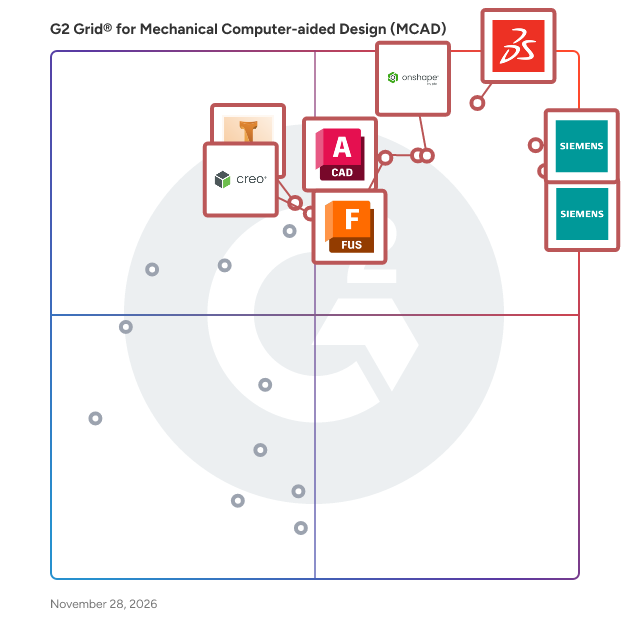
G2 Grid® for Mechanical Computer-aided Design (MCAD) Software

G2 Grid® for Mechanical Computer-aided Design (MCAD) Software plotting products by satisfaction and market presence

Highlighted products: Designcenter Solid Edge, Designcenter X, SOLIDWORKS, Onshape, AutoCAD, Autodesk Fusion, PTC Creo, and Inventor.

Underlying data: [Grid® JSON](https://www.g2.com/categories/mechanical-computer-aided-design-mcad/grids.json?focus%5B%5D=designcenter-solid-edge&focus%5B%5D=designcenter-x&focus%5B%5D=solidworks&focus%5B%5D=onshape&focus%5B%5D=autocad&focus%5B%5D=autodesk-fusion&focus%5B%5D=ptc-ptc-creo&focus%5B%5D=inventor)

Alibre Design

Alibre Design is an engineering CAD software provides tools for engineers to project and manufacture anything they want.

Average Rating: 4.8/5.0

Total Reviews: 14

How Do G2 Users Rate Alibre Design?

  • Has the product been a good partner in doing business?: 8.3/10 (Category avg: 8.4/10)
  • Ease of Use: 9.5/10 (Category avg: 8.6/10)
  • Quality of Support: 9.1/10 (Category avg: 8.4/10)

Who Is the Company Behind Alibre Design?

  • Seller: Alibre
  • Year Founded: 2017
  • HQ Location: N/A
  • LinkedIn® Page: www.linkedin.com
    13 employees on LinkedIn®

Who Uses This Product?

  • Company Size: 86% Small, 14% Medium

What Do G2 Reviewers Say About Alibre Design?

AI-generated summary from verified user reviews

Pros
  • Users find Alibre Design's ease of use appealing, thanks to its intuitive interface and minimal parameters for tasks.
  • Users commend Alibre Design for its intuitive interface, making basic tasks easier and more accessible.
  • Users value the intuitive interface of Alibre Design, finding it simplifies tasks and enhances usability.
  • Users find Alibre Design to have a simple and intuitive interface, making it easy for basic tasks.
  • Users enjoy the intuitive interface of Alibre Design, making basic tasks simpler and easier to execute.
Cons
  • Users are disappointed with the missing features in Alibre Design, including the inability to open STL files now.
  • Users are disappointed that STL file support is not yet available, despite earlier expectations for its inclusion.

What Are Recent G2 Reviews of Alibre Design?

What Are G2 Users Discussing About Alibre Design?

Creo Elements/Direct Modeling

Creo Elements/Direct Modeling (formerly CoCreate Modeling) provides robust, comprehensive direct modeling capabilities.

Average Rating: 4.0/5.0

Total Reviews: 21

How Do G2 Users Rate Creo Elements/Direct Modeling?

  • Has the product been a good partner in doing business?: 5.0/10 (Category avg: 8.4/10)
  • Ease of Use: 7.9/10 (Category avg: 8.6/10)
  • Quality of Support: 7.2/10 (Category avg: 8.4/10)

Who Is the Company Behind Creo Elements/Direct Modeling?

  • Seller: PTC
  • Year Founded: 1985
  • HQ Location: Boston, Massachusetts
  • LinkedIn® Page: www.linkedin.com
    8,226 employees on LinkedIn®
  • Ownership: NASDAQ: PTC
  • Total Revenue (USD mm): $2,300

Who Uses This Product?

  • Top Industries: Mechanical or Industrial Engineering
  • Company Size: 55% Small, 32% Large

What Are Recent G2 Reviews of Creo Elements/Direct Modeling?

KeyCreator

If adaptability is key to how you use CAD, KeyCreator is for you! KeyCreator's robust translators can open files from most leading MCAD platforms and export to the standard formats you need. Unlike parametric-based modelers, KeyCreator employs direct modeling so you can respond to unplanned design variations on the fly — never rebuild a model over one minor change again! Drafting functionality dynamically updates drawings with any changes made to the 3D model, while the flexibility to link/unlink data simplifies the handling of complex assemblies. Work faster, work smarter, work with models from virtually any source: work with KeyCreator, fast & flexible Windows-based CAD. About Us Kubotek Kosmos is a division of Kubotek USA, Inc. with development and support staff based in Marlborough, Massachusetts. Kubotek USA, Inc. is a subsidiary of Kubotek Corporation (7709.T Tokyo Stock Exchange) with headquarters in Osaka, Japan. Kubotek software brands include KeyCreator CAD, K-Compare and K-Display multi-CAD utilities, and the Kubotek Kosmos 3D framework.

Average Rating: 4.5/5.0

Total Reviews: 139

How Do G2 Users Rate KeyCreator?

  • Has the product been a good partner in doing business?: 9.2/10 (Category avg: 8.4/10)
  • Ease of Use: 9.0/10 (Category avg: 8.6/10)
  • Quality of Support: 8.7/10 (Category avg: 8.4/10)

Who Is the Company Behind KeyCreator?

Who Uses This Product?

  • Who Uses This: Owner, President
  • Top Industries: Mechanical or Industrial Engineering, Automotive
  • Company Size: 55% Small, 42% Medium

What Do G2 Reviewers Say About KeyCreator?

AI-generated summary from verified user reviews

Pros
  • Users value the flexibility and powerful tools in KeyCreator for managing complex 3D modeling tasks effectively.
  • Users value the accuracy of modeling tools in KeyCreator, enhancing precision and efficiency in 3D design tasks.
  • Users value the CAD integration of KeyCreator for its seamless compatibility with various CAD platforms, enhancing team efficiency.
  • Users value the efficiency of KeyCreator, benefiting from its flexibility and seamless integration with various CAD platforms.
  • Users value the dual 2D and 3D visualization in KeyCreator, significantly enhancing convenience and efficiency in their workflow.
Cons
  • Users often face complexity challenges with KeyCreator, impacting usability and slowing down their design processes.
  • Users find the learning curve steep, leading to longer onboarding and initial implementation challenges for diverse teams.
  • Users find the complex UI of KeyCreator challenging, leading to longer onboarding and design difficulties.
  • Users faced learning difficulties during implementation due to varying experience levels and backgrounds within the team.
  • Users find KeyCreator’s interface not user-friendly, leading to a steep learning curve and longer onboarding times.

What Are Recent G2 Reviews of KeyCreator?

What Are G2 Users Discussing About KeyCreator?

AI can help you find the answers. G2 helps you trust them.

Connect G2 to Claude or ChatGPT for answers grounded in G2's trusted reviews, comparisons, and pricing from real user insights.

How it works

IronCAD

Design better, faster IronCAD is an intuitive 3D and 2D design solution that empowers engineers, increases productivity, and facilitates collaboration throughout the enterprise. IRONCAD 3D modeling software empowers designers to focus on design by giving them an intuitive platform that mirrors how we interact with the physical world. Easily reposition components with the patented TriBall™ visualization tool, resize objects by stretching them with handles, and drag and drop predefined shapes into the design scene for a better, faster design process. 3D models made in IRONCAD only require one file, no matter how complex. Assembly part data is integrated into a file’s unified design environment, rather than linking to external files. Feature, part, and assembly data can be stored in catalogs which can be pre-built to include frequently used parts and assemblies, freeing designers to be more productive and allowing them to extend the use of 3D data throughout the enterprise.

Average Rating: 4.4/5.0

Total Reviews: 39

How Do G2 Users Rate IronCAD?

  • Has the product been a good partner in doing business?: 8.7/10 (Category avg: 8.4/10)
  • Ease of Use: 8.3/10 (Category avg: 8.6/10)
  • Quality of Support: 7.9/10 (Category avg: 8.4/10)

Who Is the Company Behind IronCAD?

  • Seller: IronCAD
  • Year Founded: 2001
  • HQ Location: Atlanta, GA
  • LinkedIn® Page: www.linkedin.com
    30 employees on LinkedIn®

Who Uses This Product?

  • Top Industries: Furniture
  • Company Size: 74% Small, 14% Large

What Are Recent G2 Reviews of IronCAD?

What Are G2 Users Discussing About IronCAD?

FreeCAD

FreeCAD is a parametric 3D modeler made primarily to design real-life objects of any size.

Average Rating: 4.1/5.0

Total Reviews: 56

How Do G2 Users Rate FreeCAD?

  • Has the product been a good partner in doing business?: 7.8/10 (Category avg: 8.4/10)
  • Ease of Use: 7.6/10 (Category avg: 8.6/10)
  • Quality of Support: 7.7/10 (Category avg: 8.4/10)

Who Is the Company Behind FreeCAD?

  • Seller: FreeCAD
  • Year Founded: 2021
  • HQ Location: Brussels
  • LinkedIn® Page: www.linkedin.com
    12 employees on LinkedIn®

Who Uses This Product?

  • Top Industries: Design, Mechanical or Industrial Engineering
  • Company Size: 72% Small, 15% Large

What Are Recent G2 Reviews of FreeCAD?

What Are G2 Users Discussing About FreeCAD?

AVEVA E3D Design

AVEVA E3D Design offers class-leading productivity and capabilities while retaining seamless compatibility with other AVEVA Engineering and Design solutions including AVEVA Unified Engineering.

Average Rating: 4.6/5.0

Total Reviews: 20

How Do G2 Users Rate AVEVA E3D Design?

  • Ease of Use: 8.6/10 (Category avg: 8.6/10)
  • Quality of Support: 8.6/10 (Category avg: 8.4/10)

Who Is the Company Behind AVEVA E3D Design?

  • Seller: AVEVA
  • Year Founded: 1967
  • HQ Location: Cambridge, GB
  • LinkedIn® Page: www.linkedin.com
    7,767 employees on LinkedIn®
  • Ownership: Private
  • Total Revenue (USD mm): $766

Who Uses This Product?

  • Top Industries: Oil & Energy
  • Company Size: 60% Medium, 30% Large

What Do G2 Reviewers Say About AVEVA E3D Design?

AI-generated summary from verified user reviews

Pros
  • Users appreciate the simple, easy-to-understand interface of AVEVA E3D Design for creating 3D models efficiently.
  • Users value the ease of integration and remote teamwork capabilities of AVEVA E3D Design for efficient design processes.
  • Users value the BOM management capabilities of AVEVA E3D Design for efficient skid preparation and accurate project costing.
  • Users value the easy CAD integration in AVEVA E3D Design, facilitating seamless collaboration from various locations.
  • Users value the seamless collaboration capabilities of AVEVA E3D Design, enabling effective teamwork from anywhere.
Cons
  • Users find the learning difficulty significant, requiring training for both beginners and experienced PDMS users.
  • Users find AVEVA E3D Design more complex for beginners and even those familiar with PDMS, hindering learning progress.
  • Users find AVEVA E3D Design difficult for beginners, posing challenges even for those familiar with PDMS.
  • Users find AVEVA E3D Design has a difficult learning curve, challenging both beginners and experienced PDMS users.
  • Users find the cost is a bit high, making it less accessible for beginners to adopt effectively.

What Are Recent G2 Reviews of AVEVA E3D Design?

What Are G2 Users Discussing About AVEVA E3D Design?

Dassault Icem Surf

Dassault Icem Surf is the industry curve and surface explicit geometry modeling tool for defining, analyzing and performing high-end visualization of complex free-form shape CAD surface models.

Average Rating: 4.7/5.0

Total Reviews: 3

How Do G2 Users Rate Dassault Icem Surf?

  • Has the product been a good partner in doing business?: 8.3/10 (Category avg: 8.4/10)
  • Ease of Use: 7.5/10 (Category avg: 8.6/10)
  • Quality of Support: 8.3/10 (Category avg: 8.4/10)

Who Is the Company Behind Dassault Icem Surf?

  • Seller: Dassault Systèmes
  • Year Founded: 1981
  • HQ Location: Vélizy-Villacoublay, FR
  • LinkedIn® Page: www.linkedin.com
    27,450 employees on LinkedIn®
  • Ownership: EPA: DSY.PA
  • Total Revenue (USD mm): $4,018

Who Uses This Product?

  • Company Size: 67% Large, 33% Small

What Are Recent G2 Reviews of Dassault Icem Surf?

What Are G2 Users Discussing About Dassault Icem Surf?

Inventor CAM

Integrated CAM software for Inventor simplifies CNC programming processes

Average Rating: 4.4/5.0

Total Reviews: 4

How Do G2 Users Rate Inventor CAM?

  • Ease of Use: 8.3/10 (Category avg: 8.6/10)
  • Quality of Support: 10.0/10 (Category avg: 8.4/10)

Who Is the Company Behind Inventor CAM?

  • Seller: Autodesk
  • Year Founded: 1982
  • HQ Location: San Francisco
  • LinkedIn® Page: www.linkedin.com
    15,757 employees on LinkedIn®
  • Ownership: NASDAQ:ADSK
  • Total Revenue (USD mm): $3,790

Who Uses This Product?

  • Company Size: 60% Large, 40% Small

What Are Recent G2 Reviews of Inventor CAM?

IronCAD Draft

IRONCAD DRAFT (a component of the Design Collaboration Suite) is an extremely powerful 2D mechanical drafting tool with an easy to learn, industry standard user interface and a unique 3D integration capability, enabling users work in 2D but also to view, leverage, analyze, render and reference 3D model data created by suppliers customers and colleagues.

Average Rating: 3.5/5.0

Total Reviews: 3

How Do G2 Users Rate IronCAD Draft?

  • Has the product been a good partner in doing business?: 6.7/10 (Category avg: 8.4/10)
  • Ease of Use: 8.3/10 (Category avg: 8.6/10)
  • Quality of Support: 8.3/10 (Category avg: 8.4/10)

Who Is the Company Behind IronCAD Draft?

  • Seller: IronCAD
  • Year Founded: 2001
  • HQ Location: Atlanta, GA
  • LinkedIn® Page: www.linkedin.com
    30 employees on LinkedIn®

Who Uses This Product?

  • Company Size: 100% Small

What Are Recent G2 Reviews of IronCAD Draft?

What Are G2 Users Discussing About IronCAD Draft?

Creo+

Creo+ is a cloud-based 3D CAD solution developed by PTC, designed to enhance product design and development processes. It combines the robust capabilities of Creo with the flexibility and collaboration features of the cloud, enabling teams to work more efficiently and innovate faster. Key Features and Functionality: - Cloud-Based Collaboration: Facilitates real-time collaboration among design teams, allowing multiple users to work on the same model simultaneously, regardless of their location. - Scalable Access: Provides scalable access to design tools and data, ensuring that teams can easily adapt to project demands without the need for extensive IT infrastructure. - Advanced Design Tools: Offers a comprehensive suite of design tools, including parametric and direct modeling, generative design, and simulation capabilities, to support complex product development. - Seamless Integration: Integrates with other PTC products and third-party applications, streamlining workflows and enhancing productivity. Primary Value and User Solutions: Creo+ addresses the challenges of modern product development by providing a collaborative, cloud-based environment that enhances team productivity and innovation. By enabling real-time collaboration and offering advanced design tools, it reduces time-to-market and improves product quality. Its scalable access and seamless integration capabilities ensure that organizations can efficiently manage resources and adapt to evolving project requirements.

Average Rating: 4.8/5.0

Total Reviews: 2

How Do G2 Users Rate Creo+?

  • Ease of Use: 10.0/10 (Category avg: 8.6/10)
  • Quality of Support: 8.3/10 (Category avg: 8.4/10)

Who Is the Company Behind Creo+?

  • Seller: PTC
  • Year Founded: 1985
  • HQ Location: Boston, Massachusetts
  • LinkedIn® Page: www.linkedin.com
    8,226 employees on LinkedIn®
  • Ownership: NASDAQ: PTC
  • Total Revenue (USD mm): $2,300

Who Uses This Product?

  • Company Size: 50% Large, 50% Small

What Do G2 Reviewers Say About Creo+?

AI-generated summary from verified user reviews

Pros
  • Users appreciate the cloud access and collaboration features of Creo+, enhancing flexibility and efficiency in design work.
  • Users value the seamless collaboration capabilities of Creo+, enhancing teamwork and project efficiency from any location.
  • Users value the collaborative sharing features of Creo+, enhancing teamwork and project efficiency from any location.
  • Users value the cloud access and automatic updates of Creo+, enhancing collaboration and efficiency in their work.
Cons
  • Users express concern about cloud dependency, as slow internet connections can significantly impact Creo+'s performance.
  • Users experience performance issues with Creo+ when dependent on an unstable or slow internet connection.

What Are Recent G2 Reviews of Creo+?

bananaz

Copilot for Mechanical Engineers. Master design changes, enhance team collaboration, automate documentation, and gain actionable design insights. All embedded into your existing CAD and PDM software. Bananaz picks up where your design tools fall short. AI-powered Validation, Compliance, and Coordination that integrates seamlessly to your design software and turbo-charge your engineers.
 Freeing your team to focus on meaningful design and innovation Intelligent Design Validation & Change Management: * Detecting Differences across 2D drawing and 3D models guiding users through the individual design changes. * Checklist Compliance verifies whether your design adheres to defined geometrical product specifications on every iteration. * Issue tracking creates an easy to-do list based on the team communication to ensure the execution meets the requirements. Integrated Collaboration & Workflow Visibility: * Design Activity Tracking - Auto-generated change logs and visual differences to provide full visibility into the design process. * Real-Time Notifications Get real-time alerts for design updates, mentions, and tasks requiring your attention. * Team Comments & Annotations Direct collaboration on 3D and 2D files with synced comments and annotations across versions. * CAD/PDM Integration - Access control connects seamlessly to your existing design stack, syncs automatically, no manual uploads. Custom Automation & Rule Definition: * Custom Rules Enforcement - Automated design review tasks - customized to your organization’s standards and processes. * Flexible Design Review Workflows that align with your organization requirements and adapt to dynamic needs across different projects. * Automatic Reports Generation - redlining, inspection balloons, audit trail and changes reports are auto-generated according to company templates.

Average Rating: 5.0/5.0

Total Reviews: 2

How Do G2 Users Rate bananaz?

  • Ease of Use: 10.0/10 (Category avg: 8.6/10)
  • Quality of Support: 9.2/10 (Category avg: 8.4/10)

Who Is the Company Behind bananaz?

Who Uses This Product?

  • Company Size: 50% Medium, 50% Small

What Do G2 Reviewers Say About bananaz?

AI-generated summary from verified user reviews

Pros
  • Users value the accurate comparison tool in bananaz, enabling precise detection of changes and enhancing design efficiency.
  • Users value the drawing efficiency of bananaz, significantly reducing design review time and preventing costly mistakes.
  • Users value the ease of use of bananaz, drastically improving design reviews and team alignment with its intuitive tools.
  • Users praise the efficiency of bananaz, as it significantly reduces design review time and catches discrepancies early.
  • Users value the 2D granular compare tool in bananaz, appreciating its precision in identifying changes and improving efficiency.
Cons
  • Users notice the limited options for direct markup on approved files, affecting their ability to streamline QA workflows.
  • Users find the missing inspection balloon feature limiting for QA workflows, impacting their ability to mark up approved drawings.
  • Users find the inability to place inspection balloons directly on drawings limits their QA workflows and efficiency.

What Are Recent G2 Reviews of bananaz?

CADMATIC Hull

From basic to detailed and production design – CADMATIC Hull creates 3D models and automatically extracts accurate production data for construction parts of any complexity. Hull Basic Design CADMATIC Hull allows you to 3D model the entire hull structure from hull surface import until the end of your project. With an intuitive user interface, we empower your designers to create GAs and other drawings and information for class approval. Hull Detailed Design The core module of the CADMATIC Hull application lets you create detailed 3D models from basic design to production engineering of hull blocks, assemblies, and parts. Hull production Information Obtain accurate, automatic, and customizable output for any manufacturing process in your hull production applications with support for automation, prefabrication, and assembly lines. Shell Plate Development Develop shell plates in 3D and extract complete production data extremely accurately. Plate Nesting Minimize material waste and optimize raw plate material usage with the CADMATIC Plate Nesting module.

Average Rating: 3.5/5.0

Total Reviews: 1

How Do G2 Users Rate CADMATIC Hull?

  • Ease of Use: 8.3/10 (Category avg: 8.6/10)
  • Quality of Support: 8.3/10 (Category avg: 8.4/10)

Who Is the Company Behind CADMATIC Hull?

  • Seller: Cadmatic
  • Year Founded: 1982
  • HQ Location: Turku, FI
  • LinkedIn® Page: www.linkedin.com
    315 employees on LinkedIn®

Who Uses This Product?

  • Company Size: 100% Small

ENCY

ENCY is a CAD/CAM for a new generation that combines advanced CAM technology with an intuitive user interface and natural workflow. Serving industries such as aerospace, automotive, and consumer goods, ENCY provides powerful tools for 2D/3D modeling, toolpath generation, simulation, and G-code verification, specifically tailored for CNC machining applications. As an integrated CAD/CAM solution, ENCY gives CAM programmers and engineers precise tools to control each machining step. This control ensures highly efficient workflows and consistently accurate parts, tailored to specific production requirements. Main Features and Benefits: - Advanced Toolpath Calculation: Generates optimized, machine-specific toolpaths for various processes, including 2D, 3-axis, 5-axis, and mill-turn operations, maximizing machine capability and precision. - High-Fidelity Simulation: ENCY CAM offers both solid and voxel-based simulations to replicate material removal, additive processes, and painting. These simulations detect potential issues like collisions and out-of-gauge conditions, helping avoid costly errors. - NC-Code Verification: Comprehensive G-code simulation and validation catch errors and discrepancies early, reducing machine downtime and minimizing risk. - Stock Tracking and Material Management: Tracks material removal throughout each machining operation, preventing redundant cuts and optimizing efficiency by ensuring purposeful toolpath creation and shortened machining time. - Machine Setup and Digital Twin Creation: Allows users to build digital twins of CNC machines, including tools, fixtures, and setup configurations. This capability improves setup accuracy and enables seamless transfer of setups across projects. - Integrated Collaboration via ENCY Clouds: ENCY Clouds provides real-time communication between programmers and operators, enhancing project sharing, NC-code fine-tuning, and troubleshooting. ENCY empowers industries focused on high-precision manufacturing with the tools needed to create accurate, efficient, and reliable machining workflows, enhancing productivity and minimizing downtime.

Average Rating: 5.0/5.0

Total Reviews: 3

How Do G2 Users Rate ENCY?

  • Ease of Use: 8.3/10 (Category avg: 8.6/10)
  • Quality of Support: 10.0/10 (Category avg: 8.4/10)

Who Is the Company Behind ENCY?

Who Uses This Product?

  • Company Size: 100% Small

What Do G2 Reviewers Say About ENCY?

AI-generated summary from verified user reviews

Pros
  • Users value the high tool efficiency of ENCY, enhancing productivity with quick calculations and superior programming ease.
  • Users value the advanced simulation tools of ENCY, enhancing efficiency and ensuring high-quality operations in machining.
  • Users value the quick toolpath calculation in ENCY, enhancing setup testing and robot kinematics simulation.
  • Users admire the advanced five-axis milling capabilities of ENCY, enabling efficient, high-quality toolpath generation.
  • Users highlight the efficient CAD integration of ENCY, enhancing workflow and reducing time on production jobs significantly.
Cons
  • Users find ENCY's complexity challenging due to limited CAD integration and constraints, requiring workarounds for optimal use.
  • Users find the component management limitations in ENCY require reliance on external CAD software for complex setups.
  • Users find the difficult configuration of ENCY frustrating, wishing for improved presets and customizable hotkeys.
  • Users find the price point expensive, suggesting a subscription option for small businesses to manage costs effectively.
  • Users find ENCY's missing features, like a full CAD replacement and better constraints, limit its effectiveness.

What Are Recent G2 Reviews of ENCY?

Archee Studio

Manual CAD is over. Archee Studio's AI agents take your mechanical design brief and deliver the calculations, editable 2D drawings (DXF) and the report, each checked before you get it. You make the engineering calls; the agents do the drafting.

Who Is the Company Behind Archee Studio?

Daniel Rivera
DR
Researched and written by Daniel Rivera