Top Free Low-Code Development Platforms - Page 2

How Many Low-Code Development Platforms Products Does G2 Track?

Total Products under this Category: 192

Category Stats (Oct 2026)

  • Average Rating: 4.48/5 (↑0.01 vs Sep 2026) The average rating of products in this category, based on all submitted ratings
  • Top Trending Product: Ultimus Digital Process Automation Suite (+19.12%) - Among all products in this category, Ultimus Digital Process Automation Suite recorded the largest rating increase compared to last month

Last updated: October 24, 2026

How Does G2 Rank Low-Code Development Platforms Products?

Why You Can Trust G2's Software Rankings:

  • 30 Analysts and Data Experts
  • 32,700+ Authentic Reviews
  • 192+ Products
  • Unbiased Rankings

G2's software rankings are built on verified user reviews, rigorous moderation, and a consistent research methodology maintained by a team of analysts and data experts. Each product is measured using the same transparent criteria, with no paid placement or vendor influence. While reviews reflect real user experiences, which can be subjective, they offer valuable insight into how software performs in the hands of professionals. Together, these inputs power the G2 Score, a standardized way to compare tools within every category.

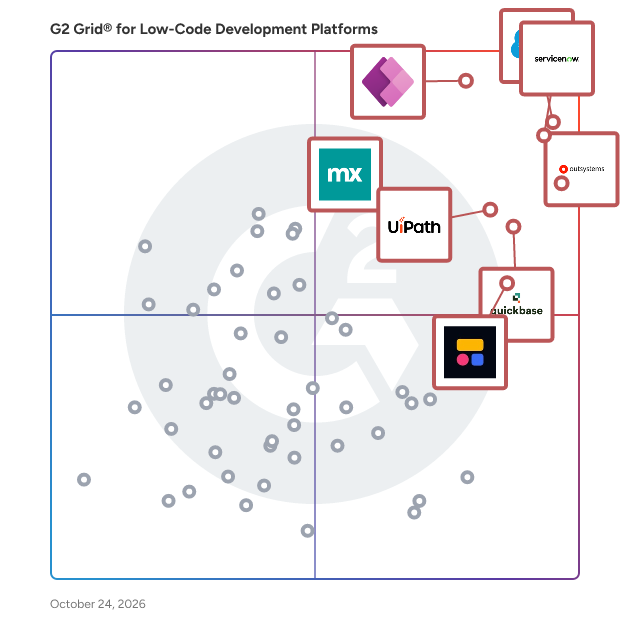
G2 Grid® for Low-Code Development Platforms

G2 Grid® for Low-Code Development Platforms plotting products by satisfaction and market presence

Highlighted products: Salesforce Platform, ServiceNow App Engine, Microsoft Power Apps, OutSystems, Quickbase, UiPath Agentic Automation, Softr, and Mendix.

Underlying data: [Grid® JSON](https://www.g2.com/categories/low-code-development-platforms/grids.json?focus%5B%5D=agentforce-360-platform-formerly-salesforce-platform&focus%5B%5D=servicenow-app-engine&focus%5B%5D=microsoft-power-apps&focus%5B%5D=outsystems&focus%5B%5D=quickbase&focus%5B%5D=uipath-agentic-automation&focus%5B%5D=softr&focus%5B%5D=mendix)

Claris FileMaker

Make tech work for you, not the other way around. The Claris platform is uniquely suited to help businesses like yours build, test, and rapidly iterate customized, integrated solutions faster and more efficiently than any other platform on the market. Unlike other software applications out there that are too lightweight and not customizable or too complex and rigid, Claris is flexible enough to meet your specific and evolving needs. Organizations just like yours — whether they’re SMBs, nonprofits, or educational institutions — use Claris apps to help them run their business the way they want and thereby significantly boost productivity and efficiencies across the board. Learn more — www.claris.com

Average Rating: 4.5/5.0

Total Reviews: 496

How Do G2 Users Rate Claris FileMaker?

  • Has the product been a good partner in doing business?: 9.0/10 (Category avg: 9.0/10)
  • Lifecycle Management: 8.6/10 (Category avg: 8.7/10)
  • UI Code Extending: 7.9/10 (Category avg: 8.5/10)
  • Platform Compatability: 8.8/10 (Category avg: 8.9/10)

Who Is the Company Behind Claris FileMaker?

  • Seller: Claris
  • Year Founded: 1998
  • HQ Location: Sunnyvale, US
  • Twitter: @ClarisOfficial
    9,238 Twitter followers
  • LinkedIn® Page: www.linkedin.com
    192 employees on LinkedIn®

Who Uses This Product?

  • Who Uses This: President, Owner
  • Top Industries: Computer Software, Information Technology and Services
  • Company Size: 66% Small, 23% Medium

What Do G2 Reviewers Say About Claris FileMaker?

AI-generated summary from verified user reviews

Pros
  • Users value the ease of use in Claris FileMaker, allowing for quick design and data collection.
  • Users praise the flexibility of Claris FileMaker for easily adapting to various needs and integration scenarios.
  • Users find easy creation with Claris FileMaker, turning ideas into functional solutions quickly and effectively.
  • Users appreciate the integration capabilities of Claris FileMaker, enabling seamless connectivity with various applications and databases.
  • Users appreciate the customizability of Claris FileMaker, enabling real-time adaptations to meet evolving business needs seamlessly.
Cons
  • Users find the learning curve steep, often requiring assistance and struggling with scalability and managing multiple files.
  • Users find navigation difficult, especially with complex layouts and multiple files, making the experience frustrating.
  • Users express concerns over cost issues related to FileMaker, including charges for web APIs and limited adoption.
  • Users find database limitations hinder their ability to utilize Claris FileMaker's full potential effectively.
  • Users find difficult customization issues with Claris FileMaker, particularly in managing layouts and tab-order settings.

What Are Recent G2 Reviews of Claris FileMaker?

What Are G2 Users Discussing About Claris FileMaker?

Alpha Anywhere

Alpha Software offers the only mobile app development environment with both “low-code” and “no-code” development environments. Developers can use the Alpha Anywhere low-code app development platform to develop and deploy secure business applications with rich user experiences and advanced features. These web and mobile apps can integrate with existing systems of record, popular software, and workflows. The software produces apps that can work without a connection and can include advanced security or authentication requirements to protect corporate data. Alternately, business users can use the Alpha TransForm no-code app builder to turn any paper form into a powerful mobile app in minutes without coding. The solution offers free app templates and includes vertical solutions, including a robust offering for Manufacturing Quality. Thousands of developers and business leaders around the world rate Alpha Software as having the best coding-optional environment to solve the enterprise mobile app challenge. Learn more try the software at: https://www.alphasoftware.com

Average Rating: 4.9/5.0

Total Reviews: 13

How Do G2 Users Rate Alpha Anywhere?

  • Has the product been a good partner in doing business?: 9.8/10 (Category avg: 9.0/10)
  • Lifecycle Management: 10.0/10 (Category avg: 8.7/10)
  • UI Code Extending: 8.3/10 (Category avg: 8.5/10)
  • Platform Compatability: 9.2/10 (Category avg: 8.9/10)

Who Is the Company Behind Alpha Anywhere?

  • Seller: Alpha Software
  • Year Founded: 2000
  • HQ Location: Burlington, MA
  • Twitter: @AlphaSoftware
    5,897 Twitter followers
  • LinkedIn® Page: www.linkedin.com
    56 employees on LinkedIn®

Who Uses This Product?

  • Company Size: 85% Small, 15% Large

What Are Recent G2 Reviews of Alpha Anywhere?

Superblocks

Superblocks is an enterprise AI platform for building internal applications. Business teams describe the app they need and build it themselves, while IT and Security keep control of everything that gets built. Governance is centralized rather than configured app by app, covering role-based access control, single sign-on, version control, audit logs, and observability from a single interface. Teams get the software they need, and the organization keeps a complete record of who built what and who accessed what. The target audience for Superblocks is enterprises where business teams need software faster than engineering can deliver it, and where IT and Security remain accountable for every application in production. This combination is common in regulated industries and in large organizations carrying a long internal app backlog. Common use cases include operational tools, approval and review workflows, customer and account portals, and internal AI agents that act on company data. The platform is built for non-technical builders, which means adoption does not depend on engineering capacity. What separates Superblocks is that it removes the usual tradeoff between speed and control. Business teams build at their own pace, and IT and Security govern that work from one place instead of chasing tools spreading across departments. Every application ships with a built-in database and connects to the systems the company already runs on, under the permissions IT defines. Applications are also available inside the AI assistants employees use every day, so the sanctioned path stays the easiest path. Superblocks also gives security and compliance teams the visibility they need after an app goes live. Audit logs record changes and user activity across every application, and observability tools show how those applications are performing and what data they touch. Because this operates at the platform level, coverage does not depend on any individual builder configuring it correctly. Smart Router adds a further layer of efficiency by running multiple models in a single harness, which lowers the cost per task as usage grows. Overall, Superblocks stands out by letting business teams build internal AI applications without asking IT and Security to give up oversight. It suits organizations that want internal software to move at the pace of the business while access, data, and compliance stay under central control. Superblocks has raised $60M from Kleiner Perkins, Spark Capital, Meritech Capital, Greenoaks, and leading angel investors.

Average Rating: 4.7/5.0

Total Reviews: 190

How Do G2 Users Rate Superblocks?

  • Has the product been a good partner in doing business?: 9.6/10 (Category avg: 9.0/10)
  • Lifecycle Management: 8.7/10 (Category avg: 8.7/10)
  • UI Code Extending: 8.8/10 (Category avg: 8.5/10)
  • Platform Compatability: 9.2/10 (Category avg: 8.9/10)

Who Is the Company Behind Superblocks?

  • Seller: Superblocks
  • Company Website:
  • Year Founded: 2021
  • HQ Location: New York, NY
  • Twitter: @superblocks
    2,619 Twitter followers
  • LinkedIn® Page: www.linkedin.com
    59 employees on LinkedIn®

Who Uses This Product?

  • Who Uses This: Software Engineer
  • Top Industries: Computer Software, Financial Services
  • Company Size: 48% Small, 47% Medium

What Do G2 Reviewers Say About Superblocks?

AI-generated summary from verified user reviews

Pros
  • Users appreciate the ease of use of Superblocks, allowing quick deployment and integration without complexity.
  • Users value the intuitive UI of Superblocks, enhancing productivity with effortless automation and seamless integrations.
  • Users rave about Superblocks' user-friendly interface that enhances development speed and facilitates easy automation.
  • Users appreciate the helpful and responsive customer support of Superblocks, enhancing their experience significantly.
  • Users value the easy integrations in Superblocks, streamlining complex tasks and enhancing workflow automation seamlessly.
Cons
  • Users find the missing features like limited Google Sheets integration and lack of multipage app creation frustrating.
  • Users seek more features and integration options for Superblocks, expressing a desire for enhanced customization.
  • Users express frustration over the limited customization options that hinder advanced configurations and developer experience.
  • Users face limited functionality in Superblocks, with issues like inadequate features and manual code merging affecting workflow.
  • Users note a lack of features in Superblocks, especially for niche applications and certain integrations.

What Are Recent G2 Reviews of Superblocks?

AI can help you find the answers. G2 helps you trust them.

Connect G2 to Claude or ChatGPT for answers grounded in G2's trusted reviews, comparisons, and pricing from real user insights.

How it works

Zoho Creator

Zoho Creator is an AI-powered low-code platform that helps companies build powerful mobile and web applications tailored to their unique needs. From startups to large enterprises, businesses use Zoho Creator to automate processes, modernize legacy systems, and accelerate digital transformation, all without extensive coding. With Zoho Creator, you can create forms, collect data, automate workflows, generate reports, and build dashboards. The platform integrates AI, business intelligence, and advanced analytics to provide meaningful insights. Its unified data model and auto-scaling infrastructure ensure reliable performance as your business grows. With this multiplatform builder, you can design applications that run natively across web, mobile, and tablet devices, all from a single build. You can also seamlessly integrate your apps with existing systems like ERPs, accounting software, inventory platforms, IoT devices, and other cloud tools to create a connected ecosystem. Create apps that work the way you work. Try Zoho Creator for free!

Average Rating: 4.3/5.0

Total Reviews: 155

How Do G2 Users Rate Zoho Creator?

  • Has the product been a good partner in doing business?: 8.7/10 (Category avg: 9.0/10)
  • Lifecycle Management: 8.7/10 (Category avg: 8.7/10)
  • UI Code Extending: 7.5/10 (Category avg: 8.5/10)
  • Platform Compatability: 8.8/10 (Category avg: 8.9/10)

Who Is the Company Behind Zoho Creator?

  • Seller: Zoho
  • Year Founded: 1996
  • HQ Location: Austin, TX
  • Twitter: @Zoho
    137,880 Twitter followers
  • LinkedIn® Page: www.linkedin.com
    30,913 employees on LinkedIn®
  • Phone: +1 (888) 900-9646

Who Uses This Product?

  • Top Industries: Information Technology and Services, Computer Software
  • Company Size: 48% Small, 43% Medium

What Do G2 Reviewers Say About Zoho Creator?

AI-generated summary from verified user reviews

Pros
  • Users value the easy integrations of Zoho Creator, enabling seamless connections with Zoho CRM and external APIs.
  • Users value the ease of use in Zoho Creator, enabling rapid app development without coding skills.
  • Users praise the easy integrations with the Zoho ecosystem, enhancing productivity and simplifying app deployment.
  • Users value the automation ease of Zoho Creator, allowing seamless data management and workflow optimization without coding.
  • Users love the user-friendly interface of Zoho Creator, enabling effortless app development without coding skills.
Cons
  • Users find the complexity of Zoho Creator challenging, particularly when managing intricate workflows and larger datasets.
  • Users find the learning curve challenging for non-technical users, especially with complex workflows and large datasets.
  • Users find limited customization frustrating, often needing workarounds to achieve their desired UI and functionality.
  • Users report poor customer support from Zoho Creator, highlighting slow responses and confusion in resolving issues.
  • Users struggle with coding challenges, especially regarding API integrations and limitations on JavaScript usage.

What Are Recent G2 Reviews of Zoho Creator?

What Are G2 Users Discussing About Zoho Creator?

UI Bakery

UI Bakery is a low-code application development platform that helps teams build internal tools, backoffice applications, and customer-facing portals using AI-assisted generation combined with visual configuration. UI Bakery belongs to the low-code and AI application builder software category. It is designed for product teams, engineers, data teams, operations, and business users who need to create custom applications on top of existing data sources without building everything from scratch. The platform focuses primarily on AI-driven app creation, where users describe what they want to build and the system generates working applications, logic, and UI, with drag-and-drop configuration available as a complementary approach. UI Bakery is commonly used to build internal dashboards, admin panels, CRUD applications, approval workflows, data management tools, and lightweight customer portals. It supports both technical and non-technical users by allowing collaboration between people who prompt and configure apps and developers who extend or fine-tune them when needed. Key capabilities and characteristics include: - AI-powered app generation that creates UI, data bindings, and logic from natural language prompts - Visual builder with drag-and-drop components for layout, forms, tables, and workflows - Integration with databases and APIs such as REST, GraphQL, PostgreSQL, MySQL, MongoDB, and third-party services - Support for authentication and authorization, including role-based access control, single sign-on, and audit logs for internal applications UI Bakery can be deployed as a cloud-hosted service or self-hosted, which makes it suitable for organizations with security, compliance, or data residency requirements. It is used across industries where software development is not the core business but custom internal tooling is required, including finance, healthcare, logistics, manufacturing, and professional services. Additional platform features include: - Environment management for development, staging, and production - Version control and collaboration for teams working on the same application - Custom JavaScript support for extending logic beyond visual configuration - Reusable templates and components to standardize internal tooling UI Bakery is typically adopted by teams that want to reduce the time and effort required to build and maintain internal applications while keeping control over data, security, and customization. It is positioned for organizations that want to combine AI-assisted development with structured low-code tooling rather than relying on fully manual coding or static app generators.

Average Rating: 4.6/5.0

Total Reviews: 129

How Do G2 Users Rate UI Bakery?

  • Has the product been a good partner in doing business?: 9.3/10 (Category avg: 9.0/10)
  • Lifecycle Management: 8.8/10 (Category avg: 8.7/10)
  • UI Code Extending: 8.7/10 (Category avg: 8.5/10)
  • Platform Compatability: 8.4/10 (Category avg: 8.9/10)

Who Is the Company Behind UI Bakery?

  • Seller: UI Bakery
  • Company Website:
  • Year Founded: 2018
  • HQ Location: Lakewood, Colorado
  • Twitter: @UiBakery
    887 Twitter followers
  • LinkedIn® Page: www.linkedin.com
    10 employees on LinkedIn®

Who Uses This Product?

  • Who Uses This: CEO, Founder
  • Top Industries: Information Technology and Services, Computer Software
  • Company Size: 76% Small, 19% Medium

What Do G2 Reviewers Say About UI Bakery?

AI-generated summary from verified user reviews

Pros
  • Users find UI Bakery incredibly easy to use, making it accessible for both technical and non-technical individuals.
  • Users appreciate the intuitive drag-and-drop interface of UI Bakery, enabling quick and easy UI development for non-specialists.
  • Users find UI Bakery's interface intuitive, allowing for quick customization and effective prototyping with minimal technical skills.
  • Users commend the easy creation process in UI Bakery, allowing quick and intuitive interface customization for all skill levels.
  • Users love the fast development capabilities of UI Bakery, enabling quick creation of customized internal tools.
Cons
  • Users experience performance issues with UI Bakery, noting slow load times and complications in complex workflows.
  • Users experience software bugs and issues with AI functionality, leading to frustration and wasted time during development.
  • Users express a desire for more built-in templates and improved documentation to enhance their experience with UI Bakery.
  • Users find the navigation and interface challenging, especially when working with more complex workflows and larger datasets.
  • Users find the missing features in UI Bakery, such as built-in templates and robust documentation, limiting their experience.

What Are Recent G2 Reviews of UI Bakery?

What Are G2 Users Discussing About UI Bakery?

AwareIM

AwareIM provides a low code tool for small businesses to large enterprises to manage and automate across digital channels. No programming or database expertise is required as our tool automatically generates forms and manages web access for you. Targeted at businesses and organizations looking to streamline their application development process, AwareIM caters to a wide range of users, from small startups to large enterprises. Its configuration-driven, rule-based approach facilitates the rapid development of enterprise-grade web applications, making it an ideal choice for teams that require agility and flexibility in their software solutions. Users can define business objects using natural language, and AwareIM takes care of the underlying database structure and SQL queries, effectively bridging the gap between technical and non-technical stakeholders. Key features of AwareIM include an intuitive visual development environment that employs drag-and-drop components, allowing users to design applications without writing traditional code. The platform automatically generates database schemas and forms, which can be easily customized to meet specific business needs. Additionally, AwareIM offers granular access controls, enabling organizations to fine-tune security measures down to the attribute level. With full internationalization (i18n) support, integrated calendar and email functionalities, and the ability to consume and serve APIs via REST and SOAP, AwareIM provides a comprehensive toolkit for modern application development. Another standout feature is the built-in report generator and server, which allows users to create and manage reports seamlessly. The platform also supports front-end AI capabilities, empowering end users to interrogate data and generate queries that may not have been considered by the development team. AwareIM’s compatibility with multiple databases, including Oracle, SQL Server, MySQL, and MariaDB, further enhances its versatility, while enterprise features like role-based access control, LDAP integration, and SAML authentication ensure robust security. AwareIM's flat-rate pricing model eliminates per-user costs, making it a cost-effective solution for businesses of all sizes. This approach allows organizations to scale their development efforts without incurring additional expenses as their teams grow. By providing a powerful, flexible, and user-friendly platform, AwareIM stands out in the low-code development landscape, enabling organizations to innovate and adapt to changing market demands efficiently.

Average Rating: 4.9/5.0

Total Reviews: 15

How Do G2 Users Rate AwareIM?

  • Has the product been a good partner in doing business?: 9.8/10 (Category avg: 9.0/10)
  • Lifecycle Management: 9.3/10 (Category avg: 8.7/10)
  • UI Code Extending: 9.3/10 (Category avg: 8.5/10)
  • Platform Compatability: 9.3/10 (Category avg: 8.9/10)

Who Is the Company Behind AwareIM?

Who Uses This Product?

  • Top Industries: Computer Software
  • Company Size: 53% Small, 47% Medium

What Do G2 Reviewers Say About AwareIM?

AI-generated summary from verified user reviews

Pros
  • Users find AwareIM to be user-friendly and easy to learn, making it accessible for beginners in web app development.
  • Users find AwareIM user-friendly, making it easy for beginners to build simple web applications.
  • Users find AwareIM to be user-friendly, making it easy for beginners to start building web applications.
Cons
  • Users find the insufficient training lacking, leading to challenges in maximizing AwareIM's potential effectively.
  • Users feel the limited community support hampers their development experience with AwareIM.
  • Users feel that the poor community support limits their overall experience and access to effective resources.

What Are Recent G2 Reviews of AwareIM?

What Are G2 Users Discussing About AwareIM?

Jitterbit

For organizations ready to modernize and innovate, Jitterbit provides a unified AI-infused low-code platform for integration, orchestration, automation, and app development that accelerates business transformation, boosts productivity, and unlocks value. The Jitterbit Harmony platform, including iPaaS, API Manager, App Builder, and EDI, future-proofs operations, simplifies complexity, and drives innovation for organizations globally.

Average Rating: 4.5/5.0

Total Reviews: 613

How Do G2 Users Rate Jitterbit?

  • Has the product been a good partner in doing business?: 9.2/10 (Category avg: 9.0/10)
  • Lifecycle Management: 8.8/10 (Category avg: 8.7/10)
  • UI Code Extending: 8.0/10 (Category avg: 8.5/10)
  • Platform Compatability: 8.7/10 (Category avg: 8.9/10)

Who Is the Company Behind Jitterbit?

  • Seller: Jitterbit
  • Company Website:
  • Year Founded: 2003
  • HQ Location: Alameda, CA
  • Twitter: @jitterbit
    3,659 Twitter followers
  • LinkedIn® Page: www.linkedin.com
    461 employees on LinkedIn®

Who Uses This Product?

  • Who Uses This: IT Manager, CEO
  • Top Industries: Information Technology and Services, Computer Software
  • Company Size: 51% Medium, 25% Large

What Do G2 Reviewers Say About Jitterbit?

AI-generated summary from verified user reviews

Pros
  • Users praise Jitterbit for its ease of use, appreciating straightforward setup and effective support for integrations.
  • Users value the outstanding customer support from Jitterbit, appreciating their dedication and quick, effective problem-solving.
  • Users praise Jitterbit for its easy integrations, enabling efficient data management across various systems seamlessly.
  • Users value the speed and efficiency of Jitterbit for quickly launching integrations with minimal effort.
  • Users value the easy integrations of Jitterbit, enabling seamless data connection between various sources efficiently.
Cons
  • Users find a steep learning curve with Jitterbit, making it hard for non-technical people to build effective systems.
  • Users find the lack of key features in Jitterbit, like a comprehensive dashboard, limits effective monitoring.
  • Users struggle with integration issues in Jitterbit, facing complexities that complicate workflows and hinder data accuracy.
  • Users find the complexity of the UI in Jitterbit challenging, affecting data accuracy and workflow efficiency.
  • Users find debugging issues to be challenging due to limited logs and vague error messages complicating troubleshooting.

What Are Recent G2 Reviews of Jitterbit?

What Are G2 Users Discussing About Jitterbit?

Integrated Management System (IMS)

Interfacing’s Integrated Management System (IMS) is an AI-powered platform that unifies BPM, QMS, Document Control, and GRC into one platform. Organizations use IMS to model and automate processes, control documents, manage risks, and maintain regulatory compliance with full traceability and audit readiness. Built for highly regulated sectors such as aerospace, life sciences, finance, and government, IMS provides real-time visibility, automated workflows, and AI-driven insights that improve quality and reduce operational risk. The platform is ISO 27001 certified and fully validated for 21 CFR Part 11, making it suitable for mission-critical environments requiring strong governance, security, and control. IMS also includes low-code automation, process mining, audit management, training tracking, CAPA workflows, and dashboards to help teams streamline operations and continuously improve. AI strengthens governance, improves accuracy, and reinforces regulatory control.

Average Rating: 4.6/5.0

Total Reviews: 59

How Do G2 Users Rate Integrated Management System (IMS)?

  • Has the product been a good partner in doing business?: 9.0/10 (Category avg: 9.0/10)
  • Lifecycle Management: 9.6/10 (Category avg: 8.7/10)
  • UI Code Extending: 8.8/10 (Category avg: 8.5/10)
  • Platform Compatability: 9.6/10 (Category avg: 8.9/10)

Who Is the Company Behind Integrated Management System (IMS)?

Who Uses This Product?

  • Who Uses This: CEO
  • Top Industries: Management Consulting, Telecommunications
  • Company Size: 48% Large, 36% Small

What Do G2 Reviewers Say About Integrated Management System (IMS)?

AI-generated summary from verified user reviews

Pros
  • Users value the real-time visibility and control Interfacing provides over compliance processes and service delivery.
  • Users value the ease of use of the Integrated Management System, enhancing workflow mapping and compliance tracking.
  • Users value the complete visibility into processes and controls provided by Interfacing, enhancing service delivery and compliance.
  • Users value the complete visibility into processes and governance provided by Integrated Management System, enhancing consistency and control.
  • Users value the seamless integration of GRC and BPM, enhancing the auditing process and compliance management.
Cons
  • Users find the learning curve steep, requiring time and support for effective configuration and usability.
  • Users find the steep learning curve challenging initially, requiring time and support to become familiar with the system.
  • Users find the complex setup of the Integrated Management System can be time-consuming and requires thorough training.
  • Users find the complexity of the IMS overwhelming initially, requiring time for configuration and user training.
  • Users find the difficult learning curve in IMS requires initial support and training for effective use.

What Are Recent G2 Reviews of Integrated Management System (IMS)?

What Are G2 Users Discussing About Integrated Management System (IMS)?

ToolJet

ToolJet is an AI-native, open-source low-code platform designed to help teams build and deploy custom internal tools with speed and security. Since its launch in 2021, ToolJet has attracted a diverse user base, including startups, large enterprises, and public institutions. With flexible deployment options—cloud or self-hosted—it meets a wide range of security and compliance needs, making it a versatile choice for organizations of all sizes. What sets ToolJet apart is its AI-powered app building experience. Users can create full-featured applications simply by describing their requirements in plain English-no coding or technical expertise required. ToolJet’s AI generates the logic, builds the UI, and connects data sources in just minutes. This prompt-driven approach accelerates internal tool development, enabling anyone on the team to quickly build dashboards, approval systems, and workflows. For advanced use cases, users can further customize their apps with JavaScript and server-side workflows, blending AI convenience with developer-level flexibility. The platform is especially valuable for teams looking to streamline their internal processes. ToolJet supports over 70 data sources out of the box, including popular databases like PostgreSQL and MongoDB, as well as REST and GraphQL APIs. It also integrates easily with SaaS tools such as Google Sheets and Stripe, and connects to cloud storage services like AWS S3 and Google Cloud Storage. This broad compatibility enables users to connect their existing data sources effortlessly and build comprehensive internal tools tailored to their requirements. In addition to its robust technology, ToolJet offers dedicated support to help teams succeed at every stage. Users have access to comprehensive documentation, an active community forum, and responsive technical support channels. For enterprise customers, ToolJet provides priority support and personalized onboarding to ensure smooth implementation and fast issue resolution. As an open-source platform, ToolJet offers true flexibility without vendor lock-in. Organizations can tailor the platform to their unique needs, retaining full control over their internal tools. This open model fosters a community-driven environment where users contribute to the platform’s development, share insights, and collaborate on improvements, continuously enriching the ToolJet ecosystem.

Average Rating: 4.6/5.0

Total Reviews: 53

How Do G2 Users Rate ToolJet?

  • Has the product been a good partner in doing business?: 9.2/10 (Category avg: 9.0/10)
  • Lifecycle Management: 8.6/10 (Category avg: 8.7/10)
  • UI Code Extending: 8.5/10 (Category avg: 8.5/10)
  • Platform Compatability: 9.3/10 (Category avg: 8.9/10)

Who Is the Company Behind ToolJet?

  • Seller: ToolJet
  • Year Founded: 2021
  • HQ Location: San Francisco, US
  • Twitter: @ToolJet
    1,953 Twitter followers
  • LinkedIn® Page: www.linkedin.com
    71 employees on LinkedIn®

Who Uses This Product?

  • Top Industries: Computer Software, Information Technology and Services
  • Company Size: 42% Small, 30% Medium

What Do G2 Reviewers Say About ToolJet?

AI-generated summary from verified user reviews

Pros
  • Users appreciate the ease of use of ToolJet, making it simple to create internal tools quickly.
  • Users praise ToolJet for its easy setup, enabling quick creation of internal tools and dashboards with existing data.
  • Users appreciate the no coding flexibility of ToolJet, enabling quick development of internal apps with ease.
  • Users value the easy integrations of ToolJet, enhancing their workflow with efficient data handling and reduced setup time.
  • Users value the easy integrations in ToolJet, enabling quick setup and use of internal tools and dashboards.
Cons
  • Users struggle with a steep learning curve in ToolJet, finding some features unintuitive and performance inconsistent.
  • Users experience slow performance with ToolJet, particularly when handling heavy pages and complex applications, impacting efficiency.
  • Users face limited customization in ToolJet, impacting design flexibility and complicating the development of complex applications.
  • Users experience performance issues with slowdowns on heavy pages, hindering efficiency and overall user experience.
  • Users find the missing features in ToolJet frustrating, especially regarding customization and the AI's precision.

What Are Recent G2 Reviews of ToolJet?

HCL Domino

HCL Domino is a rapid application platform that has been essential to business and IT developers alike for decades — to help build solutions with embedded workflow that can automate their business quickly and effectively. Domino powers businesses around the world — from banks, insurance and communications companies — for use in offices, ships, helicopters, and even oil rigs. Domino has always been a leader in application development, business transformation, and automation. Domino delivers powerful no-code app creation software that’s easy to learn and use for citizen developers. Domino has helped savvy business leaders to achieve critical outcomes for years. Domino has always been a secure, rock-solid, and proven platform.

Average Rating: 4.4/5.0

Total Reviews: 156

How Do G2 Users Rate HCL Domino?

  • Has the product been a good partner in doing business?: 8.2/10 (Category avg: 9.0/10)
  • Lifecycle Management: 8.9/10 (Category avg: 8.7/10)
  • UI Code Extending: 8.5/10 (Category avg: 8.5/10)
  • Platform Compatability: 9.1/10 (Category avg: 8.9/10)

Who Is the Company Behind HCL Domino?

  • Seller: HCL Technologies
  • Year Founded: 1999
  • HQ Location: Noida, Uttar Pradesh
  • Twitter: @hcltech
    425,043 Twitter followers
  • LinkedIn® Page: www.linkedin.com
    258,955 employees on LinkedIn®
  • Ownership: NSE - National Stock Exchange of India

Who Uses This Product?

  • Who Uses This: CEO
  • Top Industries: Information Technology and Services, Computer Software
  • Company Size: 43% Small, 31% Medium

What Do G2 Reviewers Say About HCL Domino?

AI-generated summary from verified user reviews

Pros
  • Users benefit from the fast development capabilities of HCL Domino, enabling quick creation of business applications.
  • Users value the rapid development capabilities of HCL Domino, enabling swift application creation for business needs.
  • Users find HCL Domino enables easy app development for business needs, offering flexibility in server deployment options.
  • Users value the flexibility of Cloud Hosting with HCL Domino, allowing easy app creation on preferred platforms.
  • Users value the flexibility to create apps on their preferred cloud hosting for various business needs.
Cons
  • Users find the high complexity of HCL Domino challenging, impacting user experience and team efficiency.
  • Users face integration issues with HCL Domino, struggling with outdated interfaces and limited community support compared to competitors.
  • Users find the interface outdated, struggling with customization and a steep learning curve compared to modern alternatives.
  • Users find the steep learning curve for HCL Domino challenging, especially for those unfamiliar with legacy systems.
  • Users face complex licensing issues with HCL Domino, making deployment challenging for smaller teams.

What Are Recent G2 Reviews of HCL Domino?

What Are G2 Users Discussing About HCL Domino?

1C:Enterprise

1C:Enterprise is a low-code platform designed to facilitate fast and flexible enterprise software development. This innovative solution empowers developers to quickly create applications that are both adaptable and capable of supporting a wide range of functionalities. By utilizing 1C:Enterprise, organizations can significantly reduce the time and effort required for custom software development, allowing them to streamline their processes and focus on delivering value rather than navigating complex coding tasks. The platform caters to a diverse audience, including small businesses, individual entrepreneurs, large corporations, and government agencies. Its versatility makes it suitable for various industries and use cases, enabling developers to build applications that meet specific operational needs. Whether creating a simple mobile app or a comprehensive cloud-based solution, 1C:Enterprise provides the necessary tools to accommodate a wide range of software development projects. This adaptability is particularly beneficial for organizations seeking to innovate quickly and respond to evolving market demands. Key features of 1C:Enterprise include a unified development environment that supports desktop, mobile, and cloud applications. This integration allows developers to work within a single framework, eliminating the need to manage multiple programming languages and libraries. Additionally, the platform boasts a rich library of pre-built templates and reusable components, which accelerate development by offering ready-made solutions for common challenges. This capability not only enhances productivity but also promotes consistency and reliability across applications, ensuring that developers can deliver high-quality software efficiently. 1C:Enterprise distinguishes itself in the low-code category by providing a robust foundation that has been successfully utilized by over 1,500,000 organizations worldwide. This extensive user base highlights its reliability and effectiveness in addressing the diverse needs of its clients. By adopting 1C:Enterprise, organizations gain access to a proven solution that has been effectively implemented across various sectors, ensuring they can build applications that are not only functional but also scalable and adaptable to future requirements. Overall, 1C:Enterprise is a powerful low-code platform that simplifies enterprise software development while offering a comprehensive range of features and benefits. Its ability to support multiple application types within a single environment, combined with its extensive library of pre-built templates and reusable components, positions it as an invaluable tool for organizations aiming to enhance their software development capabilities and drive innovation.

Average Rating: 4.6/5.0

Total Reviews: 62

How Do G2 Users Rate 1C:Enterprise?

  • Has the product been a good partner in doing business?: 9.2/10 (Category avg: 9.0/10)
  • Lifecycle Management: 8.3/10 (Category avg: 8.7/10)
  • UI Code Extending: 8.0/10 (Category avg: 8.5/10)
  • Platform Compatability: 8.7/10 (Category avg: 8.9/10)

Who Is the Company Behind 1C:Enterprise?

  • Seller: 1C Company
  • Company Website:
  • Year Founded: 1991
  • HQ Location: Moscow
  • LinkedIn® Page: www.linkedin.com
    670 employees on LinkedIn®

Who Uses This Product?

  • Top Industries: Computer Software, Information Technology and Services
  • Company Size: 55% Small, 36% Medium

What Do G2 Reviewers Say About 1C:Enterprise?

AI-generated summary from verified user reviews

Pros
  • Users appreciate the rapid development capabilities of 1C:Enterprise, enabling quick and efficient business application creation.
  • Users appreciate the customizability of 1C:Enterprise, enabling tailored solutions for diverse business needs efficiently and effectively.
  • Users appreciate the customization options in 1C:Enterprise, allowing for flexible and tailored business app development.
  • Users appreciate the ease of use of 1C:Enterprise, allowing for straightforward setup and management of business tasks.
  • Users value the flexibility of 1C:Enterprise, allowing customization to fit diverse business processes and workflows.
Cons
  • Users find the mobile experience uncomfortable, which hampers productivity while using 1C:Enterprise on-the-go.
  • Users struggle with the high complexity of 1C:Enterprise, impacting usability and integration across various systems.
  • Users frequently face integration issues that complicate workflows and hinder overall performance in 1C:Enterprise.
  • Users note a steep learning curve for new users, requiring time to adapt to the system's logic.
  • Users experience limited customization options, impacting adaptability and efficiency when using 1C:Enterprise for their needs.

What Are Recent G2 Reviews of 1C:Enterprise?

What Are G2 Users Discussing About 1C:Enterprise?

WaveMaker

WaveMaker is an Agentic Application Generation Platform designed to accelerate the development of web and mobile applications within enterprise environments. The platform integrates AI agents into a structured development lifecycle to assist teams in building software that adheres to established architectural standards and internal design systems. WaveMaker introduces a specialized system for generating enterprise-grade web and mobile applications using a governed, two-pass architecture. 1. Developer-Governed AI (WaveMaker 12) The platform now integrates SDLC Agents designed to handle specific development tasks—such as UI component construction, API orchestration, and security implementation—within the constraints of a project's existing design system and architectural guardrails. 2. The Two-Pass Generation Model is a structured approach to AI-assisted development that separates creative intent from code execution to ensure architectural consistency: Pass 1 (Agentic Intent): AI agents process Figma designs and natural language to generate a structured, tech-stack-agnostic application markup. This allows developers to verify architectural guardrails before any code is written. Pass 2 (Deterministic Execution): A specialized engine converts the verified markup into production-ready code (e.g., Angular, React, or React Native). This decoupled process eliminates AI hallucinations, maintains enterprise security standards, and ensures predictable LLM costs.

Average Rating: 4.3/5.0

Total Reviews: 68

How Do G2 Users Rate WaveMaker?

  • Has the product been a good partner in doing business?: 8.2/10 (Category avg: 9.0/10)
  • Lifecycle Management: 8.3/10 (Category avg: 8.7/10)
  • UI Code Extending: 8.5/10 (Category avg: 8.5/10)
  • Platform Compatability: 8.3/10 (Category avg: 8.9/10)

Who Is the Company Behind WaveMaker?

  • Seller: WaveMaker
  • Year Founded: 2003
  • HQ Location: Plano, Texas
  • Twitter: @WaveMaker
    2,191 Twitter followers
  • LinkedIn® Page: www.linkedin.com
    222 employees on LinkedIn®

Who Uses This Product?

  • Top Industries: Information Technology and Services, Computer Software
  • Company Size: 65% Small, 19% Medium

What Do G2 Reviewers Say About WaveMaker?

AI-generated summary from verified user reviews

Pros
  • Users value the ease of use of WaveMaker, which facilitates quick development and enhances learning experiences.
  • Users appreciate the fast and efficient app development capabilities of WaveMaker, aided by its user-friendly interface.
  • Users appreciate the ease of learning with WaveMaker, enabling skill development and project completion without coding expertise.
  • Users appreciate the customizability of WaveMaker, enhancing web app development with speed and efficiency.
  • Users find the easy creation process of WaveMaker accessible, even for those without extensive coding knowledge.
Cons
  • Users feel there is a lack of features in WaveMaker, limiting its potential as a powerful tool.
  • Users note a steep learning curve with WaveMaker, highlighting the need for better tutorials and guidance.

What Are Recent G2 Reviews of WaveMaker?

What Are G2 Users Discussing About WaveMaker?

Neptune DXP

Neptune DXP is a no-code/low-code application development platform specifically designed to facilitate the creation and management of applications within the SAP ecosystem and beyond. This innovative solution empowers users to develop, run, and orchestrate modern applications with ease, significantly accelerating the development process compared to traditional methods. By leveraging its unique capabilities, organizations can streamline their operations and enhance their agility in an ever-evolving technological landscape. Targeted primarily at enterprises that utilize SAP systems or integrate SAP with various Software as a Service (SaaS) applications, Neptune DXP caters to a diverse range of professionals, including IT departments, business analysts, and application developers. The platform is particularly advantageous for organizations seeking to improve operational efficiency, as it allows users with limited coding experience to create applications, thereby broadening access to app development within the organization. This democratization of development fosters collaboration between technical and non-technical teams, driving innovation and responsiveness. One of the standout features of Neptune DXP is its ability to seamlessly integrate SAP and non-SAP systems, ensuring that organizations can maximize their existing investments while adopting new technologies. This integration capability is crucial for enterprises that rely on a mix of legacy systems and modern applications. Additionally, Neptune DXP is built with enterprise-grade governance in mind, providing the necessary security and compliance measures that large organizations require to navigate complex regulatory environments effectively. The platform's performance metrics are particularly impressive, enabling users to build applications up to ten times faster while reducing development effort by as much as 80%. This level of efficiency not only accelerates time-to-market for new applications but also allows teams to allocate resources more effectively, ultimately driving productivity. With a robust user base of over 850 customers and 4 million users, Neptune DXP has established a strong presence in the market, supported by a network of more than 100 certified partners who assist with implementation and integration. Neptune DXP distinguishes itself in the no-code/low-code platform category by combining AI capabilities with a solid SAP-native foundation. This unique positioning enables enterprises to harness the power of artificial intelligence while maintaining control over their application development processes. By adopting Neptune DXP, organizations can drive innovation, enhance productivity, and achieve their digital transformation objectives more efficiently.

Average Rating: 4.5/5.0

Total Reviews: 214

How Do G2 Users Rate Neptune DXP?

  • Has the product been a good partner in doing business?: 9.1/10 (Category avg: 9.0/10)
  • Lifecycle Management: 8.6/10 (Category avg: 8.7/10)
  • UI Code Extending: 8.6/10 (Category avg: 8.5/10)
  • Platform Compatability: 8.6/10 (Category avg: 8.9/10)

Who Is the Company Behind Neptune DXP?

  • Seller: Neptune Software
  • Company Website:
  • Year Founded: 2011
  • HQ Location: Oslo, Oslo
  • Twitter: @NeptSoft
    1,279 Twitter followers
  • LinkedIn® Page: www.linkedin.com
    213 employees on LinkedIn®

Who Uses This Product?

  • Who Uses This: Software Engineer, Consultant
  • Top Industries: Information Technology and Services, Computer Software
  • Company Size: 42% Large, 31% Small

What Do G2 Reviewers Say About Neptune DXP?

AI-generated summary from verified user reviews

Pros
  • Users appreciate the ease of use of Neptune DXP, thanks to intuitive features like drag and drop functionality.
  • Users value Neptune DXP for its easy low-code development, enabling efficient app creation for all skill levels.
  • Users value the low-code capabilities of Neptune DXP, enabling both experienced and novice developers to create apps easily.
  • Users value the offline support for mobile apps, enhancing accessibility for remote work and field applications.
  • Users commend the strong and responsive customer support of Neptune DXP, ensuring assistance whenever needed.
Cons
  • Users face a steep learning curve with Neptune DXP, especially those new to low-code platforms, needing initial support.
  • Users find the complex learning curve of Neptune DXP requires significant technical skills and support for effective navigation.
  • Users find the learning difficulty of Neptune DXP steep, particularly for newcomers to low-code platforms.
  • Users find the learning curve steep for Neptune DXP, especially newcomers to low-code platforms, requiring additional support.
  • Users find the complexity of the learning curve in Neptune DXP challenging, especially for those new to low-code platforms.

What Are Recent G2 Reviews of Neptune DXP?

What Are G2 Users Discussing About Neptune DXP?

The m-Power Development Platform

m-Power is an enterprise low-code platform built to eliminate the common low-code drawbacks. Most low-code tools promise development speed, but they come with trade-offs: hidden fees, user limits, vendor lock-in, forced cloud hosting, and roadblocks the moment you need real customization. m-Power is different. What Makes m-Power Different? Like other low-code tools, m-Power lets your existing team build all types of web applications without specialized skills. Here's where it breaks from the pack: Perpetual Licensing (Yes, Really): m-Power is one of the few remaining low-code platforms that still offers a true perpetual license. Buy it once, own it forever. No rising subscription fees or per-user fees. Self-Hosted, On Your Infrastructure: Run m-Power on-premise or in your own cloud, always over your existing databases. Your data never leaves your environment. No forced migration or vendor sitting between you and your systems. Open Architecture, Full Customization: m-Power is built on open architecture and designed for limitless customization. Extend, modify, and maintain applications inside or outside the platform, with no vendor lock-in. Unlimited Users, Apps, and Data: Grow without restrictions. No costly user tiers, app caps, or data limits to plan around. Enterprise-Grade Output: m-Power generates production-ready, secure, scalable applications that integrate cleanly with the systems you already run. Expert Support and Services: Our support desk is staffed by m-Power experts, not entry-level techs. They'll answer any question, and can even step in to help you deliver projects faster. Need more? Our consulting team delivers turn-key solutions end to end.

Average Rating: 4.7/5.0

Total Reviews: 30

How Do G2 Users Rate The m-Power Development Platform?

  • Has the product been a good partner in doing business?: 9.8/10 (Category avg: 9.0/10)
  • Lifecycle Management: 7.8/10 (Category avg: 8.7/10)
  • UI Code Extending: 9.3/10 (Category avg: 8.5/10)
  • Platform Compatability: 9.2/10 (Category avg: 8.9/10)

Who Is the Company Behind The m-Power Development Platform?

  • Seller: mrc
  • Year Founded: 1981
  • HQ Location: Oak Brook, Illinois
  • Twitter: @mrcproductivity
    312 Twitter followers
  • LinkedIn® Page: www.linkedin.com
    8 employees on LinkedIn®

Who Uses This Product?

  • Company Size: 70% Medium, 20% Large

What Do G2 Reviewers Say About The m-Power Development Platform?

AI-generated summary from verified user reviews

Pros
  • Users value the responsive client management of m-Power, appreciating tailored solutions and superb support for success.
  • Users praise the exceptional customer support from mrc, facilitating solutions and enhancing their development experience.
  • Users find the ease of learning m-Power offers invaluable, facilitating quick migrations and intuitive application development.
  • Users find the ease of use in m-Power's template system simplifies report migration and application development.
  • Users find easy creation of reports and apps with m-Power's template-based system, enhancing productivity and flexibility.
Cons
  • Users experience difficult navigation due to forgetting modifications and the risk of misplacing widgets while adjusting layouts.
  • Users note a slight learning curve for advanced features, which may challenge those without technical skills at first.
  • Users experience a slight learning curve with advanced features, which may challenge those lacking technical expertise.
  • Users caution about limited customization, as forgetting tweaks or misplacing widgets can disrupt the intended layout.
  • Users express concerns about the poor interface design leading to accidental modifications and confusion during workflow.

What Are Recent G2 Reviews of The m-Power Development Platform?

What Are G2 Users Discussing About The m-Power Development Platform?

Appsmith

Appsmith is an open-source low-code application platform that simplifies custom application development for businesses, allowing them to streamline operations, automate processes, quickly integrate multiple apps and data, and enhance legacy applications with new features. Full-stack and backend developers, systems administrators, and data teams use Appsmith to quickly build: - Customer 360 and other interactive dashboards that span multiple data sources - Functional and secure user interfaces on top of IT automations and scripts - AI-powered chat, data, and document analysis tools - Enterprise app extensions that reduce SaaS seat license costs Appsmith easily connects to a wide range of databases, APIs, and SaaS applications, and provides drag-and-drop UI building tools that are 10x faster than UI development using Angular or React frameworks. Appsmith is used by leading companies including Amazon, GSK, Allianz, ABB, Omron, and Twilio to build custom software for inventory management, IT operations, and customer support.

Average Rating: 4.6/5.0

Total Reviews: 67

How Do G2 Users Rate Appsmith?

  • Has the product been a good partner in doing business?: 9.0/10 (Category avg: 9.0/10)
  • Lifecycle Management: 8.3/10 (Category avg: 8.7/10)
  • UI Code Extending: 8.1/10 (Category avg: 8.5/10)
  • Platform Compatability: 8.7/10 (Category avg: 8.9/10)

Who Is the Company Behind Appsmith?

  • Seller: Appsmith
  • Year Founded: 2019
  • HQ Location: San Francisco, US
  • Twitter: @theappsmith
    4,021 Twitter followers
  • LinkedIn® Page: in.linkedin.com
    48 employees on LinkedIn®

Who Uses This Product?

  • Top Industries: Information Technology and Services, Computer Software
  • Company Size: 64% Small, 25% Medium

What Do G2 Reviewers Say About Appsmith?

AI-generated summary from verified user reviews

Pros
  • Users find Appsmith's ease of use impressive, enabling quick connections and straightforward app development.
  • Users love the customization options in Appsmith, enabling tailored solutions and seamless integrations for their projects.
  • Users value the easy integrations with various data sources, streamlining their app development process effortlessly.
  • Users rave about the incredible speed of development with Appsmith, allowing quick project progress and ease of use.
  • Users value Appsmith for its time-saving features, enabling quick app creation and efficient data management.
Cons
  • Users face a notable learning curve with Appsmith, though the effort pays off in rapid app development.
  • Users find the missing features in Appsmith limiting, wishing for more options and branding capabilities.
  • Users note app limitations in use cases, particularly lacking integrated URL encoding methods compared to competitors.
  • Users find customization difficulty in Appsmith, facing limitations on UI flexibility and backend dependencies for complex tasks.
  • Users find functionality limitations in Appsmith, particularly with encoding URLs, which can restrict their use cases.

What Are Recent G2 Reviews of Appsmith?

What Are G2 Users Discussing About Appsmith?

Adam Crivello
AC
Researched and written by Adam Crivello
Updated June 9, 2025