Best File Reader Software - Page 2

How Many File Reader Software Products Does G2 Track?

Total Products under this Category: 76

Category Stats (Sep 2026)

  • Average Rating: 4.43/5 The average rating of products in this category, based on all submitted ratings
  • Top Trending Product: Adobe Reader Mobile (+0.04%) - Among all products in this category, Adobe Reader Mobile recorded the largest rating increase compared to last month

Last updated: September 15, 2026

How Does G2 Rank File Reader Software Products?

Why You Can Trust G2's Software Rankings:

  • 30 Analysts and Data Experts
  • 2,900+ Authentic Reviews
  • 76+ Products
  • Unbiased Rankings

G2's software rankings are built on verified user reviews, rigorous moderation, and a consistent research methodology maintained by a team of analysts and data experts. Each product is measured using the same transparent criteria, with no paid placement or vendor influence. While reviews reflect real user experiences, which can be subjective, they offer valuable insight into how software performs in the hands of professionals. Together, these inputs power the G2 Score, a standardized way to compare tools within every category.

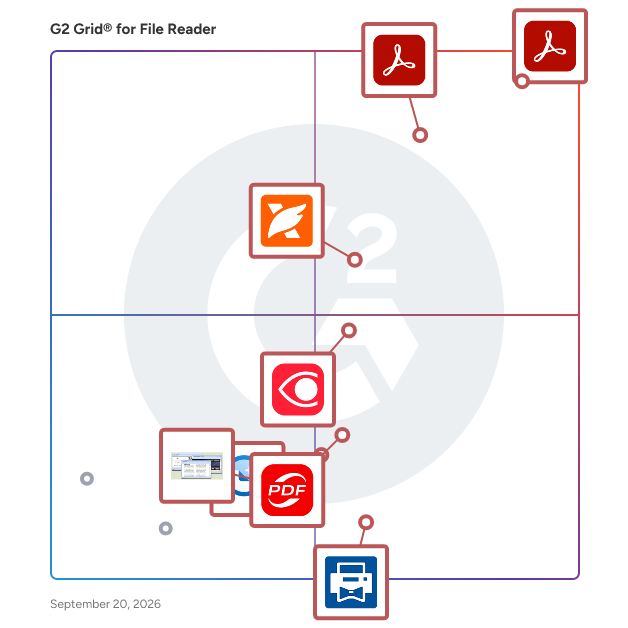
G2 Grid® for File Reader Software

G2 Grid® for File Reader Software plotting products by satisfaction and market presence

Highlighted products: Adobe Acrobat Reader, Adobe Reader Mobile, Foxit PDF Reader, FineReader PDF for Windows and Mac, KDAN PDF, File Viewer Plus, Print Conductor, and FreeFileViewer.

Underlying data: [Grid® JSON](https://www.g2.com/categories/file-reader/grids.json?focus%5B%5D=adobe-acrobat-reader&focus%5B%5D=adobe-reader-mobile&focus%5B%5D=foxit-pdf-reader&focus%5B%5D=finereader-pdf-for-windows-and-mac&focus%5B%5D=kdan-pdf&focus%5B%5D=file-viewer-plus&focus%5B%5D=print-conductor&focus%5B%5D=freefileviewer)

ABBYY Screenshot Reader

ABBYY Screenshot Reader is a for capturing anything on screen-instantly. Point and click and create snapshots from web sites, documents, images, error messages, file menus, flash demos-if it's on the screen, it can be captured.

Average Rating: 5.0/5.0

Total Reviews: 3

How Do G2 Users Rate ABBYY Screenshot Reader?

  • Ease of Use: 10.0/10 (Category avg: 8.9/10)
  • Quality of Support: 10.0/10 (Category avg: 8.5/10)
  • PC Operating System: 10.0/10 (Category avg: 8.8/10)

Who Is the Company Behind ABBYY Screenshot Reader?

  • Seller: ABBYY
  • Year Founded: 1989
  • HQ Location: Milpitas, CA
  • Twitter: @ABBYY_Software
    3,018 Twitter followers
  • LinkedIn® Page: www.linkedin.com
    947 employees on LinkedIn®

Who Uses This Product?

  • Company Size: 67% Small, 33% Medium

What Are Recent G2 Reviews of ABBYY Screenshot Reader?

Adlib

Adlib eliminates the frustration, excess costs, and risks that enterprise and public sector organizations experience transforming documents at speed, automating error prone manual processes with unmatched accuracy & interoperability. Only Adlib powers essential workflows by integrating with critical business applications – like email, QMS, ECM, RIM, MES, PLM, DMS and others – to automatically transform any documents and data into universally-accessible formats and publish to internal or external destinations. Only Adlib ensures compliance and regulatory accuracy by processing and transforming file formats of highly-regulated documents with pixel-perfect accuracy. Only Adlib brings precise and scalable automation and comprehensive coverage of all document workflows, powering the word's most complex, critical processes at Pfizer, Boeing, BP and more.

Average Rating: 4.4/5.0

Total Reviews: 10

How Do G2 Users Rate Adlib?

  • Has the product been a good partner in doing business?: 10.0/10 (Category avg: 9.2/10)
  • Ease of Use: 9.0/10 (Category avg: 8.9/10)
  • Quality of Support: 9.2/10 (Category avg: 8.5/10)

Who Is the Company Behind Adlib?

  • Seller: Adlib Software
  • Year Founded: 2000
  • HQ Location: Burlington, Ontario
  • Twitter: @adlibsoftware
    1,453 Twitter followers
  • LinkedIn® Page: www.linkedin.com
    95 employees on LinkedIn®

Who Uses This Product?

  • Top Industries: Information Technology and Services
  • Company Size: 70% Medium, 20% Large

What Do G2 Reviewers Say About Adlib?

AI-generated summary from verified user reviews

Pros
  • Users commend Adlib for its high speed and accuracy in document processing, significantly reducing errors and time spent.
  • Users find Adlib's high-speed and accurate document processing greatly enhances efficiency and reduces human errors.
  • Users appreciate the seamless compatibility of Adlib with various partner platforms, enhancing their overall experience and service.
  • Users commend Adlib for its exceptional customer support, highlighting personalized service and innovative problem-solving efforts.
  • Users value the extensive customization options of Adlib, enhancing document quality and creation efficiency.
Cons
  • Users find the additional costs for specific features frustrating, as they expect all tools to be included.
  • Users find the add-on costs for specific features irritating, as not everything is included with the purchase.
  • Users find cloud dependency challenging, complicating integration with existing cloud storage solutions during deployment.
  • Users find cloud integration challenges with Adlib, limiting deployment options within their existing cloud environments.
  • Users find the separate charges for features quite irritating, making Adlib feel expensive overall.

What Are Recent G2 Reviews of Adlib?

What Are G2 Users Discussing About Adlib?

PaperStream

PaperStream is a suite of document capture solutions designed to assist high-volume operations in achieving speed, accuracy, and compliance on a large scale. This software is particularly beneficial for environments such as busy mailrooms, finance departments, and document-heavy sectors like healthcare and legal teams. Its user-friendly setup requires minimal training, allowing organizations to efficiently process thousands of documents each day. With PaperStream, physical storage spaces filled with paper documents can be transformed into actionable data with just a simple push of a button. The product falls within the category of document management solutions, aimed at organizations that handle large quantities of paperwork and require robust systems for data capture and processing. Its target audience includes businesses and institutions that prioritize efficiency and accuracy in their document workflows. Specific use cases range from automating the intake of invoices in finance departments to digitizing patient records in healthcare settings, demonstrating its versatility across various industries. Key features of PaperStream include advanced image cleanup and form recognition capabilities, which significantly reduce the time spent on rescans and corrections. This is complemented by automated indexing and routing workflows that minimize repetitive tasks, ultimately saving hours of work each week for teams. The software comes equipped with ready-to-use profiles and intuitive controls, which facilitate a faster onboarding process and lower training costs, making it accessible for users of all skill levels. Furthermore, PaperStream ensures that captured data flows securely into existing systems, whether they are cloud storage solutions, document management platforms, or other business applications. This broad integration support helps eliminate data silos, enhances operational visibility, and accelerates decision-making processes. By streamlining the flow of information, PaperStream not only improves productivity but also contributes to better compliance and risk management. Overall, PaperStream serves as a performance multiplier for organizations, driving measurable improvements in efficiency, accuracy, and cost savings. By reducing errors and increasing throughput, it empowers teams to focus on higher-value tasks, ultimately enhancing the overall effectiveness of document management processes.

Average Rating: 3.6/5.0

Total Reviews: 7

How Do G2 Users Rate PaperStream?

  • Has the product been a good partner in doing business?: 6.7/10 (Category avg: 9.2/10)
  • Ease of Use: 6.0/10 (Category avg: 8.9/10)
  • Quality of Support: 6.0/10 (Category avg: 8.5/10)
  • PC Operating System: 10.0/10 (Category avg: 8.8/10)

Who Is the Company Behind PaperStream?

Who Uses This Product?

  • Company Size: 71% Small

What Do G2 Reviewers Say About PaperStream?

AI-generated summary from verified user reviews

Pros
  • Users appreciate the ease of use of PaperStream, highlighting its simple interface and straightforward deployment.
  • Users value the convenience of PaperStream, enjoying easy setup and efficient daily scanning for their workflow.
  • Users value the scanning efficiency of PaperStream, appreciating its speed, accuracy, and high-quality image output.
  • Users value the high accuracy of PaperStream, enhancing efficiency and reliability in their daily scanning tasks.
  • Users appreciate the automation capabilities of PaperStream, which significantly reduces manual labor and enhances efficiency.
Cons
  • Users find the complex setup of PaperStream frustrating, as it hinders effective document scanning and saving.
  • Users find the difficult setup of PaperStream frustrating, leading to confusion and inefficiencies in saving documents.
  • Users report OCR issues with PaperStream, affecting functionality and making document handling less efficient.
  • Users find the poor interface design of PaperStream frustrating, affecting their efficiency and ease of use.
  • Users find the UX improvement needed in PaperStream, citing confusion and inefficiency in document handling and settings.

What Are Recent G2 Reviews of PaperStream?

PrizmDoc® for Java

PrizmDoc® for Java, formerly known as VirtualViewer®, is a comprehensive suite of Java-based APIs designed to seamlessly integrate advanced document viewing and processing capabilities into web applications. It supports a wide array of document types, including AFP, Word, PDF, PNG, PCL, and TIFF, enabling users to view, annotate, redact, and manipulate documents directly within their browser without the need for additional software installations. Key Features and Functionality: - Cross-Platform Compatibility: Operates seamlessly across various platforms with a pure Java solution, ensuring consistent performance regardless of the operating system. - No Client-Side Installation: Eliminates the need for client-side downloads or installations, simplifying deployment and reducing IT overhead. - Localized User Interface: Automatically detects browser settings to display the interface in the appropriate language, enhancing user experience for a global audience. - High-Speed Viewing: Utilizes advanced server processing to deliver rapid document rendering and interaction, even with large files. - Seamless ECM Integration: Easily integrates with existing Enterprise Content Management systems, including Alfresco, IBM FileNet, and OpenText/Documentum, facilitating efficient document management workflows. Primary Value and User Solutions: PrizmDoc® for Java addresses the challenges of efficient document management by providing a robust, web-based solution that enhances productivity and collaboration. By enabling users to perform comprehensive document operations—such as viewing, annotating, redacting, and converting—directly within their web applications, it eliminates the need for multiple software tools and streamlines workflows. Its cross-platform support and lack of client-side installation reduce deployment complexities, while its high-speed performance and seamless ECM integration ensure that organizations can manage their documents effectively and securely.

Average Rating: 4.2/5.0

Total Reviews: 10

How Do G2 Users Rate PrizmDoc® for Java?

  • Ease of Use: 8.7/10 (Category avg: 8.9/10)
  • Quality of Support: 8.0/10 (Category avg: 8.5/10)
  • PC Operating System: 8.3/10 (Category avg: 8.8/10)

Who Is the Company Behind PrizmDoc® for Java?

  • Seller: Apryse
  • Year Founded: 1998
  • HQ Location: Denver, CO
  • Twitter: @aprysesolutions
    381 Twitter followers
  • LinkedIn® Page: www.linkedin.com
    569 employees on LinkedIn®

Who Uses This Product?

  • Company Size: 60% Medium, 20% Small

What Are Recent G2 Reviews of PrizmDoc® for Java?

React PDF Viewer

React PDF Viewer is a robust and feature-rich React component designed for seamless integration of PDF viewing capabilities into React applications. Built entirely with TypeScript and React hooks, it offers a modular architecture that allows developers to customize and extend its functionality through a comprehensive plugin system. This flexibility ensures that the viewer can be tailored to meet the specific needs of various projects, from simple document viewers to complex document management systems. Key Features and Functionality: - Plugin Architecture: Offers over 20 built-in plugins, enabling functionalities such as search, full-screen mode, and more. Developers can also create and integrate custom plugins to extend the viewer's capabilities. - Rich Feature Set: Includes essential features like document downloading, drag-and-drop support, full-screen viewing, text highlighting, page navigation, printing, rotation, multiple scroll modes, text selection, table of contents, theme customization, thumbnail previews, and zoom controls. - Localization and RTL Support: Supports translation of the user interface into multiple languages, with 12 built-in localization files. Additionally, it provides right-to-left (RTL language support for languages such as Arabic, Farsi, and Hebrew. - Theming and Customization: Allows for extensive customization of the user interface through CSS variables, offering both dark and light themes and the ability to switch between them. - Accessibility and Responsiveness: Adheres to WAI-ARIA standards for accessibility and is designed to be responsive across various screen sizes, including mobile, tablet, and desktop devices. Primary Value and User Solutions: React PDF Viewer addresses the need for a flexible and customizable PDF viewing solution within React applications. Its modular plugin architecture allows developers to tailor the viewer to specific project requirements, enhancing user experience and functionality. By providing a comprehensive set of features out of the box, it reduces development time and effort, enabling faster deployment of applications that require PDF viewing capabilities. The support for localization and RTL languages ensures that applications can cater to a global audience, while the emphasis on accessibility and responsive design guarantees usability across diverse user groups and devices.

Average Rating: 4.5/5.0

Total Reviews: 2

How Do G2 Users Rate React PDF Viewer?

  • Ease of Use: 9.2/10 (Category avg: 8.9/10)
  • Quality of Support: 9.2/10 (Category avg: 8.5/10)

Who Is the Company Behind React PDF Viewer?

Who Uses This Product?

  • Company Size: 100% Small

What Are Recent G2 Reviews of React PDF Viewer?

What Are G2 Users Discussing About React PDF Viewer?

Snowbound

Take your document viewer to the next level with our web-based viewer that allows you to view, annotate, redact, split & merge, search, OCR, compare documents and more - all without the need for the creator application. Integrates with your ECM, BPM, CRM and homegrown repositories. Supports numerous document, image, audio and video file types including PDF, Word, Excel, AFP, DWG, TIFF, JPEG, SVG and more.

Average Rating: 4.3/5.0

Total Reviews: 5

How Do G2 Users Rate Snowbound?

  • Ease of Use: 8.3/10 (Category avg: 8.9/10)
  • Quality of Support: 9.3/10 (Category avg: 8.5/10)
  • PC Operating System: 10.0/10 (Category avg: 8.8/10)

Who Is the Company Behind Snowbound?

Who Uses This Product?

  • Company Size: 60% Medium, 40% Small

What Are Recent G2 Reviews of Snowbound?

What Are G2 Users Discussing About Snowbound?

SysTools DMG Viewer

Free DMG file reader to open & view email files from Mac DMG file on all Windows Operating System. Popular mail files on Mac OS including EML, EMLX, or MBOX can be extracted on Windows using this DMG Viewer utility.

Average Rating: 4.5/5.0

Total Reviews: 2

How Do G2 Users Rate SysTools DMG Viewer?

  • Has the product been a good partner in doing business?: 8.3/10 (Category avg: 9.2/10)
  • Ease of Use: 9.2/10 (Category avg: 8.9/10)
  • Quality of Support: 8.3/10 (Category avg: 8.5/10)

Who Is the Company Behind SysTools DMG Viewer?

  • Seller: SysTools Software
  • Year Founded: 2007
  • HQ Location: Pune, IN
  • Twitter: @SYSTOOLS
    396 Twitter followers
  • LinkedIn® Page: www.linkedin.com
    140 employees on LinkedIn®

Who Uses This Product?

  • Company Size: 50% Large, 50% Small

What Are Recent G2 Reviews of SysTools DMG Viewer?

What Are G2 Users Discussing About SysTools DMG Viewer?

SysTools OST Viewer

SysTools OST Viewer tool allows a user to open multiple OST files with attachments. OST file opener generates an instant Preview multiple OST mailbox emails with attributes as From, Subject, To, Sent, Received Date and Size in bytes. OST file reader has an inbuilt attachment preview panel which preview OST file's attachments of any type like images, docs, files, etc. View OST file items such as emails, contacts, calendars, tasks, etc.

Average Rating: 4.0/5.0

Total Reviews: 2

Who Is the Company Behind SysTools OST Viewer?

  • Seller: SysTools Software
  • Year Founded: 2007
  • HQ Location: Pune, IN
  • Twitter: @SYSTOOLS
    396 Twitter followers
  • LinkedIn® Page: www.linkedin.com
    140 employees on LinkedIn®

Who Uses This Product?

  • Company Size: 100% Small

What Are Recent G2 Reviews of SysTools OST Viewer?

What Are G2 Users Discussing About SysTools OST Viewer?

SysTools SQL MDF Viewer

SysTools Freeware MDF file opener performs a quick scan to load MDF Database files with its items and make the database file easy for analyze. A user can browse any type of MDF file even corrupted or orphaned with the help of MDF Viewer tool. The MDF file reader tool is mainly used to open MDF file without the need of SQL Server installation. The Free MDF viewer program is specially developed to load MDF file of any size and any type

Average Rating: 4.8/5.0

Total Reviews: 2

Who Is the Company Behind SysTools SQL MDF Viewer?

  • Seller: SysTools Software
  • Year Founded: 2007
  • HQ Location: Pune, IN
  • Twitter: @SYSTOOLS
    396 Twitter followers
  • LinkedIn® Page: www.linkedin.com
    140 employees on LinkedIn®

Who Uses This Product?

  • Company Size: 50% Large, 50% Small

What Are Recent G2 Reviews of SysTools SQL MDF Viewer?

What Are G2 Users Discussing About SysTools SQL MDF Viewer?

Winsurtech

Document Reader REST API allows you to extract data from any Editable or Flattened Acord Forms and images. API returns the Acord form data in JSON format.

Average Rating: 4.5/5.0

Total Reviews: 2

How Do G2 Users Rate Winsurtech?

  • Ease of Use: 9.2/10 (Category avg: 8.9/10)
  • Quality of Support: 8.3/10 (Category avg: 8.5/10)
  • PC Operating System: 8.3/10 (Category avg: 8.8/10)

Who Is the Company Behind Winsurtech?

Who Uses This Product?

  • Company Size: 100% Medium

What Are Recent G2 Reviews of Winsurtech?

WordPerfect Lightning

WordPerfect Lightning digital notebook

Average Rating: 4.3/5.0

Total Reviews: 2

How Do G2 Users Rate WordPerfect Lightning?

  • Has the product been a good partner in doing business?: 8.3/10 (Category avg: 9.2/10)
  • Ease of Use: 10.0/10 (Category avg: 8.9/10)
  • Quality of Support: 9.2/10 (Category avg: 8.5/10)
  • PC Operating System: 7.5/10 (Category avg: 8.8/10)

Who Is the Company Behind WordPerfect Lightning?

  • Seller: Corel Corporation
  • Year Founded: 2006
  • HQ Location: Bellevue, WA
  • Twitter: @corelsoftware
    83 Twitter followers
  • LinkedIn® Page: www.linkedin.com
    1 employees on LinkedIn®

Who Uses This Product?

  • Company Size: 100% Small

What Are Recent G2 Reviews of WordPerfect Lightning?

Aryson NSF Viewer

Lotus Notes NSF Viewer offered by Aryson Technologies which is the best IBM Lotus Notes Database Viewer tool. It allows you to view or open your email, contacts or other email items from an unreadable or corrupted NSF file without any data loss. Dual scanning mode of the Aryson NSF Viewer software selects an unreadable NSF file after that explores all email items of the NSF file with whole attachments. It also allows to saves NSF file emails to PDF file as well as Outlook PST file format successfully. The software smoothly runs on entire Windows platforms including Win10 and all previous versions. It is a free solution that allows you to easily save your NSF file into PDF file as well as PST file 25 items per folder. IBM Notes application required to install during the use of this software. NSF Viewer software also maintains the exact formatting of mailboxes of Lotus Notes NSF file after saving into PDF file and PST file format. If you want to save entire emails and contacts from the NSF file to Outlook PST and Adobe PDF file then you can go with the upgrade version of this software.

Average Rating: 5.0/5.0

Total Reviews: 1

Who Is the Company Behind Aryson NSF Viewer?

  • Seller: Aryson Technologies
  • Year Founded: 2014
  • HQ Location: Noida, Uttar Pradesh
  • Twitter: @Arysontec
    46 Twitter followers
  • LinkedIn® Page: www.linkedin.com
    101 employees on LinkedIn®

Who Uses This Product?

  • Company Size: 100% Medium

What Are Recent G2 Reviews of Aryson NSF Viewer?

Corrupt PST Viewer

Corrupt PST Viewer is a powerful software designed to help users view and access data from damaged or inaccessible PST files. With its range of features, the tool offers a convenient and efficient solution for handling corrupt PST files. Let's explore some of the key features and benefits of Corrupt PST Viewer: 1. Preview and Access Data: The tool provides a user-friendly interface that allows users to preview and access recovered data from corrupt PST files. It offers a comprehensive view of email messages, including the sender, recipient, subject, date, and attachments. This enables users to quickly locate and retrieve important information from their damaged PST files. 2. Selective Data Extraction: With Corrupt PST Viewer, users have the flexibility to select and extract specific items or folders from the recovered PST file. This allows for targeted data retrieval, saving time and effort by focusing only on the necessary data. 3. Export Options: The tool offers various export options to ensure seamless data migration. Users can save the recovered data in multiple formats, including PST, MBOX, MSG, EML, and DBX after viewing. 4. Bulk Recovery and Conversion: Corrupt PST Viewer supports batch processing, allowing users to recover and convert multiple PST files simultaneously. This feature is particularly useful for organizations or individuals dealing with a large number of corrupt PST files, as it saves significant time and effort. 5. Data Integrity and Security: The tool ensures the integrity and security of recovered data. It preserves the original formatting, properties, and metadata of emails and other Outlook items during the recovery process. Additionally, it maintains data privacy and confidentiality by not storing or accessing any user information or data. In conclusion, the Corrupt PST Viewer is a valuable tool for users dealing with corrupt or damaged PST files. With its powerful features and intuitive interface, it simplifies the process of recovering and accessing data from corrupted PST files.

Average Rating: 4.5/5.0

Total Reviews: 1

How Do G2 Users Rate Corrupt PST Viewer?

  • Ease of Use: 8.3/10 (Category avg: 8.9/10)
  • Quality of Support: 8.3/10 (Category avg: 8.5/10)
  • PC Operating System: 8.3/10 (Category avg: 8.8/10)

Who Is the Company Behind Corrupt PST Viewer?

  • Seller: EmailProHelp
  • Year Founded: 2010
  • HQ Location: Dehradun, IN
  • LinkedIn® Page: linkedin.com
    23 employees on LinkedIn®

Who Uses This Product?

  • Company Size: 100% Medium

What Are Recent G2 Reviews of Corrupt PST Viewer?

GoodReader

GoodReader is a tool for creating, converting, editing, and annotating PDF files.

Average Rating: 5.0/5.0

Total Reviews: 1

How Do G2 Users Rate GoodReader?

  • Ease of Use: 10.0/10 (Category avg: 8.9/10)
  • Quality of Support: 10.0/10 (Category avg: 8.5/10)

Who Is the Company Behind GoodReader?

  • Seller: GoodReader
  • HQ Location: N/A
  • Twitter: @GoodReaderApp
    857 Twitter followers
  • LinkedIn® Page: www.linkedin.com
    1 employees on LinkedIn®

Who Uses This Product?

  • Company Size: 100% Small

What Are Recent G2 Reviews of GoodReader?

OST Viewer Freeware

OST File Viewer is the best tool to open, view, and read corrupt OST files without using Outlook. OST Viewer allows you to view all the contents of the damaged OST files like schedules, calendars, contacts, etc. You can also export your OST file contents in HTML and TXT file formats. It also gives you an option to open and view the OST files that are heavily encrypted or compressed.

Average Rating: 4.5/5.0

Total Reviews: 1

Who Is the Company Behind OST Viewer Freeware?

Who Uses This Product?

  • Company Size: 100% Medium

What Are Recent G2 Reviews of OST Viewer Freeware?

What Are G2 Users Discussing About OST Viewer Freeware?

Neeraja Prakash
NP
Researched and written by Neeraja Prakash
Updated March 10, 2026