# Best File Converter Software

*By [Neeraja Prakash](https://research.g2.com/insights/author/neeraja-prakash)*


File converter software converts a document from one file type to another. These solutions offer simple step-by-step processes to perform conversions, so that a user simply needs to upload the original document, select which file type they’d like the document to be converted to, and convert. Additionally, file converter software offers batch conversions so users can convert multiple documents to the same format at one time, and also typically supports converting between two specific file types. File converter software may also offer a recovery mode, so files can be safely converter from one format to another. These solutions typically integrate with [file reader software](https://www.g2.com/categories/file-reader) to ensure that users can always access the files they need to read.

To qualify for inclusion in the File Converter category, a product must:

- Convert documents from one file type to another
- Offer batch file conversions
- Provide data recovery so that files convert accurately


## How Many File Converter Software Products Does G2 Track?
**Total Products under this Category:** 1,407

### Category Stats (Jul 2026)
- **Average Rating**: 4.37/5 The average rating of products in this category, based on all submitted ratings
- **Top Trending Product**: Geekersoft Free PPT to PDF (+4.36%) - Among all products in this category, Geekersoft Free PPT to PDF recorded the largest rating increase compared to last month
*Last updated: July 03, 2026*


## How Does G2 Rank File Converter Software Products?

**Why You Can Trust G2's Software Rankings:**

- 30 Analysts and Data Experts
- 13,400+ Authentic Reviews
- 1,407+ Products
- Unbiased Rankings

G2's software rankings are built on verified user reviews, rigorous moderation, and a consistent research methodology maintained by a team of analysts and data experts. Each product is measured using the same transparent criteria, with no paid placement or vendor influence. While reviews reflect real user experiences, which can be subjective, they offer valuable insight into how software performs in the hands of professionals. Together, these inputs power the G2 Score, a standardized way to compare tools within every category.


## Which File Converter Software Is Best for Your Use Case?

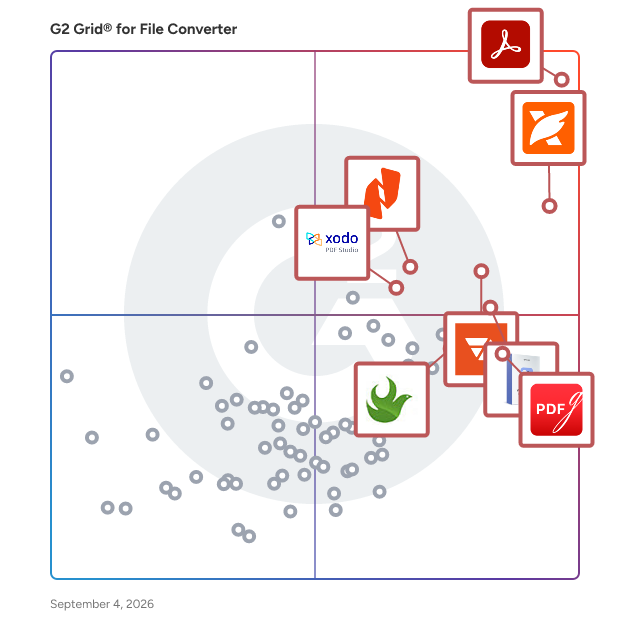
- **Leader:** [Adobe Acrobat](https://www.g2.com/products/adobe-acrobat/reviews)
- **Highest Performer:** [Movavi Video Converter](https://www.g2.com/products/movavi-video-converter/reviews)
- **Easiest to Use:** [Adobe Acrobat](https://www.g2.com/products/adobe-acrobat/reviews)
- **Top Trending:** [Foxit PDF Editor](https://www.g2.com/products/foxit-pdf-editor/reviews)
- **Best Free Software:** [Foxit PDF Editor](https://www.g2.com/products/foxit-pdf-editor/reviews)


---

**Sponsored**

### altaFlow

altaFlow generates custom docs with a click, integrates eSignatures, creates webforms, and more without coding. It’s the ultimate tool to simplify, automate, and elevate your workflows.


[Visit website](https://www.g2.com/external_clickthroughs/record?secure%5Bad_program%5D=ppc&amp;secure%5Bad_slot%5D=category_product_list&amp;secure%5Bcategory_id%5D=1706&amp;secure%5Bchosen_at%5D=2026-07-03T20%3A57%3A42Z&amp;secure%5Bdisplayable_resource_id%5D=152&amp;secure%5Bdisplayable_resource_type%5D=Category&amp;secure%5Bmedium%5D=sponsored&amp;secure%5Bplacement_reason%5D=neighbor_category&amp;secure%5Bplacement_resource_ids%5D%5B%5D=152&amp;secure%5Bprioritized%5D=false&amp;secure%5Bproduct_id%5D=116146&amp;secure%5Bresource_id%5D=1706&amp;secure%5Bresource_type%5D=Category&amp;secure%5Bsource_type%5D=category_page&amp;secure%5Bsource_url%5D=https%3A%2F%2Fwww.g2.com%2Fcategories%2Ffile-converter%3Fpage%3D40&amp;secure%5Btoken%5D=1d1689a39e9888b011e30d2b8cf3481029bf8a07ccdd4d8fda54e4e5af1fefe4&amp;secure%5Burl%5D=https%3A%2F%2Faltaflow.com%2Fg2-demo%2F%3Futm_source%3Dg2%26utm_medium%3Dppc%26utm_campaign%3Dg2clicks&amp;secure%5Burl_type%5D=book_demo)

---

## What Are the Top-Rated File Converter Software Products in 2026?
### 1. [Adobe Acrobat](https://www.g2.com/products/adobe-acrobat/reviews)
Acrobat: Trusted for documents. Now built for how work really happens. For more than 30 years, Acrobat has been the trusted name in document workflow — helping businesses create, sign, and share with confidence. As one of the leading enterprise document platforms that scales for global teams, Acrobat has evolved beyond the PDF. Now with Acrobat Studio, it has been reimagined for how modern teams work: smarter, more collaborative, and powered by AI. Acrobat Studio builds on everything professionals know from Acrobat Pro — powerful PDF editing, signing, and reviewing — and expands it into a connected workspace where teams can create, collaborate, and communicate in entirely new ways. While Acrobat Pro focuses on the PDF itself, Acrobat Studio connects the full document journey, from insight to action. With PDF Spaces, teams can bring related documents together, chat with AI Assistants that summarize content or surface key takeaways, and keep everyone aligned without endless versions or email threads. Express Premium tools make it easy to remix or reuse that same content into branded presentations, visuals, or reports — helping teams communicate ideas faster and more confidently. Security remains a constant. Acrobat follows Adobe&#39;s Secure Product Lifecycle to safeguard data at every stage, with encryption, access controls, and enterprise-grade compliance. For organizations evaluating document automation tools suitable for multi-region, multi-team deployments, Acrobat Studio delivers the scale, security, and integrations to support it. From small teams to large enterprises, it turns everyday PDFs into powerful, intelligent workspaces — helping people move ideas forward and communicate with greater clarity and impact.


**Average Rating:** 4.5/5.0
**Total Reviews:** 4,590
**How Do G2 Users Rate Adobe Acrobat?**

- **Quality of Support:** 8.5/10 (Category avg: 8.5/10)
- **Convert:** 9.3/10 (Category avg: 9.1/10)
- **Edit:** 9.1/10 (Category avg: 8.4/10)
- **Batch Conversion:** 8.6/10 (Category avg: 8.7/10)

**Who Is the Company Behind Adobe Acrobat?**

- **Seller:** [Adobe](https://www.g2.com/sellers/adobe)
- **Company Website:** https://adobe.com
- **Year Founded:** 1982
- **HQ Location:** San Jose, CA
- **Twitter:** @Adobe (956,842 Twitter followers)
- **LinkedIn® Page:** https://www.linkedin.com/company/1480/ (42,087 employees on LinkedIn®)

**Who Uses This Product?**
- **Who Uses This:** Graphic Designer, Owner
- **Top Industries:** Information Technology and Services, Computer Software
- **Company Size:** 42% Small-Business, 32% Mid-Market


#### What Are Adobe Acrobat's Pros and Cons?

**Pros:**

- Ease of Use (585 reviews)
- Easy Editing (452 reviews)
- PDF Editing (428 reviews)
- Editing (332 reviews)
- Features (314 reviews)

**Cons:**

- Expensive (224 reviews)
- Slow Performance (180 reviews)
- PDF Issues (129 reviews)
- Not-User Friendly (125 reviews)
- Learning Curve (100 reviews)


### What Do G2 Reviewers Say About Adobe Acrobat?
*AI-generated summary from verified user reviews*

**Pros:**

- Users appreciate the **ease of use** of Adobe Acrobat, making document editing and merging quick and convenient.
- Users find the **easy editing features** of Adobe Acrobat invaluable for efficiently managing and merging PDF documents.
- Users value the **versatile PDF editing options** of Adobe Acrobat, facilitating seamless document management and security.
- Users value the **versatile editing capabilities** of Adobe Acrobat, allowing seamless management of PDF documents across devices.
- Users value the **all-in-one PDF management** of Adobe Acrobat, praising its ease of use and strong security features.

**Cons:**

- Users find Adobe Acrobat **expensive** , as many features require a costly subscription despite limited free usage.
- Users experience **slow performance** with Adobe Acrobat, often facing lag and delays, affecting overall usability.
- Users find **PDF issues** in Acrobat, including difficulties in compression, slow file opening, and clunky editing.
- Users find Adobe Acrobat **not user-friendly** , especially with hidden features and complex navigation for basic PDF tasks.
- Users find the **learning curve steep** , as advanced tools can feel overwhelming and complicated for non-technical users.

#### What Are Recent G2 Reviews of Adobe Acrobat?

**"[Reliable PDF tool for daily business documents](https://www.g2.com/survey_responses/adobe-acrobat-review-13063038)"**

**Rating:** 4.5/5.0 stars
*— Evgenii B.*

[Read full review](https://www.g2.com/survey_responses/adobe-acrobat-review-13063038)

---

**"[Powerful PDF Editing Made Easy](https://www.g2.com/survey_responses/adobe-acrobat-review-13042693)"**

**Rating:** 4.5/5.0 stars
*— Divyansh Y.*

[Read full review](https://www.g2.com/survey_responses/adobe-acrobat-review-13042693)

---


#### What Are G2 Users Discussing About Adobe Acrobat?

- [How is Adobe Acrobat redefining the way professionals work with PDFs for documentation and collaboration?](https://www.g2.com/discussions/how-is-adobe-acrobat-redefining-the-way-professionals-work-with-pdfs-for-documentation-and-collaboration) - 5 comments, 9 upvotes
- [How is Adobe Acrobat being used to enhance operational efficiency and user experience in its specific field?](https://www.g2.com/discussions/how-is-adobe-acrobat-being-used-to-enhance-operational-efficiency-and-user-experience-in-its-specific-field) - 2 comments, 1 upvote
- [What does Adobe Pro DC include?](https://www.g2.com/discussions/what-does-adobe-pro-dc-include) - 8 comments, 3 upvotes
- [What is the difference between Adobe Acrobat DC and Adobe Acrobat Reader DC?](https://www.g2.com/discussions/what-is-the-difference-between-adobe-acrobat-dc-and-adobe-acrobat-reader-dc) - 4 comments, 4 upvotes
- [What can Adobe Acrobat DC do?](https://www.g2.com/discussions/what-can-adobe-acrobat-dc-do) - 3 comments, 2 upvotes

### 2. [Foxit PDF Editor](https://www.g2.com/products/foxit-pdf-editor/reviews)
Founded in 2001, Foxit is a leading provider of innovative PDF and eSignature products and services, helping knowledge workers increase productivity and do more with documents. Foxit combines easy-to-use desktop software, mobile apps, and cloud services in one powerful solution: The Foxit PDF Editor. This intelligent document solution allows users to create, edit, fill, and sign documents through their integrated PDF Editor and eSign offerings – from anywhere and on any device. Most editing tools focus only on creating and modifying documents, leaving storage, organization, and control to other systems. Foxit Document Management System (DMS) is included in Foxit PDF Editor, so every document is securely stored, organized, governed, and connected from the moment it&#39;s edited. As the first to market with AI-powered PDF editing solutions, Foxit enhances productivity with smart document editing and workflow automation. Winner of numerous awards, Foxit has over 700 million users and has sold to over 528,000 customers, ranging from SMBs to global enterprises worldwide. Foxit products are ISO 32000-1/PDF 1.7 standard compliant, therefore, compatible with your existing PDF documents and forms.


**Average Rating:** 4.6/5.0
**Total Reviews:** 3,431
**How Do G2 Users Rate Foxit PDF Editor?**

- **Quality of Support:** 8.9/10 (Category avg: 8.5/10)
- **Convert:** 9.1/10 (Category avg: 9.1/10)
- **Edit:** 9.2/10 (Category avg: 8.4/10)
- **Batch Conversion:** 8.7/10 (Category avg: 8.7/10)

**Who Is the Company Behind Foxit PDF Editor?**

- **Seller:** [Foxit](https://www.g2.com/sellers/foxit)
- **Company Website:** https://www.foxit.com/
- **Year Founded:** 2001
- **HQ Location:** Fremont, CA
- **Twitter:** @foxitsoftware (6,226 Twitter followers)
- **LinkedIn® Page:** https://www.linkedin.com/company/foxit-corporation/ (569 employees on LinkedIn®)

**Who Uses This Product?**
- **Who Uses This:** Owner, President
- **Top Industries:** Construction, Accounting
- **Company Size:** 63% Small-Business, 24% Mid-Market


#### What Are Foxit PDF Editor's Pros and Cons?

**Pros:**

- Ease of Use (567 reviews)
- PDF Editing (407 reviews)
- Easy Editing (371 reviews)
- Simple (345 reviews)
- Features (332 reviews)

**Cons:**

- Difficulty (91 reviews)
- Expensive (91 reviews)
- Learning Curve (90 reviews)
- Missing Features (85 reviews)
- Limited Features (76 reviews)


### What Do G2 Reviewers Say About Foxit PDF Editor?
*AI-generated summary from verified user reviews*

**Pros:**

- Users commend the **ease of use** of Foxit PDF Editor, highlighting its intuitive interface and seamless integration capabilities.
- Users value the **easy PDF editing features** of Foxit PDF Editor, improving efficiency and document management significantly.
- Users value the **easy editing** capabilities of Foxit PDF Editor, making PDF management effortless and efficient.
- Users appreciate the **intuitive setup** of Foxit PDF Editor, enhancing their workflow and document management efficiency.
- Users love the **fast and lightweight editing features** of Foxit PDF Editor, enhancing productivity and ease of use.

**Cons:**

- Users find the **initial setup challenging** , which complicates their ability to start using Foxit PDF Editor effectively.
- Users find Foxit PDF Editor **expensive** due to many advanced features being locked behind a paid subscription.
- Users find the **learning curve steep** , especially with the setup and advanced interface that can be challenging.
- Users find the **missing features** in Foxit PDF Editor limiting, especially between Mac and Windows versions.
- Users note the **limited features** in the free version of Foxit PDF Editor hinder its full potential for advanced tasks.

#### What Are Recent G2 Reviews of Foxit PDF Editor?

**"[Efficient solution for managing and editing PDF documents](https://www.g2.com/survey_responses/foxit-pdf-editor-review-12663473)"**

**Rating:** 4.5/5.0 stars
*— Apoorv S.*

[Read full review](https://www.g2.com/survey_responses/foxit-pdf-editor-review-12663473)

---

**"[It&#39;s been much more than just a PDF Editor in my experience](https://www.g2.com/survey_responses/foxit-pdf-editor-review-12995599)"**

**Rating:** 4.5/5.0 stars
*— Yaroslav B.*

[Read full review](https://www.g2.com/survey_responses/foxit-pdf-editor-review-12995599)

---


#### What Are G2 Users Discussing About Foxit PDF Editor?

- [How does the Foxit PDF Editor Suite stand out in terms of features and usability for professional PDF management?](https://www.g2.com/discussions/how-does-the-foxit-pdf-editor-suite-stand-out-in-terms-of-features-and-usability-for-professional-pdf-management) - 3 comments, 3 upvotes
- [What is Foxit PDF Editor used for?](https://www.g2.com/discussions/what-is-foxit-pdf-editor-used-for) - 2 comments, 1 upvote
- [Is Foxit Phantom PDF free?](https://www.g2.com/discussions/is-foxit-phantom-pdf-free) - 3 comments
- [How do I use Foxit PhantomPDF?](https://www.g2.com/discussions/how-do-i-use-foxit-phantompdf) - 1 comment
- [What is Foxit PhantomPDF standard?](https://www.g2.com/discussions/what-is-foxit-phantompdf-standard) - 2 comments

### 3. [pdfFiller](https://www.g2.com/products/pdffiller/reviews)
pdfFiller is a cloud-based platform with a comprehensive digital toolkit that makes handling PDFs easy. Edit, sign, store, manage, and collaborate on documents all in one place — no downloads, switching apps, or paying for multiple subscriptions needed. All your documents are safely stored in the cloud, so you can access them anytime, anywhere, without worrying about losing your data.


**Average Rating:** 4.6/5.0
**Total Reviews:** 869
**How Do G2 Users Rate pdfFiller?**

- **Quality of Support:** 9.0/10 (Category avg: 8.5/10)
- **Convert:** 10.0/10 (Category avg: 9.1/10)
- **Edit:** 9.6/10 (Category avg: 8.4/10)
- **Batch Conversion:** 9.8/10 (Category avg: 8.7/10)

**Who Is the Company Behind pdfFiller?**

- **Seller:** [airSlate](https://www.g2.com/sellers/airslate)
- **Company Website:** https://www.airslate.com/
- **Year Founded:** 2006
- **HQ Location:** Brookline, Massachusetts
- **Twitter:** @airSlate (1,234 Twitter followers)
- **LinkedIn® Page:** https://www.linkedin.com/company/airslate/ (798 employees on LinkedIn®)

**Who Uses This Product?**
- **Who Uses This:** Owner, President
- **Top Industries:** Real Estate, Insurance
- **Company Size:** 82% Small-Business, 13% Mid-Market


#### What Are pdfFiller's Pros and Cons?

**Pros:**

- Ease of Use (45 reviews)
- Easy Editing (31 reviews)
- Form Filling (25 reviews)
- Editing (21 reviews)
- E-Signing Features (21 reviews)

**Cons:**

- Missing Features (9 reviews)
- Expensive (8 reviews)
- Not-User Friendly (6 reviews)
- Feature Limitations (5 reviews)
- PDF Issues (5 reviews)


### What Do G2 Reviewers Say About pdfFiller?
*AI-generated summary from verified user reviews*

**Pros:**

- Users appreciate the **ease of use** of pdfFiller, finding it user-friendly for editing and document management.
- Users praise the **easy editing** features of pdfFiller, making document management seamless and user-friendly across devices.
- Users appreciate the **LinkToFill feature** for simplifying the form filling process and managing documents effectively.
- Users value the **easy editing capabilities** of pdfFiller, enhancing document management and streamlining workflows efficiently.
- Users appreciate the **e-signing features** of pdfFiller, enhancing efficiency and ensuring faster approvals and timely payments.

**Cons:**

- Users find the **missing advanced editing features** in pdfFiller hinder their overall experience and efficiency.
- Users find pdfFiller to be **expensive** relative to its limited features and bugs affecting usability.
- Users report that the interface can be **not user-friendly** , particularly for first-time users navigating complex tools.
- Users note the **feature limitations** in pdfFiller, particularly with customizations and access to advanced tools in free plans.
- Users face **PDF issues** like slow performance on large documents and limited copy-paste functionality, causing frustration.

#### What Are Recent G2 Reviews of pdfFiller?

**"[Streamlining Secured PDFs and Document Workflows in One Place](https://www.g2.com/survey_responses/pdffiller-review-12678568)"**

**Rating:** 5.0/5.0 stars
*— Rodney L.*

[Read full review](https://www.g2.com/survey_responses/pdffiller-review-12678568)

---

**"[Revolutionized Document Handling in Real Estate](https://www.g2.com/survey_responses/pdffiller-review-12664792)"**

**Rating:** 5.0/5.0 stars
*— Chris  H.*

[Read full review](https://www.g2.com/survey_responses/pdffiller-review-12664792)

---


#### What Are G2 Users Discussing About pdfFiller?

- [What is pdfFiller by airSlate used for?](https://www.g2.com/discussions/what-is-pdffiller-by-airslate-used-for) - 1 comment
- [How do I use pdfFiller for free?](https://www.g2.com/discussions/how-do-i-use-pdffiller-for-free) - 2 comments
- [How much does pdfFiller cost?](https://www.g2.com/discussions/how-much-does-pdffiller-cost) - 2 comments
- [What does PDF Filler do?](https://www.g2.com/discussions/what-does-pdf-filler-do) - 1 comment
- [What is pdfFiller software?](https://www.g2.com/discussions/what-is-pdffiller-software) - 2 comments

### 4. [Movavi Video Converter](https://www.g2.com/products/movavi-video-converter/reviews)
Movavi Video Converter is Movavi’s acclaimed bestseller, well-known for supporting a wide range of media formats and mobile devices, high-quality file encoding, and high-speed processing. Convert between more than 180 formats, including DVD and HD video: AVI, MP4, FLV, MKV, MOV, WMV, 3GP, and many more. Extract soundtracks from movies or clips and save them in MP3, FLAC, and other audio formats. Choose one of the more than 200 presets for mobile devices to easily prepare files for playback on any popular brand of smartphones, tablets, or media players. One simple program does it all! —Get access to 180+ media file formats —Choose from ready-made presets for 200+ mobile devices —Use automatic device recognition and appropriate preset selection —Rip DVD video to any popular video format —Select individual audio tracks and subtitles for conversion —Extract and convert music from video files —Convert between image formats. Make GIFs from videos. Save individual video frames —Adjust an audio track: increase, decrease, or normalize volume, remove noise —Share online. Export your files to iTunes


**Average Rating:** 4.8/5.0
**Total Reviews:** 60
**How Do G2 Users Rate Movavi Video Converter?**

- **Quality of Support:** 9.3/10 (Category avg: 8.5/10)
- **Convert:** 9.6/10 (Category avg: 9.1/10)
- **Edit:** 9.1/10 (Category avg: 8.4/10)
- **Batch Conversion:** 9.5/10 (Category avg: 8.7/10)

**Who Is the Company Behind Movavi Video Converter?**

- **Seller:** [Movavi](https://www.g2.com/sellers/movavi)
- **Year Founded:** 2004
- **HQ Location:** Limassol, Limassol
- **Twitter:** @Movavi (4,241 Twitter followers)
- **LinkedIn® Page:** https://www.linkedin.com/company/movavi/about (251 employees on LinkedIn®)

**Who Uses This Product?**
- **Top Industries:** Computer &amp; Network Security, Information Technology and Services
- **Company Size:** 95% Small-Business, 2% Enterprise


#### What Are Movavi Video Converter's Pros and Cons?

**Pros:**

- Ease of Use (3 reviews)
- Music Conversion (2 reviews)
- Cloud Integration (1 reviews)
- Compatibility (1 reviews)
- Ease of Learning (1 reviews)

**Cons:**

- File Compression (1 reviews)


### What Do G2 Reviewers Say About Movavi Video Converter?
*AI-generated summary from verified user reviews*

**Pros:**

- Users find Movavi Video Converter exceptionally **easy to use** , appreciating its user-friendly interface and quick conversion capabilities.
- Users praise Movavi Video Converter for its **lightning-fast music conversion** , maintaining quality while reducing file sizes significantly.
- Users appreciate the **cloud integration** of Movavi Video Converter, enhancing accessibility and convenience for all media tasks.
- Users value the **wide range of supported formats** in Movavi Video Converter, making multimedia conversion effortless and versatile.
- Users find the **ease of learning** with Movavi Video Converter exceptional, thanks to its intuitive interface and drag-and-drop functionality.

**Cons:**

- Users often experience **inconsistent file size reduction** when using Movavi Video Converter, impacting their expectations.

#### What Are Recent G2 Reviews of Movavi Video Converter?

**"[Uncomplicated Conversion with Professional Result](https://www.g2.com/survey_responses/movavi-video-converter-review-11079191)"**

**Rating:** 5.0/5.0 stars
*— Adilson P.*

[Read full review](https://www.g2.com/survey_responses/movavi-video-converter-review-11079191)

---

**"[Movavi Video Converter](https://www.g2.com/survey_responses/movavi-video-converter-review-12032645)"**

**Rating:** 5.0/5.0 stars
*— Daehyun B.*

[Read full review](https://www.g2.com/survey_responses/movavi-video-converter-review-12032645)

---


#### What Are G2 Users Discussing About Movavi Video Converter?

- [Does movavi have watermark?](https://www.g2.com/discussions/does-movavi-have-watermark) - 2 comments
- [Is Movavi Video Converter really free?](https://www.g2.com/discussions/is-movavi-video-converter-really-free)
- [Is Movavi Video Converter fast?](https://www.g2.com/discussions/is-movavi-video-converter-fast) - 2 comments, 1 upvote
- [Is Movavi Video Converter good?](https://www.g2.com/discussions/is-movavi-video-converter-good) - 1 upvote

### 5. [Nitro PDF](https://www.g2.com/products/nitro-pdf/reviews)
1. What is Nitro PDF? Nitro PDF is a full-featured PDF editor that enables you to create, edit, convert, sign, and secure PDF documents. It is designed for individuals, small businesses, and enterprises as a cost-effective alternative to Adobe Acrobat, combining powerful functionality with an intuitive interface that works across devices. 2. What are the main features of Nitro PDF? Nitro PDF is a comprehensive solution for creating, editing, and securing documents across Windows, Mac, iOS, and web browsers. It includes powerful AI productivity tools and is built with an intuitive interface mirroring the Microsoft Office and Apple toolbars. Key features of Nitro PDF include: • Core Editing: Tools to create, edit, convert, combine, and annotate PDFs, including advanced OCR and secure signing capabilities. • AI Smart Tools: Enhances productivity via smart data extraction, automated form creation, and intelligent document redaction. • Nitro Analytics: Real-time visibility into PDF usage, allowing organizations to measure productivity, prove ROI, and track sustainability. • Nitro Workspace: A centralized cloud hub for accessing PDF and eSign tools, AI assistants, and administration from any device. • Advanced Editing: Create PDFs from any file type and convert PDFs into editable Microsoft Word, Excel, and PowerPoint files while maintaining original layouts. • Powerful OCR (Optical Character Recognition): Turn scanned paper documents and images into fully searchable and editable PDFs with high-accuracy text recognition. Nitro PDF is available in multiple plans to suit different business needs. 3. What support options does Nitro offer? Whether you&#39;re a five-person team or a global enterprise, our dedicated support is available 24/7. • Human Support: Nitro offers dedicated customer support, including onboarding, training, and troubleshooting resources, to ensure a smooth experience for your team. • Knowledge Base and Guides: Access hundreds of detailed articles covering product features, integrations, workflows, and best practices. • Video Tutorials: Step-by-step walkthroughs and demonstrations to help you learn and master Nitro tools quickly. • Community Forum: Connect with other Nitro users, share feedback, ask questions, and discover tips and solutions. • Knowledge Assistant: A 24/7 in-app AI assistant providing instant, context-aware guidance on features, workflows, and troubleshooting. 4. Does Nitro PDF support integrations with other business tools? Yes. Nitro PDF integrates with software such as Microsoft Office suite, OneDrive, Dropbox, and other platforms. These integrations simplify document workflows and make it easy to create, edit, and share PDFs directly within your existing environment. 5. How does Nitro ensure document security and compliance? Nitro protects sensitive information with advanced encryption, password protection, granular access controls, and tamper-evident audit trails. Nitro’s solutions are designed to meet enterprise and mid-market compliance requirements, including GDPR, SOC 2, HIPAA, eIDAS, UETA, and the ESIGN Act.


**Average Rating:** 4.4/5.0
**Total Reviews:** 376
**How Do G2 Users Rate Nitro PDF?**

- **Quality of Support:** 8.1/10 (Category avg: 8.5/10)

**Who Is the Company Behind Nitro PDF?**

- **Seller:** [Nitro, Inc](https://www.g2.com/sellers/nitro-inc)
- **Company Website:** https://www.gonitro.com
- **Year Founded:** 2005
- **HQ Location:** San Francisco, CA
- **LinkedIn® Page:** https://www.linkedin.com/company/go-nitro/ (371 employees on LinkedIn®)

**Who Uses This Product?**
- **Who Uses This:** IT Manager
- **Top Industries:** Information Technology and Services, Construction
- **Company Size:** 47% Small-Business, 35% Mid-Market


#### What Are Nitro PDF's Pros and Cons?

**Pros:**

- Ease of Use (59 reviews)
- Easy Editing (40 reviews)
- Features (37 reviews)
- Easy Conversion (30 reviews)
- PDF Processing (29 reviews)

**Cons:**

- PDF Issues (22 reviews)
- Expensive (13 reviews)
- Slow Performance (11 reviews)
- Limited Features (10 reviews)
- Performance Issues (10 reviews)


### What Do G2 Reviewers Say About Nitro PDF?
*AI-generated summary from verified user reviews*

**Pros:**

- Users praise the **ease of use** of Nitro PDF, highlighting its intuitive interface and efficient PDF management features.
- Users love the **easy editing** capabilities of Nitro PDF, enabling efficient management and formatting preservation of their documents.
- Users highlight the **robust security features** of Nitro PDF, ensuring confidentiality and streamlined document management.
- Users love the **easy conversion** capabilities of Nitro PDF, making document management quick and efficient for everyone.
- Users love the **ironclad security** of Nitro PDF, ensuring their confidential documents are well-protected and accessible.

**Cons:**

- Users report **PDF processing and compression issues** , experiencing slow performance and incomplete uninstallation problems.
- Users find the **pricing steep** , making Nitro PDF less accessible for casual or small team users.
- Users experience **slow performance** with Nitro PDF when handling large documents, affecting efficiency in processing tasks.
- Users find the **limited advanced features** of Nitro PDF less effective for complex documents, requiring extra effort to ensure accuracy.
- Users experience significant **performance issues** with Nitro PDF, especially with large files and after software updates, causing system instability.

#### What Are Recent G2 Reviews of Nitro PDF?

**"[Familiar Office-Style Interface Makes Nitro Intuitive and Easy to Use](https://www.g2.com/survey_responses/nitro-pdf-review-12802767)"**

**Rating:** 5.0/5.0 stars
*— Abhijit S.*

[Read full review](https://www.g2.com/survey_responses/nitro-pdf-review-12802767)

---

**"[Fast, All-in-One PDF Editing That Saves Time and Money](https://www.g2.com/survey_responses/nitro-pdf-review-13011571)"**

**Rating:** 5.0/5.0 stars
*— Valentin G.*

[Read full review](https://www.g2.com/survey_responses/nitro-pdf-review-13011571)

---


#### What Are G2 Users Discussing About Nitro PDF?

- [What is Nitro PDF Productivity used for?](https://www.g2.com/discussions/what-is-nitro-pdf-productivity-used-for)
- [What is PDFpen used for?](https://www.g2.com/discussions/what-is-pdfpen-used-for)
- [What is Connective used for?](https://www.g2.com/discussions/what-is-connective-used-for)

### 6. [PDFgear](https://www.g2.com/products/pdfgear/reviews)
PDFgear is a free and feature-rich PDF editing software supporting Windows, Mac, and iOS. It includes functionalities for reading, editing, compressing, converting, and signing PDFs etc. A standout feature is its AI co-pilot, powered by ChatGPT, which enables users to conduct PDF summary tasks using conversational language. Say goodbye to expensive and complicated PDF editors and meet the game changer PDFgear – the easiest-to-use, affordable, and powerful solution for all your PDF editing needs.


**Average Rating:** 4.8/5.0
**Total Reviews:** 141
**How Do G2 Users Rate PDFgear?**

- **Quality of Support:** 9.3/10 (Category avg: 8.5/10)
- **Convert:** 9.4/10 (Category avg: 9.1/10)
- **Edit:** 9.3/10 (Category avg: 8.4/10)
- **Batch Conversion:** 9.0/10 (Category avg: 8.7/10)

**Who Is the Company Behind PDFgear?**

- **Seller:** [PDF Gear Tech LTD](https://www.g2.com/sellers/pdf-gear-tech-ltd)
- **HQ Location:** Singapore
- **Twitter:** @PDFgear (6,905 Twitter followers)
- **LinkedIn® Page:** https://www.linkedin.com/company/No-Linkedin-Presence-Added-Intentionally-By-DataOps (1 employees on LinkedIn®)

**Who Uses This Product?**
- **Top Industries:** Information Technology and Services, Higher Education
- **Company Size:** 76% Small-Business, 21% Mid-Market


#### What Are PDFgear's Pros and Cons?

**Pros:**

- Ease of Use (36 reviews)
- Free (32 reviews)
- Free Usage (28 reviews)
- PDF Editing (22 reviews)
- Editing (21 reviews)

**Cons:**

- Feature Limitations (6 reviews)
- Limited Features (5 reviews)
- Editing Issues (4 reviews)
- Limited Editing (4 reviews)
- Page Management (4 reviews)


### What Do G2 Reviewers Say About PDFgear?
*AI-generated summary from verified user reviews*

**Pros:**

- Users appreciate the **ease of use** of PDFgear, finding it incredibly easy to navigate and access options.
- Users love the **fully functional free version** of PDFgear, appreciating its ease of use and comprehensive features.
- Users love the **free usage** of PDFgear, finding it easy and feature-rich for all their PDF needs.
- Users praise the **intuitive PDF editing tools** of PDFgear, highlighting its efficiency and robust functionality.
- Users highlight the **efficiency and versatility** of PDFgear&#39;s editing features, making PDF modifications a breeze.

**Cons:**

- Users find the **feature limitations** of PDFgear, like the lack of digital signature and translation capabilities, frustrating.
- Users find the **limited features** of PDFgear restricts advanced editing and customization options for power users.
- Users note that **editing issues** complicate tasks, particularly with saving files and adjusting image sizes accurately.
- Users find the **limited editing options** of PDFgear frustrating, especially compared to more advanced tools like Acrobat Pro.
- Users find the **page management features limited** , hindering their ability to efficiently edit and save documents.

#### What Are Recent G2 Reviews of PDFgear?

**"[Completely Free, Fast, and Packed with All-in-One PDF + AI Features](https://www.g2.com/survey_responses/pdfgear-review-12605318)"**

**Rating:** 5.0/5.0 stars
*— Shabeer P.*

[Read full review](https://www.g2.com/survey_responses/pdfgear-review-12605318)

---

**"[Free, No-Signup PDF Tool with Fast Desktop App and AI Summaries](https://www.g2.com/survey_responses/pdfgear-review-12869979)"**

**Rating:** 4.5/5.0 stars
*— Konjengbam  M.*

[Read full review](https://www.g2.com/survey_responses/pdfgear-review-12869979)

---


### 7. [HitPaw Video Converter](https://www.g2.com/products/hitpaw-video-converter/reviews)
HitPaw Univd, formerly known as HitPaw Video Converter, is a comprehensive multimedia solution designed to meet the diverse needs of content creators, educators, and businesses. This all-in-one platform offers advanced tools for video conversion, compression, enhancement, and editing, enabling users to produce high-quality content with ease. Key Features and Functionality: - Extensive Format Support: Convert videos and audio files between over 1,000 formats, including MP4, AVI, WMV, MOV, MKV, and more, ensuring compatibility across various devices and platforms. - Lossless Video Conversion: Maintain original quality during conversions, preserving details, colors, and dynamic range for professional-grade results. - High-Speed Processing: Utilize GPU hardware acceleration to achieve conversion speeds up to 170 times faster than traditional methods, significantly reducing processing time. - Batch Processing: Efficiently handle multiple files simultaneously, allowing for bulk conversions, compressions, and edits, which is ideal for large projects. - AI-Powered Enhancements: Leverage artificial intelligence to upscale videos to HD or 4K, remove background noise, and perform other enhancements that elevate content quality. - Comprehensive Editing Tools: Access built-in features to cut, trim, merge, crop, and add subtitles to videos, streamlining the editing process within a single application. - Online Video Downloading: Download videos, audio, and subtitles from over 10,000 popular websites, including YouTube, TikTok, and Facebook, and convert them to preferred formats. Primary Value and User Solutions: HitPaw Univd addresses the challenges of multimedia content creation by providing a versatile and user-friendly platform that simplifies complex tasks. Content creators can streamline their workflows, educators can produce engaging instructional materials, and businesses can efficiently manage media assets. The integration of AI technologies ensures high-quality outputs, while the extensive format support and high-speed processing cater to the demands of modern digital media production.


**Average Rating:** 4.9/5.0
**Total Reviews:** 19
**How Do G2 Users Rate HitPaw Video Converter?**

- **Quality of Support:** 9.8/10 (Category avg: 8.5/10)
- **Convert:** 10.0/10 (Category avg: 9.1/10)
- **Edit:** 9.6/10 (Category avg: 8.4/10)
- **Batch Conversion:** 9.8/10 (Category avg: 8.7/10)

**Who Is the Company Behind HitPaw Video Converter?**

- **Seller:** [HitPaw Ltd. ](https://www.g2.com/sellers/hitpaw-ltd)
- **HQ Location:** Hong Kong Island, Hong Kong
- **LinkedIn® Page:** https://www.linkedin.com/company/hitpaw/ (19 employees on LinkedIn®)

**Who Uses This Product?**
- **Company Size:** 89% Small-Business, 11% Enterprise


#### What Are HitPaw Video Converter's Pros and Cons?

**Pros:**

- Ease of Use (3 reviews)
- Ease of Learning (2 reviews)
- Easy Conversion (2 reviews)
- Editing (2 reviews)
- Efficiency (2 reviews)

**Cons:**

- Download Issues (1 reviews)
- Slow Speed (1 reviews)
- Version Issues (1 reviews)


### What Do G2 Reviewers Say About HitPaw Video Converter?
*AI-generated summary from verified user reviews*

**Pros:**

- Users love the **ease of use** of HitPaw Video Converter, finding it simple and efficient for all their needs.
- Users find the **ease of learning** with HitPaw Video Converter makes it accessible for both beginners and advanced users.
- Users love the **easy conversion** process of HitPaw Video Converter, appreciating its speed and user-friendly interface.
- Users love the **powerful video editing tools** in HitPaw Video Converter, enhancing their editing experience significantly.
- Users value the **efficiency** of HitPaw Video Converter, enjoying its fast processing and seamless conversion features.

**Cons:**

- Users often face **download issues** with HitPaw Video Converter, impacting the overall experience with larger files.
- Users experience **slow processing speeds for larger files** , which can hinder the overall efficiency of HitPaw Video Converter.
- Users experience occasional **version issues** when registering HitPaw Video Converter, causing initial setup difficulties with the software.

#### What Are Recent G2 Reviews of HitPaw Video Converter?

**"[I love HitPaw Video Converter](https://www.g2.com/survey_responses/hitpaw-video-converter-review-10925580)"**

**Rating:** 5.0/5.0 stars
*— Verified User in Marketing and Advertising*

[Read full review](https://www.g2.com/survey_responses/hitpaw-video-converter-review-10925580)

---

**"[I use the app everyday because it has so many features.](https://www.g2.com/survey_responses/hitpaw-video-converter-review-10913930)"**

**Rating:** 5.0/5.0 stars
*— PeteMiller S.*

[Read full review](https://www.g2.com/survey_responses/hitpaw-video-converter-review-10913930)

---


### 8. [Xodo PDF Studio](https://www.g2.com/products/xodo-pdf-studio/reviews)
Xodo PDF Studio is an enterprise-grade desktop solution for professionals and teams who need powerful PDF editing, annotation, and organization tools. With over 60 advanced features—including OCR, digital signatures, batch processing, side-by-side document comparison, and cloud storage integration—it streamlines document workflows for peak productivity. Offline access ensures uninterrupted efficiency anytime, anywhere. Designed for security and performance, Xodo PDF Studio includes enterprise-grade encryption, redaction, and compliance-ready protections for sensitive documents. Compatible with Windows, macOS, and Linux, it serves diverse user needs. Flexible licensing options—including subscriptions, volume discounts, and perpetual plans upon inquiry—make it ideal for teams in AEC, finance, banking, real estate, accounting, and insurance. By automating high-volume tasks and providing precision-driven tools, Xodo PDF Studio simplifies even the most complex PDF workflows.


**Average Rating:** 4.5/5.0
**Total Reviews:** 110
**How Do G2 Users Rate Xodo PDF Studio?**

- **Quality of Support:** 8.8/10 (Category avg: 8.5/10)
- **Convert:** 9.2/10 (Category avg: 9.1/10)
- **Edit:** 9.5/10 (Category avg: 8.4/10)
- **Batch Conversion:** 8.9/10 (Category avg: 8.7/10)

**Who Is the Company Behind Xodo PDF Studio?**

- **Seller:** [Apryse](https://www.g2.com/sellers/apryse)
- **Company Website:** https://apryse.com
- **Year Founded:** 1998
- **HQ Location:** Denver, CO
- **Twitter:** @aprysesolutions (381 Twitter followers)
- **LinkedIn® Page:** https://www.linkedin.com/company/aprysesolutions/ (552 employees on LinkedIn®)

**Who Uses This Product?**
- **Who Uses This:** Student
- **Top Industries:** Education Management, Higher Education
- **Company Size:** 55% Small-Business, 11% Mid-Market


#### What Are Xodo PDF Studio's Pros and Cons?

**Pros:**

- Ease of Use (95 reviews)
- Easy Installation (43 reviews)
- PDF Processing (31 reviews)
- Editing (30 reviews)
- PDF Editing (30 reviews)

**Cons:**

- Not-User Friendly (19 reviews)
- Slow Performance (14 reviews)
- Expensive (13 reviews)
- Visual (12 reviews)
- Limited Features (11 reviews)


### What Do G2 Reviewers Say About Xodo PDF Studio?
*AI-generated summary from verified user reviews*

**Pros:**

- Users find Xodo PDF Studio to be **very easy to use** , appreciating its smooth installation and intuitive features.
- Users appreciate the **easy installation** of Xodo PDF Studio, highlighting a smooth and hassle-free setup experience.
- Users love the **PDF splitting and merging feature** of Xodo PDF Studio, finding it essential for their document needs.
- Users appreciate the **flexible editing and annotation features** of Xodo PDF Studio, enhancing their workflow and ease of use.
- Users appreciate the **flexible PDF editing and annotation features** of Xodo PDF Studio, enhancing their productivity and workflow.

**Cons:**

- Users find the interface to be **not user friendly** , especially for nontechnical individuals, due to its clutter and complexity.
- Users experience **slow performance** when loading large files, impacting efficiency and multitasking capabilities.
- Users are concerned about the **high cost** and short trial period of Xodo PDF Studio, causing financial stress.
- Users find the **visual experience lacking** , with issues like poor theme options and problematic window resizing.
- Users find **limited features** in Xodo PDF Studio, wishing for enhanced functionalities like text editing and better customization.

#### What Are Recent G2 Reviews of Xodo PDF Studio?

**"[Effortless Document Stitching with Extra Useful Features](https://www.g2.com/survey_responses/xodo-pdf-studio-review-11962967)"**

**Rating:** 5.0/5.0 stars
*— Onan H.*

[Read full review](https://www.g2.com/survey_responses/xodo-pdf-studio-review-11962967)

---

**"[Boosts Learning with Effective Annotation Tools](https://www.g2.com/survey_responses/xodo-pdf-studio-review-11933995)"**

**Rating:** 4.0/5.0 stars
*— Chedi H.*

[Read full review](https://www.g2.com/survey_responses/xodo-pdf-studio-review-11933995)

---


### 9. [PDFShift](https://www.g2.com/products/pdfshift/reviews)
PDFShift provides developers with a tool to convert their HTML documents (raw or link) in PDF with high-fidelity. Packages are available for Node.js, Python, and PHP and the API allows any programming languages to be used. Features like watermarking and encryption are available along with many options to customize the rendered documents to your exact needs.


**Average Rating:** 4.6/5.0
**Total Reviews:** 29
**How Do G2 Users Rate PDFShift?**

- **Quality of Support:** 9.9/10 (Category avg: 8.5/10)
- **Convert:** 10.0/10 (Category avg: 9.1/10)
- **Edit:** 9.6/10 (Category avg: 8.4/10)
- **Batch Conversion:** 10.0/10 (Category avg: 8.7/10)

**Who Is the Company Behind PDFShift?**

- **Seller:** [PDFShift](https://www.g2.com/sellers/pdfshift)
- **Year Founded:** 2018
- **HQ Location:** N/A
- **Twitter:** @pdfshift (186 Twitter followers)
- **LinkedIn® Page:** https://www.linkedin.com/company/pdfshift-io/ (1 employees on LinkedIn®)

**Who Uses This Product?**
- **Top Industries:** Computer Software
- **Company Size:** 87% Small-Business, 6% Enterprise


#### What Are PDFShift's Pros and Cons?

**Pros:**

- Ease of Use (5 reviews)
- Easy Conversion (3 reviews)
- Efficiency (3 reviews)
- Productivity Enhancement (3 reviews)
- Reliability (2 reviews)

**Cons:**

- Functionality Issues (1 reviews)
- Limited Access (1 reviews)
- Mobile Limitations (1 reviews)


### What Do G2 Reviewers Say About PDFShift?
*AI-generated summary from verified user reviews*

**Pros:**

- Users commend PDFShift for its **exceptional ease of use** , simplifying PDF creation and enhancing workflow efficiency effortlessly.
- Users value the **easy conversion** feature of PDFShift, streamlining their workflows and enhancing productivity with seamless integration.
- Users commend PDFShift for its **exceptional efficiency** , seamlessly integrating into workflows and ensuring rapid, reliable PDF conversion.
- Users appreciate the **ease of use and automation** in PDFShift, streamlining their PDF creation process effortlessly.
- Users highlight the **reliable performance** of PDFShift, ensuring seamless conversion and stable operation within workflows.

**Cons:**

- Users find the **functionality issues** of PDFShift frustrating, particularly the lack of direct integration with n8n.
- Users find the **limited access** of the basic plan frustrating, as it restricts document delivery to only one email.
- Users find the **lack of direct node integration** in PDFShift inconvenient, complicating their workflow processes.

#### What Are Recent G2 Reviews of PDFShift?

**"[Seamless HTML to PDF Conversion with Great Pricing](https://www.g2.com/survey_responses/pdfshift-review-12553135)"**

**Rating:** 5.0/5.0 stars
*— Jean-Paul P.*

[Read full review](https://www.g2.com/survey_responses/pdfshift-review-12553135)

---

**"[Effortless HTML-to-PDF Conversion with a Fast API](https://www.g2.com/survey_responses/pdfshift-review-12872671)"**

**Rating:** 5.0/5.0 stars
*— Steven S.*

[Read full review](https://www.g2.com/survey_responses/pdfshift-review-12872671)

---


#### What Are G2 Users Discussing About PDFShift?

- [What is PDFShift used for?](https://www.g2.com/discussions/what-is-pdfshift-used-for)

### 10. [Epubor](https://www.g2.com/products/epubor/reviews)
Epubor Software is a worldwide software developer dedicated to satisfying customers&#39; needs with diversified software products and services. We provide the best solutions for eBooks and audiobook reading. Bestsellers and hot products: Epubor Ultimate, Epubor Audible Converter, and Epubor LibAudio Mate. https://www.epubor.com/softwares.html?2499


**Average Rating:** 4.6/5.0
**Total Reviews:** 155
**How Do G2 Users Rate Epubor?**

- **Quality of Support:** 9.0/10 (Category avg: 8.5/10)
- **Convert:** 9.8/10 (Category avg: 9.1/10)
- **Edit:** 8.9/10 (Category avg: 8.4/10)
- **Batch Conversion:** 9.1/10 (Category avg: 8.7/10)

**Who Is the Company Behind Epubor?**

- **Seller:** [Epubor](https://www.g2.com/sellers/epubor)
- **Year Founded:** 2011
- **HQ Location:** Hubei, China
- **Twitter:** @eBook_Converter (7,225 Twitter followers)
- **LinkedIn® Page:** https://www.linkedin.com/company/2589312/ (12 employees on LinkedIn®)

**Who Uses This Product?**
- **Top Industries:** Higher Education, Accounting
- **Company Size:** 86% Small-Business, 4% Mid-Market


#### What Are Epubor's Pros and Cons?

**Pros:**

- Ease of Use (14 reviews)
- Easy Conversion (9 reviews)
- Easy Installation (7 reviews)
- Efficiency (5 reviews)
- Efficiency Improvement (4 reviews)

**Cons:**

- Expensive (6 reviews)
- Conversion Issues (2 reviews)
- Installation Issues (1 reviews)
- Pricing (1 reviews)
- Pricing Concerns (1 reviews)


### What Do G2 Reviewers Say About Epubor?
*AI-generated summary from verified user reviews*

**Pros:**

- Users appreciate the **clean and intuitive UI** of Epubor, making eBook management and conversion effortless.
- Users value the **easy conversion** capabilities of Epubor, streamlining their ebook management across devices and formats.
- Users praise the **easy installation** of Epubor, finding the process quick and user-friendly, even on older computers.
- Users praise Epubor&#39;s **efficiency** in quickly converting ebook formats with a simple drag-and-drop interface.
- Users commend Epubor for its **efficiency improvement** , enhancing the process of managing and converting ebooks seamlessly.

**Cons:**

- Users find the **pricing expensive** compared to basic converters, feeling it may not justify the cost.
- Users note that **conversion issues** arise rarely with KFX or AZW3 formats, causing unexpected delays in processing.
- Users report **installation issues** due to security restrictions on office PCs, requiring personal devices for successful setup.
- Users dislike the **premium pricing** of Epubor, finding it higher than basic converters available.
- Users express concerns about Epubor&#39;s **premium pricing** , feeling it is too high compared to basic converters.

#### What Are Recent G2 Reviews of Epubor?

**"[Simple and Effective Backup Solution for E-Books](https://www.g2.com/survey_responses/epubor-review-12763874)"**

**Rating:** 5.0/5.0 stars
*— Marc G.*

[Read full review](https://www.g2.com/survey_responses/epubor-review-12763874)

---

**"[Reliable DRM Removal, Empowers true Book Ownership](https://www.g2.com/survey_responses/epubor-review-12797640)"**

**Rating:** 5.0/5.0 stars
*— Carlos S.*

[Read full review](https://www.g2.com/survey_responses/epubor-review-12797640)

---


#### What Are G2 Users Discussing About Epubor?

- [What do you like most about Epubor for ebook management, and what challenges have you faced?](https://www.g2.com/discussions/what-do-you-like-most-about-epubor-for-ebook-management-and-what-challenges-have-you-faced)
- [What is Epubor used for?](https://www.g2.com/discussions/what-is-epubor-used-for) - 1 comment
- [How do I remove DRM from ePub?](https://www.g2.com/discussions/how-do-i-remove-drm-from-epub)
- [How do I use epubor ultimate?](https://www.g2.com/discussions/how-do-i-use-epubor-ultimate)
- [How much does epubor cost?](https://www.g2.com/discussions/how-much-does-epubor-cost)

### 11. [Google Transcoder API](https://www.g2.com/products/google-transcoder-api/reviews)
The Transcoder API allows you to convert video files and package them for optimized delivery to web, mobile and connected TVs.


**Average Rating:** 4.0/5.0
**Total Reviews:** 12
**How Do G2 Users Rate Google Transcoder API?**

- **Quality of Support:** 8.2/10 (Category avg: 8.5/10)
- **Convert:** 9.2/10 (Category avg: 9.1/10)
- **Edit:** 8.3/10 (Category avg: 8.4/10)
- **Batch Conversion:** 8.9/10 (Category avg: 8.7/10)

**Who Is the Company Behind Google Transcoder API?**

- **Seller:** [Google](https://www.g2.com/sellers/google)
- **Year Founded:** 1998
- **HQ Location:** Mountain View, CA
- **Twitter:** @google (31,899,995 Twitter followers)
- **LinkedIn® Page:** https://www.linkedin.com/company/1441/ (341,888 employees on LinkedIn®)
- **Ownership:** NASDAQ:GOOG

**Who Uses This Product?**
- **Company Size:** 42% Mid-Market, 42% Small-Business


#### What Are Google Transcoder API's Pros and Cons?

**Pros:**

- Compatibility (3 reviews)
- Ease of Use (3 reviews)
- Speed Efficiency (2 reviews)
- Cloud Integration (1 reviews)
- Easy Installation (1 reviews)

**Cons:**

- Pricing Concerns (3 reviews)
- Expensive (2 reviews)
- Learning Curve (1 reviews)
- Slow Performance (1 reviews)
- Slow Speed (1 reviews)


### What Do G2 Reviewers Say About Google Transcoder API?
*AI-generated summary from verified user reviews*

**Pros:**

- Users value the **compatibility with various devices** , enhancing their experience in video transcoding and content delivery.
- Users appreciate the **ease of use** of Google Transcoder API, enabling quick and efficient video transcoding effortlessly.
- Users value the **speed efficiency** of Google Transcoder API, enabling swift and reliable video format conversions.
- Users value the **easy integration with Google Cloud services** and support for multiple video formats in Transcoder API.
- Users value the **easy installation** of Google Transcoder API, seamlessly integrating it into their Node.js applications.

**Cons:**

- Users are concerned about the **complex pricing structure** of the Google Transcoder API, which can quickly escalate costs.
- Users find the **costs can be quite high** for the Google Transcoder API, affecting budget management for projects.
- Users find the **learning curve steep** due to the complex pricing structure and insufficient documentation for beginners.
- Users face **slow performance** with the Google Transcoder API, experiencing lags that impact their website&#39;s efficiency.
- Users experience **slow speeds** with the Google Transcoder API, causing lag and increased costs during usage.

#### What Are Recent G2 Reviews of Google Transcoder API?

**"[Using Google transcoder API for video delivery in enterprise app](https://www.g2.com/survey_responses/google-transcoder-api-review-10423604)"**

**Rating:** 5.0/5.0 stars
*— ANKIT R.*

[Read full review](https://www.g2.com/survey_responses/google-transcoder-api-review-10423604)

---

**"[Scalable Video Processing With Google Transcoder API](https://www.g2.com/survey_responses/google-transcoder-api-review-10364948)"**

**Rating:** 4.5/5.0 stars
*— Mohit R.*

[Read full review](https://www.g2.com/survey_responses/google-transcoder-api-review-10364948)

---


### 12. [MConverter: File Converter](https://www.g2.com/products/mconverter-file-converter/reviews)
MConverter is a online file conversion tool designed to handle a wide array of formats, including video, audio, image, e-book, document, subtitle, and archive files. It offers a user-friendly interface that allows for batch conversions, enabling users to process multiple files simultaneously. With support for large files up to 10 GB, MConverter caters to both individual and professional needs. The platform emphasizes security, ensuring that uploaded files are automatically deleted shortly after processing to maintain user privacy. Additionally, MConverter integrates seamlessly with cloud services like Google Drive, Microsoft OneDrive, and Dropbox, facilitating easy access and conversion of files stored online. Key Features and Functionality: - Comprehensive Format Support: MConverter supports a vast range of file formats, including but not limited to AVIF, JPEG XL, WebP, 7ZIP, and various document and multimedia formats. - Batch Conversion: Users can convert multiple files at once, enhancing productivity and efficiency. - Large File Handling: The platform accommodates large files up to 10 GB, suitable for extensive media and document conversions. - Cloud Integration: Direct integration with cloud storage services allows users to select and convert files from Google Drive, Microsoft OneDrive, and Dropbox. - User-Friendly Interface: Features like drag-and-drop functionality, clipboard pasting (Ctrl+V), and folder selection simplify the conversion process. - Security and Privacy: Uploaded files are automatically deleted shortly after processing, ensuring user data remains private. - Progressive Web App (PWA): MConverter operates as a PWA, eliminating the need for downloads or installations and providing a seamless experience across devices. - Browser Extensions: Available extensions for browsers like Chrome, Firefox, Edge, and Opera enable on-the-fly conversions directly from the browser interface. Primary Value and User Solutions: MConverter addresses the common challenge of converting various file types without the need for multiple software installations. Its extensive format support and batch processing capabilities streamline workflows for users dealing with diverse file types. The integration with cloud services and the emphasis on security and privacy make it a reliable choice for both personal and professional use. By offering a straightforward, efficient, and secure platform, MConverter simplifies the file conversion process, saving users time and effort.


**Average Rating:** 4.7/5.0
**Total Reviews:** 14
**How Do G2 Users Rate MConverter: File Converter?**

- **Quality of Support:** 9.5/10 (Category avg: 8.5/10)
- **Convert:** 9.7/10 (Category avg: 9.1/10)
- **Edit:** 8.7/10 (Category avg: 8.4/10)
- **Batch Conversion:** 9.4/10 (Category avg: 8.7/10)

**Who Is the Company Behind MConverter: File Converter?**

- **Seller:** [MConverter](https://www.g2.com/sellers/mconverter)
- **HQ Location:** N/A
- **Twitter:** @MConverter_eu (6 Twitter followers)
- **LinkedIn® Page:** https://www.linkedin.com/company/mconverter/ (3 employees on LinkedIn®)

**Who Uses This Product?**
- **Company Size:** 64% Small-Business, 21% Mid-Market


#### What Are MConverter: File Converter's Pros and Cons?

**Pros:**

- Speed Efficiency (3 reviews)
- Easy Conversion (2 reviews)
- Affordable (1 reviews)
- Compatibility (1 reviews)
- Ease of Use (1 reviews)

**Cons:**

- Limited Access (2 reviews)
- Feature Limitations (1 reviews)
- File Compression (1 reviews)
- Limited Editing (1 reviews)
- Security Concerns (1 reviews)


### What Do G2 Reviewers Say About MConverter: File Converter?
*AI-generated summary from verified user reviews*

**Pros:**

- Users value the **speed efficiency** of MConverter, enjoying quick and convenient file conversions for daily tasks.
- Users love the **easy conversion process** of MConverter, allowing seamless file transformation across multiple formats.
- Users value MConverter for its **affordable pricing** , allowing easy file conversions without breaking the bank.
- Users love the **wide compatibility** of MConverter, easily converting various file types without hassle.
- Users find MConverter to be an **easy-to-use** solution, requiring no installation and offering simple navigation.

**Cons:**

- Users face **limited access** in the free version, facing file size limits and restricted advanced features.
- Users face **feature limitations** in MConverter, as advanced options and file sizes are restricted for free accounts.
- Users note the **file size restriction** in the free version of MConverter limits its usability for larger projects.
- Users express concerns about the **limited editing options** available to free users, impacting overall usability.
- Users express concerns about **data security** with MConverter, particularly regarding limits for free users.

#### What Are Recent G2 Reviews of MConverter: File Converter?

**"[MConverter.eu - Effortless File Conversion with Precision and Speed - Absolutely Amazing!](https://www.g2.com/survey_responses/mconverter-file-converter-review-12897331)"**

**Rating:** 5.0/5.0 stars
*— Verified User*

[Read full review](https://www.g2.com/survey_responses/mconverter-file-converter-review-12897331)

---

**"[A very powerful software for file conversion](https://www.g2.com/survey_responses/mconverter-file-converter-review-7656821)"**

**Rating:** 4.0/5.0 stars
*— Konjengbam  M.*

[Read full review](https://www.g2.com/survey_responses/mconverter-file-converter-review-7656821)

---


### 13. [PDFCreator](https://www.g2.com/products/pdfcreator/reviews)
PDFCreator is a solution that acts as a virtual PDF printer, allowing users to convert any printable file into a PDF. It supports individuals, small businesses, and enterprises in creating standardized and secure digital documents. This software fits within the category of document automation and PDF conversion tools. It is designed for anyone who needs consistent workflows around PDF creation. By installing a virtual printer, PDF generation becomes possible from any program with printing capabilities, including Microsoft Word, Excel, image viewers, and web browsers. PDFCreator is particularly valuable in settings where document consistency, security, and efficiency are essential. This type of software is widely used across industries such as legal services, finance, healthcare, and insurance. PDFCreator can operate in both desktop and centralized deployment environments, making it suitable for both individual professionals and IT-managed environments. Key features of PDFCreator include: Compatibility with all software that allows printing, supporting consistent PDF output Workflow automation using features like automatic file naming, saving, and sending Security features include encryption, password protection, access controls, and digital signing Personalization tools such as custom watermarks, backgrounds, and metadata configuration PDFCreator supports MSI deployment, Group Policy Objects (GPOs), and profile-based configurations, making it a cost-effective choice for users who seek a structured and reliable method for generating PDFs. It integrates seamlessly into existing document workflows, catering to both individual productivity and scalable organizational needs without necessitating additional hardware or a lengthy onboarding process. PDFCreator is a cost-effective choice for users who need a structured and reliable way to generate PDFs while integrating seamlessly into existing document workflows. It supports both individual productivity and scalable organizational needs without requiring additional hardware or a long onboarding process.


**Average Rating:** 4.4/5.0
**Total Reviews:** 123
**How Do G2 Users Rate PDFCreator?**

- **Quality of Support:** 8.6/10 (Category avg: 8.5/10)
- **Convert:** 9.4/10 (Category avg: 9.1/10)
- **Batch Conversion:** 9.1/10 (Category avg: 8.7/10)

**Who Is the Company Behind PDFCreator?**

- **Seller:** [Avanquest Software](https://www.g2.com/sellers/avanquest-software-011356c8-04d1-4ad5-bbb7-a8991a16b944)
- **Company Website:** https://www.avanquest.com
- **Year Founded:** 1984
- **HQ Location:** Courbevoie, FR
- **LinkedIn® Page:** https://www.linkedin.com/company/avanquest-software/ (348 employees on LinkedIn®)
- **Ownership:** Claranova Group

**Who Uses This Product?**
- **Top Industries:** Information Technology and Services, Computer Software
- **Company Size:** 46% Small-Business, 34% Mid-Market


#### What Are PDFCreator's Pros and Cons?

**Pros:**

- Ease of Use (34 reviews)
- Easy Conversion (27 reviews)
- PDF Processing (24 reviews)
- Easy Installation (16 reviews)
- Merge (14 reviews)

**Cons:**

- Intrusive Advertising (12 reviews)
- Visual (10 reviews)
- Editing Issues (9 reviews)
- Slow Performance (9 reviews)
- Not-User Friendly (8 reviews)


### What Do G2 Reviewers Say About PDFCreator?
*AI-generated summary from verified user reviews*

**Pros:**

- Users appreciate the **ease of use** of PDFCreator, making PDF conversion and management simple and efficient.
- Users value the **easy conversion process** of PDFCreator, appreciating its speed and ability to create professional PDFs effortlessly.
- Users praise PDFCreator for its **fast and simple PDF processing** , making document conversion and merging effortless.
- Users commend the **easy installation** of PDFCreator, enabling quick start and effortless functionality for various PDF tasks.
- Users value the **seamless merging of multiple files** in PDFCreator, enhancing document management for professional use.

**Cons:**

- Users report **intrusive advertising** on PDFCreator, claiming that pop-ups disrupt the overall functionality and user experience.
- Users find the **outdated interface and slow performance** frustrating, especially when dealing with large PDF files.
- Users encounter **editing issues** with PDFCreator, particularly with merging large files and modifying scanned content.
- Users report **slow performance** with PDFCreator, experiencing delays and crashes that hinder their overall productivity.
- Users find PDFCreator to be **not user friendly** , citing slow performance and a complex interface as main issues.

#### What Are Recent G2 Reviews of PDFCreator?

**"[Virtual Print Queue Workflow Makes PDF Merging Easy](https://www.g2.com/survey_responses/pdfcreator-review-12982116)"**

**Rating:** 4.0/5.0 stars
*— Birendra C.*

[Read full review](https://www.g2.com/survey_responses/pdfcreator-review-12982116)

---

**"[Easy PDF creation, customization, and file combining.](https://www.g2.com/survey_responses/pdfcreator-review-12949900)"**

**Rating:** 4.5/5.0 stars
*— Verified User in Accounting*

[Read full review](https://www.g2.com/survey_responses/pdfcreator-review-12949900)

---


#### What Are G2 Users Discussing About PDFCreator?

- [What is PDFCreator used for?](https://www.g2.com/discussions/what-is-pdfcreator-used-for) - 2 comments
- [Is there a free PDF creator?](https://www.g2.com/discussions/is-there-a-free-pdf-creator)
- [What is the best free PDF creator?](https://www.g2.com/discussions/what-is-the-best-free-pdf-creator)
- [Is PDFCreator malware?](https://www.g2.com/discussions/is-pdfcreator-malware)
- [What is PDF creator used for?](https://www.g2.com/discussions/what-is-pdf-creator-used-for)

### 14. [Mathpix](https://www.g2.com/products/mathpix/reviews)
Mathpix is an AI-powered document conversion tool designed to streamline the digitization of complex scientific and technical content. It enables users to convert PDFs, images, and handwritten notes into editable, searchable, and machine-readable formats, including LaTeX, DOCX, Markdown, and HTML. By leveraging advanced optical character recognition (OCR) technology, Mathpix accurately processes mathematical equations, chemical structures, tables, and text across multiple languages, significantly enhancing productivity for researchers, educators, and professionals in STEM fields. Key Features and Functionality: - Snip: An AI-powered collaborative editing environment available on web and mobile platforms, facilitating the creation and editing of scientific documents with integrated image and PDF conversion tools. - Snipping Tool: A desktop application that allows users to capture and OCR content directly from their screens, converting math and chemistry notations into formats compatible with LaTeX, Markdown, and Microsoft Word. - Convert API: A robust API offering developers the ability to integrate Mathpix&#39;s OCR capabilities into their applications, supporting the extraction of math, text, and handwriting from images, as well as full document conversion. - Handwriting Recognition: Accurately digitizes handwritten mathematical and scientific notes, converting them into editable digital formats. - PDF Conversion: Transforms entire PDF documents into various formats such as LaTeX, DOCX, Markdown, and HTML, preserving the integrity of complex data structures. - Table OCR: Recognizes and converts complex tables and matrices into structured formats, facilitating data analysis and manipulation. Primary Value and User Solutions: Mathpix addresses the challenge of efficiently digitizing and editing complex scientific documents. By automating the conversion of intricate content into editable formats, it saves users significant time and effort, reducing the manual labor associated with typing complex equations and structures. This capability is particularly beneficial for researchers, educators, and students who require precise and rapid digitization of technical materials for analysis, collaboration, and publication. Additionally, Mathpix&#39;s support for multiple platforms and integration options ensures flexibility and accessibility, catering to a wide range of user needs in the scientific and educational communities.


**Average Rating:** 4.8/5.0
**Total Reviews:** 35
**How Do G2 Users Rate Mathpix?**

- **Quality of Support:** 9.4/10 (Category avg: 8.5/10)
- **Convert:** 9.8/10 (Category avg: 9.1/10)
- **Edit:** 9.4/10 (Category avg: 8.4/10)
- **Batch Conversion:** 8.6/10 (Category avg: 8.7/10)

**Who Is the Company Behind Mathpix?**

- **Seller:** [Mathpix](https://www.g2.com/sellers/mathpix)
- **HQ Location:** Brooklyn, US
- **Twitter:** @MathpixApp (3,664 Twitter followers)
- **LinkedIn® Page:** https://www.linkedin.com/company/mathpix (40 employees on LinkedIn®)

**Who Uses This Product?**
- **Top Industries:** Higher Education
- **Company Size:** 64% Small-Business, 22% Mid-Market


#### What Are Mathpix's Pros and Cons?

**Pros:**

- Reliability (3 reviews)
- Compatibility (2 reviews)
- Ease of Use (2 reviews)
- Easy Conversion (2 reviews)
- Editing (2 reviews)

**Cons:**

- Conversion Issues (1 reviews)
- Limited Editing (1 reviews)
- Limited Functionality (1 reviews)
- Limited Resources (1 reviews)
- Missing Features (1 reviews)


### What Do G2 Reviewers Say About Mathpix?
*AI-generated summary from verified user reviews*

**Pros:**

- Users commend Mathpix for its **impressive reliability** , ensuring consistent performance and exceptional support throughout their experience.
- Users appreciate the **seamless integration and high compatibility** of Mathpix, enhancing their overall experience across various platforms.
- Users find Mathpix incredibly **easy to integrate and implement** , ensuring a seamless workflow for converting complex documents.
- Users commend Mathpix for its **easy conversion** of complex documents, streamlining accessibility for educational purposes.
- Users commend Mathpix for its **exceptional editing capabilities** , enabling efficient conversion of complex documents for accessibility.

**Cons:**

- Users face **conversion issues** with Mathpix&#39;s mobile app, impacting usability and accessibility for document creation on tablets.
- Users find the **limited editing options** of Mathpix restrictive, especially for those needing more flexibility in usage.
- Users note the **limited functionality** of Mathpix&#39;s mobile app for ink-to-text conversion, hindering document creation on tablets.
- Users find **limited resources** in Mathpix&#39;s mobile app, affecting its functionality for creating documents on tablets.
- Users find **mobile app&#39;s ink-to-text limitations** frustrating, especially regarding pen tool adjustments and accessibility features.

#### What Are Recent G2 Reviews of Mathpix?

**"[Powerful, User-Friendly Platform for Notes, Snips, and Multi-Format Exports](https://www.g2.com/survey_responses/mathpix-review-12974914)"**

**Rating:** 4.5/5.0 stars
*— Konjengbam  M.*

[Read full review](https://www.g2.com/survey_responses/mathpix-review-12974914)

---

**"[Mathpix is a Reliable Math Solution for Students and Researchers](https://www.g2.com/survey_responses/mathpix-review-9559485)"**

**Rating:** 4.5/5.0 stars
*— Rakesh K.*

[Read full review](https://www.g2.com/survey_responses/mathpix-review-9559485)

---


#### What Are G2 Users Discussing About Mathpix?

- [How do I use Mathpix Snipping Tool on Windows 10?](https://www.g2.com/discussions/how-do-i-use-mathpix-snipping-tool-on-windows-10)
- [How much is Mathpix?](https://www.g2.com/discussions/how-much-is-mathpix)
- [What is Mathpix?](https://www.g2.com/discussions/what-is-mathpix)
- [Is Mathpix snipping tool free?](https://www.g2.com/discussions/is-mathpix-snipping-tool-free) - 2 comments

### 15. [Lumin for G Suite](https://www.g2.com/products/lumin-for-g-suite/reviews)
Lumin is cloud-based pdf editing &amp; document workflow software founded in 2014 and headquartered in New Zealand. Operating globally with more than 100 million users worldwide, there&#39;s a Lumin user located in almost every continent in the world - including Antarctica! Lumin offers seamless integration into G-Suite and boats a range of intuitive digital tools to add eSignatures, text, highlights and more to your PDF documents in the cloud. With Lumin you can: - Edit raw pdf text directly within your documents for ease of date changes and minor updates to contracts and agreements - Create a seamless eSignature workflow to collect and request digital signatures - Comment, tag &amp; collaborate with your team from anywhere - Sync with the Google tools you know and love - Access a range of digital tools including adding shapes, images, text, comments, highlights and - Access a range of advanced pdf features for manipulating documents, compressing files for sending, splitting files and much more. Streamline document processes and workflows with tools that feel like second nature and work just how you&#39;d expect them to. Use Lumin for study, work and life. Lumin is free to download and use, or you can unlock advanced features and functionality from just $9 p/m. Business and Enterprise plans are available and easily scalable to suit your team. Simply install Lumin PDF from the G-Suite Marketplace and you&#39;re good to go!


**Average Rating:** 4.5/5.0
**Total Reviews:** 783
**How Do G2 Users Rate Lumin for G Suite?**

- **Quality of Support:** 9.0/10 (Category avg: 8.5/10)
- **Convert:** 9.1/10 (Category avg: 9.1/10)
- **Edit:** 8.9/10 (Category avg: 8.4/10)
- **Batch Conversion:** 8.3/10 (Category avg: 8.7/10)

**Who Is the Company Behind Lumin for G Suite?**

- **Seller:** [Lumin PDF](https://www.g2.com/sellers/lumin-pdf)
- **Company Website:** https://www.luminpdf.com
- **Year Founded:** 2014
- **HQ Location:** Christchurch, Canterbury
- **Twitter:** @LuminPdf (1,249 Twitter followers)
- **LinkedIn® Page:** https://www.linkedin.com/company/lumin-pdf/about (56 employees on LinkedIn®)

**Who Uses This Product?**
- **Who Uses This:** Student, Teacher
- **Top Industries:** Primary/Secondary Education, Higher Education
- **Company Size:** 59% Small-Business, 27% Mid-Market


#### What Are Lumin for G Suite's Pros and Cons?

**Pros:**

- Ease of Use (32 reviews)
- Easy Editing (26 reviews)
- Simple (25 reviews)
- Editing (21 reviews)
- Convenience (18 reviews)

**Cons:**

- Learning Curve (5 reviews)
- Editing Difficulties (4 reviews)
- Difficult Editing (3 reviews)
- Editing Issues (3 reviews)
- Limited Editing (3 reviews)


### What Do G2 Reviewers Say About Lumin for G Suite?
*AI-generated summary from verified user reviews*

**Pros:**

- Users appreciate the **ease of use** of Lumin for G Suite, enhancing their productivity in everyday tasks.
- Users appreciate the **easy editing** capabilities of Lumin for G Suite, making everyday tasks simple and efficient.
- Users love the **simple and familiar interface** of Lumin, making document editing intuitive and efficient.
- Users love the **ease of editing** with Lumin for G Suite, finding it perfect for everyday PDF tasks.
- Users appreciate the **convenience** of sending faxes from anywhere, enhancing productivity and ease of use.

**Cons:**

- Users find a **steep learning curve** with Lumin for G Suite, noting the need for better tutorials and intuitive design.
- Users experience **editing difficulties** with lag on large files and issues detecting text in image-based PDFs.
- Users find **difficult editing** with Lumin for G Suite, especially with large files and glitchy text tools.
- Users experience **editing issues** , with delays on large files and glitches in text tools affecting efficiency.
- Users find the **limited editing options** frustrating, especially when needing to edit or merge multiple files efficiently.

#### What Are Recent G2 Reviews of Lumin for G Suite?

**"[Simpe, effcient, and perfect for handling legal documents.](https://www.g2.com/survey_responses/lumin-for-g-suite-review-11411774)"**

**Rating:** 4.5/5.0 stars
*— Anshu Y.*

[Read full review](https://www.g2.com/survey_responses/lumin-for-g-suite-review-11411774)

---

**"[Convenient Document Management, Needs Better Integration](https://www.g2.com/survey_responses/lumin-for-g-suite-review-12605138)"**

**Rating:** 4.5/5.0 stars
*— Nosheen K.*

[Read full review](https://www.g2.com/survey_responses/lumin-for-g-suite-review-12605138)

---


#### What Are G2 Users Discussing About Lumin for G Suite?

- [What is Lumin PDF for G Suite used for?](https://www.g2.com/discussions/what-is-lumin-pdf-for-g-suite-used-for)

### 16. [Any Video Converter Freeware](https://www.g2.com/products/any-video-converter-freeware/reviews)
Any Video Converter Freeware is a totally free all-in-one video converter, audio converter, CD ripper, video downloader, video editor and DVD creator. Any Video Converter can help you convert various video formats including MP4, AVI, RM, RMVB, QT, MOV, 3GP, 3G2, FLV, MPEG-1, MPEG-2, DVR-MS, VOB, MKV, ASF, DivX, OGM to AVI, WMV, MP4, FLV, MTS, M2TS and SWF with fast converting speed and excellent video quality. It helps you convert all kinds of video formats for all kinds of portable media players including Apple products such as iPod, iPhone, iPad; Sony products such as PSP, PS3; Android products and Microsoft products. So with this powerful free video converter, you can enjoy all kinds of videos on your portable devices freely! Any Video Converter is able to extract and convert audio from video files and save into MP3, AAC, WMA, OGG, Apple Lossless Audio and more formats. And it supports ripping audio files from CD directly as well! Any Video Converter can easily download videos from 100+ video sharing site, including YouTube, Facebook, Dailymotion, MetaCafe, Vimeo, Howcast, etc in a step by pasting URL links. Paste URL links of your favorite online videos to Any Video Converter, it will download them to your hard drive and convert to video formats you need. With Any Video Converter, it&#39;s an easy job to personalize videos and make them special and different. You can merge multiple video files into one singe long video, add your own audio/subtitle/watermark to your video, clip or crop video and add special effects. It is also a totally free video to DVD creator which helps you to convert all kinds video formats to DVD NTSC MPG video or DVD PAL MPG video and burn the mpg files to DVD and create DVD movie. Now you can watch any movie on your home DVD player. Any Video Converter is a totally free video converter with lots of other interesting and useful functions you will love. If you are still seeking a free video converter, it will be the best choice.


**Average Rating:** 4.8/5.0
**Total Reviews:** 17
**How Do G2 Users Rate Any Video Converter Freeware?**

- **Quality of Support:** 9.1/10 (Category avg: 8.5/10)
- **Convert:** 9.5/10 (Category avg: 9.1/10)
- **Edit:** 9.2/10 (Category avg: 8.4/10)
- **Batch Conversion:** 9.4/10 (Category avg: 8.7/10)

**Who Is the Company Behind Any Video Converter Freeware?**

- **Seller:** [Anvsoft](https://www.g2.com/sellers/anvsoft-dc18069a-11d4-4daa-b7c2-670a7cb01dca)
- **Year Founded:** 2005
- **HQ Location:** , 
- **LinkedIn® Page:** https://www.linkedin.com/company/anvsoft/about/ (47 employees on LinkedIn®)

**Who Uses This Product?**
- **Company Size:** 76% Small-Business, 12% Enterprise


#### What Are Any Video Converter Freeware's Pros and Cons?

**Pros:**

- Ease of Use (2 reviews)
- Efficiency (2 reviews)
- Free (2 reviews)
- Speed Efficiency (2 reviews)
- Affordable (1 reviews)

**Cons:**

- Conversion Issues (1 reviews)
- Formatting Issues (1 reviews)
- Slow Speed (1 reviews)


### What Do G2 Reviewers Say About Any Video Converter Freeware?
*AI-generated summary from verified user reviews*

**Pros:**

- Users find the **ease of use** of Any Video Converter impressive, making content creation seamless and efficient.
- Users appreciate the **fast conversion speeds** of Any Video Converter Freeware, enhancing their content creation efficiency.
- Users value the **free access to diverse features** in Any Video Converter, making it a favored choice for many.
- Users love the **fast conversion speeds** of Any Video Converter Freeware, enhancing their overall experience significantly.
- Users find Any Video Converter to be **affordable** , offering a free version and cost-effective upgrades for added features.

**Cons:**

- Users experience **conversion speed issues** , as the tool can be slow despite effectively handling most video formats.
- Users note significant **formatting issues** in speech-to-text outputs, along with prolonged loading times affecting usability.
- Users express frustration with the **slow loading time** of Any Video Converter Freeware, impacting their overall experience.

#### What Are Recent G2 Reviews of Any Video Converter Freeware?

**"[Any video converter for easy videos and music downloads.](https://www.g2.com/survey_responses/any-video-converter-freeware-review-12503130)"**

**Rating:** 5.0/5.0 stars
*— Victor V.*

[Read full review](https://www.g2.com/survey_responses/any-video-converter-freeware-review-12503130)

---

**"[Effortless Video Syncing and Creation Tool](https://www.g2.com/survey_responses/any-video-converter-freeware-review-12964520)"**

**Rating:** 5.0/5.0 stars
*— Verified User in Music*

[Read full review](https://www.g2.com/survey_responses/any-video-converter-freeware-review-12964520)

---


### 17. [Online PDF Converter](https://www.g2.com/products/online-pdf-converter/reviews)
Easily convert to and from PDF in seconds.


**Average Rating:** 4.7/5.0
**Total Reviews:** 29
**How Do G2 Users Rate Online PDF Converter?**

- **Quality of Support:** 8.9/10 (Category avg: 8.5/10)
- **Convert:** 9.7/10 (Category avg: 9.1/10)
- **Edit:** 8.9/10 (Category avg: 8.4/10)
- **Batch Conversion:** 8.9/10 (Category avg: 8.7/10)

**Who Is the Company Behind Online PDF Converter?**

- **Seller:** [Baltsoft PDF Converter](https://www.g2.com/sellers/baltsoft-pdf-converter)
- **HQ Location:** N/A
- **LinkedIn® Page:** https://www.linkedin.com/company/best-pdf-converter (1 employees on LinkedIn®)

**Who Uses This Product?**
- **Top Industries:** Information Technology and Services, Staffing and Recruiting
- **Company Size:** 48% Small-Business, 31% Enterprise


#### What Are Recent G2 Reviews of Online PDF Converter?

**"[Change the Doc Format &quot;Online PDF Converter&quot;](https://www.g2.com/survey_responses/online-pdf-converter-review-8585112)"**

**Rating:** 5.0/5.0 stars
*— Nick S.*

[Read full review](https://www.g2.com/survey_responses/online-pdf-converter-review-8585112)

---

**"[Awesome App for Doc format Conversion](https://www.g2.com/survey_responses/online-pdf-converter-review-8506560)"**

**Rating:** 5.0/5.0 stars
*— Neeraj  K.*

[Read full review](https://www.g2.com/survey_responses/online-pdf-converter-review-8506560)

---


### 18. [Online-Convert.com](https://www.g2.com/products/online-convert-com/reviews)
Online-Convert is a comprehensive and user-friendly platform that caters to a wide range of file conversion needs, making it a valuable tool for personal and professional use. Main Features and Services: File Conversion Converts documents, images, audio, video, eBooks, and more. Supports a broad range of formats, ensuring compatibility with various file types. Audio and Video Conversion Converts audio files between formats like MP3, WAV, and AAC. Converts video files between formats such as MP4, AVI, and MOV. Provides options for adjusting bitrate, frame rate, and resolution. Document Conversion Converts documents to and from formats like PDF, DOC, DOCX, and ODT. Ensures that converted documents maintain their original layout and formatting. Image Conversion Converts image files between formats like JPG, PNG, GIF, and TIFF. Offers options for resizing, compressing, and editing images. eBook Conversion Converts eBooks to and from formats such as EPUB, MOBI, and PDF. Adjusts formatting to fit different e-reader devices. Archive Conversion Converts compressed files between formats like ZIP, RAR, and TAR. Handles both single files and entire archives. Accessibility and Usability: Web-Based Accessible directly from the browser with no software installation required. Free and Premium Options Basic services are free, with premium plans offering faster conversion speeds and additional features. User-Friendly Interface Designed to be intuitive, suitable for both beginners and advanced users. Additional Features: Batch Conversion Supports the conversion of multiple files simultaneously. Customization Options Allows users to customize conversion settings according to their needs. Security Ensures that uploaded files are secure and deleted after a specified period to protect user privacy.


**Average Rating:** 4.0/5.0
**Total Reviews:** 10
**How Do G2 Users Rate Online-Convert.com?**

- **Quality of Support:** 8.8/10 (Category avg: 8.5/10)
- **Convert:** 10.0/10 (Category avg: 9.1/10)
- **Edit:** 10.0/10 (Category avg: 8.4/10)
- **Batch Conversion:** 9.7/10 (Category avg: 8.7/10)

**Who Is the Company Behind Online-Convert.com?**

- **Seller:** [Online-Convert.com](https://www.g2.com/sellers/online-convert-com)
- **HQ Location:** Köln, DE
- **Twitter:** @onlineconvert (3,985 Twitter followers)
- **LinkedIn® Page:** https://www.linkedin.com/company/10015070

**Who Uses This Product?**
- **Company Size:** 50% Small-Business, 20% Mid-Market


#### What Are Online-Convert.com's Pros and Cons?

**Pros:**

- Ease of Use (3 reviews)
- Easy Conversion (3 reviews)
- Efficiency (3 reviews)
- Accessibility (2 reviews)
- Convenience (2 reviews)

**Cons:**

- Expensive (2 reviews)
- Pricing Issues (2 reviews)
- Complex Setup (1 reviews)
- Conversion Issues (1 reviews)
- Learning Curve (1 reviews)


### What Do G2 Reviewers Say About Online-Convert.com?
*AI-generated summary from verified user reviews*

**Pros:**

- Users appreciate the **ease of use** of Online-Convert.com, finding it user-friendly and accessible for beginners.
- Users appreciate the **easy conversion features** of Online-Convert.com, boosting efficiency and supporting various file formats.
- Users admire the **efficiency** of Online-Convert.com, benefiting from quick and high-quality file conversions for various needs.
- Users value the **easy accessibility** of Online-Convert.com, which enhances user experience and simplifies file conversion tasks.
- Users value the **convenience** of Online-Convert.com, finding it beginner-friendly and efficient for all their conversion needs.

**Cons:**

- Users find Online-Convert.com to be **expensive** , especially when paying for unsupported file conversions and credits.
- Users express concern over **pricing issues** , noting the subscription model limits flexibility and creates confusion with unsupported files.
- Users find the **complex setup** of Online-Convert.com frustrating, leading to wasted time and confusion before use.
- Users report **conversion issues** , as unsupported files lead to frustration and wasted time before discovering errors.
- Users experience a significant **learning curve** with Online-Convert.com, often struggling with error messages and unsupported files.

#### What Are Recent G2 Reviews of Online-Convert.com?

**"[Beginner-Friendly, But Needs Speed Improvement](https://www.g2.com/survey_responses/online-convert-com-review-11938421)"**

**Rating:** 5.0/5.0 stars
*— Leo  G.*

[Read full review](https://www.g2.com/survey_responses/online-convert-com-review-11938421)

---

**"[Effortless File Conversion with Outstanding Features and User-Friendly Interface](https://www.g2.com/survey_responses/online-convert-com-review-12153734)"**

**Rating:** 4.5/5.0 stars
*— Konjengbam  M.*

[Read full review](https://www.g2.com/survey_responses/online-convert-com-review-12153734)

---


### 19. [CloudConvert](https://www.g2.com/products/cloudconvert/reviews)
CloudConvert helps to convert different types of audio, video, document, ebook, archive, image, spreadsheet, and presentations.


**Average Rating:** 4.7/5.0
**Total Reviews:** 22
**How Do G2 Users Rate CloudConvert?**

- **Quality of Support:** 8.6/10 (Category avg: 8.5/10)
- **Convert:** 10.0/10 (Category avg: 9.1/10)
- **Edit:** 7.5/10 (Category avg: 8.4/10)
- **Batch Conversion:** 8.7/10 (Category avg: 8.7/10)

**Who Is the Company Behind CloudConvert?**

- **Seller:** [Lunaweb](https://www.g2.com/sellers/lunaweb)
- **HQ Location:** WAKEFIELD, GB
- **Twitter:** @LunawebGmbH (384 Twitter followers)
- **LinkedIn® Page:** https://dk.linkedin.com/company/lunaweb-ltd.

**Who Uses This Product?**
- **Company Size:** 73% Small-Business, 23% Mid-Market


#### What Are Recent G2 Reviews of CloudConvert?

**"[Easy File Conversion Across Formats with CloudConvert](https://www.g2.com/survey_responses/cloudconvert-review-12705110)"**

**Rating:** 5.0/5.0 stars
*— David L.*

[Read full review](https://www.g2.com/survey_responses/cloudconvert-review-12705110)

---

**"[All-in-One File Conversion with OCR, Strong Security, and High-Quality Results](https://www.g2.com/survey_responses/cloudconvert-review-12883626)"**

**Rating:** 4.5/5.0 stars
*— Konjengbam  M.*

[Read full review](https://www.g2.com/survey_responses/cloudconvert-review-12883626)

---


#### What Are G2 Users Discussing About CloudConvert?

- [Is cloud convert free?](https://www.g2.com/discussions/is-cloud-convert-free)
- [Is CloudConvert fast?](https://www.g2.com/discussions/is-cloudconvert-fast)
- [Is CloudConvert a trusted app?](https://www.g2.com/discussions/is-cloudconvert-a-trusted-app)
- [What is the use of cloud convert?](https://www.g2.com/discussions/what-is-the-use-of-cloud-convert)

### 20. [Tipard 4K Video Converter for Mac](https://www.g2.com/products/tipard-4k-video-converter-for-mac/reviews)
Super UHD Video Converter for Mac


**Average Rating:** 4.7/5.0
**Total Reviews:** 12
**How Do G2 Users Rate Tipard 4K Video Converter for Mac?**

- **Quality of Support:** 9.4/10 (Category avg: 8.5/10)
- **Convert:** 9.4/10 (Category avg: 9.1/10)
- **Edit:** 9.9/10 (Category avg: 8.4/10)
- **Batch Conversion:** 9.3/10 (Category avg: 8.7/10)

**Who Is the Company Behind Tipard 4K Video Converter for Mac?**

- **Seller:** [Tipard](https://www.g2.com/sellers/tipard)
- **HQ Location:** N/A
- **Twitter:** @Tipardstudio (201 Twitter followers)
- **LinkedIn® Page:** https://www.linkedin.com/company/No-Linkedin-Presence-Added-Intentionally-By-DataOps (1 employees on LinkedIn®)

**Who Uses This Product?**
- **Top Industries:** Consumer Services
- **Company Size:** 54% Enterprise, 31% Small-Business


#### What Are Recent G2 Reviews of Tipard 4K Video Converter for Mac?

**"[Tipard 4K Video Converter for Mac Review](https://www.g2.com/survey_responses/tipard-4k-video-converter-for-mac-review-8325556)"**

**Rating:** 4.0/5.0 stars
*— Mickey V.*

[Read full review](https://www.g2.com/survey_responses/tipard-4k-video-converter-for-mac-review-8325556)

---

**"[A fast video converter for editing.](https://www.g2.com/survey_responses/tipard-4k-video-converter-for-mac-review-8321291)"**

**Rating:** 4.0/5.0 stars
*— Abhishek S.*

[Read full review](https://www.g2.com/survey_responses/tipard-4k-video-converter-for-mac-review-8321291)

---


### 21. [pdfaword.net](https://www.g2.com/products/pdfaword-net/reviews)
Convertir PDF a Word fácilmente con nuestra herramienta online. Cargue los archivos de Word que necesite (o impórtelos de Internet) y conviértalos a formato PDF en cuestión de segundos.


**Average Rating:** 4.4/5.0
**Total Reviews:** 10
**How Do G2 Users Rate pdfaword.net?**

- **Quality of Support:** 8.3/10 (Category avg: 8.5/10)
- **Convert:** 9.1/10 (Category avg: 9.1/10)
- **Edit:** 9.4/10 (Category avg: 8.4/10)
- **Batch Conversion:** 8.0/10 (Category avg: 8.7/10)

**Who Is the Company Behind pdfaword.net?**

- **Seller:** [PDF a Word](https://www.g2.com/sellers/pdf-a-word)
- **Year Founded:** 2023
- **HQ Location:** Faisalabad, PK
- **Twitter:** @pdfaword_net (1 Twitter followers)
- **LinkedIn® Page:** https://www.linkedin.com/company/pdf-a-word (1 employees on LinkedIn®)

**Who Uses This Product?**
- **Company Size:** 60% Small-Business, 40% Mid-Market


#### What Are pdfaword.net's Pros and Cons?

**Pros:**

- Easy Conversion (6 reviews)
- Ease of Use (3 reviews)
- Free (3 reviews)
- User-Friendly (2 reviews)
- Compatibility (1 reviews)

**Cons:**

- Limited Editing (3 reviews)
- Mobile Limitations (1 reviews)
- Not User-Friendly (1 reviews)
- PDF Issues (1 reviews)
- Slow Speed (1 reviews)


### What Do G2 Reviewers Say About pdfaword.net?
*AI-generated summary from verified user reviews*

**Pros:**

- Users love the **easy conversion** process of pdfaword.net, enjoying fast and free access without registration.
- Users find pdfaword.net to be **extremely easy to use** , appreciating its free and user-friendly file conversion capabilities.
- Users love the **completely free usage** of pdfaword.net, valuing its ease of access and multiple upload options.
- Users love the **user-friendly** nature of pdfaword.net, appreciating its free access and multiple upload options.
- Users value the **seamless compatibility** of pdfaword.net, enabling quick and easy conversions without any hurdles.

**Cons:**

- Users face **limited editing capabilities** due to a maximum file size of 10 MB, restricting larger PDF uploads.
- Users note the **mobile limitations** of pdfaword.net, currently only supporting Word documents and lacking broader file compatibility.
- Users find the **limited language support** frustrating, as it often defaults to Spanish despite selecting English.
- Users face **upload limitations** with pdfaword.net, as PDF files must not exceed 10 MB.
- Users wish for a **faster performance** , as the speed of pdfaword.net can be somewhat slow.

#### What Are Recent G2 Reviews of pdfaword.net?

**"[User Friendly PDF to Word Convertor](https://www.g2.com/survey_responses/pdfaword-net-review-10750159)"**

**Rating:** 4.5/5.0 stars
*— Manika T.*

[Read full review](https://www.g2.com/survey_responses/pdfaword-net-review-10750159)

---

**"[highly effective](https://www.g2.com/survey_responses/pdfaword-net-review-11609319)"**

**Rating:** 5.0/5.0 stars
*— Simon Andres H.*

[Read full review](https://www.g2.com/survey_responses/pdfaword-net-review-11609319)

---


### 22. [CocoDoc](https://www.g2.com/products/cocodoc/reviews)
CocoDoc is a cutting-edge online PDF editor. Our interactive interface makes it easier for users to utilize the different tools and features available, therefore increasing efficiency and chopping off time. With our secure gateways, users can enjoy the peace of mind that their documents are safe and private.


**Average Rating:** 4.8/5.0
**Total Reviews:** 14
**How Do G2 Users Rate CocoDoc?**

- **Quality of Support:** 10.0/10 (Category avg: 8.5/10)
- **Convert:** 9.6/10 (Category avg: 9.1/10)
- **Edit:** 9.4/10 (Category avg: 8.4/10)
- **Batch Conversion:** 9.2/10 (Category avg: 8.7/10)

**Who Is the Company Behind CocoDoc?**

- **Seller:** [CocoFax](https://www.g2.com/sellers/cocofax)
- **HQ Location:** Singapore
- **Twitter:** @coco_fax (1,501 Twitter followers)
- **LinkedIn® Page:** https://www.linkedin.com/company/cocofax/about (5 employees on LinkedIn®)

**Who Uses This Product?**
- **Top Industries:** Information Technology and Services
- **Company Size:** 53% Mid-Market, 40% Small-Business


#### What Are CocoDoc's Pros and Cons?

**Pros:**

- Automations (1 reviews)
- Document Management (1 reviews)
- Easy Access (1 reviews)
- Easy Conversion (1 reviews)
- E-Signing Features (1 reviews)


### What Do G2 Reviewers Say About CocoDoc?
*AI-generated summary from verified user reviews*

**Pros:**

- Users love the **quick conversion feature** , enabling seamless document format changes without quality loss and enhanced functionality.
- Users appreciate the **quick conversion feature** of CocoDoc for its quality and ease of use with documents.
- Users appreciate the **easy access** features of CocoDoc, simplifying document conversion and enhancing project efficiency.
- Users appreciate the **easy conversion** feature of CocoDoc, enabling seamless document format changes without quality loss.
- Users appreciate the **e-signing features** of CocoDoc, which enhance document management with intuitive tools and quality conversion.


#### What Are Recent G2 Reviews of CocoDoc?

**"[User-Friendly PDF Editor with Powerful Organizing, Conversion, and E-Sign Tools](https://www.g2.com/survey_responses/cocodoc-review-12935270)"**

**Rating:** 4.5/5.0 stars
*— Konjengbam  M.*

[Read full review](https://www.g2.com/survey_responses/cocodoc-review-12935270)

---

**"[It&#39;s easy to convert and organize document files with CocoDoc](https://www.g2.com/survey_responses/cocodoc-review-10941980)"**

**Rating:** 5.0/5.0 stars
*— Verified User in Marketing and Advertising*

[Read full review](https://www.g2.com/survey_responses/cocodoc-review-10941980)

---


#### What Are G2 Users Discussing About CocoDoc?

- [What does Cocodoc do?](https://www.g2.com/discussions/what-does-cocodoc-do)
- [Is PDF Reader Pro free?](https://www.g2.com/discussions/is-pdf-reader-pro-free)
- [Is there a truly free PDF editor?](https://www.g2.com/discussions/is-there-a-truly-free-pdf-editor)
- [What is CocoDoc?](https://www.g2.com/discussions/what-is-cocodoc)

### 23. [PDFtoExcel.com](https://www.g2.com/products/pdftoexcel-com/reviews)
PDFtoExcel.com is a web-based application designed to convert PDF documents into editable Excel spreadsheets efficiently. It supports both native and scanned PDFs, ensuring accurate extraction of tables and data while preserving the original formatting. Users can upload files directly from their devices or import them from cloud storage services like Google Drive, Dropbox, or OneDrive. The platform emphasizes user privacy by not requiring email registration and automatically deleting uploaded files after a short period. Key Features and Functionality: - Accurate Data Extraction: Utilizes advanced OCR technology to recognize and convert tables and data from both standard and scanned PDFs into Excel format. - Preserved Formatting: Maintains the original layout, including rows, columns, and styles, ensuring the converted spreadsheet mirrors the source document. - User-Friendly Interface: Offers a straightforward drag-and-drop functionality, allowing users to upload and convert files seamlessly without the need for registration. - Cloud Integration: Supports importing PDFs directly from popular cloud storage services such as Google Drive, Dropbox, and OneDrive. - Security and Privacy: Ensures data security by not requiring personal information and automatically deleting files from servers after processing. - Flexible Conversion Options: Provides free daily conversions with the option to upgrade to premium plans for faster processing, batch conversions, and additional features. Primary Value and User Solutions: PDFtoExcel.com addresses the common challenge of extracting and editing data from PDF files by providing a reliable and secure solution for converting PDFs into editable Excel spreadsheets. This service is particularly beneficial for professionals, students, and businesses that require efficient data manipulation and analysis. By preserving the original formatting and offering a user-friendly interface, it streamlines workflows and enhances productivity. The platform&#39;s commitment to privacy and security ensures that users can confidently convert sensitive documents without concerns about data breaches or unauthorized access.


**Average Rating:** 4.7/5.0
**Total Reviews:** 24
**How Do G2 Users Rate PDFtoExcel.com?**

- **Quality of Support:** 9.2/10 (Category avg: 8.5/10)
- **Convert:** 9.6/10 (Category avg: 9.1/10)
- **Edit:** 8.9/10 (Category avg: 8.4/10)
- **Batch Conversion:** 9.4/10 (Category avg: 8.7/10)

**Who Is the Company Behind PDFtoExcel.com?**

- **Seller:** [PDFtoExcel.com](https://www.g2.com/sellers/pdftoexcel-com)
- **Year Founded:** 2015
- **HQ Location:** New york, US
- **LinkedIn® Page:** https://www.linkedin.com/company/No-Linkedin-Presence-Added-Intentionally-By-DataOps (1 employees on LinkedIn®)

**Who Uses This Product?**
- **Top Industries:** Information Technology and Services
- **Company Size:** 64% Small-Business, 44% Mid-Market


#### What Are PDFtoExcel.com's Pros and Cons?

**Pros:**

- Ease of Use (1 reviews)
- Easy Installation (1 reviews)
- Easy Navigation (1 reviews)

**Cons:**

- Limited Access (1 reviews)


### What Do G2 Reviewers Say About PDFtoExcel.com?
*AI-generated summary from verified user reviews*

**Pros:**

- Users find the **ease of use** of PDFtoExcel.com exceptional, appreciating its intuitive navigation and no installation requirement.
- Users appreciate the **easy installation** of PDFtoExcel.com, making it accessible without any training or downloads.
- Users love the **easy navigation** of PDFtoExcel.com, allowing effortless use without any training or installation.

**Cons:**

- Users find the **limited access** in the free version frustrating due to file size restrictions.

#### What Are Recent G2 Reviews of PDFtoExcel.com?

**"[Good platform for converting PDF file to Excel Sheet](https://www.g2.com/survey_responses/pdftoexcel-com-review-7681507)"**

**Rating:** 4.5/5.0 stars
*— Konjengbam  M.*

[Read full review](https://www.g2.com/survey_responses/pdftoexcel-com-review-7681507)

---

**"[Very convience](https://www.g2.com/survey_responses/pdftoexcel-com-review-11687034)"**

**Rating:** 5.0/5.0 stars
*— Mike S.*

[Read full review](https://www.g2.com/survey_responses/pdftoexcel-com-review-11687034)

---


### 24. [2PDF](https://www.g2.com/products/alexandr-green0-2pdf/reviews)
2PDF is a command-line utility designed for developers and system administrators to automate the batch conversion of various documents and images into PDF format. It supports a wide array of file types, including Microsoft Office documents, images, CAD drawings, and more, facilitating seamless integration into diverse workflows. Key Features and Functionality: - Batch Conversion: Efficiently converts multiple files or entire directories to PDF, streamlining large-scale document processing tasks. - Multipage Document Management: Offers capabilities to merge multiple files into a single PDF or split multipage PDFs into individual pages, enhancing document organization. - Watermarking: Allows the addition of text or image watermarks to PDFs, providing options for branding or securing documents. - Page Orientation Control: Enables manual or automatic page rotation, ensuring correct document orientation. - Optical Character Recognition (OCR): Converts scanned documents and images into searchable PDFs, supporting multiple languages to enhance accessibility. - Metadata Editing: Permits the modification of PDF metadata, such as title, author, and keywords, aiding in document categorization and retrieval. - Attachment Handling: Facilitates the addition of external files as attachments within PDFs, consolidating related documents. - Format Support: Compatible with a broad spectrum of input formats, including DOCX, XLSX, PPTX, HTML, TIFF, JPEG, PNG, DWG, and more, ensuring flexibility across various document types. Primary Value and User Solutions: 2PDF addresses the need for efficient, automated document conversion and management. By enabling batch processing through command-line operations, it reduces manual effort, minimizes errors, and accelerates workflows. Its extensive format support and advanced features like OCR and metadata editing make it a comprehensive solution for organizations seeking to optimize their document handling processes. Whether for archiving, sharing, or securing documents, 2PDF provides a reliable and customizable toolset to meet diverse user requirements.


**Average Rating:** 4.4/5.0
**Total Reviews:** 23
**How Do G2 Users Rate 2PDF?**

- **Quality of Support:** 8.1/10 (Category avg: 8.5/10)
- **Convert:** 9.2/10 (Category avg: 9.1/10)
- **Edit:** 8.6/10 (Category avg: 8.4/10)
- **Batch Conversion:** 8.9/10 (Category avg: 8.7/10)

**Who Is the Company Behind 2PDF?**

- **Seller:** [2pdf](https://www.g2.com/sellers/2pdf)
- **HQ Location:** Astana, KZ
- **LinkedIn® Page:** https://www.linkedin.com/company/No-Linkedin-Presence-Added-Intentionally-By-DataOps (1 employees on LinkedIn®)

**Who Uses This Product?**
- **Top Industries:** Computer Software
- **Company Size:** 65% Small-Business, 30% Mid-Market


#### What Are 2PDF's Pros and Cons?

**Pros:**

- Easy Conversion (12 reviews)
- Ease of Use (10 reviews)
- Merge (4 reviews)
- Feature Quality (3 reviews)
- Speed Efficiency (3 reviews)

**Cons:**

- Intrusive Advertising (3 reviews)
- Feature Limitations (2 reviews)
- PDF Issues (2 reviews)
- Slow Performance (2 reviews)
- Slow Speed (2 reviews)


### What Do G2 Reviewers Say About 2PDF?
*AI-generated summary from verified user reviews*

**Pros:**

- Users praise the **easy conversion process** of 2PDF, finding it quick and user-friendly for all their PDF needs.
- Users appreciate the **ease of use** of 2PDF, enjoying its quick and straightforward file management features.
- Users appreciate the **easy merging of multiple PDFs** , highlighting its user-friendly design and efficiency.
- Users love the **convenient features** of 2PDF, making PDF operations efficient and hassle-free.
- Users value the **speed efficiency** of 2PDF, allowing for quick and easy document conversions and edits.

**Cons:**

- Users find the **intrusive advertising** in 2PDF somewhat annoying, but prefer it to a premium fee.
- Users find the **advanced features limited** , with some essential options needing improvement for a better experience.
- Users experience **OCR reader issues** with tables, inaccuracies in data, and occasional limit reached messages while using 2PDF.
- Users find that the **slow performance** of 2PDF affects their efficiency when processing larger files.
- Users find the **slow processing speed** of 2PDF frustrating, especially when handling larger files.

#### What Are Recent G2 Reviews of 2PDF?

**"[User-Friendly PDF Management with Powerful Conversion, Editing, and OCR](https://www.g2.com/survey_responses/2pdf-review-12894721)"**

**Rating:** 4.5/5.0 stars
*— Konjengbam  M.*

[Read full review](https://www.g2.com/survey_responses/2pdf-review-12894721)

---

**"[Quick, Easy UI with Plenty of PDF operation features in One Place](https://www.g2.com/survey_responses/2pdf-review-12712937)"**

**Rating:** 4.0/5.0 stars
*— Sarthak M.*

[Read full review](https://www.g2.com/survey_responses/2pdf-review-12712937)

---


### 25. [CamScanner](https://www.g2.com/products/camscanner-camscanner/reviews)
CamScanner&#39;s Word to PDF converter is a free online tool designed to transform Word documents into high-quality PDF files swiftly and securely. With a simple drag-and-drop interface, users can convert their Word files to PDFs within seconds, eliminating the need for software installations or app downloads. This web-based service ensures accessibility from any device with an internet connection, making document conversion convenient whether you&#39;re at home, in the office, or on the go. Key Features and Functionality: - Quick and Easy Conversion: Effortlessly convert Word documents to PDFs by uploading your file to the platform; the conversion process is completed in moments. - Secure Processing: Utilizes 256-bit SSL encryption to protect your files during the conversion process, ensuring that your data remains private and is not accessed by unauthorized parties. - Online Accessibility: Operates entirely online, requiring no installations or downloads, and is compatible with any web browser, providing flexibility and ease of use. - Cloud-Based Service: Leverages multiple cloud servers dedicated to converting Word files to PDFs, ensuring efficient and reliable performance. Primary Value and User Solutions: CamScanner&#39;s Word to PDF converter addresses the need for a reliable, secure, and user-friendly solution for converting Word documents into PDFs. By offering a free, online service that requires no additional software, it simplifies the document conversion process, saving users time and effort. The tool&#39;s emphasis on security and privacy ensures that sensitive information remains protected during conversion. Its accessibility across various devices and platforms makes it an ideal choice for professionals, students, and anyone needing to convert documents efficiently without compromising quality or security.


**Average Rating:** 4.7/5.0
**Total Reviews:** 53
**How Do G2 Users Rate CamScanner?**

- **Quality of Support:** 8.8/10 (Category avg: 8.5/10)
- **Convert:** 9.1/10 (Category avg: 9.1/10)
- **Edit:** 9.0/10 (Category avg: 8.4/10)
- **Batch Conversion:** 8.8/10 (Category avg: 8.7/10)

**Who Is the Company Behind CamScanner?**

- **Seller:** [CamScanner](https://www.g2.com/sellers/camscanner)
- **HQ Location:** N/A
- **Twitter:** @CamScanner (147,079 Twitter followers)
- **LinkedIn® Page:** https://www.linkedin.com/showcase/camscanner/

**Who Uses This Product?**
- **Top Industries:** Computer Software, Information Technology and Services
- **Company Size:** 57% Small-Business, 34% Mid-Market


#### What Are CamScanner's Pros and Cons?

**Pros:**

- Scanning Efficiency (2 reviews)
- Data Capture (1 reviews)
- Document Conversion (1 reviews)
- Page Management (1 reviews)
- PDF Management (1 reviews)

**Cons:**

- App Instability (1 reviews)
- Slow Processing (1 reviews)


### What Do G2 Reviewers Say About CamScanner?
*AI-generated summary from verified user reviews*

**Pros:**

- Users love the **scanning efficiency** of CamScanner, making document capture as easy as snapping a photo.
- Users praise the **auto detection** feature in CamScanner for efficiently capturing documents while scanning.
- Users love how **document conversion** in CamScanner makes it easy to save files in various formats with clear results.
- Users love the **easy document scanning** process with CamScanner, making it as simple as taking a photo.
- Users love the **easy PDF management** in CamScanner, simplifying document editing and sharing with great clarity.

**Cons:**

- Users experience frustrating **app instability** as it frequently hangs when scanning multiple pages continuously.
- Users experience **slow processing** as the app hangs during continuous scanning of multiple pages.

#### What Are Recent G2 Reviews of CamScanner?

**"[More than just a scanner app—CamScanner truly helps](https://www.g2.com/survey_responses/camscanner-review-11295836)"**

**Rating:** 5.0/5.0 stars
*— Verified User in Education Management*

[Read full review](https://www.g2.com/survey_responses/camscanner-review-11295836)

---

**"[Excellent experience of using CamScanner](https://www.g2.com/survey_responses/camscanner-review-10724273)"**

**Rating:** 4.0/5.0 stars
*— vikash m.*

[Read full review](https://www.g2.com/survey_responses/camscanner-review-10724273)

---


#### What Are G2 Users Discussing About CamScanner?

- [Does CamScanner have a limit?](https://www.g2.com/discussions/does-camscanner-have-a-limit)
- [Why is CamScanner banned?](https://www.g2.com/discussions/why-is-camscanner-banned)
- [What are the premium features of CamScanner?](https://www.g2.com/discussions/what-are-the-premium-features-of-camscanner)
- [What are the benefits of CamScanner?](https://www.g2.com/discussions/what-are-the-benefits-of-camscanner) - 1 comment


## What Is File Converter Software?

[Collaboration &amp; Productivity Software](https://www.g2.com/categories/collaboration-productivity)

## What Software Categories Are Similar to File Converter Software?

- [E-Signature Software](https://www.g2.com/categories/e-signature)
- [Document Creation Software](https://www.g2.com/categories/document-creation)
- [PDF Editors](https://www.g2.com/categories/pdf-editor)


---

## How Do You Choose the Right File Converter Software?

### What You Should Know About File Converter Software

### What is File Converter Software?

In the digital age, we speak in the language of files. We have more than we know what to do with: documents, videos, audio files, photos, and numerous other formats. In order for them to reach their final destination or be used by the right person, their extensions or file types often need to be updated along the way. This is where conversion comes into play.

Different media players or devices process raw files in different ways. If you download a user manual as a PDF, for example, this might not be supported by the applications on your computer. On the other hand, if you create a video but send it to a client for review, they may not be able to view it as created since you used a specific kind of software. These are just two (of many) cases where a converter tool would come in handy. With the right converter app, you can prepare this information for a new medium while preserving the contents. This way your documents can zip about as necessary between the varied applications your coworkers or clients may be using. The ability to convert files empowers your business with freedom and flexibility in creating, sharing, and using as many files as possible.

Key Benefits of File Converter Software

- Allow users to conveniently upload or drag and drop files for conversion
- Easily convert single or multiple files from their original format to the intended one while maintaining their high quality
- Export completed files into a designated output folder

### What are the Different Kinds of File Converter Software?

Due to the complexity of various files, the majority of products in this category are designed to identify, compress, and convert particular formats and output them in a select number of different formats. Conversion, especially of large or detailed data (e.g., video, audio), is an intensive task. So rather than attempt to handle too many conversions, at the risk of doing a poor job with a particular format, these products are designed for converting files of a specific type.

It’s easy to get a sense of these specializations by browsing the products featured in this category. In fact, many of the developers put the file types right in the name of the tool. Once you have an idea of the types of files you need to work with, or the specific extensions you’re aiming for in the end, you should be able to discern how a given application will assist you by reading the product name and the description. Whether you’re looking for a video converter, image converters, or something designed for Word documents, there is likely a solution to fit your needs. And because these products are typically small and affordable to download, you may wind up with several in the end.

### What are the Potential Issues with File Converter Software?

**Crashing —** Depending on the user interface, the type of file, and the file size, conversion could take anywhere from a few seconds to several hours. In this span of time, your app may lag or crash for any number of reasons, forcing you to start over from the beginning. This could also occur with your hardware if it is being overworked with a large transfer, or even just a random lapse in performance. If your source files are saved and backed up, this isn’t the end of the world. But it could cause frustration if you are on a deadline of any sort.

**Incomplete Transfers —** Occasionally, when you convert a complex file, something can be lost in translation. This could mean that some content is missing from the completed file, components are out of place, or audio is missing from your video. It’s important to double-check your finished files to be sure they are processed successfully and as you intended. If there are any problems, check the settings on your program first to see if there is anything amiss.

**Limitations —** As we previously discussed, products in this category are extremely specialized to handle one or just a few types of files. If you have a video converter, for example, it handles not only a specific media type—but probably a specific format related to that media type and not much else. If your job entails repeated conversions of different files, you may have to download a number of products to complete the full range of tasks. This is an easy fix on the surface, but these limitations could prove aggravating for some users.

### Software and Services Related to File Converter Software

Along the lifecycle of your company’s files, a number of other software tools are likely to make an appearance. This begins with the brainstorming and developing of files. Solutions such as [audio editing software](https://www.g2.com/categories/audio-editing), [graphic design software](https://www.g2.com/categories/graphic-design), [document creation software](https://www.g2.com/categories/document-creation), and [video software](https://www.g2.com/categories/video) help users produce the kind of rich multimedia that is often associated with file conversion. If you are aware from the beginning which formats will be required for your end audience, these platforms may allow you to export files and save files with various extensions—so you essentially have multiple versions of the same file and don’t need to convert again. But even in these situations, it is helpful to have an audio file converter, or whichever kind you need, at your disposal.

After your documents are created, they may travel between a number of users, disks, and devices over the course of their lives. This is where some of these additional software types may come into play.

[**File Storage and Sharing Software**](https://www.g2.com/categories/file-storage-and-sharing) **—** These tools are perhaps the most basic way to keep your files secure, organized, and accessible by the people in your organization who need them. With this software, users are allotted a certain amount of storage capacity and can upload their files into folders based on the project, team, file type, or however else they might want to organize them. Permissions are then determined by the system administrator or the individual uploaders as to who can view, edit, or download the files—whether this person is a fellow employee or a client across the world. These platforms are typically compatible with a wide range of file formats, but in cases where certain file types aren’t supported by the software, you can leverage a conversion tool to convert it as needed based on the type (e.g., a video converter to convert videos).

[**Backup Software**](https://www.g2.com/categories/backup) **—** Your important files are always at risk of being damaged, lost during transfers or computer crashes, or simply misplaced somewhere along the way. There is always the chance of user error as well. Backup software is designed to create note-for-note copies of selected batches of data or files from servers, devices, or databases. This is a proactive measure to take especially when it comes to valuable, confidential data or documents/files that were significant labors of love. If you are planning to transfer large-scale files after you convert them, you should definitely consider backing them up to be safe.

[**Digital Asset Management Software**](https://www.g2.com/categories/digital-asset-management) **—** For media files you plan to use frequently, such as branded marketing materials (e.g., logos, banners, promotional videos), these tools can help streamline your storage, sharing, and collaborating processes. Digital asset management (DAM) products typically work with popular audio formats, image files, and video files, with features like thumbnail views to give creative and marketing teams a clean view of their files. Some DAM tools can also convert files between formats right from the platform and can host various versions of the same file so you can have different file formats ready when you need them.

[**Email Software**](https://www.g2.com/categories/email) **—** Email is the most tried-and-true method of transferring files, so long as they aren’t too large. In the event of oversized videos or bulk batches of photos, it is recommended to use file storage and sharing software, video hosting software, or photo management software to transfer between clients, viewers, and colleagues. But for most other documents, sending them at email attachments is a fast, painless way to get them where they need to go. This also allows you to write a message in the body of the email to accompany the files that can help introduce it, ask questions, or add context for the recipient.


