Top Free E-Signature Software - Page 8

How Many E-Signature Software Products Does G2 Track?

Total Products under this Category: 434

Category Stats (Aug 2026)

  • Average Rating: 4.59/5 (↑0.01 vs Jul 2026) The average rating of products in this category, based on all submitted ratings
  • Top Trending Product: Kinective SignPlus (+8.33%) - Among all products in this category, Kinective SignPlus recorded the largest rating increase compared to last month

Last updated: August 04, 2026

How Does G2 Rank E-Signature Software Products?

Why You Can Trust G2's Software Rankings:

  • 30 Analysts and Data Experts
  • 56,500+ Authentic Reviews
  • 434+ Products
  • Unbiased Rankings

G2's software rankings are built on verified user reviews, rigorous moderation, and a consistent research methodology maintained by a team of analysts and data experts. Each product is measured using the same transparent criteria, with no paid placement or vendor influence. While reviews reflect real user experiences, which can be subjective, they offer valuable insight into how software performs in the hands of professionals. Together, these inputs power the G2 Score, a standardized way to compare tools within every category.

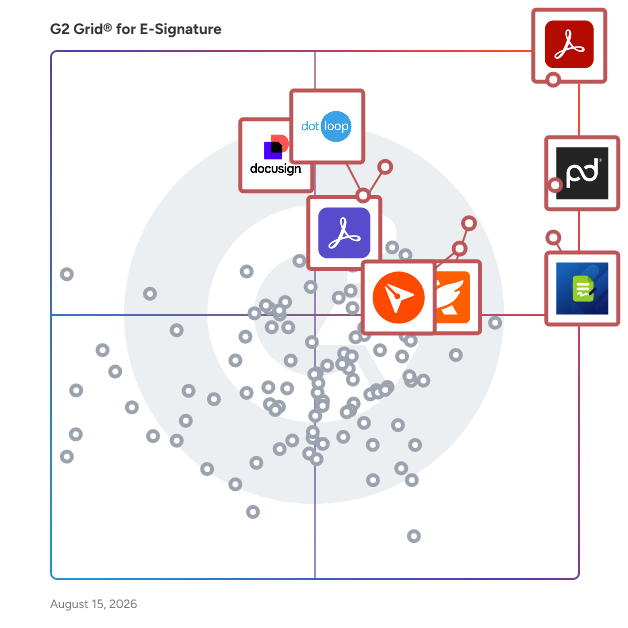
G2 Grid® for E-Signature Software

G2 Grid® for E-Signature Software plotting products by satisfaction and market presence

Highlighted products: Adobe Acrobat, PandaDoc, Jotform Sign, Foxit PDF Editor, Docusign, Adobe Acrobat Sign, BoldSign, and dotloop.

Underlying data: [Grid® JSON](https://www.g2.com/categories/e-signature/grids.json?focus%5B%5D=adobe-acrobat&focus%5B%5D=pandadoc&focus%5B%5D=jotform-sign&focus%5B%5D=foxit-pdf-editor&focus%5B%5D=docusign&focus%5B%5D=adobe-acrobat-sign&focus%5B%5D=boldsign&focus%5B%5D=dotloop)

Sponsored

Adobe Experience Manager

Adobe Experience Manager (AEM) is an agentic content system built for the agentic era, when brands must be discovered, cited, and trusted across human visitors and AI agents simultaneously. Unlike headless-only content management systems that solve for content availability (storing content and delivering it via API), AEM is architected for brand visibility: ensuring content performs once it reaches every surface, from web and mobile to LLMs and emerging agentic channels. What Adobe Experience Manager Is Experience Manager combines structured content management, digital asset management, agentic workflows, enterprise governance, and edge delivery in a single, natively integrated platform. Most enterprises already use AEM as a headless system of record powering mobile apps, multi-site experiences, and connected channels, while also gaining the presentation, delivery, and optimization layers that headless-only systems require customers to build or buy separately. Agentic CMS: The Foundation for AI Discovery AEM is designed as an agentic content management system. Structured, governed, fast content is what AI systems surface, cite, and trust. AEM's agent capabilities — including the Brand Experience Agent, Brand Governance Agent, and Content Advisor Agent — bring intelligence and automation across the content lifecycle: accelerating creation and migration, enforcing brand and compliance governance, and continuously optimizing experiences for both human and agentic traffic. Key Capabilities Experience Manager Sites: A modern decoupled architecture for creating and delivering personalized web and app experiences at scale, serving both headless (Content Fragments via GraphQL/REST) and full experience delivery needs. Experience Manager Assets: A digital asset management system to govern and activate assets, with native AI trained on a brand's data, voice, and creative DNA across regions and geographies. Experience Manager Forms: End-to-end digital enrollment integrated with back-end systems of record. AEM Sites Optimizer: Continuous optimization of performance, SEO, and discoverability (requires AEM Sites). LLM Optimizer: Purpose-built visibility into agentic traffic using real CDN signals, with brand-aware recommendations to improve how content is surfaced and cited by AI systems. Edge Delivery Services: Sub-second content delivery with personalization applied at the edge, built for agentic workflows where content is assembled and served in milliseconds. Experience Manager Guides and Learning Manager: Scalable component content management for documentation, knowledge, and support content, and an integrated learning management system. Differentiators Content + decisioning in one event loop: AEM integrates with Adobe Journey Optimizer and Real-Time CDP, making content decisions on unified customer profiles that draw on behavioral, transactional, and engagement signals, not on CRM records alone. Generative creation in the workflow: Adobe Firefly and generative content capabilities are embedded inside AEM's authoring environment as native capabilities, not adjacent integrations. Enterprise governance at scale: Multi-site, multi-brand, multi-language support with role-based access control, workflow approvals, and audit trails built in. Proven Results Brands using Adobe's optimization capabilities have seen measurable gains in AI-era visibility, including significant increases in LLM citation rates and AI-referral traffic, alongside improvements in page performance and organic visibility.

Visit website

PleaseSign

PleaseSign is an Australian-owned digital signing and document management platform that simplifies the process of electronically signing and managing documents. It offers a user-friendly interface that supports quick document upload, recipient addition, and comprehensive tracking of document progress. PleaseSign is designed to cater to both small and large businesses, providing tools to securely manage documents in the cloud, and is supported by its Australia based customer service team. The platform also allows for the integration of custom workflows and the management of user permissions, ensuring compliance with both national and international e-signature laws. For more detailed information, you can visit https://pleasesign.com.au

Average Rating: 5.0/5.0

Total Reviews: 5

How Do G2 Users Rate PleaseSign?

  • Has the product been a good partner in doing business?: 10.0/10 (Category avg: 9.2/10)
  • Performance and Reliability: 9.4/10 (Category avg: 9.0/10)
  • Enterprise Scalability: 6.7/10 (Category avg: 8.9/10)
  • Signature Document Creation: 8.3/10 (Category avg: 9.1/10)

Who Is the Company Behind PleaseSign?

Who Uses This Product?

  • Company Size: 67% Small, 17% Large

What Are Recent G2 Reviews of PleaseSign?

Document eSign

Document eSign is an electronic signature platform for teams that want signatures without an envelope allowance to monitor. Upload a PDF or Word document, place fields, and send it for signature from any browser or from the mobile app. The free plan covers 30 documents a month with no credit card, and every paid plan sends unlimited documents. New workspaces start with a 14-day Business trial. Features include reusable templates, bulk send, public self-serve signing links, in-person signing, signer authentication, custom branding, and team roles.

Average Rating: 5.0/5.0

Total Reviews: 4

How Do G2 Users Rate Document eSign?

  • Has the product been a good partner in doing business?: 10.0/10 (Category avg: 9.2/10)
  • Performance and Reliability: 8.8/10 (Category avg: 9.0/10)
  • Enterprise Scalability: 10.0/10 (Category avg: 8.9/10)
  • Signature Document Creation: 8.8/10 (Category avg: 9.1/10)

Who Is the Company Behind Document eSign?

  • Seller: Angular Minds
  • Year Founded: 2011
  • HQ Location: Pune, Maharashtra, India
  • Twitter: @angularminds
    192 Twitter followers
  • LinkedIn® Page: www.linkedin.com
    118 employees on LinkedIn®

Who Uses This Product?

  • Company Size: 60% Small, 30% Large

What Do G2 Reviewers Say About Document eSign?

AI-generated summary from verified user reviews

Pros
  • Users find the ease of use of Document eSign exceptionally helpful, enabling a smooth experience for everyone.
  • Users value the quick response of customer support in Document eSign, enhancing their overall experience significantly.
  • Users appreciate the easy document upload feature that streamlines the signature workflow and saves valuable time.
  • Users appreciate the easy setup of Document eSign, making it accessible for non-technical users and efficient for document handling.
  • Users value the intuitive accessibility of Document eSign, allowing easy access and implementation from anywhere.
Cons
  • Users find limited features in Document eSign, which affects usability, especially on mobile devices and during document sharing.
  • Users often face signature display issues and file size limits, which hinder their experience with Document eSign.

What Are Recent G2 Reviews of Document eSign?

Sign.cc by 500apps

Sign.cc by 500apps allows you to sign your agreements and other documents, and another to be able to do so faster and more effectively. With advanced reports, it helps boost your revenue by visualizing how many documents were completed, pending, or declined. You can keep your documents in order and manage them as needed with the bulk, tag, and status options. Here are the top five features individually in detail: 1. Signature Maker Many agreements and contracts communicated and signed today are graphic documents as well as text-based documents. In this case, the Signature Maker function, as well as an upload facility for signatories to add their signature, is critical. Senders and signatories will be able to simply draw their signatures on papers, which may then be downloaded or stored for future signing. 2. Customization The option to add your company's logo to the sealed cover of papers being sent acts as a kind of assurance that the documents are genuine and being sent from you, rather than a scammer or someone attempting to steal personal information. This leads to faster document turnaround, more exposure, awareness, and increased trust between you and the signatories. It might be as basic as your company's logo, brand design, and color scheme. 3. Security In electronic signature software, this is a critical characteristic to check for. SSL encryption is a must-have since it protects your documents' contents while they're being transferred between you and your signatories and prevents outsiders from accessing your confidential business information. SSL stands for Secure Socket Layer, and it is a technique that protects your internet connection from eavesdropping. Each document you provide for signature should be able to be encrypted and password-protected using your software. 4. Multiple Platform Capabilities Because you never know what sort of device your signatories are using, it's critical that your electronic signature software supports a wide range of platforms and devices, including Androids, PCs, Apple devices, Tablets, and so on. This might mean that your program has a website and a mobile app that can be downloaded on all of these devices, as well as others. This will make the signing and submitting procedure easier and faster. 5. Templates When you have pre-designed templates in your e-signature software, you won't have to start drafting contracts from scratch when you need something quickly. You may quickly find a template that meets your needs, fill in the necessary information, and have your agreement created and ready to send to your signatories in minutes. You may also make changes to existing documents by uploading them, adding fields from your templates, and eliminating fields you don't need. This shortens the time it takes to create and execute an agreement.

Average Rating: 4.9/5.0

Total Reviews: 4

How Do G2 Users Rate Sign.cc by 500apps?

  • Has the product been a good partner in doing business?: 10.0/10 (Category avg: 9.2/10)
  • Performance and Reliability: 10.0/10 (Category avg: 9.0/10)
  • Enterprise Scalability: 10.0/10 (Category avg: 8.9/10)
  • Signature Document Creation: 10.0/10 (Category avg: 9.1/10)

Who Is the Company Behind Sign.cc by 500apps?

  • Seller: 500apps.com
  • Year Founded: 2018
  • HQ Location: New York, US
  • Twitter: @Outreachwriter
    35 Twitter followers
  • LinkedIn® Page: www.linkedin.com
    1 employees on LinkedIn®

Who Uses This Product?

  • Company Size: 75% Medium, 25% Large

What Are Recent G2 Reviews of Sign.cc by 500apps?

What Are G2 Users Discussing About Sign.cc by 500apps?

TRUESigner One

TRUESigner ONE is the future-ready solution that genuinely helps you to go completely paperless. Sign all types of documents online anytime, anywhere. You have a choice of electronic signatures, Aadhaar signatures, and digital signatures in Hardware Security Module (HSM) / DSC tokens. Signatures fully comply with the IT Act 2000, UETA & ESIGN Act and eIDAS.

Average Rating: 4.4/5.0

Total Reviews: 4

How Do G2 Users Rate TRUESigner One?

  • Has the product been a good partner in doing business?: 10.0/10 (Category avg: 9.2/10)
  • Performance and Reliability: 10.0/10 (Category avg: 9.0/10)
  • Enterprise Scalability: 9.2/10 (Category avg: 8.9/10)
  • Signature Document Creation: 9.2/10 (Category avg: 9.1/10)

Who Is the Company Behind TRUESigner One?

Who Uses This Product?

  • Company Size: 50% Small, 50% Medium

What Are Recent G2 Reviews of TRUESigner One?

TurboDocx

TurboDocx is an AI-powered platform for proposals, quoting, document generation, e-signatures, and APIs—built to automate the entire document lifecycle from data to signed agreement. Teams use TurboDocx to generate proposals, statements of work (SOWs), quotes, contracts, and slide decks by pulling structured data from CRMs, project management tools, spreadsheets, and internal knowledge bases. Dynamic templates, reusable content blocks, and AI-assisted drafting ensure documents are accurate, consistent, and on-brand—without manual copy-paste work. TurboDocx includes native quoting and pricing workflows, enabling teams to assemble line items, pricing tables, and commercial terms directly into proposals and contracts. Once finalized, documents can be sent for signature using built-in e-signature capabilities, creating a seamless flow from quote → proposal → signed agreement. The platform is API-first and developer-friendly, offering robust APIs and SDKs that allow teams to embed document generation, quoting, and e-signature directly into their own products, portals, and internal systems. TurboDocx supports both no-code web workflows and fully programmable automation, making it flexible enough for sales teams and powerful enough for engineering teams. TurboDocx is used by professional services firms, MSPs, and SaaS platforms that need end-to-end, composable document automation—whether as a standalone tool or embedded infrastructure.

Average Rating: 4.9/5.0

Total Reviews: 10

How Do G2 Users Rate TurboDocx?

  • Has the product been a good partner in doing business?: 10.0/10 (Category avg: 9.2/10)
  • Signature Document Creation: 10.0/10 (Category avg: 9.1/10)

Who Is the Company Behind TurboDocx?

  • Seller: TurboDocx
  • HQ Location: Jupiter, Florida
  • Twitter: @TurboDocx
    3 Twitter followers
  • LinkedIn® Page: www.linkedin.com
    6 employees on LinkedIn®
  • Ownership: Private

Who Uses This Product?

  • Company Size: 80% Small, 30% Medium

What Do G2 Reviewers Say About TurboDocx?

AI-generated summary from verified user reviews

Pros
  • Users appreciate the robust API and SDKs of TurboDocx, enabling seamless integration and efficient automation in document generation.
  • Users praise the automation capabilities of TurboDocx, transforming sales processes into fast, efficient workflows.
  • Users appreciate the ease of use of TurboDocx, enjoying smooth integrations and intuitive document management processes.
  • Users value the document automation capabilities of TurboDocx, significantly improving efficiency and accuracy in generating custom documents.
  • Users value the robust REST API and multi-language SDKs of TurboDocx for seamless document integration and automation.
Cons
  • Users face integration issues requiring time to configure advanced templates and align AI-generated content with specific terminology.
  • Users note that the learning curve can be steep, especially for teams not tech-savvy, needing initial setup time.
  • Users desire more advanced collaborative features and better integration capabilities to enhance their drafting experience with TurboDocx.
  • Users highlight that the AI performance occasionally requires manual tweaks for niche terminology and specific content types.
  • Users experience a difficult setup process, requiring time to configure advanced templates and ensure accuracy in language use.

What Are Recent G2 Reviews of TurboDocx?

WaiverFile

Online Waiver Forms from WaiverFile takes your liability agreement and makes it electronic for your customers to sign. Sign on any device from anywhere! Designed to be incredibly easy to use, yet rich with features, WaiverFile will ensure a seamless workflow and help ensure you have all waivers signed for compliance. Our check-in tracking and event features make keeping track of signed waivers far easier than just one big long list. Your data is secured in our HIPAA compliant system so you can trust that your information is safe. WaiverFile doesn't just store forms, it helps streamline your entire customer intake process.

Average Rating: 4.9/5.0

Total Reviews: 4

How Do G2 Users Rate WaiverFile?

  • Has the product been a good partner in doing business?: 10.0/10 (Category avg: 9.2/10)
  • Performance and Reliability: 10.0/10 (Category avg: 9.0/10)
  • Enterprise Scalability: 8.3/10 (Category avg: 8.9/10)
  • Signature Document Creation: 10.0/10 (Category avg: 9.1/10)

Who Is the Company Behind WaiverFile?

Who Uses This Product?

  • Company Size: 100% Small

What Are Recent G2 Reviews of WaiverFile?

What Are G2 Users Discussing About WaiverFile?

DrySign

DrySign, Exela’s proprietary Electronic Signature platform, is designed to securely exchange legally enforceable signatures anywhere, anytime, including to multiple parties. With features like remote document delivery, digital archival, and two-factor authentication, DrySign is a powerful e-signature tool that is a must-have for a completely digitally transformed business. DrySign’s quick, simple, and user-friendly platform allows users to transform the way document signing processes are managed and executed. Powered with a robust audit trail and easy document tracking feature, DrySign makes for an end-to-end paper-free document process that can be used from any modern device. Armed with an extremely competitive pricing model and an array of exciting features, DrySign has a vision of helping enterprises to become not only a paperless business but also a digitally progressive one. Benefits of DrySign DrySign saves time and resources: ● A complete audit trail enables search and download on-demand via continuous e-document cloud storage ● DrySign is a digital transformation tool supporting complete paperless transactions. It is an environmentally friendly option that eliminates costs while being a sustainable solution ● Multiple signatory capability improves the speed of finalizing contractual agreements ● DrySign’s 256-bit encryption ensures user security worldwide ● DrySign easily integrates with other products requiring an electronic signature ● A powerful two-factor authentication to ensure enhanced identity verification DrySign can be used to: ● Upload documents from any device ● Highlight where you need to sign ● Invite signatories in any chosen order ● Track the status of the signatures ● Remind signatories to sign ● Verify signatures using custom authentication ● Store and search documents securely ● Create reusable templates The integration of DrySign into everyday processes prove to deliver significant and quantifiable results in terms of reduction in cost, speed of transaction completion, and enhanced customer satisfaction without the need to download any additional software.

Average Rating: 3.8/5.0

Total Reviews: 3

How Do G2 Users Rate DrySign?

  • Performance and Reliability: 5.6/10 (Category avg: 9.0/10)
  • Enterprise Scalability: 8.3/10 (Category avg: 8.9/10)
  • Signature Document Creation: 8.3/10 (Category avg: 9.1/10)

Who Is the Company Behind DrySign?

  • Seller: Exela Technologies
  • HQ Location: Irving, US
  • LinkedIn® Page: www.linkedin.com
    6,065 employees on LinkedIn®
  • Ownership: NASDAQ: XELA
  • Total Revenue (USD mm): $1,562

Who Uses This Product?

  • Company Size: 67% Large, 33% Medium

What Are Recent G2 Reviews of DrySign?

Loio

Loio is a contract management platform designed for creating, filling out, and signing professional legal documents. Whether you're a small business owner, freelancer, or simply someone who needs a reliable contract quickly, Loio helps you handle paperwork confidently in just a few minutes. The platform offers access to a library of 2,500+ customizable templates for business needs. Users can generate contracts by answering guided questions, fill out forms using a smart built-in PDF tool, and sign documents securely with Loio Sign — all in one place. It’s fast, intuitive, and designed for real-life business scenarios. All templates on Loio are created and reviewed by legal professionals to ensure accuracy and compliance with state laws. Whether you’re preparing a commercial lease agreement, service contract, NDA, or any other document, Loio gives you the tools to complete the process quickly and securely.

Average Rating: 3.9/5.0

Total Reviews: 11

Who Is the Company Behind Loio?

  • Seller: Loio
  • Year Founded: 2020
  • HQ Location: New York, US
  • Twitter: @LoioSoftware
    151 Twitter followers
  • LinkedIn® Page: www.linkedin.com
    17 employees on LinkedIn®

Who Uses This Product?

  • Company Size: 82% Small, 18% Medium

What Do G2 Reviewers Say About Loio?

AI-generated summary from verified user reviews

Cons
  • Users experience a lack of reliable support from Loio in document management, affecting efficiency and accuracy.
  • Users report poor customer support from Loio, leaving them frustrated and feeling unsupported in their workflow.
  • Users feel that Loio needs improved filters to better identify contract details like numbers and dates.
  • Users find Loio's inaccuracy frustrating, as it often fails to catch errors and provide reliable assistance.
  • Users report integration issues with Microsoft Word and inadequate support, impacting their overall experience with Loio.

What Are Recent G2 Reviews of Loio?

Otter Waiver

Otter Technologies offers digital waivers and customer retention services that help bring customers back through SMS marketing for activity providers.

Average Rating: 5.0/5.0

Total Reviews: 3

How Do G2 Users Rate Otter Waiver?

  • Has the product been a good partner in doing business?: 10.0/10 (Category avg: 9.2/10)
  • Performance and Reliability: 9.2/10 (Category avg: 9.0/10)
  • Enterprise Scalability: 10.0/10 (Category avg: 8.9/10)
  • Signature Document Creation: 10.0/10 (Category avg: 9.1/10)

Who Is the Company Behind Otter Waiver?

Who Uses This Product?

  • Company Size: 67% Small

What Do G2 Reviewers Say About Otter Waiver?

AI-generated summary from verified user reviews

Pros
  • Users find Otter Waiver to be exceptionally intuitive and efficient, greatly streamlining their management processes.
  • Users commend the efficiency of Otter Waiver, praising its intuitive design that streamlines various business processes.
  • Users find Otter Waiver to be intuitive and efficient, streamlining their processes exceptionally well.
  • Users value the time efficiency of Otter Waiver, significantly streamlining their business processes with ease.
  • Users value the versatility of Otter Waiver, finding it exceptional for managing various business processes efficiently.
Cons
  • Users note the limited features of Otter Waiver, but appreciate the responsive human support available.

What Are Recent G2 Reviews of Otter Waiver?

What Are G2 Users Discussing About Otter Waiver?

Penneo Sign

Penneo Sign gives regulated businesses a secure, eIDAS-compliant way to get documents signed digitally — without sacrificing compliance or control. Built for industries like audit, legal, and finance, the platform is used by over 3,500 organizations across Europe. Documents can be signed using Danish MitID, Swedish BankID, Norwegian BankID, Finnish Trust Network, Belgian itsme®/.beID, German AusweisApp, or a passport. Both Advanced Electronic Signatures (AES) and Qualified Electronic Signatures (QES) are supported, with QES carrying the same legal weight as a handwritten signature under EU law. On the technical side, Penneo Sign offers a REST API for integration with ERP, CRM, and document management platforms. Workflows can be configured with sequential or parallel signing orders, multi-document case files, role-based signing, bulk distribution, and reusable templates. Automated reminders reduce manual follow-up. All data is encrypted, hosted in EU-based data centers, and handled in full GDPR compliance.

Average Rating: 3.8/5.0

Total Reviews: 3

How Do G2 Users Rate Penneo Sign?

  • Has the product been a good partner in doing business?: 0.0/10 (Category avg: 9.2/10)
  • Enterprise Scalability: 10.0/10 (Category avg: 8.9/10)

Who Is the Company Behind Penneo Sign?

  • Seller: Penneo
  • Year Founded: 2014
  • HQ Location: Copenhagen, DK
  • LinkedIn® Page: www.linkedin.com
    98 employees on LinkedIn®

Who Uses This Product?

  • Company Size: 67% Medium

What Are Recent G2 Reviews of Penneo Sign?

What Are G2 Users Discussing About Penneo Sign?

SignWith

SignWith is the pay-per-document e-signature platform for teams that don’t want another monthly subscription. Drag-and-drop signatures onto any PDF, and send in seconds. Every document has a full audit trail, and is legally binding and compliance with ESIGN and UETA. Freelancers, agencies, CPAs, SaaS teams, founders, HR teams, legal firms, property management teams and even business in real estate use a simple e-signature tool that gets them signed document for as low as ~$0.5/doc.

Average Rating: 5.0/5.0

Total Reviews: 3

How Do G2 Users Rate SignWith?

  • Has the product been a good partner in doing business?: 10.0/10 (Category avg: 9.2/10)
  • Performance and Reliability: 10.0/10 (Category avg: 9.0/10)
  • Enterprise Scalability: 3.3/10 (Category avg: 8.9/10)
  • Signature Document Creation: 10.0/10 (Category avg: 9.1/10)

Who Is the Company Behind SignWith?

Who Uses This Product?

  • Company Size: 100% Small

What Do G2 Reviewers Say About SignWith?

AI-generated summary from verified user reviews

Pros
  • Users commend the responsive customer support of SignWith, ensuring assistance when needed for seamless document signing.
  • Users love the pay-per-signature flexibility of SignWith, appreciating the responsive support and easy document signing process.
  • Users value the affordable pay-as-you-go model of SignWith, making it a cost-effective solution for document signing.
  • Users value the easy signing process of SignWith, appreciating its straightforward interface for document management.
  • Users appreciate the intuitive design of SignWith, finding it easy to use and enhancing their overall experience.
Cons
  • Users find the document deletion flow unintuitive, requiring archiving before deletion, which complicates the process.

What Are Recent G2 Reviews of SignWith?

Tresorit

Tresorit is a secure content collaboration platform designed to help individuals and organizations store, sync, and share sensitive information while prioritizing privacy. This comprehensive solution integrates encrypted storage, file sharing, collaboration tools, data rooms, and e-signatures into a single product family. Trusted by thousands of organizations worldwide, Tresorit is part of Swiss Post and serves as a privacy-first alternative to mainstream cloud tools, particularly for teams managing confidential files, regulated data, or client-facing work. At the heart of Tresorit is its commitment to zero-knowledge, end-to-end encryption. This means that files are encrypted on the user's device before being uploaded, and the encryption keys remain inaccessible to Tresorit itself. As a result, the platform cannot read customer content, ensuring that sensitive information remains protected even in the event of infrastructure compromise. Tresorit's cryptographic design choices are specifically intended to prevent data leakage through content matching or server-side visibility, providing users with peace of mind regarding their data security. Tresorit SecureCloud serves as an encrypted workspace that facilitates both internal collaboration and external exchanges. It supports secure file storage, syncing, and team collaboration while maintaining user-friendly workflows. The platform offers personal and business plans, with personal use functioning as an encrypted vault for sensitive documents and business use providing a secure workspace that emphasizes IT control, governance, and collaboration. This dual approach caters to a wide range of users, from individuals to large organizations. The Tresorit Drive experience allows users to access encrypted content through familiar interfaces such as Windows File Explorer and macOS Finder. This feature includes “cloud-only” access, which prevents the need to store all files locally, thus enhancing efficiency while maintaining centralized control. Administrators have the capability to take action if a device is lost or compromised, such as revoking access and unlinking the device to mitigate risks. For secure external sharing, Tresorit FileSharing offers robust access control features. Users can protect sharing links with expiration rules, passwords, watermarks, and restrictions on downloading or printing, all while benefiting from detailed activity tracking and auditing. Additionally, Tresorit integrates seamlessly into email workflows like Outlook and Gmail, helping to minimize the risks associated with sending sensitive attachments. For structured client collaboration, Tresorit Engage provides customizable, encrypted data rooms that support ongoing projects, role-based access control, and granular permissions, making it particularly useful for industries such as legal, finance, and consulting. Tresorit also enhances its offerings with Tresorit eSign, which combines document signing with encrypted file handling, supporting EU-qualified electronic signatures for high-trust workflows. Tresorit Email Encryption allows users to send encrypted emails directly from Outlook, ensuring secure communication without imposing complex setups on recipients. On the compliance front, Tresorit boasts strong security validation and certifications, including ISO 27001:2022 and Common Criteria EAL4+, while also supporting compliance with frameworks like GDPR and HIPAA. With data residency options across multiple regions, organizations can align their storage locations with legal and governance requirements, further solidifying Tresorit's position as a trusted solution for secure content collaboration.

Average Rating: 4.5/5.0

Total Reviews: 257

How Do G2 Users Rate Tresorit?

  • Has the product been a good partner in doing business?: 8.9/10 (Category avg: 9.2/10)

Who Is the Company Behind Tresorit?

  • Seller: Tresorit
  • Company Website:
  • Year Founded: 2011
  • HQ Location: Zurich, Zurich
  • Twitter: @Tresorit
    7,446 Twitter followers
  • LinkedIn® Page: www.linkedin.com
    144 employees on LinkedIn®

Who Uses This Product?

  • Who Uses This: CEO, Manager
  • Top Industries: Information Technology and Services, Non-Profit Organization Management
  • Company Size: 83% Small, 15% Medium

What Do G2 Reviewers Say About Tresorit?

AI-generated summary from verified user reviews

Pros
  • Users appreciate the user-friendly interface of Tresorit, making secure file sharing and collaboration effortless.
  • Users commend Tresorit for its strong security focus, providing peace of mind and reliability in data storage.
  • Users value the secure and flexible file sharing features of Tresorit, enhancing productivity without compromising confidentiality.
  • Users value the secure sharing capabilities of Tresorit, enabling hassle-free sharing of encrypted data with privacy controls.
  • Users value Tresorit for its robust security features, including end-to-end encryption that ensures files remain private.
Cons
  • Users face access limitations with Tresorit, making file organization and collaboration cumbersome and inefficient.
  • Users find Tresorit expensive, particularly challenging for small businesses and solo practitioners with limited budgets.
  • Users experience file management issues with slow downloads, cumbersome organization, and limited customization, impacting their workflow.
  • Users face syncing issues with Tresorit, especially when deletions propagate across devices, complicating recovery efforts.
  • Users experience cumbersome file sharing issues that hinder collaboration and make the process less user-friendly compared to alternatives.

What Are Recent G2 Reviews of Tresorit?

What Are G2 Users Discussing About Tresorit?

WeSignature

WeSignature offers an alternative to traditional e-signature platforms by focusing on the sales process and not just the action of obtaining a signature. WeSignature’s Send, Sign, and Pay themed portal is bridging the gap between contract execution and payment collection.

Average Rating: 5.0/5.0

Total Reviews: 3

How Do G2 Users Rate WeSignature?

  • Performance and Reliability: 10.0/10 (Category avg: 9.0/10)
  • Enterprise Scalability: 10.0/10 (Category avg: 8.9/10)
  • Signature Document Creation: 10.0/10 (Category avg: 9.1/10)

Who Is the Company Behind WeSignature?

Who Uses This Product?

  • Company Size: 100% Small

What Are Recent G2 Reviews of WeSignature?

What Are G2 Users Discussing About WeSignature?

ZapSign

ZapSign é uma solução completa de assinatura eletrônica que ajuda organizações a simplificar e automatizar o processo de criação, enviou, assinatura e gestão de documentos. Com a ZapSign, empresas de todos os portes podem realizar assinaturas eletrônicas de forma fácil e segura, utilizando qualquer dispositivo e de qualquer lugar. Já presente em 21 países e com clientes renomados como Itaú, Greenpeace, Grupo Pão de Açúcar, L'Oréal e Sicredi, a ZapSign transforma a forma como os negócios são conduzidos, tornando os processos mais ágeis e eficazes. A ZapSign oferece uma série de benefícios para sua empresa: - Agilidade no envio, assinatura e rastreamento de documentos - Economia de custo eliminando gastos com papel, transporte e armazenameto de documentos - Melhoria na experiência do cliente com um processo de assinatura fluido e acessível - Auementa a agilidade e diminui o tempo de coleta de assinaturas - Integração com os sistemas empresariais já existentes - Segurança reforçada com métodos avançados de autenticação, como biometria facial, verificação de documentos, certificado digital e códigos de segurança via e-mail, SMS e WhatsApp Por que escolher a ZapSign? - Mais de 2 milhões de usuários ativos em todo o mundo - Presença global em 21 países - Suporte ao cliente disponível em tempo real via WhatsApp, com consultores dedicados - API intuitiva e fácil de integrar - Assinaturas eletrônicas que são seguras, legalmente válidas e totalmente compatíveis com as exigências regulatórias, garantindo a integridade de cada documento ZapSign é a escolha ideal para empresas que buscam uma solução de assinatura eletrônica eficiente, segura e fácil de usar.

Average Rating: 4.7/5.0

Total Reviews: 3

How Do G2 Users Rate ZapSign?

  • Has the product been a good partner in doing business?: 8.3/10 (Category avg: 9.2/10)
  • Performance and Reliability: 10.0/10 (Category avg: 9.0/10)
  • Enterprise Scalability: 10.0/10 (Category avg: 8.9/10)
  • Signature Document Creation: 10.0/10 (Category avg: 9.1/10)

Who Is the Company Behind ZapSign?

Who Uses This Product?

  • Company Size: 100% Small

What Are Recent G2 Reviews of ZapSign?

Zoey

Simplify your contracts with Zoey. Review, eSign, and store your contracts easily in one place with Zoey. Designed for small and medium size businesses, legal departments and membership associations. Use Zoey to review, eSign and store contracts on your terms. Features include free dashboard, templates, e-signature, storage, termination reminders, KPIs and subscription gives you contract risk scores so you can negotiate and sign contracts with confidence. Enterprise solutions provide contract storage, approvals, reminders and AI powered analytics.

Average Rating: 4.6/5.0

Total Reviews: 7

How Do G2 Users Rate Zoey?

  • Has the product been a good partner in doing business?: 10.0/10 (Category avg: 9.2/10)
  • Performance and Reliability: 10.0/10 (Category avg: 9.0/10)
  • Enterprise Scalability: 10.0/10 (Category avg: 8.9/10)
  • Signature Document Creation: 10.0/10 (Category avg: 9.1/10)

Who Is the Company Behind Zoey?

  • Seller: CrushContracts
  • Year Founded: 2017
  • HQ Location: Chicago, US
  • Twitter: @ZoeyDocs
    4 Twitter followers
  • LinkedIn® Page: www.linkedin.com
    5 employees on LinkedIn®

Who Uses This Product?

  • Company Size: 86% Small, 14% Medium

What Are Recent G2 Reviews of Zoey?