MaxxVault Enterprise
Who Is the Company Behind MaxxVault Enterprise?
- Seller: Vasion
- Year Founded: 2008
- HQ Location: St. George, Utah
-
Twitter: @VasionSoftware
66 Twitter followers -
LinkedIn® Page: www.linkedin.com
540 employees on LinkedIn®
Total Products under this Category: 750
Last updated: October 26, 2026
Why You Can Trust G2's Software Rankings:
G2's software rankings are built on verified user reviews, rigorous moderation, and a consistent research methodology maintained by a team of analysts and data experts. Each product is measured using the same transparent criteria, with no paid placement or vendor influence. While reviews reflect real user experiences, which can be subjective, they offer valuable insight into how software performs in the hands of professionals. Together, these inputs power the G2 Score, a standardized way to compare tools within every category.
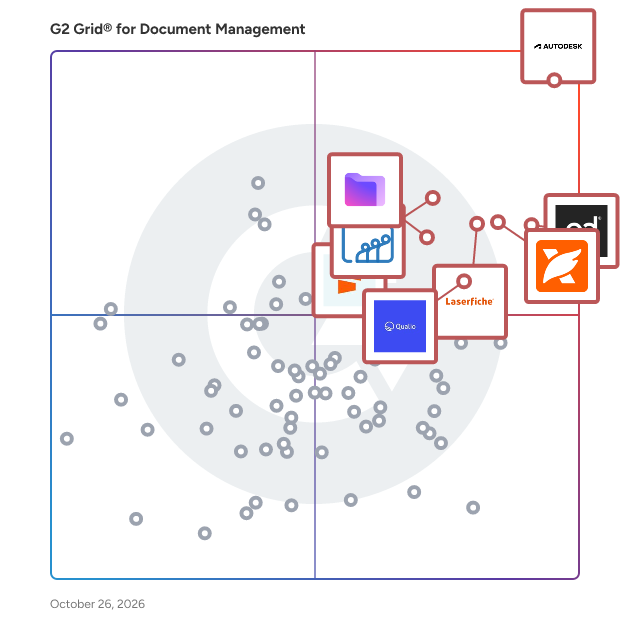
Highlighted products: Autodesk Forma (formerly Autodesk Construction Cloud), PandaDoc, Foxit PDF Editor, Laserfiche, Zoho WorkDrive, Proton Drive For Business, Qualio, and Seismic Enablement Cloud.
Underlying data: [Grid® JSON](https://www.g2.com/categories/document-management/grids.json?focus%5B%5D=autodesk-forma-formerly-autodesk-construction-cloud&focus%5B%5D=pandadoc&focus%5B%5D=foxit-pdf-editor&focus%5B%5D=laserfiche&focus%5B%5D=zoho-workdrive&focus%5B%5D=proton-drive-for-business&focus%5B%5D=qualio&focus%5B%5D=seismic-enablement-cloud)
MD Convert is a browser-based tool for converting various document formats into Markdown. It supports HTML, DOCX, Excel, CSV, TSV, web URLs, Evernote exports, XML, YAML, Jupyter notebooks, and PDFs, with format-specific options for each. The software operates entirely client-side using Web Workers and JavaScript, processing files locally via the browser's FileReader API and device CPU. No content is transmitted over the network, ensuring privacy during conversion. Libraries like Turndown, Mammoth, SheetJS, and pdf.js are used to produce clean Markdown output. For large PDFs, files are processed page-by-page to maintain constant memory usage and prevent crashes. MD Convert requires no accounts or subscriptions and works offline after the initial page load, except for URL-to-Markdown conversion, which uses a stateless CORS proxy. Developers can integrate its functionality via an embeddable iframe widget.
Connect G2 to Claude or ChatGPT for answers grounded in G2's trusted reviews, comparisons, and pricing from real user insights.
med-forms ist eine Webanwendung für Arztpraxen, die Patientenformulare digital bereitstellen, ausfüllen lassen und im Team prüfen möchten. Patientinnen und Patienten erhalten den Bogen als Link per E-Mail, über einen QR-Code in der Praxis oder am Praxistablet. Folgefragen, Pflichtfelder und ein Körperschema zum Einzeichnen führen durch den Bogen; unterschrieben wird direkt am Touchscreen. Am Empfang läuft das Tablet im gesperrten Kioskmodus, auf Android auch bei Internetausfall. Neue Eingänge erscheinen gesammelt im Praxis-Posteingang. Das Team setzt Status, ergänzt interne Notizen und erhält automatisch ein DIN-A4-PDF. Über die GDT-Schnittstelle gehen Datensatz und PDF an das Praxisverwaltungssystem; die Einrichtung prüfen wir gemeinsam an Ihrem System, bevor Sie sich entscheiden. Neue Praxen starten mit drei Startformularen (Patientenaufnahme, Anamnese und Beschwerden, Einwilligung und Bestätigung) und passen sie im Formular-Baukasten an. Die Daten liegen in der EU, ein Vertrag zur Auftragsverarbeitung ist enthalten, und ein vollständiger Export ist jederzeit möglich. Ein fester Preis von 49 € im Monat deckt unbegrenzte Formulare, Einreichungen und Teamzugänge ab; die ersten 30 Tage sind kostenlos.
MEG's healthcare document management system enables hospitals to securely manage policies, clinical guidelines, standard operating procedures and other critical documents from one integrated quality management platform. From document creation and approval through to staff acknowledgement and, verifying and recording version modifications, MEG helps organisations strengthen governance, improve compliance and support safer care. Use MEG’s document management system on the mobile app to put important reference material directly into the hands of clinical staff.
Miria empowers operationally dispersed but centrally managed companies to work smarter for less cost, delivering powerful tools to automate the management of traditionally paper-driven accounting, finance, and HR business processes.
MSG to PDF Converter Software is an MSG to PDF converter for Windows 10 and 11. It reads Outlook .msg files saved on a disk and writes them out as PDF or HTML documents on that same computer. Add one message or a whole folder, pick one document per email or a single combined file, and press Start. Outlook does not need to be installed, and the mail is never uploaded. 🔰 How to use the MSG to PDF converter 1. Click Add File(s) for single messages, or Add Folder to collect every .msg in a directory. Dragging files into the window works as well. 2. Click a row to check that message in the preview pane: sender, date, recipients, subject and the formatted body. 3. On the Convert tab, choose PDF or HTML in the Format list. 4. Tick "Combine all messages into one file" and type a name for it, or leave the box clear to get a separate document for every email. 5. Keep "Include images in output" on for pictures placed in the body, or switch it off for lighter files. 6. Choose a destination folder and press Start. Every row in the list ends up marked OK or Error. 🛠 Why IT and office teams pick it - No mail client on the machine. The file format is parsed directly, so a clean workstation or a server will do. - Batch work. A few hundred saved messages go through in one run instead of being printed one at a time, which makes MSG to PDF a routine task rather than a project. - One document for a whole thread. Combined output keeps the list order and puts a visible break between messages, which suits a case file or an audit request. - Local processing. Client correspondence is not sent to any web service. - Odd files too. Some .msg files exported by other systems are really plain internet mail saved under the wrong extension, and those are detected and converted as well. - Tidy file names. Rename on the Tools tab adds a prefix or suffix to every output, and the source folder structure can be repeated in the destination. 👥 Who uses it - Legal and compliance staff who need fixed records of exported case mail. - HR teams filing offers, approvals and policy threads in personnel records. - Helpdesk staff handed a pile of .msg files from someone who left the company. ❓ FAQ How do I convert a MSG file to PDF? Add it to the list, keep PDF selected and press Start. A folder full of messages takes exactly the same steps. Can I open a .msg file without Outlook? Yes. The preview pane shows the message, and the resulting PDF opens in any reader. Can the MSG to PDF converter put several emails into one PDF? Yes. With the combined option on, they follow the order you see in the list. What happens to attachments? Pictures inside the message body are kept while images are on. Attached files are listed by name, not embedded. ℹ️ Free trial: three messages a day, enough to judge the output on your own mail before you buy a license. Works offline on Windows 10 and 11, and the same app is listed in the Microsoft Store.
