Best Document Generation Software - Page 30

How Many Document Generation Software Products Does G2 Track?

Total Products under this Category: 463

Category Stats (Nov 2026)

  • Average Rating: 4.55/5 The average rating of products in this category, based on all submitted ratings
  • Top Trending Product: CloudFiles (+0.89%) - Among all products in this category, CloudFiles recorded the largest rating increase compared to last month

Last updated: November 01, 2026

How Does G2 Rank Document Generation Software Products?

Why You Can Trust G2's Software Rankings:

  • 30 Analysts and Data Experts
  • 31,300+ Authentic Reviews
  • 463+ Products
  • Unbiased Rankings

G2's software rankings are built on verified user reviews, rigorous moderation, and a consistent research methodology maintained by a team of analysts and data experts. Each product is measured using the same transparent criteria, with no paid placement or vendor influence. While reviews reflect real user experiences, which can be subjective, they offer valuable insight into how software performs in the hands of professionals. Together, these inputs power the G2 Score, a standardized way to compare tools within every category.

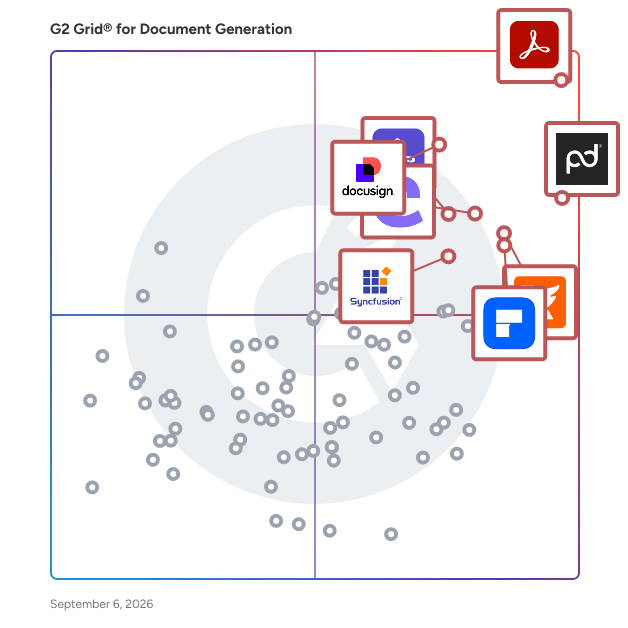
G2 Grid® for Document Generation Software

G2 Grid® for Document Generation Software plotting products by satisfaction and market presence

Highlighted products: Adobe Acrobat, PandaDoc, Docusign CLM, Foxit PDF Editor, Conga Composer, Wondershare PDFelement, Adobe Acrobat Sign, and Essential Studio.

Underlying data: [Grid® JSON](https://www.g2.com/categories/document-generation/grids.json?focus%5B%5D=adobe-acrobat&focus%5B%5D=pandadoc&focus%5B%5D=docusign-clm&focus%5B%5D=foxit-pdf-editor&focus%5B%5D=conga-composer&focus%5B%5D=wondershare-wondershare-pdfelement&focus%5B%5D=adobe-acrobat-sign&focus%5B%5D=essential-studio)

ToroDocs

ToroDocs is electronic signature (e-signature) software that lets individuals and teams upload a document, place signature and form fields, and send it for legally binding signatures online. It is built for freelancers, independent consultants, small businesses, and growing teams, and it offers a pay-as-you-go API plan for developers who want to add document signing to their own products. Senders upload a PDF, Word document, or image, then drag on any of 19 field types, including signature, initials, date, text, checkbox, and dropdown. Any document can be saved as a reusable template with signer roles, and the Business and Enterprise plans add bulk send from a CSV file, with one personalized envelope per recipient. Signers open a secure, unique link, review an electronic records consent notice, and sign by drawing, typing, or uploading a signature. Signers do not need a ToroDocs account. Key capabilities: - Drag-and-drop document editor with 19 field types and reusable templates - Automatic reminders, expiration deadlines, and a status dashboard with filters and CSV export - SHA-256 tamper-evident sealing, a Certificate of Completion, and a full audit trail on every completed document - A public verification page where anyone can check a sealed PDF or a verification code - Core REST API on every plan, with webhooks on the Enterprise and Developer plans ToroDocs is compliant with the U.S. ESIGN Act and UETA, so signed contracts, agreements, and forms are legally binding. Completed documents are kept in encrypted private storage and served only through authenticated links. Pricing is based on documents sent, not on the number of signers, which keeps costs predictable for businesses that collect signatures from many clients. The free plan includes 3 documents per month with no credit card required. Paid plans raise the monthly allowance, pool documents across team seats on per-seat plans, and charge a published $1.50 for each document over the plan. Annual billing saves up to 17%. ToroDocs is operated by ToroDocs LLC in Edmond, Oklahoma.

Who Is the Company Behind ToroDocs?

trace:original

trace:original by Enigio is a solution for creating and managing digital original documents — with the same legal and functional properties as paper but in a fully digital form. It ensures documents are secure, verifiable, and freely transferable, supporting compliance with global trade laws. Unlike closed platforms, trace:original is an open and interoperable solution, requiring only the document creator to be a user. This allows for seamless transactions, instant transfers, and reduced administrative burden — without onboarding hurdles.

Who Is the Company Behind trace:original?

  • Seller: Enigio
  • Year Founded: 2012
  • HQ Location: Stockholm, SE
  • LinkedIn® Page: www.linkedin.com
    40 employees on LinkedIn®

Trydoku

TRYDOKU is a document automation platform that converts Excel and Google Sheets data into formatted Word and PDF documents. Users can upload custom Word templates, connect their data sources, and instantly generate personalized proposals, contracts, invoices, reports, delivery notes, or employment agreements without manual data entry. Built with privacy and compliance in mind, TryDOKU adheres to GDPR standards through European hosting, AES-256 encryption at rest, and a strict zero data retention policy where source data is processed ephemerally and never stored after document generation. The platform includes pre-built templates and an API for custom workflow integrations

Who Is the Company Behind Trydoku?

AI can help you find the answers. G2 helps you trust them.

Connect G2 to Claude or ChatGPT for answers grounded in G2's trusted reviews, comparisons, and pricing from real user insights.

How it works

TS Documents

TS Document allows users to generate, customize, edit, and produce data-driven documents. Allow documents to be saved and exported in multiple formats. Generate PDFs, Word Docs, Google Docs, and auto-attach to salesforce records and show the preview.

Who Is the Company Behind TS Documents?

TX Text Control

A document processing SDK for .NET that covers the full document lifecycle, including server-side document generation, browser-based editing, mail merge reporting, PDF/UA and PDF/A compliance, and digital signatures. TX Text Control is a document processing platform for .NET developers that covers the entire document lifecycle, from creation and editing to generation, PDF processing, and archiving. It is available for ASP.NET Core, ASP.NET MVC, Web Forms, Windows Forms, and WPF, and includes frontend integrations for Blazor, Angular, React, and JavaScript. It runs on Windows and Linux and can be deployed in Docker containers, Kubernetes clusters, Azure, AWS, or on-premises infrastructure. TX Text Control supports advanced PDF standards, including PDF/A for long-term archiving and PDF/UA for accessibility compliance (ISO 14289). Documents can be digitally signed using X.509 certificates and PFX files, with RFC 3161 trusted timestamps for long-term validation (PAdES-T). Core capabilities include a browser-based, MS Word-compatible WYSIWYG document editor for web applications; a reporting and mail merge engine that merges JSON, XML, and .NET objects into templates, with support for nested repeating blocks, conditional content, and master-detail relationships; PDF generation and processing, including fillable PDF forms, encryption, permissions, and password protection; track changes, comments, and content controls for collaborative document review; and barcode support, tables, headers and footers, and full character and paragraph formatting. The platform also includes DS Server, a low-code, on-premise document services backend, and TX Spell .NET for spell checking. TX Text Control ActiveX remains available as a legacy rich edit control. TX Text Control is AI-ready, with an MCP Server and Agent Skills that connect AI assistants to document workflows. It is designed for enterprise document processing in industries such as banking, insurance, healthcare, legal, government, and more, where document compliance, structured output, and end-to-end automation are essential.

Average Rating: 1.3/5.0

Total Reviews: 2

Who Is the Company Behind TX Text Control?

  • Seller: TextControl
  • Year Founded: 1991
  • HQ Location: Charlotte, US
  • Twitter: @txtextcontrol
    1,480 Twitter followers
  • LinkedIn® Page: www.linkedin.com
    13 employees on LinkedIn®

Who Uses This Product?

  • Company Size: 100% Large

Typefi

Typefi is an Australian software company specialising in automated publishing solutions, plug-ins Adobe InDesign, and other tools designed to help you streamline your publishing workflows. The company's head office is located on the Sunshine Coast in Maroochydore, Queensland, but the Typefi workforce is global—the company employs about 60 people located across 13 countries and 5 continents. Typefi automated publishing software is the company's flagship product. Built on Adobe InDesign, the software enables automatic composition for long documents at speeds up to 1000 pages per hour. Using Typefi, you can quickly transform Word and XML to InDesign, produce multiple outputs (like PDF, EPUB, and HTML) simultaneously, and automatically generate complex elements like tables and formulas during composition. Typefi also develops plug-ins for Adobe InDesign including AutoFit, a responsive layout design plug-in, and Typefitter, a time-saving typesetting and copyfitting plug-in. Additionally, Typefi offers a service called RunScript which provides access to Adobe InDesign Server without the costly annual software license—with RunScript, you only pay for what you use, at a cost of just $0.01 per second. To learn more, visit the Typefi website.

Who Is the Company Behind Typefi?

UltraWare

Alto Imaging's UltraWare suite of products includes applications which together represent a new level of integrated functionality in document composition and make-ready in digital print production environments.

Who Is the Company Behind UltraWare?

Umbrellabird

Introducing Umbrellabird: Your AI-powered tool for transforming interview recordings into actionable insights and product strategy documents. Breathe new life into your old user-interview recordings by auto-generating concise summaries, highlighting user pains, gains, and desired outcomes. Choose specific recordings to synthesize, then let Umbrellabird craft a comprehensive product strategy brief for you. By leveraging AI, Umbrellabird ensures a consistent, unbiased review of your data, helping you save time and amplify your insights.

Who Is the Company Behind Umbrellabird?

Uphint

Uphint creates automatically step-by-step screenshots guides in seconds! We capture every click or even if you write something.

Who Is the Company Behind Uphint?

Upland Objectif Lune - OL Connect

Upland Objectif Lune helps companies automate business communications processes with its digital transformation solutions. With OL Connect technology, customers can create, personalize, and distribute transactional and promotional documents without changes to existing business systems. OL® Connect vastly improves transactional and promotional document processes and communications with its robust automation and optimization capabilities. Organizations will be able to create, manage, distribute, and automate transactional documents—and deliver multi-channel, personalized, and interactive customer communications. Eliminate manual, paper-based procedures, and transition from paper to digital without overhauling or replacing their current systems. Learn more about our product at: https://uplandsoftware.com/objectiflune/

Average Rating: 4.3/5.0

Total Reviews: 12

How Do G2 Users Rate Upland Objectif Lune - OL Connect?

  • Has the product been a good partner in doing business?: 7.8/10 (Category avg: 9.2/10)

Who Is the Company Behind Upland Objectif Lune - OL Connect?

  • Seller: Upland Software
  • Year Founded: 2010
  • HQ Location: Austin, TX
  • LinkedIn® Page: www.linkedin.com
    802 employees on LinkedIn®
  • Ownership: NASDAQ:UPLD
  • Total Revenue (USD mm): $291

Who Uses This Product?

  • Company Size: 43% Medium, 43% Small

What Are Recent G2 Reviews of Upland Objectif Lune - OL Connect?

What Are G2 Users Discussing About Upland Objectif Lune - OL Connect?

UsefulPDF

UsefulPDF is a document generation and electronic signature platform founded in 2021. It allows businesses to make documents on the go and send them or upload documents to be signed electronically. After generating a document, you can send it off for signing, approval, set up notifications, update your CRM, and much more. If you already have your documents, you can use our electronic signature software to quickly get them signed and free up your time to focus on the next deal or project.

Average Rating: 5.0/5.0

Total Reviews: 1

Who Is the Company Behind UsefulPDF?

  • Seller: UsefulPDF
  • Year Founded: 2015
  • HQ Location: San Francisco, US
  • LinkedIn® Page: www.linkedin.com
    42 employees on LinkedIn®

Who Uses This Product?

  • Company Size: 50% Medium, 50% Small

What Are Recent G2 Reviews of UsefulPDF?

Veidne

Veidne is a free, privacy-first mail merge and bulk document generation tool that runs entirely in the browser. Users upload a Word template, click the words they want to personalize to turn them into fields, upload an Excel spreadsheet, and Veidne generates one personalized Word document for every row. There is no install, no account, and no code, and files never leave their device. It is built for non-technical people who need many documents at once, and for privacy-sensitive work in legal, HR, healthcare, education, and nonprofits, where it matters that files stay on their own device. An optional PDF export uses a server in the EU that converts the files and deletes them immediately, without storing or sharing them. Veidne is free and funded by donations.

Who Is the Company Behind Veidne?

Veltadoc

Veltadoc turns a spreadsheet into hundreds of branded PDF documents in one batch, with 100+ ready-to-use templates to choose from. Upload a CSV or Excel file, map your columns to a template once, and generate invoices, payslips, certificates, purchase orders, and more, all downloadable as a single ZIP. Free plan available, no card required.

Who Is the Company Behind Veltadoc?

Neeraja Prakash
NP
Researched and written by Neeraja Prakash
Updated October 3, 2024