Write-a-Document
Who Is the Company Behind Write-a-Document?
- Seller: JMMG Communications
- HQ Location: N/A
-
LinkedIn® Page: www.linkedin.com
1 employees on LinkedIn®
Total Products under this Category: 333
Last updated: September 01, 2026
Why You Can Trust G2's Software Rankings:
G2's software rankings are built on verified user reviews, rigorous moderation, and a consistent research methodology maintained by a team of analysts and data experts. Each product is measured using the same transparent criteria, with no paid placement or vendor influence. While reviews reflect real user experiences, which can be subjective, they offer valuable insight into how software performs in the hands of professionals. Together, these inputs power the G2 Score, a standardized way to compare tools within every category.
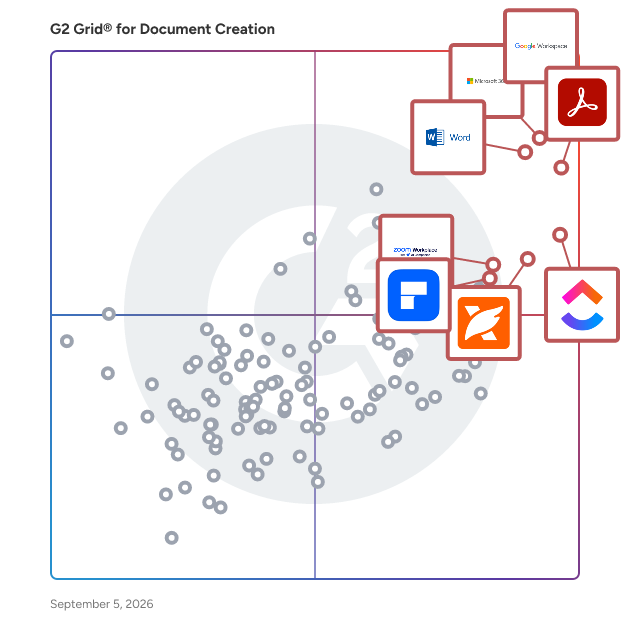
Highlighted products: Google Workspace, Microsoft 365, Adobe Acrobat, Microsoft Word, ClickUp, Foxit PDF Editor, Zoom Workplace, and Wondershare PDFelement.
Underlying data: [Grid® JSON](https://www.g2.com/categories/document-creation/grids.json?focus%5B%5D=google-workspace&focus%5B%5D=microsoft365&focus%5B%5D=adobe-acrobat&focus%5B%5D=microsoft-word&focus%5B%5D=clickup&focus%5B%5D=foxit-pdf-editor&focus%5B%5D=zoom-workplace&focus%5B%5D=wondershare-wondershare-pdfelement)
WriteLoom is an end-to-end writing, publishing, and author growth platform built to help writers move from idea to finished book with greater structure, clarity, and momentum. Designed for independent authors, aspiring writers, nonfiction experts, and creative teams, WriteLoom brings the major stages of the author journey into one connected workspace: planning, drafting, revising, preparing for publication, and building a path to readers. Unlike tools that focus only on writing or basic document editing, WriteLoom helps authors think through the full lifecycle of a book project. Writers can organize ideas, shape chapters, build project plans, manage revisions, and develop supporting assets for publishing and promotion. The platform is especially useful for authors who feel stuck, scattered, or unsure what to do next because it turns a large creative project into clear, actionable steps. WriteLoom also includes optional AI-powered support throughout the writing process. Authors can use AI to brainstorm, outline, refine language, strengthen positioning, improve project planning, and develop marketing or launch materials while still keeping creative control over their work. The platform is built to support the writer’s voice rather than replace it. For self-publishing authors, WriteLoom provides practical tools that connect the creative process with the operational realities of publishing. Users can move from manuscript development into pitch materials, book descriptions, reader targeting, launch planning, and audience-building workflows without losing track of the core project. WriteLoom is best for writers who want more than a blank page. It gives authors a structured environment to plan, finish, polish, and promote their books while reducing the overwhelm that often comes with writing and publishing independently.
Writing Desk is macOS software for planning and drafting novels in one place, bringing characters, timelines, world-building notes, and research into a single workspace. The Story Plotter offers structure templates, including the three-act structure and the Hero's Journey, linked directly to character, world, and lore sheets. Outline notes carry straight into the editor, keeping planning and writing connected. The editor is distraction-free, with a chapter scratchpad, tabbed reference panels, Focus Mode, and dark mode for long writing sessions. A built-in Research Assistant surfaces reference information without leaving the manuscript. Editorial tools include a local proofreader, prose analysis, and an AI Editor that gives feedback and line edits, never generating prose on the writer's behalf. Chapter Variants and full version history let writers experiment freely and recover earlier drafts at any point. Built-in tracking covers session stats, goals, streaks, and milestones, helpi
