Best Document Creation Software - Page 23

How Many Document Creation Software Products Does G2 Track?

Total Products under this Category: 343

Category Stats (Sep 2026)

  • Average Rating: 4.37/5 The average rating of products in this category, based on all submitted ratings
  • Top Trending Product: DocNexus (+2.22%) - Among all products in this category, DocNexus recorded the largest rating increase compared to last month

Last updated: September 01, 2026

How Does G2 Rank Document Creation Software Products?

Why You Can Trust G2's Software Rankings:

  • 30 Analysts and Data Experts
  • 156,500+ Authentic Reviews
  • 343+ Products
  • Unbiased Rankings

G2's software rankings are built on verified user reviews, rigorous moderation, and a consistent research methodology maintained by a team of analysts and data experts. Each product is measured using the same transparent criteria, with no paid placement or vendor influence. While reviews reflect real user experiences, which can be subjective, they offer valuable insight into how software performs in the hands of professionals. Together, these inputs power the G2 Score, a standardized way to compare tools within every category.

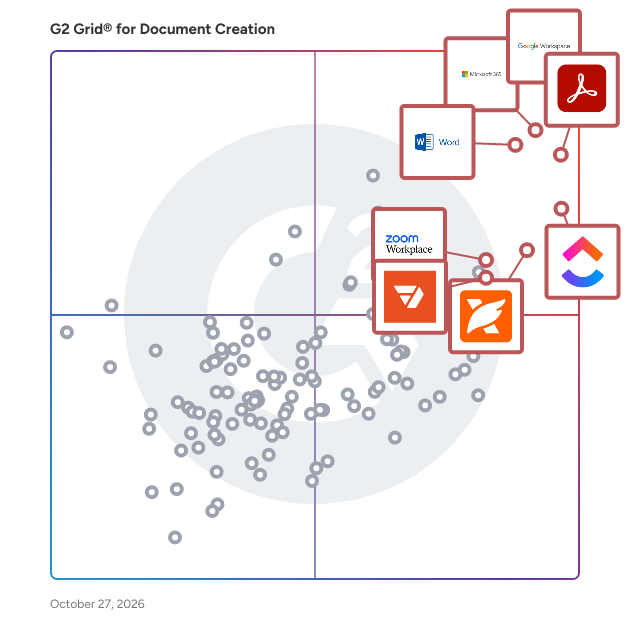
G2 Grid® for Document Creation Software

G2 Grid® for Document Creation Software plotting products by satisfaction and market presence

Highlighted products: Google Workspace, Microsoft 365, Adobe Acrobat, Microsoft Word, ClickUp, Foxit PDF Editor, Zoom Workplace, and Wondershare PDFelement.

Underlying data: [Grid® JSON](https://www.g2.com/categories/document-creation/grids.json?focus%5B%5D=google-workspace&focus%5B%5D=microsoft365&focus%5B%5D=adobe-acrobat&focus%5B%5D=microsoft-word&focus%5B%5D=clickup&focus%5B%5D=foxit-pdf-editor&focus%5B%5D=zoom-workplace&focus%5B%5D=wondershare-wondershare-pdfelement)

TheFormTool

TheFormTool is a forms automation software that allows users to easily retrieve, analyze, and use unlimited amounts of disparate information stored in one or multiple external data sources, such as SQL databases and Excel spreadsheets.

Who Is the Company Behind TheFormTool?

Tolstoy Compose

Tolstoy Compose is a local-first professional writing app for longer, structured work and everyday writing. Keep your writing, notes, research, citations, feedback and earlier versions together in one place. Documents stay on your device or in files you choose to save, keeping your writing private and under your control. Use Compose in your browser or install it as a Progressive Web App, and keep working offline. The Shelf keeps notes, ideas and research beside your writing. Built-in citation management supports sources, footnotes and bibliographies in styles including APA, MLA and Chicago. Review lets you add comments and suggest changes, while automatic versions help you return to earlier drafts. An outline built from your headings makes longer documents easier to navigate. Compose also supports tables, images, internal links and find and replace. Export to Word, PDF, Markdown, HTML or plain text, with professional Word and PDF output on paid plans. There are no AI writing tools.

Who Is the Company Behind Tolstoy Compose?

Tolstoy Compose app

Tolstoy Compose is a professional writing application built for longer, structured work as well as everyday writing. Keep your writing, notes, research, citations, feedback and earlier versions all in one place. Use Compose in your browser or install it as a Progressive Web App on desktop, tablet and phone. Documents stay on your device or in files you choose to save. This local-first approach keeps your writing private and under your control. Compose can continue working offline. There are no AI features or writing tools, so you remain in full control of your work. The tools panel keeps essential writing features close when you need them and can be hidden when you want to focus only on writing. Each document has a Shelf for notes, ideas and research, so supporting material stays with the right piece of writing. Notes can be organised with tags and pins, searched and filtered later, or added directly into the document when you are ready to use them. Citation management is built into the writing process. Add books, journal articles, websites, book chapters, theses and conference papers, or enter a DOI and let Compose fill in the available source details for you to review. Save and reuse sources without entering them again, create footnotes and bibliographies, and choose from APA, MLA, Chicago, Harvard, Vancouver and IEEE citation styles. Review lets you and the people you share your writing with add comments and suggest changes. Feedback stays linked to the relevant words, making it clear what needs attention, and you choose which changes to accept or disregard. Automatic versions are saved while you write, helping protect your work and letting you return to an earlier draft. Manual snapshots let you preserve important milestones. Compose can export documents as a Compose file, Microsoft Word document, PDF, Markdown, HTML or plain text. Professional PDF tools give you control over covers, page size, margins, tables of contents, running titles, page numbers, sections, columns and page breaks, with a preview of the finished document before you export it. Word export keeps your work editable and preserves structured content including tables, citations, native Word footnotes, sections, columns and page breaks. You can start writing for free without an account or document and word limits. Pro expands the research, review and version features and adds professional Word and PDF output. Teams gives each member the Pro features together with central member management and dedicated Team Spaces, while each person's documents remain local and private.

Who Is the Company Behind Tolstoy Compose app?

trace:original

trace:original by Enigio is a solution for creating and managing digital original documents — with the same legal and functional properties as paper but in a fully digital form. It ensures documents are secure, verifiable, and freely transferable, supporting compliance with global trade laws. Unlike closed platforms, trace:original is an open and interoperable solution, requiring only the document creator to be a user. This allows for seamless transactions, instant transfers, and reduced administrative burden — without onboarding hurdles.

Who Is the Company Behind trace:original?

  • Seller: Enigio
  • Year Founded: 2012
  • HQ Location: Stockholm, SE
  • LinkedIn® Page: www.linkedin.com
    40 employees on LinkedIn®

Unmarkdown

Unmarkdown turns markdown into beautifully formatted documents for any destination. If you use ChatGPT, Claude, or Gemini, you already write in markdown. Unmarkdown lets you paste that output, choose from 62 templates, and copy perfectly formatted results to Google Docs, Word, Slack, OneNote, Email, or Plain Text in one click. It also includes 12 AI editing actions, document publishing with custom URLs, a Chrome extension for in-page conversion, an MCP server, and a REST API. Free tier includes 5 documents. Pro starts at $8/month.

Who Is the Company Behind Unmarkdown?

VectorViewer

We are trying to solve various problems around enterprise document management. We provide a suite of products around it - Online HTML5 Viewer along storage, designing fillable forms and sending those forms to end users to collect data, store data in cloud, a complete document workflow management and finally backend APIs for various actions around documents (conversion, comparison, editing etc). All our products provide end to end solution and integrates seamlessly with any other enterprise product.

Who Is the Company Behind VectorViewer?

WeBooK

Powerful Web collector & Html Editor & Ebook builder 3 in 1. 1. Manage your files and books in one program and create your own content. With WeBooK, you can safely store all your materials here. As it supports multiple file formats, you can open EPUB2/EPUB3/KOEPUB/PDF/MOBI/AZW3 files in one program and edit the content. After your edition, you can select a proper format to output it as a new ebook. 2. Import your local files or books to html pages that are easy for you to edit, re-construct and output a target format. 3. Save unlimited webpages from various websites (include dynamic pages and login-required pages). Page selecting is done by WeBooK extension, which allows you to preview the pages before you submit them to WeBooK desktop and save them. 4. Save your bookmarked webpages without opening them one by one. WeBooK fetches your bookmarked pages and displays it in a box, you can select the ones you like to import. 5. All the pages are managed in one place. Pages either from the web, your local directory, or those you created from scratch can be categoried in diffrent folders. You can move the items to any folder, or any attached item. And if you want to make some content into an ebook, you can select them to build an ebook. 6. The files or books can be in EPUB2/EPUB3/KOEPUB/PDF/MOBI/AZW3 format. So WeBooK actually also works as a file converter. If you have some files that you want to split and recreate, WeBooK cannot be a wrong choice.

Who Is the Company Behind WeBooK?

WebSupergoo

A truly remarkable Best-Of-Class PDF component. With features ranging from simple PDF construction to complex multi-color space, spot rendering, ABCpdf provides more than you could ever need, yet still remains easy to understand and use. Why not check out our Feature Chart...

Who Is the Company Behind WebSupergoo?

  • Seller: ABCPDF
  • Year Founded: 1999
  • HQ Location: Brooklyn, US
  • LinkedIn® Page: www.linkedin.com
    1 employees on LinkedIn®

WriteLoom

WriteLoom is an end-to-end writing, publishing, and author growth platform built to help writers move from idea to finished book with greater structure, clarity, and momentum. Designed for independent authors, aspiring writers, nonfiction experts, and creative teams, WriteLoom brings the major stages of the author journey into one connected workspace: planning, drafting, revising, preparing for publication, and building a path to readers. Unlike tools that focus only on writing or basic document editing, WriteLoom helps authors think through the full lifecycle of a book project. Writers can organize ideas, shape chapters, build project plans, manage revisions, and develop supporting assets for publishing and promotion. The platform is especially useful for authors who feel stuck, scattered, or unsure what to do next because it turns a large creative project into clear, actionable steps. WriteLoom also includes optional AI-powered support throughout the writing process. Authors can use AI to brainstorm, outline, refine language, strengthen positioning, improve project planning, and develop marketing or launch materials while still keeping creative control over their work. The platform is built to support the writer’s voice rather than replace it. For self-publishing authors, WriteLoom provides practical tools that connect the creative process with the operational realities of publishing. Users can move from manuscript development into pitch materials, book descriptions, reader targeting, launch planning, and audience-building workflows without losing track of the core project. WriteLoom is best for writers who want more than a blank page. It gives authors a structured environment to plan, finish, polish, and promote their books while reducing the overwhelm that often comes with writing and publishing independently.

Who Is the Company Behind WriteLoom?

Neeraja Prakash
NP
Researched and written by Neeraja Prakash
Updated April 10, 2026