Best Construction Project Management Software for Small Business - Page 4

How Many Construction Project Management Software Products Does G2 Track?

Total Products under this Category: 946

Category Stats (Nov 2026)

  • Average Rating: 4.44/5 (↑0.01 vs Oct 2026) The average rating of products in this category, based on all submitted ratings
  • Top Trending Product: RDash (+1.64%) - Among all products in this category, RDash recorded the largest rating increase compared to last month

Last updated: November 01, 2026

How Does G2 Rank Construction Project Management Software Products?

Why You Can Trust G2's Software Rankings:

  • 30 Analysts and Data Experts
  • 20,800+ Authentic Reviews
  • 946+ Products
  • Unbiased Rankings

G2's software rankings are built on verified user reviews, rigorous moderation, and a consistent research methodology maintained by a team of analysts and data experts. Each product is measured using the same transparent criteria, with no paid placement or vendor influence. While reviews reflect real user experiences, which can be subjective, they offer valuable insight into how software performs in the hands of professionals. Together, these inputs power the G2 Score, a standardized way to compare tools within every category.

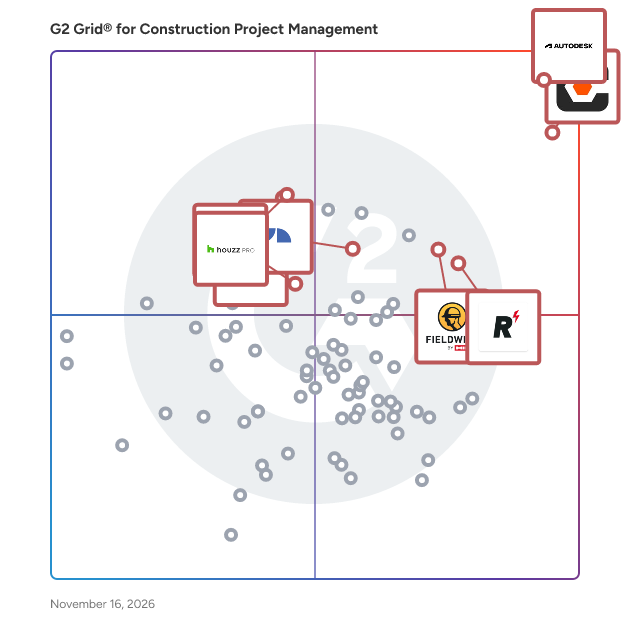
G2 Grid® for Construction Project Management Software

G2 Grid® for Construction Project Management Software plotting products by satisfaction and market presence

Highlighted products: Procore, Autodesk Forma (formerly Autodesk Construction Cloud), Fieldwire by Hilti, Houzz Pro, JobNimbus, RDash, Sage Construction Management (formerly Corecon), and Oracle Primavera.

Underlying data: [Grid® JSON](https://www.g2.com/categories/construction-project-management/grids.json?focus%5B%5D=procore&focus%5B%5D=autodesk-forma-formerly-autodesk-construction-cloud&focus%5B%5D=fieldwire-by-hilti&focus%5B%5D=houzz-pro&focus%5B%5D=jobnimbus&focus%5B%5D=rdash&focus%5B%5D=sage-construction-management-formerly-corecon&focus%5B%5D=oracle-primavera&segment=small-business)

Deltek Specpoint

Deltek Specpoint is a cloud-based construction specification software that helps architects and engineers deliver accurate specification packages faster — with less manual effort and lower project risk. Specpoint pairs digitized AIA MasterSpec guide specifications with a product library of 50,000+ manufacturer listings, giving design teams trusted, always-current content and intelligent automation in one cloud-based application. Ask Dela, the AI orchestrator, provides instant answers sourced from MasterSpec content, product listings, and supporting documents to accelerate research and spec decisions. Best for: Architecture and engineering firms of any size that author construction specifications and need to reduce errors, cut rework, and keep projects on schedule — especially teams replacing manual or Word-based spec workflows. Use cases:  Research and select building products from a verified library during the design phase  Author and produce construction specifications using digitised MasterSpec content with automatic updates  Apply firm and owner standards consistently across projects using Best Practices Smart Tagging  Collaborate with project stakeholders and building product manufacturers through two-way dialogue  Generate submittal reports and identify unresolved product decisions with Smart Reports Key Features:  AIA MasterSpec integration with automatic quarterly content updates  Product library with 50,000+ manufacturer and product listings  Best Practices Smart Tagging for automated firm and owner standard application  Level of Specification automation for managing spec detail at each project phase  One-Click Specification for integrating verified product data into project specs  Ask Dela — AI orchestrator for spec research and product questions  Revit integration for accessing product data within modelling workflows  Contributor module for two-way collaboration between A&Es and BPMs  Smart Reports for submittal tracking and unresolved option identification Why A&E firms choose Specpoint:  Reduce spec errors and project risk with industry-standard content. Specpoint is the exclusive home of digitised AIA MasterSpec — peer- reviewed guide specifications authored by licensed architects and engineers, updated quarterly, and always current.  Cut manual spec work by up to 80%. Best Practices Smart Tagging auto- applies firm and owner standards to projects, eliminating repetitive editing and reducing costly rework.  Get trusted answers during spec research without leaving the platform. Ask Dela draws from MasterSpec content, product listings, and supporting documents to surface relevant, source-backed answers in seconds.  Break down silos between designers and manufacturers. The Contributor module gives project stakeholders and BPMs a shared workspace with two- way dialogue — so product decisions happen in context, not in email chains. Used by: Architecture and engineering firms — from small practices to global design firms — that author construction specifications across commercial, institutional, and infrastructure projects. 20 of the top 25 architectural firms (Architectural Review) and 16 of the top 20 engineering firms (Engineering News Record) use Specpoint.

Average Rating: 4.0/5.0

Total Reviews: 41

How Do G2 Users Rate Deltek Specpoint?

  • Has the product been a good partner in doing business?: 7.5/10 (Category avg: 8.8/10)
  • Workforce Scheduling: 10.0/10 (Category avg: 7.8/10)
  • Information Management: 7.9/10 (Category avg: 8.9/10)

Who Is the Company Behind Deltek Specpoint?

  • Seller: Deltek
  • Year Founded: 1983
  • HQ Location: Herndon, VA
  • LinkedIn® Page: www.linkedin.com
    4,856 employees on LinkedIn®

Who Uses This Product?

  • Top Industries: Architecture & Planning
  • Company Size: 46% Small, 37% Medium

What Do G2 Reviewers Say About Deltek Specpoint?

AI-generated summary from verified user reviews

Pros
  • Users value the seamless integrations with Revit and MasterSpec, enhancing their selection process and product management.
  • Users find the ease of use with Deltek Specpoint's admin interface to be straightforward and efficient.
  • Users appreciate the navigation ease of Deltek Specpoint, making it simple to find projects quickly.
  • Users value the high product quality of Deltek Specpoint, appreciating reliable MasterSpec integration and extensive product library.
  • Users appreciate the setup ease of Deltek Specpoint, finding user management straightforward and efficient.
Cons
  • Users feel the limited customization options in Deltek Specpoint fall short of their expectations for tailored writing.
  • Users express frustration over poor customer support from Deltek Specpoint's management, affecting their overall experience since 2024.
  • Users find Deltek Specpoint has slow performance, causing frustrations in managing tasks and settings efficiently.

What Are Recent G2 Reviews of Deltek Specpoint?

What Are G2 Users Discussing About Deltek Specpoint?

Part3

Part3 revolutionizes Construction Administration, offering architects a seamless platform for efficient collaboration during the construction process. With its task automation and data-rich digital workflows, Part3 empowers projects to progress swiftly and securely, enabling architectural teams to achieve new heights of success.

Average Rating: 4.9/5.0

Total Reviews: 16

How Do G2 Users Rate Part3?

  • Has the product been a good partner in doing business?: 9.7/10 (Category avg: 8.8/10)
  • Construction Workforce Management Tool Integration: 6.0/10 (Category avg: 8.2/10)
  • Workforce Scheduling: 5.3/10 (Category avg: 7.8/10)
  • Information Management: 9.2/10 (Category avg: 8.9/10)

Who Is the Company Behind Part3?

  • Seller: Part3
  • Year Founded: 2020
  • HQ Location: Toronto, CA
  • LinkedIn® Page: www.linkedin.com
    25 employees on LinkedIn®

Who Uses This Product?

  • Top Industries: Architecture & Planning
  • Company Size: 69% Small, 31% Medium

What Do G2 Reviewers Say About Part3?

AI-generated summary from verified user reviews

Pros
  • Users love the simplicity of integration, making the product easy to use and implement effectively.
  • Users find the API integration of Part3 to be simple and effective, enhancing overall functionality and ease of use.
  • Users value the responsive customer support, which effectively resolves issues and facilitates smooth collaboration.
  • Users value the centralized document collaboration feature, enhancing coordination among architects, consultants, and contractors.
  • Users praise the ease of learning Part3, finding navigation simple even for first-time users in construction administration.
Cons
  • Users experience technical issues with Procore integration, leading to sync problems and disruptions after updates.
  • Users experience update issues with Procore, leading to syncing problems and disruptions in document handling.

What Are Recent G2 Reviews of Part3?

eSUB

eSUB is the only field-first project management platform built for commercial subcontractors. eSUB standardizes project management procedures so users in the field and office can easily enter data, site events, labor activities, material costs, time, and workforce information into a fully searchable database updated in real-time. Our platform as a service is module-driven and designed for you - the trade contractor, to increase operational efficiency, improve communications and back-office efficiency and field labor productivity.

Average Rating: 4.0/5.0

Total Reviews: 66

How Do G2 Users Rate eSUB?

  • Has the product been a good partner in doing business?: 8.5/10 (Category avg: 8.8/10)
  • Construction Workforce Management Tool Integration: 7.0/10 (Category avg: 8.2/10)
  • Workforce Scheduling: 6.9/10 (Category avg: 7.8/10)
  • Information Management: 7.7/10 (Category avg: 8.9/10)

Who Is the Company Behind eSUB?

  • Seller: eSUB
  • Year Founded: 2008
  • HQ Location: San Diego, CA
  • LinkedIn® Page: www.linkedin.com
    32 employees on LinkedIn®

Who Uses This Product?

  • Who Uses This: Project Manager
  • Top Industries: Construction, Electrical/Electronic Manufacturing
  • Company Size: 58% Small, 39% Medium

What Are Recent G2 Reviews of eSUB?

AI can help you find the answers. G2 helps you trust them.

Connect G2 to Claude or ChatGPT for answers grounded in G2's trusted reviews, comparisons, and pricing from real user insights.

How it works

SiteMax

SiteMax is the complete jobsite management platform for construction that enables the digital transformation from antiquated analog and paper-reliance to digital. Simple, streamlined and purpose-built for construction, SiteMax is powering tens of thousands of job sites daily. Our plans are purpose-built to give you what you need no matter where you are in your construction management journey. · Go Paperless · Consolidate Your Multiple Single Point Applications Into One · Streamline Construction Management Processes SiteMax is simple enough for any team to adopt, but powerful enough to run all your construction projects. SiteMax is great for: · GENERAL CONTRACTORS who value collaboration and modern construction management with ease of use. · SUB CONTRACTORS who strive to choose clear field to office communication. Easily access project information, from punch lists to project drawings all from the palm of your hand. · DEVELOPERS OWNERS who aim to get real time visibility of all current and past project details to ensure compliance, productivity, and profitability. Only the features you need: · Task Management · Timecards · Digital Forms · Purpose Built Workflow Modules · Digital Blueprint Storage and Management · Photo Management · Equipment Tracking · RFIs Tracking · Safety Reports

Average Rating: 4.4/5.0

Total Reviews: 52

How Do G2 Users Rate SiteMax?

  • Has the product been a good partner in doing business?: 9.1/10 (Category avg: 8.8/10)
  • Construction Workforce Management Tool Integration: 7.2/10 (Category avg: 8.2/10)
  • Workforce Scheduling: 6.7/10 (Category avg: 7.8/10)
  • Information Management: 8.3/10 (Category avg: 8.9/10)

Who Is the Company Behind SiteMax?

Who Uses This Product?

  • Top Industries: Construction
  • Company Size: 75% Small, 25% Medium

What Do G2 Reviewers Say About SiteMax?

AI-generated summary from verified user reviews

Pros
  • Users value the ease of use of SiteMax, seamlessly fitting into workflows and enhancing project management efficiency.
  • Users value the collaborative features of SiteMax, enabling seamless onboarding and resource sharing with subcontractors.
  • Users value the ease of construction management with SiteMax, enhancing reporting and streamlining processes effortlessly.
  • Users value the continuous improvement of SiteMax, enhancing efficiency and easing project management through regular updates.
  • Users commend the exceptional customer support from SiteMax, particularly noting the team's commitment to long-term success.
Cons
  • Users find the complex processes of SiteMax slow down onboarding and make scaling more challenging than necessary.
  • Users find the learning curve steep, requiring time to adapt and understand SiteMax's features effectively.
  • Users find it challenging to scale SiteMax effectively, highlighting difficulties in the onboarding and adjustment process.
  • Users experience a steep learning curve with SiteMax, making onboarding and scaling time-consuming and challenging.
  • Users report workflow issues with SiteMax, noting it took time to scale and find effective processes.

What Are Recent G2 Reviews of SiteMax?

Higharc

Higharc is a homebuilding AI software company serving homebuilders and homebuilding materials distributors. Its cloud-based platform connects home design, plan and option management, estimating, 3D sales tools, marketing and construction documentation around a unified data model. This helps builders increase revenue and profitability by bringing homes to market faster, selling more homes and options, and reducing costly manual rework across design, estimating and construction documentation. Higharc Enterprise: Connected homebuilding AI Higharc Enterprise is an AI-native, design-to-construction platform built around a live 3D home model containing structured building data. Unlike traditional CAD drawings, Higharc's home models represent building elements through dimensions, geometry, spatial relationships, materials, options and construction constraints. The platform combines spatial AI, generative design and rules-based building logic to help builders create and modify buildable home plans while maintaining control over their designs, standards and product offerings. Higharc Enterprise is built on a Central Data Model that connects home design, plan configuration, estimating, 3D sales visualization and construction documentation. When a builder changes a plan or selects an option, the relevant drawings, material quantities, estimates, sales assets and construction documents update in real time from the same underlying building information. This connected approach allows builders to: - Increase revenue and protect margins by offering plan and option choices with better visibility into their costs and pricing. - Improve architecture and design (A&D) productivity by creating, revising and adapting home plans with less repetitive drafting. - Lower operating costs by syncing updates automatically, reducing manual rework across estimating, sales materials and construction documentation. - Create more opportunities to sell homes by shortening the cycle from home design to sales-ready configurations and construction documents. Higharc Enterprise capabilities: Studio — AI-powered home design software Higharc Studio uses spatial AI and generative design to create and modify buildable home plans. Builders can design floor plans, manage elevations and options, adapt plans to different lots and apply building standards through configurable rules. Because Studio works with a live 3D model, related 2D drawings and downstream outputs update as designs change, reducing repetitive manual work. Showroom — Interactive 3D home sales and lead generation Higharc Showroom gives homebuilders an interactive 3D sales tool for their websites and sales teams. Buyers can explore and personalize homes online, selecting plans, elevations, finishes and structural options while viewing their choices and associated pricing in real time. When buyers save their configurations, their contact information and home selections are captured and sent to the sales team. Sales representatives can then continue configuring the home with buyers during appointments, generate personalized, lot-specific sales brochures and use AutoRender to quickly create photorealistic images. Because Showroom is synced to Higharc's underlying home model, sales materials reflect the configured home and remain aligned with the plans used by other teams. Estimate for Homebuilders — Automated construction estimating Higharc Estimate generates material takeoffs, quantities and bills of materials directly from the structured home model. Estimators apply reusable measurement logic to master plans and lot-specific configurations, including combinations of selected options. When the underlying design changes, Higharc automatically updates the estimate from the BIM model, keeping material quantities and costs aligned with the latest plan. Config — Construction operations management Higharc Config centralizes lot management, plan portfolios, elevations, options and community-specific building standards. Builders can manage which plans and options are available in each community, maintain consistent specifications, coordinate changes across their operations, and enforce sales rules and company standards. Sales teams can see what they can offer as plans, options and lot availability change. Live Plans — Automated homebuilding documentation Higharc Live Plans automatically generates construction drawings and permit-ready documentation from its structured home models. Plan configurations, elevations and selected options inform the drawings for each home, including lot-specific documentation. As the underlying model changes, related construction documents are updated without builders having to redraw every affected plan. AI Estimating for Distributors Higharc AI Estimating for Distributors helps homebuilding suppliers turn plan sets into accurate, repeatable material takeoffs and quantity estimates through a single AI workflow with a human in the loop. Built for supplier agility and efficiency, AI Estimating for Distributors includes 2D plan intake, automated material takeoff and quantity estimation so estimators can quote without manual tracing, disconnected tools or rework. About Higharc Higharc was founded in 2018 and is headquartered in Durham, North Carolina.

Average Rating: 4.8/5.0

Total Reviews: 41

How Do G2 Users Rate Higharc?

  • Has the product been a good partner in doing business?: 9.7/10 (Category avg: 8.8/10)
  • Construction Workforce Management Tool Integration: 7.4/10 (Category avg: 8.2/10)
  • Workforce Scheduling: 5.6/10 (Category avg: 7.8/10)
  • Information Management: 8.5/10 (Category avg: 8.9/10)

Who Is the Company Behind Higharc?

  • Seller: Higharc
  • Company Website:
  • Year Founded: 2018
  • HQ Location: Durham, NC
  • LinkedIn® Page: www.linkedin.com
    223 employees on LinkedIn®

Who Uses This Product?

  • Top Industries: Construction, Architecture & Planning
  • Company Size: 61% Medium, 39% Small

What Do G2 Reviewers Say About Higharc?

AI-generated summary from verified user reviews

Pros
  • Users value the ease of use of Higharc, appreciating its intuitive interface and quick integration features.
  • Users appreciate the robust platform of Higharc, enhancing the efficiency of home design and construction processes.
  • Users commend the responsive and helpful customer support from the Higharc team, ensuring smooth platform usage.
  • Users highlight the centralized data approach of Higharc, enhancing efficiency and streamlining the home construction process.
  • Users value the highly interactive collaboration of Higharc, enhancing teamwork and streamlining project development effectively.
Cons
  • Users face a steep learning curve with Higharc, impacting immediate benefits during implementation and adaptation.
  • Users note significant missing features, such as immature documentation and lack of extendability in Higharc's platform.
  • Users note that improvement is needed in Higharc, highlighting gaps in features and occasional bugs despite updates.
  • Users find a steep learning difficulty, requiring significant time and training to master the platform effectively.
  • Users note the inadequate tools in Higharc, hindering smooth drafting experiences and requiring significant enhancements.

What Are Recent G2 Reviews of Higharc?

BuildTools

BuildTools is AI-first construction management software for custom home builders and remodelers. It gives teams one place for scheduling, budgeting, purchasing, selections, change orders, and client communication, and users can manage projects from a computer, tablet, or mobile device. BuildTools serves as a construction management hub for everyone involved in the project, including project managers, subcontractors, homeowners, architects, and more, with in-app messaging and email notifications. Key features include live and working schedules, document control, change order and selection management, bid management, photo sharing, and a service module to manage work orders and warranty requests. BuildTools integrates with QuickBooks Online to reduce double entry and accounting errors. BuildTools is independently owned by BuildTools, LLC of Wayzata, Minnesota, which bought the product back from ECI Software Solutions effective January 1, 2026. A new AI-first version launched in May 2026. Pricing starts at $499 per month on a 12-month term.

Average Rating: 4.0/5.0

Total Reviews: 14

How Do G2 Users Rate BuildTools?

  • Has the product been a good partner in doing business?: 6.3/10 (Category avg: 8.8/10)
  • Workforce Scheduling: 7.6/10 (Category avg: 7.8/10)
  • Information Management: 6.7/10 (Category avg: 8.9/10)

Who Is the Company Behind BuildTools?

Who Uses This Product?

  • Company Size: 79% Small, 21% Medium

What Are Recent G2 Reviews of BuildTools?

Dalux

Simplify and streamline the management of the built environment's life cycle with Dalux's comprehensive SaaS product suite. Trusted by over 1,000,000 users and with projects in more than 147 countries, Dalux has the centre point in its cloud-based BIM Viewer, which ensures contextual information, visibility and seamless collaboration across teams, whether using mobile or desktop devices. Dalux's user-friendly approach adapts to your specific needs, offering a modular system that can be as minimal or powerful as required.

Average Rating: 4.6/5.0

Total Reviews: 170

How Do G2 Users Rate Dalux?

  • Has the product been a good partner in doing business?: 9.0/10 (Category avg: 8.8/10)
  • Construction Workforce Management Tool Integration: 5.9/10 (Category avg: 8.2/10)
  • Workforce Scheduling: 5.7/10 (Category avg: 7.8/10)
  • Information Management: 7.7/10 (Category avg: 8.9/10)

Who Is the Company Behind Dalux?

  • Seller: Dalux
  • Year Founded: 2005
  • HQ Location: Copenhagen Ø, DK
  • LinkedIn® Page: www.linkedin.com
    966 employees on LinkedIn®

Who Uses This Product?

  • Who Uses This: BIM Manager
  • Top Industries: Construction, Civil Engineering
  • Company Size: 44% Medium, 31% Large

What Do G2 Reviewers Say About Dalux?

AI-generated summary from verified user reviews

Pros
  • Users find Dalux to be extremely easy to use, simplifying the process of clash detection and collaboration.
  • Users find Dalux simple to learn and user-friendly, enhancing collaboration and coordination in project management.
  • Users find Dalux intuitive and user-friendly, making project coordination and navigation through 3D models seamless.
  • Users commend Dalux for its innovative solutions and exceptional customer support, enhancing their overall experience.
  • Users value the effective communication features, enabling seamless collaboration between field teams and subcontractors.
Cons
  • Users express dissatisfaction with the lack of essential features in Dalux, hindering functionality for scheduling and accounting.
  • Users experience limited features with Dalux, notably issues with assembly levels and lack of calendar view.
  • Users find the complex setup process of Dalux to be confusing and time-consuming, especially for first-time administrators.
  • Users experience functionality issues with Dalux, such as limitations in document search and viewer support for assemblies.
  • Users find the missing features like accounting and schedule planning hinder their overall workflow and functionality.

What Are Recent G2 Reviews of Dalux?

WRENCH SmartProject

Wrench SmartProject is an EDMS and construction management platform for design firms, contractors, PMCs, and owners. It has built-in workflows and software integrations to enable the online execution and monitoring of engineering and capital projects. SmartProject links a project’s master schedule with its technical drawings, EDDRs, BoMs, MoMs, emails, reports, S Curves, and other project documents to create a unified work environment for teams and stakeholders and results in dramatically lower manpower costs, higher productivity, 100% quality & compliance, and increased efficiency. EDMS Features: •Workflow-driven document and construction management platform •Workflows based on ISO, PMBOK7, TCM, Prince2, etc. •Actual-time status of documents available 24x7 on dashboards •Older document versions labelled obsolete automatically (everyone works on the latest versions only) •Audit trails for all documents with complete change traceability. •Electronic commenting during reviews, the system automatically collates and appends comments to each document after the review •Centralised archival and login-based access to RFI’s, correspondences, and MoMs. Construction Management & Project Control Features •Schedules integrated with budgets/invoices •Integration with planning tools like Primavera or MsProject and with ERP, email, and other corporate software •Pre-defined workflows drive deliverables from initiation to approval •Automated alerts in case of delay in any document/deliverable •Alerts automatically escalated up the management chain •S-Curves and multi-level progress reports on demand

Average Rating: 3.1/5.0

Total Reviews: 92

How Do G2 Users Rate WRENCH SmartProject?

  • Has the product been a good partner in doing business?: 8.9/10 (Category avg: 8.8/10)
  • Construction Workforce Management Tool Integration: 9.4/10 (Category avg: 8.2/10)
  • Workforce Scheduling: 9.2/10 (Category avg: 7.8/10)
  • Information Management: 10.0/10 (Category avg: 8.9/10)

Who Is the Company Behind WRENCH SmartProject?

Who Uses This Product?

  • Top Industries: Construction, Oil & Energy
  • Company Size: 43% Medium, 36% Large

What Do G2 Reviewers Say About WRENCH SmartProject?

AI-generated summary from verified user reviews

Pros
  • Users praise the ease of use of WRENCH SmartProject, benefiting from a seamless and intuitive interface.
  • Users praise the complete integration with Enterprise ERP, enhancing efficiency through a very good UI.
  • Users appreciate the very good UI of WRENCH SmartProject, enhancing their experience with seamless ERP integration.
Cons
  • Users find WRENCH SmartProject not user-friendly, as BoQ uploading adds cumbersome tasks for Capex projects.
  • Users find the inadequate tools of WRENCH SmartProject challenging, particularly with cumbersome BoQ uploading for Capex projects.
  • Users find the learning curve steep with WRENCH SmartProject, especially with cumbersome BoQ uploading for Capex projects.
  • Users find WRENCH SmartProject not intuitive, as BoQ uploading adds cumbersome tasks for Capex projects.
  • Users find the slow upload speed cumbersome, especially when dealing with BoQ in Capex projects.

What Are Recent G2 Reviews of WRENCH SmartProject?

What Are G2 Users Discussing About WRENCH SmartProject?

Neya Kumaresan
NK
Researched and written by Neya Kumaresan
Updated