Top Free Cloud Content Collaboration Software - Page 6

How Many Cloud Content Collaboration Software Products Does G2 Track?

Total Products under this Category: 263

Category Stats (Sep 2026)

  • Average Rating: 4.36/5 (↑0.01 vs Aug 2026) The average rating of products in this category, based on all submitted ratings
  • Top Trending Product: Assai Document Management (+26.07%) - Among all products in this category, Assai Document Management recorded the largest rating increase compared to last month

Last updated: September 01, 2026

How Does G2 Rank Cloud Content Collaboration Software Products?

Why You Can Trust G2's Software Rankings:

  • 30 Analysts and Data Experts
  • 118,600+ Authentic Reviews
  • 263+ Products
  • Unbiased Rankings

G2's software rankings are built on verified user reviews, rigorous moderation, and a consistent research methodology maintained by a team of analysts and data experts. Each product is measured using the same transparent criteria, with no paid placement or vendor influence. While reviews reflect real user experiences, which can be subjective, they offer valuable insight into how software performs in the hands of professionals. Together, these inputs power the G2 Score, a standardized way to compare tools within every category.

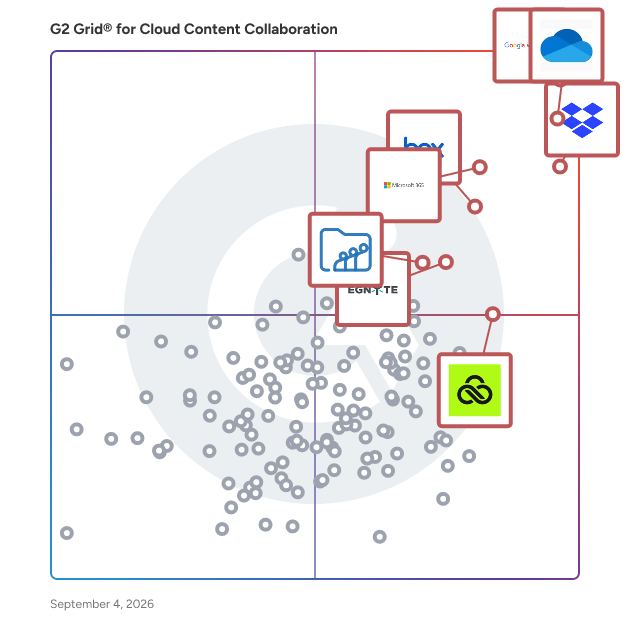
G2 Grid® for Cloud Content Collaboration Software

G2 Grid® for Cloud Content Collaboration Software plotting products by satisfaction and market presence

Highlighted products: Google Workspace, Microsoft OneDrive for Business, Dropbox, Microsoft 365, Box, Egnyte, LucidLink, and Zoho WorkDrive.

Underlying data: [Grid® JSON](https://www.g2.com/categories/cloud-content-collaboration/grids.json?focus%5B%5D=google-workspace&focus%5B%5D=microsoft-onedrive-for-business&focus%5B%5D=dropbox&focus%5B%5D=microsoft365&focus%5B%5D=box&focus%5B%5D=egnyte&focus%5B%5D=lucidlink&focus%5B%5D=zoho-workdrive)

Tarkle Send

Sharebrand is a white-label file sharing platform for businesses. Agencies, studios, freelancers, consultants, and law firms use it to share files with clients, teams, and partners from their own domain, with their own logo and brand on every page. Recipients never see Sharebrand's name.

Average Rating: 3.8/5.0

Total Reviews: 2

How Do G2 Users Rate Tarkle Send?

  • Has the product been a good partner in doing business?: 5.0/10 (Category avg: 8.8/10)
  • Performance and Reliability: 8.3/10 (Category avg: 8.7/10)
  • File following: 10.0/10 (Category avg: 8.8/10)
  • Device Syncing: 8.3/10 (Category avg: 8.7/10)

Who Is the Company Behind Tarkle Send?

  • Seller: Tarkle
  • Year Founded: 2024
  • HQ Location: Remote, US
  • Twitter: @tarkleHQ
  • LinkedIn® Page: www.linkedin.com
    2 employees on LinkedIn®

Who Uses This Product?

  • Company Size: 50% Medium, 50% Small

What Do G2 Reviewers Say About Tarkle Send?

AI-generated summary from verified user reviews

Pros
  • Users value the custom portals for file sharing, allowing personalized branding and secure, profitable file sharing.
  • Users value the customization and security features of Tarkle Send's cloud storage for efficient and safe file sharing.
  • Users love the easy sharing feature of Tarkle Send, enabling effortless file sharing while earning money.
  • Users value the high security of Tarkle Send, ensuring their data remains safe and protected.
Cons
  • Users express concerns over the high cost of Tarkle Send, especially with no trial version for testing.
  • Users find Tarkle Send to be expensive, especially without a trial version to test its features beforehand.
  • Users feel the subscription price for Tarkle Send is a bit high considering its offered services.

What Are Recent G2 Reviews of Tarkle Send?

Acollab

Acollab est une plateforme collaborative française qui simplifie la gestion de projets, le partage d'agenda, le partage d’informations et la communication au sein des équipes. Flexible et intuitive, elle permet aux PME, TPE, associations, collectivités et groupes de travail de centraliser leurs échanges et de gagner en efficacité au quotidien. Grâce à Acollab, les équipes disposent d’un espace unique pour organiser leurs projets, suivre l’avancement des tâches, partager des documents, gérer leurs plannings et collaborer en temps réel. Son interface conviviale favorise l’implication de chacun et fluidifie les processus internes, même à distance. Pensé pour s’adapter à tous les environnements professionnels, Acollab propose des fonctionnalités modulables : gestion de projets, espaces collaboratifs, messagerie interne, partage sécurisé de fichiers, gestion d’agendas, mais aussi suivi des temps et outils de reporting. Hébergée en France, la plateforme garantit également une sécurité optimale et le respect de la confidentialité des données. Lien du site internet : Acollab https://www.acollab.com

Average Rating: 4.0/5.0

Total Reviews: 1

How Do G2 Users Rate Acollab?

  • File following: 10.0/10 (Category avg: 8.8/10)
  • Device Syncing: 8.3/10 (Category avg: 8.7/10)

Who Is the Company Behind Acollab?

Who Uses This Product?

  • Company Size: 100% Large

What Are Recent G2 Reviews of Acollab?

What Are G2 Users Discussing About Acollab?

Cloudike Business

Cloudike Business is a B2B cloud storage and file-sharing platform built for enterprise teams. Unlike consumer-grade cloud services, Cloudike is designed from the ground up for business workflows — offering secure file storage, real-time collaboration, large file transfer, and granular admin controls in a single platform. With Cloudike Business, companies pay only for the storage capacity they need while allowing an unlimited number of users to access the platform. This makes it one of the most cost-effective enterprise cloud solutions on the market, especially for organizations with large teams. There are no per-user fees, so businesses can onboard their entire workforce — from a small department to thousands of employees — without worrying about rising costs. Cloudike Business is available as both a SaaS subscription and an on-premise deployment. The on-premise option includes full white-label customization — companies can apply their own branding, logo, domain, and UI theme across web, desktop, and mobile apps. This makes Cloudike an ideal choice for organizations that require data sovereignty, regulatory compliance, or a fully branded cloud experience for their employees and clients. The platform supports seamless file synchronization across all devices, including Windows, macOS, iOS, and Android. With patented RapidSync™ technology, users can upload and download large files — such as high-resolution videos, CAD drawings, and design assets — significantly faster than conventional cloud services. Built-in ransomware protection, file versioning, document watermarking, and detailed audit logs ensure that business data remains secure and traceable at all times. Cloudike Business also integrates with web-office, enabling real-time document co-editing without leaving the platform. Administrators can manage team permissions, set download restrictions, monitor all user activity, and configure role-based access controls from a centralized admin console. Trusted by hundreds of companies across manufacturing, media production, construction, retail, education, and the public sector, Cloudike Business is widely used by businesses worldwide. Major clients include Hyundai, CJ, Simmons, MBC, Nexon Korea, Heerim, Lacoste, and Lotte Engineering. Cloudike is also the first cloud storage provider in South Korea to obtain CSAP (Cloud Security Assurance Program) certification for the public sector. Founded in 2013 and headquartered in South Korea, Cloudike continues to expand globally, with services available in Indonesia through Telkom and growing adoption across Asia.

Average Rating: 5.0/5.0

Total Reviews: 1

Who Is the Company Behind Cloudike Business?

Who Uses This Product?

  • Company Size: 100% Small

What Are Recent G2 Reviews of Cloudike Business?

HTMLvault

HTMLvault is a secure HTML sharing platform built for sales, marketing, and RevOps teams. Paste or programmatically send HTML from any tool, including Claude, ChatGPT, Gemini, Zapier, Clay, or your own code, and get back a clean, trackable, optionally white-labeled link you can share anywhere. HTMLvault exists because of a hard lesson. The founder lost his job after using a non-sanctioned sharing tool for AI-generated content at work. HTMLvault is the tool he wishes had existed: the same speed and flexibility, rebuilt from the ground up so IT and security teams can actually say yes. Security in every link: automatic PII and secret scanning before publishing, no search engine indexing, password protection, configurable auto-expiry, and data retention windows down to auto-delete. Share confidently without creating shadow IT. Analytics as a core feature, not an add-on: track views, unique visitors, repeat visitors, geography, device, scroll depth, and time on page. Generate per-recipient tracked links to see exactly who opened your proposal and when. Inject your own GA4, Meta Pixel, or any custom tracking code for full-funnel attribution. Integration-first by design: create links programmatically through a REST API, API keys, and a native MCP server. Your AI assistant or workflow tool returns a finished, trackable link instead of a raw HTML file. Perfect for AI-generated reports, dashboards, lead lists, landing pages, proposals, and training material. Bring your own AI: Pro users connect their own Anthropic, OpenAI, or Google API key to power AI PII scanning. You control the model and the cost. HTMLvault never bills you for tokens. White-label hosting: host links on a custom subdomain or your own domain for consistent branding and better email deliverability. Built for procurement: Free, Pro, and Enterprise tiers with SSO/SAML, role-based access controls, audit-ready admin tools, and custom data retention for teams that need IT sign-off. HTMLvault: share HTML the way your security team wants you to.

Average Rating: 5.0/5.0

Total Reviews: 1

How Do G2 Users Rate HTMLvault?

  • Has the product been a good partner in doing business?: 10.0/10 (Category avg: 8.8/10)

Who Is the Company Behind HTMLvault?

Who Uses This Product?

  • Company Size: 100% Small

What Are Recent G2 Reviews of HTMLvault?

Smint.io Portals

What is Smint.io Portals? Smint.io Portals is a cutting-edge Content Activation Platform that enables organizations to seamlessly publish content directly from DAM, SharePoint, OneDrive, Google Drive, and PIM systems - without creating another content silo. With Smint.io, businesses can deliver engaging, personalized content experiences tailored to specific audiences. Whether for brand management, media distribution, or sales enablement, our platform ensures your content is always accessible, up-to-date, and on-brand. 🔹 Build and customize portals effortlessly - no complex projects required 🔹 Enhance and unify assets from multiple sources into a single hub 🔹 Securely share content with internal teams, partners, and the media Use Cases Smint.io Portals is ideal for: ✅ Media Download Centers – Make assets instantly available without extra storage ✅ Brand Portals – Ensure brand consistency across all stakeholders ✅ Press Portals – Provide journalists with easy, controlled access ✅ Channel Partner Portals – Enable seamless asset distribution ✅ Sales Enablement Portals – Give teams the right content at the right time Why Leading Brands Choose Smint.io 🔹 Eliminate content silos – No need for extra storage, just live connections 🔹 Reduce complexity – Simplify access to assets, even for non-technical users 🔹 Accelerate deployment – Get an out-of-the-box solution, not a lengthy project 🔹 Improve brand consistency – Ensure everyone works with the latest, approved content 🔹 Enhance collaboration – Securely share content with teams, agencies, retailers, and more The 3 Steps to Content Activation 1️⃣ Connect – Link Smint.io to your existing content storage while keeping assets securely in place 2️⃣ Publish – Organize and share content with internal and external audiences in a seamless experience 3️⃣ Activate – Boost engagement with intuitive, always-accessible content portals 🚀 Join the world’s top brands leveraging Smint.io Portals to maximize their Content Storage investment and elevate their content experience.

Average Rating: 4.8/5.0

Total Reviews: 12

How Do G2 Users Rate Smint.io Portals?

  • Has the product been a good partner in doing business?: 9.8/10 (Category avg: 8.8/10)
  • Performance and Reliability: 9.2/10 (Category avg: 8.7/10)
  • File following: 8.3/10 (Category avg: 8.8/10)
  • Device Syncing: 7.5/10 (Category avg: 8.7/10)

Who Is the Company Behind Smint.io Portals?

Who Uses This Product?

  • Company Size: 42% Large, 42% Medium

What Do G2 Reviewers Say About Smint.io Portals?

AI-generated summary from verified user reviews

Pros
  • Users value the ease of use in Smint.io Portals, transforming shared drives into effective content management systems.
  • Users love the ease of use of Smint.io Portals, transforming shared drives into an intuitive content management system.
  • Users value the ease of file sharing with Smint.io Portals, transforming shared drives into effective content management systems.
Cons
  • Users find the learning curve challenging at first due to the new approach to content management.

What Are Recent G2 Reviews of Smint.io Portals?

Storegate Cloud Storage

With Storegate corporate solutions, you collaborate with your colleagues just as you do using a normal file server. Share files,folders and other information internally or externally.

Average Rating: 4.0/5.0

Total Reviews: 1

Who Is the Company Behind Storegate Cloud Storage?

  • Seller: Storegate
  • Year Founded: 2003
  • HQ Location: Karlshamn, SE
  • Twitter: @Storegate
    561 Twitter followers
  • LinkedIn® Page: www.linkedin.com
    16 employees on LinkedIn®

Who Uses This Product?

  • Company Size: 100% Large

What Are Recent G2 Reviews of Storegate Cloud Storage?

What Are G2 Users Discussing About Storegate Cloud Storage?

Kerika

Kerika is a task management tool with a very user-friendly design and seamless integration with Google Workspace, Microsoft Office 365, and Box. If you use Google Apps, sign up with your Google ID and your Kerika files will be stored in your own Google Drive, where they will remain under your ownership and control. Your IT folks will be thrilled to know that their document management policies are being automatically enforced! You can even create new Google Docs, Slides, Sheets, and Forms from inside Kerika and have them shared automatically with your board's team: Team Members get read+write access and Visitors get read-only access. If you prefer Microsoft, sign up with your Microsoft ID and your Kerika files will be stored in your own OneDrive and, yes, you can even create new Office documents from inside Kerika and have them shared automatically with your board's team! If you use Box, sign up with your Box ID and your Kerika files will be stored in your own Box account. You create new Box Notes from inside Kerika and have them shared automatically with your board's team. Add someone to a board's team and Kerika makes sure all the relevant files in your are shared with the new team member. Change someone's role on a board and Kerika will instantly update that person's access rights to your project files. All of this is done on a board-by-board basis, to give you maximum flexibility and privacy. Within an account you can have as many boards as you like, and each board can be as big as you need it to be. Kerika is the only task management tool that supports both Task Boards that can be used for Kanban-style or Scrum work, and Whiteboards that can be used for creativity. Kerika's Whiteboards are patented and contain other Whiteboards as well as files and Web content, live! Start your new board from scratch or use one of our templates to get started faster. Every board can be completely customized, with the workflow, tags, teams, tasks, and content that you need to get the job done. Each board can also be kept as private as you like, or shared with others in your account team. Everything in Kerika’s clean design, from adjusting automatically to different time zones and highlighting “while you were away” changes supports the needs of distributed and remote teams. Even if your board has thousands of tasks, a unique Highlights feature helps you quickly focus on what matters most to you, like what's assigned to you, or what needs attention. The Dashboard makes sure you stay on top of things when you have dozens of projects to watch over: it summarizes key information across all the boards you care about so you never feel lost or overwhelmed. Kerika is available in 38 languages! After a 30-day free trial (with no strings attached), you can buy a paid plan in 135 currencies. Purchasing annual subscriptions comes with a 30-day Money Back Guarantee.

Average Rating: 4.8/5.0

Total Reviews: 11

How Do G2 Users Rate Kerika?

  • Has the product been a good partner in doing business?: 10.0/10 (Category avg: 8.8/10)

Who Is the Company Behind Kerika?

  • Seller: Kerika
  • Year Founded: 2002
  • HQ Location: Issaquah, WA
  • Twitter: @kerika
    134 Twitter followers
  • LinkedIn® Page: www.linkedin.com
    5 employees on LinkedIn®

Who Uses This Product?

  • Company Size: 83% Small, 17% Medium

What Do G2 Reviewers Say About Kerika?

AI-generated summary from verified user reviews

Pros
  • Users appreciate the user-friendly interface of Kerika, making project management simple and efficient even with large boards.
  • Users value Kerika's powerful collaboration features, enhancing teamwork through real-time updates and intuitive task management.
  • Users commend the clean and intuitive UI of Kerika, making project management a breeze compared to other tools.
  • Users value the seamless app integration of Kerika with Google Drive, enhancing collaboration and file management efficiency.
  • Users appreciate the user-friendly interface of Kerika, enjoying its intuitive drag-and-drop functionality for task organization.
Cons
  • Users find the initial complexity of Kerika overwhelming and desire a mobile version for easier access.
  • Users note a need for improved third-party integration support to enhance their Kerika experience further.
  • Users note the lack of advanced features in Kerika, particularly for complex project customization needs.
  • Users find the limited customization options restrict their ability to effectively manage complex projects in Kerika.
  • Users note the missing advanced features and suggest better customization options for complex projects in Kerika.

What Are Recent G2 Reviews of Kerika?

What Are G2 Users Discussing About Kerika?

picdrop

picdrop is a professional image delivery and collaboration platform designed specifically for photographers, creatives, and agencies. It streamlines the workflow between photographers and clients by offering secure, customizable, and user-friendly galleries for image presentation, selection, and feedback. With features like real-time commenting, selection markers, download permissions, and full control over privacy settings, picdrop makes it easy to present and manage visual work efficiently. Whether you're working on portrait sessions, editorial shoots, or large-scale commercial projects, Picdrop enhances your client communication while maintaining your brand aesthetics.

Average Rating: 5.0/5.0

Total Reviews: 1

Who Is the Company Behind picdrop?

  • Seller: PicDrop
  • Company Website:
  • Year Founded: 2014
  • HQ Location: Berlin, DE
  • LinkedIn® Page: www.linkedin.com
    18 employees on LinkedIn®

Who Uses This Product?

  • Company Size: 100% Small

What Do G2 Reviewers Say About picdrop?

AI-generated summary from verified user reviews

Pros
  • Users value the convenience of Picdrop, noting its easy integration and smooth operation for daily tasks.
  • Users value the excellent customer support from Picdrop, enhancing their overall experience and software usage.
  • Users enjoy the ease of use of Picdrop, finding it simple to integrate and operate within daily tasks.
  • Users value the easy setup of Picdrop, allowing for seamless integration into daily operations and enhancing support.
Cons
  • Users find that some advanced features require training, which can lead to a learning curve despite user-friendliness.

What Are Recent G2 Reviews of picdrop?

Slickplan

Slickplan helps teams and agencies bring order to complex web projects—from first ideas to production-ready deliverables. Instead of juggling docs, spreadsheets and generic diagram tools, Slickplan gives you one hub to structure site architecture, map user flows, plan content and review designs together. The result: websites launch faster, with fewer revisions and smoother handoffs. Plan smarter, not harder * Structure navigation: visual sitemaps clarify information architecture, align stakeholders early and lock approvals. Use AI to generate or refine structures, or import from your site. * Map user flows and journeys: connect them to your sitemap so UX decisions match how the site is actually organized. * Create production-ready content: real-time CMS-aligned blocks with inline comments, suggestive edits, page previews, plus early SEO checks (keywords, SERP previews, metadata fields). * Review designs in context: upload mockups or sync from Figma and leave pinpoint, synced feedback tied to the project. Plus: accelerate client approvals with one shared workspace and reduce developer rework with clean, export-ready deliverables (XML, Word, PDF) and direct CMS integrations. Projects stay transparent with permission controls and version history. Slickplan replaces chaos with clarity—so teams ship structured, CMS-ready work at scale. Plan websites faster, together.

Average Rating: 4.3/5.0

Total Reviews: 17

How Do G2 Users Rate Slickplan?

  • Has the product been a good partner in doing business?: 8.9/10 (Category avg: 8.8/10)

Who Is the Company Behind Slickplan?

Who Uses This Product?

  • Top Industries: Marketing and Advertising
  • Company Size: 50% Small, 39% Medium

What Are Recent G2 Reviews of Slickplan?

What Are G2 Users Discussing About Slickplan?