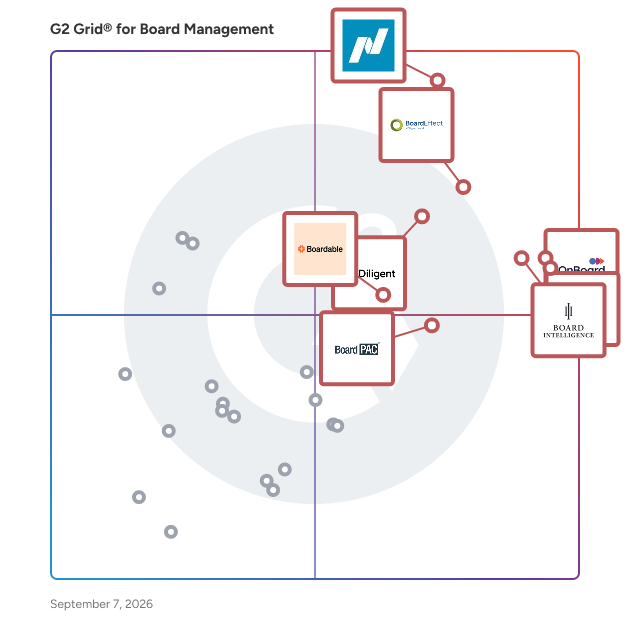
# Best Board Management Software - Page 7

*By [Neeraja Prakash](https://research.g2.com/insights/author/neeraja-prakash)*


Board management software provides a workspace for board members, chief executives, C-level executives, corporate secretaries, committee chairs, and other professionals in charge to stay organized, make timely decisions, and collaborate cohesively.

Board members can annotate documents, review materials beforehand, and attend the virtual meeting while accessing all materials in a centralized location. These tools allow access to agendas, documents, notes, calendars, and contacts that can be used to inform and fortify the corporate meeting process. Files can be uploaded within the workspaces, and users can then be assigned access according to their roles and clearance levels.

These tools are most commonly used by leadership teams, such as a parent committee or board of a large corporation. Executive leaders use board management software to track the progress of strategic initiatives, assign responsibilities, and review updates during monthly meetings.

Board management software can be used alongside other team collaboration tools that facilitate collaboration among employees or participants at varying levels of authority.

To qualify for inclusion in the Board Management category, a product must:

- Be intended for use by board or committee members, or similarly ranking directors
- Enable the creation and storage of material such as agendas, meeting minutes, team notes, document annotations, board pack builders, etc.
- Allow for communication and engagement between members
- Enable features like voting, e-signatures, surveys, and questionnaires, allowing boards to gather opinions and collect group feedback


## Top Board Management Software at a Glance
| # | Product | Rating | Best For | What Users Say |
|---|---------|--------|----------|----------------|
| 1 | [Nasdaq Boardvantage](https://www.g2.com/products/nasdaq-boardvantage/reviews) | 4.6/5.0 (219 reviews) | Compliance-focused board governance | "[Easy to Learn and a Major Upgrade—Great Integrations and New AI Features](https://www.g2.com/survey_responses/nasdaq-boardvantage-review-12693752)" |
| 2 | [BoardEffect](https://www.g2.com/products/boardeffect/reviews) | 4.5/5.0 (312 reviews) | Nonprofit and association board coordination | "[New BoardEffect User - 3 Months](https://www.g2.com/survey_responses/boardeffect-review-10224862)" |
| 3 | [Convene](https://www.g2.com/products/azeus-systems-convene/reviews) | 4.8/5.0 (389 reviews) | Mobile-friendly board meetings and remote governance | "[Reliable Board Meeting Packs with Easy Document Sharing](https://www.g2.com/survey_responses/convene-review-12930081)" |
| 4 | [OnBoard Board Management Software](https://www.g2.com/products/onboard-board-management-software/reviews) | 4.7/5.0 (653 reviews) | Streamlined digital board meetings | "[Intuitive Platform, Great Service](https://www.g2.com/survey_responses/onboard-board-management-software-review-8613585)" |
| 5 | [Diligent Boards](https://www.g2.com/products/diligent-boards/reviews) | 4.5/5.0 (496 reviews) | Enterprise-grade governance and secure board operations | "[Effortless Board Book Creation with an Intuitive Interface](https://www.g2.com/survey_responses/diligent-boards-review-12092813)" |
| 6 | [Board Intelligence](https://www.g2.com/products/board-intelligence/reviews) | 4.6/5.0 (229 reviews) | Insight-ready board reporting and decision frameworks | "[Intuitive, Versatile, and Backed by Outstanding Support](https://www.g2.com/survey_responses/board-intelligence-review-12692641)" |
| 7 | [Boardable](https://www.g2.com/products/boardable/reviews) | 4.5/5.0 (277 reviews) | Accessible board coordination | "[Effortless Meeting Management, Needs Messaging Improvements](https://www.g2.com/survey_responses/boardable-review-12977851)" |
| 8 | [BoardPAC](https://www.g2.com/products/boardpac/reviews) | 4.6/5.0 (224 reviews) | Secure mobile governance with offline access | "[Simple, Easy to Use, and Packed with Strong Security](https://www.g2.com/survey_responses/boardpac-review-12911860)" |
| 9 | [BoardPro](https://www.g2.com/products/boardpro/reviews) | 4.8/5.0 (319 reviews) | Efficient meeting management for smaller boards | "[Easy-to-Read Boards with Helpful Reminders](https://www.g2.com/survey_responses/boardpro-review-12619188)" |
| 10 | [Diligent Community](https://www.g2.com/products/diligent-community/reviews) | 4.1/5.0 (41 reviews) | — | "[Interactive, User-Friendly Platform with Minor Improvable Aspects](https://www.g2.com/survey_responses/diligent-community-review-12673092)" |


## How Many Board Management Software Products Does G2 Track?
**Total Products under this Category:** 96

### Category Stats (Jul 2026)
- **Average Rating**: 4.43/5 (↓0.01 vs Jun 2026) The average rating of products in this category, based on all submitted ratings
- **Top Trending Product**: BoardPAC (+0.28%) - Among all products in this category, BoardPAC recorded the largest rating increase compared to last month
*Last updated: July 04, 2026*


## How Does G2 Rank Board Management Software Products?

**Why You Can Trust G2's Software Rankings:**

- 30 Analysts and Data Experts
- 4,100+ Authentic Reviews
- 96+ Products
- Unbiased Rankings

G2's software rankings are built on verified user reviews, rigorous moderation, and a consistent research methodology maintained by a team of analysts and data experts. Each product is measured using the same transparent criteria, with no paid placement or vendor influence. While reviews reflect real user experiences, which can be subjective, they offer valuable insight into how software performs in the hands of professionals. Together, these inputs power the G2 Score, a standardized way to compare tools within every category.


## Which Board Management Software Is Best for Your Use Case?

- **Leader:** [Nasdaq Boardvantage](https://www.g2.com/products/nasdaq-boardvantage/reviews)
- **Highest Performer:** [BoardPAC](https://www.g2.com/products/boardpac/reviews)
- **Easiest to Use:** [Convene](https://www.g2.com/products/azeus-systems-convene/reviews)
- **Top Trending:** [Convene](https://www.g2.com/products/azeus-systems-convene/reviews)
- **Best Free Software:** [OnBoard Board Management Software](https://www.g2.com/products/onboard-board-management-software/reviews)


---

**Sponsored**

### Easy Board

Easy Board is the #1 rated Easy to Use board meeting management software solution for nonprofits and CEOs, designed to help your entire board and committees streamline organization and boost engagement. This platform is specifically tailored for organizations seeking to enhance the efficiency of board meetings, document management, and committee collaboration. By providing a centralized hub for all board-related activities, Easy Board simplifies the complexities often associated with governance and decision-making processes. Key features of Easy Board include innovative Magic Links™, which allows one-click secure board meeting access with no login required. This feature enhances security while simplifying access, making it easier for members to participate in discussions and review materials. Additionally, the platform supports various document formats, enabling users to upload and share essential files effortlessly. The intuitive interface ensures that even those unfamiliar with digital tools can navigate the system with ease. Another significant benefit of Easy Board is its commitment to user satisfaction, backed by a 90-day money-back guarantee. This assurance reflects the platform&#39;s focus on delivering a positive experience for all users, fostering a sense of confidence in its capabilities. By prioritizing user engagement and providing tools that facilitate effective communication, Easy Board stands out in the board management software category, offering a comprehensive solution that meets the diverse needs of modern boards. The target audience for Easy Board includes non-profit organizations, corporate boards, and any group that requires effective management of board activities. With features designed to facilitate seamless interactions, Easy Board caters to users who may not be tech-savvy, ensuring that all board members can engage without the usual barriers associated with traditional board management tools. The software is particularly beneficial for organizations looking to improve their meeting preparation, document sharing, and overall board engagement. Overall, Easy Board is designed to enhance the effectiveness of board governance, making it an essential tool for organizations aiming to improve their operational efficiency and member engagement. With its user-friendly features and commitment to security, Easy Board provides a valuable resource for any organization looking to optimize its board management processes.


[Visit website](https://www.g2.com/external_clickthroughs/record?secure%5Bad_program%5D=ppc&amp;secure%5Bad_slot%5D=category_product_list&amp;secure%5Bcategory_id%5D=1090&amp;secure%5Bchosen_at%5D=2026-07-04T14%3A22%3A44Z&amp;secure%5Bdisplayable_resource_id%5D=1090&amp;secure%5Bdisplayable_resource_type%5D=Category&amp;secure%5Bmedium%5D=sponsored&amp;secure%5Bplacement_reason%5D=page_category&amp;secure%5Bplacement_resource_ids%5D%5B%5D=1090&amp;secure%5Bprioritized%5D=false&amp;secure%5Bproduct_id%5D=123681&amp;secure%5Bresource_id%5D=1090&amp;secure%5Bresource_type%5D=Category&amp;secure%5Bsource_type%5D=category_page&amp;secure%5Bsource_url%5D=https%3A%2F%2Fwww.g2.com%2Fcategories%2Fboard-management%3Fpage%3D5&amp;secure%5Btoken%5D=20882b0217ce1823f60cc14d19421ae63e3b35e9127476879a2c8781980621b3&amp;secure%5Burl%5D=https%3A%2F%2Fcalendly.com%2Feasy-board%2Fgroup-demo&amp;secure%5Burl_type%5D=book_demo)

---


## What Is Board Management Software?

[Collaboration &amp; Productivity Software](https://www.g2.com/categories/collaboration-productivity)

## What Software Categories Are Similar to Board Management Software?

- [Meeting Management Software](https://www.g2.com/categories/meeting-management)


---

## How Do You Choose the Right Board Management Software?

### What You Should Know About Board Management Software 

### What is Board Management Software?

Board management tools, also called board portals, are used to organize board meetings and crowdsource executive opinions and ideas on financial, directional, and product decisions within a company. Tools with survey features make it simple to gather various types of feedback without the pressure of delivering it in front of a crowd or within the timeline of the meetings. These surveys can help gather thoughts on how a meeting was run, gauge unanimity on decisions that were made, and allow employees an outlet where their input will be heard.

Board management tools simplify aspects of managerial meetings, the planning of which requires communication. Some tools will integrate with a team’s calendar, email, and contact settings to make this planning process easier. The solution can ensure those required at a meeting receive email notifications about possible meeting times and automatically send out calendar events reflecting the final decision.

Key Benefits of Board Management Software

- Spend less time working around schedules by integrating work calendars
- Conduct better-organized meetings
- Notify users of document, meeting, or agenda changes
- Send users summaries and other meeting notes
- Search through content to locate former agendas, documents, comments, etc.

### Why Use Board Management Software?

Company leadership can make or break a company. One of the most straightforward methods to achieve strong company leadership is to guarantee that the top of a company is efficient with their time and has relevant materials exactly when they need them, including content like briefings and internal data.

**Centralized Information Hub —** Searching for documents across disparate [content management systems](https://www.g2.com/categories/content-management) is frustrating for anyone. The cost of the time spent looking for shareable documents is much higher in the context of executive board meetings. Board management software offers a singular, integrated portal where directors can find all the materials they need.

**Meeting Management —** Meetings without direction waste valuable time and energy. Executives don’t have time to spare, so ensuring that meetings are efficient and informative is imperative to the success of an organization or company. Board management tools provide features available before, during, and after meetings that keep everyone on track and on topic. This can include features such as meeting agendas, note-taking, and document viewers and editors that can be accessed from one board portal.

**Remote Collaboration —** Board members cannot always be in the same place at the same time and are sometimes dispersed into locations that do not have quality internet connections. For this reason, a team of executives might prefer a board management tool that allows users to view documents, agendas, notes, and more offline. In this way, a CEO who cannot physically attend a meeting could still look at the meeting’s agenda on their tablet on an airplane.

**Preparedness —** Many board management tools allot storage space for the various documents and board materials that teams require in meetings. These meeting documents can be uploaded prior to meetings so team members are able to consult them in advance to prepare questions or comments. Many tools also offer version control for these files and documents so there’s no confusion as to the most recently updated version.

### Which is the Best Software for Managing Board Documents Efficiently?

- [Boardable](https://www.g2.com/products/boardable/reviews): Provides a clean, easy-to-navigate platform for organizing board materials, scheduling meetings, and securely sharing documents—ideal for small teams needing streamlined board collaboration.
- [Govenda](https://www.g2.com/products/govenda/reviews): Offers centralized document management, real-time board book updates, and secure access controls, helping small businesses keep board operations organized and compliant.
- [Nasdaq Boardvantage](https://www.g2.com/products/nasdaq-nasdaq-boardvantage/reviews): Delivers secure board document sharing, annotations, and meeting prep tools with a focus on governance and efficiency, well-suited for small businesses with high accountability needs.

### Who Uses Board Management Software?

As the name implies, board management tools are intended for executive boards. However, any high-level group within an organization can find use in board management tools since their base features have broad applicability to any meeting setting. This can include middle management within a company, such as managers or coordinators who meet with one another often. However, the base functions of the software will look the same regardless of what level of management is handling it.

Some board management software is intended specifically or has functions tailored for specific types of executive boards, most notably those for nonprofit organizations. Extra features could provide lists of donors and integrate with other types of [nonprofit software](https://www.g2.com/categories/nonprofit). Board meetings will look different across disciplines, and board management software can offer specialized features based on use case. It’s crucial for a board to ensure that board portal software provide all the discipline-specific features they require if they want an effective solution.

### Board Management Software Features

**Document Storage and Sharing —** Documents can be shared and stored within most board management portals. These documents can be pulled from an outside content management system or uploaded and stored in the portal itself. Documentation can then be viewed by board members in the portal or attached to agendas and meeting notes later.

**Meeting Agenda —** One of the staple features of board management software is meeting agenda creation. An agenda can be set and viewed by board members before the meeting takes place, which can help them stay on track. Documents related to meeting talking points can also be attached to an agenda for easy access.

**Meeting Notes —** It can be inconvenient to move to a separate application to take notes during a meeting, so many board management tools provide note-taking capability. Notes can either be private or shared with other members in the portal. Some board management tools will even automate the note-taking process and send meeting minutes to members once a meeting has ended.

**Surveys —** Surveys are an excellent tool to streamline decision-making during a meeting, and board management solutions will sometimes provide a survey function within their offering. Survey results can be attached to a meeting’s minutes or stored elsewhere in the portal to be referred to later.

#### Additional Board Management Features

**Comments and Annotations —** Users can record notes publicly or privately throughout the meeting to be shared with team members or attached to documents. These notes help users remember details of the meeting and can be used later for reference. These features are helpful for team members who like to have a record of their individual perception of meeting details.

**Offline Availability —** For board teams that are frequently able to gather in full, offline capabilities might not matter as much. For those that are often operating from separate corners of the globe, this feature could help keep members in the loop.

**Integrations —** Some board management solutions won’t offer some of the features listed here and instead integrate with outside software to provide them. This can actually be beneficial in the case of calendars or content management systems, since most businesses already have these in place.

### Which Board Software Has the Best Features for Executives?

- [Diligent Boards](https://www.g2.com/products/diligent-boards/reviews): Comprehensive governance platform with secure communication, real-time document sharing, and analytics for enterprise-level boards.
- [OnBoard](https://www.g2.com/products/onboard-board-management-software/reviews): Intuitive and user-friendly with agenda building, secure messaging, and AI-powered insights, ideal for executive collaboration.
- [BoardEffect](https://www.g2.com/products/boardeffect/reviews): Designed for nonprofits and healthcare, offering scheduling, document management, and performance tracking in a simple interface.
- [Convene](https://www.g2.com/products/azeus-systems-convene/reviews): Secure platform featuring real-time annotations, voting, and video conferencing, perfect for sensitive board discussions.
- [BoardPro](https://www.g2.com/products/boardpro/reviews): Affordable and easy-to-use board management for small to mid-sized organizations, with scheduling, minutes, and action tracking.

### Software and Services Related to Board Management Software

**Structured Collaboration —** Board management software has broad overlap with [structured collaboration software](https://www.g2.com/categories/structured-collaboration), in that both provide a framework which organizes and streamlines meetings. Both offer features like document sharing, polling, agenda note-taking, and meeting note-taking. However, structured collaboration tools are intended for generalized usage, whereas board management software is tailored specifically for executives and board members.

**Employee Intranet —** The online portal and document sharing components of board management software are also found in [employee intranet software](https://www.g2.com/categories/employee-intranet). Some board management tools may even provide communication features akin to those found in employee intranet solutions. Employee intranet and board management software differs in their intended use case, with the former being employed by an entire workforce and the latter only serving the highest levels of a company.


---
## What Are the Most Common Questions About Board Management Software?
*AI-generated · Last updated: June  3, 2026*
### Board Management software with audit trails and compliance reporting for public companies
According to verified users, board management software is most valuable when it creates a secure, centralized record of agendas, materials, approvals, and governance documents. Recent G2 reviews describe audit trails through tracked approvals, version control, searchable records, and secure access controls that help teams keep board and committee activity organized. Reviewers also highlight compliance-related workflows such as questionnaires, evaluations, governance document storage, approval tracking, and maintaining a single source of truth for decisions. Across products in this category, buyers consistently mention that these capabilities reduce manual follow-up, improve visibility into sensitive materials, and make it easier to manage formal board processes without relying on email chains or printed binders.


### Which Board Management platforms ensure board member accountability with automated task tracking
Based on G2 reviews, several board management platforms are used to improve accountability and follow-up.

- [BoardEffect](https://www.g2.com/products/boardeffect) — voting, approvals, and decision records.
- [Convene](https://www.g2.com/products/azeus-systems-convene) — track approvals, votes, and agendas.
- [OnBoard Board Management Software](https://www.g2.com/products/onboard-board-management-software) — board engagement metrics and voting.
- [Boardable](https://www.g2.com/products/boardable) — reminders, task ownership, and follow-up.


### Board Management tools that simplify board communication and reduce meeting prep time
According to verified users, the strongest time-saving board management tools centralize agendas, board books, meeting materials, minutes, and announcements in one place. Recent G2 reviews repeatedly mention faster agenda creation, easier board pack assembly, quick document updates, and less reliance on email attachments or printed packets. Reviewers also value reminders, notifications, collaboration spaces, and secure messaging that keep directors aligned before meetings. Many buyers describe reduced prep time when documents can be uploaded once, linked to agenda items, updated in real time, and shared through a single portal. For teams managing recurring board or committee meetings, those workflow improvements are frequently tied to better organization, fewer version-control issues, and smoother meeting execution.


### What are the most important features in board management software
According to verified users, the most important features in board management software are secure document sharing, agenda and board book creation, centralized storage, minutes and decision tracking, and easy access for directors across devices. Recent reviews also point to voting and approvals, annotations, permissions, reminders, searchable archives, and tools that help admins manage updates without rebuilding materials from scratch. Buyers consistently call out workflow features that reduce manual work, such as drag-and-drop agenda building, real-time document updates, and automated notifications. Integrations also matter when they support existing document or calendar workflows. Overall, reviewers favor platforms that keep materials organized, maintain confidentiality, and make it easier for boards to prepare, collaborate, and follow up after meetings.


### How does Board Management integrate with document workflows
According to verified users, board management platforms fit best into document workflows when they reduce duplicate uploads and keep meeting materials tied to agenda items, approvals, and archives. Recent G2 reviews mention integrations or workflow connections with tools such as Microsoft 365, Outlook, SharePoint, Google Drive, Word, DocuSign, and SharePoint-style repositories. Buyers value the ability to upload, edit, link, replace, and distribute documents without losing organization or sending multiple versions by email. Reviewers also describe benefits from centralized folders, searchable records, and easier last-minute changes to meeting books or board packs. In practice, that means smoother preparation for admins and more reliable access for directors who need current documents in one secure location.


