HoloTab
Who Is the Company Behind HoloTab?
- Seller: H Company
- HQ Location: N/A
-
LinkedIn® Page: www.linkedin.com
306 employees on LinkedIn®
Total Products under this Category: 24
Last updated: October 29, 2026
Why You Can Trust G2's Software Rankings:
G2's software rankings are built on verified user reviews, rigorous moderation, and a consistent research methodology maintained by a team of analysts and data experts. Each product is measured using the same transparent criteria, with no paid placement or vendor influence. While reviews reflect real user experiences, which can be subjective, they offer valuable insight into how software performs in the hands of professionals. Together, these inputs power the G2 Score, a standardized way to compare tools within every category.
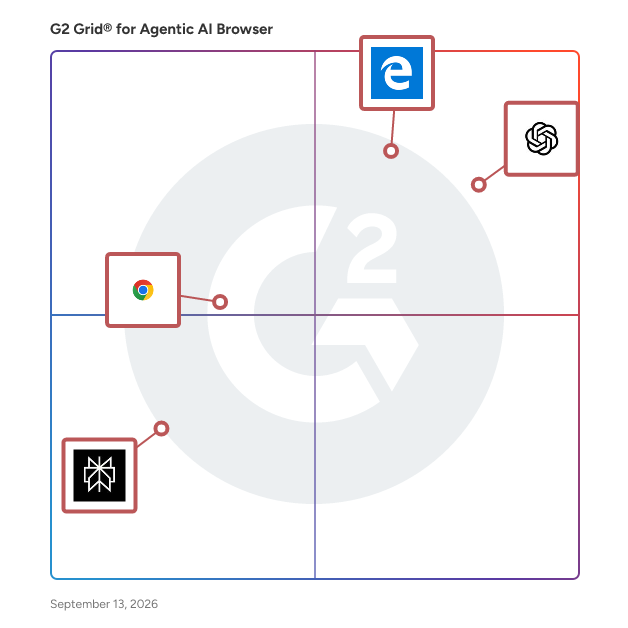
Highlighted products: ChatGPT Atlas, Microsoft Edge, Chrome Enterprise, and Comet.
Underlying data: [Grid® JSON](https://www.g2.com/categories/agentic-ai-browser/grids.json?focus%5B%5D=chatgpt-atlas&focus%5B%5D=microsoft-edge&focus%5B%5D=chrome-enterprise&focus%5B%5D=perplexity-ai-comet)
Kitesurf is an agent-first web browser from Cloudflare, built for AI agents rather than human users. Written in Rust and compiled to WebAssembly, it runs entirely in V8 isolates on Cloudflare Workers and spins up per request, using roughly 3 to 4 times less CPU and 5 to 7 times less memory than Chromium on common agentic tasks such as screenshots and HTML extraction. It drops what only humans need (tabs, extensions, themes, pixel-perfect rendering) and optimizes instead for token count, context windows, scalability, and cost, and it already passes more than 215,000 Web Platform Tests. Developers building agentic workflows reach it through Cloudflare's Browser Run service, free while in beta, without standing up their own browser infrastructure. Suggested category: Agentic AI Browser (secondary: Browser Automation).
Connect G2 to Claude or ChatGPT for answers grounded in G2's trusted reviews, comparisons, and pricing from real user insights.
Robomonkey lets you build custom Chrome extensions, browser automations, and data scraping tools in minutes using AI, without writing any code. It's designed for anyone who wants to automate web tasks, create browser extensions, or extract data from websites quickly and easily. Perfect for developers looking to ship extensions faster, marketers automating workflows, and businesses needing web automation tools without custom development. FEATURES • No Code Builder: Create browser extensions and automation tools without writing a single line of code. • Web Automation: Easily automate repetitive tasks you normally do in your browser. • Data Extraction: Quickly pull and scrape information from any website you need. • Custom Extensions: Build personalized Chrome extensions in just minutes. • Workflow Speed: Get your projects up and running much faster than traditional development. • AI Powered: Use smart technology to handle the technical heavy lifting for you.
Introducing Sigma AI Browser: Your Intelligent and Secure Web Experience Sigma AI Browser reimagines web browsing with a powerful suite of integrated AI tools, prioritizing both innovation and user security. More than just a browser, Sigma will be able to act as your personal AI agent, streamlining your online tasks and enhancing your digital life. The big update will follow in August 2025! Key Features & AI Agent Capabilities: Built-in AI Chat: Engage in natural language conversations to get answers, explore ideas, and receive personalized recommendations. Enhanced Privacy: Prioritizes your security with end-to-end encryption, a strict no-tracking policy, and robust online protection against phishing sites. Compliant with GDPR and CCPA. Advanced Search Capabilities: Leverage AI-powered search to quickly find relevant information, filter results, and uncover insights. AI-powered Content Generation: Generate high-quality text, summaries, and creative content with ease. Pre-installed AI Tools: Sigma Chat: Your central hub for interacting with the browser’s AI capabilities. Sigma GPT: Dedicated AI chat interface for complex queries and creative writing. Sigma Summarizer: Condenses lengthy articles and web pages into concise summaries. Sigma Compose: Assists with writing emails, documents, and other content. Crypto Wallet: Securely manage your digital assets directly within the browser. Getting Started with Sigma AI Browser: Download and install Sigma AI Browser for your operating system (Windows, macOS, Linux). Activate AI Chat within the app and start asking questions or creating content. Utilize the built-in extensions like SigmaGPT for chatting with AI and unlocking the full potential of your AI agent.
Strawberry is an AI agent platform for non-technical people and teams. Its agents run on your own computer, inside the browser, using the same tabs, logins and tools you already work with, so there is nothing to wire up before they can help. Ask in plain language and an agent researches leads, fills in spreadsheets, drafts replies, updates your CRM or pulls a report together. It has integrations with all the big services and works on any website, and you approve anything that matters before it is sent. With Strawberry 1.0 you build AI companions, virtual colleagues that learn how your team works, and share them with your team. Companions run routines on a schedule or a trigger and split big jobs across parallel sub-agents. Available for macOS and Windows, with a free plan.
T3rnel Browser is a browser extension that integrates developer tools with AI agent capabilities via a Model Context Protocol interface. It offers CSS inspection for clean, copyable CSS, full-page screenshot capture handling sticky headers and lazy-loaded content, and markdown file viewing. Operating within logged-in browser profiles, it avoids re-authentication and automation detection issues. Safety features include credential redaction, confirmation prompts for page-altering actions, and timeline scrubbing for reviewing automation. Additional tools include accessibility and spelling audits, link validation, test code export, an encrypted identity vault, color picker with palette export, cache clearing, React component inspection, and form filling. All processing is local, with integration across MCP clients and development environments.
