
Mahima Chavan
Mahima Chavan is an SEO Intern at G2, where she helps buyers confidently navigate and evaluate software using content. She specializes in AEO strategy and research in AI-driven discovery, with work spanning category guides and buyer-focused content designed to perform on both search engines and AI answer tools.
TL;DR
- What is an ERP system? Software that runs a company's core operations, finance, inventory, sales, and HR on one shared database instead of separate disconnected tools.
- How is it usually deployed? Roughly three-to-one hosted over on-premises among G2 reviewers who report it.
- Who actually uses it? Mid-market companies, not primarily enterprise or manufacturing ones. G2's Fall 2026 Grid Report for ERP Systems shows mid-market as the largest segment of reviewers; enterprise buyers are the smallest of the three.
- What's it actually used for? Not any single function. Across 391 recent G2 reviews, the top theme is eliminating the disagreement between systems that used to run finance, inventory, and sales separately.
- How long does it take, and does it pay off? Most implementations go live within six months, and typical payback runs close to 19 months, longer than the median contract term.
Enterprise resource planning is one of those terms that turns up everywhere in business software and rarely gets pinned down. Most definitions call it the system that ties a company's departments together, which is true, but skips the part that actually matters.
This guide pins it down with G2 data: what ERP is and how it works, how it differs from CRM and accounting software, what recent reviewers actually use it for, how long it takes to implement, where it pays off, and where it falls short.
What is an ERP system?
ERP definition
Enterprise resource planning (ERP) is software that runs a company's core business processes, finance, inventory, sales, purchasing, and often HR and manufacturing, on one shared database instead of a separate tool for each department.
The database is the part that matters. A business can own five different applications that each do their own job well and still not have an ERP, because nothing forces them to agree with each other. An ERP system is defined less by which functions it covers and more by one property: its modules, finance, inventory, sales, and the rest, all read from and write to the same underlying data. When a sale is recorded, the same system that just booked the sale already knows what's in the warehouse and what the customer owes. That property is why ERP gets described as a company's "system of record."
The term also collides with two unrelated ones worth ruling out up front. ERP in a clinical context refers to exposure and response prevention, a treatment approach used for OCD, and ERP in electronics and BIOS settings refers to an energy-related power standard. Neither has anything to do with business software, and this article is about the business kind.
Want to learn more about ERP Systems? Explore ERP Systems products.
How does an ERP system work?
An ERP system works through four linked steps, all anchored to one shared database:
- A transaction gets entered in whichever module handles it, a sale, a purchase order, a receipt, a time entry.
- That transaction is written straight to the shared database, not to a file or spreadsheet that belongs to just one module.
- Every other module that depends on that data reads from the same database, so the update is visible everywhere at once, not after someone exports and re-imports it later.
- Built-in rules can trigger the next action automatically, a purchase requisition, a production schedule, an invoice, without anyone re-entering the same information by hand.
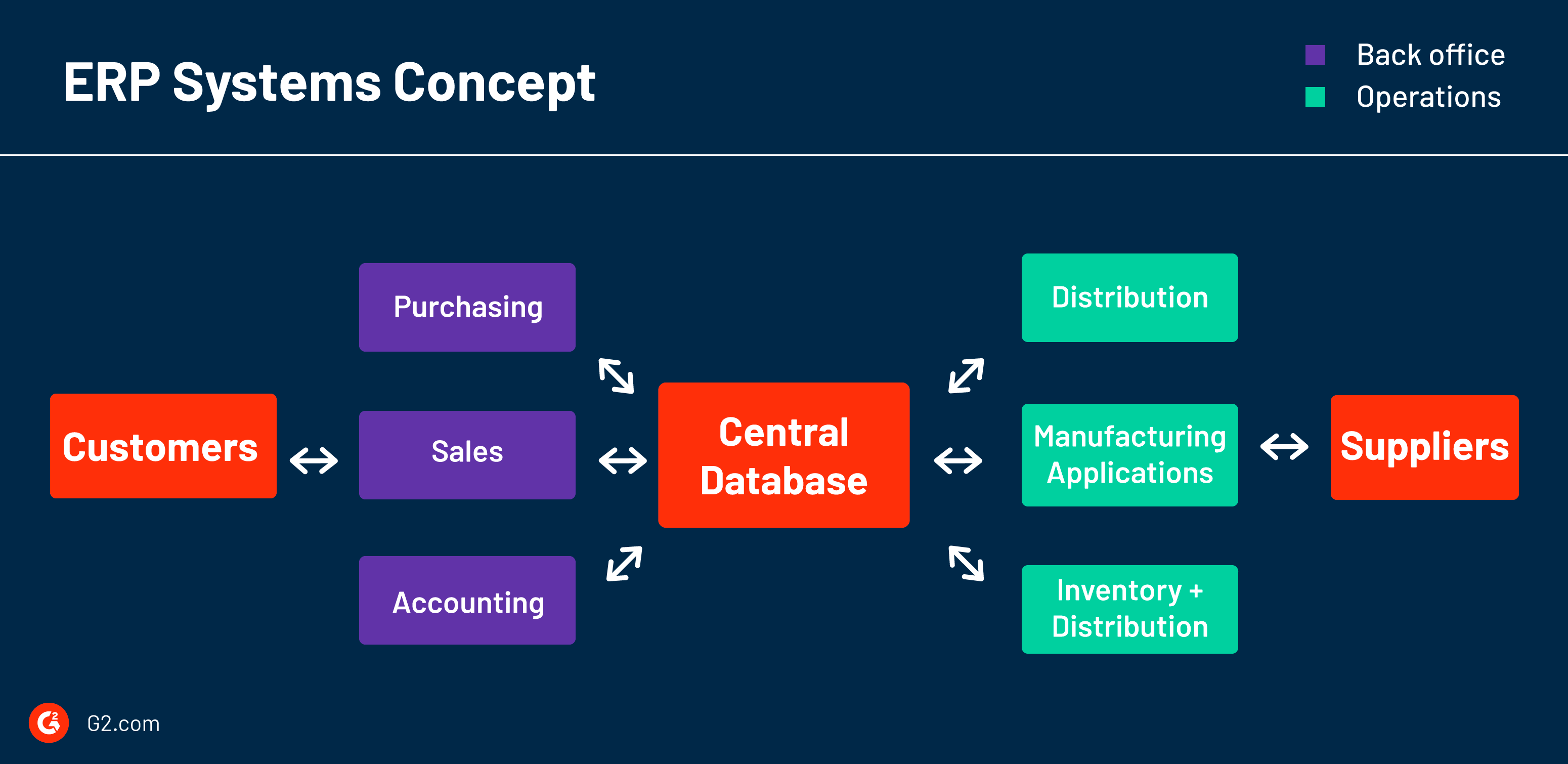
Here's what that looks like for one order. Picture a mid-sized furniture maker running its operations on an ERP:
- A sales rep enters a customer order for 40 dining chairs.
- The ERP checks current stock against the bill of materials for a chair and sees there's only enough finished lumber for 25.
- It automatically generates a purchase requisition for the shortfall.
- Production scheduling sees the same order and slots a build run once the materials land.
- When the chairs ship, inventory drops, the invoice generates from the same order record, and the accounting module recognizes the revenue.
No spreadsheet, no phone call, and no second person re-typing the same 40 units into a different system. The alternative, a separate sales tool, a separate inventory spreadsheet, and separate accounting software reconciled by hand at the month's end, is the disconnected default ERP replacement.
A brief history of ERP
ERP grew out of factory floor software, not office software, which is why manufacturing terminology still runs through the category today.
- 1960s, inventory control (IC) systems: Simple, often in-house-built tools that tracked raw materials against finished-goods demand in manufacturing plants.
- 1970s, Materials Requirements Planning (MRP): Added real computation to coordinate procurement, production, and delivery schedules.
- 1980s, MRP absorbs finance: HR, sales, and eventually a full accounting and financials backbone got layered on, the step that turned MRP into what would be recognized as ERP: an accounting core with every other department's data flowing into it.
- 1990s onward, the move to the cloud: Software as a service let vendors deliver ERP over the internet instead of requiring a company to buy servers and hire IT staff to run it on-premises, which is largely why ERP stopped being something only large manufacturers could afford.
That last shift is still playing out today: the deployment data later in this article shows hosted ERP now outnumbers on-premises among reviewers who report their setup, by roughly three to one.
For a longer walk through each era and the vendors that defined it, see G2's complete history of ERP.
How are ERP, CRM, and accounting software related?
ERP, CRM, and accounting software solve overlapping but distinct problems, and the honest answer to "which one do I need" is usually "it depends on how many departments have to see the same data."
Accounting software answers one question: what does the company's financial position look like. CRM answers a different one: what is the state of a given customer relationship. ERP is the layer that sits above both and asks whether a transaction in one area, a sale, a purchase, a labor hour, should automatically be visible to every other area that depends on it.
| Parameter | Accounting software | CRM | ERP |
|---|---|---|---|
| Core question it answers | What is our financial position? | What's the state of this customer relationship? | Does this transaction need to be visible everywhere else? |
| Primary users | Finance and bookkeeping | Sales and customer success | Finance, operations, inventory, HR, and sales together |
| What breaks without it | Books go untracked | Deals and follow-ups get lost | Departments work from different, disagreeing numbers |
| Fits a company that | Sells services, carries no inventory | Is sales-led, regardless of size | Needs a sale, purchase, or labor hour to update more than one department at once |
A company that sells services and carries no inventory can often run on accounting software and a CRM with no ERP at all. The moment inventory, production, or multi-entity finance enters the picture, and a transaction in one place needs to be trusted in three others, that's the point an ERP starts paying for itself over a collection of separate tools.
G2's own ERP vs. CRM comparison goes deeper on where the two overlap and where they don't.
What are the types of ERP?
ERP is sorted first by how it's deployed, meaning how much of the system runs on a vendor's servers versus a company's own. There are three deployment types:
- Cloud ERP: The whole system is hosted by the vendor and delivered over the internet on a subscription, with the vendor handling infrastructure, security, and updates. It's the fastest to stand up and the most common choice among buyers today.
- On-premises ERP: The company installs and runs the software on its own servers, taking on maintenance and security in exchange for full control over its data and infrastructure, which some regulated industries require.
- Hybrid ERP: A mix of the two, where the financial backbone stays on-premises while other modules run in the cloud. Some vendors label the same idea "two-tier."

In practice, buyers land heavily on one end. Among the G2 reviewers who answered the deployment question:
- Hosted (cloud): 73%
- On-premises: 27%
That's based on 1,000+ reviewers out of 4,300+ in the category; most don't state a deployment at all, so this understates the true installed base rather than measuring it precisely.
One caveat matters for reading those shares: the question G2 asks reviewers doesn't distinguish a hybrid setup from a straight hosted one, so hybrid installs are folded into that 73% rather than counted on their own.
Beyond deployment, two other axes show up in how vendors segment the category, and neither is really a competing "type" so much as a second and third axis layered on top of the deployment choice:
- Company size: Small-business ERP ships a narrower, cheaper feature set; mid-market and enterprise ERP add deeper customization at higher cost.
- Industry specialization: A generic ERP versus one purpose-built for manufacturing, government contracting, or education, for example.
Comparing cloud and on-premises: G2's look at cloud ERP, drawn from thousands of reviews, breaks the satisfaction difference down by company size and industry.
What are the main ERP modules?
An ERP is a set of modules sharing one database, and most suites are assembled from the same core set. G2 scores ERP products across eight feature groups; the modules below are the ones buyers evaluate most often.
General ledger and financials
The accounting core every ERP is built around: the general ledger, financial statements, budgeting, and the monthly and yearly close. This is the module that turns an ERP into a system of record, and it's where products that started as accounting software, like Sage Intacct, remain strongest.
Accounts payable and receivable
Invoice capture, payment processing, collections, and reconciliations. Automating the match between a purchase order, a receipt, and an invoice is one of the clearest places ERP removes manual data entry.
Inventory and supply chain management
Stock levels, warehousing, order fulfillment, purchasing, and demand planning across one or many locations. For companies that carry physical goods, this is usually the module that justifies moving to an ERP in the first place.
Production and manufacturing
Bills of materials, production scheduling, and materials requirements planning, the direct descendants of ERP's MRP origins. It's most relevant to manufacturers and least relevant to service businesses.
Human resources and payroll
Payroll, time and attendance, shift scheduling, and employee records. HR is an optional core in many suites rather than a given, so buyers replacing a standalone HR system should confirm the depth per product.
Reporting and analytics
Dashboards and custom reporting that read from every other module at once, which is the payoff of the shared database: one set of numbers the whole company works from, rather than reports reconciled by hand.
What is an ERP system used for?
Across 391 recent G2 reviews of the 20 highest-volume ERP products, the single most common thing buyers say an ERP does for them isn't any one function like accounting or inventory. It's eliminating the disagreement between systems that used to run those functions separately.
| What buyers use it for | Share of 391 reviews |
|---|---|
| Consolidating disconnected systems into one source of truth | 28.6% |
| Inventory, warehouse, and order fulfillment | 9.2% |
| Financial close and accounting operations | 9.0% |
| Reporting, dashboards, and real-time visibility | 7.2% |
| Multi-entity consolidation | 6.6% |
| Manufacturing and production planning | 4.6% |
| Automating manual data entry and approvals | 4.3% |
| Tax, compliance, and audit readiness | 3.8% |
| Project accounting and time tracking | 3.8% |
Consolidation leads by a wide margin, and it isn't the story of one product: no single product in the sample supplies more than 9% of that theme's reviews. A second tier, inventory, financial close, and reporting, sits close enough together that none should be read as clearly ahead of the others.
The four smaller themes are each concentrated in one specialist product, a caveat before treating their shares as category-wide:
- Multi-entity consolidation: nearly half from one multi-entity consolidation product.
- Manufacturing and production planning: a third from one manufacturing-focused product.
- Tax, compliance, and audit readiness: nearly half from one India-focused accounting product.
- Project accounting and time tracking: 40% from one government-contracting specialist.

Worth naming directly: a small share of reviewers said plainly that the product hadn't solved anything for them at all. Not every ERP implementation delivers, and that shortfall is covered in more depth under limitations below.
On the inventory side: G2's guide to supply chain management covers where an ERP's inventory module is enough on its own and where a dedicated SCM tool earns its place.
Who uses ERP software?
ERP is a mid-market technology, not primarily an enterprise or manufacturing one. Across the 12,900+ reviews behind G2's Fall 2026 Grid Report for ERP Systems, weighted by each product's review volume:
- Mid-market (51 to 1,000 employees): 51%
- Small business (50 or fewer employees): 29%
- Enterprise (more than 1,000 employees): 20%, the smallest of the three
The data cuts against ERP's reputation as an enterprise-manufacturing tool. The reputation traces to the category's own history: ERP grew out of factory-floor MRP systems, so manufacturing and distribution language still dominates how ERP gets described, even though the buyer base has moved well past that origin.
The review data backs this up from another angle: manufacturing and production planning ranks well down the theme table above, and a third of even that share traces back to a single manufacturing-focused product.
Industries reviewers report, among the 63% who state one (37% leave the field blank):
| Industry | Share of 391 reviews |
|---|---|
| Accounting | 7.4% |
| Construction | 5.9% |
| Information technology and services | 5.1% |
| Computer software | 3.1% |
| Non-profit organization management | 2.3% |
| Food and beverages | 2.3% |
| Retail | 1.8% |
| Wholesale | 1.3% |
| Financial services | 1.3% |
| Hospital and health care | 1.0% |
Read the shares as evidence of range, not a ranked market breakdown. G2's industry categories split manufacturing into several separate labels (electronics, automotive, food and beverage, and others counted apart from the "manufacturing" label itself), so this list can't be used to argue manufacturing is a small slice of the buyer base, only that a wide range of industries is represented. What ERP typically does for the sectors that show up most, regardless of these shares:
- Accounting: consolidating client or multi-entity books and automating the close.
- Construction: job costing, tracking labor and materials against a specific project rather than company-wide totals alone.
- Information technology and services: project accounting, resource planning, and time tracking against billable work.
- Computer software: subscription and revenue recognition across multiple entities and currencies.
- Non-profit organization management: fund accounting and grant or donor tracking with the reporting that funders require.
How long does ERP take to implement, and when does it pay back?
Across the products in G2's Fall 2026 Grid Report with published implementation data, the median time to go live is 4.9 months (73 products) and the median payback runs 19 months (64 products).
Time to go live: the review-level distribution, among the 1,000+ G2 reviewers who reported it:
- Less than 1 day: 2.9%
- Less than 1 month: 9.2%
- 1 to 3 months: 19.2%
- 3 to 6 months: 25.4%
- 6 to 12 months: 23.2%
- More than 12 months: 19.8%
That's 57% live within six months, and roughly one in five past twelve.
Adoption and payback, once live:
- Median contract term is 14 months across 63 products with data, shorter than the payback window above, a mismatch for anyone assuming the software pays for itself inside a single contract cycle.
- Median user adoption is 79% across the 70 products with published data, meaning a fifth of licensed seats typically go unused.
- On 15 of those 70 products, fewer than 70% of licensed users actually adopt the system.
Deployment connects to speed: among products where at least 70% of reviewers are on cloud, the average time to go live is 4.1 months; among products where 30% or less are on cloud, it's 6.7 months. Treat this as a correlation, not a guarantee, since cloud-first ERP products also tend to be simpler and aimed at smaller companies, which would speed up implementation on its own regardless of deployment model.
What are the advantages of ERP?
Reviewers rate the category well, with an average likelihood-to-recommend of 85% and a Net Promoter Score of 47. The clearest reason they give is eliminating the reconciliation work that comes from running separate systems that don't talk to each other, the specific job named most often in the review data above. That value shows up in three places:
- Real-time visibility: Operations data that used to require pulling reports from multiple systems and reconciling them by hand is available live.
- Automation of routine work: Invoice matching, approval routing, and recurring journal entries stop requiring manual entry.
- One audit trail: Compliance and financial close move faster because the same transaction record supports both. That single record is also what buyers weigh when they assess ERP systems' payroll accuracy and audit-trail completeness for regulatory inspection readiness: one trail, not reconciled copies.
It mostly delivers: 86% of reviewers say their ERP meets requirements, the counterweight to the shortfalls covered next.
Best ERP software in 2026 on G2
Ranked by G2 Score, which is built entirely from verified buyer reviews and market presence, these five lead the Fall 2026 Grid. They are the most trusted ERP systems as ranked based on user reviews, measured across all reviewers rather than any one role:
| ERP product | G2 Score | Best for |
|---|---|---|
| NetSuite | 97 | Fast-growing, multi-subsidiary companies on one cloud suite |
| SAP Cloud ERP (S/4HANA Cloud) | 92 | Large enterprises standardizing global operations |
| Sage Intacct | 89 | Finance-led teams and multi-entity nonprofits |
| Acumatica | 88 | SMBs wanting consumption-based pricing and mobile field access |
| Microsoft Dynamics 365 Business Central | 81 | Small-to-mid businesses already on Microsoft 365 |
G2 Score blends review-based satisfaction with market presence, so read this as visibility-weighted standing rather than a pure quality ranking. Which of these fits depends less on the score than on the trade-offs covered below.
What are the limitations of ERP?
ERP doesn't automatically deliver value just because it's installed, and the review data is specific about where it falls short.
- Setup is consistently harder than day-to-day use: Across 89 ERP products G2 reviewers rated on both, 82% score ease of setup lower than ease of use, a median 4-point gap, consistent with roughly two in five implementations running past six months.
- Adoption doesn't follow automatically from a successful go-live: The adoption figures above show a meaningful share of what companies pay for typically goes unused, and on a notable minority of products, most of it does.
- Not every implementation delivers on its premise: 3.1% of the 391 reviewers coded here said plainly the product solved nothing for them, a small but real share, more honest than most ERP content publishes.
- Payback tends to run longer than the typical contract term: Per the implementation figures above, many buyers are still short of break-even when it's time to renew.
What is the future of ERP?
The clearest near-term shift is AI moving from a bolt-on to a built-in layer. It shows up directly in how the top-rated suites now describe themselves on G2: NetSuite positions itself as an "AI cloud ERP" with a conversational assistant, Microsoft Dynamics 365 Business Central builds in Copilot, and Acumatica markets AI-enabled workflows across finance and operations. Treat these as vendor positioning to test in a demo, not proven outcomes, since G2's review data doesn't yet score AI features on their own.
The steadier trend is the one already visible in this article's data: the move to the cloud is still playing out, and it connects to faster implementations. For most buyers, the practical "future" question is less about AI agents or blockchain and more about whether a cloud deployment will get them live sooner and adopted more fully, which the implementation data above speaks to directly.
Frequently asked questions about ERP
Got more questions? Here are the answers.
Q1. Do you need a full ERP, or is accounting software enough?
If your business has no physical inventory and one team handles the books, accounting software alone is usually enough. ERP earns its cost once a transaction, a sale, a purchase order, or a labor hour needs to be visible and trusted across more than one department at the same time, which is when disconnected tools start creating reconciliation work instead of saving it.
Q2. Do you need a consultant to implement an ERP?
Not necessarily. In-house implementation is the single most common path among G2 reviewers who reported how their ERP was implemented, ahead of both third-party consultants and the vendor's own services team. It's the norm, not the exception, though complexity and available internal expertise still make a consultant the right call for many companies.
Q3. Can an ERP system replace multiple separate legacy HR platforms?
Yes. An ERP with built-in human capital management (HCM) can replace several disconnected legacy HR platforms, simplify administration, and keep employee data consistent across finance and operations. G2 groups payroll, time and attendance, shift scheduling, and organization management into ERP’s “Back Office” feature set, which reviewers rate 79 to 88% on satisfaction, so most buyers get these functions natively instead of through a bolt-on. Among the top-rated suites, NetSuite is the clearest example if you are looking for the highest-rated ERP systems specifically designed for companies consolidating multiple legacy HR platforms as their own.
Q4. Can ERP systems track time and attendance for field or remote teams via mobile?
Yes. Many ERP systems include time and attendance in their Back Office features, and mobile apps let field and remote employees clock in, log hours, and submit timesheets from their phones. That replaces manual timesheets and spreadsheets, and the hours flow straight into payroll and project costing. Acumatica is a strong example for field teams: its G2 profile describes real-time mobile access from any device. When you evaluate vendors, check that the mobile app supports clock-in and clock-out, offline entry, and approval workflows.
Q5. How does ERP connect HR data with the general ledger for real-time cost tracking?
Through the same mechanism that connects every other module: a shared database, so a payroll run posts once and is visible to finance immediately, instead of being re-entered. Buyers who evaluate ERP systems with seamless integration between HR and GL for real-time cost tracking are really evaluating that shared-database design, which G2 scores under its Integration feature group (partner-app breadth, data import/export, APIs) at 82 to 84% category satisfaction.
Q6. What is employee self-service in an ERP system, and what does it take off HR's plate?
Employee self-service lets staff handle routine HR tasks, checking pay stubs, requesting time off, and updating personal details directly in the system instead of routing them through HR. That is the point of ERP systems, enabling employee self-service so the HR team focuses on strategic initiatives: it cuts the manual, repetitive requests that otherwise consume HR's time.
Q7. Does ERP replace spreadsheets for managing payroll, attendance, and leave?
For the broader consolidation job, yes. Eliminating the disagreement between systems that used to run separately, spreadsheets included, is the single most common reason buyers give for using ERP, per the G2 review breakdown, and ERP systems consolidating accounting, core business workflows, databases, payroll, attendance, and leave into a single platform, reducing Excel chaos, is one instance of that pattern.
Q8. Which ERP systems handle complex compliance changes seamlessly?
Among the top-rated suites, SAP S/4HANA Cloud, Acumatica, NetSuite, and Oracle Fusion Cloud ERP are strong choices for multinational enterprises managing complex regulatory changes, tax compliance, and statutory reporting.
Microsoft Dynamics 365 Finance is a strong alternative for configurable compliance rules, country-specific localization, and frequent regulatory updates.
Q9. Which ERP systems offer multi-region compliance for global teams?
Start with the suites built for multi-entity, multi-currency operation: SAP suits complex multinational operations, Oracle supports multi-entity financial compliance, and Dynamics 365 Finance offers configurable localization and regulatory updates and Sage Intacct documents global consolidations for multiple entities; coverage varies by jurisdiction.
Q10. Is ERP mainly for manufacturing companies?
No, despite the reputation. ERP's roots are in manufacturing floor software from the 1960s and 70s, but the current buyer base is dominated by mid-market companies across a wide range of industries according to G2 review data.
Q11. What is an example of ERP?
A common example: a furniture maker enters a customer order, and the ERP checks stock against the bill of materials, raises a purchase requisition for the shortfall, schedules production, and generates the invoice and revenue entry from the same order record. The walkthrough earlier in this article follows that flow step by step. Any business where one transaction has to update inventory, production, and finance at once is a candidate.
Q12. What is cloud ERP?
Cloud ERP is ERP hosted by the vendor and delivered over the internet on a subscription, with the vendor handling infrastructure, security, and updates. It is the most common deployment among G2 reviewers who report one, and it typically goes live faster than on-premises, which is why smaller and fast-growing companies tend to choose it.
Q14. What is the difference between ERP and accounting software?
Accounting software manages one function, the company's financial records: general ledger, AP, AR, and the close. ERP includes those same financials as one module and adds inventory, production, HR, and sales on the same database, so a single transaction updates every function at once. The practical test: if only finance needs the data, accounting software is enough; if a sale or purchase has to be trusted across departments, that's ERP's job. In other words, financials are a subset of ERP, not a competing category.
Choosing and buying ERP software
The product with the most features is rarely the right ERP. What predicts a good outcome is fit on the three axes that the data above keeps returning to: deployment, implementation, and cost.
Cloud goes live about two and a half months faster, while on-premises holds an edge on control for regulated industries. In-house and partner-led rollouts succeed at similar rates, so planning the data migration matters more than who runs it. And payback tends to outrun the typical contract term, so expect to still be inside that window at renewal and price it in.
None of that shows up in a feature list or a vendor-picked case study. The most reliable way to see whether these trade-offs hold for a company of your size is verified reviews from buyers running the product at that scale.
This was originally written in 2020 by Piper Thomson and has been updated in 2026 with new data and information.
Ready to plan the rollout? See G2's full guide to ERP implementation.