AI-Generated Results
Finding matches…
Gmail Backup & Export Software to PST and MBOX is a Windows desktop program for people who want a Gmail backup on their own disk and not only in the cloud. It connects to the mailbox over IMAP, shows each folder and label together with how many messages it holds, and writes whatever you tick as EML, MBOX or PST files. That makes it a practical route for Gmail backup export to PST and MBOX. Run it again later and it fetches only the messages that arrived since the previous pass, without downloading the rest again.
🛠️ How to use
1. Install the program and click Connect Gmail account.
2. Enter your address and a Google app password. Google issues one only after 2-Step Verification is switched on.
3. Tick the folders and labels to save, then pick EML, MBOX or PST and a target folder on any drive.
4. Click Start backup. Next time, open the same mailbox and click Download new emails.
💼 Why IT and office teams pick it
• The program writes the PST itself, so the machine doing the export to PST does not need Outlook installed.
• Access is read-only. Nothing in the account gets erased, moved or flagged as read, and messages come down to the PC directly, with no stop on third-party servers.
• A stopped or dropped run picks up at the same message. The program retries a lost connection several times and checks free disk space before it starts.
• Every Gmail label turns into a folder in the backup, so sorting by client or project carries over to disk.
• Presets cover Yahoo Mail and iCloud Mail, and any other IMAP server can be added by host, port and encryption.
👥 Who uses it
Home users keeping ten or more years of personal mail, freelancers whose client threads are sorted by Gmail labels, and the person who maintains PCs for family or a small office and runs a Gmail backup for several mailboxes one after another.
❓ FAQ
Does Gmail support PST files?
No. Gmail neither opens nor creates PST. This tool reads your mail over IMAP and builds the Outlook data file locally during the Gmail backup.
How do I backup my entire Gmail?
Tick every folder and label you use. All Mail is unticked by default so labeled messages are not stored twice, and you can tick it as well if you archive mail without labels.
How do I back up a very large Gmail mailbox?
Google sets a daily ceiling on IMAP downloads per account. When a run reaches it, the program stops and says so, and clicking Continue backup on another day resumes from that point.
Can I keep a Gmail backup on an external drive?
Yes. Any folder works as the target, including one on a USB disk, and later runs keep adding new messages to that same copy.
🆓 Free trial and system requirements
The free trial keeps the 25 most recent messages per folder, with no time limit. You need Windows 10 or 11, 64-bit, and a personal Google account with an app password to sign in.
Not seeing what you're looking for?
Dive deeper into "Erase.bg" on G2 AI

Super File Shredder is a free, advanced security tool for Windows that enables users to permanently delete sensitive data from their hard drives. By overwriting files multiple times using the US Department of Defense 5220.22-M erasure method, it ensures that deleted files cannot be recovered by any means.
Key Features and Functionality:
- Multiple Overwrite Algorithms: Utilizes the DOD 5220.22-M erasure method to overwrite data multiple times, ensuring complete and secure deletion.
- User-Friendly Interface: Features a simple and intuitive interface, allowing users to easily add files or folders for shredding through drag-and-drop functionality.
- Context Menu Integration: Offers the option to add a shortcut to the Windows context menu, enabling quick access to the shredding function without launching the main application.
- Support for Various Windows Versions: Compatible with multiple Windows operating systems, including Windows 7, 8, 8.1, 10, and 11.
Primary Value and Problem Solved:
Super File Shredder addresses the critical need for secure data deletion by providing a reliable method to permanently erase sensitive files. Traditional file deletion methods often leave data recoverable, posing a risk of unauthorized access. By employing advanced overwriting techniques, Super File Shredder ensures that confidential information is irretrievably destroyed, offering users peace of mind regarding their data privacy and security.

AbsoluteShield File Shredder is a Windows-based utility designed to securely and permanently delete files and folders, ensuring that sensitive data cannot be recovered by unauthorized parties. Unlike standard deletion methods that leave data retrievable, this tool employs advanced shredding algorithms to overwrite files multiple times, rendering them irretrievable.
Key Features and Functionality:
- Multiple Shredding Methods: Offers two primary shredding options:
- Quick Shred: Overwrites data twice, providing a faster deletion process.
- Standard Shred: Overwrites data seven times, offering enhanced security.
- Batch Processing: Allows users to select and shred multiple files or entire folders simultaneously, streamlining the deletion process.
- User-Friendly Interface: Features an intuitive interface that simplifies the selection and shredding of files, making it accessible for users of all experience levels.
- Windows Explorer Integration: Integrates with the Windows context menu, enabling users to right-click on files or folders and select the shredding option directly.
Primary Value and Problem Solved:
AbsoluteShield File Shredder addresses the critical need for data privacy by ensuring that deleted files are permanently destroyed and cannot be recovered through standard or specialized recovery methods. This is particularly valuable for individuals and organizations handling confidential information, as it safeguards against data breaches and unauthorized access. By providing a reliable and efficient means to securely erase sensitive data, the tool helps maintain privacy and compliance with data protection standards.

Kinoslide makes videos that teach. Upload a PDF, paste lecture notes, or describe a topic, and Kinoslide writes the script, draws the visuals, records the narration and renders the video. A two minute lesson takes about five minutes to produce.
Four formats cover most teaching needs. Dry Erase and Blackboard draw diagrams and equations stroke by stroke as the narrator explains, the way a teacher works at a board. Presentation produces narrated slides with charts, numbers and images from your material. Whiteboard sketches hand-drawn illustrations live. Paper Trail and Newspaper give explainers a printed, editorial look.
Narration and on-screen text come out in the language you choose, with eleven supported: English, French, Spanish, Portuguese, German, Turkish, Indonesian, Russian, Hindi and Arabic, on every plan. Voices come from Google and ElevenLabs. Every video renders in 16:9 or vertical 9:16 for shorts.
Pro and Scale plans add a storyboard step before rendering, so you can review the script, edit scenes, swap images and rerender only what changed. Project style rules and a steering prompt keep a series consistent across videos.
Kinoslide is used by teachers making lessons for their classes, course creators building a library, YouTube and TikTok educators publishing a series, and training teams turning SOPs and compliance material into video. A free plan includes five minutes of video.

The ViceVersa PST Split and Merge Software is a professional and easy way to split large Outlook PST files into several PST files and merge an infinite number of PST files into one PST file. An expert way to swiftly split or combine PST files without erasing data. Even if you are not technical, this software is easy to use. Windows operating system versions 11, 10, 8, 8.1, 7, XP, Vista, and others are all supported. It can split a PST file into multiple PST files and combine an infinite number of PST files into a single PST file without erasing any data, regardless of the size of the PST file. One of the best methods for dividing huge PST files into many PST files is to use the software. Users can install it and test out the free trial version because it is lightweight. Email clients are not necessary for splitting and merging large PST files. This application supports all MS Outlook versions, such as 2021, 2019, 2016, 2013, 2010, 2007, 2003, and 2000. All Outlook file formats, including ANSI and UNICODE, are supported.

VerifiedThreat (VT) transforms raw threat intelligence into active validation. By deploying autonomous, situational AI agents that chain vulnerabilities exactly like a human hacker, VT stress-tests your external attack surface in real-time—safely providing hard empirical proof, erasing false positives, and automatically updating your compliance ledger at the network edge

PhotoCraft used to rescue fading family photos without expensive professional restoration. It combines 16 one-click AI tools — enhancement, restoration, colorization, erasing, and background removal/changing — into a simple upload, click, and download workflow. Evolving from basic enhance and restore features through beta feedback, it now delivers fast, natural, high-quality edits in seconds.

Interactive whiteboard software that improves efficiency in education and business.
It’s a versatile interactive tasks software for business and educational environments. Leveraging interactive touch technology, it is ideal for classrooms and personal use on Interactive Panels, laptops, and tablets based on Windows OS. Note 3 software offers functions like writing, erasing, annotating, and drawing, facilitating superior teaching and presentations. It includes subject-specific tools and multimedia capabilities for diverse educational needs and professional presentations.

Tidying up your Zendesk data has never been easier! With the Purge My Zendesk app, you can clean up your Zendesk in just one click. Say goodbye to unnecessary tickets, users, and organizations hassle-free. Simply install the app, select the data you want to delete and start the bulk process. No more spending hours manually erasing contacts or tickets one by one. Now you can focus your valuable time on more important tasks.

SyncLink66 is a real-time multi-channel inventory visibility dashboard built for small e-commerce sellers. Monitor stock across Shopify, eBay, Etsy, and WooCommerce in one place for just $19.99/mo. Get real time low/out of stock alerts with direct links to update your listings manually. Stop overpaying for bloated automation that risks erasing custom listing data. We check your stores automatically, never your listings. No setup calls required. Nothing changes without you.

AVCLabs PhotoPro AI is a cutting-edge photo editing tool that utilizes state-of-the-art AI technology to provide a wide range of professional photo editing features. With this tool, you can easily enhance your photos, remove unwanted elements and backgrounds, boost image resolution, colorize monochrome images, retouch portraits, and stylize your photos to make them look more artistic and unique.
One of the standout features of AVCLabs PhotoPro AI is its ability to remove unwanted elements from your photos. Whether you have an unwanted background, an object that you want to remove, or a person that you want to erase from your photo, AVCLabs PhotoPro AI makes it easy to delete unwanted elements without leaving a trace.
In addition to removing unwanted objects, the tool is also great at improving the quality of your photos. With its smart AI algorithms, AVCLabs PhotoPro AI can enhance your photos by automatically adjusting brightness, contrast, saturation, and other parameters to produce a more detailed and vibrant image. Whether your photo is too dark, too bright, or lacks clarity, this tool can help turn it into a masterpiece.
If you have an old black-and-white photo that you want to bring to life, AVCLabs PhotoPro AI allows you to colorize it with just one click. AI will create a stunning and vibrant image that captures the essence of your photo in a way that black and white can't. This feature is particularly helpful for restoring old family photos to their former glory.
Finally, AVCLabs PhotoPro AI offers a variety of stylish filters and effects to transform your photos into works of art. From portraits to wildlife, animes, landscapes, architecture, and more, you can add a unique touch to your photos with just a few clicks. These effects are perfect for enhancing your social media posts, creating high-quality prints, or just adding a touch of creativity to your photo collection.
Overall, AVCLabs PhotoPro AI is a comprehensive and versatile photo editing tool that makes it easy to achieve professional-quality results with minimal effort. With its advanced AI technology and wide range of features, this tool is perfect for anyone who wants to take their photo editing to the next level.

Rmark AI is a powerful online suite designed for professional image and video cleanup. Effortlessly remove backgrounds, watermarks, and subtitles with our AI-driven tools. Simply upload your files to achieve high-quality, clean results in seconds.
FEATURES
• Background removal: Instantly strips away the background from any photo or video
• Watermark remover: Cleans up your files by erasing unwanted watermarks or logos
• Subtitle removal: Automatically detects and deletes text or subtitles from videos
• High quality output: Ensures your edited files look crisp and professional
• Fast processing: Delivers clean, polished results in just a few seconds
• Easy uploading: Lets you simply upload your files to get the work done
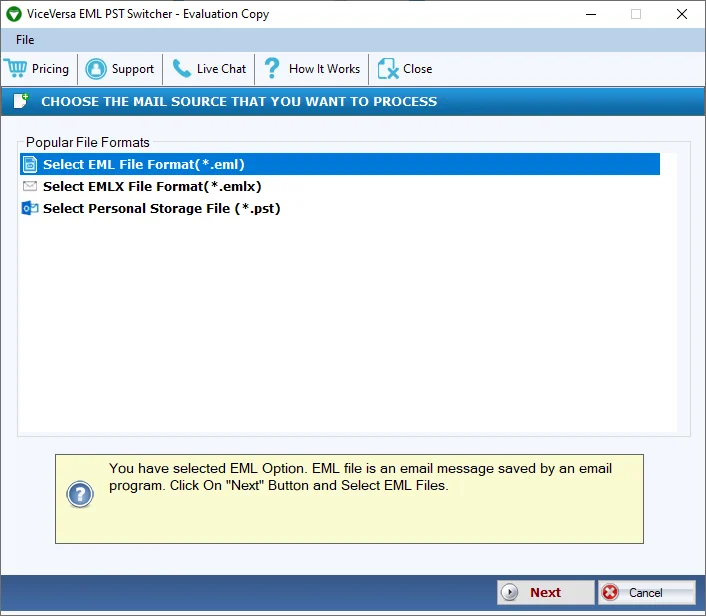
A professional option is the ViceVersa EML to PST & PST to EML Switcher, which effectively and simply switches PST files to EML format and EML files to PST files. Because of its easy-to-use interface, this application is the safest option for both experienced and novice users. This software makes it simple to switch ANSI and UNICODE PST files to EML files. All data is preserved during conversion procedures. It quickly and hassle-free switches numerous PST files to EML format and EML files to PST format. It offers users a demo version. With no size restrictions, it switches EML files to PST files and PST to EML formats. Consequently, the tool offers a quick way to switch Outlook PST files to EML files or EML files to PST files without erasing any data. Email clients that support EML include Microsoft Entourage, Mozilla Thunderbird, IncrediMail, Apple Mail, SeaMonkey, and WLM.
A group of dedicated individuals determined to help you erase prior financial defects from your record.

The TrustVare EML to MBOX Converter Tool is the best solution to convert EML files to MBOX file format. This software offers a safe and secure method of converting EML files into MBOX Mailboxes file format with Bulk Conversion. Without erasing any databases, this software transfers unlimited emails from WLM files to Thunderbird at once. It transforms Windows Live Mail to MBOX files without technical glitches. This platform has the option to view the preview before the migration process. It works with Windows OS and Microsoft Outlook versions. Users can Open WLM files with EML email clients like Windows Live Mail, Mozilla Thunderbird, Apple Mail, Eudora, Opera Mail, eM client, etc. Every individual and business User can use the application with or without technical expertise. It provides 24/7 customer guidance and an easy-to-use interface. A free demo version of this software is available for testing before making the purchase.
The TrustVare MBOX to EMLX Converter permits for conversion of data from MBOX files to EMLX format. For moving or migrating all MBOX data items, including attachments with the help of this tool. It successfully and error-free converts bulk MBOX files to EMLX at once. Any version of the Windows operating system can be used with this software. Check the email preview before moving from the mailbox to the EMLX folder. File size has no bearing on the ability to import MBOX files into EMLX format. It can easily and quickly convert a large number of MBOX files to EMLX in a single step. On any Windows operating system, use this application. When the MBOX to EMLX application converts MBOX files, the data integrity and folder structure is maintained. The program can convert an infinite number of MBOX files to EMLX without erasing any data. It also provides a free trial version to all users and migrates a few mbox files into emlx format for free.

Online AI image tools to remove backgrounds, make transparent PNGs, change background colors, erase objects and watermarks, plus Sora2 video watermark removal.

SysTools Data Wipe Software is designed to permanently erase sensitive data from storage devices, preventing recovery and ensuring privacy. With advanced algorithms and compliance with global standards, its motive is to safeguard data integrity during disposal or repurposing.

JWIZARD Cleaner is an all-in-one utility designed to clean your Mac. It identifies and eliminates unnecessary files, including outdated downloads, duplicates, temporary files, cache, and leftover data from uninstalled applications.
JWIZARD Cleaner provides the following capabilities:
System Cleanup: Conduct a comprehensive scan of your Mac to remove temporary files, logs, and cache, thus freeing up disk space and minimizing software conflicts.
Performance Boost: Enhance your Mac's startup speed by disabling unneeded applications at boot, leading to faster startup times and improved overall system efficiency.
Privacy Protection: Safeguard your privacy by erasing cookies, browsing history, and other potentially sensitive data that might be used for online tracking.
Application Uninstaller: Completely remove unwanted applications along with all their associated files and data, ensuring a thorough cleanup.
Duplicate File Removal: Reclaim valuable disk space by identifying and deleting duplicate files that are no longer needed.
Disk Space Optimization: Gain detailed insights into your disk usage and discover opportunities to optimize your storage.
Xcode Enhancement: Optimize the performance of Xcode by cleaning up its cache and index, making your development environment more efficient.
Remo Software is a software tools provider that empowers users to RECOVER, ERASE, MANAGE and OPTIMIZE data on Windows and Macintosh OS. A few best sellers include data recovery software for Mac and Windows OS and repair applications for corrupted MOV, AVI, PowerPoint, RAR, Word, Zip, and Outlook.