Best Browser Isolation Software

Last updated: November 14, 2026

How Many Browser Isolation Software Products Does G2 Track?

Total Products under this Category: 47

Category Stats (Nov 2026)

  • Average Rating: 4.48/5 The average rating of products in this category, based on all submitted ratings
  • Top Trending Product: Venn (+3.76%) - Among all products in this category, Venn recorded the largest rating increase compared to last month

Last updated: November 17, 2026

How Does G2 Rank Browser Isolation Software Products?

Why You Can Trust G2's Software Rankings:

  • 30 Analysts and Data Experts
  • 1,200+ Authentic Reviews
  • 47+ Products
  • Unbiased Rankings

G2's software rankings are built on verified user reviews, rigorous moderation, and a consistent research methodology maintained by a team of analysts and data experts. Each product is measured using the same transparent criteria, with no paid placement or vendor influence. While reviews reflect real user experiences, which can be subjective, they offer valuable insight into how software performs in the hands of professionals. Together, these inputs power the G2 Score, a standardized way to compare tools within every category.

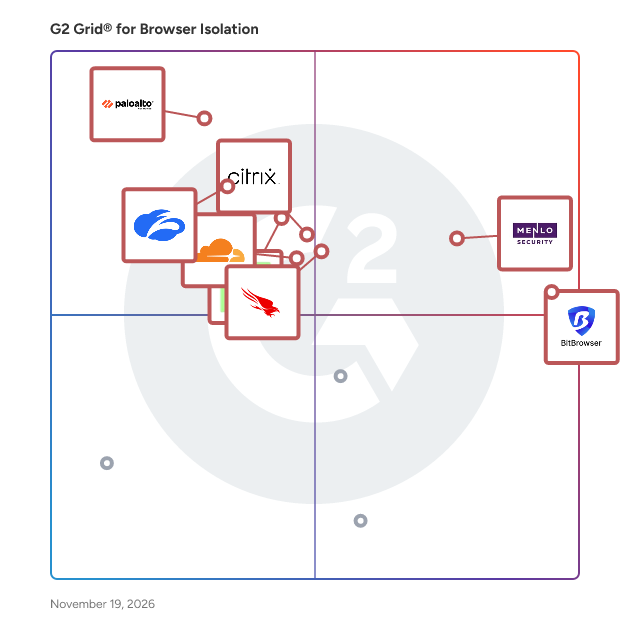
G2 Grid® for Browser Isolation Software

G2 Grid® for Browser Isolation Software plotting products by satisfaction and market presence

Highlighted products: BitBrowser, Menlo Security, Prisma Browser, Citrix SecurAccess with Chrome Enterprise, CrowdStrike Falcon Seraphic Enterprise Browser, Mimecast Email & Collaboration Security, Cloudflare One (SASE), and Zscaler Zero Trust Browser.

Underlying data: [Grid® JSON](https://www.g2.com/categories/browser-isolation/grids.json?focus%5B%5D=bitbrowser&focus%5B%5D=menlo-security&focus%5B%5D=prisma-browser&focus%5B%5D=citrix-securaccess-with-chrome-enterprise&focus%5B%5D=crowdstrike-falcon-seraphic-enterprise-browser&focus%5B%5D=mimecast-email-collaboration-security&focus%5B%5D=cloudflare-one-sase&focus%5B%5D=zscaler-zero-trust-browser)

BitBrowser

BitBrowser is an anti-detect browser built for teams and solo operators running multi-account operations e-commerce, social media, ad verification, and QA testing. Instead of juggling multiple devices or virtual machines, you manage isolated browser environments from a single desktop app—each with completely segregated fingerprints, proxies, cookies, and local data. Core Capabilities Profile Isolation: Granular control over hardware/software browser fingerprints, proxy routing, and independent storage per profile. Team work: Role-based access control (RBAC), profile sharing, and project-level permission management. Action Synchronization & RPA: Mirror keyboard/mouse actions across dozens of windows simultaneously, or build no-code RPA tasks for repetitive routines. Developer & Agent Tooling: Full Local API support for Puppeteer, Playwright, and Selenium, plus native MCP support for integrating external AI agents. Cloud Extensions: Seamless provisioning of BitCloudPhone (Android & native iOS instances) and BitCloudPC (dedicated Windows 10/11 virtual desktops). BitBrowser supports Windows and macOS. The free plan comes with 10 permanent profiles, with tiered subscriptions for higher limits, extra team seats, and cloud resources.

Average Rating: 4.7/5.0

Total Reviews: 173

How Do G2 Users Rate BitBrowser?

  • Ease of Setup: 9.4/10 (Category avg: 8.8/10)
  • Quality of Support: 9.3/10 (Category avg: 8.7/10)
  • Has the product been a good partner in doing business?: 9.3/10 (Category avg: 9.1/10)
  • Ease of Use: 9.4/10 (Category avg: 8.9/10)

Who Is the Company Behind BitBrowser?

Who Uses This Product?

  • Top Industries: Consumer Services, Accounting
  • Company Size: 68% Small, 2% Medium

What Do G2 Reviewers Say About BitBrowser?

AI-generated summary from verified user reviews

Pros
  • Users love the ease of use of BitBrowser, enjoying straightforward initial setup and efficient profile management.
  • Users value the easy accessibility of BitBrowser, especially for setting up and managing multiple accounts effortlessly.
  • Users appreciate the reliability of BitBrowser, enjoying stable performance and effective management of multiple profiles.
  • Users appreciate the browser efficiency of BitBrowser, finding it user-friendly and ideal for managing multiple accounts.
  • Users appreciate the strong safety and privacy features of BitBrowser, enabling efficient management of multiple accounts securely.
Cons
  • Users experience slow performance when multiple windows are open, impacting overall usability and efficiency.
  • Users feel the need for limited customization options in BitBrowser, particularly for advanced settings and integrations.
  • Users find that BitBrowser has slow loading times, especially when switching between multiple profiles, affecting usability.
  • Users face high resource consumption with BitBrowser, leading to slow performance when running multiple profiles simultaneously.
  • Users desire a more modern UI for BitBrowser, noting its current design feels outdated and could improve performance.

What Are Recent G2 Reviews of BitBrowser?

Menlo Security

Founded over a decade ago, Menlo Security is a global cybersecurity leader. Trusted by over 1,000 enterprises—including Fortune 500 companies and large government agencies—to protect eight million users, Menlo created the industry's first Browser Security Platform. Our platform transforms standard browsers into secure enterprise browsers using a synergistic architecture that combines local controls with the Menlo Secure Cloud Browser. Key capabilities include Adaptive Clientless Rendering (ACR) for safe cloud execution, H.E.A.T Shield AI to block zero-hour phishing, clientless Zero Trust access, and Data Loss Prevention (DLP) with Content Disarm and Reconstruction (CDR). Menlo delivers architectural immunity against evasive threats for both humans and autonomous AI agents. By solving the "Agentic Paradox," we prevent data exfiltration and block zero-day ransomware. Organizations can safely govern Generative AI, secure unmanaged BYOD endpoints, and replace costly VDI and VPNs—all without disrupting user productivity.

Average Rating: 4.6/5.0

Total Reviews: 52

How Do G2 Users Rate Menlo Security?

  • Ease of Setup: 9.2/10 (Category avg: 8.8/10)
  • Quality of Support: 9.0/10 (Category avg: 8.7/10)
  • Has the product been a good partner in doing business?: 9.5/10 (Category avg: 9.1/10)
  • Ease of Use: 9.4/10 (Category avg: 8.9/10)

Who Is the Company Behind Menlo Security?

  • Seller: Menlo Security
  • Year Founded: 2012
  • HQ Location: Mountain View, California, United States
  • LinkedIn® Page: www.linkedin.com
    503 employees on LinkedIn®

Who Uses This Product?

  • Top Industries: Banking, Financial Services
  • Company Size: 48% Large, 26% Medium

What Do G2 Reviewers Say About Menlo Security?

AI-generated summary from verified user reviews

Pros
  • Users value Menlo Security's innovative browser isolation, effectively protecting against web threats and enhancing overall cybersecurity.
  • Users value Menlo Security's innovative browser isolation technology that effectively protects against web-based threats and enhances security.
  • Users value the user-friendly setup of Menlo Security, praising its seamless deployment and effective threat prevention features.
  • Users commend Menlo Security for its innovative threat protection, effectively isolating browsing to prevent malware attacks.
  • Users appreciate the user-friendly setup of Menlo Security, finding it quick and easy to implement.
Cons
  • Users often experience slow performance with Menlo Security, particularly when accessing complex websites or downloading files.
  • Users encounter access issues with certain sites, particularly those using third-party authentication services, leading to frustrating disruptions.
  • Users report performance issues with Menlo Security, particularly with complex websites affecting overall user experience and efficiency.
  • Users often experience slow internet performance due to traffic inspection and blocked categories affecting their experience.
  • Users experience technical issues with websites and downloads, causing occasional frustration and confusion during use.

What Are Recent G2 Reviews of Menlo Security?

Prisma Browser

Prisma Access Browser is the only SASE-native secure browser to extend the power of SASE to any device, any user, any location, and any web application in minutes. With approximately 85% of daily work performed in a web browser and 95% of security incidents originating there, enterprises trust Prisma Access Browser to safeguard business-critical applications and data. Powered by Palo Alto Networks PrecisionAI™, which detects and blocks an average of 2.3 million new and unique attacks daily, Prisma Access Browser protects against advanced web-based threats and malware, malicious extensions, and compromised devices. It extends zero trust principles and last-mile data controls directly to the browser, delivering Enterprise DLP with over 1000 built-in data classifiers to protect sensitive information. Easily deployed in minutes—without admin privileges or disruption—Prisma Access Browser enhances productivity and delivers a frictionless, intuitive user experience. It provides powerful, seamless security for any user, on any device, from anywhere, empowering organizations to stay secure and agile in a rapidly evolving digital landscape.

Average Rating: 4.2/5.0

Total Reviews: 43

How Do G2 Users Rate Prisma Browser?

  • Ease of Setup: 8.4/10 (Category avg: 8.8/10)
  • Quality of Support: 8.0/10 (Category avg: 8.7/10)
  • Has the product been a good partner in doing business?: 8.6/10 (Category avg: 9.1/10)
  • Ease of Use: 8.1/10 (Category avg: 8.9/10)

Who Is the Company Behind Prisma Browser?

  • Seller: Palo Alto Networks
  • Year Founded: 2005
  • HQ Location: Santa Clara, CA
  • LinkedIn® Page: www.linkedin.com
    23,492 employees on LinkedIn®
  • Ownership: NYSE: PANW
  • Total Revenue (USD mm): $3,408

Who Uses This Product?

  • Top Industries: Information Technology and Services
  • Company Size: 49% Small, 35% Medium

What Are Recent G2 Reviews of Prisma Browser?

AI can help you find the answers. G2 helps you trust them.

Connect G2 to Claude or ChatGPT for answers grounded in G2's trusted reviews, comparisons, and pricing from real user insights.

How it works

Citrix SecurAccess with Chrome Enterprise

Citrix Secure Browser is service protects the corporate network from browser-based attacks by isolating web browsing. It delivers consistent, secure remote access to internet hosted web applications with zero end-point configuration.

Average Rating: 4.5/5.0

Total Reviews: 51

How Do G2 Users Rate Citrix SecurAccess with Chrome Enterprise?

  • Ease of Setup: 8.6/10 (Category avg: 8.8/10)
  • Quality of Support: 8.6/10 (Category avg: 8.7/10)
  • Has the product been a good partner in doing business?: 9.1/10 (Category avg: 9.1/10)
  • Ease of Use: 9.0/10 (Category avg: 8.9/10)

Who Is the Company Behind Citrix SecurAccess with Chrome Enterprise?

  • Seller: Citrix
  • Year Founded: 1989
  • HQ Location: Fort Lauderdale, FL
  • LinkedIn® Page: www.linkedin.com
    4,236 employees on LinkedIn®
  • Ownership: NASDAQ:CTXS
  • Phone: 408-790-8000

Who Uses This Product?

  • Top Industries: Information Technology and Services, Banking
  • Company Size: 48% Large, 37% Medium

What Are Recent G2 Reviews of Citrix SecurAccess with Chrome Enterprise?

What Are G2 Users Discussing About Citrix SecurAccess with Chrome Enterprise?

CrowdStrike Falcon Seraphic Enterprise Browser

Average Rating: 4.9/5.0

Total Reviews: 13

How Do G2 Users Rate CrowdStrike Falcon Seraphic Enterprise Browser?

  • Ease of Setup: 9.3/10 (Category avg: 8.8/10)
  • Quality of Support: 9.6/10 (Category avg: 8.7/10)
  • Has the product been a good partner in doing business?: 10.0/10 (Category avg: 9.1/10)
  • Ease of Use: 9.5/10 (Category avg: 8.9/10)

Who Is the Company Behind CrowdStrike Falcon Seraphic Enterprise Browser?

  • Seller: CrowdStrike
  • Year Founded: 2011
  • HQ Location: Sunnyvale, CA
  • LinkedIn® Page: www.linkedin.com
    21,058 employees on LinkedIn®
  • Ownership: NASDAQ: CRWD

Who Uses This Product?

  • Company Size: 46% Medium, 38% Large

What Are Recent G2 Reviews of CrowdStrike Falcon Seraphic Enterprise Browser?

Mimecast Email & Collaboration Security

Email Security, Cloud Integrated (CI) protects organizations against all forms of email-based attacks, from phishing and credential theft to ransomware and zero-day threats. This solution deploys behind M365 to collect emails after they have passed through Microsoft security, reinspect them, and take action as needed. With a setup time of just four minutes and out-of-the-box settings designed to optimize security immediately, Email Security CI delivers best-in-class efficacy in the simplest way possible. Customers get the full power of Mimecast’s AI-powered detection and threat intelligence in a solution built for the reality of navigating today’s hostile threat landscape with limited time and resources. Email Security CI also offers a fully integrated Awareness Training solution to help organizations easily and effectively reduce the risk of human error.

Average Rating: 4.4/5.0

Total Reviews: 382

How Do G2 Users Rate Mimecast Email & Collaboration Security?

  • Ease of Setup: 8.0/10 (Category avg: 8.8/10)
  • Quality of Support: 8.4/10 (Category avg: 8.7/10)
  • Has the product been a good partner in doing business?: 8.7/10 (Category avg: 9.1/10)
  • Ease of Use: 8.0/10 (Category avg: 8.9/10)

Who Is the Company Behind Mimecast Email & Collaboration Security?

  • Seller: Mimecast
  • Company Website:
  • Year Founded: 2003
  • HQ Location: London
  • LinkedIn® Page: www.linkedin.com
    2,388 employees on LinkedIn®
  • Ownership: NASDAQ: MIME

Who Uses This Product?

  • Who Uses This: IT Manager, Systems Administrator
  • Top Industries: Information Technology and Services, Legal Services
  • Company Size: 64% Medium, 18% Small

What Do G2 Reviewers Say About Mimecast Email & Collaboration Security?

AI-generated summary from verified user reviews

Pros
  • Users value the robust email security provided by Mimecast, effectively blocking threats and enhancing overall protection.
  • Users highlight the intuitive interface of Mimecast Advanced Email Security, making management and monitoring effortless.
  • Users value the strong protection against phishing and malware provided by Mimecast Advanced Email Security, ensuring safety and ease of management.
  • Users value the strong protection and ease of use of Mimecast Advanced Email Security for effective threat management.
  • Users appreciate the effective spam blocking capabilities of Mimecast Advanced Email Security, enhancing their email protection effortlessly.
Cons
  • Users find the complexity of the interface and steep learning curve to be challenging for new administrators.
  • Users report email filtering issues that can disrupt workflows, causing delays and complications with legitimate messages.
  • Users face email issues such as broken links and delays in quarantine workflows impacting their communication.
  • Users find the initial setup and configuration to be too complex, leading to challenges in usability.
  • Users face issues with false positives that lead to blocking legitimate emails, causing frustration and delays.

What Are Recent G2 Reviews of Mimecast Email & Collaboration Security?

What Are G2 Users Discussing About Mimecast Email & Collaboration Security?

Zscaler Zero Trust Browser

The Zscaler Zero Trust Browser is a cloud-delivered workspace that simplifies secure productivity for the enterprise. It transforms users’ existing browsers into seamless launchpads for secure web browsing and frictionless app access, on any device. With integrated security, real-time threat isolation and layered data protection are always at work—all while empowering IT teams with simplified management and budget-friendly solutions. Zscaler Zero Trust Browser isn’t just a browser—it’s a better way to work.

Average Rating: 4.2/5.0

Total Reviews: 17

How Do G2 Users Rate Zscaler Zero Trust Browser?

  • Ease of Setup: 8.1/10 (Category avg: 8.8/10)
  • Quality of Support: 8.2/10 (Category avg: 8.7/10)
  • Has the product been a good partner in doing business?: 8.6/10 (Category avg: 9.1/10)
  • Ease of Use: 8.2/10 (Category avg: 8.9/10)

Who Is the Company Behind Zscaler Zero Trust Browser?

  • Seller: Zscaler
  • Company Website:
  • Year Founded: 2008
  • HQ Location: San Jose, California
  • LinkedIn® Page: www.linkedin.com
    9,150 employees on LinkedIn®
  • Ownership: NASDAQ:ZS

Who Uses This Product?

  • Company Size: 41% Small, 35% Medium

What Are Recent G2 Reviews of Zscaler Zero Trust Browser?

Cloudflare One (SASE)

Cloudflare One is a single-vendor secure access service edge (SASE) platform that converges security and networking services into a unified, global connectivity cloud. It replaces legacy, fragmented hardware and first-generation SASE solutions with a composable, programmable architecture. Cloudflare One connects and protects an organization's workforce, AI agents, and infrastructure. Learn more at https://www.cloudflare.com/sase/ Designed for agility, it enables teams to: - Accelerate safe AI adoption with granular visibility, control, and AI agent governance. - Modernize remote access by replacing clunky VPNs with zero trust access. - Block email phishing attacks with flexible, SASE-native email security. - Protect web traffic for remote users and branch offices with lightweight DNS filtering. - Deploy “coffee shop networking” with a light branch, heavy cloud approach.

Average Rating: 4.6/5.0

Total Reviews: 104

How Do G2 Users Rate Cloudflare One (SASE)?

  • Ease of Setup: 8.8/10 (Category avg: 8.8/10)
  • Quality of Support: 9.2/10 (Category avg: 8.7/10)
  • Has the product been a good partner in doing business?: 9.4/10 (Category avg: 9.1/10)
  • Ease of Use: 9.0/10 (Category avg: 8.9/10)

Who Is the Company Behind Cloudflare One (SASE)?

  • Seller: Cloudflare, Inc.
  • Year Founded: 2009
  • HQ Location: San Francisco, California
  • LinkedIn® Page: www.linkedin.com
    8,094 employees on LinkedIn®
  • Ownership: NYSE: NET

Who Uses This Product?

  • Top Industries: Information Technology and Services, Computer & Network Security
  • Company Size: 39% Small, 33% Medium

What Do G2 Reviewers Say About Cloudflare One (SASE)?

AI-generated summary from verified user reviews

Pros
  • Users value the ease of use of Cloudflare One, appreciating its intuitive design and seamless integration with existing systems.
  • Users praise the excellent threat protection of Cloudflare One, ensuring security without compromising performance.
  • Users value the reliability of Cloudflare One, ensuring consistent performance and security for seamless operations.
  • Users value the superior security features of Cloudflare One, enhancing protection and performance seamlessly across networks.
  • Users appreciate the intuitive and unified user interface of Cloudflare One, simplifying management for IT teams.
Cons
  • Users find a steep learning curve with Cloudflare One, as onboarding and feature familiarity can be challenging.
  • Users find the complexity of Cloudflare One's setup and documentation to hinder their onboarding experience.
  • Users find the difficult learning curve of Cloudflare One challenging, especially for new and advanced features.
  • Users note a difficult learning curve for Cloudflare One, particularly with its dashboard and policy setup complexities.
  • Users face a difficult setup process in Cloudflare One, often struggling with complexity and incomplete documentation.

What Are Recent G2 Reviews of Cloudflare One (SASE)?

What Are G2 Users Discussing About Cloudflare One (SASE)?

Silo Workspace

Silo Workspace is a digital investigation platform that helps users conduct secure, anonymous online research, collect source evidence, analyze findings, and produce intelligence within an isolated cloud environment. The platform is designed for teams that need to investigate online sources while separating analyst identity, organizational attribution, and endpoint systems from the activity being performed. Silo Workspace is used by cyber threat intelligence, SOC and incident response, OSINT, fraud, brand protection, financial crime, corporate security, trust and safety, and law enforcement teams. It provides a multi-application investigation workspace that includes the Silo for Research browser, communication tools, productivity applications, and managed attribution. Users can access the surface web, deep web, and dark web while routing activity through managed egress nodes and configurable geographic, network, and device attributes. Key capabilities include: Isolated investigation environments: Analysts can launch workspaces configured for specific missions, maintain persistent browsing data and app state when needed, or deprovision workspaces to reduce cross-contamination between investigations. Managed attribution and access: Users can operate through region-specific nodes, select connection types, and use controlled browser, device, language, and geolocation settings to support non-attributable research. Evidence capture and workflow support: Silo Workspace supports screenshots, video downloads, notes, translation, transcription, scheduled collection, case management, shared storage, and tools for preserving investigation artifacts. Integrated analysis tools: Silo Nexus AI is built into the investigation workflow to help surface leads, identify patterns, provide source-grounded responses, and support analysis without retaining prompts for model training. Governance and compliance controls: Administrators can manage role-based access, enforce policies, monitor activity, record sessions, and maintain audit logs. Silo also supports APIs, SSO, directory integration, and compliance needs for regulated organizations. Silo Workspace is cloud-native and accessible from a browser, with administrative oversight designed for individual teams, distributed departments, and larger intelligence programs.

Average Rating: 4.6/5.0

Total Reviews: 107

How Do G2 Users Rate Silo Workspace?

  • Ease of Setup: 9.0/10 (Category avg: 8.8/10)
  • Quality of Support: 9.3/10 (Category avg: 8.7/10)
  • Has the product been a good partner in doing business?: 9.7/10 (Category avg: 9.1/10)
  • Ease of Use: 8.9/10 (Category avg: 8.9/10)

Who Is the Company Behind Silo Workspace?

  • Seller: Authentic8
  • Company Website:
  • Year Founded: 2010
  • HQ Location: Redwood City, California, United States
  • LinkedIn® Page: www.linkedin.com
    128 employees on LinkedIn®

Who Uses This Product?

  • Who Uses This: Software Engineer
  • Top Industries: Information Technology and Services, Telecommunications
  • Company Size: 49% Medium, 29% Small

What Do G2 Reviewers Say About Silo Workspace?

AI-generated summary from verified user reviews

Pros
  • Users find Silo Workspace to be extremely easy to use, providing strong security and peace of mind while browsing.
  • Users value the strong security features of Silo Workspace, ensuring safe online research and protecting against malware.
  • Users highlight the implementation ease of Silo Workspace, enabling seamless setup and user-friendly access across devices.
  • Users appreciate the security protection of Silo Workspace, ensuring safe browsing and peace of mind while working.
  • Users appreciate the installation ease of Silo Workspace, finding the setup process quick and user-friendly.
Cons
  • Users report occasional slow performance in Silo Workspace, particularly when dealing with media-heavy content.
  • Users often struggle with a difficult learning curve when trying to navigate Silo Workspace effectively.
  • Users find Silo Workspace to be expensive, limiting accessibility for employees outside the company for domestic use.
  • Users experience occasional slow loading times, especially with imperfect internet connections, which can disrupt their workflow.
  • Users find the interface feels outdated, suggesting the need for a graphical update to enhance the experience.

What Are Recent G2 Reviews of Silo Workspace?

What Are G2 Users Discussing About Silo Workspace?

Symantec Web Security Service

Symantec Web Security Service (WSS) provides the same proactive web protection capabilities delivered by the market’s leading on-premises Secure Web Gateway, Symantec ProxySG, but delivered as a resilient and performant cloud security service. Sitting between employees, wherever they are located, and the Internet, the service protects the enterprise from cyber threats, controls and protects corporate use of cloud applications and the web, prevents data leaks, and ensures compliance with all company information and web/cloud access policies. Symantec WSS delivers web and cloud security from a diversified network of certified global data centers. Universal Policy Enforcement (UPE) capabilities allow administrators to define protection policies once and distribute them to all of their gateways. Whether they are in the cloud or on-premises, enterprises can ensure consistent protection is in place. Its best-in-class feature set, combined with powerful integrated solution options, enterprise-class network security capabilities, and flexible subscription pricing model, has made WSS the smart choice for companies looking for enterprise-class security capabilities in a cloud-delivered service.

Average Rating: 4.4/5.0

Total Reviews: 109

How Do G2 Users Rate Symantec Web Security Service?

  • Ease of Setup: 8.9/10 (Category avg: 8.8/10)
  • Quality of Support: 8.4/10 (Category avg: 8.7/10)
  • Has the product been a good partner in doing business?: 8.8/10 (Category avg: 9.1/10)
  • Ease of Use: 8.9/10 (Category avg: 8.9/10)

Who Is the Company Behind Symantec Web Security Service?

  • Seller: Broadcom
  • Year Founded: 1991
  • HQ Location: San Jose, CA
  • LinkedIn® Page: www.linkedin.com
    44,602 employees on LinkedIn®
  • Ownership: NASDAQ: CA
  • Phone: +1 800 225-5224

Who Uses This Product?

  • Top Industries: Information Technology and Services, Computer Software
  • Company Size: 48% Large, 28% Small

What Do G2 Reviewers Say About Symantec Web Security Service?

AI-generated summary from verified user reviews

Pros
  • Users value the robust security protection of Symantec Web Security Service, ensuring safety across cloud and local environments.
  • Users find the ease of use of Symantec Web Security Service beneficial for seamless implementation and management.
  • Users find the easy implementation and management of Symantec Web Security Service highly beneficial for their needs.
  • Users are impressed by the affordability of Symantec Web Security Service, finding it cost-effective with ample features.
  • Users praise the network analytics of Symantec Web Security Service, highlighting its effectiveness in enhancing access control.
Cons
  • Users find the notification issues frustrating, as they disrupt work and can lead to false alerts and site blocks.
  • Users find the cost of Symantec Web Security Service to be prohibitively high, impacting value perception.
  • Users frequently face integration issues with Symantec Web Security Service, complicating implementation and affecting overall satisfaction.
  • Users find the poor customer support lacking, impacting their overall experience with Symantec Web Security Service.
  • Users experience slow performance with the EDR function search and find XDR correlation to be manual and cumbersome.

What Are Recent G2 Reviews of Symantec Web Security Service?

What Are G2 Users Discussing About Symantec Web Security Service?

Kasm Workspaces

The Next-Generation Workspace: Web-Native. Zero-Trust. Hyperconverged. Kasm provides capabilities not possible with your legacy workspace provider: a modern foundation for integrations, devops-enabled automation for deployment speed, data-loss-prevention controls for cybersecurity, and freedom of choice across cloud/hypervisor/infrastructure to escape vendor-lock. Kasm is changing the way that businesses deliver digital workspaces using our open-source web-native container streaming technology to establish a modern devops delivery of Desktop as a Service (DaaS), application streaming, and browser isolation. Provide your workforce on-demand, high-performance, and automatically updated desktop workspaces, with secure DLP-controlled access to their data, regardless of location or device. Kasm is the future of digital workplaces, offering secure, efficient and scalable Windows, Linux and MacOS desktops...along with secure remote access, application streaming and open-source intelligence (OSINT) research environments. Trusted to run the most critical enterprise workloads, aligned with your business/mission needs, at a price you can afford. There is a better way...and Kasm is your partner for getting there.

Average Rating: 4.7/5.0

Total Reviews: 49

How Do G2 Users Rate Kasm Workspaces?

  • Ease of Setup: 9.3/10 (Category avg: 8.8/10)
  • Quality of Support: 9.5/10 (Category avg: 8.7/10)
  • Has the product been a good partner in doing business?: 9.6/10 (Category avg: 9.1/10)
  • Ease of Use: 9.5/10 (Category avg: 8.9/10)

Who Is the Company Behind Kasm Workspaces?

Who Uses This Product?

  • Top Industries: Information Technology and Services, Computer & Network Security
  • Company Size: 112% Small, 14% Medium

What Do G2 Reviewers Say About Kasm Workspaces?

AI-generated summary from verified user reviews

Pros
  • Users praise Kasm Workspaces for being affordable, making it a great choice for cost-effective VDI solutions.
  • Users appreciate the swift customer support from Kasm, ensuring quick resolutions and a smooth experience.
  • Users praise the ease of use of Kasm Workspaces, enjoying quick setup and seamless integration without hassle.
  • Users find Kasm Workspaces to be very user-friendly, making it accessible even for those with limited IT skills.
  • Users value the easy deployment of Kasm Workspaces, facilitating quick setup and simplified access for various teams.
Cons
  • Users report system instability affecting performance, often due to browser dependency and issues with resource-intensive tasks.
  • Users face occasional connection issues due to browser dependency, impacting responsiveness and performance for demanding tasks.
  • Users experience performance limitations with Kasm Workspaces, particularly for heavy workloads and browser dependency issues.
  • Users experience slow performance for resource-intensive tasks due to browser dependency and containerization limitations.
  • Users often face technical issues related to browser dependency and performance for resource-heavy tasks in Kasm Workspaces.

What Are Recent G2 Reviews of Kasm Workspaces?

What Are G2 Users Discussing About Kasm Workspaces?

iboss

iboss is a leading Zero Trust Secure Access Service Edge (SASE) cloud security platform that consolidates network and security technologies into a single cloud-based service. By integrating VPN, Secure Web Gateway (SWG), SD-WAN, branch firewalls, Browser Isolation, and Cloud Access Security Broker (CASB) capabilities, iboss replaces legacy solutions to enhance security, reduce complexity, and lower costs. Utilizing Zero Trust Network Access (ZTNA), iboss grants users access only to the applications they need based on their identity, minimizing risks of breaches and data loss. As a unified network and security service with a single-pane-of-glass management console, iboss empowers organizations to enhance security, improve user experience, and support a distributed workforce in today's evolving digital landscape. Leveraging a purpose-built cloud architecture backed by 230+ issued and pending patents and more than 100 points of presence globally, iboss processes over 150 billion transactions daily, blocking 4 billion threats per day. More than 4,000 global enterprises trust the iboss platform to support their modern workforces, including a large number of Fortune 50 companies. iboss was named a Leader in the IDC MarketScape for Worldwide ZTNA, one of the Top 25 Cybersecurity Companies by The Software Report, one of the 25 highest-rated Private Cloud Computing Companies to work for by Battery Ventures, CRN’s top 20 Coolest Cloud Security Companies, and is one of Inc.’s 2024 Best Workplaces. To learn more, visit http://www.iboss.com

Average Rating: 4.0/5.0

Total Reviews: 15

How Do G2 Users Rate iboss?

  • Ease of Setup: 6.5/10 (Category avg: 8.8/10)
  • Quality of Support: 8.2/10 (Category avg: 8.7/10)
  • Has the product been a good partner in doing business?: 8.1/10 (Category avg: 9.1/10)
  • Ease of Use: 7.9/10 (Category avg: 8.9/10)

Who Is the Company Behind iboss?

  • Seller: iboss
  • Year Founded: 2003
  • HQ Location: Boston, MA
  • LinkedIn® Page: www.linkedin.com
    356 employees on LinkedIn®

Who Uses This Product?

  • Top Industries: Information Technology and Services
  • Company Size: 50% Medium, 31% Small

What Are Recent G2 Reviews of iboss?

What Are G2 Users Discussing About iboss?

Venn

Venn is the leader in workspace security for remote and contractor workforces. Built on Venn’s patented technology, Blue Border™ protects company data, applications, and AI workflows on any computer – without VDI and without fully managing the endpoint. Installing Blue Border on a Mac or PC creates a company-controlled secure enclave directly on that device. All business activity inside the enclave – company data, applications, networking, and AI workflows – is protected and isolated from any other use on the same computer. Work applications run locally, with no performance tradeoffs, visually marked by a blue line wrapped around those application windows. Blue Border gives IT a simpler, device-agnostic way to secure remote work, enable contractor and BYOD workforces, govern AI usage and replace VDI. More than 700 security and compliance-driven organizations – including Fidelity, Guardian, Whatnot, and the IMF – trust Venn to support the strictest compliance standards: HIPAA, FINRA, SEC, NAIC, and SOC 2. To learn more, visit venn.com.

Average Rating: 4.4/5.0

Total Reviews: 19

How Do G2 Users Rate Venn?

  • Ease of Setup: 9.4/10 (Category avg: 8.8/10)
  • Quality of Support: 8.6/10 (Category avg: 8.7/10)
  • Has the product been a good partner in doing business?: 9.4/10 (Category avg: 9.1/10)
  • Ease of Use: 9.3/10 (Category avg: 8.9/10)

Who Is the Company Behind Venn?

  • Seller: Venn
  • Company Website:
  • Year Founded: 2019
  • HQ Location: New York, US
  • LinkedIn® Page: www.linkedin.com
    137 employees on LinkedIn®

Who Uses This Product?

  • Top Industries: Information Technology and Services
  • Company Size: 63% Medium, 21% Small

What Do G2 Reviewers Say About Venn?

AI-generated summary from verified user reviews

Pros
  • Users appreciate the secure password management in Venn, making app organization and launching effortless and safe.
  • Users love the automation capabilities of Venn, making app organization and secure password management effortless.
  • Users commend Venn for its exceptional customer support, consistently providing prompt and effective assistance with genuine kindness.
  • Users value the ease of use of Venn for organizing apps and managing secure passwords effortlessly.
  • Users value the easy access Venn provides, simplifying app organization and secure password management.
Cons
  • Users note the limited customization options with Venn, yet find it effective for organization and task management.
  • Users report that the Blue Border feature crashes laptops, leading to frustrating performance issues and costly upgrades.
  • Users experience serious update issues with Venn, causing crashes and prompting costly hardware upgrades.

What Are Recent G2 Reviews of Venn?

What Are G2 Users Discussing About Venn?

Check Point Browser Security

Remote workers often unwittingly put their organizations at risk by visiting phishing sites or downloading malware. Harmony Browse is a modern web security solution that offers the strongest protections against web-based attacks without compromising workers productivity.

Average Rating: 4.3/5.0

Total Reviews: 6

How Do G2 Users Rate Check Point Browser Security?

  • Ease of Setup: 9.2/10 (Category avg: 8.8/10)
  • Quality of Support: 8.6/10 (Category avg: 8.7/10)
  • Has the product been a good partner in doing business?: 8.3/10 (Category avg: 9.1/10)
  • Ease of Use: 9.2/10 (Category avg: 8.9/10)

Who Is the Company Behind Check Point Browser Security?

Who Uses This Product?

  • Company Size: 50% Medium, 50% Small

What Are Recent G2 Reviews of Check Point Browser Security?

Phantom

Phantom is a cutting-edge cybersecurity platform developed by Intelligent Waves, designed to provide secure, obfuscated, and managed attribution communication solutions for defense and intelligence operations. It enables personnel to conduct remote open-source intelligence (OSINT gathering and research without exposing their identities or compromising operational security. By leveraging cloud-based technologies, Phantom ensures that users can access foreign points of presence while maintaining anonymity and protecting against foreign intelligence threats. Key Features and Functionality: - Phantom Desktop: A customizable cloud sandbox Virtual Desktop Infrastructure (VDI that allows secure access to OSINT sources from any location, enabling intelligence gathering without a physical presence in the area of interest. - Phantom Mobile: Facilitates obfuscated communications and forward-projected cellular presence through the Hypori Virtual Device framework, allowing analysts to operate securely on virtual Android phones while disassociating their physical location and identity from electronic activity. - Secure Operation Across Networks: Protects mission integrity by ensuring secure data communication across various networks. - Obfuscated Data Communication: Maintains stealth in all activities by obscuring data communication, reducing the risk of detection and interception. - Managed Attribution: Enables misattribution by obscuring the origin of activities, thereby protecting operational anonymity. - Customizable and Scalable: Adaptable to various operational needs, serving a broad range of military applications. Primary Value and Problem Solved: Phantom addresses critical gaps in secure communication within the Department of Defense (DoD by providing a platform that ensures anonymity and operational security for personnel conducting remote intelligence operations. Traditional communication systems often fail to preserve anonymity or eliminate traceable digital evidence, exposing identities and compromising mission success. Phantom mitigates these risks by offering secure, obfuscated communication channels that protect users from foreign intelligence threats, thereby enhancing decision-making superiority and safeguarding both mission integrity and individual safety.

Average Rating: 4.7/5.0

Total Reviews: 5

How Do G2 Users Rate Phantom?

  • Ease of Setup: 9.4/10 (Category avg: 8.8/10)
  • Quality of Support: 7.8/10 (Category avg: 8.7/10)
  • Has the product been a good partner in doing business?: 8.3/10 (Category avg: 9.1/10)
  • Ease of Use: 9.4/10 (Category avg: 8.9/10)

Who Is the Company Behind Phantom?

Who Uses This Product?

  • Company Size: 60% Small, 20% Medium

What Are Recent G2 Reviews of Phantom?

Lauren Worth
LW
Researched and written by Lauren Worth