



Introducing G2.ai, the future of software buying.Try now
Inactive Profile: Need Admin Access?
No one has managed this profile for over a year.
If you work at HarePoint Analytics for Microsoft SharePoint, reclaim access to make changes.
Paylocity
Sponsored
Paylocity
Visit Website
Product Avatar Image
HarePoint Analytics for Microsoft SharePoint

By HarePoint

Re-claim Profile

Re-claim your company’s G2 profile

This profile hasn’t been active for over a year.
If you work at HarePoint Analytics for Microsoft SharePoint, you can re-claim it to keep your company’s information up to date and make the most of your G2 presence.

    Once approved, you can:

  • Update your company and product details

  • Boost your brand's visibility on G2, search and LLMs

  • Access insights on visitors and competitors

  • Respond to customer reviews

  • We’ll verify your work email before granting access.

Re-claim
4.1 out of 5 stars

How would you rate your experience with HarePoint Analytics for Microsoft SharePoint?

Paylocity
Sponsored
Paylocity
Visit Website
It's been two months since this profile received a new review
Leave a Review

HarePoint Analytics for Microsoft SharePoint Reviews & Product Details

Pricing

Pricing provided by HarePoint Analytics for Microsoft SharePoint.

HarePoint Analytics for SharePoint

$3.00
per user

HarePoint Analytics for Microsoft SharePoint Media

HarePoint Analytics for Microsoft SharePoint Demo - HarePoint Analytics for SharePoint
The sample of grouped report in the solution.
HarePoint Analytics for Microsoft SharePoint Demo - HarePoint Analytics for SharePoint
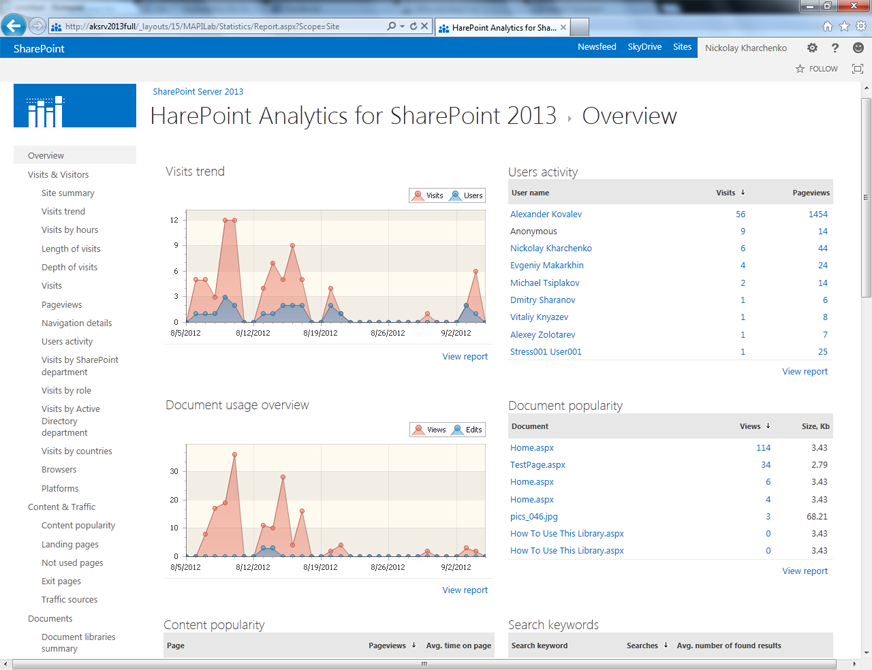
The main dashboard of the solution.
HarePoint Analytics for Microsoft SharePoint Demo - HarePoint Analytics for SharePoint
The sample of visitor trends report
HarePoint Analytics for Microsoft SharePoint Demo - HarePoint Analytics for SharePoint
The sample of browser report in the product.
Product Avatar Image

Have you used HarePoint Analytics for Microsoft SharePoint before?

Answer a few questions to help the HarePoint Analytics for Microsoft SharePoint community

HarePoint Analytics for Microsoft SharePoint Reviews (14)

Reviews

HarePoint Analytics for Microsoft SharePoint Reviews (14)

4.1
14 reviews

Search reviews
Filter Reviews
Clear Results
G2 reviews are authentic and verified.
Aman S.
AS
Payroll Associate Team Lead
Mid-Market (51-1000 emp.)
"Review for Microsoft SharePoint"
What do you like best about HarePoint Analytics for Microsoft SharePoint?

It is user-friendly and easy to use everyone can use this with less training and not so much technical knowledge required for this. this tool can handle large files as well and provides file access from mobile too. it is integrated with Microsoft office apps and allows the creation of pages. Overall it's an awesome collaboration tool to use. Review collected by and hosted on G2.com.

What do you dislike about HarePoint Analytics for Microsoft SharePoint?

it's sometimes challenging when users are modifying one excel. but overall it's a very secure place to upload documents because only an authorized person will have the access to read them. Review collected by and hosted on G2.com.

AK
Analyst
Information Technology and Services
Mid-Market (51-1000 emp.)
"Emerging Name in SharePoint Analytics"
What do you like best about HarePoint Analytics for Microsoft SharePoint?

HarePoint provides real-time analytics of SharePoint, which helps in tracking and giving insights about the usage of web apps. It offers other helpful tools as a workflow designer/scheduler, enabling us to build it directly on the browser instead of installing the designer locally. Review collected by and hosted on G2.com.

What do you dislike about HarePoint Analytics for Microsoft SharePoint?

UI could be improved and be more interactive, and there are some challenges when using it. Although HarePoint fulfills the requirement. Review collected by and hosted on G2.com.

AM
Sales Operations
Mid-Market (51-1000 emp.)
"Sharepoint great tool for sharing files with a large group"
What do you like best about HarePoint Analytics for Microsoft SharePoint?

Helps with local storage of files and everyone in group can access and download. Review collected by and hosted on G2.com.

What do you dislike about HarePoint Analytics for Microsoft SharePoint?

Sometimes hard to find files if they are not labelled put in right folders, need a good strucutre to organize. Review collected by and hosted on G2.com.

Gayathrie S.
GS
Marketing Manager - South Asia
Small-Business (50 or fewer emp.)
"HarePoint is a powerful and comprehensive tool for managing SharePoint environments."
What do you like best about HarePoint Analytics for Microsoft SharePoint?

One of the standout features of HarePoint is its analytics capabilities. With HarePoint, users can track site usage and performance, identify potential issues and bottlenecks, and make data-driven decisions about how to optimize their SharePoint environments. Review collected by and hosted on G2.com.

What do you dislike about HarePoint Analytics for Microsoft SharePoint?

Pricing of HarePoint can be a bit expensive, especially for smaller organizations. Have packages with unique features so everyone can access this amazing tool Review collected by and hosted on G2.com.

Peter B.
PB
Risk Associate
Small-Business (50 or fewer emp.)
"we used to work on powerbi, amazing data feed, fast and easy to use"
What do you like best about HarePoint Analytics for Microsoft SharePoint?

the live data feed is the most helpful thing in our field, as we need to monitor live pl and equities, so it gives you the access to monitor these variables, it could be defined as one of the best softwares Review collected by and hosted on G2.com.

What do you dislike about HarePoint Analytics for Microsoft SharePoint?

I am unfamiliar with its coding, but our developers used to have limitations when it came to trailing spaces in files, also, leading and trailing spaces in folder names aren't allowed. Review collected by and hosted on G2.com.

Ambuj Kumar M.
AM
Functional Consultant
Mid-Market (51-1000 emp.)
"usage reports at all levels of your farm"
What do you like best about HarePoint Analytics for Microsoft SharePoint?

Product reports cover aspects as users and their behavior, usage of content, documents, list items and search services. The product is a source of essential information on portal usage for IT management, project managers, web editors, business managers and others. Review collected by and hosted on G2.com.

What do you dislike about HarePoint Analytics for Microsoft SharePoint?

Exhaustive dashboard and options, may feel overwhelming at times. Review collected by and hosted on G2.com.

Hitabrata N.
HN
Software Engineer
Enterprise (> 1000 emp.)
"HarePoint Analytics - A easy to get report"
What do you like best about HarePoint Analytics for Microsoft SharePoint?

HarePoint provided easy-to-use tools to give a good insight into data and reporting. Even though you can always create your custom reporting with PowerShell, having a tool like this is always handly. Review collected by and hosted on G2.com.

What do you dislike about HarePoint Analytics for Microsoft SharePoint?

HarePoint analytics is a pretty good software to use but the only downside is its licensing cost which make the software a secondary options in a small firm there by making it unsuitable. Review collected by and hosted on G2.com.

Sudhakar N S.
SS
Software Engineer
Enterprise (> 1000 emp.)
"Web-Analytics Solution Offered By HarePoint Analytics In My Enterprise"
What do you like best about HarePoint Analytics for Microsoft SharePoint?

Harepoint Analytics fetches me quick and contextual insights about my usage of web applications. It helps me to know how the user interact with the features, and it's built-in walkthrough offers onboarding procedures for my organisation's end users. I can design my own menu options and other workflows easily by customising the CSS templates in its dashboard provided by Hairpoint Analytics. Review collected by and hosted on G2.com.

What do you dislike about HarePoint Analytics for Microsoft SharePoint?

Task setup for some login items is quite challenging as there exists few upload and sync issues and the task gets created. Sometimes, single-page application causes bugs which needs automated refresh features. Overall, Harepoint is good for my business requirements. Review collected by and hosted on G2.com.

Abhaya P.
AP
Senior SDET
Enterprise (> 1000 emp.)
Business partner of the seller or seller's competitor, not included in G2 scores.
"Awesome analytics application"
What do you like best about HarePoint Analytics for Microsoft SharePoint?

I am very fond of this application since it helps me in analyzing the data and present them in a user readable way such as reports, graphs or charts. These charts which can be easily presented to our customers, stakeholders or any other non-technical person. The application is very easy to use and interactive one. Review collected by and hosted on G2.com.

What do you dislike about HarePoint Analytics for Microsoft SharePoint?

The application is disorganized and some of the features are not so much useful to the end user. Some time, it takes a lot of time to load and open. The charts and tools take a longer time than useful which can be irritating. Review collected by and hosted on G2.com.

LK
Admin
Small-Business (50 or fewer emp.)
"Very robust data tracking"
What do you like best about HarePoint Analytics for Microsoft SharePoint?

Great data tracking capabilities and reports are easy to understand. Review collected by and hosted on G2.com.

What do you dislike about HarePoint Analytics for Microsoft SharePoint?

We are just starting off with this software and haven't branched out much more than inner office reporting, but no complaints yet. Review collected by and hosted on G2.com.

Pricing Options

Pricing provided by HarePoint Analytics for Microsoft SharePoint.

HarePoint Analytics for SharePoint

$3.00
per user
Product Avatar Image
HarePoint Analytics for Microsoft SharePoint
View Alternatives