Backlog Reviews & Product Details

Pricing

Pricing provided by Backlog.

Free

Free
Per Month

Backlog Media

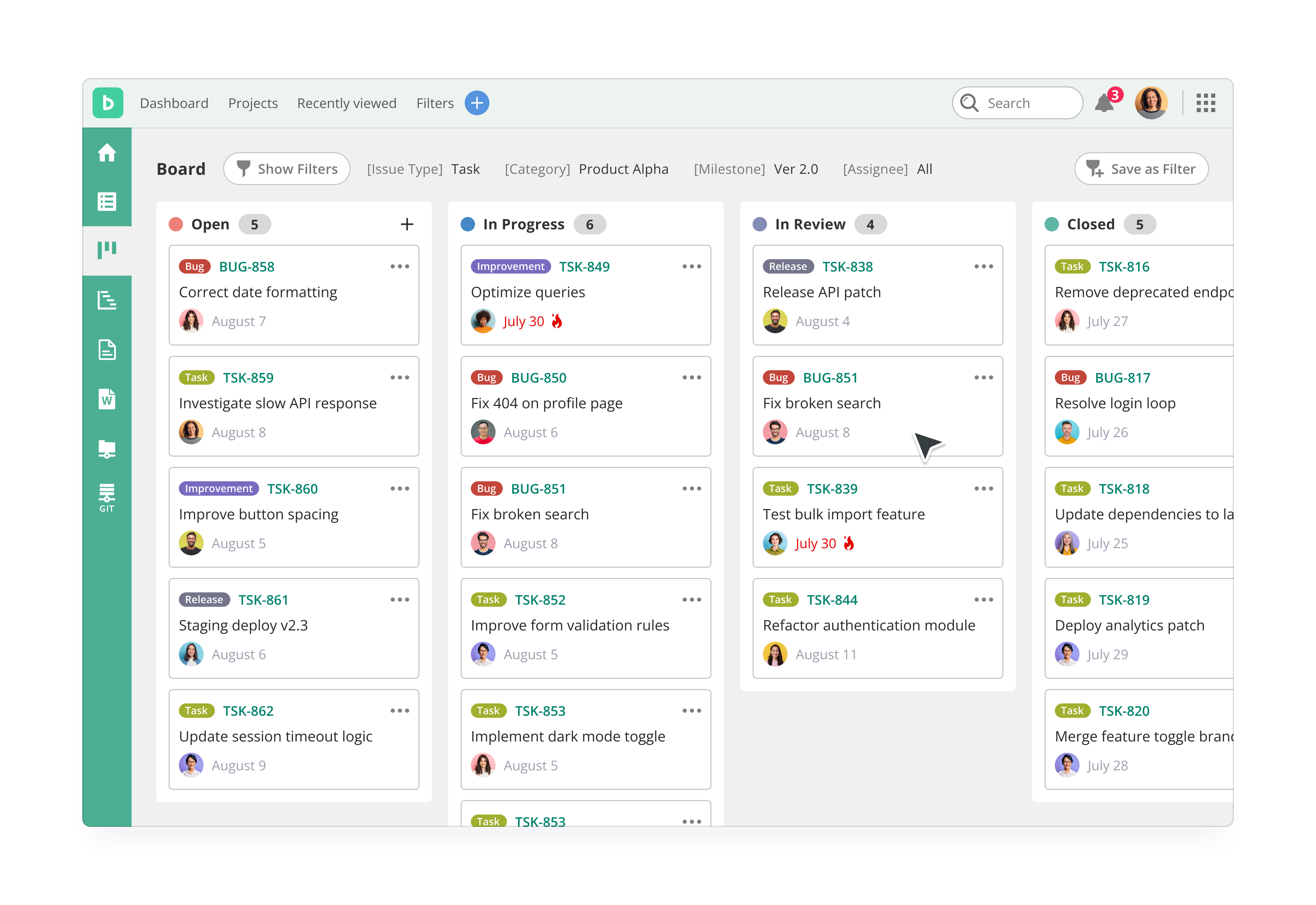
Backlog Demo - Kanban Board
Kanban-style boards let you understand where every task is at a glance, edit with a click, and estimate delivery in seconds. Each project has its own board for easy, drag-and-drop updating of issues.
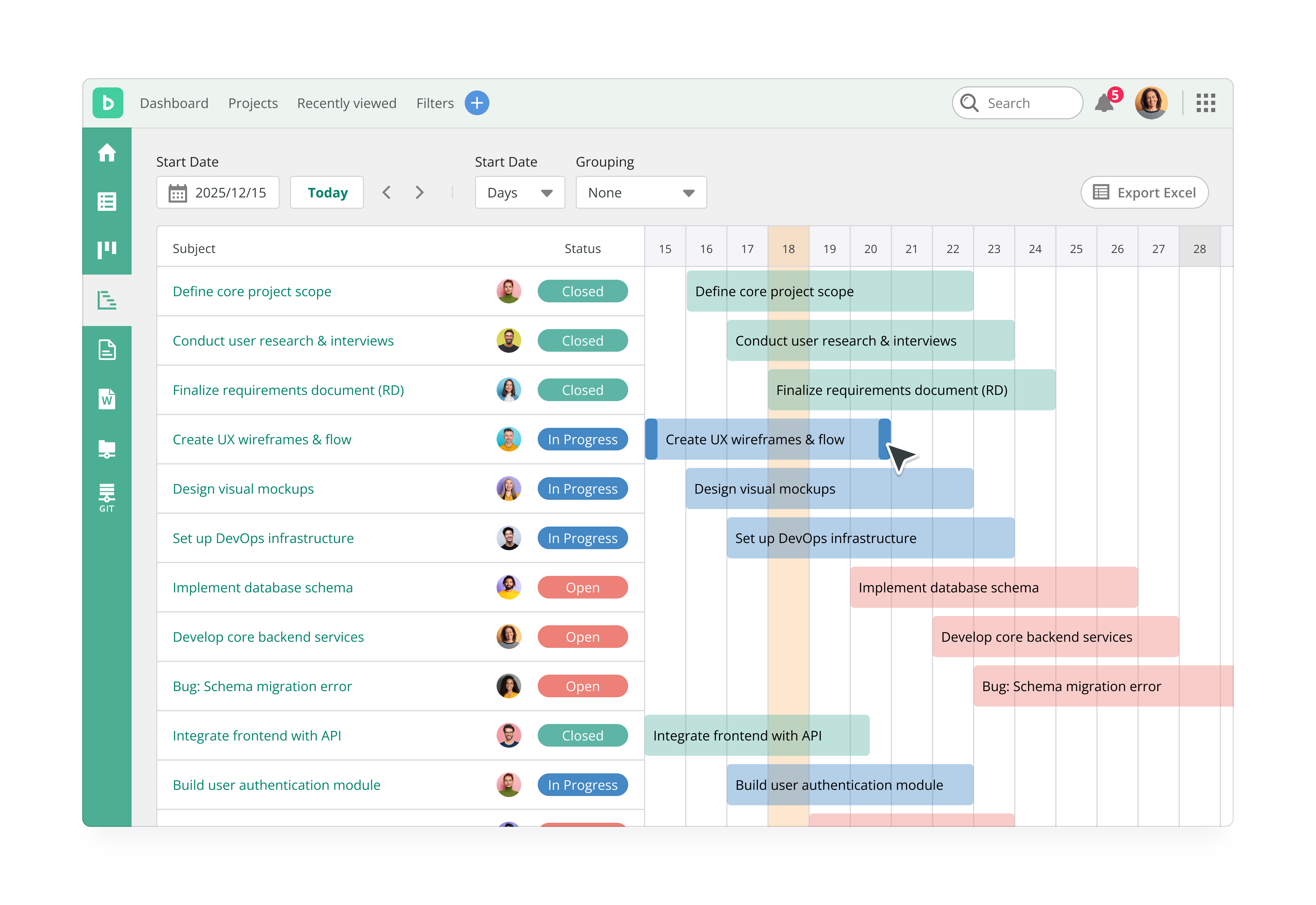
Backlog Demo - Gantt Chart
Gantt charts allow you to quickly visualize and edit the timeline of your entire project.
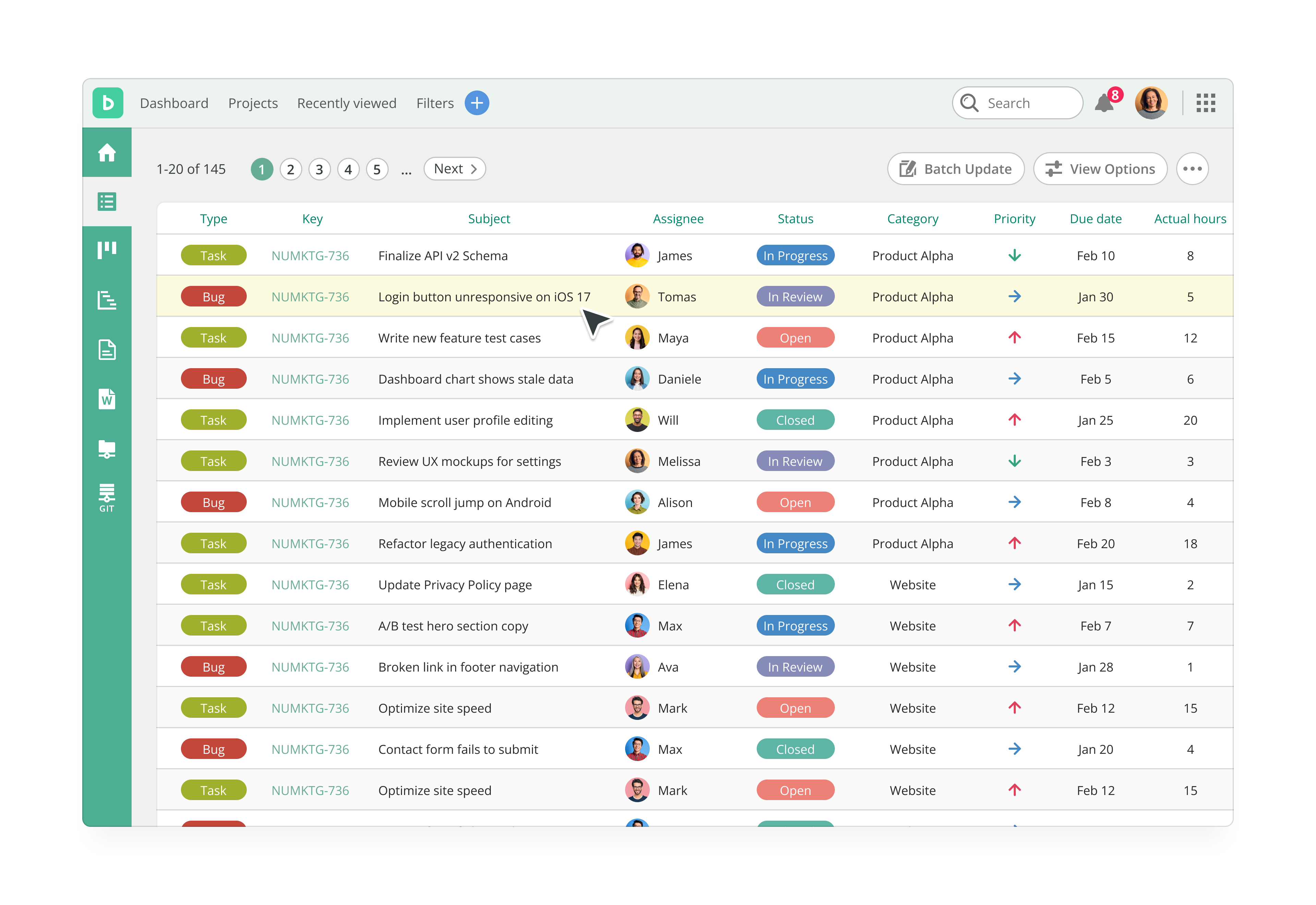
Backlog Demo - Issues - List View
In Backlog, a piece of work or a ticket within a project, such as a task is represented as an issue. Issues help you stay organized and keep track of tasks in the project and their timelines. Standardize issue creation by creating templates, or set up automatic issue creation via an email add...
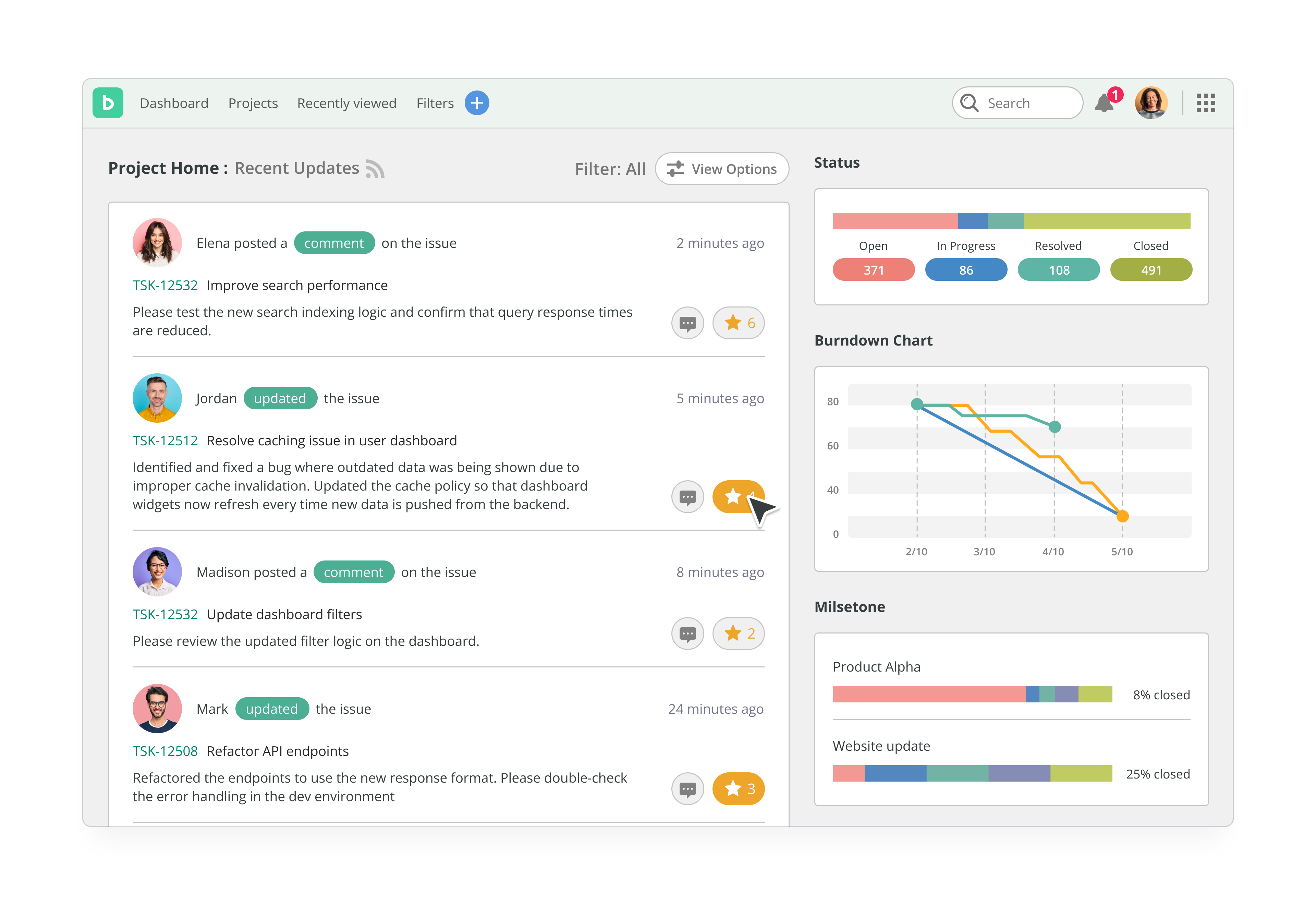
Backlog Demo - Backlog Dashboard
This is a home page for a project, various information about the project is displayed here. This includes the 50 latest activities, such as new and updated issues, Wiki, comments, uploaded files and Subversion commit log.
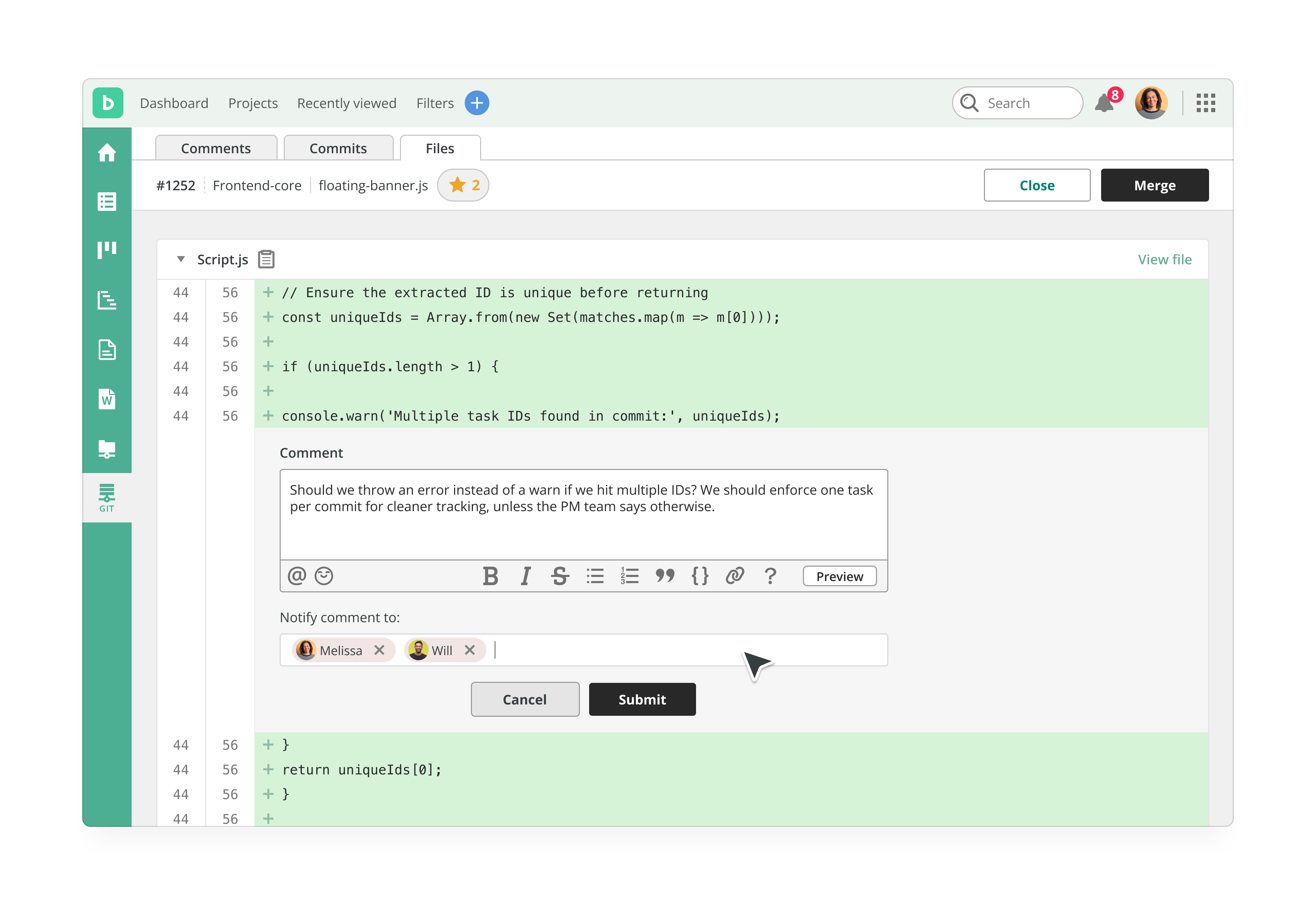
Backlog Demo - Code Review
Backlog has Git & SVN code review built in, so no additional integrations are needed to use it. Version control helps the team keep track of the change history of files and work concurrently on code using the branching and merging functions. What’s more, they can link code updates to issues i...
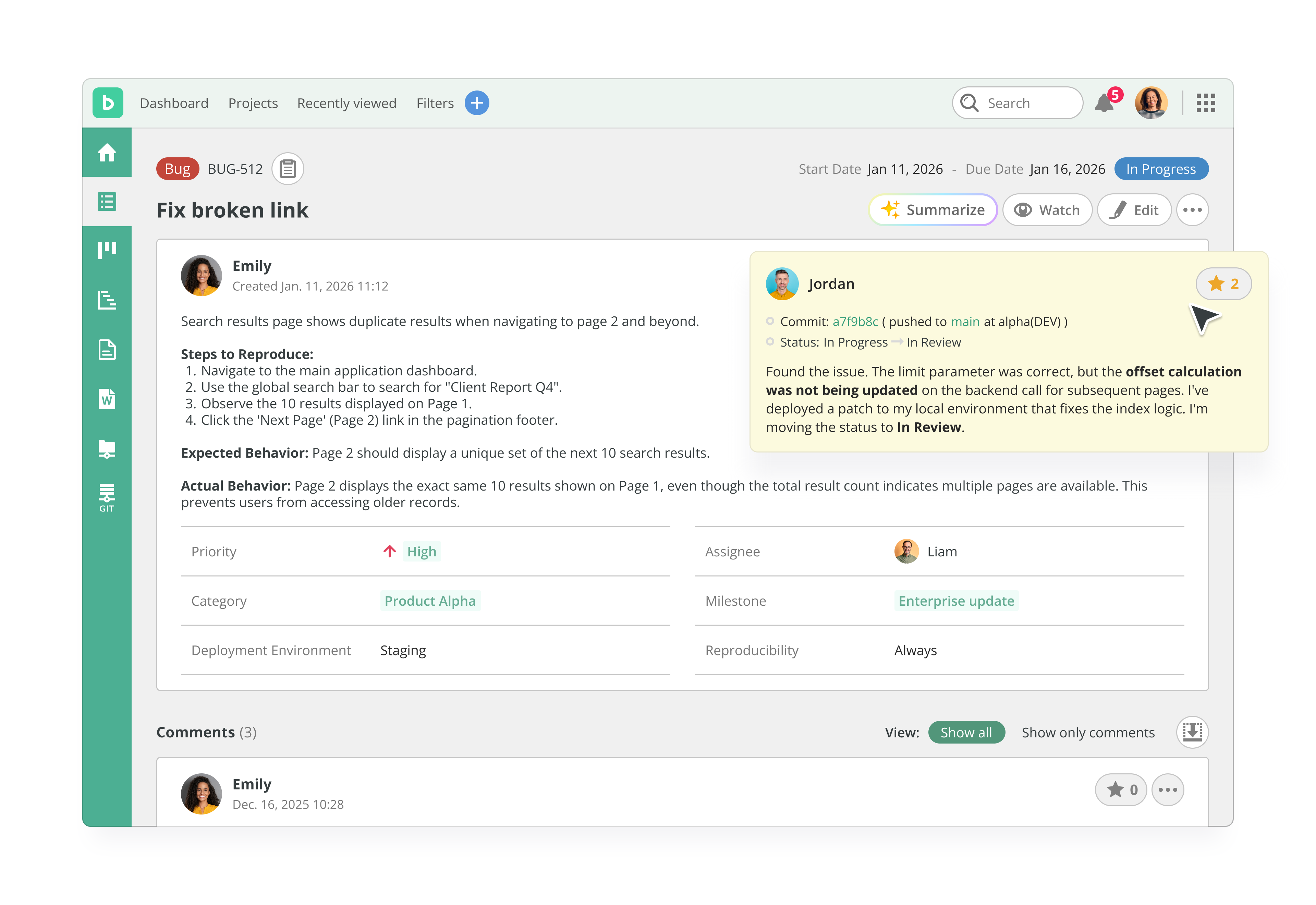
Backlog Demo - Bug Tracking
Backlog’s clean, intuitive interface lets any team member log bugs clearly and quickly. With fields for descriptions, screenshots, priorities, and more, anyone can report issues—no technical background needed.
Play Backlog Video
Play Backlog Video
Play Backlog Video
Play Backlog Video
Play Backlog Video
Product Avatar Image

Have you used Backlog before?

Answer a few questions to help the Backlog community

Backlog Reviews (397)

View 1 Video Reviews
Reviews

Backlog Reviews (397)

View 1 Video Reviews
4.6
397 reviews

Review Summary

Generated using AI from real user reviews
Users consistently praise the intuitive interface and seamless collaboration features of Backlog, which simplify project management and bug tracking. The integration of task management with built-in version control allows teams to work efficiently without switching tools. However, some users note that the mobile app experience could be improved, as it lacks features and can be slow.

Pros & Cons

Generated from real user reviews
View All Pros and Cons
Search reviews
Filter Reviews
Clear Results
G2 reviews are authentic and verified.
IRUNGU G.
IG
technical lead
Small-Business (50 or fewer emp.)
"Backlog: Easy, Affordable Project Management with Strong Collaboration & Visibility"
What do you like best about Backlog?

Backlog is most helpful to me as a simple, centralized way to manage projects, tasks, and team communication in one place. Its main upsides are ease of use, clear task tracking, and strong collaboration features like comments, notifications, and shared wikis. Visual tools such as Kanban boards, Gantt charts, and burndown charts help teams plan work and monitor progress. For software teams, built-in Git integration improves traceability between code and tasks. Overall, Backlog increases transparency, accountability, and productivity while remaining affordable and easy to adopt for small to mid-sized teams. Review collected by and hosted on G2.com.

What do you dislike about Backlog?

The least helpful aspects of Backlog i have experienced are its limited advanced features and customization compared to more powerful tools like Jira. It may feel restrictive for large or complex projects that require detailed workflows, automation, or advanced reporting. Backlog’s integrations with third-party apps are also relatively limited, which can be a drawback for teams using many external tools. Its user interface, while simple, can feel basic and less flexible for power users. Additionally, Backlog is less suited for organizations needing highly scalable enterprise-level project management or deep analytics. Review collected by and hosted on G2.com.

Response from Joanna Latarska of Backlog

Dear Irungu,

Thank you for your review! It's great to hear that you find Backlog to be a very helpful centralized platform to manage projects, and that its features such as Kanban boards, Gantt charts, and burndown charts help your teams with planning work and monitoring progress.

Thank you for your feedback on the advanced features, customization, integrations, UI and analytics as well, our team will review it. Please also see the link to the Custom fields feature for your reference attached.

See how Backlog improved
James S.
JS
Regional Software Engineering Lead
Enterprise (> 1000 emp.)
"Intuitive Task Tracking for Small Projects"
What do you like best about Backlog?

I find Backlog very easy to use and intuitive. After a quick login, I can get right into the issues and be working within a few seconds. I don't have to jump around between pages or search extensively to find what I'm looking for. I love how Backlog organizes and tracks tasks, allowing me to easily see the status of outstanding tasks, priorities, and timeframes. The client interaction feature is great as it allows clients to approve task completion with full interaction. The initial setup was very easy; I just added members and started adding tasks. I rate it a 10 for small projects with a small team and a small client. Review collected by and hosted on G2.com.

What do you dislike about Backlog?

It would be nice if tasks could be 'released' by version. And choosing a version would show the associated tasks. Review collected by and hosted on G2.com.

Benjamin E.
BE
Account Manager | Sport Scientist
Mid-Market (51-1000 emp.)
"User-Friendly Ticket Management with Room for UI Improvement"
What do you like best about Backlog?

I find Backlog to be user-friendly and convenient for submitting support tickets, making it easy to get help for software and hardware issues. The system simplifies tracking and updating tickets, as each ticket is unique with a shareable link, which helps keep everyone in the loop. Additionally, I appreciate the templates for specific tickets that save time by reducing redundant typing. The initial setup was straightforward as well, requiring just my email and a password. Review collected by and hosted on G2.com.

What do you dislike about Backlog?

I think the general UI can look a little clunky at times. That's not to say it's bad, I just think there may be ways it can be a bit smoother and more intuitive. Review collected by and hosted on G2.com.

Anh P.
AP
iOS Engineer
Mid-Market (51-1000 emp.)
"Backlog Review: What Works Well and What Could Improve"
What do you like best about Backlog?

What I like best about Backlog is how it keeps project communication, task tracking, and issue management in one place. It makes it easy to see progress, follow discussions, and stay aligned with the team without jumping between multiple tools. Review collected by and hosted on G2.com.

What do you dislike about Backlog?

What I dislike about Backlog is that some actions can feel less intuitive than in other project management tools, especially when filtering, navigating issues, or tracking detailed updates. It works well overall, but certain workflows could be smoother and more user-friendly. Review collected by and hosted on G2.com.

HK
CEO
"Streamlined Task Management with an Intuitive Interface"
What do you like best about Backlog?

I use Backlog to organize my daily tasks and manage projects efficiently, making teamwork simple and transparent. I like Backlog most for its clean interface and every task tracking, which makes collaboration smooth and keeps everything well organized in one place. This clean interface saves time and avoids confusion while task tracking helps me instantly see what's done and what's pending so nothing gets missed. The initial setup was very easy and quick, even for first-time users. I also use Backlog along with email and cloud storage to share updates and files smoothly with my team. I rate it a 9 out of 10 because it's simple, reliable, and very effective for managing tasks and projects. Review collected by and hosted on G2.com.

What do you dislike about Backlog?

Sometimes the mobile app feels a bit slow, and adding more customization options for dashboards and notifications would make it even better. Review collected by and hosted on G2.com.

Response from Joanna Latarska of Backlog

Dear Harikshna,

Thank you for your review, we love to hear our customers feedback! We are happy to hear that you find Backlog's interface clean and intuitive, and that it helps you to manage your daily tasks and projects efficiently.

Thank you for your feedback on the Backlog mobile app, Dashboard and notifications customization options as well, our team will review it.

dhathri p.
DP
Student Intern
Small-Business (50 or fewer emp.)
"Unified Task Management with Powerful Version Control"
What do you like best about Backlog?

I like Backlog by Nulab because it's a top-tier project management tool that unifies task management, bug tracking, and version control in one platform. It addresses critical friction points that hinder team productivity and project transparency by consolidating disparate tools. Users highly rate it for its balance of power and simplicity. I find the Unified Version Control feature, with built-in Git and SVN repositories, particularly valuable as it bridges the gap between project management and technical execution, providing a 'single source of truth' for the development lifecycle. Backlog is also praised for its real-time collaboration capabilities, allowing multiple users to update tasks simultaneously with a clear audit trail. The initial setup is quick and easy, especially for teams migrating from spreadsheets or complex tools, often taking less than 30 minutes. The integration of communication tools like Slack and Microsoft Teams for real-time notifications, Jenkins for CI/CD, and LambdaTest for automated bug logging enhances our automated workflow, making Backlog a central hub in project management. Additionally, Backlog generally receives a high recommendation score of 8 or 9 out of 10 for small-to-medium-sized teams and agencies. Review collected by and hosted on G2.com.

What do you dislike about Backlog?

While Backlog is widely praised for its simplicity, in 2026, users have identified several areas that could be improved to better support growing or highly complex teams. Enhancements in automation, reporting, and integration ecosystems are needed. To compete with enterprise heavyweights like Jira and Wrike in 2026, Backlog would need to introduce features that handle complexity without sacrificing its signature simplicity. Review collected by and hosted on G2.com.

Response from Joanna Latarska of Backlog

Dear Dhathri,

Thank you for your review, we love to hear our customers feedback! It's great to hear that Backlog helps you in solving critical productivity and transparency issues, and that the simpler interface is useful for non-technical members.

Thank you for taking the time to share your experience with our product as well.

Sandeep Kumar M.
SM
Student
Small-Business (50 or fewer emp.)
Guest users or non-business users of the software, not included in G2 scores.
"All-in-One Project Management with Seamless Collaboration"
What do you like best about Backlog?

What I like best about Backlog is its all‑in‑one project management and collaboration platform that keeps tasks, timelines, and communication organized in one place. It offers visual tools like Kanban boards and Gantt charts that make tracking progress and planning work easy and clear. It also combines task/issue tracking with built‑in version control (Git/SVN) so developers and teams can manage code and bugs alongside project tasks without switching tools Review collected by and hosted on G2.com.

What do you dislike about Backlog?

• The interface can feel outdated or cluttered, especially compared to newer project tools.

• It offers limited customization and reporting, making it harder for complex workflows.

• The mobile app has fewer features and may not be as smooth as the desktop version.

• Some users find integration options and deep analytics lacking compared to competitors.

These are the main areas where Backlog could improve for more advanced or larger teams. Review collected by and hosted on G2.com.

Response from Joanna Latarska of Backlog

Dear Sandeep Kumar,

Thank you for your review, we love to hear our customers feedback! We are happy to hear that you find Backlog to be a great all‑in‑one project management and collaboration tool, and that you and your teams find its features such as Git and Subversion very useful.

Thank you for your feedback on Backlog's interface, customization and reporting, mobile app features, and integration options as well, our team will review it. Please also see the link to the Custom fields feature for your reference below.

See how Backlog improved
JB
"Effective Team Alerts, Minor Closing Glitch"
What do you like best about Backlog?

I use Backlog for keeping on top of team needs like member transfers, repairs, and requests. I appreciate that with Backlog, issues never slip through the cracks, even when we're busy. Detailed notes can be left quickly for everyone to see, making it a reliable platform for team communication. I like that anything big or small can be posted here to ensure it gets the attention it deserves. It's particularly useful for connecting with team members whose schedules don't often overlap. Review collected by and hosted on G2.com.

What do you dislike about Backlog?

On occasion, a step gets missed when going back and forth handling an issue. I think it would be great if 'Resolved' issues would also then close as well. Review collected by and hosted on G2.com.

Response from Joanna Latarska of Backlog

Dear Jennifer,

Thank you for your review! We are delighted to hear that you find Backlog to be an effective and reliable platform for team communication, and that it helps you to keep track of issues and activities.

Thank you for your feedback on the Backlog issue statuses as well, our team will review it.

Nguyen Nhat Q.
NQ
Aerospace IoT
Mid-Market (51-1000 emp.)
"User-Friendly Task Management with Backlog"
What do you like best about Backlog?

I use Backlog mainly to create and report tasks in my projects. It helps me see which tasks need to be done first and the progress of the project, as well as monitor my teammates' progress and state of work. I really like the friendly UI and how easy it is to use. The task tracking feature is valuable because it helps my team and me know what tasks to focus on to complete projects. Review collected by and hosted on G2.com.

What do you dislike about Backlog?

no, it a ok tool Review collected by and hosted on G2.com.

Beatriz d.
BD
Small-Business (50 or fewer emp.)
"Feature-Rich and User-Friendly, Ideal for Projects"
What do you like best about Backlog?

I appreciate Backlog for helping me understand how project tracking works during challenges or when launching new projects. I find it has a lot of features that other similar tools don't have, especially how easy it is to collaborate with other users. The dashboard is great for following up on how projects are going. Also, the initial setup was very easy. Review collected by and hosted on G2.com.

What do you dislike about Backlog?

It can be a bit of an expensive tool Review collected by and hosted on G2.com.

Pricing Options

Pricing provided by Backlog.

Free

Free
Per Month

Starter

$35.00
Per Month

Standard

$100.00
Per Month
Backlog Comparisons
Product Avatar Image
Jira
Compare Now
Product Avatar Image
Redmine
Compare Now
Product Avatar Image
MantisBT
Compare Now
Backlog Features
Creation & Assignment
Due Dates
Task Prioritization
Project Map
GANTT
User Reports & Feedback
Tester Reports & Feedback
Team Reports & Comments
Bug History
Data Retention
Product Avatar Image
Backlog