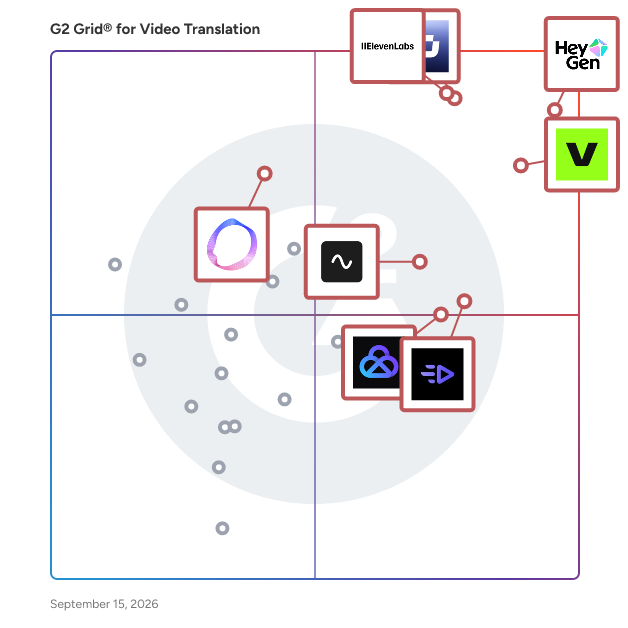
# Best Video Translation Software - Page 2

*By [Shalaka Joshi](https://research.g2.com/insights/author/shalaka-joshi)*


Video translation software, also known as dubbing software, facilitates the dubbing process by translating the source language of a video and generating new speech in a target language, using AI voice cloning, lip-sync tools, and synchronization features to produce high-quality dubbed video with natural-sounding multilingual output.

### Core Capabilities of Video Translation Software

To qualify for inclusion in the Video Translation category, a product must:

- Support different input formats for videos and languages
- Have lip-syncing tools to synchronize dubbed dialogues
- Be able to adjust timing, translation, accent, and tone
- Have real-time monitoring of dubbing and other automation features

### Common Use Cases for Video Translation Software

Content creators, media companies, and global marketing teams use video translation software to make video content accessible across languages and regions. Common use cases include:

- Dubbing marketing videos, explainer content, and training materials into multiple languages at scale
- Cloning a speaker&#39;s voice to generate natural-sounding dubbed audio in target languages
- Automating the translation and synchronization pipeline for pre-recorded video libraries

### How Video Translation Software Differs from Other Tools

Video translation software replaces the original audio track with a different language, distinguishing it from [localization software](https://www.g2.com/categories/localization), which adapts content more broadly for different languages and cultures, accounting for dialects, cultural references, and context rather than simply swapping audio. AI video generation software also differs by generating the entire video from scratch using machine learning models, whereas video translation works with existing video content to produce a dubbed version.

### Insights from G2 on Video Translation Software

Based on category trends on G2, lip-sync accuracy and voice cloning quality stand out as standout capabilities. Faster multilingual content delivery and reduced professional dubbing costs stand out as primary outcomes of adoption.


## Top Video Translation Software at a Glance
| # | Product | Rating | Best For | What Users Say |
|---|---------|--------|----------|----------------|
| 1 | [HeyGen](https://www.g2.com/products/heygen/reviews) | 4.8/5.0 (1,863 reviews) | Multilingual video dubbing with lip-sync accuracy | "[Unique Speech-to-Video with Reliable Audio Upload and Transcription](https://www.g2.com/survey_responses/heygen-review-13039371)" |
| 2 | [Synthesia](https://www.g2.com/products/synthesia/reviews) | 4.6/5.0 (2,746 reviews) | Multilingual video dubbing and localization at scale | "[Empowered Our Marketing and Training Efforts with Ease](https://www.g2.com/survey_responses/synthesia-review-10836418)" |
| 3 | [VEED](https://www.g2.com/products/veed/reviews) | 4.6/5.0 (2,132 reviews) | AI subtitle translation with multilingual accuracy | "[Easy Video Editing with Quick Turnaround](https://www.g2.com/survey_responses/veed-review-11784336)" |
| 4 | [ElevenLabs](https://www.g2.com/products/elevenlabsio/reviews) | 4.5/5.0 (1,145 reviews) | AI dubbing with voice-cloned localization | "[ElevenLabs Delivers Super-Realistic Audio &amp; Video with a Clean, Easy UI](https://www.g2.com/survey_responses/elevenlabs-review-13054760)" |
| 5 | [Riverside](https://www.g2.com/products/riverside/reviews) | 4.8/5.0 (1,729 reviews) | Remote interview dubbing with local-recording fidelity | "[Effortless Recording and Amazing Text-Based Editing](https://www.g2.com/survey_responses/riverside-review-13034561)" |
| 6 | [AKOOL](https://www.g2.com/products/akool/reviews) | 4.8/5.0 (567 reviews) | Multilingual video localization with lip-synced dubbing | "[All-in-One, User-Friendly AI Content Creation With Realistic Face Swap &amp; Avatars](https://www.g2.com/survey_responses/akool-review-12927887)" |
| 7 | [Creatify AI](https://www.g2.com/products/creatify-labs-inc-creatify-ai/reviews) | 4.8/5.0 (1,572 reviews) | Multilingual ad creation with avatar lip-sync | "[URL-to-Video Is a Game-Changer for Fast, High-Volume Ad Creative Testing](https://www.g2.com/survey_responses/creatify-ai-review-13054774)" |
| 8 | [Descript](https://www.g2.com/products/descript/reviews) | 4.6/5.0 (891 reviews) | Transcript-based multilingual video editing | "[Makes Video Editing Much Easier for Teaching and Content Creation](https://www.g2.com/survey_responses/descript-review-12694941)" |
| 9 | [Perso Dubbing](https://www.g2.com/products/perso-dubbing/reviews) | 4.1/5.0 (51 reviews) | Multilingual dubbing with lip-sync accuracy | "[Excellent AI Dubbing Solution for YouTube Creators](https://www.g2.com/survey_responses/perso-dubbing-review-12984963)" |
| 10 | [Vyond](https://www.g2.com/products/vyond/reviews) | 4.8/5.0 (499 reviews) | Multilingual eLearning video translation with AI voiceover | "[Saves Hours with Reusable Characters, Scenes, and Flexible Styles](https://www.g2.com/survey_responses/vyond-review-12781412)" |


## How Many Video Translation Software Products Does G2 Track?
**Total Products under this Category:** 132

### Category Stats (Jul 2026)
- **Average Rating**: 4.55/5 (↑0.01 vs Jun 2026) The average rating of products in this category, based on all submitted ratings
- **Top Trending Product**: Perso Dubbing (+5.04%) - Among all products in this category, Perso Dubbing recorded the largest rating increase compared to last month
*Last updated: July 03, 2026*


## How Does G2 Rank Video Translation Software Products?

**Why You Can Trust G2's Software Rankings:**

- 30 Analysts and Data Experts
- 19,300+ Authentic Reviews
- 132+ Products
- Unbiased Rankings

G2's software rankings are built on verified user reviews, rigorous moderation, and a consistent research methodology maintained by a team of analysts and data experts. Each product is measured using the same transparent criteria, with no paid placement or vendor influence. While reviews reflect real user experiences, which can be subjective, they offer valuable insight into how software performs in the hands of professionals. Together, these inputs power the G2 Score, a standardized way to compare tools within every category.


## Which Video Translation Software Is Best for Your Use Case?

- **Leader:** [HeyGen](https://www.g2.com/products/heygen/reviews)
- **Highest Performer:** [Creatify AI](https://www.g2.com/products/creatify-labs-inc-creatify-ai/reviews)
- **Easiest to Use:** [Creatify AI](https://www.g2.com/products/creatify-labs-inc-creatify-ai/reviews)
- **Top Trending:** [ElevenLabs](https://www.g2.com/products/elevenlabsio/reviews)
- **Best Free Software:** [HeyGen](https://www.g2.com/products/heygen/reviews)


---

**Sponsored**

### UserEvidence

UserEvidence is a customer voice platform that automates social proof for GTM teams, generating verified case studies, testimonials, and stats in minutes. Using surveys and third-party reviews, UserEvidence continually captures feedback throughout the customer journey and creates a customer story library that proves the value of your product. Game-changing B2B companies like Pendo, Workato, Gong, Jasper.ai, and Ramp rely on UserEvidence to create authentic customer stories at scale.


[Visit website](https://www.g2.com/external_clickthroughs/record?secure%5Bad_program%5D=ppc&amp;secure%5Bad_slot%5D=category_product_list&amp;secure%5Bcategory_id%5D=1008899&amp;secure%5Bchosen_at%5D=2026-07-04T12%3A57%3A54Z&amp;secure%5Bdisplayable_resource_id%5D=1558&amp;secure%5Bdisplayable_resource_type%5D=Category&amp;secure%5Bmedium%5D=sponsored&amp;secure%5Bplacement_reason%5D=neighbor_category&amp;secure%5Bplacement_resource_ids%5D%5B%5D=1558&amp;secure%5Bprioritized%5D=false&amp;secure%5Bproduct_id%5D=170410&amp;secure%5Bresource_id%5D=1008899&amp;secure%5Bresource_type%5D=Category&amp;secure%5Bsource_type%5D=category_page&amp;secure%5Bsource_url%5D=https%3A%2F%2Fwww.g2.com%2Fcategories%2Fvideo-translation-software%3Fpage%3D3&amp;secure%5Btoken%5D=2cd85148893167253fb1702ce2d01923620e65f647ef1fd03ef807754b66d9ec&amp;secure%5Burl%5D=https%3A%2F%2Fuserevidence.com&amp;secure%5Burl_type%5D=company_website)

---

## What Are the Top-Rated Video Translation Software Products in 2026?
### 1. [Vmaker AI](https://www.g2.com/products/vmaker-ai/reviews)
What is Vmaker AI? Vmaker AI is an advanced AI powered video editor designed to simplify and accelerate video creation for businesses and individuals. With minimal expertise required, anyone can produce high quality videos are scale Built for Learning &amp; Development, content teams, sales, and marketing, Vmaker AI brings together AI powered video creation and editing capabilities. AI Avatar Video Generator Generate perfectly lip-synced avatar videos in 120+ languages. Ideal for training, onboarding, explainers, and multilingual global training. Pick from 100+ Avatars representing 15+ ethnicities Doc to Video Converter Convert PDFs, PPTs, Docs and slides into videos with an AI presenter. Auto interprets complex tables and graphs through narration for simplified knowledge delivery. AI Video Dubbing Localize existing videos with emotion-aware voiceovers in multiple languages, without the need for re-recording. Generate videos and edit them with a robust AI video editing suite that streamlines production: Edit with AI: One-click enhancement that adds B-rolls, music, transitions, subtitles, intro / outro, gifs to your video. Short Clip Generator: Generate bite-sized clips from long-form videos Highlights Maker: Extracts key moments to create highlights, teaser of your video. Powerful Manual Editor: Offers full control for advanced edits when needed Tools included Screen + Webcam Recorder: Record screen, webcam or both together. Ideal for tutorials, walkthroughs, and product demos AI Background Remover: Easily remove or change video backgrounds Audio Noise Remover: Eliminate background noise for clear, professional sound Subtitle generator: Generate subtitles in 150+ language with 99.9% accuracy


**Average Rating:** 4.7/5.0
**Total Reviews:** 105

**Who Is the Company Behind Vmaker AI?**

- **Seller:** [Animaker, Inc](https://www.g2.com/sellers/animaker-inc)
- **Year Founded:** 2015
- **HQ Location:** San Francisco, California
- **Twitter:** @animakerhq (4,054 Twitter followers)
- **LinkedIn® Page:** https://www.linkedin.com/company/3579051/ (204 employees on LinkedIn®)

**Who Uses This Product?**
- **Who Uses This:** CEO, Founder
- **Top Industries:** Marketing and Advertising, Computer Software
- **Company Size:** 79% Small-Business, 9% Mid-Market


#### What Are Vmaker AI's Pros and Cons?

**Pros:**

- Ease of Use (20 reviews)
- Screen Recording (15 reviews)
- Easy Creation (12 reviews)
- Easy Editing (12 reviews)
- Video Editing (11 reviews)

**Cons:**

- Slow Loading (5 reviews)
- Slow Rendering (5 reviews)
- Software Bugs (5 reviews)
- Editing Issues (4 reviews)
- Slow Performance (4 reviews)


### What Do G2 Reviewers Say About Vmaker AI?
*AI-generated summary from verified user reviews*

**Pros:**

- Users praise the **ease of use** of Vmaker AI, enabling quick video recording and seamless editing for tutorials.
- Users love the **effortless screen recording** capabilities of Vmaker AI, making video tutorials a breeze to create and share.
- Users love the **easy creation** of videos with Vmaker AI, streamlining tutorials and enhancing engagement with minimal effort.
- Users love the **easy editing** features of Vmaker AI, allowing quick video creation and seamless sharing.
- Users love the **easy and efficient video editing** capabilities of Vmaker AI, enhancing their recording experience significantly.

**Cons:**

- Users experience **slow loading and exporting** times with Vmaker AI, causing frustration during urgent video production tasks.
- Users experience **slow rendering** with Vmaker AI, leading to frustration during urgent projects and tight deadlines.
- Users experience **software bugs** that disrupt workflow, including unexpected closures and recording issues when switching tabs.
- Users report frequent **editing issues** , including limited options and manual adjustments that hinder the editing experience.
- Users face **slow performance** during video processing, impacting productivity and complicating urgent projects with lengthy export times.

#### What Are Recent G2 Reviews of Vmaker AI?

**"[Effortless Recording with Vmaker AI](https://www.g2.com/survey_responses/vmaker-ai-review-12512529)"**

**Rating:** 5.0/5.0 stars
*— Candice J.*

[Read full review](https://www.g2.com/survey_responses/vmaker-ai-review-12512529)

---

**"[Clean, Easy to Use Interface for Quick Video Recording and Light Editing](https://www.g2.com/survey_responses/vmaker-ai-review-12281432)"**

**Rating:** 4.0/5.0 stars
*— Muzammil M.*

[Read full review](https://www.g2.com/survey_responses/vmaker-ai-review-12281432)

---


#### What Are G2 Users Discussing About Vmaker AI?

- [What recorder do YouTubers use?](https://www.g2.com/discussions/what-recorder-do-youtubers-use)
- [Is ScreenRec safe to use?](https://www.g2.com/discussions/is-screenrec-safe-to-use)
- [How do you use a Vmaker?](https://www.g2.com/discussions/how-do-you-use-a-vmaker)
- [How do I download Vmaker?](https://www.g2.com/discussions/how-do-i-download-vmaker)

### 2. [Papercup](https://www.g2.com/products/papercup/reviews)
Papercup was founded in 2017 with a mission to make all the world’s videos watchable in any language. Using state-of-the-art machine learning, Papercup has created an AI system capable of translating people’s voices into other languages. The delivery is indistinguishable from human speech and can also retain characteristics of the speaker&#39;s voice. Papercup helps global content owners unlock revenue by localizing videos faster and more affordably than traditional methods. Our native-speaking translators ensure perfect translation accuracy and emotional dubbing. We stand out by creating proprietary voices with voice actors, powered by our own speech engines and trained on licensed data. The London-based startup has raised over $33.2 million in funding to date, with backers including leading venture funds Octopus Ventures, LocalGlobe, Sands Capital Ventures, Guardian Media Group Ventures, Entrepreneur First and BDMI as well as media leader Sky (now owned by Comcast).


**Average Rating:** 4.3/5.0
**Total Reviews:** 3

**Who Is the Company Behind Papercup?**

- **Seller:** [Papercup Technologies Ltd](https://www.g2.com/sellers/papercup-technologies-ltd)
- **Year Founded:** 2017
- **HQ Location:** London, GB
- **LinkedIn® Page:** https://www.linkedin.com/company/papercupai (88 employees on LinkedIn®)

**Who Uses This Product?**
- **Company Size:** 67% Enterprise, 33% Small-Business


#### What Are Papercup's Pros and Cons?

**Pros:**

- Ease of Use (1 reviews)
- Features (1 reviews)
- Intuitive (1 reviews)
- Natural Voices (1 reviews)
- Pricing (1 reviews)


### What Do G2 Reviewers Say About Papercup?
*AI-generated summary from verified user reviews*

**Pros:**

- Users find Papercup&#39;s setup to be **easy and intuitive** , allowing for quick and efficient operation within their networks.
- Users love the **easy setup and intuitive design** of Papercup, appreciating its speed and extensive features.
- Users find Papercup to be **intuitive** , enjoying its easy setup and fast performance within their printer network.
- Users love the **natural voices** of Papercup, saving time while maintaining idioms and phrases in translations.
- Users value the **time-saving pricing** of Papercup, which efficiently translates videos for international distribution.


#### What Are Recent G2 Reviews of Papercup?

**"[This is awesome...](https://www.g2.com/survey_responses/papercup-review-11065120)"**

**Rating:** 5.0/5.0 stars
*— Mayank K.*

[Read full review](https://www.g2.com/survey_responses/papercup-review-11065120)

---

**"[Easy Setup, Fast Performance, and Flexible Charging Features](https://www.g2.com/survey_responses/papercup-review-12249126)"**

**Rating:** 4.0/5.0 stars
*— Verified User in Real Estate*

[Read full review](https://www.g2.com/survey_responses/papercup-review-12249126)

---


### 3. [Speechify AI Dubbing](https://www.g2.com/products/speechify-ai-dubbing/reviews)
Best AI Dubbing for video and content localization It’s like magic! In a few short clips, you can listen to your videos in any of 20+ languages. Take your existing video and use AI to automatically dub it into other languages. No need for expensive process, equipment and talent. Instantly make your videos accessible to almost anyone across the world with the leading ai dubbing app. Anyone can dub videos, easily. Speechify AI video is part of a suite of AI tools that uses AI to simplify complex tasks. Dub your videos by simply uploading your script in one language and it can automatically be translated into the languages of your choice.


**Average Rating:** 4.3/5.0
**Total Reviews:** 9

**Who Is the Company Behind Speechify AI Dubbing?**

- **Seller:** [Speechify](https://www.g2.com/sellers/speechify)
- **Year Founded:** 2017
- **HQ Location:** Remote, US
- **LinkedIn® Page:** https://www.linkedin.com/company/getspeechify/ (187 employees on LinkedIn®)

**Who Uses This Product?**
- **Company Size:** 89% Small-Business, 11% Mid-Market


#### What Are Speechify AI Dubbing's Pros and Cons?

**Pros:**

- Ease of Use (8 reviews)
- Language Support (5 reviews)
- Customer Support (4 reviews)
- Speed (4 reviews)
- Dubbing (3 reviews)

**Cons:**

- Expensive (2 reviews)
- Pronunciation Issues (2 reviews)
- Download Issues (1 reviews)
- Editing Issues (1 reviews)
- Inaccuracy Issues (1 reviews)


### What Do G2 Reviewers Say About Speechify AI Dubbing?
*AI-generated summary from verified user reviews*

**Pros:**

- Users appreciate the **ease of use** of Speechify AI Dubbing, making it accessible and efficient for multitasking.
- Users value the **widespread language support** of Speechify AI Dubbing, enabling broader audience reach effortlessly.
- Users appreciate the **excellent customer support** provided by Speechify AI Dubbing, enhancing their overall user experience.
- Users love the **speed of Speechify AI Dubbing** , allowing for quick and efficient video dubbing and voiceovers.
- Users appreciate the **user-friendly dubbing experience** of Speechify AI, enabling quick and efficient multilingual video translations.

**Cons:**

- Users find the service **expensive** and note that AI fails to capture human emotions accurately.
- Users report **pronunciation issues** with Speechify AI Dubbing, affecting the clarity and emotional delivery of the audio.
- Users find it **inconvenient to export audio files** as it&#39;s restricted for non-premium or basic users.
- Users miss **additional editing options** in Speechify Studio, limiting their ability to customize scripts effectively.
- Users experience **inaccuracy issues** with Speechify AI Dubbing, leading to incorrect outputs when importing documents.

#### What Are Recent G2 Reviews of Speechify AI Dubbing?

**"[My Experience](https://www.g2.com/survey_responses/speechify-ai-dubbing-review-10396452)"**

**Rating:** 5.0/5.0 stars
*— Anuj S.*

[Read full review](https://www.g2.com/survey_responses/speechify-ai-dubbing-review-10396452)

---

**"[AI can make wonders! yes. Look at how speechify AI Dubbing made things easier](https://www.g2.com/survey_responses/speechify-ai-dubbing-review-10352505)"**

**Rating:** 5.0/5.0 stars
*— Swathi K.*

[Read full review](https://www.g2.com/survey_responses/speechify-ai-dubbing-review-10352505)

---


### 4. [Tutorial AI](https://www.g2.com/products/tutorial-ai/reviews)
Tutorial.ai turns raw screen recordings into polished, multilingual product tutorials, demos, and step-by-step documentation — in minutes, without video-editing skills. Record once on Mac, Windows, or directly in the browser via the Chrome extension. Tutorial.ai automatically transcribes your voice, polishes the script (removing filler words, restructuring for clarity), and regenerates the narration with lifelike AI voices in 74 languages. The proprietary AutoRetime™ technology re-syncs scenes, captions, callouts, and cuts across every translated version automatically — so one recording produces every language variant, perfectly timed, with no re-shoots. The breakthrough is the editing model. Instead of timelines and tracks, you edit &quot;like a doc&quot;: change the script and the voice-over, on-screen timing, zooms, highlights, and cuts update automatically. Anyone who can edit a Google Doc can publish a professional video tutorial. Smart Auto-Cut removes pauses and mistakes; mouse-tracked effects (size, smoothing, smart zoom, highlights, blur for sensitive data) clean up the recording post-hoc; Brand Kits keep every video on-brand with custom fonts, colors, intros, and outros. Every recording also outputs a step-by-step article — exportable as Markdown, HTML, or RTF, or pushed directly into Zendesk, Notion, HubSpot, or any knowledge base. The embeddable Multilingual Player serves one video to global audiences: viewers pick their language inside the player, no re-embedding. Built for customer education, product marketing, sales enablement, customer support, L&amp;D, and HR teams. Trusted by Microsoft, Bosch, Intesa Sanpaolo, Coca-Cola, Deutsche Bahn, and UNICEF, plus a growing base of fast-moving SaaS companies who use Tutorial.ai to ship product walkthroughs, onboarding sequences, support deflection videos, internal training libraries, SOP documentation, and software training content. A modern alternative to Loom for teams that need polished, multilingual output — and a more video-first complement to Tango, Scribe, and Guidde. Free trial. Solo, Growth, and Enterprise plans with SSO, custom voices, iPhone/iPad recording, and priority support.


**Average Rating:** 5.0/5.0
**Total Reviews:** 12

**Who Is the Company Behind Tutorial AI?**

- **Seller:** [Tutorial AI](https://www.g2.com/sellers/tutorial-ai)
- **Company Website:** https://www.tutorial.ai
- **Year Founded:** 2023
- **HQ Location:** Budapest, HU
- **LinkedIn® Page:** https://www.linkedin.com/company/tutorialai (3 employees on LinkedIn®)

**Who Uses This Product?**
- **Top Industries:** Computer Software
- **Company Size:** 92% Small-Business, 8% Mid-Market


#### What Are Tutorial AI's Pros and Cons?

**Pros:**

- Easy Editing (1 reviews)
- Easy Recording (1 reviews)
- Editing Ease (1 reviews)
- Intuitive (1 reviews)
- Recording (1 reviews)


### What Do G2 Reviewers Say About Tutorial AI?
*AI-generated summary from verified user reviews*

**Pros:**

- Users value the **easy editing** feature, allowing them to fix errors without re-recording their videos.
- Users love the **easy recording feature** that allows for quick edits, eliminating the need for multiple takes.
- Users value the **editing ease** of Tutorial AI, allowing for quick corrections without the need for multiple recordings.
- Users value the **intuitive editing features** of Tutorial AI, allowing for seamless video corrections without multiple recordings.
- Users value the **sophisticated editing capabilities** of Tutorial AI, allowing for efficient one-time video recordings.


#### What Are Recent G2 Reviews of Tutorial AI?

**"[A genuine boost for Deligo training](https://www.g2.com/survey_responses/tutorial-ai-review-11405785)"**

**Rating:** 5.0/5.0 stars
*— Fatime K.*

[Read full review](https://www.g2.com/survey_responses/tutorial-ai-review-11405785)

---

**"[Super Easy Video Recording—The App Takes Care of the Rest](https://www.g2.com/survey_responses/tutorial-ai-review-13058875)"**

**Rating:** 4.0/5.0 stars
*— Verified User in Computer Software*

[Read full review](https://www.g2.com/survey_responses/tutorial-ai-review-13058875)

---


### 5. [Async Creator](https://www.g2.com/products/async-creator/reviews)
Async is shaping a new standard for content creation with a fully integrated, AI-powered platform designed for end-to-end video, audio, and voice production. Its browser-based platform turns ideas into ready-to-publish content in seconds, bringing recording, AI generation, editing, and publishing into one cohesive environment - no tool-switching required. At the center is chat-based editing. Instead of hunting through timelines and menus, creators just type what they want - tighten the intro, add Spanish subtitles, cut the filler - and the edit happens. It&#39;s the fastest path from raw footage to finished content, with no experience needed. Around it, intelligent automation handles the time-consuming work: removing background noise, cutting filler words, generating precise transcripts, and producing natural, multilingual voiceovers instantly. Async doesn&#39;t stop at creation - it&#39;s built to help content scale. Subtitles, translation, dubbing, reframing, eye contact correction, AI avatars, and short-form clipping are all part of the same system, making it easy to adapt content for any platform. And with the Engagement Booster, every piece is optimized to maximize performance. Millions of creators and businesses already rely on Async. By combining 100+ advanced AI generative models with a unified, prompt-driven workflow, Async makes high-quality content creation faster, more accessible, and ready to scale with the demands of modern creators.


**Average Rating:** 4.7/5.0
**Total Reviews:** 186

**Who Is the Company Behind Async Creator?**

- **Seller:** [Async](https://www.g2.com/sellers/async-8b0d2de8-48a3-47f0-ac14-4e940a765421)
- **Year Founded:** 2020
- **HQ Location:** Middletown, Delaware
- **LinkedIn® Page:** https://www.linkedin.com/company/podcastle-ai/ (44 employees on LinkedIn®)

**Who Uses This Product?**
- **Who Uses This:** Founder
- **Top Industries:** Entertainment, Health, Wellness and Fitness
- **Company Size:** 95% Small-Business, 3% Mid-Market


#### What Are Async Creator's Pros and Cons?

**Pros:**

- Ease of Use (60 reviews)
- Quality (32 reviews)
- Easy Editing (27 reviews)
- Easy Recording (24 reviews)
- Podcasting (23 reviews)

**Cons:**

- Recording Issues (12 reviews)
- Expensive (8 reviews)
- Limited Features (8 reviews)
- Technical Issues (8 reviews)
- Feature Deficiency (6 reviews)


### What Do G2 Reviewers Say About Async Creator?
*AI-generated summary from verified user reviews*

**Pros:**

- Users appreciate the **ease of use** of Async Creator, finding it intuitive and efficient for video podcasting.
- Users highlight the **excellent quality** of Async Creator, making podcast production both simple and professionally polished.
- Users love the **easy editing** features of Async Creator, enabling quick and efficient content production and distribution.
- Users love the **easy recording** feature of Async Creator, enabling seamless podcast production and editing for all users.
- Users value the **intuitive interface** of Async Creator, enabling effortless podcast creation for beginners and experienced users alike.

**Cons:**

- Users experience **recording issues** with missing features like a pause button, affecting podcasting convenience.
- Users find Async Creator **expensive** , especially with many features locked behind paywalls, making it tough for budget-conscious creators.
- Users note the **limited features** of Async Creator, particularly missing video options and usability challenges.
- Users report **technical issues** with Async Creator, including bugs and inadequate support affecting overall satisfaction.
- Users find **feature deficiencies** in Async Creator, with limitations on advanced tools and basic mobile app functionality.

#### What Are Recent G2 Reviews of Async Creator?

**"[Easy to Use, Great Value, and Invaluable for Podcasts, Show Notes, and Videos](https://www.g2.com/survey_responses/async-creator-review-12373376)"**

**Rating:** 4.5/5.0 stars
*— Molly W.*

[Read full review](https://www.g2.com/survey_responses/async-creator-review-12373376)

---

**"[Podcastle allowed me to achieve my dream of an online interview podcast](https://www.g2.com/survey_responses/async-creator-review-11780224)"**

**Rating:** 5.0/5.0 stars
*— iCast P.*

[Read full review](https://www.g2.com/survey_responses/async-creator-review-11780224)

---


### 6. [GeckoDub](https://www.g2.com/products/geckodub/reviews)
GeckoDub is an AI-powered video dubbing and localization platform designed for marketing teams, agencies, and content creators. It automatically translates, voice clones, and lip-syncs videos into multiple languages while preserving tone, emotion, and timing. With intuitive tools for single or bulk uploads, GeckoDub enables brands to quickly adapt video ads and campaigns for global audiences — reducing production time from days to minutes.


**Average Rating:** 5.0/5.0
**Total Reviews:** 2

**Who Is the Company Behind GeckoDub?**

- **Seller:** [GeckoDub](https://www.g2.com/sellers/geckodub)
- **Year Founded:** 2025
- **HQ Location:** New York, US
- **LinkedIn® Page:** https://www.linkedin.com/company/geckodub/ (3 employees on LinkedIn®)

**Who Uses This Product?**
- **Company Size:** 100% Small-Business


#### What Are GeckoDub's Pros and Cons?

**Pros:**

- Accents (1 reviews)
- Ease of Use (1 reviews)
- Intuitive (1 reviews)
- Lip Syncing (1 reviews)
- Natural Voices (1 reviews)

**Cons:**

- Limited Customization (1 reviews)
- Limited Options (1 reviews)
- Pitch Control (1 reviews)


### What Do G2 Reviewers Say About GeckoDub?
*AI-generated summary from verified user reviews*

**Pros:**

- Users value the **natural-sounding translations** of GeckoDub, enhancing the effectiveness of their e-commerce video ads.
- Users praise the **intuitive interface** of GeckoDub, enabling quick and easy video creation without prior experience.
- Users find the **intuitive interface** of GeckoDub allows for quick, effortless video creation without prior experience.
- Users rave about the **realistic lip-sync quality** of GeckoDub, making video creation quick and professional.
- Users praise the **natural voice quality** of GeckoDub, enhancing the effectiveness of their translated video ads.

**Cons:**

- Users find the **customization options limited** , particularly expressing concerns about the lack of voice control features.
- Users find the **customization options limited** , specifically regarding voice control features in GeckoDub.
- Users find the **voice control customization options limited** , which can restrict their overall experience with GeckoDub.

#### What Are Recent G2 Reviews of GeckoDub?

**"[Very good software, crazy good lipsync, my friend didnt notice the person is not real](https://www.g2.com/survey_responses/geckodub-review-11792133)"**

**Rating:** 5.0/5.0 stars
*— Milan V.*

[Read full review](https://www.g2.com/survey_responses/geckodub-review-11792133)

---

**"[I successfully translated my video ads for various EU markets](https://www.g2.com/survey_responses/geckodub-review-11791468)"**

**Rating:** 5.0/5.0 stars
*— Borut M.*

[Read full review](https://www.g2.com/survey_responses/geckodub-review-11791468)

---


### 7. [Hei.io](https://www.g2.com/products/hei-io/reviews)
Hei.io is an AI-powered platform designed to streamline the localization of video and audio content, enabling creators to reach a global audience effortlessly. By offering automatic dubbing and subtitle generation in over 140 languages, Hei.io eliminates the complexities traditionally associated with content translation and adaptation. The platform provides access to more than 440 natural-sounding AI voices, ensuring that dubbed content maintains a human touch. Its user-friendly interface allows for quick uploads of media files, selection of original and target languages, and efficient processing to generate captions and translations. Advanced features like voice cloning preserve the essence of the original speaker’s voice across multiple languages, while upcoming capabilities such as lip-syncing aim to enhance the synchronization of audio and visuals. This comprehensive toolkit eliminates the need for manual transcription, making content localization faster and more accurate. Key Features and Functionality: - AI Voiceover and Dubbing: Access over 440 natural-sounding AI voices in 140+ languages, facilitating authentic and engaging multilingual content. - Automatic Captions and Subtitles: Generate and synchronize captions without manual effort, enhancing accessibility and viewer comprehension. - Voice Cloning: Preserve the original speaker’s voice across multiple languages, maintaining consistency and authenticity in translated content. - User-Friendly Interface: Simplify the upload, translation, and editing process, making it accessible for users of varying technical abilities. - Fast and Accurate Translations: Achieve up to 90% accuracy in translations, expediting content localization and reducing the need for extensive manual corrections. Primary Value and User Solutions: Hei.io addresses the challenges of content creators and businesses aiming to engage international audiences by providing a seamless and efficient solution for multilingual content production. By automating the processes of dubbing and subtitle generation, it significantly reduces the time and resources required for content localization. The platform&#39;s extensive language support and realistic voice options ensure that content resonates with diverse audiences, breaking down language barriers and expanding reach. Features like voice cloning and upcoming lip-syncing capabilities further enhance the quality and authenticity of localized content, enabling users to maintain the original tone and style across different languages. Overall, Hei.io empowers users to create high-quality, accessible, and engaging content for a global audience with minimal effort.


**Average Rating:** 3.8/5.0
**Total Reviews:** 2

**Who Is the Company Behind Hei.io?**

- **Seller:** [Eco Heiio](https://www.g2.com/sellers/eco-heiio)
- **Year Founded:** 2021
- **HQ Location:** Espoo, FI
- **LinkedIn® Page:** https://www.linkedin.com/company/heitechnology/ (11 employees on LinkedIn®)

**Who Uses This Product?**
- **Company Size:** 50% Enterprise, 50% Mid-Market


#### What Are Hei.io's Pros and Cons?

**Pros:**

- AI Technology (1 reviews)
- Audio Management (1 reviews)
- Ease of Use (1 reviews)
- Editing Ease (1 reviews)
- Features (1 reviews)

**Cons:**

- Lack of Emotion (1 reviews)
- Limited Accents (1 reviews)
- Voice Authenticity (1 reviews)


### What Do G2 Reviewers Say About Hei.io?
*AI-generated summary from verified user reviews*

**Pros:**

- Users value the **ease of integration** of Hei.io, enhancing workflow and minimizing the need for multiple tools.
- Users appreciate the **seamless integration** of Hei.io with existing tools, enhancing their workflow and efficiency.
- Users value the **seamless integration** of Hei.io, which enhances workflow and minimizes reliance on multiple tools.
- Users value the **seamless integration** of Hei.io, enhancing workflow and minimizing the need for multiple tools.
- Users find that Hei.io excels at **adding subtitles** , though results may occasionally vary in quality.

**Cons:**

- Users note a **lack of emotion** in Hei.io, wishing for a more human touch in interactions.
- Users find **limited accents** challenging, making Hei.io less efficient, particularly with Indian accents.
- Users feel the **lack of human touch** in Hei.io&#39;s voice authenticity feature detracts from their overall experience.

#### What Are Recent G2 Reviews of Hei.io?

**"[Amazing Multilingual Dubbing Platform With Seamless Integration](https://www.g2.com/survey_responses/hei-io-review-10442698)"**

**Rating:** 4.0/5.0 stars
*— Verified User in Information Technology and Services*

[Read full review](https://www.g2.com/survey_responses/hei-io-review-10442698)

---


### 8. [Maestra](https://www.g2.com/products/maestra/reviews)
Maestra is an automatic transcription, captioning, and voiceover platform that allows you to automatically turn your audio and video files to your desired format. Our automatic AI processor will transcribe, caption, or voiceover your files and send them back to you incredibly fast. Edit your videos in our advanced and easy to use editor, then save and share with your audience!


**Average Rating:** 4.8/5.0
**Total Reviews:** 19

**Who Is the Company Behind Maestra?**

- **Seller:** [Katara Tech](https://www.g2.com/sellers/katara-tech)
- **Year Founded:** 2018
- **HQ Location:** New York City, New York
- **LinkedIn® Page:** https://www.linkedin.com/company/maestrasuite/ (47 employees on LinkedIn®)

**Who Uses This Product?**
- **Company Size:** 79% Small-Business, 21% Mid-Market


#### What Are Maestra's Pros and Cons?

**Pros:**

- Accuracy (2 reviews)
- Ease of Use (1 reviews)
- Transcription Speed (1 reviews)

**Cons:**

- Cost (1 reviews)
- Expensive (1 reviews)
- Pricing Issues (1 reviews)
- Subscription Cost (1 reviews)


### What Do G2 Reviewers Say About Maestra?
*AI-generated summary from verified user reviews*

**Pros:**

- Users value the **high accuracy** of Maestra, finding its output consistently satisfying and reliable.
- Users commend the **ease of use** of Maestra, highlighting its clarity and intuitive formatting in Spanish transcriptions.
- Users value the **fast transcription speed** of Maestra, enhancing their productivity and efficiency in projects.

**Cons:**

- Users express frustration over the **cost of Maestra** , particularly when funding for projects is limited.
- Users feel the product is **expensive** , especially those without funding for their projects, limiting accessibility.
- Users express frustration over **pricing issues** , particularly those without funding for projects like oral histories.
- Users are frustrated by the **subscription cost** of Maestra, especially those with limited project funding.

#### What Are Recent G2 Reviews of Maestra?

**"[Excellent software for transcription, subtile and voice over services.](https://www.g2.com/survey_responses/maestra-review-10715634)"**

**Rating:** 5.0/5.0 stars
*— Pratik D.*

[Read full review](https://www.g2.com/survey_responses/maestra-review-10715634)

---

**"[Best transcription from Spanish audio that I have found.](https://www.g2.com/survey_responses/maestra-review-10724952)"**

**Rating:** 5.0/5.0 stars
*— Judy B.*

[Read full review](https://www.g2.com/survey_responses/maestra-review-10724952)

---


#### What Are G2 Users Discussing About Maestra?

- [What is Maestra used for?](https://www.g2.com/discussions/what-is-maestra-used-for)

### 9. [VideoDubber](https://www.g2.com/products/videodubber/reviews)
VideoDubber.ai provides a user-friendly and efficient solution for simplifying video translation services. By automating and optimizing the translation and dubbing process, it eliminates the complexities typically involved in multilingual content creation. This ensures not only a seamless and hassle-free experience for users but also significantly enhances workflow efficiency. Whether for content creators, businesses, or educators, VideoDubber.ai enables effortless localization, making high-quality translations accessible with just a few clicks.


**Average Rating:** 5.0/5.0
**Total Reviews:** 2

**Who Is the Company Behind VideoDubber?**

- **Seller:** [VideoDubber](https://www.g2.com/sellers/videodubber)
- **Year Founded:** 2022
- **HQ Location:** Bengaluru, IN
- **LinkedIn® Page:** https://www.linkedin.com/company/videodubber-ai (7 employees on LinkedIn®)

**Who Uses This Product?**
- **Company Size:** 100% Small-Business


#### What Are VideoDubber's Pros and Cons?

**Pros:**

- Ease of Use (2 reviews)
- Features (2 reviews)
- Quality (2 reviews)
- Translation Efficiency (2 reviews)
- Video Editing (2 reviews)

**Cons:**

- Ineffective Emphasis (1 reviews)
- Lack of Emotion (1 reviews)
- Limited Accents (1 reviews)
- Limited Customization (1 reviews)
- Limited Editing Capabilities (1 reviews)


### What Do G2 Reviewers Say About VideoDubber?
*AI-generated summary from verified user reviews*

**Pros:**

- Users praise VideoDubber for its **user-friendly interface** , allowing for quick and effortless multilingual video dubbing.
- Users value VideoDubber&#39;s **quick and accurate multilingual dubbing** , enhancing video reach effortlessly with high-quality voiceovers.
- Users commend VideoDubber for its **high-quality voiceovers** , enabling efficient and accurate multilingual video dubbing effortlessly.
- Users appreciate the **quick and accurate dubbing efficiency** of VideoDubber, enabling effortless multilingual content creation.
- Users appreciate **VideoDubber&#39;s fast and precise video dubbing** , enabling effortless creation of multilingual content for global audiences.

**Cons:**

- Users find that **emphasis on emotional accuracy** can be ineffective, needing manual adjustments for fast-paced scenes.
- Users note a **lack of emotion** in VideoDubber&#39;s voiceovers during expressive scenes, requiring manual adjustments for improvement.
- Users find the **limited accents** in VideoDubber restrict creative flexibility, especially for expressive or fast-paced scenes.
- Users note the **limited customization** options in VideoDubber, expressing a desire for more creative control and voice variety.
- Users wish for more **limited editing capabilities** in VideoDubber, seeking advanced features for enhanced creative control.

#### What Are Recent G2 Reviews of VideoDubber?

**"[Effortlessly Bridges Language Barriers Worldwide](https://www.g2.com/survey_responses/videodubber-review-12012614)"**

**Rating:** 5.0/5.0 stars
*— shashank c.*

[Read full review](https://www.g2.com/survey_responses/videodubber-review-12012614)

---

**"[Outstanding Value with Impressive Voice Cloning and Translation](https://www.g2.com/survey_responses/videodubber-review-12010583)"**

**Rating:** 5.0/5.0 stars
*— Verified User in Education Management*

[Read full review](https://www.g2.com/survey_responses/videodubber-review-12010583)

---


### 10. [Youtube-Dubbing](https://www.g2.com/products/youtube-dubbing/reviews)
YouTube Dubbing is an innovative browser extension designed to eliminate language barriers in video content. By providing real-time AI-powered translation and dubbing, it enables users to watch foreign-language videos in their preferred language without the need to read subtitles. With just one click, users can experience synchronized dubbing that adapts instantly to playback controls, offering a seamless and native-like viewing experience. Key Features and Functionality: - Intelligent Dubbing: Delivers precise, fully synchronized dubbing that adjusts in real-time to user interactions such as pausing, speed changes, or scrubbing. - AI-Generated Subtitles: Utilizes artificial intelligence to generate and cache subtitles, allowing for immediate viewing of over 400,000 pre-processed videos, with minimal wait times for new content. - Extensive Language Support: Covers a vast array of languages, from widely spoken global languages to regional dialects, ensuring accessibility for a diverse user base. - Diverse Voice Options: Offers a selection of male and female voices, including regional accents, to create a more authentic and personalized listening experience. - Multi-Platform Compatibility: Compatible with various operating systems and browsers, including PC, Android, iOS, Chrome, Firefox, and Safari, facilitating easy access across devices. - Support for Multiple Platforms: Extends beyond YouTube to support other major platforms like Udemy, Bilibili, and gamedev.tv, with ongoing expansions to include more sites. - Speaker Detection: Automatically identifies multiple speakers within a video, allowing users to assign distinct voices for a more immersive experience. - Background Audio Preservation: Maintains the original background sounds during dubbing to preserve the authentic ambiance of the video. - Webpage Text-to-Speech: Converts selected text on any webpage into spoken audio, providing a hands-free reading experience. Primary Value and User Solutions: YouTube Dubbing addresses the challenge of language barriers in video content by offering real-time translation and dubbing, allowing users to enjoy foreign-language videos without relying on subtitles. This enhances viewing efficiency and comprehension, making international content more accessible. The extension&#39;s compatibility with multiple platforms and devices ensures a versatile and user-friendly experience, catering to a global audience seeking seamless access to diverse video content.


**Average Rating:** 4.0/5.0
**Total Reviews:** 2

**Who Is the Company Behind Youtube-Dubbing?**

- **Seller:** [YouTube Dubbing](https://www.g2.com/sellers/youtube-dubbing)
- **HQ Location:** N/A
- **LinkedIn® Page:** https://www.linkedin.com/company/No-Linkedin-Presence-Added-Intentionally-By-DataOps (1 employees on LinkedIn®)

**Who Uses This Product?**
- **Company Size:** 50% Small-Business, 50% Enterprise


#### What Are Youtube-Dubbing's Pros and Cons?

**Pros:**

- Customer Support (1 reviews)
- Dubbing (1 reviews)
- Ease of Use (1 reviews)
- Features (1 reviews)
- Simple (1 reviews)

**Cons:**

- Limited Customization (1 reviews)
- Limited Language Options (1 reviews)
- Needs Improvement (1 reviews)
- Poor Customer Support (1 reviews)
- Pronunciation Issues (1 reviews)


### What Do G2 Reviewers Say About Youtube-Dubbing?
*AI-generated summary from verified user reviews*

**Pros:**

- Users appreciate the **reliable customer support** of YouTube-Dubbing, enhancing their overall user experience and satisfaction.
- Users value the **ease of use and seamless integration** of YouTube Dubbing, enhancing their overall viewing experience.
- Users find Youtube-Dubbing **easy to use** , making content consumption and dubbing a seamless experience.
- Users appreciate the **ease of use and smooth integration** of Youtube-Dubbing, enhancing their overall viewing experience.
- Users appreciate the **easy implementation** of Youtube-Dubbing, which enhances their viewing experience with seamless integration.

**Cons:**

- Users find the **limited customization** of YouTube Dubbing affects voice consistency and language integration negatively.
- Users find the **limited language options** in YouTube Dubbing can lead to inconsistent experiences and frustration.
- Users find YouTube Dubbing&#39;s **inconsistent voice matching and limited features** can lead to a frustrating experience over time.
- Users find **customer support slow** , which can lead to frustration when encountering issues with YouTube Dubbing.
- Users find **pronunciation issues** in YouTube Dubbing lead to inconsistent voice matching and a frustrating user experience.

#### What Are Recent G2 Reviews of Youtube-Dubbing?

**"[Simple, Easy Way to Connect with Audiences Worldwide](https://www.g2.com/survey_responses/youtube-dubbing-review-12609909)"**

**Rating:** 4.5/5.0 stars
*— Verified User in Entertainment*

[Read full review](https://www.g2.com/survey_responses/youtube-dubbing-review-12609909)

---


### 11. [BIGVU](https://www.g2.com/products/bigvu/reviews)
BIGVU’s AI Video Generator is the instant idea to video platform that that makes it easy to create professional, engaging videos on the go by seamlessly combining AI with your personal brand. Automate your video content strategy, attract leads, close bigger deals, and move 10x faster. Join 10 million registered users across 236 countries who use BIGVU to reach new clients and audiences. Key Features of BIGVU’s AI Video Generator: AI Script Creation: Generate scripts in your brand&#39;s tone, ensuring consistency across all your videos. Instant Text-to-Video: Utilize AI Avatar Clones and Voiceovers, or leverage the Beauty Teleprompter for flawless delivery. Time-Saving Auto-Styling: Let AI edit your video with features like AI Eye Contact Fix, AI B-rolls, Auto Zoom, Captions, AI Music, AI Background Replacement, Audio Boost Layouts and Logos. Video Email and Social Media Management: Grow your pipeline with video email and a social media scheduler. One-Stop Reporting: Manage video marketing efforts for all offices and teams with a centralized reporting function. Know what’s working and when it’s time to change course with a holistic view of social media and video messaging performance Built for Efficiency: BIGVU offers a cloud-based sync between its mobile app and web-browser platform, saving you storage space and ensuring that your content is always accessible. Control the Process, Increase Collaboration: Assign role-specific permissions, eliminate mistakes and messy e-mail chains Align your messaging and branding: dedicated brand kits make sure everyone stays on message Break Language Barriers: Create instant videos featuring executives’ avatars in 29 languages, voiceovers or translate subtitles in over 70 languages Legendary Support: Experience exceptional customer service with live chat and personal Zoom coaching calls available 7 days a week.


**Average Rating:** 4.6/5.0
**Total Reviews:** 73

**Who Is the Company Behind BIGVU?**

- **Seller:** [BIGVU](https://www.g2.com/sellers/bigvu)
- **Year Founded:** 2016
- **HQ Location:** New York
- **Twitter:** @videoinspire (970 Twitter followers)
- **LinkedIn® Page:** https://www.linkedin.com/company/bigvu (44 employees on LinkedIn®)

**Who Uses This Product?**
- **Who Uses This:** CEO, Founder
- **Top Industries:** Marketing and Advertising, Consulting
- **Company Size:** 99% Small-Business, 1% Mid-Market


#### What Are BIGVU's Pros and Cons?

**Pros:**

- Time-saving (34 reviews)
- Ease of Use (33 reviews)
- Ease of Creation (28 reviews)
- Features (28 reviews)
- Easy Creation (25 reviews)

**Cons:**

- Recording Issues (10 reviews)
- Slow Performance (9 reviews)
- Editing Issues (8 reviews)
- Poor Design Quality (8 reviews)
- Slow Rendering (8 reviews)


### What Do G2 Reviewers Say About BIGVU?
*AI-generated summary from verified user reviews*

**Pros:**

- Users appreciate the **time-saving capabilities** of BIGVU, enabling streamlined video creation without reshoots or learning curves.
- Users appreciate the **ease of use** of BIGVU, finding it simple and efficient for video creation on social media.
- Users praise the **ease of creation** with BIGVU, enabling seamless video production with intuitive tools and features.
- Users appreciate the **reliability and extensive capabilities** of BIGVU, enjoying seamless video production and sharing.
- Users highlight the **easy creation** process with BigVu, making video content production seamless and efficient.

**Cons:**

- Users find the **recording issues** frustrating, especially lacking automatic uploads and pause button functionality.
- Users report **slow performance** with BIGVU, as processing times and app responsiveness can be frustratingly low.
- Users find the **editing tools clunky** and lacking advanced options for professional video production, affecting detailed adjustments.
- Users highlight the **poor design quality** of BIGVU, noting that the interface could be more intuitive and user-friendly.
- Users experience **slow rendering** with BIGVU, leading to delays and a lack of consistency across devices.

#### What Are Recent G2 Reviews of BIGVU?

**"[The Ultimate Mobile and Online Teleprompter for Effortless, Professional Video Creation](https://www.g2.com/survey_responses/bigvu-review-11530594)"**

**Rating:** 5.0/5.0 stars
*— Mark D.*

[Read full review](https://www.g2.com/survey_responses/bigvu-review-11530594)

---

**"[Streamlines Real Estate Marketing Professionally](https://www.g2.com/survey_responses/bigvu-review-12806439)"**

**Rating:** 4.5/5.0 stars
*— Richard L.*

[Read full review](https://www.g2.com/survey_responses/bigvu-review-12806439)

---


### 12. [BlipCut](https://www.g2.com/products/blipcut/reviews)
BlipCut Video Translator is an AI-powered tool that makes video localization quick and simple. Perfect for video creators, businesses, marketers, educators, and professionals in film, documentary, and animation production, BlipCut helps you easily adapt your videos for global audiences—boosting your global reach, increasing likes, and driving more traffic to your social media. With BlipCut, you can translate your videos into different languages, add AI-generated voiceovers or voice cloning, automatically add or translate subtitles, and even clip your video highlights with the AI clipper. Whether you&#39;re working on one video or a large batch, BlipCut saves you time, money, and effort while delivering high-quality results, helping you connect with more people, no matter the language.


**Average Rating:** 5.0/5.0
**Total Reviews:** 1

**Who Is the Company Behind BlipCut?**

- **Seller:** [HitPaw](https://www.g2.com/sellers/hitpaw)
- **HQ Location:** N/A
- **LinkedIn® Page:** https://www.linkedin.com/company/No-Linkedin-Presence-Added-Intentionally-By-DataOps (1 employees on LinkedIn®)

**Who Uses This Product?**
- **Company Size:** 100% Small-Business


#### What Are BlipCut's Pros and Cons?

**Pros:**

- Accuracy (1 reviews)
- Intuitive (1 reviews)

**Cons:**

- Poor Design (1 reviews)


### What Do G2 Reviewers Say About BlipCut?
*AI-generated summary from verified user reviews*

**Pros:**

- Users enjoy the **high accuracy** of BlipCut, benefiting from synchronized features that enhance usability across tasks.
- Users appreciate the **intuitive design** of BlipCut, making it easy to perform multiple tasks seamlessly.

**Cons:**

- Users often find the **poor design** of BlipCut frustrating due to confusing interface changes that hinder usability.

#### What Are Recent G2 Reviews of BlipCut?

**"[Works Pretty and Does the Job Accurately](https://www.g2.com/survey_responses/blipcut-review-10791415)"**

**Rating:** 5.0/5.0 stars
*— Vivek N.*

[Read full review](https://www.g2.com/survey_responses/blipcut-review-10791415)

---


### 13. [Checksub](https://www.g2.com/products/checksub/reviews)
Translate your videos automatically with astonishing quality. Checksub allows you to generate perfect captions, subtitles and dubbing from your videos. Why Choose CheckSub? 🤖 Cutting-Edge Tech: Leveraging the latest in AI to offer exclusive feature like, voice-cloning, auto diarization, 99% accurate transcription in different languages, turn your script into subtitles or dubbing, isolate voices from background music,... 🤝 Collaborative Spirit: Checksub work closely with their clients, tailoring solutions that best fit their needs.


**Average Rating:** 4.7/5.0
**Total Reviews:** 12

**Who Is the Company Behind Checksub?**

- **Seller:** [Check Company](https://www.g2.com/sellers/check-company)
- **Year Founded:** 2017
- **HQ Location:** Paris, France
- **LinkedIn® Page:** https://www.linkedin.com/company/checksub/ (6 employees on LinkedIn®)

**Who Uses This Product?**
- **Company Size:** 58% Small-Business, 33% Mid-Market


#### What Are Recent G2 Reviews of Checksub?

**"[Having a first subtitle draft](https://www.g2.com/survey_responses/checksub-review-9938280)"**

**Rating:** 4.0/5.0 stars
*— Mohamed S.*

[Read full review](https://www.g2.com/survey_responses/checksub-review-9938280)

---

**"[Very easy to handle and kind and nice personal contact](https://www.g2.com/survey_responses/checksub-review-10025167)"**

**Rating:** 5.0/5.0 stars
*— Verified User in Electrical/Electronic Manufacturing*

[Read full review](https://www.g2.com/survey_responses/checksub-review-10025167)

---


### 14. [Dubdub](https://www.g2.com/products/dubdub/reviews)
Dubdub.ai is an online tool to make video content multilingual. We make dubbing cheaper, faster, reliable, scalable, and shareable using AI/ML.


**Average Rating:** 3.0/5.0
**Total Reviews:** 1

**Who Is the Company Behind Dubdub?**

- **Seller:** [Dubdub.ai](https://www.g2.com/sellers/dubdub-ai)
- **HQ Location:** N/A
- **LinkedIn® Page:** https://www.linkedin.com/company/No-Linkedin-Presence-Added-Intentionally-By-DataOps (1 employees on LinkedIn®)

**Who Uses This Product?**
- **Company Size:** 100% Mid-Market


#### What Are Dubdub's Pros and Cons?

**Pros:**

- Ease of Use (1 reviews)
- Features (1 reviews)

**Cons:**

- Credit Limitations (1 reviews)


### What Do G2 Reviewers Say About Dubdub?
*AI-generated summary from verified user reviews*

**Pros:**

- Users praise the **ease of use** of Dubdub, enabling hassle-free generation of social media content effortlessly.
- Users appreciate Dubdub&#39;s **hassle-free social media content generation** , making it a standout tool for quick content creation.

**Cons:**

- Users feel frustrated with the **limited 3-day trial pack** , hindering their ability to fully explore Dubdub&#39;s features.


### 15. [Echo9](https://www.g2.com/products/echo9/reviews)
Echo9 is the first AI video translation and dubbing platform built specifically for episodic content. Manage entire series from one dashboard, maintain perfect voice consistency across 100+ episodes, and deliver multi-language content 90% faster than traditional dubbing studios. Why Studios Choose Echo9: ✓ Series Management - Track unlimited shows, seasons, and episodes in one place. ✓ Voice Cloning - Same voice dubbing across your entire series ✓ 60-Minute Delivery - Upload to dubbed in under an hour ✓ 100+ Languages - Reach global audiences instantly ✓ AI + Human Review - Quality you can trust for broadcast Perfect For: TV Groups, OTT Platforms, Broadcasters, Localization Agencies, EdTech Platforms. Transform how you handle video localization → echo9.ai


**Average Rating:** 5.0/5.0
**Total Reviews:** 1

**Who Is the Company Behind Echo9?**

- **Seller:** [Echo9](https://www.g2.com/sellers/echo9)
- **HQ Location:** N/A
- **LinkedIn® Page:** https://www.linkedin.com/company/echo9ai/ (1 employees on LinkedIn®)

**Who Uses This Product?**
- **Company Size:** 100% Small-Business


#### What Are Recent G2 Reviews of Echo9?

**"[Mind-Blowing Efficiency for Dubbing and Subtitling](https://www.g2.com/survey_responses/echo9-review-12631386)"**

**Rating:** 5.0/5.0 stars
*— Muhammad H.*

[Read full review](https://www.g2.com/survey_responses/echo9-review-12631386)

---


### 16. [HeyGen Video Translare](https://www.g2.com/products/heygen-video-translare/reviews)
HeyGen Video Translate is an innovative tool designed to break language barriers in video content, enabling creators to reach a global audience effortlessly. By leveraging advanced AI technology, it translates and dubs videos into multiple languages while preserving the original speaker&#39;s voice and lip movements, ensuring a natural and authentic viewing experience. Key Features: - Multilingual Translation and Dubbing: Automatically translates and dubs videos into various languages, expanding content accessibility. - Voice Preservation: Maintains the original speaker&#39;s voice characteristics, providing a consistent auditory experience. - Lip-Sync Technology: Synchronizes lip movements with the translated speech, enhancing visual authenticity. - User-Friendly Interface: Offers a straightforward process for uploading and translating videos, making it accessible to users without technical expertise. Primary Value: HeyGen Video Translate addresses the challenge of language barriers in video content, allowing creators to engage with a diverse, global audience. By automating the translation and dubbing process while preserving the original voice and lip movements, it ensures that the content remains authentic and relatable, thereby increasing its reach and impact.


**Average Rating:** 5.0/5.0
**Total Reviews:** 1

**Who Is the Company Behind HeyGen Video Translare?**

- **Seller:** [HeyGen Video Translare](https://www.g2.com/sellers/heygen-video-translare)
- **HQ Location:** N/A
- **LinkedIn® Page:** https://www.linkedin.com/company/No-Linkedin-Presence-Added-Intentionally-By-DataOps (1 employees on LinkedIn®)

**Who Uses This Product?**
- **Company Size:** 100% Small-Business


#### What Are Recent G2 Reviews of HeyGen Video Translare?

**"[Perfect translation – very helpful in everyday life and work - Quick processing, Strong function](https://www.g2.com/survey_responses/heygen-video-translare-review-12898135)"**

**Rating:** 5.0/5.0 stars
*— Ayhan G.*

[Read full review](https://www.g2.com/survey_responses/heygen-video-translare-review-12898135)

---


### 17. [MyVocal AI](https://www.g2.com/products/myvocal-ai/reviews)
MyVocal AI offers instant voice cloning for text-to-speech and singing.


**Average Rating:** 3.0/5.0
**Total Reviews:** 1

**Who Is the Company Behind MyVocal AI?**

- **Seller:** [ProVisionary Intelligence](https://www.g2.com/sellers/provisionary-intelligence)
- **HQ Location:** N/A
- **LinkedIn® Page:** https://www.linkedin.com/company/No-Linkedin-Presence-Added-Intentionally-By-DataOps (1 employees on LinkedIn®)

**Who Uses This Product?**
- **Company Size:** 100% Mid-Market


#### What Are MyVocal AI's Pros and Cons?

**Pros:**

- Voice Cloning (1 reviews)

**Cons:**

- Needs Improvement (1 reviews)


### What Do G2 Reviewers Say About MyVocal AI?
*AI-generated summary from verified user reviews*

**Pros:**

- Users love the **flexibility of using any sample voice** for seamless voice overs with MyVocal AI.

**Cons:**

- Users feel the product needs **significant refinement** to enhance overall performance and usability.


### 18. [Pinch](https://www.g2.com/products/pinch/reviews)
Go global with video conferencing that delivers split-second audio translation, synchronized lip movements, and natural expressions, so you can conduct calls and webinars and seem like a native speaker.


**Average Rating:** 5.0/5.0
**Total Reviews:** 1

**Who Is the Company Behind Pinch?**

- **Seller:** [Pinch](https://www.g2.com/sellers/pinch)
- **Year Founded:** 2025
- **HQ Location:** N/A
- **LinkedIn® Page:** https://www.linkedin.com/company/startpinch/ (4 employees on LinkedIn®)

**Who Uses This Product?**
- **Company Size:** 100% Small-Business


#### What Are Pinch's Pros and Cons?

**Pros:**

- Ease of Creation (1 reviews)
- Quality (1 reviews)
- Video Production (1 reviews)

**Cons:**

- Text Limitations (1 reviews)


### What Do G2 Reviewers Say About Pinch?
*AI-generated summary from verified user reviews*

**Pros:**

- Users value the **ease of creation** with Pinch, appreciating its intuitive setup for seamless translated audio during calls.
- Users appreciate the **high-quality translations** of Pinch, making video calls seamless and easy without interruptions.
- Users appreciate the **seamless video call translation** of Pinch, enjoying accurate audio without the hassle of subtitles.

**Cons:**

- Users note **text limitations** in Pinch, identifying missing features that could enhance overall functionality and usefulness.

#### What Are Recent G2 Reviews of Pinch?

**"[Game changer for chatting with international partners](https://www.g2.com/survey_responses/pinch-review-10801639)"**

**Rating:** 5.0/5.0 stars
*— Joey F.*

[Read full review](https://www.g2.com/survey_responses/pinch-review-10801639)

---


### 19. [Sequence](https://www.g2.com/products/adoptsequence-sequence/reviews)
Sequence is an 𝐀𝐈-𝐩𝐨𝐰𝐞𝐫𝐞𝐝 𝐯𝐢𝐝𝐞𝐨 𝐩𝐥𝐚𝐭𝐟𝐨𝐫𝐦 that helps global teams communicate clearly across languages and time zones. Founded in 2024 in Austin, Texas, the company is remote-first and focused on solving one of the biggest challenges in modern work: miscommunication across distributed teams. With Sequence, teams can record or upload walkthroughs, trainings, and updates. The platform automatically generates transcripts, refines language, and applies natural AI voiceovers in multiple languages — all perfectly synced with on-screen activity. 𝐊𝐞𝐲 𝐜𝐚𝐩𝐚𝐛𝐢𝐥𝐢𝐭𝐢𝐞𝐬 𝐢𝐧𝐜𝐥𝐮𝐝𝐞: • Screen recording via Chrome extension or video upload • Automatic transcription and multilingual translation • AI voice replacement with natural tone and dialects • Variant outputs for clients, teammates, or stakeholders • Automated sharing and distribution paths Sequence enables faster onboarding, smoother development handoffs, and consistent global rollouts — reducing rework, eliminating language friction, and preserving institutional knowledge across teams.


**Average Rating:** 4.5/5.0
**Total Reviews:** 1

**Who Is the Company Behind Sequence?**

- **Seller:** [AdoptSequence](https://www.g2.com/sellers/adoptsequence)
- **Year Founded:** 2024
- **HQ Location:** Austin, Texas
- **Twitter:** @AdoptSequence (6 Twitter followers)
- **LinkedIn® Page:** https://www.linkedin.com/company/adoptsequence/ (1 employees on LinkedIn®)

**Who Uses This Product?**
- **Company Size:** 100% Small-Business


#### What Are Sequence's Pros and Cons?


**Cons:**

- Needs Improvement (1 reviews)
- Pricing Issues (1 reviews)


### What Do G2 Reviewers Say About Sequence?
*AI-generated summary from verified user reviews*


**Cons:**

- Users find the **configuration process inadequate** , needing improvements for better governance and documentation clarity.
- Users find **pricing issues** due to insufficient public information and the need for sales assistance in advanced governance.

#### What Are Recent G2 Reviews of Sequence?

**"[Product Manager’s Review of Sequence](https://www.g2.com/survey_responses/sequence-review-11731801)"**

**Rating:** 4.5/5.0 stars
*— Parth K.*

[Read full review](https://www.g2.com/survey_responses/sequence-review-11731801)

---


### 20. [videodubbing.com](https://www.g2.com/products/videodubbing-com/reviews)
GoGlobal (videodubbing.com) is an AI-powered video dubbing and translation platform that helps content creators, agencies, and enterprises reach global audiences. Transform videos into 50+ languages with professional AI voice cloning that preserves emotion, tone, and cultural context. End-to-end workflow: upload → AI transcription → translation → voice synthesis → dubbed output in 10–30 minutes. Features include multi-speaker identification, individual voice assignment, studio-quality lip sync, and 99% accurate speech-to-text. Optional human-in-the-loop review for marketing, training, and executive content. Supports HD and 4K exports, SRT/VTT subtitles, and integrations with YouTube, Dropbox, and Google Drive. Plans from £29/month for creators; enterprise plans with API access and dedicated support.


**Average Rating:** 4.5/5.0
**Total Reviews:** 1

**Who Is the Company Behind videodubbing.com?**

- **Seller:** [GoGlobal](https://www.g2.com/sellers/goglobal)
- **Year Founded:** 2018
- **HQ Location:** Tokyo, JP
- **LinkedIn® Page:** https://linkedin.com/company/GoGlobalGEO (496 employees on LinkedIn®)

**Who Uses This Product?**
- **Company Size:** 100% Small-Business


#### What Are Recent G2 Reviews of videodubbing.com?

**"[Easy to Use, But AI Voices Need Improvement](https://www.g2.com/survey_responses/videodubbing-com-review-12760825)"**

**Rating:** 4.5/5.0 stars
*— Mohadese B.*

[Read full review](https://www.g2.com/survey_responses/videodubbing-com-review-12760825)

---


### 21. [Vidtags](https://www.g2.com/products/vidtags/reviews)
VidTags is an AI-powered interactive video and audio hosting platform designed to enhance user engagement and accessibility. By leveraging advanced artificial intelligence, VidTags automates the processes of transcribing, translating, and creating interactive elements within multimedia content. This enables content creators, educators, and businesses to offer a more dynamic and user-friendly experience to their audiences. Key Features and Functionality: - Automatic Transcription and Translation: VidTags provides accurate transcriptions and supports translations in over 60 languages, making content accessible to a global audience. - Interactive Table of Contents: The platform generates an Interactive Actionable Table of Contents (iAToC) by analyzing video or audio content, allowing viewers to navigate directly to specific segments of interest. - Text-Based Video Editing: Users can edit videos by modifying the transcribed text, streamlining the editing process without the need for complex software. - Text-to-Speech Conversion: VidTags offers a diverse collection of over 190 voice options across 35 languages, enabling the creation of human-like voiceovers with emotional nuances. - Secure Video Hosting: The platform includes features such as password protection, geo-restriction, and embedding controls to ensure content security and manage viewer access. - Customizable Video Pages: Users can create branded video pages with customizable titles, descriptions, logos, and embedding permissions, enhancing the professional presentation of their content. Primary Value and Solutions Provided: VidTags addresses the challenges of content accessibility, engagement, and management by automating complex tasks associated with multimedia content. Its AI-driven features reduce the time and effort required for transcription, translation, and editing, allowing creators to focus on producing high-quality content. The interactive elements, such as the iAToC and deep tagging, improve viewer navigation and engagement, leading to longer watch times and increased audience retention. Additionally, VidTags&#39; secure hosting and customizable options provide businesses and educators with a reliable platform to share their content while maintaining control over their brand and intellectual property.


**Total Reviews:** 1

**Who Is the Company Behind Vidtags?**

- **Seller:** [VidTags](https://www.g2.com/sellers/vidtags)
- **Year Founded:** 2020
- **HQ Location:** United States, US
- **LinkedIn® Page:** https://www.linkedin.com/company/vidtags/ (1 employees on LinkedIn®)

**Who Uses This Product?**
- **Company Size:** 100% Small-Business


### 22. [AddSubtitle](https://www.g2.com/products/addsubtitle/reviews)
AddSubtitle gives creators full control over how your message meets the world. Subtitles, voiceover, and translation—all in one tool to speed up your video workflow. Experience the perfect balance of efficiency and creative control. Key Features: 1.Auto Subtitle Generator Automatically generate accurate subtitles with precise timing and full customization options. Fine-tune subtitle styles, positioning, and sizing with pixel-perfect precision. Export subtitles as hardcoded MP4s, or standalone SRT and TXT files for your preferred workflow. 2.Translate Subtitles and Voice Seamlessly translate subtitles and voice tracks across 60+ languages while preserving emotional tone and delivery. Add bilingual subtitles in a click, perfect for fast, multilingual video content. 3.Add Voiceover with AI Instantly add voiceovers using lifelike AI-generated voices in various languages, ideal for narration, tutorials, or dubbing. 4.Voice Cloning Clone any speaker’s voice to maintain authenticity and emotional consistency in translated or revoiced videos. 5.Text-Based Video Editor Edit spoken content and subtitles just like editing text—no need to re-record or re-upload. Make quick changes directly from the transcript. 6.Other Feature Includes one-click vocal removal, background music isolation, and aspect ratio adjustment tools to optimize videos for platforms like TikTok, YouTube Shorts, and Instagram Reels.


**Who Is the Company Behind AddSubtitle?**

- **Seller:** [Talecast Inc](https://www.g2.com/sellers/talecast-inc)
- **Year Founded:** 2024
- **HQ Location:** Los Angeles, US
- **LinkedIn® Page:** https://www.linkedin.com/company/talecast (4 employees on LinkedIn®)


### 23. [AdTransPro](https://www.g2.com/products/adtranspro/reviews)
AdTransPro is an AI-powered batch video transcription and translation platform supporting 145+ languages. Designed for marketing teams, ad agencies, and content localization teams that need to translate video content at scale. Key features include frame-aligned subtitle synchronization, batch processing of 500+ videos simultaneously, enterprise API integration, and support for multiple subtitle formats (SRT, VTT, ASS). AdTransPro helps businesses localize video ads, training content, and social media videos faster and more accurately than traditional translation workflows.


**Who Is the Company Behind AdTransPro?**

- **Seller:** [AdTransPro](https://www.g2.com/sellers/adtranspro)
- **HQ Location:** N/A
- **LinkedIn® Page:** https://www.linkedin.com/company/No-Linkedin-Presence-Added-Intentionally-By-DataOps (1 employees on LinkedIn®)


### 24. [AiLuvio](https://www.g2.com/products/ailuvio/reviews)
AiLuvio is an innovative video communication platform that leverages advanced artificial intelligence to provide real-time dubbing during video calls, effectively bridging language barriers. Supporting over 30 languages, AiLuvio enables users to converse fluently in their native tongue without the need to learn additional languages. This cutting-edge technology ensures seamless and natural communication, making it an invaluable tool for global interactions. Key Features and Functionality: - Real-Time AI-Powered Dubbing: Instantly translates and dubs spoken language during video calls, facilitating smooth conversations across different languages. - Automatic Chat Translation: Translates text messages in real-time, ensuring clear and understandable written communication. - Group Calls and Chats: Supports multiple participants, allowing for collaborative discussions without language constraints. - Call Transcription: Provides written records of conversations, aiding in documentation and review. - Premium AI Voices: Offers high-quality, natural-sounding voice translations for an enhanced user experience. - Encrypted Communication: Utilizes SSL encryption to protect user data and maintain privacy. - Unlimited Communication Without Translation: Allows users to communicate freely without translation limits. Primary Value and User Solutions: AiLuvio addresses the challenge of language barriers in global communication by providing real-time translation and dubbing services. This empowers users to engage in meaningful conversations without language proficiency concerns, fostering better collaboration in international business meetings, enhancing online education by connecting instructors and students worldwide, and improving telemedicine services by facilitating doctor-patient interactions across different languages. By ensuring secure, ad-free, and private communication, AiLuvio offers a reliable solution for diverse communication needs.


**Who Is the Company Behind AiLuvio?**

- **Seller:** [AiLuvio](https://www.g2.com/sellers/ailuvio)
- **Year Founded:** 2023
- **HQ Location:** N/A
- **LinkedIn® Page:** https://www.linkedin.com/company/ailuvio (1 employees on LinkedIn®)


### 25. [Aimangatrans](https://www.g2.com/products/aimangatrans/reviews)
AI Manga Trans is an advanced AI-powered platform designed to translate manga and comics into multiple languages, providing a seamless reading experience for fans worldwide. By leveraging cutting-edge artificial intelligence technology, it ensures accurate and contextually appropriate translations, preserving the original tone and nuances of the content. Key Features and Functionality: - Multi-Language Support: Offers translations in various languages, catering to a diverse global audience. - High-Quality Translations: Utilizes advanced AI algorithms to deliver precise and context-aware translations, maintaining the integrity of the original manga. - User-Friendly Interface: Provides an intuitive platform that allows users to easily upload and translate manga images. - Secure Data Handling: Ensures the privacy and security of user-uploaded content through robust data protection measures. Primary Value and User Solutions: AI Manga Trans addresses the challenge of language barriers in the manga community by offering accurate and accessible translations. This enables fans to enjoy their favorite manga titles in their preferred language, fostering a more inclusive and connected global manga community.


**Who Is the Company Behind Aimangatrans?**

- **Seller:** [AI Manga Translator](https://www.g2.com/sellers/ai-manga-translator)
- **HQ Location:** N/A
- **LinkedIn® Page:** https://www.linkedin.com/company/No-Linkedin-Presence-Added-Intentionally-By-DataOps (1 employees on LinkedIn®)


## What Is Video Translation Software?

[Artificial Intelligence Software](https://www.g2.com/categories/artificial-intelligence)

## What Software Categories Are Similar to Video Translation Software?

- [Content Creation Software](https://www.g2.com/categories/content-creation)
- [Text to Speech Software](https://www.g2.com/categories/text-to-speech)
- [AI Video Generators](https://www.g2.com/categories/ai-video-generators)


---

## How Do You Choose the Right Video Translation Software?

### What You Should Know About Video Translation Software

Video translation software, often powered by [artificial intelligence (AI) technologies](https://www.g2.com/articles/what-is-artificial-intelligence), converts audio and visual content into multiple languages, making it accessible to a wider audience. It is commonly used for creating multilingual marketing campaigns, localizing educational videos, and enhancing international communication during virtual events.&amp;nbsp;

With the growing popularity of video as a medium for communication, education, and entertainment, businesses, content creators, educators, and event organizers use this software to adapt their content for global viewers.&amp;nbsp;

### What are the common features of AI video translators?

Video translation software has several features that make it a powerful tool for adapting content to an international audience. Here are some of the key functionalities that the best video translators often have:

- **Audio translation:** Video translators convert spoken words in videos into text or other languages. This feature is essential for creating [voiceovers](https://www.g2.com/glossary/voiceover-definition) and subtitles, enabling seamless communication across different languages.
- **Subtitles and captions:** Many video translating software automatically generates subtitles and captions and ensures accessibility for viewers.
- **Multilingual support:** The best video translation software auto-translates audio into multiple languages like English, Spanish, Mandarin Chinese, and Hindi. It allows businesses to cater to diverse markets without requiring separate tools for each language.
- **Voice dubbing:** Most video translation software includes a voice dubbing feature that adds translated audio tracks matching the tone and delivery of the original speaker. Advanced tools include voice cloning to replicate the original speaker&#39;s voice in the translated audio and AI voice synthesis for natural-sounding voiceovers and dubbing.
- **Integration with video editing tools:** Many AI video translators sync with popular [video editing software](https://www.g2.com/categories/video-editing), making it easy to add and edit translations within existing projects.

### What types of video translation software exist?&amp;nbsp;

Video translation software comes in different types, each designed to address specific needs and use cases. Here are the main types:

1. **Subtitling software:** Auto subtitle generators automatically generate subtitles for videos and audio in multiple languages. They are ideal for translating dialogue or narration into text that appears on the screen. It makes videos inclusive for viewers who are deaf or hard of hearing or for those watching without sound.
2. **Dubbing and voiceover software:** Video dubbing tools replace the original audio with translated versions or overlay voiceovers in the target language. This is commonly used in the media and entertainment industries to localize movies, TV shows, and marketing videos.
3. **Automatic speech recognition (ASR) and translation software:** ASR-based tools, also called [voice recognition software](https://www.g2.com/articles/free-voice-recognition-software), transcribe spoken words from video into text and then translate the text into other languages. These are particularly useful for live events, meetings, webinars, and real-time applications where quick and accurate transcription and translation are essential.

### How to translate a video into any language using AI video translators&amp;nbsp;

Translating a video into any language using video translation software is a straightforward process. Here&#39;s a step-by-step guide:

**Upload the video:** Start by uploading the video file to the video translation software. You can either upload directly from the device or paste the link from a [cloud storage](https://learn.g2.com/cloud-storage) account like Google Drive or Dropbox. Most platforms support popular formats like MP4, MOV, and AVI.&amp;nbsp;

**Select the source and target languages:** Choose the language your video is currently in and the desired language you want to translate to. Many tools support over 50 languages.

**Choose the translation method**

- **Subtitles:** Generate subtitles in the target language, which can be auto-synced to the video.
- **Voiceovers:** Replace or overlay the original audio with translated voiceovers.
- **Dubbing:** Create audio tracks in the target language, mimicking the original tone and delivery.
- **AI-powered translation:** Use AI to process the video, transcribe audio, and translate it into the selected language.&amp;nbsp;

**Customize and edit:** Review the translated text, adjust timing for subtitles, and fine-tune voiceover synchronization to ensure the translation aligns perfectly with the visuals.

**Export the final video:** Once satisfied with the translation, export the video in your preferred format. Some software even offers direct integration with[video hosting platforms](https://www.g2.com/categories/video-hosting-platforms) for easy sharing.

### Benefits of automatic video translation software

Businesses, online video content creators, social media influencers, educators, and marketers aiming to expand their reach get great benefits from video translation software. Here are the key benefits:

- **Enhanced accessibility:** By adding subtitles and multilingual voiceovers, video translation software ensures that content is inclusive for viewers with different language preferences and those with hearing impairments.
- **Increased revenue opportunities:** Expanding into international markets by translating content can unlock new revenue streams, especially for businesses using platforms like [e-commerce sites](https://www.g2.com/categories/e-commerce-platforms), video-on-demand services, and digital marketing.
- **Improved viewer engagement:** Localized content resonates better with viewers and can lead to higher engagement on [social media platforms](https://www.g2.com/categories/social-networks) like Instagram, TikTok, and YouTube, where personalized experiences drive performance.
- **SEO and discoverability optimization** : Adding multilingual subtitles, captions, and metadata improves video rankings on search engines. Moreover, it ensures content is discoverable on platforms like Google, YouTube, and Vimeo.
- **Enhanced learning and training:** Educational videos and corporate training materials can be localized to reach learners in different regions, improving learning outcomes and participation.
- **Real-time translation for live events:** For live events, meetings, and webinars, real-time translation ensures unbroken interactions with multilingual audiences.
- **Time and cost efficiency:** Unlike traditional methods of manual subtitling and dubbing, AI-powered video translation provides precise results in a fraction of the time. Translated videos can be posted anywhere within minutes and a few clicks, which significantly reduces turnaround times.

### Who uses video translators?

From digital content creators to multinational businesses, video translation software empowers professionals across industries to break linguistic barriers and connect with global audiences. Here are some of the key users:

- **Content creators and social media marketers** like YouTubers, vloggers, and streamers use video translation apps to localize their videos and [vlogs](https://www.g2.com/glossary/vlog-definition), reaching non-native speakers and multiplying their viewership.
- **Game developers** use video translation software to make their content accessible to players worldwide. By localizing in-game dialogues, cutscenes, and promotional videos, they ensure their game resonates with audiences across different cultures and markets.
- **Businesses,** specifically marketing teams, use video translation to adapt promotional materials and create localized campaigns that connect with customers in new markets. Corporate training teams also use it to produce training materials and ensure consistent communication among employees across regions.
- **Online event organizers** hosting webinars, virtual conferences, or live events use video translation software to provide real-time translations or localized recordings.
- **Educational institutions** , such as [e-learning platforms](https://www.g2.com/categories/online-learning-platform) and universities, use video translation to make instructional videos and course materials accessible to international students. This ensures diverse learners can access educational content without language barriers.
- **Translators** use video translation software to manage large-scale projects and adapt video content into multiple languages efficiently, ensuring accuracy and consistency in their work.

### How much does it cost to translate a video?

The cost of video translation depends on factors like the translation method, video length, language pair, and content complexity.&amp;nbsp;

Manual [video translation services](https://www.g2.com/categories/video-translation), such as translation, subtitling, voiceover, and dubbing services, are typically charged on a per-word, per-minute, or per-hour basis.&amp;nbsp;

Translation services start from $0.07 per word and can go higher depending on the language pair and content complexity. Subtitling, voiceover, and dubbing involve higher costs due to the additional resources and expertise needed.

AI video translators provide an affordable alternative, automating the process at a fraction of the cost. Here are the common pricing models for video translation software:&amp;nbsp;

- **Pay-per-minute or pay-per-hour model:&amp;nbsp;** This model charges based on the duration of the video content being translated. It’s cost-effective for short-term or occasional projects, as payment is required only for the specific amount of content processed.&amp;nbsp;
- **Subscription-based model:** Designed for ongoing translation needs, this model involves a monthly or annual fee in exchange for access to features and usage limits. The subscription model provides predictable costs, making it suitable for consistent workloads. Plans start at around $20 per month for individual or small business use. Mid-tier plans offer additional minutes and advanced features like application programming interface (API) access or premium voices, with costs ranging from $100 to $750 per month. Enterprise options are customizable and include unlimited video duration and 4K quality for businesses with large-scale projects.&amp;nbsp;

Many AI video translators offer free tiers within their subscription models, allowing users to explore basic features with some limitations like restricted output length or limited monthly usage.&amp;nbsp;&amp;nbsp;

- **Credits-based pricing model** :&amp;nbsp;In this flexible system, users purchase credits to access various services within the software. Each translation task deducts a certain number of credits, depending on factors like video length and complexity. This model is scalable and works well for fluctuating translation needs, as credits can be bought as required.

### What are the alternatives to AI video translators?

While video translation software offers a comprehensive solution for translating and localizing video content, there are other tools that can fulfill similar needs, depending on your requirements:

- **Subtitling and captioning software:** These tools specialize in adding subtitles or captions to videos, either manually or through automated processes. While they don&#39;t directly translate video content, many support importing translations for subtitles, which makes them useful for multilingual audiences.
- [Audio and speech recognition software](https://www.g2.com/categories/voice-recognition) **:** This type of software converts spoken language in videos into text, often as a transcription. The transcriptions can then be translated using separate translation tools. It’s a helpful option when you need accurate speech-to-text conversion as a first step.
- [Machine translation software](https://www.g2.com/categories/machine-translation) **:** Machine translation tools focus on translating text-based content, which can include video transcriptions or subtitles. While they lack the video-specific features of translation software, integrating them with subtitling or transcription tools can optimize the translation process for videos.

### Software and services related to video translation solutions

Several software and services complement video translation software by addressing specific aspects of the video localization process. Here are some key categories:

- [Transcription software](https://www.g2.com/categories/transcription) **:** This tool is designed to convert audio from interviews, conversations, dictations, video footage, and more into text. This text serves as a foundation for translation and subtitling, enabling video translation software to focus on adapting the content into multiple languages.&amp;nbsp;Many transcription tools come with automated speech recognition features, speeding up the process and reducing manual effort.
- [Subtitling and captioning services](https://www.g2.com/categories/closed-captioning-services): These services help create and embed subtitles or captions into videos. Some subtitling software also supports importing translations, enabling you to add subtitles in multiple languages efficiently.
- **Speech-to-text (STT) and**[](https://www.g2.com/categories/text-to-speech)[text-to-speech (TTS) software](https://www.g2.com/categories/text-to-speech) **:** STT software transforms spoken language into text, which can then be translated or captioned. On the other hand, TTS software converts translated text back into spoken language, helping localize voiceovers or audio tracks in different languages. These tools are often integrated into video translation workflows to handle both audio and text localization needs.

### Challenges with AI video translators&amp;nbsp;

Using video translation software can significantly simplify the localization process, but it also comes with its own set of challenges that users need to navigate:

- **Maintaining translation accuracy and context:** Ensuring that translations convey the original message accurately can be tricky, especially with idiomatic expressions or industry-specific terminology. Poorly translated content risks miscommunication or confusion for the audience.
- **Handling regional and cultural nuances:** Language variations and cultural differences across regions can complicate the translation process. For example, words or phrases may have different meanings or cultural significance in different areas and might require careful adaptation to resonate with the target audience.
- **Accuracy in speech recognition:** For online video translation software that relies on speech recognition, capturing spoken content accurately can be challenging, especially with background noise, overlapping speakers, or heavy accents. Errors in transcription can lead to flawed translations.
- **Syncing subtitles and voiceover timing:** Properly timing subtitles or translated voiceovers with the video content is crucial for a smooth viewing experience. Even minor misalignments can distract viewers and reduce the impact of the localized content.

Overcoming these challenges often requires a mix of software capabilities and human oversight to ensure high-quality results.

### Which companies should buy online video translator apps?

Companies that should consider investing in such software include:

- **Media and entertainment companies:** Film studios, television networks, and streaming platforms can use video translation software to localize content, making it accessible to viewers worldwide.
- **Educational institutions:** Universities and online learning platforms can translate lectures and educational materials, broadening their reach to non-native speakers and international students.
- **Marketing and advertising agencies:** These agencies can create multilingual campaigns to effectively target diverse markets, ensuring messages resonate across different languages and cultures.
- **Corporate training departments:** Multinational corporations can translate training videos and internal communications to ensure all employees, regardless of location, receive consistent information.
- **Healthcare organizations:** Hospitals and medical institutions can translate informational videos to better serve patients from various linguistic backgrounds, improving patient care and communication.
- **E-commerce businesses:** Online retailers can translate product videos and tutorials to cater to international customers, enhancing user experience and potentially increasing sales.

### Video translation software trends

The video translation software market is rapidly evolving, driven by advancements in technology and growing global demand for localized content. Here are some notable trends shaping the industry:

- **Increased use of AI and machine learning:** [Generative AI](https://www.g2.com/articles/what-is-generative-ai) has significantly influenced the video translation software landscape by introducing advanced capabilities that enhance the quality and efficiency of translations. Tools powered by generative AI can create more natural-sounding voiceovers, mimic original speaker tones through voice cloning, and generate subtitles with improved context awareness. These innovations reduce the dependency on manual adjustments.
- **Adoption of real-time translation:** Real-time translation is becoming a game-changer for live events, webinars, and virtual meetings. It allows businesses to engage multilingual audiences instantly, a feature especially valuable in an increasingly globalized and remote-first world.
- **Emphasis on regional dialects and cultural nuances:** With businesses prioritizing localized content, the demand for software that supports regional dialects and culturally sensitive translations is rising. This trend ensures that messages resonate with diverse audiences while maintaining authenticity.

**Researched and written by** [Shalaka Joshi](https://research.g2.com/insights/author/shalaka-joshi)

**Edited by** [Monishka Agrawal](https://learn.g2.com/author/monishka-agrawal)


---
## What Are the Most Common Questions About Video Translation Software?
*AI-generated · Last updated: June  3, 2026*
### Video Translation Software solutions with strong mobile capabilities and real-time performance for remote teams
According to verified users, strong mobile and remote-friendly video translation workflows depend on quick access, simple editing, and fast turnaround rather than heavy production steps. Recent reviewers mention browser-based workflows, easy setup, subtitle editing, fast captioning, and the ability to translate or localize videos without relying on a studio or complex desktop tools. Mobile usability matters most for caption fixes, script edits, and publishing on the go, while real-time performance shows up in reviews as fast rendering, quick subtitle generation, and efficient content updates. Reviewers also note tradeoffs, including slower rendering during peak times, missing advanced mobile editing features, and occasional sync issues that still require final review before publishing.


### Video Translation Software tools that support seamless integration with existing workflows without extensive customization
According to verified users, the best fit for existing workflows is software that reduces handoffs and lets teams move from script, recording, subtitle generation, translation, and distribution in one place. Recent reviews frequently mention browser-based editing, import and export simplicity, API access, cloud workflows, and support for creating localized versions without rebuilding the entire video process. Buyers also value tools that fit into documentation, onboarding, social publishing, and training workflows with minimal setup. Reviewers repeatedly describe easier collaboration when captions, dubbing, and localization can be edited directly inside the platform. Common friction points include unclear credit systems, limited advanced editing, and occasional workflow breaks when longer files, moving text, or feature compatibility require extra manual fixes.


### Which Video Translation Software solutions address the most common pain points mentioned by managers
Based on G2 reviews, several products are most often associated with faster multilingual production and fewer manual steps.

- [HeyGen](https://www.g2.com/products/heygen) — multilingual training and marketing videos.
- [VEED](https://www.g2.com/products/veed) — subtitle translation and quick edits.
- [Synthesia](https://www.g2.com/products/synthesia) — scalable onboarding and learning content.
- [AKOOL](https://www.g2.com/products/akool) — localized campaigns with lip sync.


### What features define modern video translation software
According to verified users, modern video translation software is defined by a mix of translation accuracy, subtitle generation, dubbing, lip sync, and editing flexibility. Across recent reviews, buyers consistently mention multilingual voiceovers, realistic voice cloning, subtitle translation, script-based editing, and the ability to preserve timing or speaker tone across languages. Ease of use is another defining trait, especially for non-editors who need to create training, onboarding, marketing, or social content quickly. Reviewers also look for support for multiple languages, natural-sounding voices, and workflows that avoid reshooting videos for every region. Common gaps include robotic pronunciation in some languages, limited advanced editing, confusing credits, and the need to manually review technical terms, pacing, or synchronization before final publication.


### How do teams use Video Translation for training and onboarding
G2 reviewers mention that teams commonly use video translation to scale training and onboarding without recording separate versions for every audience. Recent reviews describe converting existing scripts, walkthroughs, webinars, and explainer videos into multiple languages for employees, customers, partners, and regional teams. This is especially useful for onboarding documentation, internal updates, educational lessons, product tutorials, and compliance-style communication where consistency matters. Reviewers say these workflows help reduce filming time, lower dependence on voice actors or studios, and make updates easier when content changes. They also note that translated training still benefits from human review, especially for technical jargon, pacing, lip sync, and subtitle timing in longer videos or more specialized learning content.


