Best Vector Graphics Software - Page 2

How Many Vector Graphics Software Products Does G2 Track?

Total Products under this Category: 81

Category Stats (Sep 2026)

  • Average Rating: 4.39/5 (↑0.01 vs Aug 2026) The average rating of products in this category, based on all submitted ratings
  • Top Trending Product: SVGsmith (+14.29%) - Among all products in this category, SVGsmith recorded the largest rating increase compared to last month

Last updated: September 01, 2026

How Does G2 Rank Vector Graphics Software Products?

Why You Can Trust G2's Software Rankings:

  • 30 Analysts and Data Experts
  • 10,400+ Authentic Reviews
  • 81+ Products
  • Unbiased Rankings

G2's software rankings are built on verified user reviews, rigorous moderation, and a consistent research methodology maintained by a team of analysts and data experts. Each product is measured using the same transparent criteria, with no paid placement or vendor influence. While reviews reflect real user experiences, which can be subjective, they offer valuable insight into how software performs in the hands of professionals. Together, these inputs power the G2 Score, a standardized way to compare tools within every category.

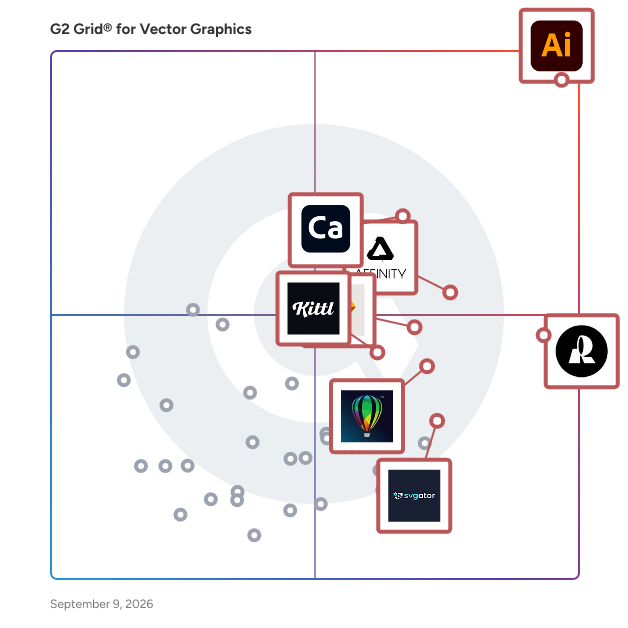
G2 Grid® for Vector Graphics Software

G2 Grid® for Vector Graphics Software plotting products by satisfaction and market presence

Highlighted products: Adobe Illustrator, Recraft, Adobe Capture, Affinity Designer, Sketch, CorelDRAW, Kittl, and SVGator.

Underlying data: [Grid® JSON](https://www.g2.com/categories/vector-graphics/grids.json?focus%5B%5D=adobe-illustrator&focus%5B%5D=recraft&focus%5B%5D=adobe-capture&focus%5B%5D=affinity-designer&focus%5B%5D=sketch&focus%5B%5D=coreldraw&focus%5B%5D=kittl&focus%5B%5D=svgator)

YouiDraw Logo Creator

YouiDraw Logo Creator is an online tool designed for creating high-quality vector graphics, including logos, icons, headings, and web elements. Operating entirely within a web browser, it eliminates the need for software downloads or installations, allowing users to design and access their projects from any device with internet connectivity. This cloud-based platform offers a user-friendly interface suitable for both beginners and experienced designers. Key Features and Functionality: - Extensive Template Library: Access hundreds of customizable templates and styles to jumpstart your design process. - Quick Styles: Apply a variety of pre-designed styles, including gradients and artistic effects, to elements with a single click. - Freehand Drawing Tools: Create unique logos by adding and manipulating points to form lines and curves. - Vector Effects: Enhance designs with effects such as drop shadow, inner shadow, outer glow, inner glow, reflection, blur, and light filters. - Shape Tools: Incorporate various shapes like rectangles, ellipses, convex, concave, and gear shapes, with adjustable properties for quick logo creation. - SVG Editing: Import and edit SVG files, adding styles and effects, and combining them with other shapes. - Cloud Integration: Save and access projects directly from Google Drive or Dropbox, facilitating seamless collaboration and storage. - Export Options: Export designs in multiple formats, including SVG, PDF, PNG, and JPG, with customizable sizes to suit various applications. Primary Value and User Solutions: YouiDraw Logo Creator empowers users to produce professional-grade vector graphics without the complexities associated with traditional design software. Its browser-based nature ensures accessibility from any device, making it ideal for individuals and businesses seeking a flexible and efficient design solution. By offering a comprehensive suite of tools and templates, it streamlines the design process, enabling users to create and customize logos and other graphics swiftly, thereby enhancing brand identity and visual communication.

Average Rating: 4.1/5.0

Total Reviews: 13

Who Is the Company Behind YouiDraw Logo Creator?

  • Seller: YouiDraw
  • HQ Location: Newark
  • Twitter: @YouiDraw
    40 Twitter followers
  • LinkedIn® Page: www.linkedin.com
    1 employees on LinkedIn®

Who Uses This Product?

  • Company Size: 73% Small, 20% Medium

What Do G2 Reviewers Say About YouiDraw Logo Creator?

AI-generated summary from verified user reviews

Pros
  • Users value the extensive customization options in YouiDraw Logo Creator, making logo design tailored and efficient for their brands.
  • Users appreciate the ease of use of YouiDraw Logo Creator, enabling quick and professional logo design without hassle.
  • Users love the extensive font options in YouiDraw Logo Creator, enhancing creativity and customization in their designs.
  • I appreciate the intuitive interface of YouiDraw Logo Creator, making logo design effortless and enhancing my brand identity.
  • Users value the intuitive design tools of YouiDraw Logo Creator, enhancing brand identity effortlessly and efficiently.
Cons
  • Users experience a learning curve with advanced features like layering and effects, requiring time to become comfortable.
  • Users note a lack of advanced customization options for text and textures, limiting their creative flexibility in designs.
  • Users find a limited editing experience frustrating, especially with advanced features that lack intuitiveness and customization options.

What Are Recent G2 Reviews of YouiDraw Logo Creator?

CADE

CADE is a compact but powerful 2D vector editor for Windows.

Average Rating: 4.2/5.0

Total Reviews: 13

How Do G2 Users Rate CADE?

  • Ease of Admin: 8.9/10 (Category avg: 8.5/10)

Who Is the Company Behind CADE?

  • Seller: CADE
  • Year Founded: 1994
  • HQ Location: San Francisco
  • Twitter: @DownloadNow
    16,933 Twitter followers
  • LinkedIn® Page: www.linkedin.com
    1 employees on LinkedIn®

Who Uses This Product?

  • Company Size: 43% Medium, 43% Small

What Are Recent G2 Reviews of CADE?

What Are G2 Users Discussing About CADE?

Amadine

Amadine is a vector graphics application designed for Mac, iPad, and iPhone, catering to both professional designers and hobbyists. It offers a comprehensive suite of tools for creating intricate vector illustrations, designing user interfaces, crafting websites, and developing logos. With its intuitive interface and robust functionality, Amadine simplifies the design process, making it accessible for users of all skill levels. Key Features and Functionality: - Comprehensive Toolset: Amadine provides a wide array of vector drawing tools, including pen, pencil, and brush instruments, enabling precise and creative designs. - Advanced Typography: The application supports extensive text formatting options, allowing designers to incorporate and manipulate text seamlessly within their projects. - Multiple Artboards: Users can work on multiple artboards simultaneously, facilitating the creation of complex designs and layouts. - Isometric Grid: Amadine includes an isometric grid feature, aiding in the creation of three-dimensional designs on a two-dimensional canvas. - Cross-Platform Compatibility: The software is optimized for macOS and iOS devices, ensuring a consistent and efficient user experience across platforms. Primary Value and User Solutions: Amadine addresses the need for a user-friendly yet powerful vector graphics tool that bridges the gap between professional-grade software and accessibility for beginners. Its intuitive design and comprehensive features empower users to produce high-quality vector graphics without a steep learning curve. Whether designing intricate illustrations, developing user interfaces, or creating compelling marketing materials, Amadine provides the tools necessary to bring creative visions to life efficiently and effectively.

Average Rating: 4.6/5.0

Total Reviews: 16

How Do G2 Users Rate Amadine?

  • Ease of Admin: 8.3/10 (Category avg: 8.5/10)

Who Is the Company Behind Amadine?

  • Seller: BeLight Software
  • Year Founded: 2003
  • HQ Location: N/A
  • Twitter: @BeLightSoftware
    4,578 Twitter followers
  • LinkedIn® Page: www.linkedin.com
    27 employees on LinkedIn®

Who Uses This Product?

  • Top Industries: Graphic Design
  • Company Size: 69% Small, 38% Medium

What Do G2 Reviewers Say About Amadine?

AI-generated summary from verified user reviews

Pros
  • Users value the ease of use of Amadine, allowing for efficient printing and high-quality results.
  • Users appreciate the quality output of Amadine, highlighting its ease of use and excellent results.

What Are Recent G2 Reviews of Amadine?

What Are G2 Users Discussing About Amadine?

Vecteezy Editor

Vecteezy Editor is a free, web-based SVG editing tool that enables users to customize vector graphics directly within their browser. Designed for both beginners and professionals, it offers an intuitive interface and a suite of features to create and modify vector designs without the need for additional software installations. Key Features and Functionality: - User-Friendly Interface: The editor is accessible to users of all skill levels, providing a seamless design experience. - Comprehensive Editing Tools: It includes essential vector drawing tools such as the Pen, Line, Curve, and Shape tools, along with editing capabilities like move, scale, rotate, align, and distribute. - Text and Style Customization: Users can add and modify text, adjust fonts, colors, sizes, and apply gradients to objects. - Integrated Asset Library: The platform offers access to a vast collection of vector graphics, stock photos, and design templates, enhancing creative possibilities. - Multiple Export Options: Designs can be exported in various formats, including JPG, PNG, SVG, and PDF, ensuring compatibility with other design tools. Primary Value and User Solutions: Vecteezy Editor streamlines the design process by eliminating the need for external software, allowing users to edit and customize vector graphics directly in their browser. This accessibility is particularly beneficial for those seeking a cost-effective and efficient solution for creating high-quality vector designs. By integrating a comprehensive asset library with robust editing tools, Vecteezy Editor empowers users to produce professional-grade visuals for various applications, from social media content to marketing materials.

Average Rating: 3.9/5.0

Total Reviews: 34

How Do G2 Users Rate Vecteezy Editor?

  • Ease of Admin: 9.2/10 (Category avg: 8.5/10)

Who Is the Company Behind Vecteezy Editor?

  • Seller: Eezy
  • Year Founded: 2008
  • HQ Location: Bowling Green, Kentucky
  • Twitter: @Eezy
    245 Twitter followers
  • LinkedIn® Page: www.linkedin.com
    227 employees on LinkedIn®

Who Uses This Product?

  • Top Industries: Design, Graphic Design
  • Company Size: 85% Small, 18% Medium

What Do G2 Reviewers Say About Vecteezy Editor?

AI-generated summary from verified user reviews

Pros
  • Users love the ease of use of Vecteezy Editor, which simplifies editing and enhances accessibility for everyone.
  • Users value the editing control of Vecteezy Editor, enjoying seamless in-browser functionality for vector graphics.
  • Users appreciate the high-quality images offered by Vecteezy Editor, valuing both ease of use and effective editing.
  • Users appreciate the affordability of Vecteezy Editor, enjoying high-resolution image editing without any cost.
  • Users love the high-resolution images and easy editing offered by Vecteezy Editor, making design simple and accessible.
Cons
  • Users find the lack of advanced tools in Vecteezy Editor limits their ability to perform complex edits effectively.
  • Users feel the lack of advanced tools in Vecteezy Editor limits their ability to perform complex edits effectively.
  • Users express frustration with the lack of advanced tools and unintuitive interface in Vecteezy Editor, complicating edits.
  • Users often struggle with difficult navigation, repeatedly searching for items due to the editor’s limited organization.
  • Users report that Vecteezy Editor can experience image issues, becoming unresponsive with complex and detailed images.

What Are Recent G2 Reviews of Vecteezy Editor?

What Are G2 Users Discussing About Vecteezy Editor?

Free vectorization tool

The Free Color SVG Converter is an online tool designed to transform bitmap images—such as JPG, PNG, WEBP, AVIF, and HEIC—into scalable vector graphics (SVG). This conversion ensures that images can be resized without any loss of quality, making them ideal for web use and printing purposes. Key Features and Functionality: - Wide Format Support: Accepts various bitmap formats, including JPG, PNG, WEBP, AVIF, and HEIC, providing flexibility for different user needs. - Advanced Customization Options: Offers adjustable settings like clustering methods (B/W, Color, Cutout, Stacked), curve fitting techniques (Pixel, Polygon, Spline), and parameters for color precision, gradient steps, and corner thresholds, allowing users to fine-tune the vectorization process. - User-Friendly Interface: Features a simple drag-and-drop functionality for uploading images, making the conversion process straightforward and accessible. - Additional Tools: Provides supplementary resources such as an image resizer to optimize images before conversion and a vector file converter to transform SVG files into other vector formats like AI, EPS, PDF, and CDR. Primary Value and User Solutions: The Free Color SVG Converter addresses the common challenge of maintaining image quality during resizing. By converting raster images into vector format, it ensures that graphics remain crisp and clear at any scale. This is particularly beneficial for professionals in design, printing, and web development who require high-quality, scalable images. The tool's advanced options and support for multiple formats make it a versatile solution for various vectorization needs.

Average Rating: 4.4/5.0

Total Reviews: 16

How Do G2 Users Rate Free vectorization tool?

  • Ease of Admin: 10.0/10 (Category avg: 8.5/10)

Who Is the Company Behind Free vectorization tool?

Who Uses This Product?

  • Company Size: 69% Small, 25% Large

What Do G2 Reviewers Say About Free vectorization tool?

AI-generated summary from verified user reviews

Pros
  • Users love the variety of file formats supported by the Free vectorization tool, making conversions hassle-free and efficient.
  • Users appreciate the affordability of the Free vectorization tool, enjoying free image conversion for quick tasks.
  • Users love the fast and easy-to-use interface of the Free vectorization tool for quick image processing.
  • Users commend the efficiency improvement of the Free vectorization tool, enabling quick and easy vector conversions.
  • Users love the easy image import options for converting files directly online without any installation hassle.
Cons
  • Users find the complexity of fine-tuning nodes and paths challenging, impacting the quality of output images.
  • Users face limited image editing options, struggling with node and curve adjustments, affecting output quality.
  • Users note the one-by-one conversion limitation can be frustrating for those with many images to process.

What Are Recent G2 Reviews of Free vectorization tool?

What Are G2 Users Discussing About Free vectorization tool?

Linearicons

The Linearicons icon pack includes a font that you can install and use in any application with a custom text tool .

Average Rating: 4.2/5.0

Total Reviews: 11

How Do G2 Users Rate Linearicons?

  • Ease of Admin: 10.0/10 (Category avg: 8.5/10)

Who Is the Company Behind Linearicons?

  • Seller: Linear Icons
  • HQ Location: N/A
  • Twitter: @KingPerxis
    260 Twitter followers
  • LinkedIn® Page: www.linkedin.com
    1 employees on LinkedIn®

Who Uses This Product?

  • Company Size: 91% Small, 9% Large

What Do G2 Reviewers Say About Linearicons?

AI-generated summary from verified user reviews

Pros
  • Users appreciate the various file formats offered by Linearicons, ensuring high quality and scalability for design projects.
  • Users appreciate the clean and modern icon design of Linearicons, enhancing the visual appeal of their projects.
  • Users value the variety and quality of icons in Linearicons, making it a staple for design projects.
  • Users appreciate the extensive variety of icons in Linearicons, enhancing projects with modern and versatile designs.
  • Users value the Adobe integration of Linearicons, enhancing usability and efficiency in their design processes.
Cons
  • Users find the limited icon editing features in the free version a significant drawback for unique branding needs.
  • Users feel that Linearicons is expensive compared to other icon packs, lacking essential features and frequent updates.
  • Users find tool limitations frustrating, noting the lack of customization and fewer updates compared to competitors.
  • Users desire an expansion in icon variety, particularly for animated options to enhance project engagement.
  • Users find the limited editing capabilities restrictive, hindering personalization and brand alignment in their projects.

What Are Recent G2 Reviews of Linearicons?

What Are G2 Users Discussing About Linearicons?

SVGConverter

SVGConverter is an online vectorizing tool that converts raster images, such as PNG, JPG/JPEG, BMP, TIFF, WEBP to vector images, such as SVG, AI, EPS, and PDF. It produces high-quality, full-color vector graphics without compromising pixel details. It's the best free online image tracer.

Average Rating: 4.6/5.0

Total Reviews: 14

Who Is the Company Behind SVGConverter?

Who Uses This Product?

  • Top Industries: Design
  • Company Size: 100% Small, 7% Medium

What Do G2 Reviewers Say About SVGConverter?

AI-generated summary from verified user reviews

Pros
  • Users commend the intuitive interface of SVGConverter, enhancing workflow efficiency and quick design updates.
  • Users praise the impeccable image quality of SVGConverter, enhancing their workflow with reliable conversions.
  • Users value the intuitive interface of SVGConverter, which significantly enhances workflow efficiency for design updates.
  • Users admire the high-quality conversions of SVGConverter, significantly enhancing their workflow and design efficiency.
  • Users appreciate the intuitive interface of SVGConverter, which accelerates workflow and simplifies design updates.
Cons
  • Users often face import issues with SVGConverter, including blurriness and the need for manual adjustments on complex files.
  • Users note limited image editing, requiring manual adjustments and experiencing occasional blurriness with complex SVGs.
  • Users face vector issues with SVGConverter, needing manual adjustments and experiencing image quality problems post-conversion.

What Are Recent G2 Reviews of SVGConverter?

What Are G2 Users Discussing About SVGConverter?

Gravit Designer

Gravit Designer is a, cross-platform vector graphic design application tailored for both beginners and professionals. It enables users to create a wide array of designs, including logos, icons, illustrations, presentations, and print materials. Accessible as both a desktop application and a web-based tool, Gravit Designer ensures seamless functionality across Windows, macOS, Linux, and Chrome OS platforms. Key Features and Functionality: - Vector Design Tools: Offers precise and scalable artwork creation with tools like anchors, Bézier curves, and complex shape formation. - Advanced Effects: Provides a rich set of non-destructive effects, including blur, shadows, overlays, and more, applicable per layer. - Multi-Page Support: Facilitates the creation of multi-page designs with master pages for reusable elements and efficient batch editing. - Cloud Integration: Enables seamless syncing and collaboration through cloud storage, while also supporting local saves. - Cross-Platform Accessibility: Operates smoothly on various operating systems and offers a full-featured web application for browser-based access. - Comprehensive Export Options: Supports a broad range of formats, including SVG, PDF, PNG, and JPG, with integration for Google Fonts. Primary Value and User Solutions: Gravit Designer addresses the need for a cost-effective, user-friendly vector design tool that doesn't compromise on functionality. Its cross-platform compatibility and cloud integration offer flexibility for designers working across different devices and locations. The intuitive interface and comprehensive feature set make it suitable for a variety of design tasks, from web graphics to print materials, catering to both novice and experienced designers. By providing a free version with substantial capabilities and a competitively priced Pro version for advanced features, Gravit Designer ensures accessibility without sacrificing quality.

Average Rating: 4.2/5.0

Total Reviews: 43

How Do G2 Users Rate Gravit Designer?

  • Ease of Admin: 8.3/10 (Category avg: 8.5/10)

Who Is the Company Behind Gravit Designer?

Who Uses This Product?

  • Top Industries: Design, Graphic Design
  • Company Size: 79% Small, 21% Medium

What Do G2 Reviewers Say About Gravit Designer?

AI-generated summary from verified user reviews

Pros
  • Users value the cross-platform compatibility of Gravit Designer, enabling seamless design work across various devices.
  • Users value the creativity features of Gravit Designer, enabling dynamic graphics and high-quality SVG exports for projects.
  • Users appreciate the intuitive interface of Gravit Designer, enabling easy design without a steep learning curve.
  • Users appreciate the superb SVG handling in Gravit Designer, enabling high-quality exports for web and educational projects.
  • Users value the excellent image quality in Gravit Designer, allowing seamless SVG exports for various applications.
Cons
  • Users note limited tools in Gravit Designer compared to industry standards like Adobe and Sketch.

What Are Recent G2 Reviews of Gravit Designer?

What Are G2 Users Discussing About Gravit Designer?

ArcGIS Maps for Adobe Creative Cloud

ArcGIS Maps for Adobe Creative Cloud is ideal for design and communications professionals.It gives access data-driven maps inside Adobe Illustrator and Photoshop.

Average Rating: 4.1/5.0

Total Reviews: 20

How Do G2 Users Rate ArcGIS Maps for Adobe Creative Cloud?

  • Ease of Admin: 5.0/10 (Category avg: 8.5/10)

Who Is the Company Behind ArcGIS Maps for Adobe Creative Cloud?

  • Seller: Esri
  • Year Founded: 1969
  • HQ Location: Redlands, CA
  • Twitter: @Esri
    188,738 Twitter followers
  • LinkedIn® Page: www.linkedin.com
    7,396 employees on LinkedIn®

Who Uses This Product?

  • Company Size: 52% Small, 33% Medium

What Are Recent G2 Reviews of ArcGIS Maps for Adobe Creative Cloud?

Artboard

Powerful functionality for making creative vector graphics.

Average Rating: 4.4/5.0

Total Reviews: 21

How Do G2 Users Rate Artboard?

  • Ease of Admin: 9.2/10 (Category avg: 8.5/10)

Who Is the Company Behind Artboard?

  • Seller: Mapdiva
  • Year Founded: 2008
  • HQ Location: Indianapolis, IN
  • Twitter: @mapdiva
    330 Twitter followers
  • LinkedIn® Page: www.linkedin.com

Who Uses This Product?

  • Company Size: 81% Small, 29% Medium

What Are Recent G2 Reviews of Artboard?

DrawPad

DrawPad is a fully featured image composition and manipulation program, and an essential tool for all types of graphic design projects. Key features include pencil and brush tools, raster and vector images, image layers for non-destructive editing, and effects such as bevels and shadows. With the easy to use interface, you'll be able to immediately get working on your next project. Create banner ads or invitations, make sketches and paintings on your computer, draw diagrams, icons and other web graphics, and more with DrawPad. Insert shape objects, including circles, rectangles, polygons, stars, word/thought bubbles or insert text. Fill areas with solid colors, gradients, patterns or textures. Editing features include crop, rotate, resize, and flip. DrawPad also supports png, bmp, jpg, gif, pdf, and svg formats.

Average Rating: 4.4/5.0

Total Reviews: 31

How Do G2 Users Rate DrawPad?

  • Ease of Admin: 3.3/10 (Category avg: 8.5/10)

Who Is the Company Behind DrawPad?

  • Seller: NCH Software
  • Year Founded: 1993
  • HQ Location: Greenwood Village, CO
  • Twitter: @nchsoftware
    9,910 Twitter followers
  • LinkedIn® Page: www.linkedin.com
    77 employees on LinkedIn®

Who Uses This Product?

  • Top Industries: Design
  • Company Size: 67% Small, 30% Medium

What Do G2 Reviewers Say About DrawPad?

AI-generated summary from verified user reviews

Pros
  • Users commend DrawPad for its ease of use, making it accessible for both beginners and experienced designers.
  • Users appreciate the ease of learning with DrawPad, allowing quick mastery for both beginners and experienced designers.
  • Users value the user-friendly interface of DrawPad, ensuring easy access to graphic design tools for everyone.
  • Users value the intuitive interface of DrawPad, facilitating easy use for both beginners and experienced designers.
  • Users appreciate the user-friendly interface of DrawPad, enabling both beginners and pros to design effortlessly.
Cons
  • Users find the slow speed somewhat frustrating, as it affects hand movements and overall performance.
  • Users find the professional version expensive, especially given some performance issues like lag.

What Are Recent G2 Reviews of DrawPad?

What Are G2 Users Discussing About DrawPad?

Lunacy

Lunacy is a next-gen vector graphic software for UI, UX, and web design. It has everything you are used to in other similar apps and goes beyond. Created by designers for designers to focus on the workflow and minimize distractions. No more wasting time surfing the internet for graphics or switching apps to remove backgrounds, or thinking placeholder texts! Lunacy has it all and even more. Faster than Figma, smarter than Sketch! 100% FREE Lunacy is absolutely free for personal and commercial use. CROSS-PLATFORM APP Lunacy runs on Windows, macOS, and Linux. REAL-TIME COLLABORATION Users working on different platforms can collaborate over the same design in real-time. LOW SYSTEM REQUIREMENTS Lunacy is not demanding on hardware and runs smoothly even on moderate laptops. BUILT-IN GRAPHICS Lunacy comes with built-in graphics: Icons Photos Illustrations You can use this content for free if you set a link to Icons8 in your final work. Or you can subscribe to one of our paid plans and forget about linking. AI-POWERED TOOLS ONBOARD Inside Lunacy, you will find some handy tools that will save you tons of time: Background remover — get rid of photo backgrounds in one click Image upscaler — enlarge images and enhance their resolution Avatar generator — instantly create user avatars when designing contact lists, chats, testimonial carousels and things alike Text generator — forget about lorem ipsum and add meaningful copy to your designs in one click: names, job titles, cities, phone and credit card numbers, and more WORKS ONLINE AND OFFLINE You can work both with cloud and local documents. It's up to you to choose. You can switch between the cloud and local modes whenever you want. Cloud documents: Accessible from anywhere Up to 10 simultaneous editors Observer mode and other collaboration perks Local documents: Privacy: what you save to a local file stays local When you have to work over a low-bandwidth connection or with no internet at all MINIMUM LEARNING CURVE If you have experience with Sketch or Figma, in Lunacy you’ll feel like home. FULL SUPPORT FOR SKETCH FILES Lunacy natively works with the Sketch format. You can do whatever you want with .sketch files: Open Edit Save No need to buy a Mac and/or Sketch license. Lunacy can handle both dusty kits from Sketchappsources and the latest versions of .sketch files. NO BOUNDS Thanks to the native support for the Sketch format, you can use Lunacy with all major hand-off and version control tools like Avocode, Zeplin, Abstract, Simpli, etc. If it is necessary, you can easily import .sketch files to Figma or XD.

Average Rating: 4.3/5.0

Total Reviews: 28

How Do G2 Users Rate Lunacy?

  • Ease of Admin: 8.9/10 (Category avg: 8.5/10)

Who Is the Company Behind Lunacy?

  • Seller: Icons8
  • Year Founded: 2012
  • HQ Location: United States
  • Twitter: @icons_8
    12,216 Twitter followers
  • LinkedIn® Page: www.linkedin.com
    50 employees on LinkedIn®

Who Uses This Product?

  • Top Industries: Design
  • Company Size: 93% Small, 18% Medium

What Do G2 Reviewers Say About Lunacy?

AI-generated summary from verified user reviews

Pros
  • Users appreciate the AI integration in Lunacy, enhancing productivity with easy background removal and smart snippets.
  • Users value the multi–OS compatibility of Lunacy, enabling seamless project access across various devices.
  • Users appreciate the intuitive interface of Lunacy, making it easy to access essential tools across devices.
  • Users appreciate the well-designed interface of Lunacy, enabling easy access to essential tools across devices.
Cons
  • Users face performance issues with Lunacy, as it struggles to load assets and feels neglected.
  • Users have experienced slow speed with large files in Lunacy, leading to temporary freezes before updates resolved the issue.
  • Users find Lunacy's tool limitations frustrating, with issues like assets not loading and a sense of neglect.

What Are Recent G2 Reviews of Lunacy?

What Are G2 Users Discussing About Lunacy?

Canvas X Draw

canvasxdraw is a precision 2D technical illustration platform built for engineers, patent professionals, technical writers, and researchers who demand accuracy that "close enough" simply can't deliver. With over 20 years in the industry, canvasxdraw is the all-in-one 2D workspace that eliminates the need to juggle multiple tools — combining vector graphics, raster integration, smart annotations, and automated dimensioning in a single, focused environment. What Makes canvasxdraw Different Most design tools are built for creatives. canvasxdraw is built for technical professionals. While competitors chase 3D rendering and generalist workflows, canvasxdraw doubles down on the specialized 2D capabilities that matter to engineers, patent drawers, and cartographers: · 0.035-micron drawing accuracy — a CAD-lite precision engine inside an intuitive modern interface · 2,000+ symbol libraries with built-in IEEE, ANSI, and USPTO-compliant templates · Smart annotations and callouts that stay connected when objects move · Native CAD import/export — open and edit AutoCAD files without leaving your 2D workflow. Who Uses canvasxdraw · Patent Drawers: Clean vector lines and intelligent callouts for USPTO-compliant utility patent drawings · Technical Writers/Illustrators: Rapidly produce assembly, maintenance, and repair illustrations for technical manuals · Cartographers: Visualize and annotate complex geospatial data with precision · Researchers: Translate findings into publication-ready visuals that meet peer-reviewed journal standards. Key Features · Linear, chain, and baseline dimensioning with automatic calculation · Seamless vector + raster integration in a single document · High-resolution export to PDF, print-ready raster, and clean vector formats · Technical-first UI designed to feel natural to engineers, not just artists Pricing & Access canvasxdraw is a Product-Led Growth company — no sales calls, no procurement delays. · Free Trial — full access, no credit card required · Annual Subscription — always on the latest version · Perpetual License — one-time purchase, own it forever The Bottom Line canvasxdraw gives technical professionals 100% of the 2D tools they need — and none of the 3D complexity they don't. From blank page to finished technical schematic in a single afternoon.

Average Rating: 4.3/5.0

Total Reviews: 28

How Do G2 Users Rate Canvas X Draw?

  • Ease of Admin: 8.3/10 (Category avg: 8.5/10)

Who Is the Company Behind Canvas X Draw?

Who Uses This Product?

  • Top Industries: Information Technology and Services
  • Company Size: 75% Small, 25% Medium

What Do G2 Reviewers Say About Canvas X Draw?

AI-generated summary from verified user reviews

Pros
  • Users value the professional graphic design capabilities of Canvas X Draw, praising its quality and extensive features.
  • Users value the professional logo design capabilities of Canvas X Draw, praising its versatility and precision.
  • Users love the exceptional quality of Canvas X Draw, praising its detailed vector graphics and versatile output options.
  • Users praise the versatile and user-friendly vector design features of Canvas X Draw for precise technical creations.
  • Users appreciate the exceptional quality of vector graphics in Canvas X Draw, delivering precision for various design needs.
Cons
  • Users note the high price of Canvas X Draw as a significant drawback affecting its overall appeal.
  • Users are frustrated by the lack of multiple switch programs in Canvas X Draw, along with interface confusion and support issues.
  • Users find the poor usability of Canvas X Draw frustrating, especially with its confusing interface and limited functionality.
  • Users report encountering occasional software bugs, which can disrupt their overall experience with Canvas X Draw.
  • Users find the software instability of Canvas X Draw frustrating, impacting their overall experience and productivity.

What Are Recent G2 Reviews of Canvas X Draw?

What Are G2 Users Discussing About Canvas X Draw?

Designimo

Online Logo Design Maker - Create professional logo design for your business in minutes.

Average Rating: 4.6/5.0

Total Reviews: 11

Who Is the Company Behind Designimo?

  • Seller: Designimo
  • Year Founded: 2013
  • HQ Location: N/A
  • Twitter: @designim0
    114 Twitter followers
  • LinkedIn® Page: nz.linkedin.com
    4 employees on LinkedIn®

Who Uses This Product?

  • Company Size: 55% Small, 36% Large

What Are Recent G2 Reviews of Designimo?

Drawtify

Drawtify is a Free Online Vector Graphic Editor with Great Design Templates and Elements. You can create almost all the beautiful graphics with online vector graphic editor, and become a graphic designer, illustrator, animator, and publisher of Drawtify. With our powerful vector design software, you can create exclusive almost all beautiful graphics online for free, such as SVG graphics, vector logos, infographics, flyer, poster, banners, etc. * 3000+ exquisite original design templates. * 20K+ shapes and icons. * 1000+ graphic elements. * 100K+ HD backgrounds. * 200+ color schemes. * 1M+ HD pictures.

Average Rating: 4.5/5.0

Total Reviews: 21

How Do G2 Users Rate Drawtify?

  • Ease of Admin: 9.2/10 (Category avg: 8.5/10)

Who Is the Company Behind Drawtify?

  • Seller: Drawtify,Inc.
  • Year Founded: 2018
  • HQ Location: Newark, Delaware
  • Twitter: @drawtify
    81 Twitter followers
  • LinkedIn® Page: www.linkedin.com
    3 employees on LinkedIn®

Who Uses This Product?

  • Company Size: 64% Small, 27% Medium

What Do G2 Reviewers Say About Drawtify?

AI-generated summary from verified user reviews

Pros
  • Users find Drawtify's ease of use delightful, allowing quick starts with its intuitive setup and high-quality templates.
  • Users enjoy the Adobe integration, finding it easy to start and appreciating its functionality between Canva and Adobe.
  • Users highlight the easy compatibility of Drawtify, making it simple to start designing right away.
  • Users value the high-quality templates provided by Drawtify, making initial design drafts easy and efficient.
  • Users value the diverse, high-quality templates in Drawtify, making design easier for client projects.
Cons
  • Users find the limited customization options and outdated templates of Drawtify hinder its overall effectiveness.
  • Users feel the limited editing options hinder creativity and reliance on outdated templates with a specific aesthetic.
  • Users find the limited templates of Drawtify outdated and lacking in customization options, hindering creative potential.

What Are Recent G2 Reviews of Drawtify?

What Are G2 Users Discussing About Drawtify?

Neeraja Prakash
NP
Researched and written by Neeraja Prakash
Updated October 8, 2024