Best Task Management Software - Page 13

How Many Task Management Software Products Does G2 Track?

Total Products under this Category: 560

Category Stats (Sep 2026)

  • Average Rating: 4.46/5 (↑0.01 vs Aug 2026) The average rating of products in this category, based on all submitted ratings
  • Top Trending Product: Chaser (+1.82%) - Among all products in this category, Chaser recorded the largest rating increase compared to last month

Last updated: September 01, 2026

How Does G2 Rank Task Management Software Products?

Why You Can Trust G2's Software Rankings:

  • 30 Analysts and Data Experts
  • 118,800+ Authentic Reviews
  • 560+ Products
  • Unbiased Rankings

G2's software rankings are built on verified user reviews, rigorous moderation, and a consistent research methodology maintained by a team of analysts and data experts. Each product is measured using the same transparent criteria, with no paid placement or vendor influence. While reviews reflect real user experiences, which can be subjective, they offer valuable insight into how software performs in the hands of professionals. Together, these inputs power the G2 Score, a standardized way to compare tools within every category.

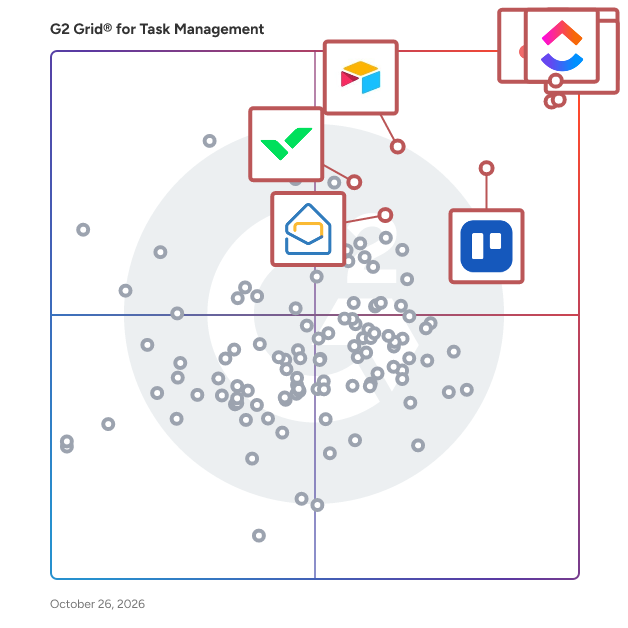
G2 Grid® for Task Management Software

G2 Grid® for Task Management Software plotting products by satisfaction and market presence

Highlighted products: Asana, ClickUp, monday AI Work Platform, Smartsheet, Trello, Airtable, Wrike, and Microsoft Planner.

Underlying data: [Grid® JSON](https://www.g2.com/categories/task-management-software/grids.json?focus%5B%5D=asana&focus%5B%5D=clickup&focus%5B%5D=monday-com&focus%5B%5D=smartsheet&focus%5B%5D=trello&focus%5B%5D=airtable&focus%5B%5D=wrike&focus%5B%5D=microsoft-planner)

MyLifeOrganized (MLO)

MyLifeOrganized (MLO) is the most flexible and powerful personal to-do list & task management app. The #1 for those who are truly serious about getting things done, in every aspect of life. Designed to strike a balance between the simple and the complex, MyLifeOrganized (MLO) comes with optional contexts, tags, stars, flags, time-based and location-based reminders, start and due dates, priorities, dependencies, completely customizable filters and views that make MLO really flexible to adapt to your own system for managing your tasks. With the unlimited hierarchy in MLO you can break a big task into small actions while preserving the big picture. Once loaded with your information, MLO goes to work and generates a simple list containing only the next actions that require your immediate attention. This list is updated auto-magically once you complete a task, or simply when it’s dinner time. MLO keeps you focused on what really matters. What else makes MLO so powerful? Behind MLO products there is a long history (since 2004), a team of responsive developers and a strong community of users who care a lot tools they use. It is their honest feedback that makes MLO apps packed with carefully thought out, powerful, yet easy-to-use features.

Average Rating: 5.0/5.0

Total Reviews: 2

How Do G2 Users Rate MyLifeOrganized (MLO)?

  • Task Prioritization: 8.3/10 (Category avg: 8.8/10)
  • Creation & Assignment: 10.0/10 (Category avg: 9.0/10)
  • To-Do Lists: 10.0/10 (Category avg: 8.9/10)

Who Is the Company Behind MyLifeOrganized (MLO)?

Who Uses This Product?

  • Company Size: 50% Medium, 50% Small

What Are Recent G2 Reviews of MyLifeOrganized (MLO)?

myTask2do

Simple task management tool for creating and managing tasks. myTask2do add-in for Outlook brings the power of myTask2do to Outlook. myTask2do add-in lets you create tasks, set time schedules, add a footnote, prioritize, and track progress fast and easily. Create a task by simply entering the name of the task and hitting the add task button. Easily turn your mail into tasks and insert them into projects. Quickly find any task with the advanced search and filtering option. The task list shows the daily tasks in order of projects and information on when to finish by. Update task information from the task details that shows up when a task is selected from the task list. Add time log entries on task from the task list with the option for closing it if it is completed. Comments can be added to the task for providing additional information. myTask2do can help you: Turn Emails into Tasks Review and manage tasks Schedule and organize project tasks Recording of work hours Keeping track of the workload Collaborate real-time with team myTask2do features include: Creating task - Create a task by simply entering the name of the task and hitting the add task button. Managing task - Update task information from the task details that show up when a task is selected from the task list. Time-log entry - Add time log entries on task from the task list with the option for closing it if it is completed. Adding comment - Comments can be added to the task for providing additional information during the course of a task being done. Repeating tasks - create a recurring task for tasks that you need to complete daily, weekly, monthly, or even annually myTask2do is a task management and collaboration tool that simplifies managing combined team tasks and allows you to effectively work with your team to get things done from a single platform in real-time. It is a cloud-based application enabling managers and teams to optimize business processes, increase productivity and implement accountability. NOTE: myTask2do is a subscription-based service and requires either a free trial or paid account. After installing the app, you must sign up for an account if you don’t have a myTask2do account with your Microsoft email. For more information check out our website: http://mytask2do.com or contact us at info@mytask2do.com Add-in capabilities - When this add-in is used, it Can send data over the Internet This add-in can access and modify personal information in the active message, such as the body, subject, sender, recipients, and attachment information. It may send this data to a third-party service. Other items in your mailbox can’t be read or modified.

Average Rating: 4.5/5.0

Total Reviews: 3

How Do G2 Users Rate myTask2do?

  • Has the product been a good partner in doing business?: 10.0/10 (Category avg: 9.0/10)
  • Task Prioritization: 6.7/10 (Category avg: 8.8/10)
  • Creation & Assignment: 8.3/10 (Category avg: 9.0/10)
  • To-Do Lists: 10.0/10 (Category avg: 8.9/10)

Who Is the Company Behind myTask2do?

Who Uses This Product?

  • Company Size: 67% Medium, 33% Small

What Are Recent G2 Reviews of myTask2do?

What Are G2 Users Discussing About myTask2do?

Nimble

Nimble is an enterprise platform built for managing complex projects with confidence, consistency, and complete visibility. Designed for organizations that need more than basic task tracking, NimbleWork brings together teams, workflows, resources, and data into one unified delivery system that helps enterprises plan smarter, execute faster, and deliver more predictably at scale. Nimble supports the full lifecycle of project delivery—from intake and prioritization to execution, governance, and reporting. Its flexible hierarchy modeling allows organizations to structure work the way they operate, whether it’s simple projects or large, multi-team programs with dependencies, risks, and cross-functional workflows. Teams get real-time visibility across initiatives, while leaders gain clarity into progress, bottlenecks, resource utilization, and delivery risks—without relying on spreadsheets or disconnected tools. Key capabilities include: Project Visibility: Unified views of all projects, dependencies, milestones, and risks, enabling proactive decision-making across teams and portfolios. Flexible Work Hierarchy & Custom Work Types: Model projects, tasks, risks, decisions, and change requests with configurable workflows and forms. Hybrid Delivery Support: Manage Agile, Waterfall, or hybrid teams in a consistent framework—ideal for large enterprises with diverse execution models. Advanced Scheduling & Resource Management: Balance workloads, allocate skilled resources, and forecast capacity with built-in intelligence. Real-Time Dashboards & Reporting: Executive-level insights for PMOs, CIOs, and delivery leaders—no custom BI required. Integrated Collaboration: Comments, updates, file sharing, approvals, and discussions happen in context of the work, reducing communication gaps. Automation & Integrations: Rule-based automation, API integrations, and connectivity with 2000+ apps through Zapier and other connectors. AI Capabilities: Nimble includes AI-powered Agents that accelerate planning, automate routine work, and surface actionable insights across projects and teams. From generating project plans and acceptance criteria to summarizing discussions and highlighting risks, these AI companions help teams work smarter, faster, and with greater predictability. For teams adopting modern Project management practices, Nimble also offers intuitive Agile boards, sprint tools, and backlog management—making it easy to support iterative delivery while preserving enterprise governance and traceability. Whether you're managing a multi-year transformation program, cross-team engineering projects, or department-wide initiatives, Nimble helps enterprises eliminate chaos, improve predictability, and deliver with confidence.

Average Rating: 4.0/5.0

Total Reviews: 11

How Do G2 Users Rate Nimble?

  • Has the product been a good partner in doing business?: 8.3/10 (Category avg: 9.0/10)
  • To-Do Lists: 10.0/10 (Category avg: 8.9/10)

Who Is the Company Behind Nimble?

Who Uses This Product?

  • Company Size: 45% Medium, 36% Small

What Do G2 Reviewers Say About Nimble?

AI-generated summary from verified user reviews

Pros
  • Users value the tracking ease of Nimble, facilitating smooth monitoring of issues and progress effortlessly.
  • Users praise Nimble for its responsive customer support and effortless implementation, enhancing their overall experience.
  • Users highlight Nimble's ease of use, appreciating its smooth implementation and functionality in multi-user environments.
  • Users appreciate the effective communication features of Nimble, facilitating easy coordination and tracking of requests.
  • Users find NIMBLE’s implementation ease excellent, appreciating its user-friendly setup and responsive support during integration.
Cons
  • Users face limited customization options with Nimble, making it difficult to tailor the product to their needs.
  • Users report experiencing slow performance with Nimble, leading to extended loading times and frustration.
  • Users find the lack of difficult reporting capabilities frustrating, limiting their ability to track resolved issues effectively.
  • Users express frustration over the inability to extract reports in Excel format, limiting data usability for analysis.
  • Users find Nimble not intuitive, struggling with the interface and limited customization options for their needs.

What Are Recent G2 Reviews of Nimble?

Rindle

Rindle is a task and project management tool your team will actually want to use. Rindle's flexible project boards adapt to your workflow and make sure everyone is on the same page. Task and project management has never been easier.

Average Rating: 4.3/5.0

Total Reviews: 2

How Do G2 Users Rate Rindle?

  • Has the product been a good partner in doing business?: 8.3/10 (Category avg: 9.0/10)
  • Task Prioritization: 3.3/10 (Category avg: 8.8/10)
  • Creation & Assignment: 8.3/10 (Category avg: 9.0/10)
  • To-Do Lists: 8.3/10 (Category avg: 8.9/10)

Who Is the Company Behind Rindle?

  • Seller: Rindle
  • Year Founded: 2015
  • HQ Location: N/A
  • Twitter: @HelloRindle
    240 Twitter followers
  • LinkedIn® Page: www.linkedin.com
    1 employees on LinkedIn®

Who Uses This Product?

  • Company Size: 100% Small

What Are Recent G2 Reviews of Rindle?

What Are G2 Users Discussing About Rindle?

RTMS

A simple platform that gives you an overarching centralised management tool to track performance, document processes, record logs and KPIs. A simple-to-understand interface that allows easy access to all your user's performance scores and overall scheduled daily, weekly and monthly tasks and respective completion rates. An at-a-glance dashboard that gives you an overview of how your team is performing.

Average Rating: 4.3/5.0

Total Reviews: 2

How Do G2 Users Rate RTMS?

  • Task Prioritization: 8.3/10 (Category avg: 8.8/10)
  • Creation & Assignment: 8.3/10 (Category avg: 9.0/10)
  • To-Do Lists: 8.3/10 (Category avg: 8.9/10)

Who Is the Company Behind RTMS?

  • Seller: The Software House
  • Year Founded: 2012
  • HQ Location: Warsaw, Mazowieckie, Poland
  • Twitter: @RealTSH
    1,461 Twitter followers
  • LinkedIn® Page: linkedin.com
    284 employees on LinkedIn®

Who Uses This Product?

  • Company Size: 67% Large, 33% Medium

What Do G2 Reviewers Say About RTMS?

AI-generated summary from verified user reviews

Pros
  • Users praise the ease of learning with RTMS, highlighting its user-friendly and beginner-friendly setup.
  • Users appreciate the ease of use of RTMS, finding it beginner-friendly and simple to set up anywhere.
  • Users value the easy setup of RTMS, appreciating its user-friendly and accessible configuration.
  • Users find RTMS to be user-friendly, with easy setup and accessibility from anywhere, making it ideal for beginners.
Cons
  • Users experience inadequate reporting with RTMS, limiting insights and integration with third-party software.
  • Users face integration issues with RTMS, limiting flexibility and advanced reporting capabilities.
  • Users experience a lack of integration, which limits reporting options and compatibility with third-party software.

What Are Recent G2 Reviews of RTMS?

What Are G2 Users Discussing About RTMS?

scrumplanning.com

A scrum estimation tool for scrum masters & dev teams for story point estimations. Designed for better team collaboration on estimation.

Average Rating: 5.0/5.0

Total Reviews: 2

How Do G2 Users Rate scrumplanning.com?

  • Task Prioritization: 10.0/10 (Category avg: 8.8/10)
  • Creation & Assignment: 10.0/10 (Category avg: 9.0/10)
  • To-Do Lists: 10.0/10 (Category avg: 8.9/10)

Who Is the Company Behind scrumplanning.com?

Who Uses This Product?

  • Company Size: 50% Medium, 50% Small

What Do G2 Reviewers Say About scrumplanning.com?

AI-generated summary from verified user reviews

Pros
  • Users find the ease of use of scrumplanning.com remarkable, enabling quick navigation and efficient task management.
  • Users value the excellent team collaboration tools in scrumplanning.com, enhancing participation and engagement in planning meetings.
  • Users find the ease of learning for scrumplanning.com exceptional, making it accessible for all team members.
  • Users find the navigation ease of scrumplanning.com exceptional, making it accessible for all team members.
  • Users value the easy navigation and quick setup of scrumplanning.com, enhancing team collaboration and efficiency.
Cons
  • Users suggest enhancing the advanced reporting features of Scrumplanning for better usability and insights.
  • Users note the need for improved UX features like advanced reporting and better mobile responsiveness for Scrumplanning.com.

What Are Recent G2 Reviews of scrumplanning.com?

SingularityApp

SingularityApp is a task management and personal productivity software that helps individuals and teams organize tasks, manage projects, and track time across multiple devices. The application is designed for individuals with personal goals, managers coordinating team workflows, and anyone seeking to stay on top of daily responsibilities. SingularityApp is available on Mac, Windows x64, Linux, iOS, Android, and via a web version for PC. Key features include: 1. Tasks and projects — unlimited levels of nested subtasks for managing simple to-do lists and complex multi-level projects, with support for recurring tasks and prioritization. 2. Time tracking and Pomodoro timer — built-in Pomodoro technique with customizable work and rest intervals, productivity statistics, and completed session tracking. 3. Visual project management — Kanban boards for tracking task progress and Gantt charts for timeline planning with dependencies and milestones. 4. Collaboration — shared projects with up to 10 participants, link-based access, and real-time task updates. 5. Notifications and reminders — multiple reminders per task, alarm mode, and GPS-based geo-notifications to avoid missing deadlines. Additional capabilities include a habit tracker, Focus and Review modes, notepads with rich text editing and image support, file attachments with cloud storage, color tags, flexible filters, offline access, and mobile widgets. SingularityApp integrates with Google Calendar (two-way sync), iCal web calendars, local iOS calendar, Telegram bot, and email. An open API is available for connecting external systems and automating workflows. Pricing is available in three tiers: Basic (free), Pro ($3.33/month billed annually), and Elite ($4.17/month billed annually). A 14-day trial with access to most Elite features activates automatically upon registration without requiring a credit card.

Average Rating: 4.3/5.0

Total Reviews: 2

How Do G2 Users Rate SingularityApp?

  • Task Prioritization: 10.0/10 (Category avg: 8.8/10)
  • Creation & Assignment: 9.2/10 (Category avg: 9.0/10)
  • To-Do Lists: 10.0/10 (Category avg: 8.9/10)

Who Is the Company Behind SingularityApp?

Who Uses This Product?

  • Company Size: 100% Small

What Are Recent G2 Reviews of SingularityApp?

Smart Checklist for Jira

Smart Checklist by TitanApps helps you organize your work with clear ToDo’s. Create checklists, save them as templates, and apply them to recurring tasks with automation. Smart Checklist functionality ▪️ Apply Markdown formatting ▪️ Save and automatically apply checklists to Jira issues ▪️ Create custom statuses for checklist items ▪️ Validate checklists before issue transition in your workflow ▪️ Add checklists automatically based on your rules and workflow setup ▪️ Prevent users from modifying checklists with Linked Templates ▪️ Find specific values in checklists with JQL ▪️ View progress on the Agile board. What do you get with Smart Checklist? ✅ Help your teams complete tasks ✅ Check progress at a glance ✅ Automate repetitive tasks ✅ Ensure that the delivered work meets your standards Visit us at: https://titanapps.io/products/jira-checklist TitanApps is a set of productivity tools for project management platforms (such as Jira and monday.com) designed for professional teams to move projects forward.

Average Rating: 4.3/5.0

Total Reviews: 3

How Do G2 Users Rate Smart Checklist for Jira?

  • Task Prioritization: 5.0/10 (Category avg: 8.8/10)
  • Creation & Assignment: 6.7/10 (Category avg: 9.0/10)
  • To-Do Lists: 8.3/10 (Category avg: 8.9/10)

Who Is the Company Behind Smart Checklist for Jira?

  • Seller: Railsware
  • Year Founded: 2007
  • HQ Location: Pasadena, CA, USA
  • Twitter: @railsware
    2,116 Twitter followers
  • LinkedIn® Page: www.linkedin.com
    175 employees on LinkedIn®
  • Ownership: Private

Who Uses This Product?

  • Company Size: 67% Small, 33% Medium

What Are Recent G2 Reviews of Smart Checklist for Jira?

subtask.co

Task management for teams Subtask helps your team break down their work, decide what to do first, and get it done together.

Average Rating: 5.0/5.0

Total Reviews: 2

How Do G2 Users Rate subtask.co?

  • Has the product been a good partner in doing business?: 10.0/10 (Category avg: 9.0/10)
  • Task Prioritization: 10.0/10 (Category avg: 8.8/10)
  • Creation & Assignment: 10.0/10 (Category avg: 9.0/10)
  • To-Do Lists: 10.0/10 (Category avg: 8.9/10)

Who Is the Company Behind subtask.co?

  • Seller: Plectica
  • HQ Location: N/A
  • Twitter: @Plectica
    73 Twitter followers
  • LinkedIn® Page: www.linkedin.com
    2 employees on LinkedIn®

Who Uses This Product?

  • Company Size: 100% Small

What Are Recent G2 Reviews of subtask.co?

What Are G2 Users Discussing About subtask.co?

Taskbox

Meet the future of work. Be more efficient in your processes, collaborate better with teams, and get more done.

Average Rating: 4.5/5.0

Total Reviews: 2

How Do G2 Users Rate Taskbox?

  • Has the product been a good partner in doing business?: 10.0/10 (Category avg: 9.0/10)
  • Task Prioritization: 10.0/10 (Category avg: 8.8/10)
  • Creation & Assignment: 10.0/10 (Category avg: 9.0/10)
  • To-Do Lists: 10.0/10 (Category avg: 8.9/10)

Who Is the Company Behind Taskbox?

Who Uses This Product?

  • Company Size: 100% Small

What Are Recent G2 Reviews of Taskbox?

What Are G2 Users Discussing About Taskbox?

Tasker

Simple and Secure Task Management: Task across your organization and easily track statuses in real-time. Standardize and customize tasks, processes, and assignment groups. Provide total visibility and accountability with on-demand reporting for any users in any department within the organization. Save time, collaborate better, and keep track of what matters. Plug and play without leaving the Platform: Powered by ServiceNow, Tasker is certified and available in the ServiceNow App Store. Download, deploy, and maximize your ServiceNow technology investment with configuration, not code. Key Features Drive productivity - Clear task tracking - Automated notification - Real-time task reporting Make better decisions - Easy task management - Flexible ad-hoc tasking - Real-time communication - One-click task escalation - Custom processes Reduce costs - Scheduled / unscheduled taskings - Access SharePoint with DocIntegrator plugin - Top-down tasking - Bottom-up tasking

Average Rating: 4.8/5.0

Total Reviews: 2

How Do G2 Users Rate Tasker?

  • Task Prioritization: 8.3/10 (Category avg: 8.8/10)
  • Creation & Assignment: 8.3/10 (Category avg: 9.0/10)
  • To-Do Lists: 8.3/10 (Category avg: 8.9/10)

Who Is the Company Behind Tasker?

Who Uses This Product?

  • Company Size: 100% Small

What Do G2 Reviewers Say About Tasker?

AI-generated summary from verified user reviews

Pros
  • Users appreciate the automation capabilities of Tasker, enabling seamless control over their Android devices based on various triggers.
  • Users appreciate the ease of use of Tasker, finding it straightforward to automate their Android experience effortlessly.
  • Users value the seamless integrations of Tasker, enhancing automation with plugins and other apps for greater versatility.
  • Users celebrate the versatility of Tasker, enabling automation of numerous device aspects through various triggers and integrations.
Cons
  • Users find the complex interface of Tasker to be overwhelming, especially for those new to the app.
  • Users find the steep learning curve of Tasker overwhelming, particularly for beginners navigating its complex interface.
  • Users find the steep learning curve of Tasker overwhelming, making it difficult for beginners to gain confidence.
  • Users find the overwhelming experience of Tasker challenging due to its steep learning curve and complex interface.
  • Users find the steep learning curve of Tasker overwhelming, especially due to its complex and dated interface.

What Are Recent G2 Reviews of Tasker?

Tasklogix

No Code Workflow & Business Process Management Software

Average Rating: 5.0/5.0

Total Reviews: 2

How Do G2 Users Rate Tasklogix?

  • Has the product been a good partner in doing business?: 10.0/10 (Category avg: 9.0/10)
  • Task Prioritization: 10.0/10 (Category avg: 8.8/10)
  • Creation & Assignment: 10.0/10 (Category avg: 9.0/10)
  • To-Do Lists: 10.0/10 (Category avg: 8.9/10)

Who Is the Company Behind Tasklogix?

Who Uses This Product?

  • Company Size: 50% Medium, 50% Small

What Are Recent G2 Reviews of Tasklogix?

todo.vu

todo.vu combines task and project management with time tracking and billing to provide a versatile, all-in-one productivity tool for freelancers, consultants and teams. Managing any number of client-related or in-house tasks is made simple. Capture tasks quickly, organize your workload visually, delegate, collaborate, and track any time spent on tasks – at any hourly rate. todo.vu’s unique integration of tasks with time tracking and billing means teams can work uninterrupted while time cost totals are calculated automatically in the background. See where every minute of your workday goes, track team and project progress, raise detailed invoices in minutes, and use real data to fine-tune the way you work. All of this leads to improved efficiency, profitability, and service transparency that exceeds client expectations.

Average Rating: 4.4/5.0

Total Reviews: 15

How Do G2 Users Rate todo.vu?

  • Has the product been a good partner in doing business?: 8.3/10 (Category avg: 9.0/10)

Who Is the Company Behind todo.vu?

  • Seller: Kitovu Pty Ltd
  • Year Founded: 2013
  • HQ Location: New Farm, Australia
  • Twitter: @todovu
    279 Twitter followers
  • LinkedIn® Page: www.linkedin.com
    3 employees on LinkedIn®

Who Uses This Product?

  • Company Size: 40% Medium, 33% Small

What Are Recent G2 Reviews of todo.vu?

What Are G2 Users Discussing About todo.vu?

Total Synergy

Founded in Australia in 1999, Total Synergy is an Australian-built project management platform created specifically for architecture and engineering (A&E) firms. What began as a simple idea to simplify project management for A&E firms, has grown into a globally trusted platform supporting A&E businesses across Australia, New Zealand, the UK and beyond. Total Synergy brings project delivery and business management into one connected system. Designed for the way architects and engineers actually work, our all-in-one platform includes: • Project management and job tracking • Resource planning and capacity management • Timesheets and time tracking • Stage-based and discipline-based invoicing • Budget tracking and cost management • Work in progress (WIP) visibility • Real-time reporting and dashboards • Revenue forecasting • Document management • Client and contact management (CRM) • Expense tracking • Accounting integrations (including Xero and MYOB) • Business intelligence and performance insights By connecting operational and financial data in real time, Total Synergy gives A&E leaders complete visibility across projects, people, and profitability. We help firms reduce manual processes, eliminate spreadsheets, improve cash flow, and make confident commercial decisions earlier. Trusted by hundreds of architecture and engineering practices worldwide, Total Synergy continues to evolve with one clear goal: to provide the clearest path to project profitability. Find out more: www.totalsynergy.com

Average Rating: 4.4/5.0

Total Reviews: 29

How Do G2 Users Rate Total Synergy?

  • Has the product been a good partner in doing business?: 8.9/10 (Category avg: 9.0/10)

Who Is the Company Behind Total Synergy?

  • Seller: Total Synergy
  • Company Website:
  • Year Founded: 1999
  • HQ Location: North Sydney, Australia
  • Twitter: @totalsynergy
    468 Twitter followers
  • LinkedIn® Page: www.linkedin.com
    64 employees on LinkedIn®

Who Uses This Product?

  • Top Industries: Civil Engineering, Architecture & Planning
  • Company Size: 77% Small, 13% Medium

What Do G2 Reviewers Say About Total Synergy?

AI-generated summary from verified user reviews

Pros
  • Users find Total Synergy's ease of use remarkable, simplifying project management and enhancing productivity effectively.
  • Users praise the amazing customer support of Total Synergy, which enhances their overall experience and productivity.
  • Users value the user-friendly interface of Total Synergy, streamlining project management and enhancing overall productivity.
  • Users love the efficient project tracking of Total Synergy, simplifying task management and improving workflow significantly.
  • Users value the time tracking functionality of Total Synergy, significantly reducing workload and streamlining project management.
Cons
  • Users express concerns about the high cost of the Enterprise version, which may impact future use of Total Synergy.
  • Users note a high cost for Total Synergy's Enterprise version, raising concerns about long-term sustainability.
  • Users find the high cost of Total Synergy concerning for long-term use, despite liking the tool overall.
  • Users note the integration issues with Total Synergy, particularly regarding communication with Xero.
  • Users note the lack of integration between Total Synergy and Xero, hindering seamless data exchange.

What Are Recent G2 Reviews of Total Synergy?

viResourceAllocation

viResourceAllocation is a centralized work allocation and resource management system made for professional services firms. It features employee availability tracking, skills tracking, and smart filters that help resource managers quickly find the right employees for each project. Firms can improve utilization while decreasing employee burnout and attrition​. * Staff employees on projects based on their availability, skills, and interests​ * Ensure that all employees work at capacity, and that no one is over- or under-utilized * Minimize bias and inequity in the work allocation process * Develop and retain talent with the right quantity, quality, and variety of work More than 3,000 talent leaders at world-leading organizations rely on viGlobal’s feature-rich software and top-notch customer support for their strategic people management.

Average Rating: 4.6/5.0

Total Reviews: 4

How Do G2 Users Rate viResourceAllocation?

  • Has the product been a good partner in doing business?: 10.0/10 (Category avg: 9.0/10)

Who Is the Company Behind viResourceAllocation?

  • Seller: Aderant
  • Year Founded: 1978
  • HQ Location: Atlanta, GA
  • Twitter: @Aderant
    1,959 Twitter followers
  • LinkedIn® Page: www.linkedin.com
    870 employees on LinkedIn®

Who Uses This Product?

  • Company Size: 50% Large, 50% Medium

What Are Recent G2 Reviews of viResourceAllocation?

What Are G2 Users Discussing About viResourceAllocation?

Subhransu Sahu
SS
Researched and written by Subhransu Sahu
Updated April 10, 2026