Best Enterprise Statistical Analysis Software - Page 2

How Many Statistical Analysis Software Products Does G2 Track?

Total Products under this Category: 113

Category Stats (Oct 2026)

  • Average Rating: 4.25/5 The average rating of products in this category, based on all submitted ratings
  • Top Trending Product: Rapidminer SLC (+0.61%) - Among all products in this category, Rapidminer SLC recorded the largest rating increase compared to last month

Last updated: October 08, 2026

How Does G2 Rank Statistical Analysis Software Products?

Why You Can Trust G2's Software Rankings:

  • 30 Analysts and Data Experts
  • 8,000+ Authentic Reviews
  • 113+ Products
  • Unbiased Rankings

G2's software rankings are built on verified user reviews, rigorous moderation, and a consistent research methodology maintained by a team of analysts and data experts. Each product is measured using the same transparent criteria, with no paid placement or vendor influence. While reviews reflect real user experiences, which can be subjective, they offer valuable insight into how software performs in the hands of professionals. Together, these inputs power the G2 Score, a standardized way to compare tools within every category.

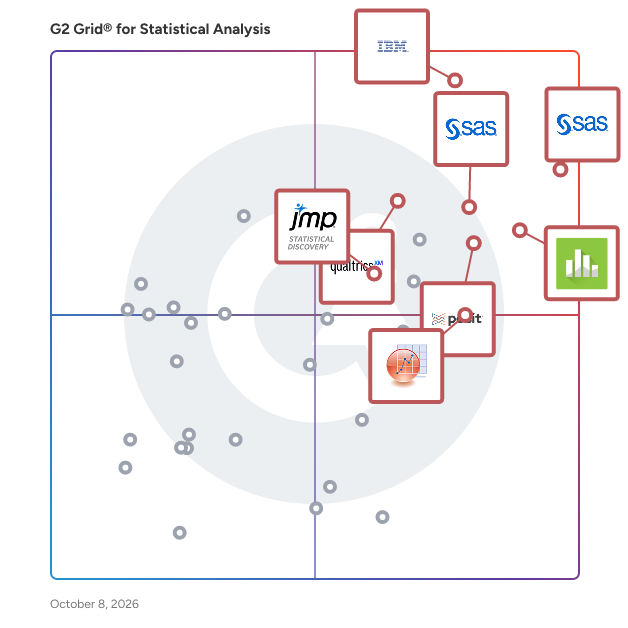
G2 Grid® for Statistical Analysis Software

G2 Grid® for Statistical Analysis Software plotting products by satisfaction and market presence

Highlighted products: SAS Viya, IBM SPSS Statistics, Qualtrics Market Research, Minitab Statistical Software, Posit Team, Base SAS, JMP, and OriginPro.

Underlying data: [Grid® JSON](https://www.g2.com/categories/statistical-analysis/grids.json?focus%5B%5D=sas-sas-viya&focus%5B%5D=ibm-spss-statistics&focus%5B%5D=qualtrics-market-research&focus%5B%5D=minitab-statistical-software&focus%5B%5D=posit-team&focus%5B%5D=base-sas&focus%5B%5D=jmp&focus%5B%5D=originpro&segment=enterprise)

SAS Enterprise Miner

SAS Enterprise Miner is a comprehensive data mining and predictive analytics software designed to streamline the process of developing descriptive and predictive models. It enables users to analyze vast amounts of data efficiently, uncovering patterns and relationships that inform better decision-making. With an intuitive graphical user interface, SAS Enterprise Miner facilitates the entire data mining process, from data preparation to model assessment, making advanced analytics accessible to both technical and non-technical users. Key Features and Functionality: - User-Friendly Interface: An interactive GUI allows users to build process flow diagrams, simplifying the modeling process. - Advanced Data Preparation: Tools for handling missing values, filtering outliers, and performing data transformations enhance data quality. - Diverse Modeling Techniques: Supports a wide range of algorithms, including decision trees, neural networks, and regression models, catering to various analytical needs. - Open Source Integration: Seamless integration with R enables users to perform data transformations and model training within the platform. - High-Performance Capabilities: Incorporates high-performance data mining nodes to boost processing efficiency. - Automated Scoring: Generates score code in multiple languages (SAS, C, Java, PMML) for deployment across various environments. - Model Comparison and Management: Features for comparing multiple models using lift curves and statistical diagnostics to identify the best-performing models. Primary Value and Solutions Provided: SAS Enterprise Miner empowers organizations to harness the full potential of their data by providing a robust platform for developing accurate predictive models. It addresses challenges such as fraud detection, risk minimization, resource demand forecasting, and customer attrition reduction. By automating and simplifying complex data mining tasks, it enables users to make informed, data-driven decisions, ultimately enhancing operational efficiency and competitive advantage.

Average Rating: 4.2/5.0

Total Reviews: 185

How Do G2 Users Rate SAS Enterprise Miner?

  • Quality Control: 7.8/10 (Category avg: 8.3/10)
  • Has the product been a good partner in doing business?: 8.3/10 (Category avg: 8.7/10)
  • Survival Analysis: 8.1/10 (Category avg: 8.4/10)
  • Data Sampling: 7.2/10 (Category avg: 8.6/10)

Who Is the Company Behind SAS Enterprise Miner?

  • Seller: SAS Institute
  • Year Founded: 1976
  • HQ Location: Cary, NC
  • Twitter: @SASsoftware
    60,863 Twitter followers
  • LinkedIn® Page: www.linkedin.com
    15,122 employees on LinkedIn®
  • Phone: 1-800-727-0025

Who Uses This Product?

  • Top Industries: Higher Education, Information Technology and Services
  • Company Size: 60% Large, 28% Medium

What Do G2 Reviewers Say About SAS Enterprise Miner?

AI-generated summary from verified user reviews

Pros
  • Users appreciate the ease of installation in SAS Enterprise Miner, allowing for quick node-based analysis setup.
  • Users appreciate the ease of node-based analysis in SAS Enterprise Miner, enhancing their analytical workflow.
  • Users value the ease of creating node-based analyses with SAS Enterprise Miner, enhancing their analytical capabilities.
Cons
  • Users find the learning curve steep, especially when generating output to other SAS products as beginners.
  • Users find SAS Enterprise Miner not user-friendly, especially when generating output without sufficient experience.
  • Users find the steep learning curve of SAS Enterprise Miner challenging, especially when generating output to other SAS products.

What Are Recent G2 Reviews of SAS Enterprise Miner?

What Are G2 Users Discussing About SAS Enterprise Miner?

XLSTAT

The leading data analysis and statistical solution for Microsoft Excel®. XLSTAT is a powerful yet flexible Excel data analysis add-on that allows users to analyze, customize and share results within Microsoft Excel. With over 250 standard to advanced statistical features available, XLSTAT is the preferred tool for statistical analysis in businesses and universities, large and small, and for 110,000+ users in over 120 countries across the world.

Average Rating: 4.7/5.0

Total Reviews: 46

How Do G2 Users Rate XLSTAT?

  • Quality Control: 8.8/10 (Category avg: 8.3/10)
  • Has the product been a good partner in doing business?: 9.2/10 (Category avg: 8.7/10)
  • Survival Analysis: 7.4/10 (Category avg: 8.4/10)
  • Data Sampling: 8.9/10 (Category avg: 8.6/10)

Who Is the Company Behind XLSTAT?

  • Seller: Lumivero
  • Year Founded: 1995
  • HQ Location: Denver, CO
  • Twitter: @LUMIVER0
    399 Twitter followers
  • LinkedIn® Page: www.linkedin.com
    296 employees on LinkedIn®

Who Uses This Product?

  • Top Industries: Research, Higher Education
  • Company Size: 57% Small, 27% Large

What Do G2 Reviewers Say About XLSTAT?

AI-generated summary from verified user reviews

Pros
  • Users praise the ease of use of XLSTAT, finding it self-explanatory and straightforward to implement.
  • Users value the excellent graphical visualization of XLSTAT, which enhances client comprehension in clinical trials.
  • Users value the seamless sensory data analysis capabilities of XLSTAT, finding it user-friendly and time-saving.
  • Users value the responsive customer support of XLSTAT, enhancing their overall experience with the product.
  • Users value the seamless sensory data analysis offered by XLSTAT, finding it more intuitive than other software alternatives.
Cons
  • Users find the high cost of licensing for XLSTAT to be a significant barrier, especially in low-income regions.
  • Users find the subscription costs to be quite high, especially for the extended features of XLSTAT.

What Are Recent G2 Reviews of XLSTAT?

What Are G2 Users Discussing About XLSTAT?

GraphPad Prism

GraphPad Prism is a comprehensive scientific software designed to streamline data analysis, graphing, and presentation for researchers across various disciplines. It combines robust statistical analysis capabilities with intuitive graphing tools, enabling users to efficiently interpret complex datasets and produce publication-quality visuals. Prism's user-friendly interface and guided workflows make it accessible to both novice and experienced scientists, facilitating accurate and reproducible results. Key Features and Functionality: - Data Organization: Prism offers structured data tables tailored for different types of analyses, including quantitative and categorical data, ensuring accurate data entry and management. - Statistical Analysis: The software provides a wide array of statistical tests such as t-tests, ANOVA (one-, two-, and three-way), linear and nonlinear regression, survival analysis, and principal component analysis, all presented in clear language to aid understanding. - Graphing and Visualization: Users can create a variety of graph types, including scatter plots, bar charts, and bubble plots, with extensive customization options to enhance data visualization. - Nonlinear Regression: Prism simplifies curve fitting with over 100 built-in equations, allowing for robust nonlinear regression analyses, including dose-response curves and growth models. - Automation and Reproducibility: The software enables automation of repetitive analyses without the need for programming, ensuring consistency and efficiency in data processing. - Collaboration Tools: Prism Cloud facilitates project sharing and collaboration, allowing teams to view and discuss projects in real-time, enhancing collective research efforts. Primary Value and User Solutions: GraphPad Prism addresses the critical need for accurate and efficient data analysis in scientific research. By integrating statistical analysis with advanced graphing capabilities, it reduces the complexity of data interpretation, allowing researchers to focus on deriving meaningful insights. The software's intuitive design and guided analyses minimize the learning curve, making sophisticated statistical methods accessible to a broader audience. Additionally, Prism's collaboration features streamline teamwork, ensuring that research findings are easily shared and discussed, ultimately accelerating the research process and enhancing the quality of scientific outputs.

Average Rating: 4.6/5.0

Total Reviews: 54

How Do G2 Users Rate GraphPad Prism?

  • Quality Control: 9.0/10 (Category avg: 8.3/10)
  • Has the product been a good partner in doing business?: 8.3/10 (Category avg: 8.7/10)
  • Survival Analysis: 9.2/10 (Category avg: 8.4/10)
  • Data Sampling: 9.3/10 (Category avg: 8.6/10)

Who Is the Company Behind GraphPad Prism?

  • Seller: GraphPad Software
  • Year Founded: 1989
  • HQ Location: San Diego, California
  • Twitter: @GraphPad
    1,863 Twitter followers
  • LinkedIn® Page: www.linkedin.com
    13 employees on LinkedIn®

Who Uses This Product?

  • Top Industries: Research, Higher Education
  • Company Size: 35% Small, 33% Large

What Do G2 Reviewers Say About GraphPad Prism?

AI-generated summary from verified user reviews

Pros
  • Users appreciate the quick customer support of GraphPad Prism, making issue resolution convenient and efficient.
  • Users appreciate the intuitive interface and high-quality graphs of GraphPad Prism, enhancing their analysis experience.
  • Users value the data visualization capabilities of GraphPad Prism, enabling effective graph creation for research publications.
  • Users find the ease of use of GraphPad Prism very convenient, requiring minimal training to get started.
  • Users praise the graphical visualization capabilities of GraphPad Prism for effective Anova and statistical analysis.
Cons
  • Users express concern over the high cost of GraphPad Prism, making it less accessible for researchers in need.
  • Users are concerned about the limited resources available for understanding program assumptions and the software's affordability.
  • Users are frustrated by poor educational resources, making it hard to understand statistical test assumptions and results.

What Are Recent G2 Reviews of GraphPad Prism?

What Are G2 Users Discussing About GraphPad Prism?

AI can help you find the answers. G2 helps you trust them.

Connect G2 to Claude or ChatGPT for answers grounded in G2's trusted reviews, comparisons, and pricing from real user insights.

How it works

Spotfire Analytics

Spotfire® is a visual data science platform designed to help organizations address complex, industry-specific challenges by effectively utilizing data. This solution offers a range of flexible packaging options tailored to meet the diverse needs of teams at various stages of their visual data science journey. Turn raw data into real-time decisions with powerful, interactive visual analytics with Spotfire® Analytics. Spotfire Analytics is designed for business agility, enabling every user to explore data visually, uncover patterns quickly, and make confident, data-driven decisions without writing a single line of code. As a self-service visual data science solution, it empowers teams across roles and departments to gain fast, actionable insights that drive impact. With its no-code interactive dashboards and rich visual exploration capabilities, Spotfire Analytics connects natively to hundreds of cloud, on-premises, and real-time data sources. Built-in geoanalytics extend the power of analysis with multi-layer mapping and seamless integration of spatial data, while data wrangling and transformation can be performed directly within the visual interface, making it easy to clean, shape, and blend data as you analyze. AI-assisted recommendations and anomaly detection help uncover hidden patterns, suggest the most meaningful visualizations, and accelerate the path to discovery. Customizable visualizations, workflows, and an intuitive interface ensure that insights are not only easier to create but also easier to share. With seamless collaboration features, Spotfire Analytics enables teams to work together, align on insights, and act decisively. Whether the goal is to analyze trends, detect anomalies, or unlock location-based intelligence, Spotfire Analytics delivers the speed, flexibility, and depth needed to make smarter decisions with confidence. Explore and understand your data visually, uncover hidden insights, and build powerful analytics applications - all without writing a single line of code. Spotfire Analytics combines advanced interactive visualizations and intuitive data wrangling in one environment. Connect to hundreds of data sources, from files to real-time streaming data, and transform messy data directly within your visuals. Built-in AI recommendations help you find patterns, anomalies, and trends faster. With flexible visualizations, spatial analytics, and custom applications, anyone can turn raw data into actionable insights in minutes. Designed for business agility, Spotfire Analytics empowers every user to explore, analyze, and share results confidently - turning questions into decisions. Best for: Analysts, data-savvy professionals, and teams looking to explore and share data visually with maximum flexibility.

Average Rating: 4.2/5.0

Total Reviews: 328

How Do G2 Users Rate Spotfire Analytics?

  • Quality Control: 6.3/10 (Category avg: 8.3/10)
  • Has the product been a good partner in doing business?: 8.4/10 (Category avg: 8.7/10)
  • Survival Analysis: 10.0/10 (Category avg: 8.4/10)
  • Data Sampling: 8.8/10 (Category avg: 8.6/10)

Who Is the Company Behind Spotfire Analytics?

Who Uses This Product?

  • Who Uses This: Student, Manager
  • Top Industries: Oil & Energy, Information Technology and Services
  • Company Size: 52% Large, 26% Medium

What Do G2 Reviewers Say About Spotfire Analytics?

AI-generated summary from verified user reviews

Pros
  • Users appreciate the powerful and flexible data visualization capabilities of Spotfire Analytics, enhancing their data exploration experience.
  • Users appreciate the ease of use of Spotfire Analytics, enabling quick insights and effective decision-making with complex data.
  • Users appreciate the easy integrations of Spotfire Analytics, enhancing accuracy and enabling robust AI-powered analytics seamlessly.
  • Users rave about Spotfire's powerful analytics capabilities, enabling advanced data handling and insightful visualizations seamlessly.
  • Users love the transformative interactive visualizations of Spotfire, simplifying complex data for clear understanding across teams.
Cons
  • Users find Spotfire's steep learning curve challenging, particularly for those unfamiliar with data modeling and scripting.
  • Users find the learning difficulty significant, especially for beginners navigating advanced features and options in Spotfire.
  • Users find the licensing costs high, making Spotfire Analytics less accessible for smaller organizations.
  • Users often face a steep learning curve with Spotfire Analytics, making initial use challenging for newcomers.
  • Users note that there are limitations in data comparison and features, affecting usability and clarity of Spotfire Analytics.

What Are Recent G2 Reviews of Spotfire Analytics?

What Are G2 Users Discussing About Spotfire Analytics?

TIMi

TIMi is the most efficient Data Science and Data Processing Platform. Since 2007, we have been creating and improving the most powerful framework to push the barriers of analytics, predictive analytics, AI and Big Data, while offering a helpful, fast and friendly environment. The TIMi Suite consists of four tools: 1. Anatella (Analytical ETL, Data Prep & Big Data), 2. Modeler (Auto-ML / Automated Predictive Modelling / Automated-AI), 3. StarDust (3D Segmentation) 4. Kibella (BI Dashboarding solution). TIMi dominates the Data Science market: In the "Summer 2022 - Momentum Report” from G2, in the “Data Science” category, TIMi has the #1 rank: TIMi is the Data Science solution with both the highest market growth and the highest customer-satisfaction! More about this subject here: https://timi.eu/blog/timi-the-number-one-data-science-platform/

Average Rating: 4.8/5.0

Total Reviews: 50

How Do G2 Users Rate TIMi?

  • Quality Control: 9.1/10 (Category avg: 8.3/10)
  • Has the product been a good partner in doing business?: 9.1/10 (Category avg: 8.7/10)
  • Survival Analysis: 8.3/10 (Category avg: 8.4/10)
  • Data Sampling: 8.5/10 (Category avg: 8.6/10)

Who Is the Company Behind TIMi?

  • Seller: TIMi SPRL
  • Year Founded: 2007
  • HQ Location: Brussels
  • Twitter: @TIMiSuite
    3,532 Twitter followers
  • LinkedIn® Page: www.linkedin.com
    86 employees on LinkedIn®

Who Uses This Product?

  • Top Industries: Information Technology and Services, Banking
  • Company Size: 40% Small, 32% Large

What Do G2 Reviewers Say About TIMi?

AI-generated summary from verified user reviews

Pros
  • Users highlight the exceptional customer support from the TIMi team, noting their quick response times and helpfulness.
  • Users find TIMi easy to use, thanks to its intuitive design and quick learning curve.
  • Users appreciate TIMi's user-friendly interface and exceptional support, making data transformation quick and efficient.
  • Users value the fast and intuitive automation capabilities of TIMi, streamlining data transformations and analyses effectively.
  • Users value the intuitive charting features of TIMi, enabling efficient data visualization and analysis.

What Are Recent G2 Reviews of TIMi?

What Are G2 Users Discussing About TIMi?

Analyse-it

Analyse-it is statistical analysis and method validation software for Microsoft Excel. One add-in, five editions: for general statistics, for quality control, for biomedical research and for analytical and diagnostic method validation with CLSI protocols, or all of them in Ultimate. ANOVA, regression, control charts, ROC curves, survival analysis and method comparison, all inside Excel. Analyse-it runs in Excel 365 and Excel 2016 onwards, on Windows. Your data stays in the workbook it is already in, and every analysis is written back to the workbook as an ordinary worksheet, so you can share it with colleagues, submit it, archive it for audit and open it on any PC with Excel. Every calculation is performed by Analyse-it, not by Excel formulas, and every release is tested against the NIST Statistical Reference Datasets, published datasets and thousands of internal test cases. The Method Validation edition implements eleven CLSI evaluation protocols. IVD manufacturers file it with 510(k) submissions, clinical laboratories show it to CAP inspectors and ISO 15189 auditors, and researchers have cited it in thousands of peer-reviewed papers. Trusted for nearly 30 years by 75,000 scientists in research, quality control and clinical laboratories, including 8 of the top 10 IVD manufacturers. Developed and supported by its founders since 1997. Free 15-day trial.

Average Rating: 3.8/5.0

Total Reviews: 40

How Do G2 Users Rate Analyse-it?

  • Quality Control: 10.0/10 (Category avg: 8.3/10)
  • Has the product been a good partner in doing business?: 6.7/10 (Category avg: 8.7/10)
  • Survival Analysis: 8.3/10 (Category avg: 8.4/10)
  • Data Sampling: 10.0/10 (Category avg: 8.6/10)

Who Is the Company Behind Analyse-it?

  • Seller: Analyse-it Software
  • Year Founded: 1997
  • HQ Location: Leeds, England
  • Twitter: @Analyse_it
    216 Twitter followers
  • LinkedIn® Page: www.linkedin.com
    1 employees on LinkedIn®

Who Uses This Product?

  • Who Uses This: data analizer
  • Top Industries: Education Management, Construction
  • Company Size: 71% Large, 19% Small

What Are Recent G2 Reviews of Analyse-it?

Bijou Barry
BB
Researched and written by Bijou Barry
Updated
Reviews & FAQs

Reviews Summary: The Best Statistical Analysis Software for Enterprise Businesses

Thanks to 7774 Statistical Analysis software reviews and associated data from users working for large-scale companies, at G2 we have some of the most definitive data on the best Statistical Analysis software for the large space. We have identified 21 individual Statistical Analysis products offering the features, pricing and support that Enterprise companies look for when comparing Statistical Analysis software and solutions. These reviews are generated using the qualitative and quantitative feedback from G2 members working in large-scale companies and who have used these Statistical Analysis software products.

When G2 reviewers submit their Statistical Analysis software reviews, they often provide information on the type of company they work for and what market segment they belong to. We break these different market segments into three distinct groups:

  • Small Business Statistical Analysis Software Reviews (< 50 employees)
  • large Statistical Analysis Software Reviews (51-1,000 employees)
  • Enterprise Statistical Analysis Software Reviews (1,001+ employees)

large businesses have their own unique requirements when it comes to Statistical Analysis software compared to small or enterprise companies. That is why these individual large-scale company Statistical Analysis software reviews are especially helpful when comparing product set up, ease of use and overall cost.

Below you will find FAQs and review snippets for Statistical Analysis software products that work well in large environments. These reviews are written by real G2 users working for these Enterprise companies who have real-world experience with these Statistical Analysis software products.

FAQs About Statistical Analysis Software for Enterprise Businesses

Q. What are the best Statistical Analysis software products for large-scale businesses, according to G2 reviewers?
  • SAS Viya - 4.4-stars, 64 reviews (26% from large reviewers)
  • IBM SPSS Statistics - 4.1-stars, 386 reviews (43% from large reviewers)
  • Qualtrics Market Research - 4.5-stars, 129 reviews (46% from large reviewers)
  • Minitab Statistical Software - 4.6-stars, 99 reviews (46% from large reviewers)
  • Posit Team - 4.5-stars, 271 reviews (48% from large reviewers)
Q. What are the least-liked Statistical Analysis software products for professionals at large-scale companies, based on the overall G2 rating?
  • Analyse-it - 3.8-stars, 29 reviews (73% from large reviewers)
  • TIMi - 4.9-stars, 10 reviews (37% from large reviewers)
  • Spotfire Analytics - 4.1-stars, 18 reviews (47% from large reviewers)
  • GraphPad Prism - 4.8-stars, 17 reviews (31% from large reviewers)
  • XLSTAT - 4.8-stars, 14 reviews (30% from large reviewers)
Q. What are the highest-rated Statistical Analysis software tool features according to employees at Enterprise companies?
  • Regression - 4.5-stars
  • Time Series Analysis - 4.4-stars
  • ANOVA Support - 4.4-stars
Q. What are the features that are rated lowest by employees at Enterprise companies?
  • AI Text Summarization - 3.5-stars
  • AI Text Generation - 3.5-stars
  • Cost Analysis - 4.0-stars
Q. How many Statistical Analysis software reviews are from users working in large companies?

1486 out of all Statistical Analysis software reviews on G2 are from users working in Enterprise companies (19%).

Here's What Reviewers Working at large Businesses Have to Say About Statistical Analysis Software

What Enterprise Professionals Liked What Enterprise Professionals Disliked

IBM SPSS Statistics: “Easy and straightforward. Allows users of any grade level to complete projects. Allows the addition of fantastic macros.”

Read Review

IBM SPSS Statistics: “Where do I start? It's expensive, and if something breaks, good luck with support. I've wasted literally a week of time just trying to pay them for my license. I'm not kidding. They outsource to Mexico and have a ton of turnover so every time I try to email our account rep, they're no longer there. I will never use another IBM product.”

Read Review

JMP: “JMP has superior capabilities for preparing data for analyses as well as outstanding ways to visualize and understand what the data is telling. The training and community available is excellent as well.”

Read Review

Base SAS: “The subscription is costly and it’s outdated”

Read Review

TIMi: “1. Intuitive and visual for better efficiency: no need to code. You can intuitively design and follow the flow of data. This makes the whole process much less prone to errors and easier to debug 2. Fast and powerful: Can process huge amounts of data on an ordinary laptop 3. Designed for real world applications: I appreciated the fact that Anatella was clearly designed for data science partitioners in the real world and not only academia (and I say this as an academic). The predictive models fit very well with the ETL and pretty much all components needed for data processing and analysis are natively available. 4. The perfect “cognition amplifier” for data scientists: As a programmer, my experience is that data processing can become cumbersome when done exclusively with programming. The logic of the data flow is lost in the code and debugging becomes pretty tedious. Anatella fulfills perfectly this job while maintaining the clarity of the process. I would say, even for experienced programmers and Excel wizard and may be especially for them, Anatella has all its place in the data scientist toolbox.”

Read Review

IBM SPSS Statistics: “took too long to install, ROI not clear. hard to integrate with open source product, not many experts out there in academia/new user base”

Read Review

Recommendations To Others Problems Solved & Benefits

Minitab Statistical Software: “Visit the community page before beginning to use the software. The software has the potential to solve more problems but please refer if it suits you before buying it”

Read Review

Posit Team: “Posit connect has been our team primary platform for shiny app/r markdown/ schedule report, serving hundreds of users for daily business. It enabled data scientists/ actuaries to transform insights to action. Positron has been my go-to editor with seamless AI integration and Rstudo essence. I can experiment more complicate assumptions and larger scale project with more confidence.”

Read Review

Minitab Statistical Software: “If Minitab 18 can have the option to allow users to set any projects or any analysis to save automatically, it can help to avoid any worksheets or any projects unsaved. The choice of having Minitab to save any analysis automatically will allow the user to redo any analysis again, which in turn saves a lot of time-wasting.”

Read Review

IBM SPSS Statistics: “IBM SPSS Statistics simplifies statistical analysis, provides reliable insights, and efficiently handles complex tasks with its user-friendly interface, saving time and effort in interpreting data.”

Read Review

Minitab Statistical Software: “It's fast and easy to implement and pretty easy to train on.”

Read Review

IBM SPSS Statistics: “IBM SPSS Statistics helps me solve complex data analysis, statistical modeling, and data management problems without writing code. It balances powerful analytics and user accessibility, democratizing advanced data analysis for teams.”

Read Review