Best Spreadsheets Software - Page 11

How Many Spreadsheets Software Products Does G2 Track?

Total Products under this Category: 179

Category Stats (Nov 2026)

  • Average Rating: 4.42/5 (↑0.01 vs Oct 2026) The average rating of products in this category, based on all submitted ratings
  • Top Trending Product: Ajelix (+5.56%) - Among all products in this category, Ajelix recorded the largest rating increase compared to last month

Last updated: November 01, 2026

How Does G2 Rank Spreadsheets Software Products?

Why You Can Trust G2's Software Rankings:

  • 30 Analysts and Data Experts
  • 59,600+ Authentic Reviews
  • 179+ Products
  • Unbiased Rankings

G2's software rankings are built on verified user reviews, rigorous moderation, and a consistent research methodology maintained by a team of analysts and data experts. Each product is measured using the same transparent criteria, with no paid placement or vendor influence. While reviews reflect real user experiences, which can be subjective, they offer valuable insight into how software performs in the hands of professionals. Together, these inputs power the G2 Score, a standardized way to compare tools within every category.

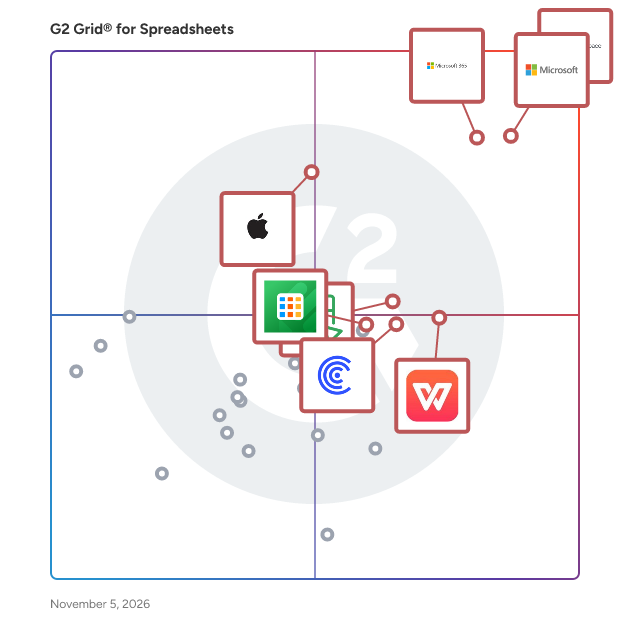
G2 Grid® for Spreadsheets Software

G2 Grid® for Spreadsheets Software plotting products by satisfaction and market presence

Highlighted products: Google Workspace, Microsoft Excel, Microsoft 365, Apple Numbers, WPS Spreadsheets, Zoho Sheet, Coefficient, and Jotform Tables.

Underlying data: [Grid® JSON](https://www.g2.com/categories/spreadsheets/grids.json?focus%5B%5D=google-workspace&focus%5B%5D=microsoft-excel&focus%5B%5D=microsoft365&focus%5B%5D=apple-numbers&focus%5B%5D=wps-spreadsheets&focus%5B%5D=zoho-sheet&focus%5B%5D=coefficient&focus%5B%5D=jotform-jotform-tables)

Sheet Alchemy

SheetAlchemy is a SaaS platform that simplifies data analysis and formula generation for Excel, Google Sheets, and other spreadsheet tools. It helps users create complex formulas, automate calculations, and generate scripts using AI. The platform offers free AI-powered formula generation to attract users while providing advanced data analysis and automation as premium features.

Who Is the Company Behind Sheet Alchemy?

SheetQuery

SheetQuery is the add-on that lets you run SQL directly on your spreadsheets. Combine the flexibility of Google Sheets with the power of SQL to analyze, update, and manage data like never before.

Who Is the Company Behind SheetQuery?

Sheets Genie

Sheets Genie's automation + data processing + web scraping abilities = pure Google Sheets magic. Do things with Google Sheets you never dreamed possible. Create step by step systems to automate collecting, organizing, and processing data in Google Sheets. Scrape data / leads from websites, and send that data directly to Google Sheets to be processed however you see fit.

Average Rating: 4.0/5.0

Total Reviews: 1

Who Is the Company Behind Sheets Genie?

Who Uses This Product?

  • Company Size: 100% Small

What Are Recent G2 Reviews of Sheets Genie?

AI can help you find the answers. G2 helps you trust them.

Connect G2 to Claude or ChatGPT for answers grounded in G2's trusted reviews, comparisons, and pricing from real user insights.

How it works

SHEQXEL

A spreadsheet software for setting HSE objectives and targets, building of HSE database for generating monthly statistics of KPIs and analyzing trends for Annual HSE performance reporting. The tool analyzes over 40 leading indicators and 10 lagging indicators, and has 10 dynamic dashboards for data visualization and a template for generating monthly reports. It estimates all accidents and incidents rates such as Total Recordable Injury Frequency Rates and Lost Time Injury Frequency Rate

Who Is the Company Behind SHEQXEL?

  • Seller: SHEQXEL
  • Year Founded: 2017
  • HQ Location: Abu Dhabi, AE
  • LinkedIn® Page: www.linkedin.com
    2 employees on LinkedIn®

Shopify Excel Add-In by Devart

Devart Excel Add-in for Shopify allows you to connect Microsoft Excel to Shopify, quickly and easily load data from Shopify to Excel, instantly refresh data in an Excel workbook from the database, edit these data, and save them back to Shopify. It enables you to work with Shopify data like with usual Excel worksheets, easily perform data cleansing and de-duplication, and apply all the Excel's powerful data processing and analysis capabilities to these data.

Who Is the Company Behind Shopify Excel Add-In by Devart?

  • Seller: Devart
  • Year Founded: 1997
  • HQ Location: Wilmington, Delaware, USA
  • LinkedIn® Page: www.linkedin.com
    252 employees on LinkedIn®

Spread.NET

Who Is the Company Behind Spread.NET?

  • Seller: MESCIUS
  • Year Founded: 1980
  • HQ Location: Pittsburgh, PA
  • LinkedIn® Page: www.linkedin.com
    313 employees on LinkedIn®

Spreadsheet Converter

Spreadsheet Converter is a versatile tool designed to transform complex spreadsheets into user-friendly web applications, enhancing accessibility and interactivity. It simplifies the process of converting Excel files into responsive web pages, making data sharing and collaboration more efficient. Key Features and Functionality: - Excel to Web Conversion: Seamlessly converts Excel spreadsheets into interactive web applications without requiring programming skills. - Responsive Design: Ensures that the generated web pages are mobile-friendly and adapt to various screen sizes. - Data Validation and Calculation: Maintains the original spreadsheet's formulas and data validation rules in the web version. - Customization Options: Offers a range of customization features to match the web application's appearance with branding requirements. - Integration Capabilities: Supports embedding the converted web applications into existing websites or platforms. Primary Value and User Solutions: Spreadsheet Converter addresses the challenge of sharing complex Excel data by converting it into interactive web applications, eliminating the need for recipients to have Excel installed. This enhances data accessibility, improves user engagement, and streamlines collaboration across various devices and platforms.

Who Is the Company Behind Spreadsheet Converter?

Spreadsheet Gorilla

Spreadsheet Gorilla for monday.com lets users create, manage and export Excel spreadsheets directly from the monday.com workspace. Combine multiple monday.com boards into unified spreadsheet templates. Use Excel-like functions to calculate on board item values, and embed them directly in your Excel spreadsheets or update board items across workspaces. Send Excel reports recurrently by email with automations.

Who Is the Company Behind Spreadsheet Gorilla?

Spreadsheet Secrets

Spreadsheet Secrets is a comprehensive online resource dedicated to enhancing users' proficiency with spreadsheet software, particularly Microsoft Excel and Google Sheets. It offers a wide array of tutorials, tips, and strategies designed to help users unlock the full potential of spreadsheets, enabling them to work more efficiently and effectively. Key Features and Functionality: - In-Depth Tutorials: Step-by-step guides covering various spreadsheet functions, formulas, and tools to assist users in mastering complex tasks. - Time-Saving Tips: Practical advice and shortcuts aimed at streamlining workflow and increasing productivity. - Advanced Techniques: Insights into sophisticated features such as pivot tables, data analysis, and automation to elevate users' spreadsheet skills. - Regular Updates: Continuous addition of new content to keep users informed about the latest developments and best practices in spreadsheet usage. Primary Value and User Solutions: Spreadsheet Secrets addresses the common challenges users face when working with spreadsheets by providing clear, accessible, and actionable information. It empowers individuals and businesses to harness the full capabilities of their spreadsheet software, leading to improved data management, analysis, and decision-making processes. By demystifying complex features and offering practical solutions, Spreadsheet Secrets helps users save time, reduce errors, and achieve their goals more effectively.

Who Is the Company Behind Spreadsheet Secrets?

SQLite Excel Add-In by Devart

Devart Excel Add-in for SQLite allows you to connect Microsoft Excel to SQLite, quickly and easily load data from SQLite to Excel, instantly refresh data in an Excel workbook from the database, edit these data, and save them back to SQLite. It enables you to work with SQLite data like with usual Excel worksheets, easily perform data cleansing and de-duplication, and apply all the Excel's powerful data processing and analysis capabilities to these data.

Who Is the Company Behind SQLite Excel Add-In by Devart?

  • Seller: Devart
  • Year Founded: 1997
  • HQ Location: Wilmington, Delaware, USA
  • LinkedIn® Page: www.linkedin.com
    252 employees on LinkedIn®

SugarCRM Excel Add-In by Devart

Devart Excel Add-in for SugarCRM allows you to connect Microsoft Excel to SugarCRM, quickly and easily load data from SugarCRM to Excel, instantly refresh data in an Excel workbook from the database, edit these data, and save them back to SugarCRM. It enables you to work with SugarCRM data like with usual Excel worksheets, easily perform data cleansing and de-duplication, and apply all the Excel's powerful data processing and analysis capabilities to these data.

Who Is the Company Behind SugarCRM Excel Add-In by Devart?

  • Seller: Devart
  • Year Founded: 1997
  • HQ Location: Wilmington, Delaware, USA
  • LinkedIn® Page: www.linkedin.com
    252 employees on LinkedIn®

Symphony

Symphony improves business communication and collaboration by letting teams collaborate on individual worksheets—not whole workbooks—with private drafts, sync-by-choice, and a full who/what/when/why history, backed by a database rather than a file.

Who Is the Company Behind Symphony?

Tellsheet

Tellsheet is a Microsoft Excel add-in for data cleaning, data preparation and spreadsheet automation. It replaces the fiddly, error-prone work most people do by hand — or by hunting for a formula they will have forgotten by next month. It adds dozens of point-and-click tools for the jobs that come up constantly: splitting names and text into columns, removing or merging duplicate rows, unpivoting cross-tabs, reconciling two sheets, fuzzy matching records that do not quite agree, VLOOKUP-style merges between workbooks, combining multiple files into one table, standardising inconsistent values, fixing garbled text and broken dates from a system export, regex find-and-replace, redacting personal data, generating barcodes, building a quick dashboard, and pulling tables out of PDFs and scanned images. Three things set it apart from other Excel tools. PREVIEW BEFORE IT CHANGES ANYTHING. Every tool shows you exactly what it is about to do to your sheet before it does it, so you are never guessing whether a transformation did what you intended. A change history is stored inside the workbook itself, which means you can revert a step even after saving, closing and reopening the file — not just while the undo stack survives. YOUR DATA STAYS ON YOUR MACHINE. The tools run locally. Nothing is uploaded to a server for processing, and that includes the PDF reader and the image OCR, which work entirely offline. Most PDF-to-Excel converters require you to upload the document to a third party; for anyone handling bank statements, invoices, payroll or client records, that is the difference between a usable tool and a data-protection problem. NO SUBSCRIPTION. Tellsheet is a one-time purchase with a permanent free tier. Buy it once for a computer and it stays yours — no trial that expires, no renewal, no seat you keep paying for after the project ends. Team and site licences are also one-time. It works the same on Windows, Mac and Excel on the web, so a team on mixed machines gets identical behaviour. There is an optional AI command bar for anyone who would rather describe what they want in plain English than find the right tool — and even then, only your instruction is sent, never your cell data. Typical users are accountants, analysts, bookkeepers, operations and finance teams, and anyone who regularly receives messy spreadsheets or PDF reports from someone else's system and has to turn them into something usable. Made by Souq E Kamil Trading and Solutions WLL.

Who Is the Company Behind Tellsheet?

Neeraja Prakash
NP
Researched and written by Neeraja Prakash
Updated March 7, 2025