# Top Free Spreadsheets Software - Page 4

## How Many Spreadsheets Software Products Does G2 Track?

**Total Products under this Category:** 129

### Category Stats (Aug 2026)

- **Average Rating:** 4.41/5 (↓0.02 vs Jul 2026) The average rating of products in this category, based on all submitted ratings
- **Top Trending Product:** MobiOffice (+0.31%) - Among all products in this category, MobiOffice recorded the largest rating increase compared to last month

_Last updated: August 12, 2026_

## How Does G2 Rank Spreadsheets Software Products?

**Why You Can Trust G2's Software Rankings:**

- 30 Analysts and Data Experts
- 59,200+ Authentic Reviews
- 129+ Products
- Unbiased Rankings

G2's software rankings are built on verified user reviews, rigorous moderation, and a consistent research methodology maintained by a team of analysts and data experts. Each product is measured using the same transparent criteria, with no paid placement or vendor influence. While reviews reflect real user experiences, which can be subjective, they offer valuable insight into how software performs in the hands of professionals. Together, these inputs power the G2 Score, a standardized way to compare tools within every category.

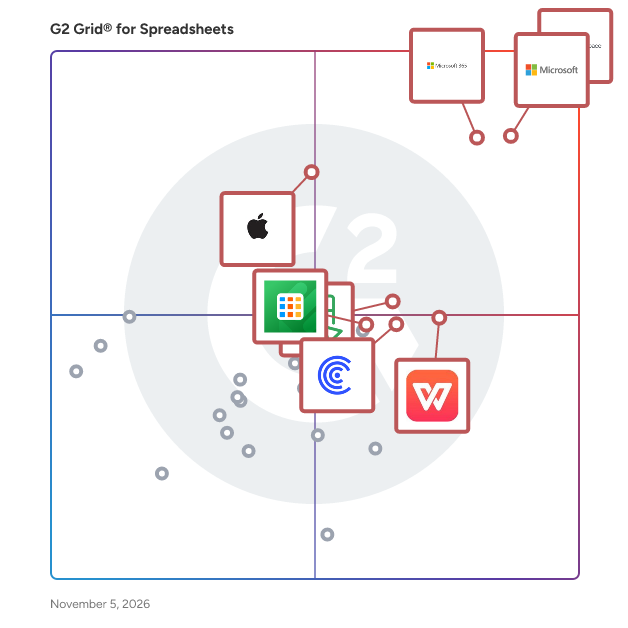
## G2 Grid® for Spreadsheets Software
 ![G2 Grid® for Spreadsheets Software plotting products by satisfaction and market presence](https://www.g2.com/categories/spreadsheets/grids.png?focus%5B%5D=1434&focus%5B%5D=19076&focus%5B%5D=663&focus%5B%5D=60336&focus%5B%5D=60460&focus%5B%5D=54580&focus%5B%5D=1435768&focus%5B%5D=1204004)

Highlighted products: Google Workspace, Microsoft Excel, Microsoft 365, WPS Spreadsheets, Apple Numbers, Zoho Sheet, Detrics, and Coefficient.

Underlying data: [Grid® JSON](https://www.g2.com/categories/spreadsheets/grids.json?focus%5B%5D=google-workspace&focus%5B%5D=microsoft-excel&focus%5B%5D=microsoft365&focus%5B%5D=wps-spreadsheets&focus%5B%5D=apple-numbers&focus%5B%5D=zoho-sheet&focus%5B%5D=detrics&focus%5B%5D=coefficient)

**Sponsored**

### Mitratech HotDocs

Mitratech HotDocs is document automation software trusted by thousands of law firms, enterprise teams, and government agencies to eliminate manual drafting at scale. Used across legal, financial services, insurance, and corporate teams, it handling everything from contracts and compliance documents to client-facing forms. HotDocs turns your most complex, high-volume documents into intelligent templates that generate accurate, consistent output every time. Instead of copy-paste drafting and manual edits, teams answer a guided interview and HotDocs does the rest: applying rules-based logic to produce compliant, error-free documents across every office, jurisdiction, and use case. Key features and capabilities include: - Rules-based document templates — convert standard documents into intelligent templates with conditional logic that automatically adapts content based on inputs, matter type, or jurisdiction - Guided interviews and dynamic questionnaires — structured data collection ensures the right information is captured upfront, reducing back-and-forth and improving output quality - High-volume and complex document support — purpose-built for organizations generating large quantities of intricate documents where manual drafting creates risk and inefficiency - Reusable data across documents and workflows — enter data once and populate it across multiple documents and templates, reducing duplication and improving consistency - Integration with Mitratech platform — native integrations with TAP, TeamConnect, and CaseCloud™ support connected document generation within broader legal and operational workflows Common use cases include: - Contract drafting and standard agreement generation - Regulated document production in financial services, insurance, and government - Legal form and pleading assembly - High-volume client-facing document generation - Compliance document creation across jurisdictions HotDocs is designed for legal, compliance, operations, and business teams in mid-size to enterprise organizations that produce high volumes of documents where accuracy, consistency, and compliance are non-negotiable. It is particularly well-suited for organizations looking to reduce the time and cost of manual document drafting, standardize document output across distributed teams, and scale document production without proportionally increasing headcount or outside counsel spend. By transforming static documents into intelligent, reusable templates, Mitratech HotDocs helps organizations reduce drafting risk, accelerate document turnaround, and maintain compliance across even their most complex and high-volume document workflows.

[Visit website](https://www.g2.com/external_clickthroughs/record?secure%5Bad_program%5D=ppc&secure%5Bad_slot%5D=category_product_list_llm&secure%5Bcategory_id%5D=645&secure%5Bchosen_at%5D=2026-08-15T05%3A36%3A15Z&secure%5Bdisplayable_resource_id%5D=237&secure%5Bdisplayable_resource_type%5D=Category&secure%5Bmedium%5D=sponsored&secure%5Bplacement_reason%5D=neighbor_category&secure%5Bplacement_resource_ids%5D%5B%5D=237&secure%5Bprioritized%5D=false&secure%5Bproduct_id%5D=65464&secure%5Bresource_id%5D=645&secure%5Bresource_type%5D=Category&secure%5Bsource_type%5D=category_page&secure%5Bsource_url%5D=https%3A%2F%2Fwww.g2.com%2Fcategories%2Fspreadsheets%2Ffree%3Fpage%3D4&secure%5Btoken%5D=7340ad78fb37347df047d337f39be9b022da12f7cf88bd4e5183b9d4ce63306b&secure%5Burl%5D=https%3A%2F%2Fclc.mitratech.com%2Fg2-click%3Futm_source%3Dg2%26utm_medium%3Dcpc%26utm_campaign%3Dclc-hotdocs-g2-click-june-2026&secure%5Burl_type%5D=custom_url)

### [NetSuite Excel Add-In by Devart](https://www.g2.com/products/netsuite-excel-add-in-by-devart/reviews)

Devart Excel Add-in for NetSuite allows you to connect Microsoft Excel to NetSuite, quickly and easily load data from NetSuite to Excel, instantly refresh data in an Excel workbook from the database, edit these data, and save them back to NetSuite. It enables you to work with NetSuite data like with usual Excel worksheets, easily perform data cleansing and de-duplication, and apply all the Excel's powerful data processing and analysis capabilities to these data.

#### Who Is the Company Behind NetSuite Excel Add-In by Devart?

- **Seller:** [Devart](https://www.g2.com/sellers/devart)
- **Year Founded:** 1997
- **HQ Location:** Wilmington, Delaware, USA
- **Twitter:** @DevartSoftware  
1,736 Twitter followers
- **LinkedIn® Page:** [www.linkedin.com](https://www.g2.com/external_clickthroughs/record?secure%5Bsource_type%5D=product_profile&secure%5Btoken%5D=79979469a3bee56c782598382543e7a4af65b7f1bcf71aea7d9fde07241e81e6&secure%5Burl%5D=https%3A%2F%2Fwww.linkedin.com%2Fcompany%2F800325%2F&secure%5Burl_type%5D=linkedin_company_website)  
249 employees on LinkedIn®

### [Oracle Excel Add-In by Devart](https://www.g2.com/products/oracle-excel-add-in-by-devart/reviews)

Devart Excel Add-in for Oracle allows you to connect Microsoft Excel to Oracle, quickly and easily load data from Oracle to Excel, instantly refresh data in an Excel workbook from the database, edit these data, and save them back to Oracle. It enables you to work with Oracle data like with usual Excel worksheets, easily perform data cleansing and de-duplication, and apply all the Excel's powerful data processing and analysis capabilities to these data.

#### Who Is the Company Behind Oracle Excel Add-In by Devart?

- **Seller:** [Devart](https://www.g2.com/sellers/devart)
- **Year Founded:** 1997
- **HQ Location:** Wilmington, Delaware, USA
- **Twitter:** @DevartSoftware  
1,736 Twitter followers
- **LinkedIn® Page:** [www.linkedin.com](https://www.g2.com/external_clickthroughs/record?secure%5Bsource_type%5D=product_profile&secure%5Btoken%5D=79979469a3bee56c782598382543e7a4af65b7f1bcf71aea7d9fde07241e81e6&secure%5Burl%5D=https%3A%2F%2Fwww.linkedin.com%2Fcompany%2F800325%2F&secure%5Burl_type%5D=linkedin_company_website)  
249 employees on LinkedIn®

### [PerfectXL](https://www.g2.com/products/perfectxl/reviews)

What is PerfectXL? PerfectXL is a powerful suite of Excel productivity tools designed to help professionals audit, optimize, and manage complex spreadsheets with confidence. Our solutions improve data accuracy, model consistency, and risk management, ensuring your Excel files are reliable, efficient, and free from critical errors. Key Features 🔸 Excel Risk Management and Quality Control: Identify risks, detect errors, and generate detailed risk reports in seconds. 🔸 Spreadsheet Optimization: Pinpoint formula inconsistencies, broken patterns, and structural issues to improve model integrity. 🔸 Version Control and Change Tracking: Compare spreadsheet versions to log and review modifications. 🔸 Model Insights and Documentation: Understand Excel files faster with clear visualizations and reports. 🔸 Formula Debugging and Data Flow Visualization: Break formulas into step by step components, highlight cell dependencies with color coding, and map data flow to audit and fix issues faster. Our Products ✔️ PerfectXL Suite: A complete toolkit to audit, validate, and enhance Excel files. ✔️ PerfectXL Risk Finder: Detect errors and risks in spreadsheets to prevent costly mistakes. ✔️ PerfectXL Explore: Quickly analyze and explain complex models with clear insights. ✔️ PerfectXL Compare: Compare Excel files to track changes and maintain version control. ✔️ PerfectXL Highlighter: Identify formula patterns to improve consistency and accuracy. ✔️ PerfectXL Formula Inspector: Analyze and debug complex formulas with step-by-step breakdowns, colour-coded dependencies, and data-flow mapping to quickly understand logic and fix errors. Who Uses PerfectXL? PerfectXL is trusted by leading financial institutions, consulting firms, and enterprises, including BDO, Deloitte, PGGM, VGZ, Grant Thornton, Eneco, Blackstone, and KPMG. Our tools help accountants, financial analysts, consultants, and auditors streamline spreadsheet management, reduce risk, and increase data integrity. About Us Developed by Infotron, a technology driven company based in Amsterdam, PerfectXL has strong ties to TU Delft and specializes in automated spreadsheet analysis. Our mission is to eliminate spreadsheet errors and optimize data management for professionals worldwide. With PerfectXL, Excel becomes your most powerful tool, not your biggest risk.

#### Who Is the Company Behind PerfectXL?

- **Seller:** [Infotron B.V.](https://www.g2.com/sellers/infotron-b-v)
- **Year Founded:** 2012
- **HQ Location:** Amsterdam, NL
- **LinkedIn® Page:** [www.linkedin.com](https://www.g2.com/external_clickthroughs/record?secure%5Bsource_type%5D=product_profile&secure%5Btoken%5D=37bea50cc11756ea543b54f2a7e366279065a96855e527b5b265c34366d84a6b&secure%5Burl%5D=https%3A%2F%2Fwww.linkedin.com%2Fcompany%2Fperfectxl&secure%5Burl_type%5D=linkedin_company_website)  
5 employees on LinkedIn®

### [PostgreSQL Excel Add-In by Devart](https://www.g2.com/products/postgresql-excel-add-in-by-devart/reviews)

Devart Excel Add-in for PostgreSQL allows you to connect Microsoft Excel to PostgreSQL, quickly and easily load data from PostgreSQL to Excel, instantly refresh data in an Excel workbook from the database, edit these data, and save them back to PostgreSQL. It enables you to work with PostgreSQL data like with usual Excel worksheets, easily perform data cleansing and de-duplication, and apply all the Excel's powerful data processing and analysis capabilities to these data.

#### Who Is the Company Behind PostgreSQL Excel Add-In by Devart?

- **Seller:** [Devart](https://www.g2.com/sellers/devart)
- **Year Founded:** 1997
- **HQ Location:** Wilmington, Delaware, USA
- **Twitter:** @DevartSoftware  
1,736 Twitter followers
- **LinkedIn® Page:** [www.linkedin.com](https://www.g2.com/external_clickthroughs/record?secure%5Bsource_type%5D=product_profile&secure%5Btoken%5D=79979469a3bee56c782598382543e7a4af65b7f1bcf71aea7d9fde07241e81e6&secure%5Burl%5D=https%3A%2F%2Fwww.linkedin.com%2Fcompany%2F800325%2F&secure%5Burl_type%5D=linkedin_company_website)  
249 employees on LinkedIn®

### [Salesforce Marketing Cloud Excel Add-In by Devart](https://www.g2.com/products/salesforce-marketing-cloud-excel-add-in-by-devart/reviews)

Devart Excel Add-in for Salesforce Marketing Cloud allows you to connect Microsoft Excel to Salesforce Marketing Cloud, quickly and easily load data from Salesforce Marketing Cloud to Excel, instantly refresh data in an Excel workbook from the database, edit these data, and save them back to Salesforce Marketing Cloud. It enables you to work with Salesforce Marketing Cloud data like with usual Excel worksheets, easily perform data cleansing and de-duplication, and apply all the Excel's powerful data processing and analysis capabilities to these data.

#### Who Is the Company Behind Salesforce Marketing Cloud Excel Add-In by Devart?

- **Seller:** [Devart](https://www.g2.com/sellers/devart)
- **Year Founded:** 1997
- **HQ Location:** Wilmington, Delaware, USA
- **Twitter:** @DevartSoftware  
1,736 Twitter followers
- **LinkedIn® Page:** [www.linkedin.com](https://www.g2.com/external_clickthroughs/record?secure%5Bsource_type%5D=product_profile&secure%5Btoken%5D=79979469a3bee56c782598382543e7a4af65b7f1bcf71aea7d9fde07241e81e6&secure%5Burl%5D=https%3A%2F%2Fwww.linkedin.com%2Fcompany%2F800325%2F&secure%5Burl_type%5D=linkedin_company_website)  
249 employees on LinkedIn®

### [Shopify Excel Add-In by Devart](https://www.g2.com/products/shopify-excel-add-in-by-devart/reviews)

Devart Excel Add-in for Shopify allows you to connect Microsoft Excel to Shopify, quickly and easily load data from Shopify to Excel, instantly refresh data in an Excel workbook from the database, edit these data, and save them back to Shopify. It enables you to work with Shopify data like with usual Excel worksheets, easily perform data cleansing and de-duplication, and apply all the Excel's powerful data processing and analysis capabilities to these data.

#### Who Is the Company Behind Shopify Excel Add-In by Devart?

- **Seller:** [Devart](https://www.g2.com/sellers/devart)
- **Year Founded:** 1997
- **HQ Location:** Wilmington, Delaware, USA
- **Twitter:** @DevartSoftware  
1,736 Twitter followers
- **LinkedIn® Page:** [www.linkedin.com](https://www.g2.com/external_clickthroughs/record?secure%5Bsource_type%5D=product_profile&secure%5Btoken%5D=79979469a3bee56c782598382543e7a4af65b7f1bcf71aea7d9fde07241e81e6&secure%5Burl%5D=https%3A%2F%2Fwww.linkedin.com%2Fcompany%2F800325%2F&secure%5Burl_type%5D=linkedin_company_website)  
249 employees on LinkedIn®

### [Spreadsheet Gorilla](https://www.g2.com/products/spreadsheet-gorilla/reviews)

Spreadsheet Gorilla for monday.com lets users create, manage and export Excel spreadsheets directly from the monday.com workspace. Combine multiple monday.com boards into unified spreadsheet templates. Use Excel-like functions to calculate on board item values, and embed them directly in your Excel spreadsheets or update board items across workspaces. Send Excel reports recurrently by email with automations.

#### Who Is the Company Behind Spreadsheet Gorilla?

- **Seller:** [Gorilla Apps](https://www.g2.com/sellers/gorilla-apps)
- **HQ Location:** Stuttgart, DE
- **LinkedIn® Page:** [www.linkedin.com](https://www.g2.com/external_clickthroughs/record?secure%5Bsource_type%5D=product_profile&secure%5Btoken%5D=b47aad86e82872ffcd9a7f390d5ba16bf97a5b8c2c478f77c7e89d50a8643b2b&secure%5Burl%5D=https%3A%2F%2Fwww.linkedin.com%2Fcompany%2Fgorilla-apps%2F&secure%5Burl_type%5D=linkedin_company_website)  
6 employees on LinkedIn®

### [SQLite Excel Add-In by Devart](https://www.g2.com/products/sqlite-excel-add-in-by-devart/reviews)

Devart Excel Add-in for SQLite allows you to connect Microsoft Excel to SQLite, quickly and easily load data from SQLite to Excel, instantly refresh data in an Excel workbook from the database, edit these data, and save them back to SQLite. It enables you to work with SQLite data like with usual Excel worksheets, easily perform data cleansing and de-duplication, and apply all the Excel's powerful data processing and analysis capabilities to these data.

#### Who Is the Company Behind SQLite Excel Add-In by Devart?

- **Seller:** [Devart](https://www.g2.com/sellers/devart)
- **Year Founded:** 1997
- **HQ Location:** Wilmington, Delaware, USA
- **Twitter:** @DevartSoftware  
1,736 Twitter followers
- **LinkedIn® Page:** [www.linkedin.com](https://www.g2.com/external_clickthroughs/record?secure%5Bsource_type%5D=product_profile&secure%5Btoken%5D=79979469a3bee56c782598382543e7a4af65b7f1bcf71aea7d9fde07241e81e6&secure%5Burl%5D=https%3A%2F%2Fwww.linkedin.com%2Fcompany%2F800325%2F&secure%5Burl_type%5D=linkedin_company_website)  
249 employees on LinkedIn®

### [Univer](https://www.g2.com/products/univer/reviews)

Univer provides a comprehensive enterprise-level solution for document and data collaboration, supporting three core document types: 📊 spreadsheets, 📝 documents, and 📽️ slides. Through a flexible API and plugin mechanism, developers can customize and extend personalized features on Univer to meet the specific needs of different users in various scenarios.

#### Who Is the Company Behind Univer?

- **Seller:** [Dream Number](https://www.g2.com/sellers/dream-number)
- **HQ Location:** N/A
- **Twitter:** @univerHQ  
137 Twitter followers
- **LinkedIn® Page:** [www.linkedin.com](https://www.g2.com/external_clickthroughs/record?secure%5Bsource_type%5D=product_profile&secure%5Btoken%5D=7886df2ed926834e5eb248c77dcfa8e5c815d3ab1f0fe3132ced0dba45868834&secure%5Burl%5D=https%3A%2F%2Fwww.linkedin.com%2Fcompany%2FNo-Linkedin-Presence-Added-Intentionally-By-DataOps&secure%5Burl_type%5D=linkedin_company_website)  
1 employees on LinkedIn®

### [WorktreeX](https://www.g2.com/products/worktreex/reviews)

WorktreeX (https://www.kleverin.com/worktreex) is an Excel link management tool that visualizes and manages connections between Excel files. It simplifies recurring reports through an interactive workflow tree that maps dependencies, allowing for data source updates, file renaming, and synchronized changes without breaking links. The system automates link management with real-time file monitoring and alerts, while using intelligent matching to detect and update links to the correct period files. The interface is designed for accessibility, enabling spreadsheet connection management without requiring technical expertise in complex formulas. The tool streamlines workflows and automates repetitive tasks, enhancing accuracy and efficiency in spreadsheet management while allowing users to concentrate on data analysis.

#### Who Is the Company Behind WorktreeX?

- **Seller:** [Kleverin](https://www.g2.com/sellers/kleverin)
- **Year Founded:** 2016
- **HQ Location:** SYDNEY, AU
- **LinkedIn® Page:** [www.linkedin.com](https://www.g2.com/external_clickthroughs/record?secure%5Bsource_type%5D=product_profile&secure%5Btoken%5D=665bcfb6149c755f0d13cf4b34e15b320fd17180530daab7f248ee44ec833172&secure%5Burl%5D=https%3A%2F%2Fwww.linkedin.com%2Fcompany%2Fyourprofile%2F&secure%5Burl_type%5D=linkedin_company_website)  
1 employees on LinkedIn®

### [Zendesk Excel Add-In by Devart](https://www.g2.com/products/zendesk-excel-add-in-by-devart/reviews)

Devart Excel Add-in for Zendesk allows you to connect Microsoft Excel to Zendesk, quickly and easily load data from Zendesk to Excel, instantly refresh data in an Excel workbook from the database, edit these data, and save them back to Zendesk. It enables you to work with Zendesk data like with usual Excel worksheets, easily perform data cleansing and de-duplication, and apply all the Excel's powerful data processing and analysis capabilities to these data.

#### Who Is the Company Behind Zendesk Excel Add-In by Devart?

- **Seller:** [Devart](https://www.g2.com/sellers/devart)
- **Year Founded:** 1997
- **HQ Location:** Wilmington, Delaware, USA
- **Twitter:** @DevartSoftware  
1,736 Twitter followers
- **LinkedIn® Page:** [www.linkedin.com](https://www.g2.com/external_clickthroughs/record?secure%5Bsource_type%5D=product_profile&secure%5Btoken%5D=79979469a3bee56c782598382543e7a4af65b7f1bcf71aea7d9fde07241e81e6&secure%5Burl%5D=https%3A%2F%2Fwww.linkedin.com%2Fcompany%2F800325%2F&secure%5Burl_type%5D=linkedin_company_website)  
249 employees on LinkedIn®

### [Zoho Books Excel Add-In by Devart](https://www.g2.com/products/zoho-books-excel-add-in-by-devart/reviews)

Devart Excel Add-in for Zoho Books allows you to connect Microsoft Excel to Zoho Books, quickly and easily load data from Zoho Books to Excel, instantly refresh data in an Excel workbook from the database, edit these data, and save them back to Zoho Books. It enables you to work with Zoho Books data like with usual Excel worksheets, easily perform data cleansing and de-duplication, and apply all the Excel's powerful data processing and analysis capabilities to these data.

#### Who Is the Company Behind Zoho Books Excel Add-In by Devart?

- **Seller:** [Devart](https://www.g2.com/sellers/devart)
- **Year Founded:** 1997
- **HQ Location:** Wilmington, Delaware, USA
- **Twitter:** @DevartSoftware  
1,736 Twitter followers
- **LinkedIn® Page:** [www.linkedin.com](https://www.g2.com/external_clickthroughs/record?secure%5Bsource_type%5D=product_profile&secure%5Btoken%5D=79979469a3bee56c782598382543e7a4af65b7f1bcf71aea7d9fde07241e81e6&secure%5Burl%5D=https%3A%2F%2Fwww.linkedin.com%2Fcompany%2F800325%2F&secure%5Burl_type%5D=linkedin_company_website)  
249 employees on LinkedIn®

### [Zoho CRM Excel Add-In by Devart](https://www.g2.com/products/zoho-crm-excel-add-in-by-devart/reviews)

Devart Excel Add-in for Zoho CRM allows you to connect Microsoft Excel to Zoho CRM, quickly and easily load data from Zoho CRM to Excel, instantly refresh data in an Excel workbook from the database, edit these data, and save them back to Zoho CRM. It enables you to work with Zoho CRM data like with usual Excel worksheets, easily perform data cleansing and de-duplication, and apply all the Excel's powerful data processing and analysis capabilities to these data.

#### Who Is the Company Behind Zoho CRM Excel Add-In by Devart?

- **Seller:** [Devart](https://www.g2.com/sellers/devart)
- **Year Founded:** 1997
- **HQ Location:** Wilmington, Delaware, USA
- **Twitter:** @DevartSoftware  
1,736 Twitter followers
- **LinkedIn® Page:** [www.linkedin.com](https://www.g2.com/external_clickthroughs/record?secure%5Bsource_type%5D=product_profile&secure%5Btoken%5D=79979469a3bee56c782598382543e7a4af65b7f1bcf71aea7d9fde07241e81e6&secure%5Burl%5D=https%3A%2F%2Fwww.linkedin.com%2Fcompany%2F800325%2F&secure%5Burl_type%5D=linkedin_company_website)  
249 employees on LinkedIn®

- [&lsaquo; Prev ‹ Prev](/categories/spreadsheets/free?category_id=spreadsheets&order=g2_score&page=3#product-list)
- [1](/categories/spreadsheets/free?category_id=spreadsheets&order=g2_score#product-list)
- [2](/categories/spreadsheets/free?category_id=spreadsheets&order=g2_score&page=2#product-list)
- [3](/categories/spreadsheets/free?category_id=spreadsheets&order=g2_score&page=3#product-list)
- 4
- Next &rsaquo; Next ›

Spotlight Categories

[Operational Risk Management Software](https://www.g2.com/categories/operational-risk-management)

[Accounts Receivable Software](https://www.g2.com/categories/accounts-receivable)

[Relational Databases](https://www.g2.com/categories/relational-databases)

[Robotic Process Automation (RPA) Software](https://www.g2.com/categories/robotic-process-automation-rpa)

[Payment Processing Software](https://www.g2.com/categories/payment-processing)

Similar Categories

- [Team Collaboration](/categories/team-collaboration)
- [Other Collaboration](/categories/other-collaboration)
- [Agentic AI Browser](/categories/agentic-ai-browser)
- [AI Meeting Assistants](/categories/ai-meeting-assistants)
- [AI Presentation Tools](/categories/ai-presentation-tools)

- [Audio Conferencing](/categories/audio-conferencing)
- [Board Management](/categories/board-management)
- [Bookmark Manager](/categories/bookmark-manager)
- [Browser](/categories/browsers)
- [Business Scheduling](/categories/business-scheduling)

- [Calendar](/categories/calendar-software)
- [Cloud PBX Platforms](/categories/cloud-pbx-platforms)
- [Collaborative Research Writing Tools](/categories/collaborative-research-writing-tools)
- [Decision-Making](/categories/decision-making)
- [Digital Adoption Platform](/categories/digital-adoption-platform)

[Browse Spreadsheets Themes](/categories/spreadsheets/themes)