# Top Free Spreadsheets Software - Page 3

## How Many Spreadsheets Software Products Does G2 Track?

**Total Products under this Category:** 129

### Category Stats (Aug 2026)

- **Average Rating:** 4.41/5 (↓0.02 vs Jul 2026) The average rating of products in this category, based on all submitted ratings
- **Top Trending Product:** MobiOffice (+0.31%) - Among all products in this category, MobiOffice recorded the largest rating increase compared to last month

_Last updated: August 12, 2026_

## How Does G2 Rank Spreadsheets Software Products?

**Why You Can Trust G2's Software Rankings:**

- 30 Analysts and Data Experts
- 59,200+ Authentic Reviews
- 129+ Products
- Unbiased Rankings

G2's software rankings are built on verified user reviews, rigorous moderation, and a consistent research methodology maintained by a team of analysts and data experts. Each product is measured using the same transparent criteria, with no paid placement or vendor influence. While reviews reflect real user experiences, which can be subjective, they offer valuable insight into how software performs in the hands of professionals. Together, these inputs power the G2 Score, a standardized way to compare tools within every category.

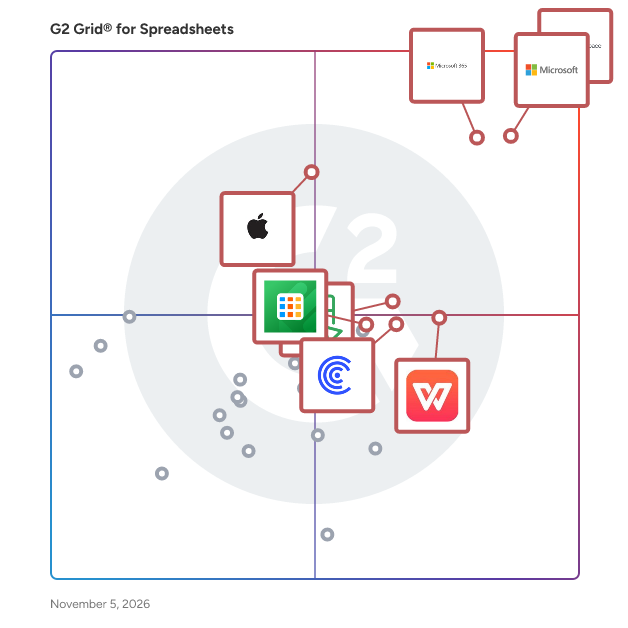
## G2 Grid® for Spreadsheets Software
 ![G2 Grid® for Spreadsheets Software plotting products by satisfaction and market presence](https://www.g2.com/categories/spreadsheets/grids.png?focus%5B%5D=1434&focus%5B%5D=19076&focus%5B%5D=663&focus%5B%5D=60336&focus%5B%5D=60460&focus%5B%5D=54580&focus%5B%5D=1435768&focus%5B%5D=1204004)

Highlighted products: Google Workspace, Microsoft Excel, Microsoft 365, WPS Spreadsheets, Apple Numbers, Zoho Sheet, Detrics, and Coefficient.

Underlying data: [Grid® JSON](https://www.g2.com/categories/spreadsheets/grids.json?focus%5B%5D=google-workspace&focus%5B%5D=microsoft-excel&focus%5B%5D=microsoft365&focus%5B%5D=wps-spreadsheets&focus%5B%5D=apple-numbers&focus%5B%5D=zoho-sheet&focus%5B%5D=detrics&focus%5B%5D=coefficient)

**Sponsored**

### Beautiful.ai

Beautiful.ai is the AI presentation maker designed for professionals who need to move fast and look polished. Whether you’re building a client pitch, investor deck, or internal strategy presentation, Beautiful.ai combines the speed of AI with the control of smart design tools—so you get stunning, brand-ready results in minutes, not hours. Unlike traditional slide tools or lightweight “PowerPoint generators,” Beautiful.ai goes beyond static templates. Our Smart Slides automatically format, align, and animate your content, so every deck looks consistent and professional. With built-in AI assistance, you can generate images, edit copy, and swap visuals directly in your slides, while keeping full control to refine your message. Why Beautiful.ai is the Best AI Presentation Maker AI + Smart Design: Generate an entire presentation with AI, then refine it with Smart Slides that auto-adjust layouts, fonts, and colors for a polished finish. Themes & Branding: Apply your brand colors, fonts, and logos across decks instantly with our Theme Builder—ideal for scaling design consistency across teams. Professional Quality: Outputs aren’t just “AI demos.” You get editable, animated, stakeholder-ready decks that impress clients, executives, and investors. Stock Library Included: Access millions of free stock photos, icons, and videos without leaving the editor. Beautiful.ai Plans for Every Stage of Growth Pro Plan: Perfect for consultants, freelancers, and individual professionals who want to create AI presentations quickly and look credible without hiring a designer. Generate decks with AI, customize with Smart Slides, and export to PowerPoint, PDF, or share online. Team Plan: Built for small businesses and growing teams who need brand control and collaboration. Apply consistent branding across every deck, collaborate in real time, and ensure every presentation—sales, marketing, product, or boardroom—is on brand and professional. Enterprise Plan: Designed for larger organizations with advanced needs. Enterprise customers get everything in Pro and Team, plus dedicated account management, SSO and security features, advanced admin controls, and integrations for scaling Beautiful.ai across the business. Who Uses Beautiful.ai? Consultants and agencies who need client-ready decks, fast. Marketers and sales teams who want consistent, on-brand presentations without design bottlenecks. Founders and executives who need credible investor decks and board presentations. Enterprise teams rolling out standardized, AI-powered storytelling across the organization. With Beautiful.ai, presentations stop being a time sink. You can start with AI-generated outlines, refine with Smart Slides, and present a board-ready or client-ready deck the same day. If you’re searching for the best AI presentation maker, a smarter PowerPoint generator, or simply a faster way to create professional decks, Beautiful.ai is the tool built for real work.

[Visit website](https://www.g2.com/external_clickthroughs/record?secure%5Bad_program%5D=ppc&secure%5Bad_slot%5D=category_product_list_llm&secure%5Bcategory_id%5D=645&secure%5Bchosen_at%5D=2026-08-15T05%3A35%3A35Z&secure%5Bdisplayable_resource_id%5D=345&secure%5Bdisplayable_resource_type%5D=Category&secure%5Bmedium%5D=sponsored&secure%5Bplacement_reason%5D=neighbor_category&secure%5Bplacement_resource_ids%5D%5B%5D=345&secure%5Bprioritized%5D=false&secure%5Bproduct_id%5D=110900&secure%5Bresource_id%5D=645&secure%5Bresource_type%5D=Category&secure%5Bsource_type%5D=category_page&secure%5Bsource_url%5D=https%3A%2F%2Fwww.g2.com%2Fcategories%2Fspreadsheets%2Ffree%3Fpage%3D3&secure%5Btoken%5D=6bae0439084f5e0740cbcbfa635074489fe6da1d6e40143d1b8f4d8be3346162&secure%5Burl%5D=https%3A%2F%2Fwww.beautiful.ai%2Fdemorequest%3Futm_campaign%3Dg2-ppc%26utm_source%3Ddisplay_dsp%26utm_medium%3Dppc&secure%5Burl_type%5D=custom_url)

### [Alphasheet](https://www.g2.com/products/alphasheet/reviews)

Alphasheet is a no-code software platform that allows business teams to seamlessly connect live company data directly into their spreadsheets, including Google Sheets and Microsoft Excel.

#### Who Is the Company Behind Alphasheet?

- **Seller:** [Alphasheet](https://www.g2.com/sellers/alphasheet)
- **HQ Location:** N/A
- **LinkedIn® Page:** [www.linkedin.com](https://www.g2.com/external_clickthroughs/record?secure%5Bsource_type%5D=product_profile&secure%5Btoken%5D=a17fade5610d827a42b6373d4b65f8b54b2873962a6c87f968b543593cf557da&secure%5Burl%5D=https%3A%2F%2Fwww.linkedin.com%2Fcompany%2Falphasheet&secure%5Burl_type%5D=linkedin_company_website)  
9 employees on LinkedIn®

### [BigCommerce Excel Add-In by Devart](https://www.g2.com/products/bigcommerce-excel-add-in-by-devart/reviews)

Devart Excel Add-in for BigCommerce allows you to connect Microsoft Excel to BigCommerce, quickly and easily load data from BigCommerce to Excel, instantly refresh data in an Excel workbook from the database, edit these data, and save them back to BigCommerce. It enables you to work with BigCommerce data like with usual Excel worksheets, easily perform data cleansing and de-duplication, and apply all the Excel's powerful data processing and analysis capabilities to these data.

#### Who Is the Company Behind BigCommerce Excel Add-In by Devart?

- **Seller:** [Devart](https://www.g2.com/sellers/devart)
- **Year Founded:** 1997
- **HQ Location:** Wilmington, Delaware, USA
- **Twitter:** @DevartSoftware  
1,736 Twitter followers
- **LinkedIn® Page:** [www.linkedin.com](https://www.g2.com/external_clickthroughs/record?secure%5Bsource_type%5D=product_profile&secure%5Btoken%5D=79979469a3bee56c782598382543e7a4af65b7f1bcf71aea7d9fde07241e81e6&secure%5Burl%5D=https%3A%2F%2Fwww.linkedin.com%2Fcompany%2F800325%2F&secure%5Burl_type%5D=linkedin_company_website)  
249 employees on LinkedIn®

### [DB2 Excel Add-In by Devart](https://www.g2.com/products/db2-excel-add-in-by-devart/reviews)

Devart Excel Add-in for DB2 allows you to connect Microsoft Excel to DB2, quickly and easily load data from DB2 to Excel, instantly refresh data in an Excel workbook from the database, edit these data, and save them back to DB2. It enables you to work with DB2 data like with usual Excel worksheets, easily perform data cleansing and de-duplication, and apply all the Excel's powerful data processing and analysis capabilities to these data.

#### Who Is the Company Behind DB2 Excel Add-In by Devart?

- **Seller:** [Devart](https://www.g2.com/sellers/devart)
- **Year Founded:** 1997
- **HQ Location:** Wilmington, Delaware, USA
- **Twitter:** @DevartSoftware  
1,736 Twitter followers
- **LinkedIn® Page:** [www.linkedin.com](https://www.g2.com/external_clickthroughs/record?secure%5Bsource_type%5D=product_profile&secure%5Btoken%5D=79979469a3bee56c782598382543e7a4af65b7f1bcf71aea7d9fde07241e81e6&secure%5Burl%5D=https%3A%2F%2Fwww.linkedin.com%2Fcompany%2F800325%2F&secure%5Burl_type%5D=linkedin_company_website)  
249 employees on LinkedIn®

### [Documents API](https://www.g2.com/products/documents-api/reviews)

Fast, Efficient Document APIs for .NET Core 2.0 and Java. Take total document control with ultra-fast, low-footprint document APIs for enterprise apps Generate, load, edit, save spreadsheets, PDF, images, and DOCX files Create large spreadsheets, Word, images, and PDF documents, fast No dependencies on Excel, Word, or Acrobat Run on Windows, Mac, Linux Deploy to Azure, AWS, and AWS Lambda What’s New in GrapeCity Documents v4.1: - New Signature Tool in GrapeCity Documents for PDF Viewer - Extract data from PDF documents using structure tags - Performance improvements in Excel template processing - Improved Copy and Move Range Operations in GrapeCity Documents for Word - And much more!

#### Who Is the Company Behind Documents API?

- **Seller:** [MESCIUS](https://www.g2.com/sellers/mescius)
- **Year Founded:** 1980
- **HQ Location:** Pittsburgh, PA
- **Twitter:** @MESCIUS\_inc  
3,846 Twitter followers
- **LinkedIn® Page:** [www.linkedin.com](https://www.g2.com/external_clickthroughs/record?secure%5Bsource_type%5D=product_profile&secure%5Btoken%5D=4907dae7a15eb51c7dd03a7b96d86dee40ed387940238e1fd2b951cd2d374719&secure%5Burl%5D=https%3A%2F%2Fwww.linkedin.com%2Fcompany%2F15913%2F&secure%5Burl_type%5D=linkedin_company_website)  
316 employees on LinkedIn®

### [Freshdesk Excel Add-In by Devart](https://www.g2.com/products/freshdesk-excel-add-in-by-devart/reviews)

Devart Excel Add-in for Freshdesk allows you to connect Microsoft Excel to Freshdesk, quickly and easily load data from Freshdesk to Excel, instantly refresh data in an Excel workbook from the database, edit these data, and save them back to Freshdesk. It enables you to work with Freshdesk data like with usual Excel worksheets, easily perform data cleansing and de-duplication, and apply all the Excel's powerful data processing and analysis capabilities to these data.

#### Who Is the Company Behind Freshdesk Excel Add-In by Devart?

- **Seller:** [Devart](https://www.g2.com/sellers/devart)
- **Year Founded:** 1997
- **HQ Location:** Wilmington, Delaware, USA
- **Twitter:** @DevartSoftware  
1,736 Twitter followers
- **LinkedIn® Page:** [www.linkedin.com](https://www.g2.com/external_clickthroughs/record?secure%5Bsource_type%5D=product_profile&secure%5Btoken%5D=79979469a3bee56c782598382543e7a4af65b7f1bcf71aea7d9fde07241e81e6&secure%5Burl%5D=https%3A%2F%2Fwww.linkedin.com%2Fcompany%2F800325%2F&secure%5Burl_type%5D=linkedin_company_website)  
249 employees on LinkedIn®

### [Google Workspace Excel Add-In by Devart](https://www.g2.com/products/google-workspace-excel-add-in-by-devart/reviews)

Devart Excel Add-in for Google Workspace allows you to connect Microsoft Excel to Google Workspace, quickly and easily load data from Google Workspace to Excel, instantly refresh data in an Excel workbook from the database, edit these data, and save them back to Google Workspace. It enables you to work with Google Workspace data like with usual Excel worksheets, easily perform data cleansing and de-duplication, and apply all the Excel's powerful data processing and analysis capabilities to these data.

#### Who Is the Company Behind Google Workspace Excel Add-In by Devart?

- **Seller:** [Devart](https://www.g2.com/sellers/devart)
- **Year Founded:** 1997
- **HQ Location:** Wilmington, Delaware, USA
- **Twitter:** @DevartSoftware  
1,736 Twitter followers
- **LinkedIn® Page:** [www.linkedin.com](https://www.g2.com/external_clickthroughs/record?secure%5Bsource_type%5D=product_profile&secure%5Btoken%5D=79979469a3bee56c782598382543e7a4af65b7f1bcf71aea7d9fde07241e81e6&secure%5Burl%5D=https%3A%2F%2Fwww.linkedin.com%2Fcompany%2F800325%2F&secure%5Burl_type%5D=linkedin_company_website)  
249 employees on LinkedIn®

### [GSheetConnector](https://www.g2.com/products/gsheetconnector/reviews)

GSheetConnector is a suite of powerful Google Sheet integration addon plugins for WordPress that connects your website forms and eCommerce data directly to Google Sheets, enabling real-time, no-code data transfer from your site to spreadsheets. Whether you’re using Contact Form 7, WPForms, Gravity Forms, Ninja Forms, Formidable Forms, Forminator Forms, or Page Builder-based forms like Elementor, Avada, and Divi, GSheetConnector automatically sends your form entries to your connected Google Sheet, no manual work needed. It also includes WooCommerce and Easy Digital Downloads integrations, allowing you to sync orders, products, and customer data effortlessly with Google Sheets. With built-in real-time and manual sync options, GSheetConnector makes it easy to manage, analyze, and automate workflows across your WordPress ecosystem. Each integration — Contact Form, Page Builder, and eCommerce - is available as an individual addon plugin, so you can choose exactly what fits your needs and keep your setup lightweight, efficient, and flexible. Designed for site owners, marketers, developers, and eCommerce businesses, GSheetConnector helps automate tasks, streamline data management, and save valuable time by keeping all your WordPress data organized, accessible, and in sync with Google Sheets.

#### Who Is the Company Behind GSheetConnector?

- **Seller:** [GSheetConnector](https://www.g2.com/sellers/gsheetconnector)
- **Year Founded:** 2016
- **HQ Location:** N/A
- **LinkedIn® Page:** [www.linkedin.com](https://www.g2.com/external_clickthroughs/record?secure%5Bsource_type%5D=product_profile&secure%5Btoken%5D=4a082a53d1b4030444e19e39fd12e22ba85392de470524469c3049f10525c792&secure%5Burl%5D=https%3A%2F%2Fwww.linkedin.com%2Fcompany%2Fgsheetconnector%2F&secure%5Burl_type%5D=linkedin_company_website)  
2 employees on LinkedIn®

### [HubSpot Excel Add-In by Devart](https://www.g2.com/products/hubspot-excel-add-in-by-devart/reviews)

Devart Excel Add-in for Hubspot allows you to connect Microsoft Excel to Hubspot, quickly and easily load data from Hubspot to Excel, instantly refresh data in an Excel workbook from the database, edit these data, and save them back to Hubspot. It enables you to work with Hubspot data like with usual Excel worksheets, easily perform data cleansing and de-duplication, and apply all the Excel's powerful data processing and analysis capabilities to these data.

#### Who Is the Company Behind HubSpot Excel Add-In by Devart?

- **Seller:** [Devart](https://www.g2.com/sellers/devart)
- **Year Founded:** 1997
- **HQ Location:** Wilmington, Delaware, USA
- **Twitter:** @DevartSoftware  
1,736 Twitter followers
- **LinkedIn® Page:** [www.linkedin.com](https://www.g2.com/external_clickthroughs/record?secure%5Bsource_type%5D=product_profile&secure%5Btoken%5D=79979469a3bee56c782598382543e7a4af65b7f1bcf71aea7d9fde07241e81e6&secure%5Burl%5D=https%3A%2F%2Fwww.linkedin.com%2Fcompany%2F800325%2F&secure%5Burl_type%5D=linkedin_company_website)  
249 employees on LinkedIn®

### [Kutools for Excel](https://www.g2.com/products/kutools-for-excel/reviews)

Kutools for Excel is an advanced Excel add-in that extends the functionality of Microsoft Excel by providing over 300 tools for data management, formatting, and automation. It is designed to help users simplify complex tasks, reduce manual work, and improve efficiency without requiring formulas or VBA. The add-in supports a wide range of common Excel operations, including data cleaning, merging and splitting cells, removing duplicates, batch processing across multiple worksheets, and converting data formats. These features allow users to complete tasks that would normally require multiple steps or complex formulas in a more streamlined way. Kutools for Excel is used by professionals, analysts, and general Excel users who work with large datasets or perform repetitive tasks. It is particularly useful for improving productivity in scenarios such as data preparation, reporting, and spreadsheet management. Compared to native Excel functionality, Kutools provides more direct and user-friendly tools for handling everyday tasks, helping users save time and reduce errors.

#### Who Is the Company Behind Kutools for Excel?

- **Seller:** [ExtendOffice](https://www.g2.com/sellers/extendoffice)
- **HQ Location:** 60 PAYA LEBAR ROAD, #04-16, PAYA LEBAR SQUARE, SINGAPORE 409051
- **LinkedIn® Page:** [www.linkedin.com](https://www.g2.com/external_clickthroughs/record?secure%5Bsource_type%5D=product_profile&secure%5Btoken%5D=7886df2ed926834e5eb248c77dcfa8e5c815d3ab1f0fe3132ced0dba45868834&secure%5Burl%5D=https%3A%2F%2Fwww.linkedin.com%2Fcompany%2FNo-Linkedin-Presence-Added-Intentionally-By-DataOps&secure%5Burl_type%5D=linkedin_company_website)  
1 employees on LinkedIn®
- **Ownership:** Privately held software company

### [Logic Sheet](https://www.g2.com/products/logic-sheet/reviews)

Logic Sheet is a Google Sheets add-on designed to help individuals and teams automate repetitive spreadsheet tasks without writing code. The product allows users to define simple logic-based workflows directly inside Google Sheets, enabling actions such as triggering updates, sending data to external services, or running automated processes when specific conditions are met. Logic Sheet focuses on making spreadsheet automation accessible, transparent, and easy to maintain for non-technical users. Typical use cases include: Automating repetitive data updates in Google Sheets Triggering actions based on cell changes or conditions Reducing manual work in reporting and operational spreadsheets Supporting lightweight workflow automation for small teams and solo users Logic Sheet is particularly suited for freelancers, small businesses, and teams that rely heavily on Google Sheets and want more control than basic formulas offer, without the complexity of full automation platforms. The product has previously been offered via third-party lifetime deal marketplaces. Today, Logic Sheet is actively maintained and continues to evolve with a focus on reliability, usability, and sustainable development.

#### Who Is the Company Behind Logic Sheet?

- **Seller:** [Logic Labs](https://www.g2.com/sellers/logic-labs)
- **HQ Location:** N/A
- **LinkedIn® Page:** [www.linkedin.com](https://www.g2.com/external_clickthroughs/record?secure%5Bsource_type%5D=product_profile&secure%5Btoken%5D=7886df2ed926834e5eb248c77dcfa8e5c815d3ab1f0fe3132ced0dba45868834&secure%5Burl%5D=https%3A%2F%2Fwww.linkedin.com%2Fcompany%2FNo-Linkedin-Presence-Added-Intentionally-By-DataOps&secure%5Burl_type%5D=linkedin_company_website)  
1 employees on LinkedIn®

### [Magento Excel Add-In by Devart](https://www.g2.com/products/magento-excel-add-in-by-devart/reviews)

Devart Excel Add-in for Magento allows you to connect Microsoft Excel to Magento, quickly and easily load data from Magento to Excel, instantly refresh data in an Excel workbook from the database, edit these data, and save them back to Magento. It enables you to work with Magento data like with usual Excel worksheets, easily perform data cleansing and de-duplication, and apply all the Excel's powerful data processing and analysis capabilities to these data.

#### Who Is the Company Behind Magento Excel Add-In by Devart?

- **Seller:** [Devart](https://www.g2.com/sellers/devart)
- **Year Founded:** 1997
- **HQ Location:** Wilmington, Delaware, USA
- **Twitter:** @DevartSoftware  
1,736 Twitter followers
- **LinkedIn® Page:** [www.linkedin.com](https://www.g2.com/external_clickthroughs/record?secure%5Bsource_type%5D=product_profile&secure%5Btoken%5D=79979469a3bee56c782598382543e7a4af65b7f1bcf71aea7d9fde07241e81e6&secure%5Burl%5D=https%3A%2F%2Fwww.linkedin.com%2Fcompany%2F800325%2F&secure%5Burl_type%5D=linkedin_company_website)  
249 employees on LinkedIn®

### [Mailchimp Excel Add-In by Devart](https://www.g2.com/products/mailchimp-excel-add-in-by-devart/reviews)

Devart Excel Add-in for Mailchimp allows you to connect Microsoft Excel to Mailchimp, quickly and easily load data from Mailchimp to Excel, instantly refresh data in an Excel workbook from the database, edit these data, and save them back to Mailchimp. It enables you to work with Mailchimp data like with usual Excel worksheets, easily perform data cleansing and de-duplication, and apply all the Excel's powerful data processing and analysis capabilities to these data.

#### Who Is the Company Behind Mailchimp Excel Add-In by Devart?

- **Seller:** [Devart](https://www.g2.com/sellers/devart)
- **Year Founded:** 1997
- **HQ Location:** Wilmington, Delaware, USA
- **Twitter:** @DevartSoftware  
1,736 Twitter followers
- **LinkedIn® Page:** [www.linkedin.com](https://www.g2.com/external_clickthroughs/record?secure%5Bsource_type%5D=product_profile&secure%5Btoken%5D=79979469a3bee56c782598382543e7a4af65b7f1bcf71aea7d9fde07241e81e6&secure%5Burl%5D=https%3A%2F%2Fwww.linkedin.com%2Fcompany%2F800325%2F&secure%5Burl_type%5D=linkedin_company_website)  
249 employees on LinkedIn®

### [Marketo Excel Add-In by Devart](https://www.g2.com/products/marketo-excel-add-in-by-devart/reviews)

Devart Excel Add-in for Marketo allows you to connect Microsoft Excel to Marketo, quickly and easily load data from Marketo to Excel, instantly refresh data in an Excel workbook from the database, edit these data, and save them back to Marketo. It enables you to work with Marketo data like with usual Excel worksheets, easily perform data cleansing and de-duplication, and apply all the Excel's powerful data processing and analysis capabilities to these data.

#### Who Is the Company Behind Marketo Excel Add-In by Devart?

- **Seller:** [Devart](https://www.g2.com/sellers/devart)
- **Year Founded:** 1997
- **HQ Location:** Wilmington, Delaware, USA
- **Twitter:** @DevartSoftware  
1,736 Twitter followers
- **LinkedIn® Page:** [www.linkedin.com](https://www.g2.com/external_clickthroughs/record?secure%5Bsource_type%5D=product_profile&secure%5Btoken%5D=79979469a3bee56c782598382543e7a4af65b7f1bcf71aea7d9fde07241e81e6&secure%5Burl%5D=https%3A%2F%2Fwww.linkedin.com%2Fcompany%2F800325%2F&secure%5Burl_type%5D=linkedin_company_website)  
249 employees on LinkedIn®

### [MySQL Excel Add-In by Devart](https://www.g2.com/products/mysql-excel-add-in-by-devart/reviews)

Devart Excel Add-in for MySQL allows you to connect Microsoft Excel to MySQL or MariaDB, quickly and easily load data from MySQL or MariaDB to Excel, instantly refresh data in an Excel workbook from the database, edit these data, and save them back to MySQL. It enables you to work with MySQL data like with usual Excel worksheets, easily perform data cleansing and de-duplication, and apply all the Excel's powerful data processing and analysis capabilities to these data.

#### Who Is the Company Behind MySQL Excel Add-In by Devart?

- **Seller:** [Devart](https://www.g2.com/sellers/devart)
- **Year Founded:** 1997
- **HQ Location:** Wilmington, Delaware, USA
- **Twitter:** @DevartSoftware  
1,736 Twitter followers
- **LinkedIn® Page:** [www.linkedin.com](https://www.g2.com/external_clickthroughs/record?secure%5Bsource_type%5D=product_profile&secure%5Btoken%5D=79979469a3bee56c782598382543e7a4af65b7f1bcf71aea7d9fde07241e81e6&secure%5Burl%5D=https%3A%2F%2Fwww.linkedin.com%2Fcompany%2F800325%2F&secure%5Burl_type%5D=linkedin_company_website)  
249 employees on LinkedIn®

### [Navifia](https://www.g2.com/products/navifia/reviews)

Navifia is the finance toolkit inside Excel and PowerPoint — built for finance teams that ship the monthly reporting pack. Export once. Push when the model moves. Link charts, tables, and cell values from the Excel model straight into the deck. When the numbers change, one Push refreshes every linked shape — and links survive the workbook moving, rows being inserted in the model, and life on OneDrive or SharePoint. Review stays in the file. Cell-anchored Threads keep the "where did this number come from?" conversation on the number itself — statuses, attachments, audit trail. One-click Stamps flag draft, final, or confidential on one slide or the whole deck. Audit before it ships. Check Period sweeps for stale quarters and mixed fiscal labels. Check Numbers finds leftover figures — it knows $1.2m and 1,200,000 are the same number. Check Fonts catches the stray typeface. In Excel, Formula Audit traces the precedents and dependents behind every figure. Calibrated for FP&A. 50+ features across both add-ins, including 30+ Excel tools: consolidate and split workbooks, batch-clean sheets with thirteen operations, variance and CAGR in a keystroke. Set up in minutes. Pin your layouts and elements, tune the Smart Formatting cyclers, rebind any shortcut — all from the ribbon. Export the whole setup as one file and the entire team gets the same ribbon. Private by architecture. Your spreadsheets and slides never leave your computer. The add-ins send only license-validation data. $16/user/month for both add-ins — it pays for itself the first month-end. Public Beta: Free until 31 August 2026.

#### Who Is the Company Behind Navifia?

- **Seller:** [Navifia](https://www.g2.com/sellers/navifia)
- **Year Founded:** 2026
- **HQ Location:** United States
- **Twitter:** @navifia001
- **LinkedIn® Page:** [www.linkedin.com](https://www.g2.com/external_clickthroughs/record?secure%5Bsource_type%5D=product_profile&secure%5Btoken%5D=1a2aa7e49ce52ee884b5d15458da53751a086db7be593f9c32adf7d44510b5b8&secure%5Burl%5D=https%3A%2F%2Fwww.linkedin.com%2Fcompany%2Fnavifia&secure%5Burl_type%5D=linkedin_company_website)  
1 employees on LinkedIn®

- [&lsaquo; Prev ‹ Prev](/categories/spreadsheets/free?order=g2_score&page=2#product-list)
- [1](/categories/spreadsheets/free?order=g2_score#product-list)
- [2](/categories/spreadsheets/free?order=g2_score&page=2#product-list)
- 3
- [4](/categories/spreadsheets/free?order=g2_score&page=4#product-list)
- [Next &rsaquo; Next ›](/categories/spreadsheets/free?order=g2_score&page=4#product-list)

Spotlight Categories

[E-commerce Fraud Protection Software](https://www.g2.com/categories/e-commerce-fraud-protection)

[ERP Systems](https://www.g2.com/categories/erp-systems)

[Payroll Software](https://www.g2.com/categories/payroll)

[Influencer Marketing Platforms](https://www.g2.com/categories/influencer-marketing-platforms)

[Event Management Platforms](https://www.g2.com/categories/event-management-platforms)

Similar Categories

- [Team Collaboration](/categories/team-collaboration)
- [Other Collaboration](/categories/other-collaboration)
- [Agentic AI Browser](/categories/agentic-ai-browser)
- [AI Meeting Assistants](/categories/ai-meeting-assistants)
- [AI Presentation Tools](/categories/ai-presentation-tools)

- [Audio Conferencing](/categories/audio-conferencing)
- [Board Management](/categories/board-management)
- [Bookmark Manager](/categories/bookmark-manager)
- [Browser](/categories/browsers)
- [Business Scheduling](/categories/business-scheduling)

- [Calendar](/categories/calendar-software)
- [Cloud PBX Platforms](/categories/cloud-pbx-platforms)
- [Collaborative Research Writing Tools](/categories/collaborative-research-writing-tools)
- [Decision-Making](/categories/decision-making)
- [Digital Adoption Platform](/categories/digital-adoption-platform)

[Browse Spreadsheets Themes](/categories/spreadsheets/themes)