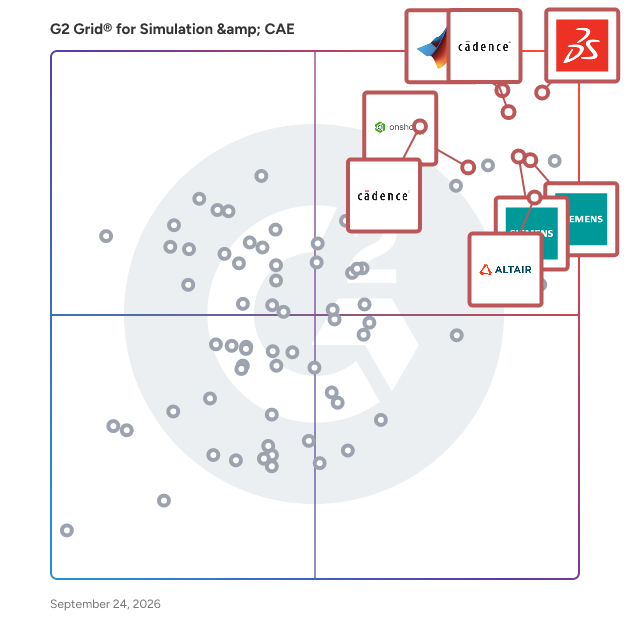
# Best Simulation &amp; CAE Software for Small Business - Page 3

*By [Daniel Rivera](https://research.g2.com/insights/author/daniel-rivera)*


Products classified in the overall Simulation &amp; CAE category are similar in many regards and help companies of all sizes solve their business problems. However, small business features, pricing, setup, and installation differ from businesses of other sizes, which is why we match buyers to the right Small Business Simulation &amp; CAE to fit their needs. Compare product ratings based on reviews from enterprise users or connect with one of G2&#39;s buying advisors to find the right solutions within the Small Business Simulation &amp; CAE category.

In addition to qualifying for inclusion in the Simulation &amp; CAE Software category, to qualify for inclusion in the Small Business Simulation &amp; CAE Software category, a product must have at least 10 reviews left by a reviewer from a small business.


## Top Simulation &amp; CAE Software at a Glance
| # | Product | Rating | Best For | What Users Say |
|---|---------|--------|----------|----------------|
| 1 | [MATLAB](https://www.g2.com/products/matlab/reviews) | 4.5/5.0 (749 reviews) | Matrix-based engineering simulation and algorithm prototyping | "[A Robust Powerhouse for Advanced Engineering Simulations and Modeling](https://www.g2.com/survey_responses/matlab-review-12689149)" |
| 2 | [Fidelity CFD Platform](https://www.g2.com/products/cadence-design-systems-fidelity-cfd-platform/reviews) | 4.2/5.0 (57 reviews) | GPU-accelerated CFD with dirty-CAD meshing automation | "[Empowers Complex Simulations, But Learning Curve Remains](https://www.g2.com/survey_responses/fidelity-cfd-platform-review-12958623)" |
| 3 | [Capital](https://www.g2.com/products/capital/reviews) | 4.3/5.0 (103 reviews) | Electrical harness design with PLM integration | "[Fast, Reliable NX Integration with Easy Schematic and Wiring Diagram Extraction](https://www.g2.com/survey_responses/capital-review-12785640)" |
| 4 | [Designcenter Solid Edge](https://www.g2.com/products/designcenter-solid-edge/reviews) | 4.3/5.0 (593 reviews) | Synchronous CAD edits with integrated FEA | "[Unique Interface, Synchronous Design, and Great Support Boost Efficiency](https://www.g2.com/survey_responses/designcenter-solid-edge-review-12709304)" |
| 5 | [Altair SimSolid](https://www.g2.com/products/altair-simsolid/reviews) | 4.3/5.0 (181 reviews) | Meshless structural analysis on complex assemblies | "[Ultra-Fast Simulation on Large CAD Models—Perfect for Early-Stage Design](https://www.g2.com/survey_responses/altair-simsolid-review-12348127)" |
| 6 | [Simcenter STAR-CCM+](https://www.g2.com/products/simcenter-star-ccm/reviews) | 4.5/5.0 (174 reviews) | Integrated multiphysics CFD with automated meshing | "[Simcenter STAR-CCM+ Software Review: Capabilities, Usability, and Engineering Value](https://www.g2.com/survey_responses/simcenter-star-ccm-review-7841765)" |
| 7 | [Simcenter 3D](https://www.g2.com/products/simcenter-3d/reviews) | 4.3/5.0 (192 reviews) | CAD-integrated multiphysics simulation with NX | "[Strong CAD/CAE Integration and Advanced Meshing That Streamline Engineering Workflows](https://www.g2.com/survey_responses/simcenter-3d-review-12185159)" |
| 8 | [Onshape](https://www.g2.com/products/onshape/reviews) | 4.7/5.0 (683 reviews) | Cloud CAD with real-time collaborative design | "[Cloud-Based Flexibility with Robust Performance](https://www.g2.com/survey_responses/onshape-review-12462851)" |
| 9 | [Altair Hypermesh](https://www.g2.com/products/altair-hypermesh/reviews) | 4.4/5.0 (94 reviews) | FE mesh generation with solver-agnostic preprocessing | "[User-Friendly and Efficient for Automobile Simulations.](https://www.g2.com/survey_responses/altair-hypermesh-review-8724120)" |
| 10 | [Sigrity X Platform](https://www.g2.com/products/sigrity-x-platform/reviews) | 4.1/5.0 (54 reviews) | — | "[Deep SI/PI Insight for Complex High-Speed PCB Designs](https://www.g2.com/survey_responses/sigrity-x-platform-review-12934769)" |


## How Many Simulation &amp; CAE Software Products Does G2 Track?
**Total Products under this Category:** 264

### Category Stats (Jul 2026)
- **Average Rating**: 4.34/5 The average rating of products in this category, based on all submitted ratings
- **Top Trending Product**: Fidelity CFD Platform (+2.39%) - Among all products in this category, Fidelity CFD Platform recorded the largest rating increase compared to last month
*Last updated: July 01, 2026*


## How Does G2 Rank Simulation &amp; CAE Software Products?

**Why You Can Trust G2's Software Rankings:**

- 30 Analysts and Data Experts
- 7,800+ Authentic Reviews
- 264+ Products
- Unbiased Rankings

G2's software rankings are built on verified user reviews, rigorous moderation, and a consistent research methodology maintained by a team of analysts and data experts. Each product is measured using the same transparent criteria, with no paid placement or vendor influence. While reviews reflect real user experiences, which can be subjective, they offer valuable insight into how software performs in the hands of professionals. Together, these inputs power the G2 Score, a standardized way to compare tools within every category.


---

**Sponsored**

### CMS IntelliCAD

CMS IntelliCAD® is a sophisticated CAD software solution designed to meet the diverse needs of professionals in engineering, architecture, and consulting. This full-featured software provides users with an extensive array of 2D and 3D drawing tools that are compatible with Autodesk® AutoCAD®, making it an ideal choice for anyone who relies on CAD drawings for their work. With its intelligent design and powerful capabilities, CMS IntelliCAD serves as a reliable alternative for those seeking advanced CAD functionalities without the associated high costs. Targeted primarily at engineers, architects, and consultants, CMS IntelliCAD caters to a wide range of users who require precision and efficiency in their design processes. The software is particularly beneficial for professionals who need to create detailed drawings, models, and documentation. Its compatibility with .DWG file extensions ensures seamless integration with existing projects, allowing users to work with files from various sources without losing data integrity. Additionally, the software supports Building Information Modeling (BIM), enhancing its utility for modern architectural and engineering practices, which increasingly rely on collaborative and data-rich environments. One of the standout features of CMS IntelliCAD is its extensive customization options. Users can take advantage of a comprehensive programming toolkit that includes support for LISP, VBA, .Net, and IRX development. This flexibility allows users to tailor the software to their specific workflows, enhancing productivity and streamlining repetitive tasks. The ability to create custom commands and automate processes can significantly reduce the time spent on drafting and design, making it a valuable asset for busy professionals who need to maximize their efficiency. Moreover, CMS IntelliCAD offers extended interoperability with various file formats, including DGN, .STEP, .IGES, and .PDF. This broad compatibility ensures that users can collaborate effectively with colleagues and clients who may be using different software solutions. The software&#39;s robust features, combined with its affordability, make it an attractive option for businesses and individuals looking to enhance their CAD capabilities without compromising on quality or performance. CMS IntelliCAD stands out in the CAD software landscape by providing a powerful, customizable, and cost-effective solution for professionals in various fields. Its intelligent design, extensive compatibility, and support for advanced programming make it a practical choice for those who require a reliable tool for their design and drafting needs. The combination of these features positions CMS IntelliCAD as a strong contender in the competitive CAD market, appealing to both seasoned professionals and newcomers alike.


[Visit website](https://www.g2.com/external_clickthroughs/record?secure%5Bad_program%5D=ppc&amp;secure%5Bad_slot%5D=category_product_list&amp;secure%5Bcategory_id%5D=901&amp;secure%5Bchosen_at%5D=2026-07-01T20%3A50%3A23Z&amp;secure%5Bdisplayable_resource_id%5D=291&amp;secure%5Bdisplayable_resource_type%5D=Category&amp;secure%5Bmedium%5D=sponsored&amp;secure%5Bplacement_reason%5D=neighbor_category&amp;secure%5Bplacement_resource_ids%5D%5B%5D=291&amp;secure%5Bprioritized%5D=false&amp;secure%5Bproduct_id%5D=5497&amp;secure%5Bresource_id%5D=901&amp;secure%5Bresource_type%5D=Category&amp;secure%5Bsource_type%5D=category_page&amp;secure%5Bsource_url%5D=https%3A%2F%2Fwww.g2.com%2Fcategories%2Fsimulation-cae%2Fsmall-business%3Fpage%3D3&amp;secure%5Btoken%5D=e25a95cdbaa22a4a9e0dbe3c17ef41c85ccf88a339168046c0e9eac9e6039fc3&amp;secure%5Burl%5D=https%3A%2F%2Fintellicadms.com%2Fsite%2F&amp;secure%5Burl_type%5D=custom_url)

---


## What Is Simulation &amp; CAE Software?

[CAD &amp; PLM Software](https://www.g2.com/categories/cad-plm)

## What Software Categories Are Similar to Simulation &amp; CAE Software?

- [General-Purpose CAD Software](https://www.g2.com/categories/general-purpose-cad)
- [Mechanical Computer-aided Design (MCAD) Software](https://www.g2.com/categories/mechanical-computer-aided-design-mcad)
- [PCB Design Software](https://www.g2.com/categories/pcb-design)


---

## How Do You Choose the Right Simulation &amp; CAE Software?

### What You Should Know About Simulation &amp; CAE Software

### What is Simulation &amp; CAE Software?

Simulation and computer-aided engineering (CAE) software allows engineers, analysts, and designers to perform finite element analysis (FEA), computational fluid dynamics (CFD), multibody dynamics (MDB), and optimization. Simulation software can also be referred to as CAE simulation software due to its association with CAE analysis and its application. Simulation software can create models based on mathematical data and place them in a predefined system. By analyzing these models, engineers study the relationship between model and system and the interactions that happen in a controlled environment. This helps predict performance, defects, and judge the potential product lifespan.

**What Does Simulation &amp; CAE Software Stand For?**

CAE stands for computer-aided engineering. The term computer-aided engineering is used as a technical term for simulation while the term simulation is what is often heard in the market when users refer to engineering simulation.

### What are the Common Features of Simulation &amp; CAE Software?

The following are some core features within simulation software:&amp;nbsp;

[**Computational fluid dynamics (CFD)**](https://www.g2.com/categories/simulation-cae/f/computational-fluid-dynamics): One of the main forms of engineering analysis that CAE software performs is CFD. CFD is a way to model the behavior of both fluids and gases. This includes modeling the way they interact with one another as well as surfaces that they come in contact with. This feature can solve problems such as identifying incompressible and compressible fluids, laminar and turbulent flows, as well as multiphase flow problems.

**Finite element analysis (FEA):** FEA is a numerical method used to solve engineering problems. This process is used to break down one large problem into a handful of smaller ones, called finite elements. Using this method, engineers can break down complex engineering problems into manageable pieces. One of the main ways engineers use FEA is to make model representations in which they can test how objects interact with one another, which provides an understanding of how an actual object would be affected by other physical forces. Examples are bridge modeling, car crash testing, and testing the structural integrity of any given object.

**Mechanical event simulation:** Mechanical event simulation enables engineers to simulate how objects will react to certain events in real life. A good example of this is a simulation of how a mobile phone will interact with a cement floor in the event that it is accidentally dropped. Within the simulation, the software can indicate if the phone screen will crack or if any other permanent issues will be caused. The software can then suggest changes to be made to the phone to make it more durable and protected in the event of a dropped phone; when considering these changes, users can test the simulation until the product is adjusted to their liking.

[**Electromagnetic simulation**](https://www.g2.com/categories/simulation-cae/f/electromagnetic-simulation) **:** Electromagnetic simulation allows users to simulate the electromagnetic properties of components or systems. This allows engineers in industries such as electronics and communications to determine how effective their component design is.

[**Thermal simulation**](https://www.g2.com/categories/simulation-cae/f/thermal-simulation) **:** Thermal simulation allows users to simulate how the physical properties of materials change with changes in temperature. Thermal simulation can be used to simulate areas such as electronics cooling, automotive thermal management, heat exchangers, pressure vessels, and other applications where users need to simulate the effect of thermal loads.

Other Features of Simulation &amp; CAE Software: [Structural Simulation](https://www.g2.com/categories/simulation-cae/f/structural-simulation)

### What are the Benefits of Simulation &amp; CAE Software?

**Speeds up design time:** Simulation software speeds up the time it takes engineers to prototype and test how objects will perform in the real world. This allows product engineers to improve design performance well before a product is manufactured. A major example of this is how airplane engineers manufacture an airplane that can withhold the stress of landing on a runway. Within this process, there are so many variables to take into account, including the material, size, and speed of the airplane. Given the perspective of how many factors go into the safety and performance design of an airplane, one would think it would take countless days of manipulating the design to create a reliable product. However, CAE allows engineers to speed up this process by running simulations of plane landings and detailing exact ways in which the engineer can improve the design.&amp;nbsp;

**Saves money:** Simulation software is all virtual and done on the computer, hence the name “computer-aided engineering”. Since these simulations are all conducted virtually, it allows companies to save plenty of money by not having to manufacture countless designs before getting the final product correct. For example, car engineers can simulate how a car crash would occur before they even have to conduct the final experiment. This way, before car crash testing occurs, engineering teams already have a good sense of how the test will go. The result is having to spend less money on testing and trashing actual physical prototypes.&amp;nbsp;

**Improves testing:** When prototypes finally come down to physical testing, simulation software can help analyze what’s occurring during the test and identify any key faults that occurred. For example, if a car was tested for impact and the body of the car wasn’t strong enough to withstand a crash, simulation software can identify exactly what went wrong and suggest what needs to be changed.

### Who Uses Simulation &amp; CAE Software?

Simulation and CAE software is used across a variety of industries in the manufacturing and engineering world. Its main functions include simulation, validation, and optimization of products, which can be broadly applied to any business trying to test and improve a manufactured product. With this in mind, here are a couple of industries that use simulation software.

**Automotive industry:** Historically, automakers spent plenty of time producing physical vehicle models and then testing them for safety by actually crashing them into physical barriers. With advancements in simulation software, however, design and safety testing is all done using computer simulations. Within the virtual simulation, a car can be tested to improve safety, comfort, and vehicle durability. This has saved the automotive industry both time and money by eliminating the need to produce countless physical prototypes.

**Manufacturers:** Simulation and CAE software can produce simulations of manufacturing assembly lines. This helps manufacturers identify any inefficiencies or issues before they begin construction on expensive production assemblies. By identifying these issues, they can save money and increase the efficiency of their manufacturing systems.

**Electronic engineers:** Industries that work with developing electronic products can greatly benefit from using simulation software. Some simulation tools offer physics-based electronics design that provides fast and accurate life predictions for electronic hardware at the component, board, and system levels in early-stage design. This can be extremely beneficial to product development.

**Education:** Simulation and CAE software is also used by educators to teach engineering students. For learning or teaching simulation, several vendors even offer academic or student editions of their software packages, usually at a reduced cost.

#### Software Related to Simulation &amp; CAE Software&amp;nbsp;

Related solutions that can be used together with simulation and CAE software include:

[CAD software](https://www.g2.com/categories/general-purpose-cad) **:** Computer-aided design (CAD) software allows users to design 3D models of physical objects. Before using simulation software, engineers often create a 3D design of whatever they’d like to conduct a simulation on. This can be a building, a mechanical assembly, an engineering plant, etc. Once the design is done, users then upload the product to a simulation software where they can then simulate how the product would react to real-life forces. Some simulation software have robust 3D design capabilities built in, while others are more elementary and are best complemented by a more robust 3D CAD software.&amp;nbsp;

### Challenges with Simulation &amp; CAE Software&amp;nbsp;

As a technically involved software, simulation and CAE software can come with a few major challenges. Some of the most common challenges include:

**CAD/CAE integration:** CAD files are completely different from CAE files. With this in mind, it’s very difficult to produce a model in CAD software, and hope that it will be suited for FEA within CAE software. However, there are software offerings that allow design and analysis to be tested within an integrated CAD/CAE environment, so to avoid this potential issue, it may be best to find a CAD solution that also offers CAE capabilities.

**Learning curve:** CAE software comes with a steep learning curve. While there are more products and resources that can help beginners, it will still take a significant amount of time to master all the nuances of the software.

**Price:** Another major concern for small businesses is the high price of CAE software. Some commercial CAE software can range anywhere from $10,000 to $50,000 per person, which is a hefty price tag for a single user in a company.

### Which Companies Should Buy Simulation &amp; CAE Software?

Simulation and CAE software has applications that span multiple industries as well as multiple company types.

**Structural engineering and automotive engineering companies:** Whether a company engineers planes, cars, or buildings, simulation software can solve a lot of use cases for structural engineering teams. With plenty of tools for stress and impact analysis, users can simulate how their structures or products will react to real-world environmental effects.

**Manufacturing and industrial equipment companies:** It’s critical to test industrial equipment for strength, speed, safety, reliability, and endurance under different operating conditions. Simulation and CAE software can optimize the industrial equipment design early in the design cycle. This ensures the production of high-performance machinery with a shorter time-to-market and lower costs for physical testing. Some of the tools used within typical CAE software include mounting, clamping, adjusting, rotating and other elements.

### How to Buy Simulation &amp; CAE Software&amp;nbsp;

#### Requirements Gathering (RFI/RFP) for Simulation &amp; CAE Software

Requirements gathering for simulation and CAE software is critical to ensure that the business is implementing a product that meets all of their needs. To do so, businesses must evaluate their critical needs.

#### Compare Simulation &amp; CAE Software Products

**Create a long list**

Long lists are created by eliminating software options that do not provide critical functionality. To make a long list for simulation software, a buyer should look at the following functionalities and deem which products provide the necessary functionality:

- Finite element analysis
- Computational fluid dynamics&amp;nbsp;
- Thermal simulation
- Continuous event modeling
- Mechanical event simulation
- Manufacturing process simulation
- 3D design and modeling
- Drawing tools

**Create a short list**

Once a buyer has narrowed down their list from the following functionality above, it’s then important to get even more specific requirements. A buyer may be looking for simulation software that allows for a wide range of CAD integrations, or some buyers may be looking for solutions that specialize specifically in multibody dynamics or electronics simulation. Additionally, CAE is not easy to learn so it may be important to narrow it down to vendors that have great implementation support or additional resources to help learn how to use the simulation software.

**Conduct demos**

Demos are one of the most important stages in the buying journey. This allows a buyer to sit through an actual product demo and see if the product matches all of the requirements. To make sure the demo runs smoothly, users must ensure that the vendor has all of the requirements beforehand so they can showcase their features properly. Some of the use cases that a business should ask the vendor to showcase are:

**Specific simulation features:** Before getting into the demo, a potential buyer needs to hone in on what simulation features are the most important to them. If a buyer is looking for thermal, fluids, or structural simulation then the buyers should make sure that the vendor showcases those specific features.

**Workflows:** Another important feature to showcase is workflow functionality. How does the solution offer better workflow management for CAE projects? Can users share projects easily, are there simple functions for content management?

**Selection of Simulation &amp; CAE Software&amp;nbsp;**

**Choose a selection team**

Simulation and CAE software is going to most often be used by engineers as well as managers who oversee these teams of engineers. As such, a few senior engineers and relevant managers need to be involved in the decision-making process. At a minimum, the selection team should be at least three senior engineers and two members from management. Since simulation software is costly, this will ensure that enough eyes are on the project to make sure the best decision is made.

**Negotiation**

When negotiating during the purchasing stage, it is advisable to always start small in terms of licenses and functionality. Licenses will always be the biggest cost within any purchase, and oftentimes, companies purchase additional licenses or features in a product that they don’t necessarily need. During this negotiation, vendors will try to convince buyers that they can offer discounts on more functionality or licenses if they buy in bulk, but most businesses don’t need this. If businesses end up needing a few more licenses down the road, they can always add as need be.&amp;nbsp;

In addition to this, the selection team should always strive to have implementation and ongoing support fees included in the cost. As stated previously, simulation software is not easy to learn. Before purchasing, buyers must ensure that the vendor offers regular training or even online training options to help new users onboard quickly. This way, if any ongoing support is needed, businesses can always contact their customer success or support representative.

**Final decision**

After the negotiation stage is conducted, the final decision requires buy-in from everyone on the selection team. It’s important to ensure that all requirements are met and the final decision is supported by everyone involved.

### What Does Simulation &amp; CAE Software Cost?

There are a variety of factors that will play into both the upfront and ongoing cost of simulation software. For upfront costs, a business will pay for setup, any custom integrations, and training. The ongoing cost is the subscription cost to actually use the software. Many simulation software options are usually run on a subscription model which means users will pay a monthly or yearly rate to use the software. The subscription model is generally set up as a per-user model and will ultimately be the biggest cost. As stated previously, to limit the upfront cost, it’s important to pay for a limited number of licenses right away as buyers still need to figure out if the software will ultimately be the best choice for their company. In terms of hard numbers, there is simulation software for as little as $30 per user on a monthly basis, whereas some go up to $100 per user per month.

#### Return on Investment (ROI)

Below is the breakdown of the estimated time to ROI according to the review data on G2 as of May 4, 2021:

35% of buyers see an ROI in 6 months or less

26% of buyers see an ROI in 7-12 months

19 % of buyers see an ROI in 13-24 months

7% of buyers see an ROI from 24-36 months

7% of buyers see an ROI in 48+ months&amp;nbsp;

7% of buyers haven’t realized a full payback yet

### Simulation &amp; CAE Software Trends

**Machine learning&amp;nbsp;**

Machine learning can help speed up engineering simulations by enabling highly accurate predictions. With tools like statistical learning, computers are able to learn and develop better data on their own. This can help speed up the optimal design of a product. An example would be data that is extracted from a car crash simulation repeated thousands of times. Within simulations, machine learning tools can understand which changes need to be made to make the car safer without sacrificing the integrity of the design.


---
## What Are the Most Common Questions About Simulation &amp; CAE Software?
*AI-generated · Last updated: June  3, 2026*
### Which companies integrate simulation software with existing CAD workflows for teams looking to
Based on G2 reviews, several products are repeatedly used when teams need simulation work to fit into established CAD-driven engineering processes.

- [Capital](https://www.g2.com/products/capital) — NX, PLM, and harness workflows.
- [Designcenter Solid Edge](https://www.g2.com/products/designcenter-solid-edge) — edit parts before FEA or CFD.
- [Simcenter 3D](https://www.g2.com/products/simcenter-3d) — unified CAD, meshing, and validation.
- [Simcenter STAR-CCM+](https://www.g2.com/products/simcenter-star-ccm) — CFD with NX-connected design workflows.


### Security and data protection in cloud-based CAE simulation platforms before committing to a multi-year
According to verified users, cloud-based CAE evaluation often centers less on formal security terminology and more on operational confidence. Recent reviews highlight concerns about centralized access, connected data, and sharing across teams, especially when simulation work ties into broader engineering workflows. Users value platforms that keep project information accessible from anywhere, support controlled collaboration, and reduce file handoffs between tools. At the same time, buyers should review how each platform handles shared environments, versioning, and connected design data before a long commitment. In this category, cloud access is often praised for speed and convenience, but teams still want clearer governance around collaboration, model handling, and integration points.


### What are the main challenges when starting CAE simulation for product design software
According to verified users, the biggest startup challenges are usually learning curve, setup complexity, and model preparation rather than the simulation idea itself. Reviews repeatedly mention time spent cleaning geometry, defining contacts or constraints, selecting the right libraries or modules, and understanding which workflow fits the problem. New users also run into hardware limits on large models, confusing interfaces, and difficulty finding the right tutorials for advanced cases. Teams get value fastest when the software reduces manual preprocessing, keeps design and simulation connected, and provides reusable workflows. In recent reviews, buyers also weigh whether the platform helps them test early concepts quickly or requires expert-level effort before useful results appear.


### What are the most important features in cae software
According to verified users, the most important features in cae software are accurate solvers, strong meshing or meshless setup, clear visualization, and workflows that reduce rework between CAD and analysis. Buyers also look for multiphysics support, automation for repetitive studies, optimization tools, and post-processing that makes results easy to interpret. Integration matters a lot in recent reviews, especially when engineering teams need to move between modeling, validation, and reporting without switching tools constantly. Users also value scalable performance on larger assemblies, reusable templates, and collaboration features that keep design data consistent across teams. For many teams, the best platforms shorten setup time while still supporting detailed simulation work.


### How do teams use Simulation &amp; CAE for optimization
According to verified users, teams use simulation and CAE for optimization by testing design alternatives before physical builds, then comparing performance across variables like strength, airflow, thermal behavior, vibration, or manufacturability. Reviews describe workflows where engineers run design exploration, topology studies, what-if scenarios, and parameter sweeps to find lighter, stronger, faster, or easier-to-build options. This is especially useful when projects involve repeated iterations or tight packaging constraints. Recent feedback also shows optimization works best when the platform supports automation, reusable setups, and direct links to CAD or system models. In practice, teams use CAE optimization to reduce prototyping cycles, catch weak points earlier, and make design decisions with more confidence.


