# Best Project Cost Management Software

*By [Subhransu Sahu](https://research.g2.com/insights/author/subhransu-sahu)*


Companies use project cost management software to monitor the profitability of the projects they deliver. This type of software allows businesses to estimate the cost of delivering different types of projects, identify actual costs, and compare them to calculate profit. Project cost management software is used by project managers and project control officers to ensure projects do not exceed estimated costs. Accountants also use this type of software to monitor costs per project or portfolio of projects, and by type of resource (human or material).

Project cost management software can be delivered as a module of [project management software](https://www.g2.com/categories/project-management) or [project and portfolio management software](https://www.g2.com/categories/project-and-portfolio-management). [Project-based ERP software](https://www.g2.com/categories/project-based-erp) also includes features for project cost management. When provided separately, project cost management solutions integrate with project, portfolio &amp; program management software, [ERP systems](https://www.g2.com/categories/erp-systems), and [accounting software](https://www.g2.com/categories/accounting).

To qualify for inclusion in the Project Cost Management category, a product must:

- Allow companies to define standard costs for resources and activities
- Create project budgets using estimated and standard costs
- Calculate costs per activity, project, portfolio, or customer
- Compare budgets and actual costs per project or portfolio


## Top Project Cost Management Software at a Glance
| # | Product | Rating | Best For | What Users Say |
|---|---------|--------|----------|----------------|
| 1 | [Hubstaff](https://www.g2.com/products/hubstaff/reviews) | 4.4/5.0 (2,260 reviews) | Screenshot-backed time tracking for remote billing | "[So much at the same place](https://www.g2.com/survey_responses/hubstaff-review-9900407)" |
| 2 | [Projectworks](https://www.g2.com/products/projectworks/reviews) | 4.5/5.0 (210 reviews) | Professional services margin tracking with Xero integration | "[Reliable, Data-Rich Projectworks with Great Integrations and Support](https://www.g2.com/survey_responses/projectworks-review-12888353)" |
| 3 | [Harvest](https://www.g2.com/products/harvest/reviews) | 4.3/5.0 (831 reviews) | Billable hour tracking with project budget alerts | "[Harvest Makes Mundane Time Tracking Simple and Effortless](https://www.g2.com/survey_responses/harvest-review-12862022)" |
| 4 | [Productive](https://www.g2.com/products/productive/reviews) | 4.6/5.0 (73 reviews) | Project profitability tracking with budget-to-actuals visibility | "[We have used Productive for almost 10 years. It was good when we started and keeps getting better!](https://www.g2.com/survey_responses/productive-review-9235077)" |
| 5 | [Ruddr Professional Services Automation](https://www.g2.com/products/ruddr-professional-services-automation/reviews) | 4.6/5.0 (337 reviews) | Project margin visibility with billable time tracking | "[Intuitive Time Logging and Clear Reporting for Better Team Transparency](https://www.g2.com/survey_responses/ruddr-professional-services-automation-review-12907642)" |
| 6 | [Timely](https://www.g2.com/products/timely-time-tracking/reviews) | 4.8/5.0 (480 reviews) | Billable hour recovery with automatic activity tracking | "[Timely is the best data tracking app for any organization.](https://www.g2.com/survey_responses/timely-review-8084200)" |
| 7 | [Oracle Primavera](https://www.g2.com/products/oracle-primavera/reviews) | 4.4/5.0 (342 reviews) | Resource-loaded CPM schedules with earned value | "[Promising Tool with Scope for Enhancements](https://www.g2.com/survey_responses/oracle-primavera-review-12906556)" |
| 8 | [Oracle Aconex](https://www.g2.com/products/oracle-aconex/reviews) | 4.5/5.0 (198 reviews) | Construction document control with budget approvals | "[Streamlines Project Management and Communication](https://www.g2.com/survey_responses/oracle-aconex-review-12541171)" |
| 9 | [Toggl Track](https://www.g2.com/products/toggl-track/reviews) | 4.6/5.0 (1,555 reviews) | Granular task-level time tracking for client billing | "[Clean, Fast Time Tracking with Visual Reports](https://www.g2.com/survey_responses/toggl-track-review-12640228)" |
| 10 | [PSOHUB.](https://www.g2.com/products/psohub/reviews) | 4.2/5.0 (209 reviews) | Billable time tracking with CRM-to-project integration | "[PSOHUB Boosts Productivity with Intuitive Drag-and-Drop and Real-Time Collaboration](https://www.g2.com/survey_responses/psohub-review-12819605)" |


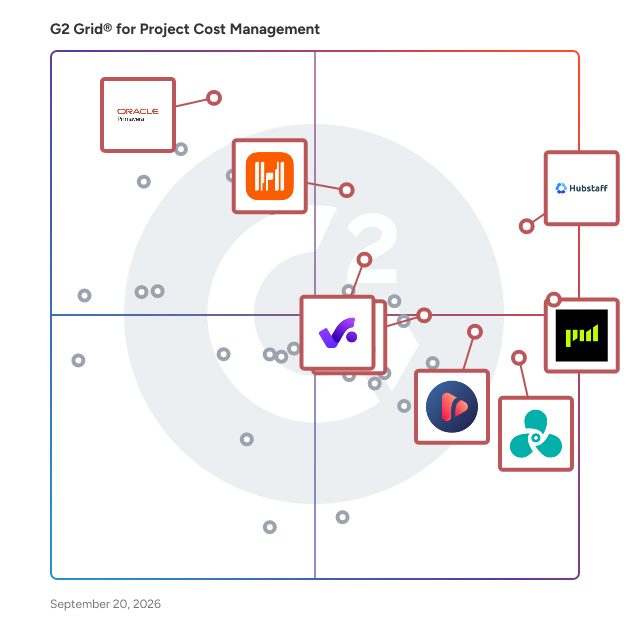
## G2 Grid® for Project Cost Management Software
![G2 Grid® for Project Cost Management Software plotting products by satisfaction and market presence](https://www.g2.com/categories/project-cost-management/grids.png?focus%5B%5D=5349&focus%5B%5D=144455&focus%5B%5D=1629&focus%5B%5D=42943&focus%5B%5D=138755&focus%5B%5D=20385&focus%5B%5D=1045&focus%5B%5D=9394)
Highlighted products: Hubstaff, Projectworks, Harvest, Productive, Ruddr Professional Services Automation, Timely, Oracle Primavera, and Oracle Aconex.
Underlying data: [Grid® JSON](https://www.g2.com/categories/project-cost-management/grids.json?focus%5B%5D=hubstaff&amp;focus%5B%5D=projectworks&amp;focus%5B%5D=harvest&amp;focus%5B%5D=productive&amp;focus%5B%5D=ruddr-professional-services-automation&amp;focus%5B%5D=timely-time-tracking&amp;focus%5B%5D=oracle-primavera&amp;focus%5B%5D=oracle-aconex)


## How Many Project Cost Management Software Products Does G2 Track?
**Total Products under this Category:** 91

### Category Stats (Jul 2026)
- **Average Rating**: 4.38/5 (↑0.01 vs Jun 2026) The average rating of products in this category, based on all submitted ratings
- **Top Trending Product**: Planview PPM Pro (+1.1%) - Among all products in this category, Planview PPM Pro recorded the largest rating increase compared to last month
*Last updated: July 14, 2026*


## How Does G2 Rank Project Cost Management Software Products?

**Why You Can Trust G2's Software Rankings:**

- 30 Analysts and Data Experts
- 12,700+ Authentic Reviews
- 91+ Products
- Unbiased Rankings

G2's software rankings are built on verified user reviews, rigorous moderation, and a consistent research methodology maintained by a team of analysts and data experts. Each product is measured using the same transparent criteria, with no paid placement or vendor influence. While reviews reflect real user experiences, which can be subjective, they offer valuable insight into how software performs in the hands of professionals. Together, these inputs power the G2 Score, a standardized way to compare tools within every category.


## Which Project Cost Management Software Is Best for Your Use Case?

- **Leader:** [Hubstaff](https://www.g2.com/products/hubstaff/reviews)
- **Highest Performer:** [Ruddr Professional Services Automation](https://www.g2.com/products/ruddr-professional-services-automation/reviews)
- **Easiest to Use:** [Hubstaff](https://www.g2.com/products/hubstaff/reviews)
- **Top Trending:** [Projectworks](https://www.g2.com/products/projectworks/reviews)
- **Best Free Software:** [Harvest](https://www.g2.com/products/harvest/reviews)


---

**Sponsored**

### Productive

Productive is the all-in-one professional services automation platform built for agencies, consultancies, and service businesses. Manage projects, resources, and finances in one place — with real-time visibility across your entire company. Sales Pipeline Easily manage your sales funnel and win more deals with a simple CRM solution. You won&#39;t ever forget to follow up on that potential business opportunity. When the deal is won, convert it into a project, and continue working in the same tool. Project Management Assign work, collaborate, and organize agency projects. Project Management features are integrated with Time Tracking and Task Management so you will run projects faster and more elegantly. Resource Planning Organize and plan a work schedule for your entire agency. Find bottlenecks that cost money and consume time. Avoid collisions, burnouts, and overbooking with resource planning features. Powerful Business Insights Build customizable reports from scratch by focusing on what&#39;s important for you: Actual Utilization by People, Revenue &amp; Profitability by Client, Invoiced Revenue by Months, Overtime by People, Profitability by Months, etc. Billing and Invoicing Automatically track invoiced amounts and be confident you’ve billed everything you need. Simply generate invoices using tracked time on billable services.


[Visit website](https://www.g2.com/external_clickthroughs/record?secure%5Bad_program%5D=ppc&amp;secure%5Bad_slot%5D=category_product_list&amp;secure%5Bcategory_id%5D=1589&amp;secure%5Bchosen_at%5D=2026-07-14T11%3A46%3A57Z&amp;secure%5Bdisplayable_resource_id%5D=1589&amp;secure%5Bdisplayable_resource_type%5D=Category&amp;secure%5Bmedium%5D=sponsored&amp;secure%5Bplacement_reason%5D=page_category&amp;secure%5Bplacement_resource_ids%5D%5B%5D=1589&amp;secure%5Bprioritized%5D=false&amp;secure%5Bproduct_id%5D=42943&amp;secure%5Bresource_id%5D=1589&amp;secure%5Bresource_type%5D=Category&amp;secure%5Bsource_type%5D=category_page&amp;secure%5Bsource_url%5D=https%3A%2F%2Fwww.g2.com%2Fcategories%2Fproject-cost-management%3Fpage%3D4&amp;secure%5Btoken%5D=e4dab0b34429bc23337f899598a390b54f09f296f1d13dc328665f14b4761d71&amp;secure%5Burl%5D=https%3A%2F%2Fproductive.io%2Flp-project-cost-management-software%2F%3Futm_source%3Dg2.com%26utm_medium%3Dad%26utm_campaign%3DProject%2520Cost%2520Management%2520Software&amp;secure%5Burl_type%5D=custom_url)

---

## What Are the Top-Rated Project Cost Management Software Products in 2026?
### 1. [Hubstaff](https://www.g2.com/products/hubstaff/reviews)
Hubstaff is a time tracking software built for global teams. Track hours with precision, automate payments and invoicing, and gain full visibility into how work gets done — whether your team is remote, hybrid, in-office or field-based. In addition to time tracking, Hubstaff includes built-in productivity monitoring features such as activity rates, app and URL usage, and optional screenshots — helping managers understand how time is spent and where focus is lost. The platform also offers advanced workforce analytics that classify work time, detect unusual activity patterns, and highlight inefficiencies — enabling data-driven decisions that improve performance and reduce wasted hours. Available on Mac, Windows, Linux, iOS, Android, and Chrome, Hubstaff platform integrates with over 35+ tools to streamline operations and support productive, high-performing teams.


**Average Rating:** 4.4/5.0
**Total Reviews:** 2,260
**How Do G2 Users Rate Hubstaff?**

- **Identification:** 8.7/10 (Category avg: 8.9/10)
- **Has the product been a good partner in doing business?:** 8.8/10 (Category avg: 8.9/10)
- **Standard Costs:** 8.5/10 (Category avg: 8.8/10)
- **Allocation:** 8.6/10 (Category avg: 8.9/10)

**Who Is the Company Behind Hubstaff?**

- **Seller:** [Hubstaff](https://www.g2.com/sellers/hubstaff)
- **Company Website:** https://hubstaff.com
- **Year Founded:** 2013
- **HQ Location:** Indianapolis, IN
- **Twitter:** @HubStaff (11,558 Twitter followers)
- **LinkedIn® Page:** https://www.linkedin.com/company/2358159/ (346 employees on LinkedIn®)

**Who Uses This Product?**
- **Who Uses This:** CEO, Owner
- **Top Industries:** Information Technology and Services, Computer Software
- **Company Size:** 45% Small-Business, 26% Mid-Market


#### What Are Hubstaff's Pros and Cons?

**Pros:**

- Ease of Use (751 reviews)
- Time Tracking (726 reviews)
- Tracking Ease (553 reviews)
- Simple (443 reviews)
- Productivity Tracking (362 reviews)

**Cons:**

- Time Tracking (227 reviews)
- Inaccurate Tracking (196 reviews)
- Limited Features (132 reviews)
- Time Tracking Issues (126 reviews)
- Slow Loading (118 reviews)


### What Do G2 Reviewers Say About Hubstaff?
*AI-generated summary from verified user reviews*

**Pros:**

- Users appreciate the **ease of use** of Hubstaff, finding navigation simple and setup quick and seamless.
- Users rave about Hubstaff&#39;s **easy time tracking** , making remote management seamless for their global teams.
- Users find the **tracking ease** of Hubstaff exceptional, expertly managing remote staff&#39;s times effortlessly across time zones.
- Users appreciate the **intuitive time tracking** of Hubstaff, finding it easy to use and effective for billing accuracy.
- Users value the **effective productivity tracking** of Hubstaff, which simplifies task management and reporting.

**Cons:**

- Users experience **automatic tracker stoppage** that disrupts work recording and affects performance insights negatively.
- Users often face **inaccurate tracking** issues with Hubstaff, leading to frustrations regarding reported work percentages.
- Users find **limited features** in Hubstaff, such as costly add-ons and slow, unhelpful support impacting usability.
- Users face **time tracking issues** with Hubstaff, including limits on project hours and concerns over privacy and micro-management.
- Users report **slow loading** times with Hubstaff, impacting the efficiency of task management and real-time updates.

#### What Are Recent G2 Reviews of Hubstaff?

**"[Easy Time Tracking and Clear Productivity Visibility for Remote Teams](https://www.g2.com/survey_responses/hubstaff-review-12970854)"**

**Rating:** 5.0/5.0 stars
*— Amro A.*

[Read full review](https://www.g2.com/survey_responses/hubstaff-review-12970854)

---

**"[So much at the same place](https://www.g2.com/survey_responses/hubstaff-review-9900407)"**

**Rating:** 5.0/5.0 stars
*— Kriti  K.*

[Read full review](https://www.g2.com/survey_responses/hubstaff-review-9900407)

---


#### What Are G2 Users Discussing About Hubstaff?

- [What is Hubstaff used for?](https://www.g2.com/discussions/hubstaff-what-is-hubstaff-used-for) - 4 comments
- [How do you use the Hubstaff app?](https://www.g2.com/discussions/how-do-you-use-the-hubstaff-app)
- [Is Hubstaff legal?](https://www.g2.com/discussions/is-hubstaff-legal) - 5 comments, 2 upvotes
- [How does Hubstaff measure activity?](https://www.g2.com/discussions/how-does-hubstaff-measure-activity) - 3 comments
- [What is Hubstaff used for?](https://www.g2.com/discussions/what-is-hubstaff-used-for) - 2 comments

### 2. [Projectworks](https://www.g2.com/products/projectworks/reviews)
Grow your firm - and your impact Projectworks is professional services automation software built for consulting firms that want to grow - and make a difference. As a project intelligence platform, Projectworks connects time tracking, expense tracking, resource management, invoicing, and financial reporting in one live system. It gives you the visibility to see what’s working, fix what’s not, and scale your firm with confidence. Projectworks was built by consultants who know what it’s like to lose hours to spreadsheets and billing chaos. Designed specifically for engineering, architecture, software development, and management consulting, it’s professional services automation (PSA) software that gets experts out of the admin grind and back to the work that matters. Our cloud-based PSA tool brings together everything your business needs to plan, track, forecast, and grow. By automating time tracking, expense tracking, resource planning, project financials, and real-time reporting, Projectworks frees your people to focus on solving the world’s hardest problems - not wrestling with manual processes. On average, Projectworks users grow 20% in their first year. Connect Projectworks with your existing stack - including Xero, QuickBooks Online, MYOB, Jira, Azure DevOps, HubSpot, and Salesforce - to eliminate double handling, align your data, and operate with confidence. We’ll help you set up for success with expert data migration, comprehensive training, and responsive ongoing support. Key features Time tracking software Easy, accurate timesheets that actually get filled out. Simplify project time tracking and keep billing up to date with integrated time management software for consultants. Expense tracking Track project spend against budget with simple, mobile-friendly expense submission. Sync approved expenses directly to Xero as bills to pay. Resource management software Plan and allocate resources effectively. See availability, utilization, and capacity in real time with powerful resource planning tools that make project delivery predictable. Revenue forecasting &amp; project profitability Combine financial and resourcing data to model revenue, monitor utilization and profitability, and make confident growth decisions. Invoicing automation Create pre-populated invoices that sync seamlessly with Xero, reducing admin and helping you get paid faster. Reporting &amp; insights Access real-time dashboards, project profitability reports, and PSA analytics that bring clarity to every decision. Track the consulting metrics that matter most - across projects, clients, and teams. Integrations Connect your favorite tools and run your firm on a unified project management and financial reporting platform. Flexible pricing means you only pay for what you use - plus, get a 10% discount on annual subscriptions.


**Average Rating:** 4.5/5.0
**Total Reviews:** 210
**How Do G2 Users Rate Projectworks?**

- **Identification:** 8.9/10 (Category avg: 8.9/10)
- **Has the product been a good partner in doing business?:** 9.3/10 (Category avg: 8.9/10)
- **Standard Costs:** 8.7/10 (Category avg: 8.8/10)
- **Allocation:** 8.7/10 (Category avg: 8.9/10)

**Who Is the Company Behind Projectworks?**

- **Seller:** [Projectworks](https://www.g2.com/sellers/projectworks)
- **Company Website:** https://projectworks.com
- **Year Founded:** 2019
- **HQ Location:** San Mateo, California
- **Twitter:** @projectworksltd (28 Twitter followers)
- **LinkedIn® Page:** https://www.linkedin.com/company/projectworks-io/ (77 employees on LinkedIn®)

**Who Uses This Product?**
- **Who Uses This:** Project Manager, Director
- **Top Industries:** Information Technology and Services, Consulting
- **Company Size:** 65% Small-Business, 32% Mid-Market


#### What Are Projectworks's Pros and Cons?

**Pros:**

- Ease of Use (84 reviews)
- Project Management (65 reviews)
- Comprehensive Features (38 reviews)
- Project Tracking (38 reviews)
- User-Friendly (38 reviews)

**Cons:**

- Limited Features (25 reviews)
- Missing Features (25 reviews)
- Limited Customization (19 reviews)
- Learning Curve (18 reviews)
- Reporting Issues (18 reviews)


### What Do G2 Reviewers Say About Projectworks?
*AI-generated summary from verified user reviews*

**Pros:**

- Users commend the **ease of use** of Projectworks, highlighting its intuitive interface and seamless integration into workflows.
- Users value the **user-friendly interface** of Projectworks, making task management and invoicing effortless and efficient.
- Users commend the **comprehensive features** of Projectworks, appreciating its user-friendly interface and detailed project insights.
- Users value the **effective project tracking** in Projectworks, enhancing visibility and management of tasks and resources.
- Users highlight the **user-friendly interface** of Projectworks, enhancing efficiency and ease of navigation in daily tasks.

**Cons:**

- Users find Projectworks has **limited features** , especially regarding mobile access and customization options.
- Users find Projectworks has **missing features** in mobile usage and flexibility, affecting time management and integration.
- Users find the **limited customization** in Projectworks restricts flexibility and presentation options for their organizations.
- Users note a challenging **learning curve** that requires significant time investment to fully grasp the interface.
- Users find the **reporting issues** in Projectworks cumbersome, with limited exporting options and complicated customization processes.

#### What Are Recent G2 Reviews of Projectworks?

**"[All-in-One, Flexible End-to-End Project Management Solution](https://www.g2.com/survey_responses/projectworks-review-13100948)"**

**Rating:** 5.0/5.0 stars
*— Kevin L.*

[Read full review](https://www.g2.com/survey_responses/projectworks-review-13100948)

---

**"[Reliable, Data-Rich Projectworks with Great Integrations and Support](https://www.g2.com/survey_responses/projectworks-review-12888353)"**

**Rating:** 4.5/5.0 stars
*— Stefi G.*

[Read full review](https://www.g2.com/survey_responses/projectworks-review-12888353)

---


#### What Are G2 Users Discussing About Projectworks?

- [What is Projectworks used for?](https://www.g2.com/discussions/what-is-projectworks-used-for) - 1 comment

### 3. [Harvest](https://www.g2.com/products/harvest/reviews)
Harvest makes it easy to track time, gain insights from past projects, and get paid for your work. Dedicated apps and integrations with popular tools like Asana and Slack allow Harvest to fit into your team’s workflow. A wide selection of visual reports keep projects running smoothly and your team supported. Turn your team’s tracked time and expenses into invoices and collect payment quickly with integrated online payments. Help your team spend time wisely with Harvest.


**Average Rating:** 4.3/5.0
**Total Reviews:** 831
**How Do G2 Users Rate Harvest?**

- **Identification:** 8.6/10 (Category avg: 8.9/10)
- **Has the product been a good partner in doing business?:** 8.9/10 (Category avg: 8.9/10)
- **Standard Costs:** 8.5/10 (Category avg: 8.8/10)
- **Allocation:** 8.4/10 (Category avg: 8.9/10)

**Who Is the Company Behind Harvest?**

- **Seller:** [Harvest](https://www.g2.com/sellers/harvest)
- **Year Founded:** 2006
- **HQ Location:** New York
- **Twitter:** @harvest (20,409 Twitter followers)
- **LinkedIn® Page:** https://www.linkedin.com/company/951058/ (516 employees on LinkedIn®)

**Who Uses This Product?**
- **Who Uses This:** Project Manager, Owner
- **Top Industries:** Marketing and Advertising, Information Technology and Services
- **Company Size:** 72% Small-Business, 23% Mid-Market


#### What Are Harvest's Pros and Cons?

**Pros:**

- Time Tracking (15 reviews)
- Ease of Use (13 reviews)
- Time-saving (12 reviews)
- Integrations (7 reviews)
- Invoicing (7 reviews)

**Cons:**

- Limited Features (5 reviews)
- Missing Features (5 reviews)
- Time Tracking Issues (3 reviews)
- Integration Issues (2 reviews)
- Confusing Visualization (1 reviews)


### What Do G2 Reviewers Say About Harvest?
*AI-generated summary from verified user reviews*

**Pros:**

- Users appreciate the **effortless one-click timer** of Harvest, enabling accurate time tracking across all devices seamlessly.
- Users love the **ease of use** of Harvest, appreciating its intuitive interface and quick setup for tracking time.
- Users appreciate the **time-saving** features of Harvest, enabling quick and efficient tracking of work hours.
- Users love the **seamless integrations** of Harvest, enhancing their workflow and connecting effortlessly with various applications.
- Users appreciate the **automated invoicing features** of Harvest, enabling efficient management of collections and project time tracking.

**Cons:**

- Users find the **limited features** of Harvest restrictive, lacking in advanced capabilities and integrations necessary for efficiency.
- Users criticize Harvest for its **limited features** , feeling the product lacks essential functionality and automation options.
- Users face **time tracking issues** with Harvest, needing manual inputs and struggling with task addition and limited features.
- Users find the **integration issues** with Harvest problematic, particularly with API functionality and documentation clarity.
- Users find the lack of **visualization tools** in Harvest confusing, making it hard to track their hours effectively.

#### What Are Recent G2 Reviews of Harvest?

**"[Harvest Makes Mundane Time Tracking Simple and Effortless](https://www.g2.com/survey_responses/harvest-review-12862022)"**

**Rating:** 5.0/5.0 stars
*— Frank C.*

[Read full review](https://www.g2.com/survey_responses/harvest-review-12862022)

---

**"[Support and develop your projects and work processes with Harvest&#39;s advanced features.](https://www.g2.com/survey_responses/harvest-review-12161169)"**

**Rating:** 5.0/5.0 stars
*— Martin P.*

[Read full review](https://www.g2.com/survey_responses/harvest-review-12161169)

---


#### What Are G2 Users Discussing About Harvest?

- [What is Harvest used for?](https://www.g2.com/discussions/what-is-harvest-used-for) - 1 comment

### 4. [Productive](https://www.g2.com/products/productive/reviews)
Productive is the all-in-one professional services automation platform built for agencies, consultancies, and service businesses. Manage projects, resources, and finances in one place — with real-time visibility across your entire company. Sales Pipeline Easily manage your sales funnel and win more deals with a simple CRM solution. You won&#39;t ever forget to follow up on that potential business opportunity. When the deal is won, convert it into a project, and continue working in the same tool. Project Management Assign work, collaborate, and organize agency projects. Project Management features are integrated with Time Tracking and Task Management so you will run projects faster and more elegantly. Resource Planning Organize and plan a work schedule for your entire agency. Find bottlenecks that cost money and consume time. Avoid collisions, burnouts, and overbooking with resource planning features. Powerful Business Insights Build customizable reports from scratch by focusing on what&#39;s important for you: Actual Utilization by People, Revenue &amp; Profitability by Client, Invoiced Revenue by Months, Overtime by People, Profitability by Months, etc. Billing and Invoicing Automatically track invoiced amounts and be confident you’ve billed everything you need. Simply generate invoices using tracked time on billable services.


**Average Rating:** 4.6/5.0
**Total Reviews:** 73
**How Do G2 Users Rate Productive?**

- **Identification:** 8.3/10 (Category avg: 8.9/10)
- **Has the product been a good partner in doing business?:** 9.5/10 (Category avg: 8.9/10)
- **Standard Costs:** 8.1/10 (Category avg: 8.8/10)
- **Allocation:** 8.0/10 (Category avg: 8.9/10)

**Who Is the Company Behind Productive?**

- **Seller:** [Productive](https://www.g2.com/sellers/productive)
- **Year Founded:** 2014
- **HQ Location:** Claymont, US
- **LinkedIn® Page:** https://www.linkedin.com/company/productive-io/ (161 employees on LinkedIn®)

**Who Uses This Product?**
- **Top Industries:** Marketing and Advertising, Computer Software
- **Company Size:** 80% Small-Business, 17% Mid-Market


#### What Are Productive's Pros and Cons?

**Pros:**

- Ease of Use (10 reviews)
- Customizability (8 reviews)
- Team Collaboration (7 reviews)
- User Interface (7 reviews)
- Customer Support (6 reviews)

**Cons:**

- Lack of Integrations (3 reviews)
- Missing Features (3 reviews)
- Organization Difficulties (3 reviews)
- Challenging Reporting (2 reviews)
- Complex Usability (2 reviews)


### What Do G2 Reviewers Say About Productive?
*AI-generated summary from verified user reviews*

**Pros:**

- Users find Productive&#39;s **ease of use** essential, enhancing efficiency with intuitive features and seamless integrations.
- Users value the **customizability** of Productive, enabling tailored views and reports that fit diverse preferences and workflows.
- Users value the **seamless team collaboration** offered by Productive, enhancing project management and efficiency across their projects.
- Users appreciate the **intuitive and user-friendly interface** of Productive, enhancing onboarding and overall management experience.
- Users highlight the **exceptional customer support** from Productive, noting its responsiveness and helpfulness in enhancing user experience.

**Cons:**

- Users find the **lack of integrations** with other software frustrating, affecting workflow efficiency and collaboration.
- Users desire more **missing features** , particularly for flexible reporting and enhanced mobile app capabilities.
- Users face **organization difficulties** , particularly with report configuration and navigating the overwhelming layout for new users.
- Users find the **challenging reporting** aspect limits their ability to generate detailed insights, especially on mobile.
- Users find the **complex usability** of configuring reports challenging, impacting their overall experience with Productive.

#### What Are Recent G2 Reviews of Productive?

**"[Intuitive Dashboards and Powerful AI Reporting That Transformed Our Workflow](https://www.g2.com/survey_responses/productive-review-13031933)"**

**Rating:** 5.0/5.0 stars
*— Verified User in Marketing and Advertising*

[Read full review](https://www.g2.com/survey_responses/productive-review-13031933)

---

**"[We have used Productive for almost 10 years. It was good when we started and keeps getting better!](https://www.g2.com/survey_responses/productive-review-9235077)"**

**Rating:** 5.0/5.0 stars
*— Torin S.*

[Read full review](https://www.g2.com/survey_responses/productive-review-9235077)

---


#### What Are G2 Users Discussing About Productive?

- [What are the benefits of productivity software?](https://www.g2.com/discussions/what-are-the-benefits-of-productivity-software)
- [What are 3 examples of productivity software?](https://www.g2.com/discussions/what-are-3-examples-of-productivity-software)
- [What is productivity software?](https://www.g2.com/discussions/what-is-productivity-software)
- [What does productivity software include?](https://www.g2.com/discussions/what-does-productivity-software-include)

### 5. [Ruddr Professional Services Automation](https://www.g2.com/products/ruddr-professional-services-automation/reviews)
Ruddr is an AI-native Professional Services Automation (PSA) platform that helps professional services organizations manage project delivery, resource planning, financial operations, and business performance in a single system. The platform is designed for consulting firms, agencies, IT services companies, and other project-based organizations with 20 to 2,000 billable employees. Our software supports the full professional services lifecycle, including client management, project planning, budgeting, task management, resource allocation, time and expense tracking, invoicing, revenue recognition, forecasting, utilization tracking, gross margin analysis, and KPI reporting. The platform also supports more than 150 global currencies, making it suitable for firms operating across multiple regions, subsidiaries, and distributed teams. Ruddr Intelligence, the platform’s embedded AI functionality, enables users to analyze operational data, generate reports and visualizations, answer business questions, and identify trends using natural language prompts. Teams can use AI-powered workflows to reduce manual reporting, improve visibility into project and financial performance, and support faster operational decision-making. Users can also create downloadable custom reports and generate data visualizations for executive reporting and planning. Ruddr is designed to provide enterprise-level functionality with an intuitive user experience and flexible deployment options for growing and established services organizations that need operational visibility, financial oversight, and scalable project management capabilities. Key capabilities include: - Project management, budgeting, forecasting, and resource management - Time tracking, expense management, invoicing, and revenue recognition - AI-powered reporting, analytics, and operational insights through Ruddr Intelligence - Support for multi-currency operations and global professional services teams - Flexible subscription options with monthly or annual billing and free licenses for non-billable users


**Average Rating:** 4.6/5.0
**Total Reviews:** 337
**How Do G2 Users Rate Ruddr Professional Services Automation?**

- **Identification:** 9.0/10 (Category avg: 8.9/10)
- **Has the product been a good partner in doing business?:** 9.8/10 (Category avg: 8.9/10)
- **Standard Costs:** 9.2/10 (Category avg: 8.8/10)
- **Allocation:** 9.1/10 (Category avg: 8.9/10)

**Who Is the Company Behind Ruddr Professional Services Automation?**

- **Seller:** [Ruddr](https://www.g2.com/sellers/ruddr)
- **Company Website:** https://www.ruddr.com
- **Year Founded:** 2018
- **HQ Location:** Atlanta, Georgia, United States
- **Twitter:** @RuddrHQ (52 Twitter followers)
- **LinkedIn® Page:** https://www.linkedin.com/company/ruddr (24 employees on LinkedIn®)

**Who Uses This Product?**
- **Who Uses This:** Software Engineer, Account Coordinator
- **Top Industries:** Information Technology and Services, Marketing and Advertising
- **Company Size:** 53% Small-Business, 43% Mid-Market


#### What Are Ruddr Professional Services Automation's Pros and Cons?

**Pros:**

- Ease of Use (38 reviews)
- Time Tracking (25 reviews)
- Intuitive (20 reviews)
- User Interface (16 reviews)
- Customer Support (15 reviews)

**Cons:**

- Report Customization (12 reviews)
- Missing Features (11 reviews)
- Limited Features (10 reviews)
- Learning Curve (9 reviews)
- Limited Customization (7 reviews)


### What Do G2 Reviewers Say About Ruddr Professional Services Automation?
*AI-generated summary from verified user reviews*

**Pros:**

- Users find Ruddr Professional Services Automation to be incredibly **easy to use** , facilitating smooth project and resource management.
- Users value the **efficient time tracking** features of Ruddr, enhancing project management and overall productivity.
- Users praise the **intuitive interface** of Ruddr, making project management and resource allocation effortless for teams.
- Users appreciate the **clean and intuitive UI** of Ruddr, which streamlines project management and resource tracking effectively.
- Users value the **excellent customer support** from Ruddr, appreciating quick responses to questions and issues.

**Cons:**

- Users express a need for better **report customization** in Ruddr, highlighting limitations in filtering and exporting data.
- Users find that Ruddr lacks **essential features** like better PTO management and insufficient reporting tools.
- Users find the **limited features** of Ruddr somewhat restrictive, particularly regarding custom reports and specific reporting time ranges.
- Users find the **learning curve steep** for beginners, making initial setup and advanced features challenging to grasp.
- Users find the **limited customization options** in Ruddr&#39;s reports and dashboards restrictive for their project management needs.

#### What Are Recent G2 Reviews of Ruddr Professional Services Automation?

**"[Intuitive Time Logging and Clear Reporting for Better Team Transparency](https://www.g2.com/survey_responses/ruddr-professional-services-automation-review-12907642)"**

**Rating:** 5.0/5.0 stars
*— Keila G.*

[Read full review](https://www.g2.com/survey_responses/ruddr-professional-services-automation-review-12907642)

---

**"[Affordable Ruddr with Excellent Support, Clear ROI, and Seamless QuickBooks Online Sync](https://www.g2.com/survey_responses/ruddr-professional-services-automation-review-13093498)"**

**Rating:** 5.0/5.0 stars
*— Denise L.*

[Read full review](https://www.g2.com/survey_responses/ruddr-professional-services-automation-review-13093498)

---


#### What Are G2 Users Discussing About Ruddr Professional Services Automation?

- [What is Ruddr used for?](https://www.g2.com/discussions/what-is-ruddr-used-for) - 1 comment

### 6. [Timely](https://www.g2.com/products/timely-time-tracking/reviews)
The world’s first automatic time tracking app, developed by Vikings in Norway. Timely helps 5,000 companies across 160 countries stay connected with their workforce and report accurately on their business – covering payroll, project management, team management and capacity planning. By automating timesheet admin, Timely frees teams for the important work that matters. Offering strict user-level privacy by design, it&#39;s a tracking tool that employees actually trust.


**Average Rating:** 4.8/5.0
**Total Reviews:** 480
**How Do G2 Users Rate Timely?**

- **Identification:** 8.8/10 (Category avg: 8.9/10)
- **Has the product been a good partner in doing business?:** 9.6/10 (Category avg: 8.9/10)
- **Standard Costs:** 8.5/10 (Category avg: 8.8/10)
- **Allocation:** 8.8/10 (Category avg: 8.9/10)

**Who Is the Company Behind Timely?**

- **Seller:** [Timely](https://www.g2.com/sellers/timely-b4336c85-3f45-46a9-be29-c829e03fcd55)
- **Company Website:** https://timely.com
- **Year Founded:** 2013
- **HQ Location:** Oslo, Norway
- **Twitter:** @timelyapp (1,550 Twitter followers)
- **LinkedIn® Page:** https://www.linkedin.com/company/memory-ai/ (40 employees on LinkedIn®)

**Who Uses This Product?**
- **Who Uses This:** CEO, Partner
- **Top Industries:** Marketing and Advertising, Computer Software
- **Company Size:** 75% Small-Business, 19% Mid-Market


#### What Are Timely's Pros and Cons?

**Pros:**

- Time Tracking (39 reviews)
- Time-saving (33 reviews)
- Ease of Use (22 reviews)
- Tracking (16 reviews)
- Automatic Tracking (15 reviews)

**Cons:**

- Time Tracking Issues (14 reviews)
- Time Management Issues (7 reviews)
- Limited Features (6 reviews)
- Missing Features (6 reviews)
- Cost Issues (3 reviews)


### What Do G2 Reviewers Say About Timely?
*AI-generated summary from verified user reviews*

**Pros:**

- Users appreciate the **effective time tracking** of Timely, thanks to its memory feature and user-friendly layout.
- Users value the **time-saving features** of Timely, making tracking effortless and efficient across platforms.
- Users appreciate the **ease of use** of Timely, making tracking time simple for everyone involved.
- Users love the **easy time tracking** with Timely, simplifying reporting and enhancing productivity for consultants.
- Users love Timely for its **automatic tracking** , making task management and invoicing simple and stress-free.

**Cons:**

- Users find **time tracking issues** with Timely, as it fails to accurately log short tasks and phone calls.
- Users face **time management issues** with Timely, as quick tasks and phone call tracking aren&#39;t accurately recorded.
- Users express concerns about **limited features** in Timely, wishing for improved integrations and advanced customizations.
- Users express concerns over **missing features** such as better AI training options and improved report generation tools.
- Users find the **cost issues** of Timely to be a concern, particularly for small teams and individual users.

#### What Are Recent G2 Reviews of Timely?

**"[Timely is the best data tracking app for any organization.](https://www.g2.com/survey_responses/timely-review-8084200)"**

**Rating:** 5.0/5.0 stars
*— Aashir S.*

[Read full review](https://www.g2.com/survey_responses/timely-review-8084200)

---

**"[Timely: Flexible Tracking and Easy Integration](https://www.g2.com/survey_responses/timely-review-11959773)"**

**Rating:** 5.0/5.0 stars
*— Gianfranco R.*

[Read full review](https://www.g2.com/survey_responses/timely-review-11959773)

---


#### What Are G2 Users Discussing About Timely?

- [What is the best free scheduling software?](https://www.g2.com/discussions/timely-what-is-the-best-free-scheduling-software)
- [How much does timely app cost?](https://www.g2.com/discussions/how-much-does-timely-app-cost)
- [Is timely free?](https://www.g2.com/discussions/is-timely-free) - 1 comment
- [What is timely software?](https://www.g2.com/discussions/what-is-timely-software) - 1 comment

### 7. [Oracle Primavera](https://www.g2.com/products/oracle-primavera/reviews)
For more than 30 years, successful projects around the world have relied on Oracle Construction and Engineering&#39;s Primavera solutions to plan, build, and operate critical assets. It is the only solution that integrates project and portfolio planning and delivery teams for planning, resourcing, risk mitigation, scheduling, and program management. Manage projects of any size. Robust and easy-to-use. Key Benefits - Cloud-based, delivering fast time to value - One platform for planning, prioritizing, executing, and monitoring projects and programs - Optimization and oversight of capital spend to maximize return and align with strategies - Enhanced risk mitigation; better visibility of project and portfolio health - Comprehensive, integrated planning - critical path method (CPM) and Lean scheduling, plus upstream portfolio planning and downstream risk mitigation - Total resource management – maintain optimal staffing levels to improve delivery efficiency - Collaboration and control across teams – drive efficiency and quality, reduce waste - Connect teams with access from any device, create and update activities and tasks, and view portfolios and files with offline support - Risk mitigation – avoid delays and cost overruns


**Average Rating:** 4.4/5.0
**Total Reviews:** 342
**How Do G2 Users Rate Oracle Primavera?**

- **Identification:** 8.5/10 (Category avg: 8.9/10)
- **Has the product been a good partner in doing business?:** 8.0/10 (Category avg: 8.9/10)
- **Standard Costs:** 8.6/10 (Category avg: 8.8/10)
- **Allocation:** 8.4/10 (Category avg: 8.9/10)

**Who Is the Company Behind Oracle Primavera?**

- **Seller:** [Oracle](https://www.g2.com/sellers/oracle)
- **Year Founded:** 1977
- **HQ Location:** Austin, TX
- **Twitter:** @Oracle (827,997 Twitter followers)
- **LinkedIn® Page:** https://www.linkedin.com/company/1028/ (208,078 employees on LinkedIn®)
- **Ownership:** NYSE:ORCL

**Who Uses This Product?**
- **Who Uses This:** Planning Engineer, Project Manager
- **Top Industries:** Construction, Oil &amp; Energy
- **Company Size:** 38% Mid-Market, 37% Enterprise


#### What Are Oracle Primavera's Pros and Cons?

**Pros:**

- Project Management (2 reviews)
- Centralization (1 reviews)
- Comprehensive Coverage (1 reviews)
- Comprehensive Features (1 reviews)
- Organization (1 reviews)

**Cons:**

- Complex Setup (1 reviews)
- Cost Issues (1 reviews)
- Expensive (1 reviews)
- Limited Features (1 reviews)
- Limited Functionality (1 reviews)


### What Do G2 Reviewers Say About Oracle Primavera?
*AI-generated summary from verified user reviews*

**Pros:**

- Users value the **comprehensive project management tools** of Oracle Primavera, crucial for organizing and tracking high-stakes projects.
- Users value the **centralization** of Oracle Primavera, ensuring organization and progress in high-stakes project management.
- Users value the **comprehensive coverage** of Oracle Primavera, enabling effective management from planning to monitoring.
- Users value the **comprehensive features** of Oracle Primavera, aiding in effective project management from start to finish.
- Users find Oracle Primavera essential for **keeping large projects organized** and on track, regardless of their complexity.

**Cons:**

- Users struggle with the **complex setup** of Oracle Primavera due to its steep learning curve and outdated interface.
- Users find Oracle Primavera **costly** , with extensive features that may overwhelm small or simple projects.
- Users find Oracle Primavera **expensive** , often deeming its extensive features unnecessary for small or simple projects.
- Users find the **limited features** of Oracle Primavera inadequate for simpler projects, leading to unnecessary complexity.
- Users find the **limited functionality** of Oracle Primavera challenging for small or straightforward projects, deeming it overkill.

#### What Are Recent G2 Reviews of Oracle Primavera?

**"[Planner](https://www.g2.com/survey_responses/oracle-primavera-review-13099552)"**

**Rating:** 4.0/5.0 stars
*— Verified User in Civil Engineering*

[Read full review](https://www.g2.com/survey_responses/oracle-primavera-review-13099552)

---

**"[Promising Tool with Scope for Enhancements](https://www.g2.com/survey_responses/oracle-primavera-review-12906556)"**

**Rating:** 4.5/5.0 stars
*— Valli K.*

[Read full review](https://www.g2.com/survey_responses/oracle-primavera-review-12906556)

---


#### What Are G2 Users Discussing About Oracle Primavera?

- [What is Oracle Primavera used for?](https://www.g2.com/discussions/oracle-primavera-what-is-oracle-primavera-used-for) - 1 comment
- [Is Primavera better than Microsoft Project?](https://www.g2.com/discussions/is-primavera-better-than-microsoft-project)
- [What are the features and applications of Primavera?](https://www.g2.com/discussions/what-are-the-features-and-applications-of-primavera) - 1 comment
- [What is Primavera p6 software used for?](https://www.g2.com/discussions/what-is-primavera-p6-software-used-for) - 1 comment
- [What is Oracle Primavera used for?](https://www.g2.com/discussions/what-is-oracle-primavera-used-for) - 1 comment

### 8. [Oracle Aconex](https://www.g2.com/products/oracle-aconex/reviews)
Owners and delivery teams trust Oracle Aconex for visibility, control, reduced risk, and connected teams. Drive efficiency in design and construction coordination, project controls and cost management, document management, and field management. Get fast time to value with construction management software that is easy to use and deploys in days. The Aconex Difference: - A trusted platform and rock-solid audit trail drives adoption, visibility, a single source of truth and minimizes disputes. - Connected processes and data drives performance, insights, continuous learning and control. - Set up flexible processes based on how you work, and change as your processes develop. - Secure and compliant, meeting the highest international security standards. - Unparalleled service and support get your projects off to the best possible start and helps keep them running smoothly. Key Business Benefits of Oracle Aconex include: - Control, insights, effortless handover, and fast ROI - Process management across the entire lifecycle - Connected project team enhances collaboration - Common data environment (CDE) connects all project and model information - Configurable platform - enable specific processes - Single source of truth improves data management, reduces errors - Data-driven intelligence fuels continuous improvement Product Features: - Secure Document Management - Advanced Communications and Forms - Model Coordination in a Common Data Environment - Integrated Cost Management - Quality and Safety Processes - Unparalleled Service and Support “Using the review process, workflows and the online viewer have removed work duplication due to easy collaboration between all parties.” Nisha Khetani, Head of Document Control, Multiplex


**Average Rating:** 4.5/5.0
**Total Reviews:** 198
**How Do G2 Users Rate Oracle Aconex?**

- **Identification:** 8.4/10 (Category avg: 8.9/10)
- **Has the product been a good partner in doing business?:** 8.5/10 (Category avg: 8.9/10)
- **Standard Costs:** 8.3/10 (Category avg: 8.8/10)
- **Allocation:** 8.5/10 (Category avg: 8.9/10)

**Who Is the Company Behind Oracle Aconex?**

- **Seller:** [Oracle](https://www.g2.com/sellers/oracle)
- **Year Founded:** 1977
- **HQ Location:** Austin, TX
- **Twitter:** @Oracle (827,997 Twitter followers)
- **LinkedIn® Page:** https://www.linkedin.com/company/1028/ (208,078 employees on LinkedIn®)
- **Ownership:** NYSE:ORCL

**Who Uses This Product?**
- **Who Uses This:** Document Controller, Senior Document Controller
- **Top Industries:** Construction, Civil Engineering
- **Company Size:** 54% Mid-Market, 30% Enterprise


#### What Are Oracle Aconex's Pros and Cons?


**Cons:**

- File Organization (1 reviews)
- Missing Features (1 reviews)


### What Do G2 Reviewers Say About Oracle Aconex?
*AI-generated summary from verified user reviews*


**Cons:**

- Users find the **missing hierarchy** in file organization frustrating, lacking clarity in project and document management.
- Users find the **missing features** frustrating, particularly lacking folder hierarchy and document attributes beyond email.

#### What Are Recent G2 Reviews of Oracle Aconex?

**"[Streamlines Project Management and Communication](https://www.g2.com/survey_responses/oracle-aconex-review-12541171)"**

**Rating:** 5.0/5.0 stars
*— Umer I.*

[Read full review](https://www.g2.com/survey_responses/oracle-aconex-review-12541171)

---

**"[Role of Oracle Aconex in project management](https://www.g2.com/survey_responses/oracle-aconex-review-9164527)"**

**Rating:** 4.0/5.0 stars
*— Aaron S.*

[Read full review](https://www.g2.com/survey_responses/oracle-aconex-review-9164527)

---


#### What Are G2 Users Discussing About Oracle Aconex?

- [What is Oracle Aconex used for?](https://www.g2.com/discussions/what-is-oracle-aconex-used-for)
- [Is aconex free?](https://www.g2.com/discussions/is-aconex-free) - 1 comment
- [What is the main purpose of the Aconex Software?](https://www.g2.com/discussions/oracle-aconex-what-is-the-main-purpose-of-the-aconex-software)
- [What is Oracle aconex?](https://www.g2.com/discussions/what-is-oracle-aconex) - 1 comment

### 9. [Toggl Track](https://www.g2.com/products/toggl-track/reviews)
Toggl Track is a customizable time tracking software for small and large teams. Our easy-to-use timer syncs tracking across multiple devices to track tasks and projects in real time. Teams can create detailed profitability and workload reports, uncover unprofitable projects, and spot uneven workload distribution. Managers can export time logs as spreadsheets, get reports via email or share saved reports with public links with clients for additional transparency. Available for web, desktop (Windows, Mac and Linux), and mobile (iOS and Android) and integrates with hundreds of invoicing and project management tools.


**Average Rating:** 4.6/5.0
**Total Reviews:** 1,555
**How Do G2 Users Rate Toggl Track?**

- **Identification:** 9.0/10 (Category avg: 8.9/10)
- **Has the product been a good partner in doing business?:** 9.1/10 (Category avg: 8.9/10)
- **Standard Costs:** 8.8/10 (Category avg: 8.8/10)
- **Allocation:** 9.0/10 (Category avg: 8.9/10)

**Who Is the Company Behind Toggl Track?**

- **Seller:** [Toggl](https://www.g2.com/sellers/toggl)
- **Year Founded:** 2007
- **HQ Location:** Tallinn
- **Twitter:** @toggl (21,788 Twitter followers)
- **LinkedIn® Page:** https://www.linkedin.com/company/3039441/ (121 employees on LinkedIn®)

**Who Uses This Product?**
- **Who Uses This:** Owner, Founder
- **Top Industries:** Marketing and Advertising, Computer Software
- **Company Size:** 76% Small-Business, 15% Mid-Market


#### What Are Toggl Track's Pros and Cons?

**Pros:**

- Ease of Use (11 reviews)
- Time Tracking (11 reviews)
- Time-saving (7 reviews)
- Tracking (6 reviews)
- Reporting Features (5 reviews)

**Cons:**

- Limited Features (7 reviews)
- Time Tracking Issues (3 reviews)
- Missing Features (2 reviews)
- Not Intuitive (2 reviews)
- Poor Color Customization (2 reviews)


### What Do G2 Reviewers Say About Toggl Track?
*AI-generated summary from verified user reviews*

**Pros:**

- Users appreciate the **ease of use** of Toggl Track, enjoying its clean interface and straightforward time tracking.
- Users appreciate the **clean and simple time tracking** of Toggl Track, making productivity effortless and efficient.
- Users find Toggl Track a **time-saving tool** that simplifies task tracking and enhances productivity effortlessly.
- Users appreciate the **seamless time tracking** of Toggl Track, enhancing productivity and organization across various tasks.
- Users appreciate the **handy reporting features** of Toggl Track, simplifying time tracking and enhancing awareness of productivity.

**Cons:**

- Users express frustration with the **limited features** of Toggl Track, particularly regarding syncing and organizational tools.
- Users face **time tracking issues** with Toggl Track, often forgetting to start timers and experiencing sync delays.
- Users miss **features like custom reporting and built-in calendar view** in Toggl Track, impacting their productivity.
- Users find the **interface not intuitive** , requiring time to adapt to the desktop and web versions.
- Users find the **poor color customization** options limiting, making it harder to tailor the interface to their preferences.

#### What Are Recent G2 Reviews of Toggl Track?

**"[Clean, Fast Time Tracking with Visual Reports](https://www.g2.com/survey_responses/toggl-track-review-12640228)"**

**Rating:** 5.0/5.0 stars
*— Mariana V.*

[Read full review](https://www.g2.com/survey_responses/toggl-track-review-12640228)

---

**"[Easy Time Tracking and Reporting for Multiple Clients and Projects](https://www.g2.com/survey_responses/toggl-track-review-12986369)"**

**Rating:** 4.0/5.0 stars
*— Verified User in Marketing and Advertising*

[Read full review](https://www.g2.com/survey_responses/toggl-track-review-12986369)

---


#### What Are G2 Users Discussing About Toggl Track?

- [I&#39;m confused about using Toggl Track’s detailed reporting feature. How do I generate specific reports for team productivity analysis?](https://www.g2.com/discussions/i-m-confused-about-using-toggl-track-s-detailed-reporting-feature-how-do-i-generate-specific-reports-for-team-productivity-analysis)
- [What is Toggl Track used for?](https://www.g2.com/discussions/what-is-toggl-track-used-for)
- [What is Toggl app?](https://www.g2.com/discussions/what-is-toggl-app)
- [Is Toggl track free?](https://www.g2.com/discussions/is-toggl-track-free) - 2 comments
- [How do I use Toggl track?](https://www.g2.com/discussions/how-do-i-use-toggl-track) - 1 comment

### 10. [PSOHUB.](https://www.g2.com/products/psohub/reviews)
PSOhub is PSA software purpose-built for professional services organizations: IT firms, consultancies, marketing agencies, and financial services teams. It covers the entire delivery cycle in one connected platform, from quoting and project management through resource and capacity planning, time and expense tracking, and invoicing. Built by a founding team with over 30 years of combined experience in professional services, and trusted by organizations across 40+ countries. From quote to project When a quote is accepted, the project is ready to start. Tasks are structured, budgets are set, and the team is assigned. Project managers get a real-time view of task progress, budget burn, and margin at every stage, so there are no surprises at month-end. Most professional services teams run 6 to 10 separate tools. PSOhub replaces that stack so data flows without manual handovers at every step. Resource and capacity planning The AI scheduling layer automatically assigns and reschedules resources based on skills, live capacity, and current utilization. When someone hits full utilization, the system flags it and suggests moving tasks to another team member with headroom. Keeping utilization high without blowing deadlines used to mean constant manual oversight. With PSOhub, it largely handles itself. Time and expense tracking Time and expenses connect directly to each project&#39;s budget and contract type. Whether billing fixed-fee, time and material, or retainer, hours log against the right scope and invoices generate without a manual reconciliation step. AI project and risk management The AI Copilot generates a full project plan, including financials, team assignment, and timeline, in around 10 seconds, drawing on the organization&#39;s own historical data rather than generic benchmarks. It monitors margins continuously, flags scope creep early, including situations like a senior consultant logging hours on a junior task, and generates risk assessments with concrete recommended actions. Integrations For teams using HubSpot as their CRM, a native two-way integration connects closed deals directly to projects, with time logs flowing back to the CRM. Also integrates with SAP Business One, QuickBooks, Xero, and Salesforce. Works for organizations of 10 to 1,000+.


**Average Rating:** 4.2/5.0
**Total Reviews:** 209
**How Do G2 Users Rate PSOHUB.?**

- **Identification:** 7.7/10 (Category avg: 8.9/10)
- **Has the product been a good partner in doing business?:** 8.6/10 (Category avg: 8.9/10)
- **Standard Costs:** 8.0/10 (Category avg: 8.8/10)
- **Allocation:** 7.8/10 (Category avg: 8.9/10)

**Who Is the Company Behind PSOHUB.?**

- **Seller:** [PSOHUB.](https://www.g2.com/sellers/psohub)
- **Company Website:** https://www.psohub.com/
- **Year Founded:** 2020
- **HQ Location:** Bussum, North Holland, Netherlands
- **Twitter:** @PSOhub (38 Twitter followers)
- **LinkedIn® Page:** https://www.linkedin.com/company/64996832/ (16 employees on LinkedIn®)

**Who Uses This Product?**
- **Top Industries:** Consulting, Marketing and Advertising
- **Company Size:** 66% Small-Business, 32% Mid-Market


#### What Are PSOHUB.'s Pros and Cons?

**Pros:**

- Ease of Use (47 reviews)
- Time Tracking (39 reviews)
- Project Management (30 reviews)
- Project Tracking (28 reviews)
- Tracking (23 reviews)

**Cons:**

- Not Intuitive (14 reviews)
- Time Tracking Issues (12 reviews)
- Limited Customization (11 reviews)
- Complex Usability (10 reviews)
- Learning Curve (10 reviews)


### What Do G2 Reviewers Say About PSOHUB.?
*AI-generated summary from verified user reviews*

**Pros:**

- Users find PSOHUB&#39;s **ease of use** remarkable, enabling effortless project management and invoicing.
- Users value the **seamless time tracking** in PSOHUB, enhancing project management and overall business efficiency.
- Users commend the **user-friendly project management** features of PSOHUB, enhancing organization and collaboration effortlessly.
- Users appreciate the **intuitive user interface** of PSOHUB, making project tracking and management seamless and efficient.
- Users appreciate the **efficient time tracking** of PSOhub, enabling seamless management of project hours effortlessly.

**Cons:**

- Users find the **dashboard navigation unintuitive** , struggling to locate necessary reports amidst overwhelming options.
- Users report **time tracking issues** that complicate scheduling, cause frustrations with bugs, and hinder progress tracking.
- Users find the **limited customization** of PSOhub frustrating, impacting its flexibility and effectiveness for their needs.
- Users experience **complex usability** issues with PSOHUB, including bugs, lack of customization, and disjointed task management.
- Users find the **learning curve steep** , with challenges in understanding features and transferring contact details from Hub Spot.

#### What Are Recent G2 Reviews of PSOHUB.?

**"[PSOHUB Boosts Productivity with Intuitive Drag-and-Drop and Real-Time Collaboration](https://www.g2.com/survey_responses/psohub-review-12819605)"**

**Rating:** 5.0/5.0 stars
*— Muhammad Ganda R.*

[Read full review](https://www.g2.com/survey_responses/psohub-review-12819605)

---

**"[PSOhub: All-in-One Project Management That Boosts Team Productivity](https://www.g2.com/survey_responses/psohub-review-12754483)"**

**Rating:** 4.5/5.0 stars
*— M. Arghian T.*

[Read full review](https://www.g2.com/survey_responses/psohub-review-12754483)

---


#### What Are G2 Users Discussing About PSOHUB.?

- [What is PSOHUB. used for?](https://www.g2.com/discussions/what-is-psohub-used-for)

### 11. [Octave Sequence Enterprise (EcoSys)](https://www.g2.com/products/octave-sequence-enterprise-ecosys/reviews)
Octave Sequence Enterprise (formerly EcoSys) is an enterprise project performance solution designed to bring clarity, control, and predictability to complex project environments. It connects project portfolio management, project controls, and project management into a unified platform that helps organizations manage the full lifecycle of their capital programs. Built for complex engineering, construction, and infrastructure projects, Sequence Enterprise provides the structure needed to align strategy with execution. Organizations gain a consistent view of cost, schedule, risk, and performance, allowing teams to act earlier, manage change more effectively, and deliver better outcomes. The platform is highly configurable and easy to use, enabling organizations to adapt workflows, dashboards, and reporting to their delivery models without heavy customization. Sequence Enterprise also integrates with key enterprise systems, including ERP, scheduling, and other critical project data sources, creating a connected ecosystem that replaces fragmented tools and eliminates data silos. With trusted data and enterprise-wide visibility, leaders can better understand performance, allocate resources more effectively, and forecast outcomes with greater confidence. Ultimately, Sequence Enterprise helps organizations move from fragmented project oversight to coordinated performance, empowering teams to deliver projects on time, on budget, and aligned with strategic goals.


**Average Rating:** 4.1/5.0
**Total Reviews:** 58
**How Do G2 Users Rate Octave Sequence Enterprise (EcoSys)?**

- **Identification:** 8.8/10 (Category avg: 8.9/10)
- **Has the product been a good partner in doing business?:** 8.9/10 (Category avg: 8.9/10)
- **Standard Costs:** 8.7/10 (Category avg: 8.8/10)
- **Allocation:** 9.4/10 (Category avg: 8.9/10)

**Who Is the Company Behind Octave Sequence Enterprise (EcoSys)?**

- **Seller:** [Octave](https://www.g2.com/sellers/octave-9e5a428c-f303-4735-9417-dff1ef5736d4)
- **Company Website:** https://www.octave.com/
- **HQ Location:** Madison, US
- **LinkedIn® Page:** https://www.linkedin.com/company/octaveintelligence/ (3,001 employees on LinkedIn®)

**Who Uses This Product?**
- **Top Industries:** Construction, Computer Software
- **Company Size:** 40% Mid-Market, 39% Small-Business


#### What Are Octave Sequence Enterprise (EcoSys)'s Pros and Cons?

**Pros:**

- Ease of Use (22 reviews)
- Project Management (20 reviews)
- Features (15 reviews)
- Easy Integration (14 reviews)
- Project Tracking (14 reviews)

**Cons:**

- Learning Curve (16 reviews)
- Steep Learning Curve (11 reviews)
- Difficult Onboarding (9 reviews)
- Complexity (8 reviews)
- Difficult Learning Curve (8 reviews)


### What Do G2 Reviewers Say About Octave Sequence Enterprise (EcoSys)?
*AI-generated summary from verified user reviews*

**Pros:**

- Users appreciate the **ease of use** of EcoSys, benefiting from seamless integration and a user-friendly interface.
- Users appreciate the **integration of complex project data** in EcoSys, enhancing efficiency and decision-making across projects.
- Users highly value EcoSys for its **centralized data integration** , enhancing efficiency and decision-making in project management.
- Users appreciate the **easy integration** of EcoSys, enabling seamless data flow and centralized project management.
- Users value the **visibility into project performance** provided by EcoSys, enhancing budgeting and scheduling efficiency.

**Cons:**

- Users find the **steep learning curve** of Octave Sequence Enterprise challenging, requiring considerable time and training for new users.
- Users find the **steep learning curve** of EcoSys challenging, requiring significant training for new users to be productive.
- Users find the **difficult onboarding** process for Octave Sequence Enterprise overwhelming, especially without prior experience or training.
- Users find EcoSys **complex for new users** , requiring significant training to navigate its powerful yet cluttered interface.
- Users find the **difficult learning curve** of Octave Sequence Enterprise (EcoSys) requires significant time and training for new users.

#### What Are Recent G2 Reviews of Octave Sequence Enterprise (EcoSys)?

**"[Strong Project Financial Management Tool with Room for Improvement](https://www.g2.com/survey_responses/octave-sequence-enterprise-ecosys-review-12959087)"**

**Rating:** 5.0/5.0 stars
*— ATUL A.*

[Read full review](https://www.g2.com/survey_responses/octave-sequence-enterprise-ecosys-review-12959087)

---

**"[Unified Project Controls in One Powerful Platform](https://www.g2.com/survey_responses/octave-sequence-enterprise-ecosys-review-13067060)"**

**Rating:** 4.0/5.0 stars
*— Enrik S.*

[Read full review](https://www.g2.com/survey_responses/octave-sequence-enterprise-ecosys-review-13067060)

---


#### What Are G2 Users Discussing About Octave Sequence Enterprise (EcoSys)?

- [What is a cost control software?](https://www.g2.com/discussions/ecosys-what-is-a-cost-control-software)
- [What is hexagon EcoSys?](https://www.g2.com/discussions/ecosys-what-is-hexagon-ecosys)
- [What is EcoSys EPC?](https://www.g2.com/discussions/ecosys-what-is-ecosys-epc)
- [What is EcoSys used for?](https://www.g2.com/discussions/ecosys-what-is-ecosys-used-for)

### 12. [Oracle Primavera Unifier](https://www.g2.com/products/oracle-primavera-unifier/reviews)
Drive best practices that increase visibility and efficiency. Leverage extensive configurability along with prebuilt processes for a rapid start to automate any business process with custom forms and workflows. Key Benefits: - Ultimate configurability and governance—automate any process, from simple to complex, with total control and data ownership - Cloud or on-premise deployment - Comprehensive solution for the entire project lifecycle—control planning through asset management - Best-in-class cost control capabilities - Full earned value management analysis - Real-time enterprise visibility to make fast, accurate decisions - Easy monitoring, visualization, and adjustment of plans based on financial forecasts - Multilevel hierarchies to model programs, portfolios, facilities, and assets - Completely integrated and user-friendly collaboration


**Average Rating:** 4.3/5.0
**Total Reviews:** 40
**How Do G2 Users Rate Oracle Primavera Unifier?**

- **Identification:** 8.1/10 (Category avg: 8.9/10)
- **Has the product been a good partner in doing business?:** 8.6/10 (Category avg: 8.9/10)
- **Standard Costs:** 8.1/10 (Category avg: 8.8/10)
- **Allocation:** 8.0/10 (Category avg: 8.9/10)

**Who Is the Company Behind Oracle Primavera Unifier?**

- **Seller:** [Oracle](https://www.g2.com/sellers/oracle)
- **Year Founded:** 1977
- **HQ Location:** Austin, TX
- **Twitter:** @Oracle (827,997 Twitter followers)
- **LinkedIn® Page:** https://www.linkedin.com/company/1028/ (208,078 employees on LinkedIn®)
- **Ownership:** NYSE:ORCL

**Who Uses This Product?**
- **Who Uses This:** Planning Engineer
- **Top Industries:** Construction, Oil &amp; Energy
- **Company Size:** 46% Mid-Market, 36% Enterprise


#### What Are Oracle Primavera Unifier's Pros and Cons?

**Pros:**

- Ease of Use (1 reviews)
- Interface Simplicity (1 reviews)
- User Interface (1 reviews)
- Workflow Efficiency (1 reviews)
- Workflow Management (1 reviews)

**Cons:**

- Limited Features (1 reviews)
- Missing Features (1 reviews)


### What Do G2 Reviewers Say About Oracle Primavera Unifier?
*AI-generated summary from verified user reviews*

**Pros:**

- Users appreciate the **ease of use** of Oracle Primavera Unifier, enhanced by its advanced UI and smart features.
- Users appreciate the **interface simplicity** of Oracle Primavera Unifier, finding it easy to navigate and use effectively.
- Users value the **enhanced UI** of Oracle Primavera Unifier, appreciating its intuitive design and advanced features.
- Users enjoy the **workflow efficiency** provided by Oracle Primavera Unifier&#39;s enhanced UI and advanced formulas.
- Users value the **enhanced UI and advanced formulas** in Oracle Primavera Unifier, streamlining their workflow management effectively.

**Cons:**

- Users note the **limited features** in rules and data definitions of Oracle Primavera Unifier, calling for improvements.
- Users note the **missing features** in rules and data definitions, which require improvement for better usability.

#### What Are Recent G2 Reviews of Oracle Primavera Unifier?

**"[Streamlined, efficient, and organized: Unifier gets any job done in any building](https://www.g2.com/survey_responses/oracle-primavera-unifier-review-5165693)"**

**Rating:** 5.0/5.0 stars
*— Verified User in Higher Education*

[Read full review](https://www.g2.com/survey_responses/oracle-primavera-unifier-review-5165693)

---

**"[PMS with Unifier.](https://www.g2.com/survey_responses/oracle-primavera-unifier-review-4631338)"**

**Rating:** 4.5/5.0 stars
*— Hemanth D.*

[Read full review](https://www.g2.com/survey_responses/oracle-primavera-unifier-review-4631338)

---


#### What Are G2 Users Discussing About Oracle Primavera Unifier?

- [What is Primavera cloud?](https://www.g2.com/discussions/what-is-primavera-cloud)
- [Who uses Oracle Primavera?](https://www.g2.com/discussions/who-uses-oracle-primavera)
- [Is unifier an Oracle product?](https://www.g2.com/discussions/is-unifier-an-oracle-product)
- [What is Primavera unifier used for?](https://www.g2.com/discussions/what-is-primavera-unifier-used-for) - 2 comments

### 13. [ClickTime](https://www.g2.com/products/clicktime/reviews)
ClickTime is AI-powered time tracking software that turns work hours into finance-ready labor cost data. ClickTime AI automatically captures hours from the tools your team already uses, maps every hour to your organization&#39;s cost categories, and turns that data into instant answers, giving finance and operations the same numbers for billing, cost classification, capacity planning, and audit-ready compliance. Most mid-market and enterprise organizations track cloud spend, software costs, and equipment depreciation with precision. Labor costs, typically 70% of operating expenses, still get managed with spreadsheets and manager estimates. ClickTime closes that gap, so no one rebuilds the numbers after the fact. Best for: Mid-market and enterprise organizations, professional services firms, internal technical teams, and nonprofits, where finance and operations leaders both need labor cost and capacity data they can trust. Use cases: - Automatically capture and code billable hours to speed up invoicing and protect margins - Classify labor as CapEx, OpEx, R&amp;D, or billable at the moment it&#39;s captured - Ask natural language questions about labor costs and get instant charts and dashboards - Plan capacity and monitor utilization without exporting to spreadsheets - Produce audit-ready records for grant compliance, R&amp;D credits, and financial reviews What makes ClickTime AI different Most AI tools for workforce data query whatever they can find, unverified logs, rough estimates, reconstructed activity. ClickTime AI starts from a different foundation: it maps activity to the right cost categories before employees confirm and submit. Then ask a question in plain language and get an instant answer, chart, or dashboard (Canvas) built on that clean, human-approved data. Clean data in. Defensible answers out. Who uses ClickTime Professional services firms capture billable hours, protect margins, and give clients transparent reporting. Operations leaders plan capacity, balance workloads, and give managers visibility without exposing salaries. Internal teams classify CapEx vs. OpEx labor, track R&amp;D tax credit eligibility, manage chargebacks, and prepare for audits. Nonprofits prove where grant funding went and stay audit-ready year-round. Key capabilities - ClickTime AI: automatically captures and maps hours from connected tools, no manual entry required - No monitoring: connects to tools your team already uses (no screenshots, no keystroke logging, no install) - Configurable approval flow: auto-submit or review-and-confirm - Canvas: ask questions about labor cost data, get instant charts and dashboards - Billable and non-billable hour tracking with client billing outputs - CapEx/OpEx labor classification at the moment of entry - R&amp;D tax credit and grant compliance reporting - Departmental chargebacks and internal billing - Budget monitoring and project profitability dashboards - Resource management: capacity planning and utilization visibility by department, skill, or client - Audit trail with approval workflows - Integrations with Outlook, Jira, Zoom, GitHub, Asana, and major ERP, HRIS, PM, and analytics platforms Built for finance and operations, designed for adoption ClickTime works alongside your ERP and financial planning tools, giving finance and operations the same accurate, verified labor data. Trusted by organizations from 50 to 5,000 employees across professional services, technology, healthcare, and the public sector. Learn more at clicktime.com


**Average Rating:** 4.6/5.0
**Total Reviews:** 1,152
**How Do G2 Users Rate ClickTime?**

- **Identification:** 7.3/10 (Category avg: 8.9/10)
- **Has the product been a good partner in doing business?:** 9.3/10 (Category avg: 8.9/10)
- **Standard Costs:** 8.8/10 (Category avg: 8.8/10)
- **Allocation:** 7.1/10 (Category avg: 8.9/10)

**Who Is the Company Behind ClickTime?**

- **Seller:** [ClickTime](https://www.g2.com/sellers/clicktime)
- **Company Website:** https://www.clicktime.com
- **Year Founded:** 1999
- **HQ Location:** San Francisco, CA
- **Twitter:** @clicktime (1,662 Twitter followers)
- **LinkedIn® Page:** https://www.linkedin.com/company/281619/ (46 employees on LinkedIn®)

**Who Uses This Product?**
- **Who Uses This:** Software Engineer, Director
- **Top Industries:** Non-Profit Organization Management, Information Technology and Services
- **Company Size:** 49% Small-Business, 29% Mid-Market


#### What Are ClickTime's Pros and Cons?

**Pros:**

- Ease of Use (224 reviews)
- Time Tracking (119 reviews)
- Intuitive (88 reviews)
- Simplicity (85 reviews)
- Time-saving (67 reviews)

**Cons:**

- Time Tracking Issues (30 reviews)
- Limited Options (29 reviews)
- Manual Entry (28 reviews)
- Timesheet Issues (26 reviews)
- Limited Features (22 reviews)


### What Do G2 Reviewers Say About ClickTime?
*AI-generated summary from verified user reviews*

**Pros:**

- Users appreciate the **ease of use** of ClickTime, finding it simple to track hours and manage tasks effectively.
- Users find ClickTime&#39;s **easy time tracking** features essential for efficient management of time cards and payroll tasks.
- Users value the **intuitive user interface** of ClickTime, enhancing efficiency and ease in time management tasks.
- Users value the **simplicity** of ClickTime, appreciating its intuitive layout and effortless navigation for time management.
- Users benefit from **time-saving features** in ClickTime, streamlining tasks like payroll and invoicing with ease.

**Cons:**

- Users express frustration with the **time tracking issues** in ClickTime, particularly regarding timesheet filling and visibility of logged hours.
- Users find **limited options** in ClickTime, particularly regarding customization and reporting templates, making it less adaptable.
- Users often find the **manual entry requirement** cumbersome and wish for more automated solutions in ClickTime.
- Users face **timesheet issues** as entries can clear unexpectedly, and dropdown menus are inconveniently combined.
- Users find ClickTime&#39;s **limited features** frustrating, especially regarding customization and reporting options.

#### What Are Recent G2 Reviews of ClickTime?

**"[Clean, Intuitive UI That Makes Time Tracking Effortless](https://www.g2.com/survey_responses/clicktime-review-12960439)"**

**Rating:** 5.0/5.0 stars
*— Ashwin P.*

[Read full review](https://www.g2.com/survey_responses/clicktime-review-12960439)

---

**"[Flexible Time Tracking: Timer and Manual Entry with Clear Task Breakdown](https://www.g2.com/survey_responses/clicktime-review-13045642)"**

**Rating:** 5.0/5.0 stars
*— Amanda F.*

[Read full review](https://www.g2.com/survey_responses/clicktime-review-13045642)

---


#### What Are G2 Users Discussing About ClickTime?

- [What is ClickTime used for?](https://www.g2.com/discussions/what-is-clicktime-used-for) - 2 comments

### 14. [Dapt Job Costing Solution](https://www.g2.com/products/dapt-job-costing-solution/reviews)
Dapt provides a job costing and certified payroll platform that automates and streamlines project financial management, empowering businesses to optimize margins, reduce errors and operational costs, and achieve unprecedented project profitability. DAPT bridges the gap between your payroll data and your project&#39;s profitability. It automatically assigns every labor dollar to the correct job, phase, and cost code eliminating manual effort and reducing errors to almost none. DAPT Certified Payroll Automates compliance for government and prevailing wage contracts. DAPT pulls time and wage data directly from your system , for example ADP, and automatically formats it into the specific federal (WH-347) or state-mandated reports required for public works projects. It turns a 20-hour-per-week manual compliance headache into a &quot;one-click&quot; process. It significantly reduces the risk of labor audits or withheld payments due to reporting errors.


**Average Rating:** 4.6/5.0
**Total Reviews:** 17
**How Do G2 Users Rate Dapt Job Costing Solution?**

- **Identification:** 9.2/10 (Category avg: 8.9/10)
- **Has the product been a good partner in doing business?:** 9.4/10 (Category avg: 8.9/10)
- **Standard Costs:** 9.2/10 (Category avg: 8.8/10)
- **Allocation:** 9.3/10 (Category avg: 8.9/10)

**Who Is the Company Behind Dapt Job Costing Solution?**

- **Seller:** [Dapt](https://www.g2.com/sellers/dapt)
- **Year Founded:** 2021
- **HQ Location:** Crofton, US
- **LinkedIn® Page:** https://www.linkedin.com/company/dapt-tech/ (16 employees on LinkedIn®)

**Who Uses This Product?**
- **Top Industries:** Construction
- **Company Size:** 65% Mid-Market, 35% Small-Business


#### What Are Dapt Job Costing Solution's Pros and Cons?

**Pros:**

- Customer Support (5 reviews)
- Ease of Use (3 reviews)
- Helpful (2 reviews)
- Interface Simplicity (2 reviews)
- Tracking (2 reviews)

**Cons:**

- Data Inaccuracy (1 reviews)
- Difficult Onboarding (1 reviews)
- Inadequate Reporting (1 reviews)
- Payment Issues (1 reviews)


### What Do G2 Reviewers Say About Dapt Job Costing Solution?
*AI-generated summary from verified user reviews*

**Pros:**

- Users value the **responsive customer support** of Dapt Job Costing Solution, ensuring timely assistance and effective solutions.
- Users value the **ease of use** of Dapt, finding it simple to navigate and efficient for job costing.
- Users value the **quick and helpful communication** from Dapt Job Costing Solution, enhancing collaboration and productivity.
- Users appreciate the **interface simplicity** of Dapt, enabling efficient job costing and ease of use.
- Users value the **efficient tracking** capabilities of Dapt, simplifying job costing and payroll management seamlessly.

**Cons:**

- Users encounter **data inaccuracies** in Dapt Job Costing Solution, leading to mistakes in entries and amounts.
- Users found the **difficult onboarding** process lengthy, though improvements have made it easier to navigate over time.
- Users desire more flexible reporting options, mentioning that **inadequate reporting** makes output less user-friendly and appealing.
- Users often face **payment issues** , as 75% of payroll file uploads encounter problems requiring resolution.

#### What Are Recent G2 Reviews of Dapt Job Costing Solution?

**"[Efficient and User-Friendly with Stellar Support](https://www.g2.com/survey_responses/dapt-job-costing-solution-review-12845883)"**

**Rating:** 5.0/5.0 stars
*— Pat P.*

[Read full review](https://www.g2.com/survey_responses/dapt-job-costing-solution-review-12845883)

---

**"[Simplified Job Allocation, Game-Changer for Accuracy](https://www.g2.com/survey_responses/dapt-job-costing-solution-review-12768116)"**

**Rating:** 5.0/5.0 stars
*— Janisa C.*

[Read full review](https://www.g2.com/survey_responses/dapt-job-costing-solution-review-12768116)

---


### 15. [4castplus](https://www.g2.com/products/4castplus/reviews)
What is this product?: 4castplus provides performance-driven Project Cost Management software for construction contractors worldwide. Organizations can get free of outdated, inefficient spreadsheet solutions for managing construction projects, and move forward into an integrated cloud platform where multiple disciplines share data and workflows in real-time to deliver projects on budget, on time and with exacting precision. Contractors maximize profitability by letting the software do much of the heavy-lifting and time-consuming work so that professionals can spend time on the high-value work of successful execution of projects. Built to integrate data seamlessly with your ERP finance system, 4castplus gives your finance team the assurance that project financial data is controlled, secure and in total harmony with your accounting system. We deliver true one-touch enterprise information that connects your business from the construction Jobsite to project management to finance. Key Features include: Project Controls, Project Procurement, Jobsite Cost Tracking, Forecasting, Construction Estimating, Contract Management, Labor Time Tracking, Change Orders, Client Billing, Project Management, Portfolio Management, and Labor Resource Management


**Average Rating:** 3.9/5.0
**Total Reviews:** 46
**How Do G2 Users Rate 4castplus?**

- **Identification:** 9.6/10 (Category avg: 8.9/10)
- **Has the product been a good partner in doing business?:** 9.7/10 (Category avg: 8.9/10)
- **Standard Costs:** 8.9/10 (Category avg: 8.8/10)
- **Allocation:** 9.4/10 (Category avg: 8.9/10)

**Who Is the Company Behind 4castplus?**

- **Seller:** [4CastPlus](https://www.g2.com/sellers/4castplus)
- **Company Website:** https://www.4castplus.com
- **HQ Location:** Calgary, Alberta
- **Twitter:** @4castplus (423 Twitter followers)
- **LinkedIn® Page:** https://www.linkedin.com/company/2223764/ (18 employees on LinkedIn®)

**Who Uses This Product?**
- **Top Industries:** Oil &amp; Energy, Construction
- **Company Size:** 66% Mid-Market, 15% Small-Business


#### What Are 4castplus's Pros and Cons?

**Pros:**

- Ease of Use (3 reviews)
- Budget Management (2 reviews)
- Easy Integrations (2 reviews)
- Features (2 reviews)
- Integration Capabilities (2 reviews)

**Cons:**

- Update Issues (2 reviews)
- Poor Navigation (1 reviews)


### What Do G2 Reviewers Say About 4castplus?
*AI-generated summary from verified user reviews*

**Pros:**

- Users appreciate the **user-friendly interface** of 4castplus, making project management seamless and efficient.
- Users value the **budget management features** of 4castplus for enabling accurate tracking and preventing overspending on projects.
- Users love the **easy integrations** of 4castplus, enabling seamless connectivity with other essential project management tools.
- Users value the **analytical and reporting tools** of 4castplus, enhancing project management and decision-making efficiency.
- Users value the **easy integration** of 4castplus with other products, enhancing their project management efficiency.

**Cons:**

- Users note that **update issues** with cost codes can disrupt the otherwise smooth experience of 4castplus.
- Users find the **navigation challenging initially** , but it becomes easier over time with experience and familiarity.

#### What Are Recent G2 Reviews of 4castplus?

**"[4castplus: Extremely User-Friendly, Well-Organized, and Capable](https://www.g2.com/survey_responses/4castplus-review-12861579)"**

**Rating:** 5.0/5.0 stars
*— Joshua  R.*

[Read full review](https://www.g2.com/survey_responses/4castplus-review-12861579)

---

**"[Invoice Automating or Batch-Processing](https://www.g2.com/survey_responses/4castplus-review-12854393)"**

**Rating:** 4.0/5.0 stars
*— K K.*

[Read full review](https://www.g2.com/survey_responses/4castplus-review-12854393)

---


#### What Are G2 Users Discussing About 4castplus?

- [What is 4castplus used for?](https://www.g2.com/discussions/what-is-4castplus-used-for) - 1 comment

### 16. [Beebole](https://www.g2.com/products/beebole/reviews)
Beebole is a cloud-based time tracking and project management tool for teams that need to track hours, manage resources, and monitor project costs and profitability. It has been used by companies worldwide of all sizes across multiple industries since 2008. Core capabilities: •Time tracking: Log hours against unlimited clients, projects, subprojects, and tasks. Track billable and non-billable time separately. Set flexible logging modes — daily, weekly, or monthly — and configure automated reminders for timesheet submission. •Resource planning: Plan and allocate work across the team using Gantt or Kanban views. Compare planned hours to actuals in real time, monitor capacity, and turn planned tasks into timesheet entries directly. •Time off and attendance: Create custom time off types (vacation, sick leave, accrued time, etc.), assign annual allowances, and manage requests and approvals in the same place as timesheets. •Costs, billing, and budgets: Define billing rates and costs at the person, client, project, subproject, or task level. Track labor and project expenses against budgets in real time. Beebole supports multiple currencies and multiple billing rates. •Approvals and permissions: Multi-level timesheet approval workflows allow managers to review, approve, reject, and lock entries individually or in bulk. Role-based permissions control what each user can see and do. •Reporting and dashboards: Build custom reports on time, costs, profitability, overtime, billable ratios, budget status, and more. Save views to a KPI dashboard or export as CSV, PDF, or directly to Excel and Google Sheets via native add-ons. •Integrations: Connects natively with Microsoft 365, Google Workspace, BambooHR, Slack, Jira, Asana, and others. Also available via Zapier, Pipedream, and an open API. •Security and compliance: GDPR and DCAA compliant. Data protected with 256-bit encryption, SSL/TLS connections, multi-layer server security, and daily backups. Beebole is available on web, iOS, and Android, and it&#39;s supported in 10 languages with live multilingual customer support. Plans start with a free tier (project tracking, resource planning, basic time off, custom reports) for up to 5 users. Paid plans — Essential ($9/user/mo) and Advanced ($18/user/mo) — add billing rates, approvals, integrations, cost tracking, expense tracking, project budgets, and advanced configuration options.


**Average Rating:** 4.5/5.0
**Total Reviews:** 79
**How Do G2 Users Rate Beebole?**

- **Identification:** 7.6/10 (Category avg: 8.9/10)
- **Has the product been a good partner in doing business?:** 9.2/10 (Category avg: 8.9/10)
- **Standard Costs:** 7.3/10 (Category avg: 8.8/10)
- **Allocation:** 7.8/10 (Category avg: 8.9/10)

**Who Is the Company Behind Beebole?**

- **Seller:** [Beebole](https://www.g2.com/sellers/beebole)
- **Company Website:** https://beebole.com/
- **Year Founded:** 2008
- **HQ Location:** Brussels, Belgium
- **Twitter:** @BeeBole (694 Twitter followers)
- **LinkedIn® Page:** https://www.linkedin.com/company/237639/ (8 employees on LinkedIn®)

**Who Uses This Product?**
- **Top Industries:** Information Technology and Services, Computer Software
- **Company Size:** 63% Small-Business, 30% Mid-Market


#### What Are Beebole's Pros and Cons?

**Pros:**

- Ease of Use (9 reviews)
- Time Tracking (9 reviews)
- Time-saving (6 reviews)
- Customer Support (5 reviews)
- Customization (4 reviews)

**Cons:**

- Missing Features (4 reviews)
- Not Intuitive (3 reviews)
- Data Inaccuracy (2 reviews)
- Limited Features (2 reviews)
- Poor Interface Design (2 reviews)


### What Do G2 Reviewers Say About Beebole?
*AI-generated summary from verified user reviews*

**Pros:**

- Users praise the **ease of use** of Beebole, finding it streamlined and effective for tracking and reporting.
- Users appreciate the **detailed time tracking** in Beebole, enabling comprehensive analysis and efficient project management.
- Users benefit from the **time-saving efficiency** of Beebole, streamlining tasks and enhancing productivity significantly.
- Users appreciate the **helpful Customer Support** of Beebole, enhancing their experience and efficiency with the product.
- Users value the **customization options** in Beebole, enhancing their efficiency and adaptability to various workflows.

**Cons:**

- Users feel that Beebole lacks **forecasting, user permissions, and automated reminder features** , complicating their workflow and planning.
- Users find Beebole&#39;s interface to be **not intuitive** , with a complex correction process and cumbersome menus affecting usability.
- Users find the **data inaccuracy** problematic, as incomplete timesheets appear in unexpected sections, complicating access and reporting.
- Users find the **limited features** of Beebole hinder forecasting and create manual processes for basic tasks.
- Users find the **poor interface design** cumbersome and outdated, affecting overall usability and user experience.

#### What Are Recent G2 Reviews of Beebole?

**"[Beebole Streamlined Our Timesheets and Reporting Processes](https://www.g2.com/survey_responses/beebole-review-12104853)"**

**Rating:** 5.0/5.0 stars
*— Sunčica L.*

[Read full review](https://www.g2.com/survey_responses/beebole-review-12104853)

---

**"[User-Friendly Interface, But Navigational Hurdles](https://www.g2.com/survey_responses/beebole-review-8611198)"**

**Rating:** 4.0/5.0 stars
*— Benjamin L.*

[Read full review](https://www.g2.com/survey_responses/beebole-review-8611198)

---


#### What Are G2 Users Discussing About Beebole?

- [How do you automate a timesheet process?](https://www.g2.com/discussions/how-do-you-automate-a-timesheet-process)
- [What is the best free time tracking software?](https://www.g2.com/discussions/beebole-what-is-the-best-free-time-tracking-software)
- [What is the best timesheet app?](https://www.g2.com/discussions/what-is-the-best-timesheet-app)
- [What does a time tracking software do?](https://www.g2.com/discussions/what-does-a-time-tracking-software-do)

### 17. [Worksection](https://www.g2.com/products/worksection/reviews)
Worksection — one tool instead of 5: tasks, project timeline, time tracking, work chats, and file storage. When work lives in five apps — tasks in one, chats in another, files somewhere else — things get lost, and nobody sees the full picture. Worksection puts it all in one system, for one per-user price. Free for teams up to 5 users. What Worksection replaces: • Project management tool — tasks with deadlines, assignees, statuses • Planner — Gantt chart, Kanban board, calendar • Time tracker — track hours and bill clients at hourly rates • Work chats — discussions live inside each task • File storage — files stored next to the tasks they belong to Time tracking and client billing are built in — features other tools sell as separate add-ons. Who it fits: teams of 5 to 50+ — agencies, IT, consulting, manufacturing, construction. Especially teams that bill clients for their hours. Worksection has been doing this since 2008. GDPR + ISO 27001 certified, available in 11 languages.


**Average Rating:** 4.8/5.0
**Total Reviews:** 121
**How Do G2 Users Rate Worksection?**

- **Identification:** 9.5/10 (Category avg: 8.9/10)
- **Has the product been a good partner in doing business?:** 9.7/10 (Category avg: 8.9/10)
- **Standard Costs:** 10.0/10 (Category avg: 8.8/10)
- **Allocation:** 9.8/10 (Category avg: 8.9/10)

**Who Is the Company Behind Worksection?**

- **Seller:** [Worksection](https://www.g2.com/sellers/worksection)
- **Year Founded:** 2008
- **HQ Location:** Kyiv, Ukraine
- **Twitter:** @worksection (238 Twitter followers)
- **LinkedIn® Page:** https://www.linkedin.com/company/1230921/ (25 employees on LinkedIn®)

**Who Uses This Product?**
- **Top Industries:** Marketing and Advertising, Civic &amp; Social Organization
- **Company Size:** 76% Small-Business, 20% Mid-Market


#### What Are Worksection's Pros and Cons?

**Pros:**

- Ease of Use (6 reviews)
- Project Management (6 reviews)
- Task Management (6 reviews)
- Task Tracking (6 reviews)
- Management Ease (5 reviews)

**Cons:**

- Limited Features (4 reviews)
- Mobile App Limitations (4 reviews)
- Missing Features (3 reviews)
- Poor Integration (3 reviews)
- App Functionality (2 reviews)


### What Do G2 Reviewers Say About Worksection?
*AI-generated summary from verified user reviews*

**Pros:**

- Users value the **ease of use** in Worksection, facilitating immediate team adoption without the need for extensive training.
- Users appreciate the **seamless integration of user-friendly design and powerful features** in Worksection for efficient project management.
- Users appreciate the **intuitive task management** of Worksection, enabling quick adoption and effective project organization.
- Users value the **intuitive task tracking** in Worksection, enabling immediate adoption and enhancing project organization seamlessly.
- Users appreciate the **management ease** of Worksection, allowing efficient project coordination and intuitive task oversight.

**Cons:**

- Users note the **limited features** , particularly in mobile functionality and integration options, affecting overall usability.
- Users find the **mobile app limited** , feeling it&#39;s insufficient for comprehensive project management while on the go.
- Users feel the **mobile app functionality is limited** , hindering on-the-go project management and integration efficiency.
- Users find the **poor integration** with other tools frustrating, often relying on manual workarounds for effective use.
- Users find the **mobile app functionality limited** , making on-the-go project management less efficient than desired.

#### What Are Recent G2 Reviews of Worksection?

**"[Worksection Keeps Project Management Clean, Simple, and All-in-One](https://www.g2.com/survey_responses/worksection-review-12744735)"**

**Rating:** 4.0/5.0 stars
*— Verified User in Oil &amp; Energy*

[Read full review](https://www.g2.com/survey_responses/worksection-review-12744735)

---

**"[The Perfect Central Hub for All Our Projects](https://www.g2.com/survey_responses/worksection-review-12404200)"**

**Rating:** 5.0/5.0 stars
*— Maxim N.*

[Read full review](https://www.g2.com/survey_responses/worksection-review-12404200)

---


#### What Are G2 Users Discussing About Worksection?

- [What do you recommend for those considering Worksection for project management?](https://www.g2.com/discussions/what-do-you-recommend-for-those-considering-worksection-for-project-management)
- [What is Worksection used for?](https://www.g2.com/discussions/what-is-worksection-used-for) - 1 comment

### 18. [Runrun.it](https://www.g2.com/products/runrun-it/reviews)
Runrun.it is a Cloud Work Management Solution. If your company needs to track where people’s time goes and centralize the use of AI in a single platform, Runrun.it can help in a simple and unique way. Imagine Runrun.it as a playlist of tasks, projects, AI Agents, and workflows. Users simply click Play, and Runrun.it automatically tracks time, allocates costs to clients, projects, and task types, and creates, reviews, and analyzes content with AI. You gain greater control and visibility into the profitability of your projects and clients through a powerful set of data. Try it free.


**Average Rating:** 4.8/5.0
**Total Reviews:** 1,231
**How Do G2 Users Rate Runrun.it?**

- **Identification:** 9.1/10 (Category avg: 8.9/10)
- **Has the product been a good partner in doing business?:** 9.2/10 (Category avg: 8.9/10)
- **Standard Costs:** 8.8/10 (Category avg: 8.8/10)
- **Allocation:** 9.1/10 (Category avg: 8.9/10)

**Who Is the Company Behind Runrun.it?**

- **Seller:** [Runrun.it](https://www.g2.com/sellers/runrun-it)
- **Year Founded:** 2012
- **HQ Location:** Sao Paulo, Brazil
- **Twitter:** @runrun_it (1,387 Twitter followers)
- **LinkedIn® Page:** https://www.linkedin.com/company/2689312 (46 employees on LinkedIn®)

**Who Uses This Product?**
- **Who Uses This:** CEO, Designer
- **Top Industries:** Marketing and Advertising, Information Technology and Services
- **Company Size:** 58% Small-Business, 36% Mid-Market


#### What Are Runrun.it's Pros and Cons?

**Pros:**

- Organization (6 reviews)
- Efficiency (5 reviews)
- Task Management (5 reviews)
- Task Tracking (5 reviews)
- Time Tracking (5 reviews)

**Cons:**

- App Functionality (2 reviews)
- App Issues (2 reviews)
- Bug Issues (2 reviews)
- Confusing Visualization (2 reviews)
- Learning Curve (2 reviews)


### What Do G2 Reviewers Say About Runrun.it?
*AI-generated summary from verified user reviews*

**Pros:**

- Users appreciate the **organization features** of Runrun.it, which aid in tracking projects and prioritizing tasks efficiently.
- Users appreciate the **efficiency** of Runrun.it for streamlining tasks and enhancing productivity with its intuitive features.
- Users find **task management effortless** with Runrun.it, appreciating its intuitive interface and efficient project tracking.
- Users value the **task tracking features** of Runrun.it, which enhance project organization and real-time monitoring.
- Users appreciate the **time tracking features** of Runrun.it, allowing efficient monitoring of project progress and urgency.

**Cons:**

- Users often face **functionality issues** with the app, including unresponsive buttons and frequent login requirements.
- Users experience issues with the **app&#39;s unreliability** , such as unresponsive buttons and frequent login requirements.
- Users frequently experience **bug issues** like slowness and visual errors, complicating their workflow with Runrun.it.
- Users find the **visualization confusing** , making it difficult to understand and navigate the Kanban and process boards.
- Users find the **learning curve steep** , as adjusting hours and navigating boards can be confusing and laborious.

#### What Are Recent G2 Reviews of Runrun.it?

**"[He is very useful in my daily life.](https://www.g2.com/survey_responses/runrun-it-review-11137007)"**

**Rating:** 5.0/5.0 stars
*— Sarah S.*

[Read full review](https://www.g2.com/survey_responses/runrun-it-review-11137007)

---

**"[RunRun.it Experience](https://www.g2.com/survey_responses/runrun-it-review-11173125)"**

**Rating:** 4.5/5.0 stars
*— Gabriel F.*

[Read full review](https://www.g2.com/survey_responses/runrun-it-review-11173125)

---


#### What Are G2 Users Discussing About Runrun.it?

- [What is Runrun.it used for?](https://www.g2.com/discussions/what-is-runrun-it-used-for)

### 19. [BusyBusy](https://www.g2.com/products/busybusy/reviews)
AlignOps BusyBusy is the leading construction time tracking and job costing software. Leverage GPS to efficiently track field time, equipment, materials, and progress. Simplify payroll, manage employee schedules, and generate daily reports in one easy-to-use app. BusyBusy&#39;s job site data is instantly available to your team, allowing you to see what’s happening anytime, anywhere. Voted #1 by employees for ease of use and reliability, join 75,000+ happy customers who’ve ditched outdated paper timesheets. The #1 Mobile Time Tracking and Job Costing App for Construction, and all industries with employees out in the field. Make GPS Time Tracking &amp; scheduling a breeze with an easy-to-use, reliable app. Favorite features include GPS Time Tracking, Supervisor Time Tracking, Scheduling, Photos &amp; Notes, Budgets, PTO, Safety Reports, Daily Project Reports, Work Accomplished, and more. We offer a 90-day money-back guarantee, no contract, &amp; bill based on usage, ensuring great customer service!


**Average Rating:** 4.8/5.0
**Total Reviews:** 157
**How Do G2 Users Rate BusyBusy?**

- **Identification:** 9.1/10 (Category avg: 8.9/10)
- **Has the product been a good partner in doing business?:** 9.6/10 (Category avg: 8.9/10)
- **Standard Costs:** 9.2/10 (Category avg: 8.8/10)
- **Allocation:** 9.2/10 (Category avg: 8.9/10)

**Who Is the Company Behind BusyBusy?**

- **Seller:** [AlignOps](https://www.g2.com/sellers/alignops)
- **Company Website:** https://alignops.com/
- **Year Founded:** 1991
- **HQ Location:** Englewood, Colorado
- **Twitter:** @ToolWatch (127 Twitter followers)
- **LinkedIn® Page:** https://www.linkedin.com/company/78430/ (141 employees on LinkedIn®)

**Who Uses This Product?**
- **Who Uses This:** Office Manager, Operations Manager
- **Top Industries:** Construction, Accounting
- **Company Size:** 77% Small-Business, 20% Mid-Market


#### What Are BusyBusy's Pros and Cons?

**Pros:**

- Ease of Use (21 reviews)
- Time Tracking (14 reviews)
- Time Management (12 reviews)
- Time-saving (12 reviews)
- Efficiency Improvement (11 reviews)

**Cons:**

- Missing Features (5 reviews)
- Clocking Issues (4 reviews)
- Location Issues (4 reviews)
- Complex Usability (3 reviews)
- Data Inaccuracy (3 reviews)


### What Do G2 Reviewers Say About BusyBusy?
*AI-generated summary from verified user reviews*

**Pros:**

- Users highlight the **ease of use** of BusyBusy, appreciating its intuitive design for quick and efficient operation.
- Users value the **easy time tracking** features of BusyBusy, making clocking in and out simple and organized.
- Users praise BusyBusy for its **efficient time tracking** , making clocking in and out seamless and organized.
- Users appreciate the **time-saving efficiency** of BusyBusy, simplifying hour tracking and payroll reporting significantly.
- Users appreciate the **efficiency improvement** of BusyBusy, finding it easy for employees to clock in and out.

**Cons:**

- Users find the **missing features** in BusyBusy frustrating, impacting usability and integration with systems like QuickBooks.
- Users find **clocking issues** problematic, from unnecessary mappings to difficulties syncing data and adjusting clock times.
- Users report **location inaccuracies** in BusyBusy, causing confusion with equipment numbers and mixed services integration.
- Users find the **complex usability** of BusyBusy frustrating, particularly with equipment entry and unnecessary mapping features.
- Users report **data inaccuracy** issues, such as incorrect location tracking and equipment number mismatches, causing confusion.

#### What Are Recent G2 Reviews of BusyBusy?

**"[Effortless Time and Project Tracking](https://www.g2.com/survey_responses/busybusy-review-12160879)"**

**Rating:** 4.5/5.0 stars
*— Sarah M.*

[Read full review](https://www.g2.com/survey_responses/busybusy-review-12160879)

---

**"[Spectacular Accuracy with Seamless Time Tracking](https://www.g2.com/survey_responses/busybusy-review-12149805)"**

**Rating:** 5.0/5.0 stars
*— Colton M.*

[Read full review](https://www.g2.com/survey_responses/busybusy-review-12149805)

---


#### What Are G2 Users Discussing About BusyBusy?

- [What is your primary use case for busybusy in construction time tracking, and how has it impacted your project management?](https://www.g2.com/discussions/what-is-your-primary-use-case-for-busybusy-in-construction-time-tracking-and-how-has-it-impacted-your-project-management)
- [How much is busybusy app?](https://www.g2.com/discussions/how-much-is-busybusy-app)
- [How does busy app work?](https://www.g2.com/discussions/how-does-busy-app-work) - 1 comment
- [WHAT IS BUSY BUSY software?](https://www.g2.com/discussions/what-is-busy-busy-software) - 2 comments
- [How does busybusy work?](https://www.g2.com/discussions/how-does-busybusy-work) - 1 comment

### 20. [TimeCamp](https://www.g2.com/products/timecamp/reviews)
Know what every project earns. You bill by the hour and only find out how fruitful the project is after it&#39;s done? We change that – TimeCamp logs your team hands-free, in the background, and with AI suggestions, so the profit you see is based on what actually happened, not what someone remembered on Friday. - Hours log themselves in the background, no timers, no timesheet chasing - Real-time margin on every client and project - Time, attendance, reporting, and capacity planning in one login Automatic capture, not clock-watching. For teams who are done guessing. TimeCamp is the time tracking software teams use to record work hours, create accurate timesheets, and bill with confidence. Designed for remote, hybrid, and in-office environments, it delivers granular, up-to-date insights into team performance, employees’ daily activity, project progress, and billable vs. non-billable time. Track hours by project and client, streamline employee time tracking, and simplify timesheet submission so managers get reliable data without the back-and-forth. With billable hours tracking and clear time reports, you can improve productivity, stay on budget, and keep work on schedule while ensuring accurate invoicing and better forecasting. If you need dependable timesheet software that makes project time tracking effortless and provides real-time team insights, TimeCamp brings everything together in one place. Start your free trial or book a demo to see how TimeCamp can help your team track hours, bill accurately, and make smarter decisions faster. TimeCamp is a perfect fit for mid-market services firms, agencies, software houses, and consultancies in the 51–1,000-employee range that bill by the hour and need to see real project margins. Larger enterprise teams (1,000+) are also a strong fit, especially where a high volume of time and project data, as well as a self-hosted deployment, are important for scaling. Still weighing your options? We&#39;ve put together honest, side-by-side breakdowns of how TimeCamp stacks up against the tools you&#39;re probably evaluating: TimeCamp vs Clockify (https://www.timecamp.com/blog/timecamp-vs-clockify/), TimeCamp vs Toggl (https://www.timecamp.com/blog/timecamp-vs-toggl/), TimeCamp vs Harvest (https://www.timecamp.com/blog/timecamp-vs-harvest/), TimeCamp vs Hubstaff (https://www.timecamp.com/blog/timecamp-vs-hubstaff/), TimeCamp vs Everhour (https://www.timecamp.com/blog/timecamp-vs-everhour/), TimeCamp vs Time Doctor (https://www.timecamp.com/blog/timecamp-vs-time-doctor/), and TimeCamp vs Jibble (https://www.timecamp.com/blog/timecamp-vs-jibble/). Feature-by-feature comparisons so you can pick what actually fits your team. 1. Native Integrations (Account-Level API Sync) These integrations import project/task structure, synchronize data bidirectionally, or export time to the connected tool. Each is configured in the TimeCamp Integrations panel by an Administrator. Jira (Cloud + Self-hosted) Asana Trello Monday.com ClickUp Notion Smartsheet Wrike Basecamp (2 + 3) Teamwork Podio Redmine ActiveCollab MeisterTask Breeze Targetprocess Dropbox Paper Todoist Azure DevOps GitHub GitLab Slack Microsoft Teams Salesforce Insightly Zendesk Freshdesk QuickBooks (Online only) Xero Google Calendar Outlook Calendar iCal / Calendar (ICS feed) Microsoft Entra (Azure AD) LDAP BambooHR Sage HRIS Zapier Toggl (migration tool) Global Holidays Custom Attendance Day Types 2. Browser Extension Timer Buttons (Chrome / Edge) These integrations add a one-click &quot;Start timer&quot; button directly into the interface of third-party web applications via the TimeCamp Chrome Extension or Microsoft Edge Extension. They do NOT sync project structure – they only provide a timer button that logs time to the currently selected project in TimeCamp. Requirement: TimeCamp Chrome Extension or Microsoft Edge Extension installed and logged in. Project Management Asana Trello ClickUp Monday.com Notion Wrike Todoist Podio Teamwork Projects OpenProject YouTrack Redbooth Fibery DokuWiki Unfuddle CodebaseHQ Zube Kantree Sprintly CRM &amp; Sales HubSpot Pipedrive Insightly MiniCRM Bitrix24 Helpdesk &amp; Support Zendesk Freshdesk osTicket Zammad Google Workspace Google Docs Google Keep Google Mail (Gmail) Productivity &amp; Other TickTick Habitica Odoo Remember The Milk Toodledo PagerDuty Sifterapp Spidergap Focuster Husky Marketing Planner Engineering &amp; CAD Onshape 3. Tools with Both Native Integration + Browser Extension These tools appear in both categories – they have a native account-level integration AND a dedicated Chrome extension timer button for quick access: Asana Trello ClickUp Monday.com Notion Wrike Todoist Insightly Zendesk Podio Teamwork Summary: 40 native integrations, 42 browser extension timer integrations, 11 tools available in both categories.


**Average Rating:** 4.7/5.0
**Total Reviews:** 350
**How Do G2 Users Rate TimeCamp?**

- **Identification:** 8.4/10 (Category avg: 8.9/10)
- **Has the product been a good partner in doing business?:** 9.1/10 (Category avg: 8.9/10)
- **Standard Costs:** 8.4/10 (Category avg: 8.8/10)
- **Allocation:** 8.3/10 (Category avg: 8.9/10)

**Who Is the Company Behind TimeCamp?**

- **Seller:** [TimeCamp](https://www.g2.com/sellers/timecamp)
- **Year Founded:** 2010
- **HQ Location:** Covina, CA
- **Twitter:** @timecamp (4,985 Twitter followers)
- **LinkedIn® Page:** https://www.linkedin.com/company/851167/ (39 employees on LinkedIn®)

**Who Uses This Product?**
- **Who Uses This:** Owner, Founder
- **Top Industries:** Information Technology and Services, Marketing and Advertising
- **Company Size:** 79% Small-Business, 16% Mid-Market


#### What Are TimeCamp's Pros and Cons?

**Pros:**

- Ease of Use (13 reviews)
- Time Tracking (10 reviews)
- Task Management (6 reviews)
- Simple (5 reviews)
- Time-saving (5 reviews)

**Cons:**

- Time Tracking Issues (4 reviews)
- Deletion Difficulty (3 reviews)
- Slow Loading (3 reviews)
- Task Management (3 reviews)
- Task Management Issues (3 reviews)


### What Do G2 Reviewers Say About TimeCamp?
*AI-generated summary from verified user reviews*

**Pros:**

- Users appreciate the **ease of use** of TimeCamp, finding it simple and straightforward for team management.
- Users find TimeCamp&#39;s **automatic time tracking** feature convenient, enhancing productivity without disrupting their workflow.
- Users appreciate the **easy setup and task tracking** of TimeCamp, enhancing productivity without workflow disruptions.
- Users appreciate the **simplicity and ease of use** of TimeCamp, highlighting its good team overview and free option.
- Users value the **time-saving features** of TimeCamp, enabling efficient tracking and management of client projects.

**Cons:**

- Users face **time tracking issues** , particularly with pausing and resuming timers and inaccurate activity logging.
- Users find the **deletion difficulty** frustrating, especially with a lack of an undo option for deleted items.
- Users face **slow loading** issues with TimeCamp, causing frustration and hindering effective time tracking across devices.
- Users find the **task selection process cumbersome** , lacking quick options for selecting and moving tasks efficiently.
- Users experience **task management issues** with cumbersome selection processes and lack of efficient undo options.

#### What Are Recent G2 Reviews of TimeCamp?

**"[High value in free features for a time-blind user.](https://www.g2.com/survey_responses/timecamp-review-9692553)"**

**Rating:** 5.0/5.0 stars
*— Shannon P.*

[Read full review](https://www.g2.com/survey_responses/timecamp-review-9692553)

---

**"[Effortless project management, Packed with Useful Features to improve productivity and efficiency.](https://www.g2.com/survey_responses/timecamp-review-12022245)"**

**Rating:** 5.0/5.0 stars
*— Verified User in Accounting*

[Read full review](https://www.g2.com/survey_responses/timecamp-review-12022245)

---


#### What Are G2 Users Discussing About TimeCamp?

- [What is TimeCamp used for?](https://www.g2.com/discussions/what-is-timecamp-used-for)
- [Is TimeCamp free?](https://www.g2.com/discussions/is-timecamp-free)
- [Does TimeCamp take screenshots?](https://www.g2.com/discussions/does-timecamp-take-screenshots)
- [What is the best free time tracking software?](https://www.g2.com/discussions/what-is-the-best-free-time-tracking-software) - 1 comment
- [What Does TimeCamp do?](https://www.g2.com/discussions/what-does-timecamp-do)

### 21. [Oracle Project Financial Management Cloud](https://www.g2.com/products/oracle-project-financial-management-cloud/reviews)
Modern enterprise-grade solutions for project-centric businesses let you stay informed and stay in control, with complete and integrated project financial management


**Average Rating:** 4.2/5.0
**Total Reviews:** 18
**How Do G2 Users Rate Oracle Project Financial Management Cloud?**

- **Identification:** 9.2/10 (Category avg: 8.9/10)
- **Has the product been a good partner in doing business?:** 7.9/10 (Category avg: 8.9/10)
- **Standard Costs:** 9.4/10 (Category avg: 8.8/10)
- **Allocation:** 7.9/10 (Category avg: 8.9/10)

**Who Is the Company Behind Oracle Project Financial Management Cloud?**

- **Seller:** [Oracle](https://www.g2.com/sellers/oracle)
- **Year Founded:** 1977
- **HQ Location:** Austin, TX
- **Twitter:** @Oracle (827,997 Twitter followers)
- **LinkedIn® Page:** https://www.linkedin.com/company/1028/ (208,078 employees on LinkedIn®)
- **Ownership:** NYSE:ORCL

**Who Uses This Product?**
- **Company Size:** 50% Enterprise, 45% Mid-Market


#### What Are Recent G2 Reviews of Oracle Project Financial Management Cloud?

**"[Oracle Project Financial Management Performance and Abilities](https://www.g2.com/survey_responses/oracle-project-financial-management-cloud-review-4145106)"**

**Rating:** 4.5/5.0 stars
*— Jane N.*

[Read full review](https://www.g2.com/survey_responses/oracle-project-financial-management-cloud-review-4145106)

---

**"[It has make it very simple and easy to budget and forecasting process](https://www.g2.com/survey_responses/oracle-project-financial-management-cloud-review-4247546)"**

**Rating:** 4.0/5.0 stars
*— Amjad M.*

[Read full review](https://www.g2.com/survey_responses/oracle-project-financial-management-cloud-review-4247546)

---


#### What Are G2 Users Discussing About Oracle Project Financial Management Cloud?

- [What is Oracle Project Financial Management Cloud used for?](https://www.g2.com/discussions/what-is-oracle-project-financial-management-cloud-used-for)

### 22. [ProjectManager](https://www.g2.com/products/projectmanager-com-projectmanager/reviews)
ProjectManager is a project and portfolio management software that offers unparalleled control, in-depth project data and the most comprehensive planning features on the market. With advanced scheduling, automated cost and time tracking, risk analysis and resource management, our platform ensures flawless execution while providing unbeatable insights at every stage. Trusted by thousands worldwide for seamless collaboration, ProjectManager empowers teams to deliver with precision.


**Average Rating:** 4.4/5.0
**Total Reviews:** 95
**How Do G2 Users Rate ProjectManager?**

- **Identification:** 9.3/10 (Category avg: 8.9/10)
- **Has the product been a good partner in doing business?:** 8.7/10 (Category avg: 8.9/10)
- **Standard Costs:** 8.7/10 (Category avg: 8.8/10)
- **Allocation:** 9.0/10 (Category avg: 8.9/10)

**Who Is the Company Behind ProjectManager?**

- **Seller:** [ProjectManager](https://www.g2.com/sellers/projectmanager)
- **Year Founded:** 2008
- **HQ Location:** Austin, Texas
- **Twitter:** @ProjectTips (52,588 Twitter followers)
- **LinkedIn® Page:** https://www.linkedin.com/company/411289 (90 employees on LinkedIn®)

**Who Uses This Product?**
- **Who Uses This:** Project Manager
- **Top Industries:** Information Technology and Services, Construction
- **Company Size:** 50% Small-Business, 32% Mid-Market


#### What Are ProjectManager's Pros and Cons?

**Pros:**

- Ease of Use (5 reviews)
- Helpful (3 reviews)
- Project Management (3 reviews)
- Centralization (2 reviews)
- Communication (2 reviews)

**Cons:**

- Frequent Refreshing (2 reviews)
- App Crashes (1 reviews)
- App Functionality (1 reviews)
- Bugs (1 reviews)
- Dashboard Issues (1 reviews)


### What Do G2 Reviewers Say About ProjectManager?
*AI-generated summary from verified user reviews*

**Pros:**

- Users find ProjectManager to be a **user-friendly tool** that simplifies project planning and execution effortlessly.
- Users find ProjectManager to be a **user-friendly and helpful tool** that simplifies project management and communication.
- Users value ProjectManager for its **effortless planning and smart execution** , enhancing project management efficiency and collaboration.
- Users appreciate the **centralization of information** in ProjectManager, which simplifies planning and enhances project execution efficiency.
- Users value the **effective communication** features of ProjectManager, significantly enhancing collaboration and project execution across teams.

**Cons:**

- Users face **frequent refreshing** issues due to slow updates, which hampers their overall experience with ProjectManager.
- Users face **app crashes** that necessitate refreshing the browser, disrupting workflow and creating frustration.
- Users often struggle with **poor integration** of ProjectManager with other programs, which affects their workflow efficiency.
- Users often face **website errors** , necessitating refreshing the browser for smoother functionality.
- Users often face **glitches** with the website, requiring frequent browser refreshes for a smooth experience.

#### What Are Recent G2 Reviews of ProjectManager?

**"[Easy Task Tracking and Team Collaboration with Real-Time Dashboard Updates](https://www.g2.com/survey_responses/projectmanager-review-12724498)"**

**Rating:** 4.0/5.0 stars
*— Verified User in Information Technology and Services*

[Read full review](https://www.g2.com/survey_responses/projectmanager-review-12724498)

---

**"[Comprehensive Management with Some Mobile Hiccups](https://www.g2.com/survey_responses/projectmanager-review-12535602)"**

**Rating:** 5.0/5.0 stars
*— Rocio M.*

[Read full review](https://www.g2.com/survey_responses/projectmanager-review-12535602)

---


#### What Are G2 Users Discussing About ProjectManager?

- [What do you like most about ProjectManager for project management, and what could be improved?](https://www.g2.com/discussions/what-do-you-like-most-about-projectmanager-for-project-management-and-what-could-be-improved)
- [Does Google have a project management tool?](https://www.g2.com/discussions/projectmanager-does-google-have-a-project-management-tool) - 1 comment
- [Does Google have a project management tool?](https://www.g2.com/discussions/does-google-have-a-project-management-tool) - 1 comment
- [What are the main features of a Gantt chart?](https://www.g2.com/discussions/projectmanager-what-are-the-main-features-of-a-gantt-chart-4302ea17-adce-42fd-a228-332e12af25cd) - 1 comment
- [What are the main features of a Gantt chart?](https://www.g2.com/discussions/projectmanager-what-are-the-main-features-of-a-gantt-chart)

### 23. [Avaza](https://www.g2.com/products/avaza/reviews)
Avaza provides an integrated suite of functionality for running your client-focused business. This includes Project Management &amp; Collaboration, Team Chat, Resource Scheduling, Time Tracking, Expense Management, Quoting &amp; Invoicing. Each of these modules can be used together or independently to suit a wide range of businesses. Avaza is particularly useful for consulting &amp; professional services companies that need all these functions, and enjoy having a single source of truth &amp; powerful reporting. Avaza is built in the cloud and available on any device.


**Average Rating:** 4.5/5.0
**Total Reviews:** 371
**How Do G2 Users Rate Avaza?**

- **Identification:** 8.5/10 (Category avg: 8.9/10)
- **Has the product been a good partner in doing business?:** 9.3/10 (Category avg: 8.9/10)
- **Standard Costs:** 8.4/10 (Category avg: 8.8/10)
- **Allocation:** 8.6/10 (Category avg: 8.9/10)

**Who Is the Company Behind Avaza?**

- **Seller:** [Avaza Software](https://www.g2.com/sellers/avaza-software)
- **Company Website:** https://www.avaza.com
- **Year Founded:** 2014
- **HQ Location:** Neutral Bay
- **Twitter:** @AvazaHQ (1,038 Twitter followers)
- **LinkedIn® Page:** https://www.linkedin.com/company/3778536/ (20 employees on LinkedIn®)

**Who Uses This Product?**
- **Who Uses This:** Owner, Project Manager
- **Top Industries:** Marketing and Advertising, Information Technology and Services
- **Company Size:** 75% Small-Business, 22% Mid-Market


#### What Are Avaza's Pros and Cons?

**Pros:**

- Ease of Use (16 reviews)
- Time Tracking (15 reviews)
- Customer Support (12 reviews)
- Time-saving (12 reviews)
- User Interface (12 reviews)

**Cons:**

- Limited Features (11 reviews)
- Missing Features (10 reviews)
- Limited Customization (6 reviews)
- Challenging Reporting (5 reviews)
- Reporting Issues (5 reviews)


### What Do G2 Reviewers Say About Avaza?
*AI-generated summary from verified user reviews*

**Pros:**

- Users find Avaza to be **easy to use** , enhancing collaboration and providing clear insights into team performance.
- Users appreciate the **efficiency of time tracking** in Avaza, seamlessly integrating team utilization insights and project management.
- Users value the **world-class customer support** of Avaza, noting quick responses and effective issue resolution.
- Users find that Avaza&#39;s **time-saving features** streamline project management, enhancing clarity and collaboration for busy teams.
- Users appreciate Avaza&#39;s **simplicity and intuitive user interface** , enhancing their overall experience and efficiency.

**Cons:**

- Users find the **limited features** of Avaza insufficient for their invoicing and project management needs.
- Users find the **limited grouping options** for timesheet entries and sub-task functionality lacking for effective project management.
- Users find **limited customization** in Avaza, particularly with templates and project management features, affecting personalization.
- Users find **reporting challenging** in Avaza, often struggling with complex data pulls and project setup confusion.
- Users face **reporting issues** in Avaza, struggling with complex setups and irrelevant data pulling from reports.

#### What Are Recent G2 Reviews of Avaza?

**"[Avaza has help my team stay organized](https://www.g2.com/survey_responses/avaza-review-9237212)"**

**Rating:** 4.0/5.0 stars
*— Craig S.*

[Read full review](https://www.g2.com/survey_responses/avaza-review-9237212)

---

**"[Avaza Helps Me Track Time, Bill Accurately, and Build Client Trust](https://www.g2.com/survey_responses/avaza-review-9235185)"**

**Rating:** 5.0/5.0 stars
*— Trent C.*

[Read full review](https://www.g2.com/survey_responses/avaza-review-9235185)

---


#### What Are G2 Users Discussing About Avaza?

- [What is Avaza used for?](https://www.g2.com/discussions/what-is-avaza-used-for)

### 24. [Synergist](https://www.g2.com/products/synergist/reviews)
Synergist is an all-in-one agency and project management software, designed for agencies that want to improve performance and profitability. From CRM, job costing, project management, resource scheduling and capacity planning to timesheets, expenses, billing and reporting, Synergist gives you everything you need to manage your agency’s projects, people, clients, and financials. Synergist comes with hundreds of features and gives you more advanced functionality as you grow. But we get that every agency is unique, so your system setup should be too. Synergist’s flexible nature means it can be configured to work as your agency does and give you the exact data intelligence you need. https://www.synergist.co.uk/


**Average Rating:** 4.6/5.0
**Total Reviews:** 31
**How Do G2 Users Rate Synergist?**

- **Identification:** 9.3/10 (Category avg: 8.9/10)
- **Has the product been a good partner in doing business?:** 8.9/10 (Category avg: 8.9/10)
- **Standard Costs:** 8.8/10 (Category avg: 8.8/10)
- **Allocation:** 9.7/10 (Category avg: 8.9/10)

**Who Is the Company Behind Synergist?**

- **Seller:** [Synergist](https://www.g2.com/sellers/synergist)
- **Company Website:** https://www.synergist.co.uk/
- **Year Founded:** 2003
- **HQ Location:** Bollington, England, United Kingdom
- **LinkedIn® Page:** https://www.linkedin.com/company/synergist/ (41 employees on LinkedIn®)
- **Ownership:** Private

**Who Uses This Product?**
- **Top Industries:** Marketing and Advertising
- **Company Size:** 63% Small-Business, 34% Mid-Market


#### What Are Synergist's Pros and Cons?

**Pros:**

- Ease of Use (11 reviews)
- Features (9 reviews)
- Project Management (9 reviews)
- Ease of Learning (8 reviews)
- Project Tracking (8 reviews)

**Cons:**

- Learning Curve (8 reviews)
- Complexity (6 reviews)
- Steep Learning Curve (5 reviews)
- Difficult Navigation (3 reviews)
- Difficult Onboarding (3 reviews)


### What Do G2 Reviewers Say About Synergist?
*AI-generated summary from verified user reviews*

**Pros:**

- Users highly value the **ease of use** of Synergist, facilitating informed decisions through real-time project insights.
- Users value the **end-to-end visibility** Synergist provides, enhancing decision-making across the entire project lifecycle.
- Users commend Synergist for its **comprehensive project management capabilities** , offering a seamless experience across multiple functions.
- Users find the **ease of learning** with Synergist enhanced by excellent training and ongoing support resources.
- Users value the **end-to-end visibility** Synergist provides, enhancing project management and decision-making with real-time insights.

**Cons:**

- Users find the **initial learning curve** with Synergist challenging, requiring time and training to navigate its features.
- Users find the **complexity of Synergist** challenging, requiring training to navigate its features effectively.
- Users find the **steep learning curve** intimidating, requiring time and training to navigate Synergist&#39;s complex features.
- Users find **difficult navigation** in Synergist challenging at first, though support is available to ease learning.
- Users find the **difficult onboarding** process of Synergist challenging, requiring significant training to maximize its capabilities.

#### What Are Recent G2 Reviews of Synergist?

**"[End-to-End Project Visibility and Profitability Insights with Synergist](https://www.g2.com/survey_responses/synergist-review-12409450)"**

**Rating:** 5.0/5.0 stars
*— Paula M.*

[Read full review](https://www.g2.com/survey_responses/synergist-review-12409450)

---

**"[User-Friendly ERP with Stellar Scheduling, Needs Better Integration](https://www.g2.com/survey_responses/synergist-review-12970708)"**

**Rating:** 5.0/5.0 stars
*— Vince M.*

[Read full review](https://www.g2.com/survey_responses/synergist-review-12970708)

---


#### What Are G2 Users Discussing About Synergist?

- [What is Synergist used for?](https://www.g2.com/discussions/what-is-synergist-used-for)

### 25. [Deltek Project Portfolio Management](https://www.g2.com/products/deltek-project-portfolio-management/reviews)
Deltek&#39;s industry-leading Project Portfolio Management (PPM) solutions provide effective cost management, scalable scheduling and reliable risk evaluation, which in turn enable you to achieve consistent project success. Our earned value management software gives you unparalleled flexibility in deployment and configuration and sets the standard for analyzing, sharing and reporting data. Join the thousands of customers worldwide who trust Deltek to help them drive peak performance and profitability. •Deltek Open Plan – An enterprise planning and scheduling tool that optimizes program management. •Deltek Acumen – Scheduling software that identifies acceleration options and assesses risk at every step of the project cycle. •Deltek Acumen Touchstone - Automate the schedule submission process while adhering to the company’s metrics, best practices, and quality standards. •Deltek Cobra – Earned value and cost management software that allows firms to control and report on project costs. •Deltek wInsight Analytics – The defacto standard and platform for analyzing, sharing, consolidating, and reporting earned value management data •Deltek PM Compass – Instantly retrieve detailed program information from one central command center to ensure projects stay appropriately resourced and on task


**Average Rating:** 4.2/5.0
**Total Reviews:** 23
**How Do G2 Users Rate Deltek Project Portfolio Management?**

- **Identification:** 8.6/10 (Category avg: 8.9/10)
- **Has the product been a good partner in doing business?:** 8.1/10 (Category avg: 8.9/10)
- **Standard Costs:** 7.8/10 (Category avg: 8.8/10)
- **Allocation:** 8.6/10 (Category avg: 8.9/10)

**Who Is the Company Behind Deltek Project Portfolio Management?**

- **Seller:** [Deltek](https://www.g2.com/sellers/deltek)
- **Year Founded:** 1983
- **HQ Location:** Herndon, VA
- **Twitter:** @Deltek (6,574 Twitter followers)
- **LinkedIn® Page:** https://www.linkedin.com/company/163414/ (4,828 employees on LinkedIn®)

**Who Uses This Product?**
- **Top Industries:** Defense &amp; Space
- **Company Size:** 42% Enterprise, 42% Mid-Market


#### What Are Deltek Project Portfolio Management's Pros and Cons?

**Pros:**

- Integrations (2 reviews)
- Budget Management (1 reviews)
- Ease of Use (1 reviews)
- Easy Integration (1 reviews)
- Features (1 reviews)

**Cons:**

- Beginner Difficulty (1 reviews)
- Difficult Onboarding (1 reviews)
- Layout Issues (1 reviews)
- Learning Curve (1 reviews)
- Limited Customization (1 reviews)


### What Do G2 Reviewers Say About Deltek Project Portfolio Management?
*AI-generated summary from verified user reviews*

**Pros:**

- Users value the **seamless integrations** of Deltek Project Portfolio Management, enhancing overall project and risk management capabilities.
- Users find Deltek Project Portfolio Management exceptional for **budget management** with easy cost analysis and EVM support.
- Users find it easy to perform **cost analysis** and gain valuable insights with Deltek Project Portfolio Management.
- Users value the **easy integration** of Deltek Project Portfolio Management with other systems, enhancing overall project management efficiency.
- Users value the **seamless integration** of Deltek Project Portfolio Management with enterprise risk management for enhanced project oversight.

**Cons:**

- Users feel the **beginner difficulty** of Deltek Project Portfolio Management could be improved with more helpful tutorials.
- Users feel that the **difficult onboarding** process could be improved with more comprehensive tutorials for new users.
- Users find the **layout issues** of Deltek Project Portfolio Management cumbersome, making it feel outdated compared to competitors.
- Users feel the **learning curve is steep** , as more tutorials are needed for effective navigation of the software.
- Users find the **limited customization** in Deltek Project Portfolio Management frustrating compared to competitor offerings.

#### What Are Recent G2 Reviews of Deltek Project Portfolio Management?

**"[Deltec saves a lot of time in organizing my narratives each month](https://www.g2.com/survey_responses/deltek-project-portfolio-management-review-11284250)"**

**Rating:** 5.0/5.0 stars
*— Verified User in Architecture &amp; Planning*

[Read full review](https://www.g2.com/survey_responses/deltek-project-portfolio-management-review-11284250)

---

**"[Promising Tool with Risk Management Integration](https://www.g2.com/survey_responses/deltek-project-portfolio-management-review-11944054)"**

**Rating:** 4.5/5.0 stars
*— Conor L.*

[Read full review](https://www.g2.com/survey_responses/deltek-project-portfolio-management-review-11944054)

---


## What Is Project Cost Management Software?

[Project, Portfolio &amp; Program Management Software](https://www.g2.com/categories/project-portfolio-program-management)

## What Software Categories Are Similar to Project Cost Management Software?

- [Project Management Software](https://www.g2.com/categories/project-management)
- [Time Tracking Software](https://www.g2.com/categories/time-tracking-software)
- [Resource Management Software](https://www.g2.com/categories/resource-management)


