Top Free Print Management Solutions - Page 2

How Many Print Management Solutions Products Does G2 Track?

Total Products under this Category: 163

Category Stats (Oct 2026)

  • Average Rating: 4.18/5 The average rating of products in this category, based on all submitted ratings
  • Top Trending Product: PrinterLogic (+0.06%) - Among all products in this category, PrinterLogic recorded the largest rating increase compared to last month

Last updated: October 23, 2026

How Does G2 Rank Print Management Solutions Products?

Why You Can Trust G2's Software Rankings:

  • 30 Analysts and Data Experts
  • 1,500+ Authentic Reviews
  • 163+ Products
  • Unbiased Rankings

G2's software rankings are built on verified user reviews, rigorous moderation, and a consistent research methodology maintained by a team of analysts and data experts. Each product is measured using the same transparent criteria, with no paid placement or vendor influence. While reviews reflect real user experiences, which can be subjective, they offer valuable insight into how software performs in the hands of professionals. Together, these inputs power the G2 Score, a standardized way to compare tools within every category.

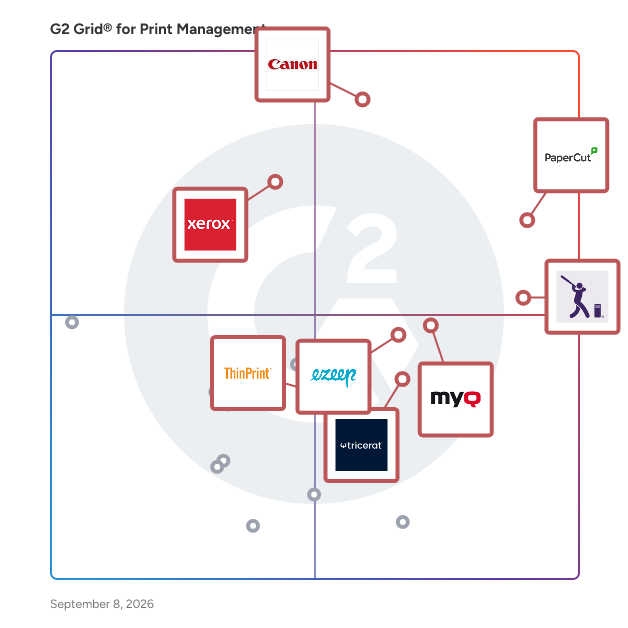
G2 Grid® for Print Management Solutions

G2 Grid® for Print Management Solutions plotting products by satisfaction and market presence

Highlighted products: PaperCut, uniFLOW, PrinterLogic, MyQ, Xerox FreeFlow Print Server, ezeep, ScrewDrivers, and ThinPrint.

Underlying data: [Grid® JSON](https://www.g2.com/categories/print-management/grids.json?focus%5B%5D=papercut-mf&focus%5B%5D=canon-uniflow&focus%5B%5D=printerlogic&focus%5B%5D=myq&focus%5B%5D=xerox-freeflow-print-server&focus%5B%5D=ezeep&focus%5B%5D=screwdrivers&focus%5B%5D=thinprint)

FreeCheckPrint - Online Check Printing

FreeCheckPrint.com is a free online template tool for printing bank-compatible business checks from your own printer, with no software to install, no signup, no account, and no subscription required. Small businesses, freelancers, startups, and home-based businesses can enter check details directly in the browser, preview the finished check, and print on plain paper or blank check stock using a standard inkjet or laser printer. The tool is built for occasional, on-demand check printing when you need to pay a vendor, contractor, supplier, landlord, or service provider without waiting for pre-printed checks to arrive or buying dedicated check-printing software. FreeCheckPrint.com focuses on simplicity, privacy, and cost savings. The normal check-creation workflow runs locally in the browser, so check details such as routing numbers, account numbers, payees, amounts, and business information are not stored on FreeCheckPrint.com servers. The generated checks use standard check dimensions, MICR positioning, and bank-compatible formatting, and printed checks are formatted to fit standard #8 check envelopes after printing and signing. Users can print a single check when needed or print multiple checks without setup fees, monthly subscriptions, order minimums, or a credit card. The service is especially useful for small businesses that only write a few checks per month and do not want the expense or complexity of traditional check ordering, desktop check software, or accounting-system check modules. FreeCheckPrint.com gives users a fast way to create professional-looking checks with equipment they already have, while still allowing them to choose between regular printer paper for occasional use and blank check stock for a more polished result. It is designed to be practical, lightweight, and easy enough for anyone who has filled out a paper check before.

Who Is the Company Behind FreeCheckPrint - Online Check Printing?

IDpack Cloud

IDpack Cloud helps organizations control their security requirements with access control cards, membership cards, price tags, convention badges, student ID cards, event passes, and other types of ID cards. IDpack Cloud supports all card printers like Evolis, HID Fargo, Zebra, and Magicard. Choose from four plans to suit your needs and budget from IDC Element plan with up to 600 records, single-side printing, and one user to IDC Enterprise plan with up to 6,000 records, double-side printing, and unlimited users. Each organization gets a unique encryption key, and all sensitive data is encrypted in our database using that key for maximum security. Unlock the power of your ID card printer with IDpack Cloud. IDpack has been the number one choice of event organizers, trade associations, and corporations of all types since 1999. IDpack Cloud is the result of 25 years of passionate dedication and experience.

Who Is the Company Behind IDpack Cloud?

  • Seller: Aptika
  • Year Founded: 2000
  • HQ Location: Montreal, CA
  • LinkedIn® Page: www.linkedin.com
    9 employees on LinkedIn®

OrderPrint

Online orders arrive as email, and in a busy kitchen nobody watches an inbox — so orders get missed. OrderPrint turns an ordinary Android phone into an automatic order printer. It watches the mailbox your order emails arrive in and prints each one as a kitchen ticket, to a Bluetooth or network thermal printer in 58mm or 80mm. It works from the order email rather than an integration, so it does not depend on your platform. WooCommerce, Shopify, Wix and anything else that emails an order all work, with nothing installed on your site. It reads items, quantities, options, notes, totals and fulfilment method, putting service details above the food where a kitchen needs them. Systems like this fail quietly, so OrderPrint tells you when a ticket does not come out, and its status card is never green unless orders are printing. It keeps the last 100 orders for one-tap reprints. Runs on the device: no server, no account, encrypted password storage. English, Spanish, French and Portuguese.

Who Is the Company Behind OrderPrint?

AI can help you find the answers. G2 helps you trust them.

Connect G2 to Claude or ChatGPT for answers grounded in G2's trusted reviews, comparisons, and pricing from real user insights.

How it works

Printing Press Manager (PPM)

Printing Press Manager (PPM) is a comprehensive desktop software solution developed by AGM Services, specifically designed to streamline the operations of printing presses and graphic workshops. This on-premise application offers a suite of integrated tools that cover the entire workflow of a printing business, from client management to production and inventory control, all without the need for constant internet connectivity. **Client and Supplier Management** PPM provides a centralized platform for managing detailed profiles of clients and suppliers. Users can maintain comprehensive records, track account balances, manage deposits, and review the history of past jobs. This centralized approach ensures that all pertinent information is readily accessible, facilitating efficient communication and transaction management. **Inventory Control** The software includes robust inventory management capabilities, allowing users to monitor materials and finished products in real-time. This feature helps prevent shortages and optimizes resource utilization by providing accurate stock levels and movement histories. The system's integration with production processes ensures that inventory data is always up-to-date, reflecting actual usage and replenishment needs. **Technical Quoting** PPM's intelligent quoting module enables the generation of detailed and professional estimates. It calculates material costs, labor, and machine time with precision, ensuring accurate and competitive pricing. The system supports multiple quantities and automatically generates PDF quotes, streamlining the sales process and enhancing client satisfaction. **Sales Module** The sales module simplifies the commercial process by managing quotations, orders, and sales tracking. Its intuitive interface allows for quick access to product catalogs and services, facilitating efficient order processing and customer relationship management. **Production Management** PPM offers tools to efficiently manage the production flow. Users can create and track work orders, monitor job statuses, and assign responsibilities. The system's Kanban-style board provides a clear visual representation of the production pipeline, aiding in the identification of bottlenecks and ensuring timely delivery of jobs. **Pricing and Cost Management** The software allows for the configuration of machine costs and material prices, enabling businesses to maintain control over their pricing strategies. Users can update profit margins en masse and manage the costs of paper, inks, and outsourced services in a centralized location, ensuring profitability and competitiveness. **Technical Specifications** PPM is a desktop application designed exclusively for Windows operating systems. It operates on a local PostgreSQL database, ensuring data privacy and security. The system requires a minimum of Windows 10 (64-bit), an Intel Core i3 or AMD Ryzen 3 processor, 4 GB of RAM, and 500 MB of free storage space. For optimal performance, a Full HD (1920 x 1080) display and an SSD with 1 GB of free space are recommended. **Licensing and Deployment** PPM is offered under a perpetual licensing model, granting users lifetime usage rights without recurring monthly fees. This model is ideal for businesses preferring to utilize their own infrastructure. The software is installed locally, ensuring that all sensitive business information remains within the company's control. **Support and Updates** AGM Services provides ongoing support and updates for PPM. Users who participate in the pre-sale phase receive access to beta versions, direct support from the development team, and priority for installation and initial configuration assistance. The company is committed to continuous improvement, with a development roadmap that includes features such as advanced work order lists, industrial planning by machine, multi-PC infrastructure, automated client notifications, and advanced sales reports. In summary, Printing Press Manager is a tailored solution for printing businesses seeking to optimize their operations through a comprehensive, locally installed software system. Its range of features addresses the specific needs of the printing industry, offering tools for client management, inventory control, quoting, sales, and production management, all within a secure and efficient desktop environment.

Who Is the Company Behind Printing Press Manager (PPM)?
  • Seller: AGM Services
  • Year Founded: 2020
  • HQ Location: San Miguel de Tucumán, AR
  • LinkedIn® Page: www.linkedin.com
    1 employees on LinkedIn®

Print Labels International

Print Labels International is cloud-based barcode and thermal label printing software that enables label design and printing directly from a web browser without local installation. The software offers customizable label designs incorporating text, logos, shapes, barcodes, and QR codes. It integrates with data sources such as spreadsheets, databases, and APIs, automating workflows to reduce manual errors. Batch printing supports single and large-scale operations, while compatibility with thermal printers, including Zebra devices, ensures seamless integration. Multi-user access allows collaboration across locations without multiple installations. The cloud-based architecture centralizes operations and reduces IT overhead. Round-the-clock support assists with design, setup, and troubleshooting to streamline label printing operations.

Who Is the Company Behind Print Labels International?

Print Shop Manager

Print Shop Manager is a print estimating software that comes with industry standard rates which you customize to fit your local and national markets. PSM uses templates, allowing more than one job setup for pricing comparisons.

Who Is the Company Behind Print Shop Manager?

SoftOrbits BatchPrint

BatchPrint is batch print software for Windows offices that need a stack of documents on paper without opening each file. Point it at a folder, pick the printer and press Print once. PDFs, scans, Word and Excel files and saved emails go out in list order, and each one keeps its own copies and page range. If you regularly have to print all files in a folder, this is the tool for that one job. 🖨️ How to use it 1. Click Add folder or Add files. Subfolders are picked up too. 2. Choose the device, then the paper source and size. 3. Open Settings for duplex, pages per sheet, scale or a watermark for the run. 4. Double-click a row when one document needs a different paper source or range. 5. Check the paper estimate under the button and press Print. ⚙️ Why office and IT teams pick it Explorer drops its Print command once more than 15 items are selected. This batch print software takes a queue of thousands. It works as a PDF batch printer with its own rendering engine, so Acrobat never opens. DOCX and XLSX go through Microsoft Office when it is installed, and through LibreOffice or a built-in reader when it is not. A damaged or password-locked file is skipped with the reason written down, and the remaining documents keep printing. Nothing is uploaded and there is no account to create. 👥 Who uses it Accounts staff who batch print PDF invoices at month end. Legal assistants who need exhibits in a fixed order. Dispatch clerks with packing lists, school offices with class sets, and the IT person who sets up the shared print PC. Teams that buy batch print software usually do so after the third afternoon lost to Ctrl+P, and keep it for the weekly runs that follow. ❓ FAQ How do I print multiple PDFs at once without opening each one? Add the folder, leave every row ticked and press Print. Each PDF becomes its own print job, and no viewer window appears. Can I put 4 PDF pages on one sheet? Yes. Choose 4 under pages per sheet, or 2, 6 or 9. The pages of one document share a sheet, and the next document starts on a fresh one. Is Microsoft Office required for Word and Excel files? No. With Office the layout matches the screen. Without it, text, tables and images still print, but headers and footers inside the document are dropped. Should I merge everything into one PDF first? No need. Separate files keep separate copies, ranges and paper sources, and the end report lists them one by one. Will the order of the stack match the list? Yes. Rows can be dragged into any sequence, and pages leave the tray in that order, so a bundle comes out ready for the binder. 💡 Free trial and requirements The free trial of this batch print software prints up to 10 files per batch and adds a report page at the end, while your documents come out clean. After 100 printed files it moves to one file at a time. Runs on Windows 10 and 11, in 20 interface languages.

Who Is the Company Behind SoftOrbits BatchPrint?

Neeraja Prakash
NP
Researched and written by Neeraja Prakash
Updated October 3, 2024