Top Free Presentation Management Software - Page 2

How Many Presentation Management Software Products Does G2 Track?

Total Products under this Category: 44

Category Stats (Nov 2026)

  • Average Rating: 4.58/5 The average rating of products in this category, based on all submitted ratings
  • Top Trending Product: Ampler (+0.1%) - Among all products in this category, Ampler recorded the largest rating increase compared to last month

Last updated: November 25, 2026

How Does G2 Rank Presentation Management Software Products?

Why You Can Trust G2's Software Rankings:

  • 30 Analysts and Data Experts
  • 1,300+ Authentic Reviews
  • 44+ Products
  • Unbiased Rankings

G2's software rankings are built on verified user reviews, rigorous moderation, and a consistent research methodology maintained by a team of analysts and data experts. Each product is measured using the same transparent criteria, with no paid placement or vendor influence. While reviews reflect real user experiences, which can be subjective, they offer valuable insight into how software performs in the hands of professionals. Together, these inputs power the G2 Score, a standardized way to compare tools within every category.

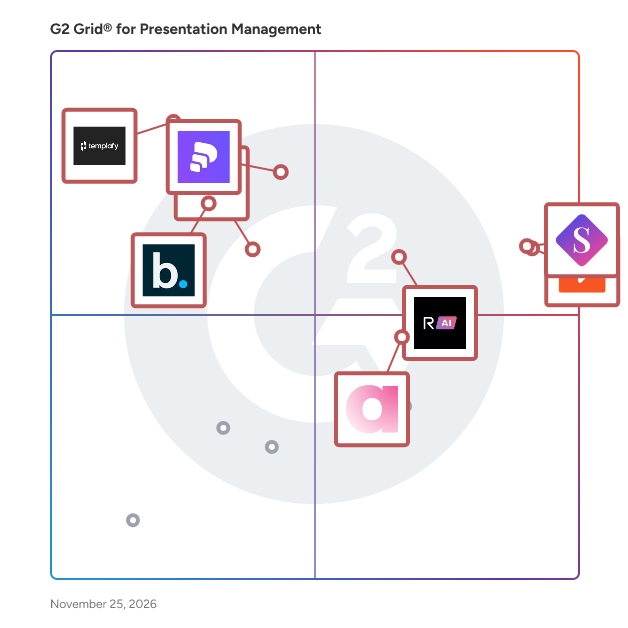
G2 Grid® for Presentation Management Software

G2 Grid® for Presentation Management Software plotting products by satisfaction and market presence

Highlighted products: UpSlide, SlideHub, RELAYTO AI, Pitch, Templafy, Ampler, Beautiful.ai, and empower.

Underlying data: [Grid® JSON](https://www.g2.com/categories/presentation-management/grids.json?focus%5B%5D=upslide&focus%5B%5D=slidehub&focus%5B%5D=relayto-ai&focus%5B%5D=pitch-pitch&focus%5B%5D=templafy&focus%5B%5D=ampler&focus%5B%5D=beautiful-ai-beautiful-ai&focus%5B%5D=empower-empower)

Docutree

Docutree is a version control and review platform for PowerPoint. It helps teams track every change across deck versions, run structured approval workflows, and maintain a clear audit trail from first draft to final sign-off. Instead of managing high-stakes decks over email chains and shared drives, teams can compare any two versions side-by-side, see exactly what changed at the slide and object level, and assign reviewers with deadline and approval status tracking. Key features: • Visual diff: Automatically detects and highlights every change between PowerPoint versions — text edits, shape moves, color changes, added or removed slides. • Review workflows: Assign reviewers, track approval status, and maintain a full audit trail for every deck version. • AI-powered risk analysis: Flags slides that may contain errors, inconsistencies, or compliance risks before sign-off. • Version history: A complete record of all deck versions in one place. Docutree is built for teams that work with high-stakes presentations: consulting, finance, legal, marketing, and agencies.

Who Is the Company Behind Docutree?

eformity

eformity is a SaaS platform for template and asset management, headquartered in Alblasserdam, The Netherlands. Established in 2013, eformity provides businesses with a seamless solution for managing corporate templates and automating document workflows. The platform is deeply integrated into the Microsoft 365 suite and is designed to streamline document standardization across organizations. eformity serves a diverse customer base across various industries and is used in over 100 countries. With more than 200,000 active users and over 75,000 templates used daily. The eformity platform enables businesses to centralize template management, automate document generation, and ensure brand consistency across Microsoft Word, Outlook, PowerPoint, Excel, SharePoint, and Teams. The solution supports over 200 languages, allowing users to create multilingual documents from a single template. Additionally, eformity offers a structured asset library where organizations can store and manage images, icons, shapes, and graphs for consistent branding. The platform is available on both the web and desktop version of Microsoft 365, providing flexibility across different devices and work environments. Next to that eformity integrates with various CRM and business applications, enabling seamless data synchronization and reducing the need for manual data entry. By automating document creation and ensuring standardized workflows, eformity helps businesses reduce manual errors, improve efficiency, and maintain compliance with corporate guidelines. Organizations benefit from a streamlined workflow where users can generate professional, branded documents quickly and accurately. The ability to integrate with existing business systems enhances collaboration and ensures that employees always work with up-to-date content. Whether for legal, financial, healthcare, educational, or governmental use, eformity supports companies in enforcing document consistency, reducing administrative overhead, and increasing productivity.

Who Is the Company Behind eformity?

  • Seller: eformity
  • Year Founded: 1997
  • HQ Location: Alblasserdam, NL
  • LinkedIn® Page: nl.linkedin.com
    8 employees on LinkedIn®

Journeys

Journeys - Intelligent Sales Presentation Platform Transform static PowerPoint decks into dynamic, trackable sales experiences. Journeys helps sales teams create personalized presentations in minutes instead of hours, while providing real-time engagement analytics and AI-powered content generation. Key Capabilities: • Rapid Presentation Creation - Generate customized sales decks in under 2 minutes using AI and template libraries • Interactive Web Experiences - Convert static slides into responsive, web-based presentations that prospects can explore at their own pace • Engagement Analytics - Track slide views, time spent, and engagement patterns to identify buying signals and optimize follow-up • CRM Integration - Native Salesforce integration keeps presentation activity synced with your pipeline • Template Management - Centralize and govern approved content while empowering reps to personalize for their prospects • Mobile-Optimized - Presentations render perfectly on any device without plugins or downloads Built for Sales Teams Who: • Waste 15+ hours per week rebuilding presentations • Lose deals to competitors who respond faster • Lack visibility into how prospects engage with proposals • Struggle with presentation version control and brand consistency • Need to scale personalized sales content across growing teams Results: Sales teams using Journeys reduce presentation prep time by 85%, increase proposal engagement rates by 3x, and close deals 18% faster through better buyer insights and faster response times.

Who Is the Company Behind Journeys?

AI can help you find the answers. G2 helps you trust them.

Connect G2 to Claude or ChatGPT for answers grounded in G2's trusted reviews, comparisons, and pricing from real user insights.

How it works

Leanr

What is Leanr? Leanr is a presentation management software that helps organizations centrally organize, update, and distribute their PowerPoint presentations and sales materials. The platform enables teams to manage presentation content in a single location, ensuring all employees work with current, approved versions while maintaining brand consistency and compliance standards. Software Category: Leanr is a type of content management and sales enablement software designed specifically for presentation workflows. What Leanr Does: The platform provides version control, access management, and real-time collaboration tools for presentation files. Users can assemble customer-specific presentations from pre-approved slide modules, automatically update slides across multiple presentations, and track changes through audit trails. Companies use Leanr to eliminate version chaos, reduce presentation creation time, and ensure only approved content circulates within their organization. Key Features and Benefits: Central Presentation Library – Store all company presentations in one searchable location with granular access controls at the folder and slide level, eliminating time spent searching through email chains and file servers. Modular Presentation Builder – Assemble custom presentations from pre-approved slide building blocks with variable insertion (customer names, dates, locations), enabling sales teams to create client-specific decks in minutes while maintaining brand compliance. Automatic Global Updates – Update a master slide once and automatically deploy changes across all presentations where it appears, ensuring consistent messaging and reducing manual update work by up to 50%. Approval Workflows and Audit Trail – Manage review processes with defined responsibilities and document all changes at the slide level, providing full transparency for compliance requirements and quality control. Real-Time Collaboration – Multiple team members can work simultaneously on presentations with integrated commenting, notifications, and chat functionality, replacing email back-and-forth with structured collaboration. Primary Use Cases: Marketing teams use Leanr to maintain brand-compliant presentation templates and ensure global teams access current materials. Sales organizations leverage the platform to quickly customize client presentations while adhering to corporate guidelines. Project management teams coordinate on complex proposal presentations with clear ownership and deadline tracking. Target Audience: Leanr serves mid-sized to enterprise companies (50+ employees) across industries where teams regularly create presentations for external stakeholders. The solution is particularly valuable for organizations with distributed teams, strict brand guidelines, or regulatory compliance requirements in sectors like financial services, consulting, manufacturing, and technology.

Who Is the Company Behind Leanr?

SlideLizard

SlideLizard is a PowerPoint Add-In, which let's presenters interact with their audience. Participants join the presentation with a unique presentation URL and can access your slides and shared resources, but as well ask questions, vote in live polls and give feedback. After the presentation, you get a report including audience email addresses and analytics about how long each of your slides was viewed by your audience. All data can be exported to Word or Excel.

Average Rating: 4.5/5.0

Total Reviews: 1

Who Is the Company Behind SlideLizard?

Who Uses This Product?

  • Company Size: 100% Medium

What Are Recent G2 Reviews of SlideLizard?

What Are G2 Users Discussing About SlideLizard?

Neeraja Prakash
NP
Researched and written by Neeraja Prakash
Updated August 20, 2025