Password Manager
Who Is the Company Behind Password Manager?
- Seller: AxCrypt
- Year Founded: 2014
- HQ Location: Stockholm, SE
-
LinkedIn® Page: linkedin.com
36 employees on LinkedIn®
Total Products under this Category: 125
Last updated: October 26, 2026
Why You Can Trust G2's Software Rankings:
G2's software rankings are built on verified user reviews, rigorous moderation, and a consistent research methodology maintained by a team of analysts and data experts. Each product is measured using the same transparent criteria, with no paid placement or vendor influence. While reviews reflect real user experiences, which can be subjective, they offer valuable insight into how software performs in the hands of professionals. Together, these inputs power the G2 Score, a standardized way to compare tools within every category.
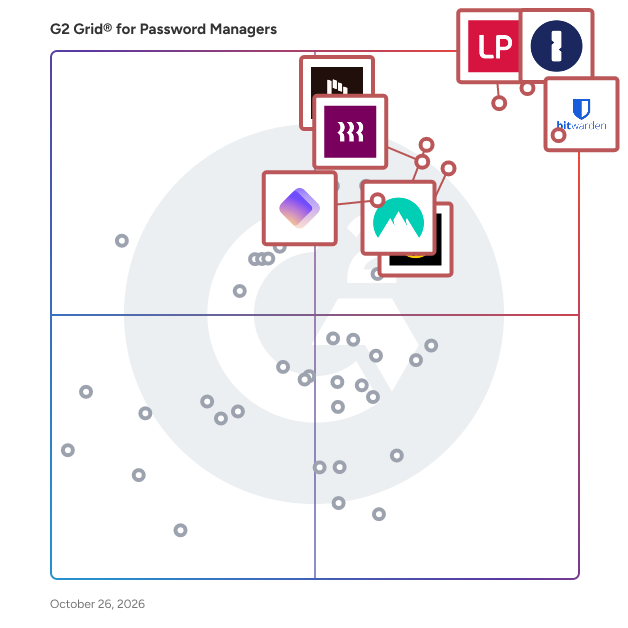
Highlighted products: 1Password, Bitwarden, LastPass, NordPass Business, Keeper Password Manager, Rippling IT, Dashlane Password Manager, and Proton Pass For Business.
Underlying data: [Grid® JSON](https://www.g2.com/categories/password-managers/grids.json?focus%5B%5D=1password&focus%5B%5D=bitwarden&focus%5B%5D=lastpass&focus%5B%5D=nordpass-business&focus%5B%5D=keeper-password-manager&focus%5B%5D=rippling-it&focus%5B%5D=dashlane-password-manager&focus%5B%5D=proton-pass-for-business)
Patara, a blockchain-based password manager, ensures the protection of passwords, crypto wallets and sensitive data through user-based smart contracts. This decentralized solution, unlike Web2 alternatives, assigns each user their own smart contract, eliminating the risk of data leakage and making it impossible for attackers to identify both the data and its owner.
Connect G2 to Claude or ChatGPT for answers grounded in G2's trusted reviews, comparisons, and pricing from real user insights.
PlusIdentity is a password management solution designed specifically for startups, integrating seamlessly with Slack to enhance team collaboration and security. By embedding directly into your Slack workspace, PlusIdentity offers a user-friendly interface that simplifies password sharing and management, eliminating the risks associated with sharing credentials in plaintext. Key Features and Functionality: - Slack Integration: Operates within Slack, allowing teams to manage passwords without leaving their communication platform. - Password Generator: Creates strong, unique passwords to enhance security. - Single Sign-On : Enables access to multiple applications with a single set of credentials, streamlining the login process. - Third-Party Integration: Synchronizes with various startup tools, ensuring compatibility and ease of use. - Password Encryption: Utilizes robust encryption methods to protect sensitive information. - Secure Password Sharing: Allows safe sharing of passwords among team members without exposing the actual credentials. - Onboarding/Offboarding Solutions: Facilitates efficient management of user access during team changes. - Compliance Support: Provides solutions to meet security compliance requirements, essential for startups aiming to adhere to industry standards. Primary Value and User Solutions: PlusIdentity addresses the critical need for secure and efficient password management within startup environments. By integrating directly into Slack, it reduces the friction associated with adopting new tools, allowing teams to manage credentials within their existing workflow. This integration not only enhances security by preventing the sharing of passwords in unsecured formats but also improves productivity by streamlining access to various applications. Additionally, PlusIdentity's features support compliance with security standards, providing startups with a robust foundation for managing sensitive information securely.
RemyPass is a membership and ticketing platform for clubs, venues, and member-led organisations. It enables organisations to sell memberships and tickets, issue branded Apple Wallet and Google Wallet passes, manage renewals and member records, run events, and scan access from any phone—without requiring members to download an app.
Rippling is the AI workforce management platform that connects HR, IT, and Finance — giving Rippling AI everything it needs to help run your company. Because employee data, permissions, and approvals all live in one place, Rippling AI has a complete view of your business and can take action quickly and safely, across the entire employee lifecycle, from hiring to benefits administration to access management. Automate business tasks, ensure compliance, and streamline approvals with workflows that understand your organization. Enjoy timely payroll, real-time financial visibility, and dynamic spend policies that adjust as your business changes. Simplify IT with device management, software access, and compliance monitoring, all from one dashboard. Because Rippling AI works from a single source of truth instead of disconnected systems, your business can save time, reduce costs, and enhance efficiency — with the trust and safety that comes from unified data and permissions. Experience the power of AI-driven, unified management with Rippling today.
Average Rating: 4.7/5.0
Total Reviews: 12,824
AI-generated summary from verified user reviews
"The app is somewhat user friendly but can be confusing at times."
Rating: 4.5/5.0 stars
— Samantha M.
"Intuitive, Well-Designed Platform — Unified Profiles & Easy Device Management"
Rating: 5.0/5.0 stars
— Larry K.
SAASPASS is your key to the world. By providing a comprehensive and frictionless solution fully-secured with dynamic passcodes and multi-factor authentication, SAASPASS is the only identity and access management tool you need to secure your corporate network or your own personal data. Whether logging into your work emails and company apps, accessing your personal online bank account, making purchases at online retailers, browsing social media, or even unlocking the door of your car, home, or hotel room, SAASPASS allows you to use your mobile or other enabled device to manage all your digital and physical access needs securely and conveniently SAASPASS allows you to do with one product what it currently takes a combination of 4 to 5 other products to do.
Average Rating: 2.8/5.0
Total Reviews: 2
"A real passwordless solution, resilient and more than ready to be discovered"
Rating: 5.0/5.0 stars
— Deodat L.
Rating: 4.5/5.0 stars
— Verified User in Information Technology and Services
Securely Manage and Create Encrypted Passwords, Store and Share Notes and Documents of all types, with the protection of Swiss Privacy Laws using Military Grade Encryption. Your data is fully encrypted in DigitalSafe and scanned for viruses as you back it up.
Recovering an Outlook PST file password and accessing PST files within the Microsoft Outlook email client is very easy with the Shoviv Outlook PST Password Recovery Tool. It has a very simple Graphical User Interface (GUI), which helps users work with this software without any technical knowledge. The Outlook Password Remover tool is a hassle-free utility. The Outlook Password Recovery tool from Shoviv Software works with all versions of the Windows operating system, such as Windows 10, Windows 8.1, Windows 8, Windows 7, and older versions. Outlook password recovery software also works with all the versions of Microsoft Outlook, such as 2019, 2016, 2013, 2010, and all the older versions. A demo version of the application is also available to test the software's capabilities before buying the full version. To unlock the normal or healthy password, users should use the full version of the PST password recovery software. For further inquiries, our technical support team is available for your assistance.
Simply Sync is a quick and easy way synchronize passwords. It allows organizations to synchronize passwords and active directory properties from their local Active Directory site to an external other external systems like hosted AD, Office 365, Google Apps and more.
SysInfo PST File Password Recovery Tool is an easy and reliable software designed to help users unlock password-protected Outlook PST files without any technical effort. If you’ve forgotten your PST password or are unable to access your mailbox due to encryption, this tool quickly retrieves the password—no matter how long, complex, or multilingual it is. The best part is that you don’t need Microsoft Outlook installed on your system for the recovery process. The software can unlock both ANSI and UNICODE PST files, making it compatible with all versions of MS Outlook. It also shows important details about the locked PST file, such as file size, encryption type, and code page, before recovering the password. Once the tool retrieves the password, you can copy it directly using the Copy to Clipboard option so you never lose it again.
